
Claverie J-M., Notredame C. Bioinformatics for Dummies
Подождите немного. Документ загружается.


When using BLAST, the #1 rule to follow is to define as clearly as possible
what you want to do. Treat BLAST like an ancient oracle — to get the answer
you need, your question must be crystal-clear. Tables 7-3 and 7-4 may help
you fine-tune your questions so they’re as clear as possible.
The default parameters that BLAST uses are quite optimal and well tested. If
you don’t get anything meaningful with them, don’t expect any miracles if
you change them. Table 7-5 lists the main reasons why you may want to
change the default parameters, along with the parameters you may change.
These reasons are valid for DNA and protein sequences alike.
Most of the BLAST servers use slightly different ways of specifying parame-
ters. In this section, we have chosen to focus on the NCBI server. You will find
that it is generally easy to adapt what we are saying here to your favorite
server, although sometimes the parameters can feel a bit hidden. Whenever
you want to customize your search, look for the advanced mode of the server
you are using; that often offers more possibilities.
Table 7-5 Some Reasons to Change BLAST Default Parameters
Reason Parameters to Change
The sequence you’re interested in Sequence filter (automatic masking)
contains many identical residues;
it has a biased composition.
BLAST doesn’t report any results. The substitution matrix or the gap penalties
Your match has a borderline E-value. The substitution matrix or the gap penalties
to check the match’s robustness
BLAST reports too many matches. The database you’re searching OR filter
the reported entries by keyword OR
increase the number of reported matches
OR increase Expect (the E-value threshold)
OR reject sequences too similar to the
query (those with very low E-values)
Controlling the sequence masking
When BLAST searches databases, it makes an important assumption: BLAST
assumes that all your sequences are
average sequences. For instance, if you’re
searching protein sequences, BLAST supposes that the average protein compo-
sition of any protein is the same as the average composition of the whole data-
base. In practice, this assumption is too far from reality to work all the time.
220
Part III: Becoming a Pro in Sequence Analysis
13_089857 ch07.qxp 11/6/06 3:58 PM Page 220

Masking protein sequences
Many proteins contain patches known as low-complexity (or low-entropy)
regions. For instance, these regions can be segments that contain many pro-
lines or many glutamic acid residues. If BLAST aligns two proline-rich
domains, this alignment gets a very good E-value because of the high number
of identical amino acids it contains. Unfortunately, there is a good chance
that these two proline-rich domains are not related at all. In fact, these one-
amino-acid-rich domains are notorious for fooling BLAST.
To avoid this problem, BLAST filters out low-complexity regions when analyz-
ing proteins. To do that, it replaces those regions in the sequence with Xs. If
you’re specifically interested in the low-complexity regions and don’t want
these regions filtered out of your search, you must deselect the correspond-
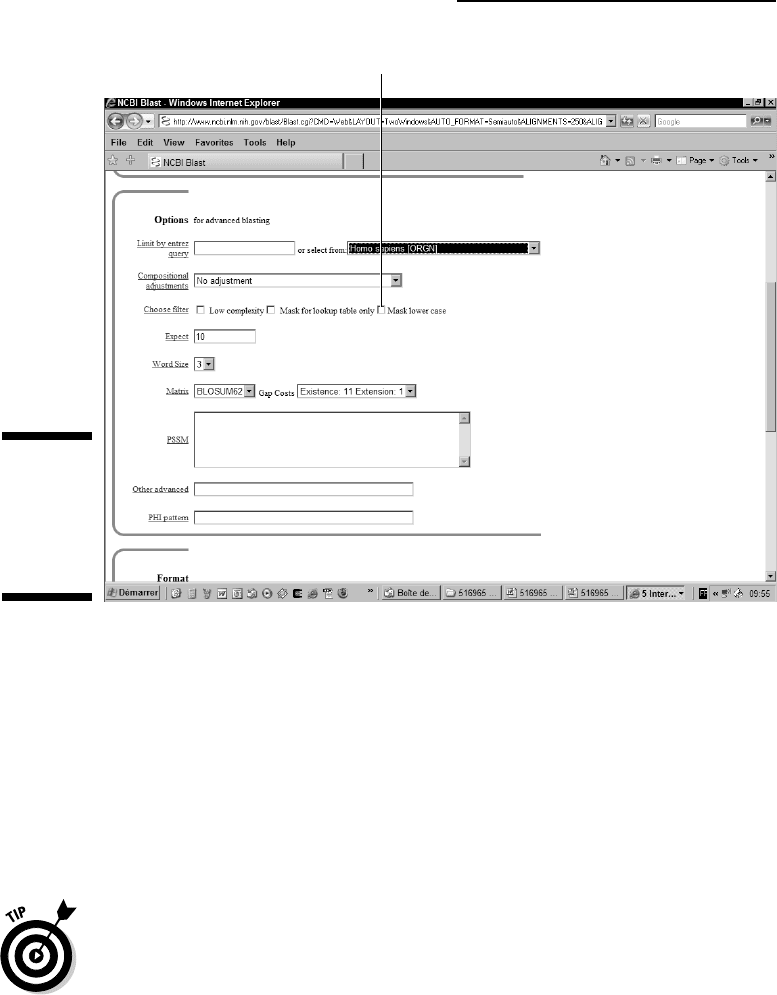
ing Low Complexity check box next to Choose Filter in the Options for
Advanced Blasting section of the blastp search page, as shown in Figure 7-11.
Imagine that you have just cloned and sequenced a protein. In the sequence
of this protein, you find a stretch of 10 Prolines:
PPPPPPPPPP. At this point,
you’re probably wondering whether this is a sequencing error or a mistake of
some kind. You would feel much more confident if you had a valid protein
sequence that contains the same stretch of amino acids.
To find this protein, write your own sequence
PPPPPPPPPPPPPPPPPP and
give it to blastp as a query. Do not forget to deselect the Low Complexity
check box.
Some domains are very common in protein sequences, such as Zn Fingers in
tandems or Fibronectines domains. If your protein contains this type of
domain, BLAST reports many matches with proteins that contain the same
domains but are otherwise unrelated. To make your search more interesting,
filtering out these domains is a good idea. Here’s how:
1. Use CD search, InterProScan, or Pfscan to find domains in your
protein.
See Chapter 6 for more information about using these searches.
2. Read the domain documentation to find out how widespread the
domains are that you found.
3. Replace the sequences of less-informative domains with Xs (or rewrite
them in lowercase) and then select the Mask Lower check box next to
Choose Filter in the BLAST form. (See Figure 7-11.)
4. Run a standard blastp as shown at the beginning of this chapter.
When your results are returned, interpret them as shown in the
“Understanding your BLAST output” section, earlier in this chapter.
221
Chapter 7: Similarity Searches on Sequence Databases
13_089857 ch07.qxp 11/6/06 3:58 PM Page 221
Masking DNA sequences
If you think it’s a problem keeping your protein-sequence results significant,
things get even worse when you’re dealing with DNA sequences. DNA is full of
sequences that repeat many times, and yet such similarities don’t actually
mean very much when you come right down to it. Most genomes contain
many such repeats — especially the human genome, which is 60 percent
repeats! If you want to avoid having to wade through that many repeats,
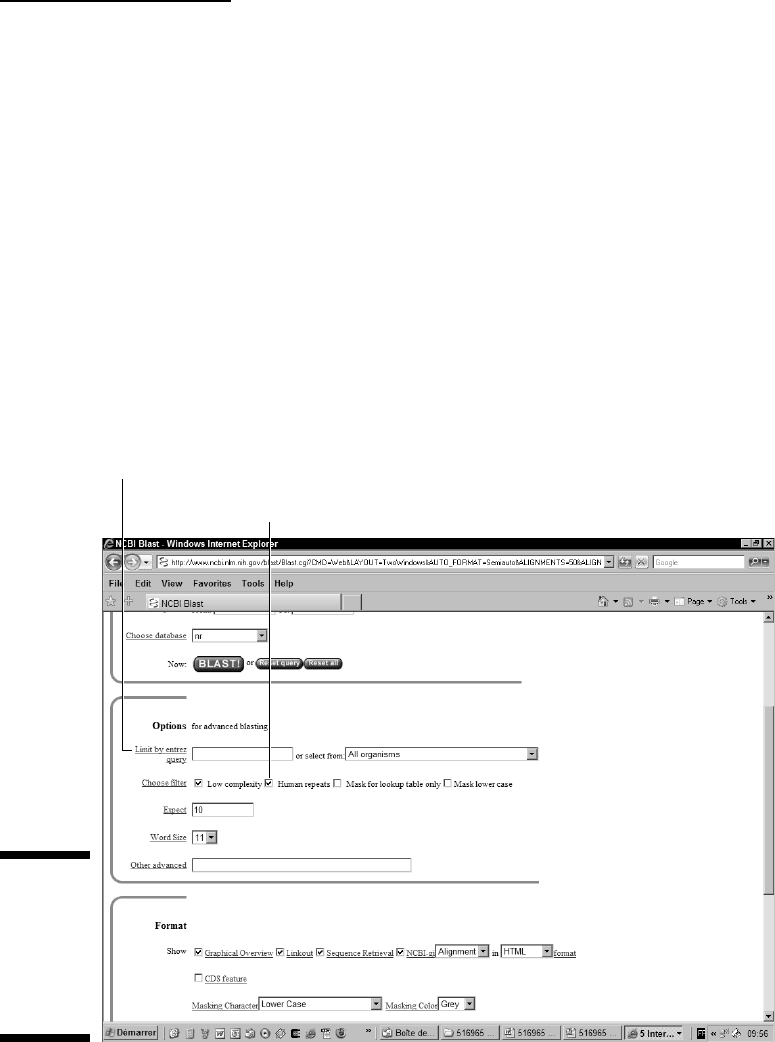
select the Human Repeats check box that appears in the blastn page, as
shown in Figure 7-12. Selecting this box causes the human repeats to be fil-
tered out from your sequences.
Large-scale genome sequencing is not always as smooth as the gurus want us
to believe. For instance, in many cases, the final genome ends up containing
bits and pieces of the organism used to clone it (which is why, when you’re
looking at a human genome, you may find bits of yeast and
E. coli). This simply
means that before you get very excited about a gene you’ve just found in the
human genome (or in any genome), you may want to make sure that this gene
is not a contamination brought in by the organism used for the cloning. Imagine
Mask Lower Case option
Figure 7-11:
The
advanced
parameters
of blastp at
NCBI.
222
Part III: Becoming a Pro in Sequence Analysis
13_089857 ch07.qxp 11/6/06 3:58 PM Page 222
the embarrassment if you were to discover that the cancer-susceptibility gene
you’ve been studying for three years is in fact an
E. coli protein!
Changing the BLAST alignment
parameters
Figure 7-11 shows you all the parameters you can change on the NCBI BLAST
server. These include the Expect value, the Word Size, and the means of filter-
ing. Among these parameters, two important ones have to do with the way
BLAST makes the alignments; these are the
gap penalties (named gap cost on the
NCBI BLAST server page) and the
substitution matrix (named simply matrix on
the NCBI BLAST server page). If you change either of these parameters, BLAST
may report different hits. Hits that are likeliest to change from one run to the
next are the hits that were borderline (those with an E-value higher than 0.0001).
Limit by Entrez Query option
Human Repeats option
Figure 7-12:
Filtering
possibilities
for a DNA
sequence
while using
blastn.
223
Chapter 7: Similarity Searches on Sequence Databases
13_089857 ch07.qxp 11/6/06 3:58 PM Page 223

Word size is BLAST’s main secret recipe. In BLAST, a word is the minimum
size of the sequence elements BLAST tries to match between your sequence
and the sequences in the database. For instance, if the word size is set to 6,
BLAST will consider all the possible sub-sequences of size 6 contained in
your query, and it will identify in the database all the sequences containing
words of size 6 similar to those in your sequence. Long words make BLAST
faster and less sensitive; short words do the opposite.
The best reason to play with these parameters is to check the robustness of a
borderline hit. If this match does not go away when you change the substitu-
tion matrix or the gap penalties, then it has better chances of being a biologi-
cally meaningful match.
Controlling the BLAST output
If the subject of your query belongs to a large protein family, the BLAST
output may give you trouble because the databases contain too many
sequences nearly identical to yours.
Sometimes this wealth of homologous sequences can prevent you from
seeing a homologous sequence that’s less closely related but still associated
with experimental information. If this sort of thing happens to you, refer to
Table 7-5 — where the last entry gives you five solutions for correcting this
problem. In the following sections, we show you how to implement those
solutions.
Choosing the right database
Choose a database that is suited to your needs. If BLAST reports too many
hits, you may find a way around this quandary by searching Swiss-Prot rather
than NR (Swiss-Prot is 100 times smaller than NR), by searching only one
genome, or by only searching the PDB if you are mostly interested in struc-
tural similarities.
Limit by Entrez query
Use the Limit Results by Entrez Query box (Refer to Figure 7-12) or its associ-
ated pull-down menu if you get too many hits when you’re interested in only
one type of organism.
You can use this box to combine keywords with the two Boolean operators
AND and NOT. For instance, if you want BLAST to report proteases only —
and to ignore proteases from the HIV virus — type
“protease NOT
hiv1[Organism]”
(don’t forget the quotation marks). If you want to find more
about this, see the online documentation on Entrez queries at
224
Part III: Becoming a Pro in Sequence Analysis
13_089857 ch07.qxp 11/6/06 3:58 PM Page 224
www.ncbi.nlm.nih.gov/entrez/query/static/help/helpdoc.html
#Writing_Advanced_Search_Statements
Expect
This is the cutoff point for reporting hits. BLAST doesn’t report hits with an
E-value higher than what you indicate in the corresponding box. A low cutoff
value for this parameter forces BLAST to report only good hits.
You can filter on both side of the range and prevent the report of semi-identical
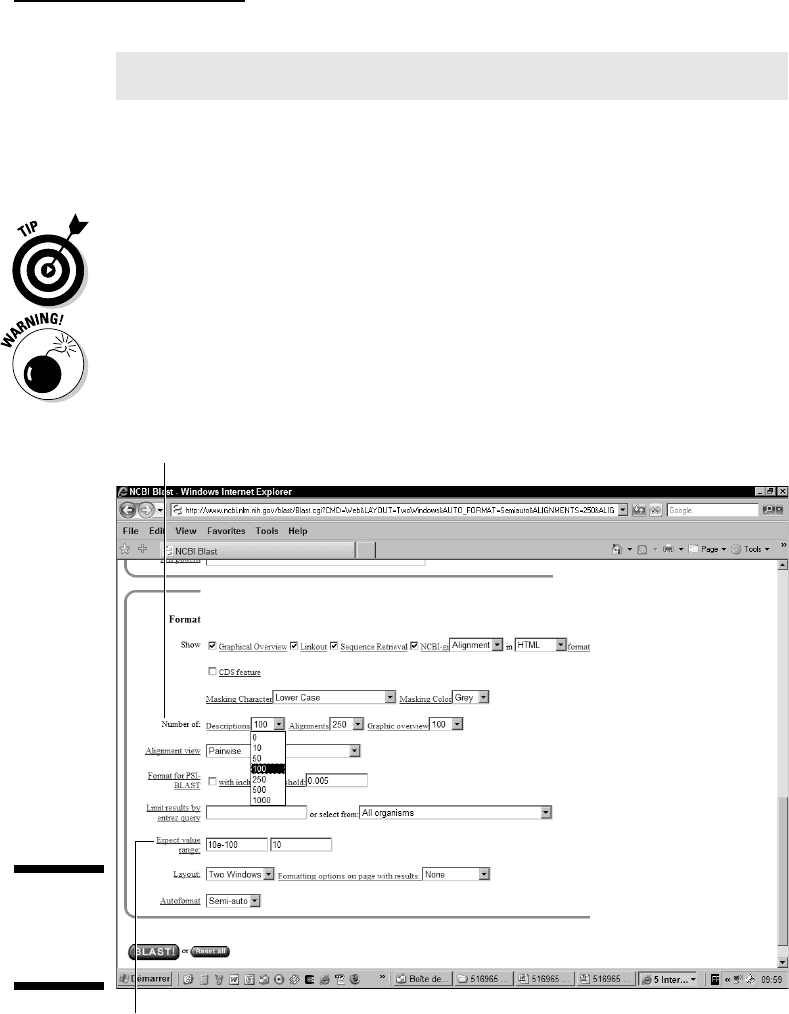
sequences. For instance, in Figure 7-13, we requested that the best sequences
(E-value lower than 10e–100) not be shown.
Be aware that if your search yields more than 100 hits, you also need to
increase the number of reported Descriptions in the Format section, as
shown in Figure 7-13.
Number of Descriptions option
Expect Value Range option
Figure 7-13:
Reformat-
ting options
of BLAST.
225
Chapter 7: Similarity Searches on Sequence Databases
13_089857 ch07.qxp 11/6/06 3:58 PM Page 225

Making BLAST Iterative with PSI-BLAST
Sometimes BLAST just isn’t enough. Imagine, for instance, that you want to
catch all the members of a very large protein family, starting with the one
sequence that you have. When running BLAST, you catch only the most
closely related sequences. How about finding the other distant cousins, the
ones that your query sequence can’t recognize?
PSI-BLAST does just that; first it looks for sequences that are closely related
to yours — and then, gradually and carefully, it extends the circle of friends
to include sequences that didn’t look so interesting at first but happen to be
related in the end.
Each time PSI-BLAST makes a new attempt to recruit new members of the
family, it does so by using the most common properties among the members
already recruited. Each new round is an
iteration.
PSI-BLASTing protein sequences
In the following example, we use PSI-BLAST to ask whether leghemoglobin, a
protein that sequesters oxygen in plants, is related to human hemoglobin.
1. Point your browser to the main NCBI BLAST page at
www.ncbi.nlm.nih.gov/BLAST
2. Click the PSI- and PHI-BLAST link (the second link under protein
BLAST
).
The PSI-BLAST page appears, as shown in Figure 7-14.
3. Enter your sequence accession number or paste the complete
sequence in the window.
The procedure to give a sequence to PSI-BLAST is exactly the same as
the procedure blastp uses. (Refer to Figures 7-2 and 7-3.)
• If your sequence is already in a database, you can type in its ID.
For this example, we use the human hemoglobin, a protein from
Swiss-Prot whose accession number is P01922.
• If your sequence isn’t in a database, you must provide it in the
FASTA format.
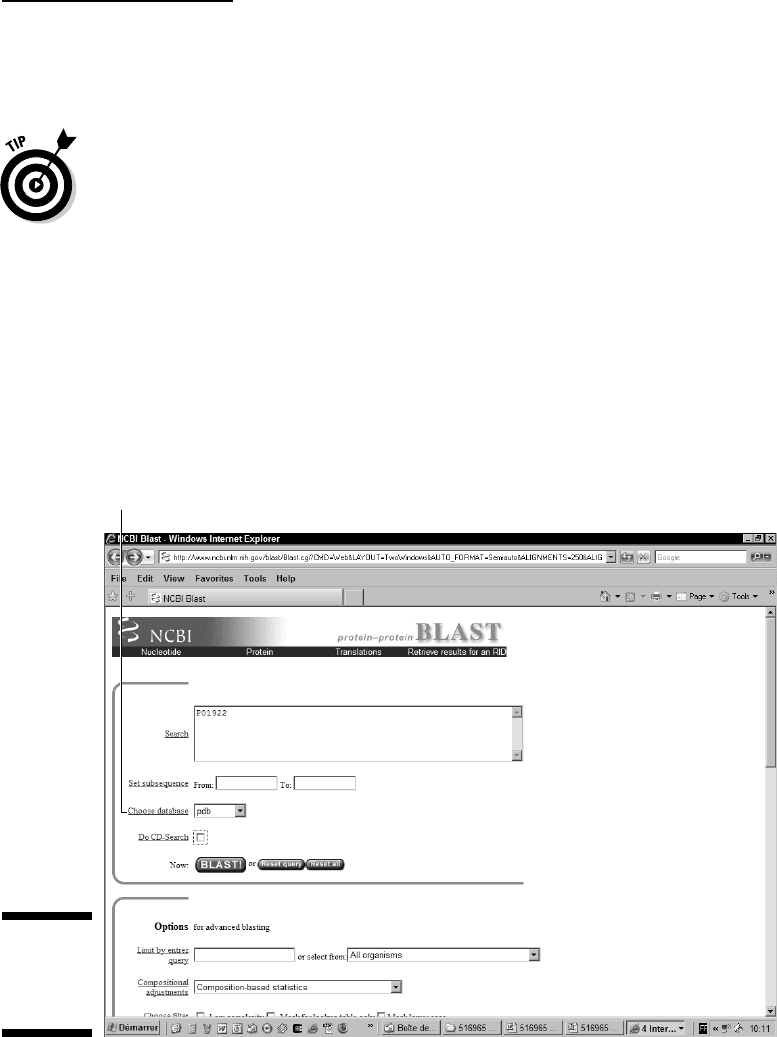
4. Choose PDB from the Choose Database pull-down menu (refer to
Figure 7-14).
PDB is the Protein Database, a database of proteins with a known 3-D
structure. We chose it here because it is a small database that lends
itself well to this example.
226
Part III: Becoming a Pro in Sequence Analysis
13_089857 ch07.qxp 11/6/06 3:58 PM Page 226
The aim of the search is to hit a PDB sequence annotated as a leghemo-
globin, and therefore convince ourselves that hemoglobin and leghemo-
globin are structurally related.
If the first PSI-BLAST run finds no homologue to your sequence, you
can use NR (the complete Non-Redundant protein-sequence database)
instead of PDB. NR may contain intermediates between your sequence
and another PDB sequence that PSI-BLAST may catch after a few
iterations.
5. Click the BLAST! button.
The time it takes can be longer than what it says on-screen. Be patient!
An intermediate page (titled Reformatting BLAST) appears, containing a
Format! button.
6. Click this Format! button.
A new page appears in a new window titled Results of BLAST. This is
where your results are displayed when ready.
Choose Database menu
Figure 7-14:
Giving a
sequence to
PSI-BLAST.
227
Chapter 7: Similarity Searches on Sequence Databases
13_089857 ch07.qxp 11/6/06 3:58 PM Page 227

Be sure to keep the Reformatting BLAST window open: You’re going to
need it.
7. Inspect the results.
There are many very similar sequences and only a few distantly related.
Getting excited here is difficult; we have many hemoglobin proteins and
a few myoglobins, as we might have expected.
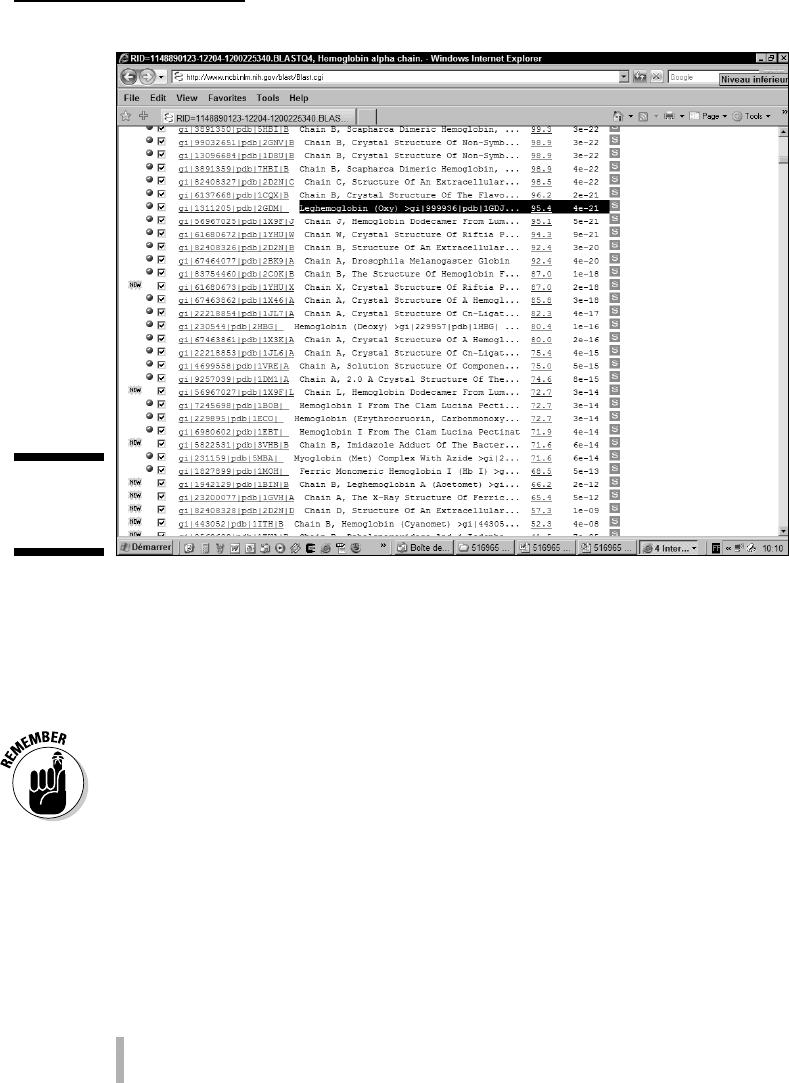
Note in Figure 7-15 that the hit list in PSI-BLAST is different from the one
we see in BLAST proper. It contains three new features associated with
each sequence:
•
A check box: If this box is selected, PSI-BLAST is going to use the
corresponding sequence to derive the position-specific matrix for
the next iteration of PSI-BLAST.
•
The New symbol: It shows you sequences that PSI-BLAST reports
as hits for the first time.
•
The green pill: It shows you sequences that PSI-BLAST has already
used to obtain the current result.
If the description makes you think one of the sequences is not related to
your initial query, don’t hesitate to uncheck it. That way, the unrelated
sequence won’t be used in the next iteration.
8. Click the Run PSI-BLAST Iteration 2 button (near the top of the page).
The Reformatting BLAST window pops up.
9. Click the Format! button on the Reformatting BLAST window.
The results appear in the Result of BLAST window.
10. Continue repeating Steps 9 and 10.
Leghemoglobin appears at the second iteration, but it doesn’t have a
very good E-value. However, after the third iteration (Figure 7-15), its E-
value improves noticeably, suggesting that it is a genuine relative of the
hemoglobin family.
Avoiding mistakes when
running PSI-BLAST
In the leghemoglobin example (in the preceding section), we keep going from
one iteration to the next because the annotated sequences that every itera-
tion adds are obviously hemoglobin-related. That’s a sign we’re going in the
right direction.
228
Part III: Becoming a Pro in Sequence Analysis
13_089857 ch07.qxp 11/6/06 3:58 PM Page 228
On the other hand, sometimes the road is a dead end. If, after the second iter-
ation, every new hit is an alcohol dehydrogenase, that means it’s time to give
up! Unfortunately, no simple rule governs when to stop or when to continue.
The only source of help is the annotation. Anything strange happening means
one of two things: that you must stop — or that you have found something
truly interesting.
Bear in mind that you also have the obvious possibility (and even the obliga-
tion!) to uncheck clearly false matches between two iterations.
Choosing the right sequences
The main difficulty in PSI-BLAST is deciding which sequences you can keep
from one iteration to the next. PSI-BLAST controls that decision automatically
with the E-value threshold (Inclusion Threshold in the Format section) — but
you can use the check box associated with each match to alter the automatic
procedure manually.
This Inclusion Threshold is a mixed blessing, for the following reasons:
If you set this threshold too low, PSI-BLAST doesn’t catch any sequence.
If you set this threshold too high, PSI-BLAST catches unrelated sequences.
Figure 7-15:
The hit list in
PSI-BLAST.
229
Chapter 7: Similarity Searches on Sequence Databases
13_089857 ch07.qxp 11/6/06 3:58 PM Page 229