
Lowe D. Networking For Dummies
Подождите немного. Документ загружается.


Book III
Chapter 7
Solving Network
Problems
237
Double-Checking Your Network Settings
A Bunch of Error Messages Just Flew By!
Error messages that display when your computer boots can provide invalu-
able clues to determine the source of the problem.
If you see error messages when you start up the computer, keep the follow-
ing points in mind:
✦ Don’t panic if you see a lot of error messages. Sometimes, a simple
problem that’s easy to correct can cause a plethora of error messages
when you start your computer. The messages may look as if your com-
puter is falling to pieces, but the fix may be very simple.
✦ If the messages fly by so fast that you can’t see them, press your com-
puter’s Pause key. Your computer comes to a screeching halt, giving
you a chance to catch up on your error-message reading. After you’ve
read enough, press the Pause key again to get things moving. (On key-
boards that don’t have a Pause key, pressing Ctrl+Num Lock or Ctrl+S
does the same thing.)
✦ If you miss the error messages the first time, restart the computer and
watch them again.
✦ Better yet, press F8 when you see the Starting Windows message. This
displays a menu that allows you to select from several startup options,
including one that processes each line of your CONFIG.SYS file sepa-
rately so that you can see the messages displayed by each command
before proceeding to the next command.
Double-Checking Your Network Settings
I swear that there are little green men who sneak into offices at night, turn
on computers, and mess up TCP/IP configuration settings just for kicks.
These little green men are affectionately known as networchons.
Remarkably, network configuration settings sometimes get inadvertently
changed so that a computer, which enjoyed the network for months or even
years, one day finds itself unable to access the network. So one of the first
things you do, after making sure that the computers are actually on and that
the cables aren’t broken, is a basic review of the computer’s network set-
tings. Check the following:
✦ At a command prompt, run ipconfig to make sure that TCP/IP is up
and running on the computer and that the IP addresses, subnet masks,
and default gateway settings look right.
✦ Call up the network connection’s Properties dialog box and make sure
that the necessary protocols are installed correctly.
25_625873-bk03ch07.indd 23725_625873-bk03ch07.indd 237 9/21/10 10:15 PM9/21/10 10:15 PM
238
Using the Windows Networking Troubleshooter
✦ Open the System Properties dialog box (double-click System in
Control Panel) and check the Computer Name tab.
Make sure that the computer name is unique and that the domain or
workgroup name is spelled properly.
✦ Double-check the user account to make sure that the user really has
permission to access the resources he or she needs.
For more information about network configuration settings, see Book II,
Chapters 3 and 6.
Using the Windows Networking Troubleshooter
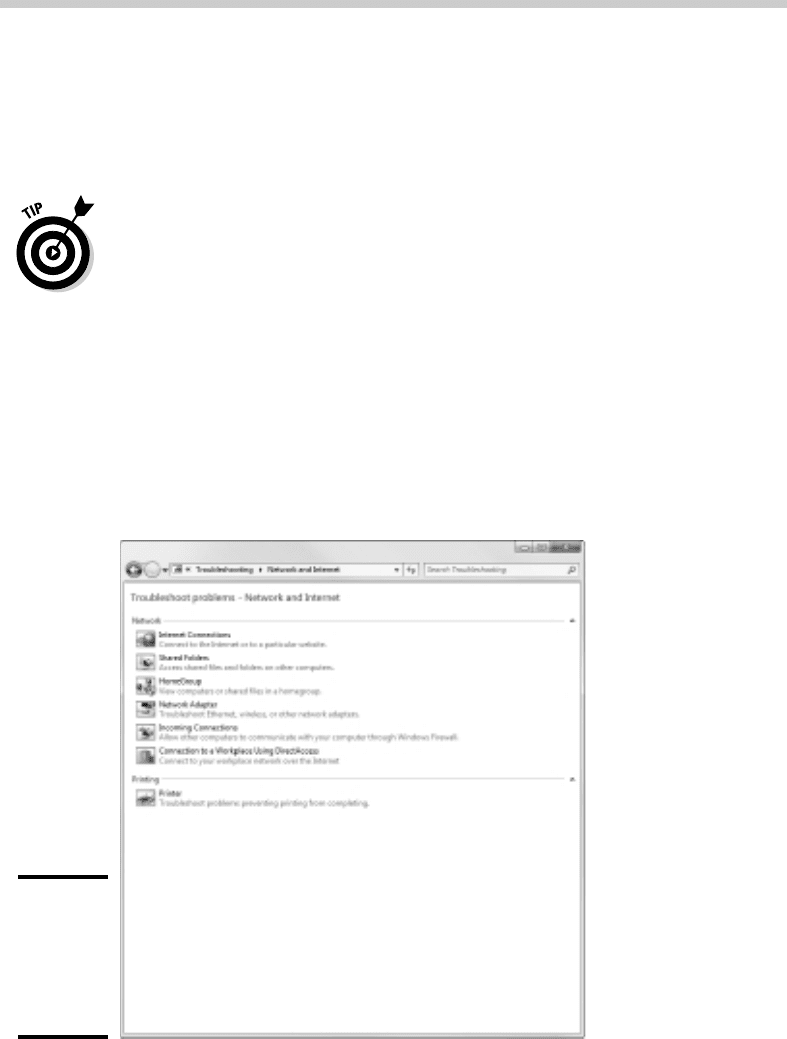
Windows comes with a built-in troubleshooter that can often help you to pin
down the cause of a network problem. Figure 7-1 shows the Windows 7 ver-
sion. Answer the questions asked by the troubleshooter and click Next to
move from screen to screen. The Networking Troubleshooter can’t solve all
networking problems, but it does point out the causes of the most common
problems.
Figure 7-1:
The
Windows 7
Networking
Trouble-
shooter.
25_625873-bk03ch07.indd 23825_625873-bk03ch07.indd 238 9/21/10 10:15 PM9/21/10 10:15 PM

Book III
Chapter 7
Solving Network
Problems
239
Time to Experiment
The procedure for starting Networking Troubleshooter depends on which
version of Windows you’re using:
✦ Windows 7: Open the Control Panel, click View Network Status and
Tasks, and then click Troubleshoot Problems. Then select the trouble-
shooter that seems most directly related to the problem you’re experi-
encing. You’ll find troubleshooters for wireless network problems, home
networks, and local area network (LAN) and Internet connections.
✦ Windows Vista: Choose Start➪Help and Support, click Troubleshooting,
and then click the link for the network troubleshooter that seems most
directly related to the problem you’re experiencing. You’ll find trouble-
shooters for wireless network problems, home networks, and local area
network (LAN) and Internet connections.
✦ Windows XP: Choose Start➪Help and Support➪Networking and the
Web➪Fixing Network or Web Problems. Then click Home and Small
Office Networking Troubleshooter.
Time to Experiment
If you can’t find some obvious explanation for your troubles — like the com-
puter is unplugged — you need to do some experimenting to narrow down
the possibilities. Design your experiments to answer one basic question: Is it
a network problem or a local computer problem?
Here are some ways you can narrow down the cause of the problem:
✦ Try performing the same operation on someone else’s computer. If no
one on the network can access a network drive or printer, something is
probably wrong with the network. On the other hand, if the error occurs
on only one computer, the problem is likely with that computer. The
wayward computer may not be reliably communicating with the network
or configured properly for the network, or the problem may have noth-
ing to do with the network at all.
✦ If you’re able to perform the operation on another computer with-
out problems, try logging on to the network with another computer
using your own username. Then see whether you can perform the
operation without error. If you can, the problem is probably on your
computer. If you can’t, the problem may be with the way your user
account is configured.
✦ If you can’t log on at another computer, try waiting for a bit. Your
account may be temporarily locked out. This can happen for a variety of
reasons — the most common of which is trying to log on with the wrong
password several times in a row. If you’re still locked out an hour later,
call the network administrator and offer a doughnut.
25_625873-bk03ch07.indd 23925_625873-bk03ch07.indd 239 9/21/10 10:15 PM9/21/10 10:15 PM

240
Who’s on First?
Who’s on First?
When troubleshooting a networking problem, it’s often useful to find out
who is actually logged on to a network server. For example, if a user can’t
access a file on the server, you can check whether the user is logged on.
If so, you know that the user’s account is valid, but the user may not have
permission to access the particular file or folder that he’s attempting to
access. On the other hand, if the user isn’t logged on, the problem may
lie with the account itself or how the user is attempting to connect to the
server.
It’s also useful to find out who’s logged on in the event that you need to
restart the server. For more information about restarting a server, see the
section, “Restarting a Network Server,” later in this chapter.
To find out who is currently logged on to a Windows server, right-click the
Computer icon on the desktop (My Computer in Windows Server 2003,
Computer in Windows Server 2008) and choose Manage from the menu that
appears. This brings up the Computer Management window. Open System
Tools in the tree list and then open Shared Folders and select Sessions. A list
of users who are logged on appears.
You can immediately disconnect all users by right-clicking Sessions in the
Computer Management window and choosing All Tasks➪Disconnect All.
Restarting a Client Computer
Sometimes, trouble gets a computer so tied up in knots that the only thing
you can do is reboot. In some cases, the computer just starts acting weird.
Strange characters appear on the screen, or Windows goes haywire and
doesn’t let you exit a program. Sometimes, the computer gets so confused
that it can’t even move. It just sits there, like a deer staring at oncoming
headlights. It won’t move, no matter how hard you press Esc or Enter. You
can move the mouse all over your desktop, or you can even throw it across
the room, but the mouse pointer on the screen stays perfectly still.
When a computer starts acting strange, you need to reboot. If you must
reboot, you should do so as cleanly as possible. I know this procedure may
seem elementary, but the technique for safely restarting a client computer is
worth repeating, even if it is basic:
1. Save your work if you can.
25_625873-bk03ch07.indd 24025_625873-bk03ch07.indd 240 9/21/10 10:15 PM9/21/10 10:15 PM

Book III
Chapter 7
Solving Network
Problems
241
Restarting a Client Computer
Use the File➪Save command to save any documents or files that you
were editing when things started to go haywire. If you can’t use the
menus, try clicking the Save button on the toolbar. If that doesn’t
work, try pressing Ctrl+S (the standard keyboard shortcut for the Save
command).
2. Close any running programs if you can.
Use the File➪Exit command or click the Close button in the upper-right
corner of the program window. Or press Alt+F4.
3. Restart the computer.
• Windows XP: Choose Start➪Turn Off Computer to summon the
Shut Down Windows dialog box. Select the Restart option, and then
click OK.
• Windows 7 and Vista: Click the Start button, click the right arrow that
appears at the bottom-right corner of the Start menu, and then click
Restart.
If restarting your computer doesn’t seem to fix the problem, you may need
to turn your computer off and then turn it on again. To do so, follow the pre-
vious procedure but choose Shut Down instead of Restart.
Here are a few things to try if you have trouble restarting your computer:
1. If your computer refuses to respond to the Start➪Shut Down com-
mand, try pressing Ctrl+Alt+Delete.
This is called the “three-finger salute.” It’s appropriate to say, “Queueue”
while you do it.
When you press Ctrl+Alt+Delete, Windows displays a dialog box that
enables you to close any running programs or shut down your computer
entirely.
2. If pressing Ctrl+Alt+Delete doesn’t do anything, you’ve reached the
last resort. The only thing left to do is turn off the computer by press-
ing the power On/Off button and holding it down for a few seconds.
Turning off your computer by pressing the power button is a drastic
action that you should take only after your computer becomes com-
pletely unresponsive. Any work you haven’t yet saved to disk is lost.
(Sniff.) (If your computer doesn’t have a Reset button, turn off the com-
puter, wait a few moments, and then turn the computer back on again.)
If at all possible, save your work before restarting your computer. Any work
you haven’t saved is lost. Unfortunately, if your computer is totally tied up in
knots, you probably can’t save your work. In that case, you have no choice
but to push your computer off the digital cliff.
25_625873-bk03ch07.indd 24125_625873-bk03ch07.indd 241 9/21/10 10:15 PM9/21/10 10:15 PM

242
Booting in Safe Mode
Booting in Safe Mode
Windows provides a special start-up mode called Safe Mode that’s designed
to help fix misbehaving computers. When you start your computer in Safe
Mode, Windows loads only the most essential parts of itself into memory —
the bare minimum required for Windows to work. Safe Mode is especially
useful when your computer has developed a problem that prevents you
from using the computer at all.
To boot your computer in Safe Mode, first restart the computer. Then, as
soon as the computer begins to restart, start pressing the F8 key — just tap
away at it until a menu titled Advanced Boot Options appears. One of the
options on this menu is Safe Mode; use the up- or down-arrow keys to select
that option and then press Enter to boot in Safe Mode.
Using System Restore
System Restore is a Windows feature that periodically saves important
Windows configuration information and allows you to later return your
system to a previously saved configuration. This can often fix problems by
reverting your computer to a time when it was working.
By default, Windows saves restore points whenever you install new software
on your computer or apply a system update. Restore points are also saved
automatically every seven days.
Although System Restore is turned on by default, you should verify that
System Restore is active and running to make sure that System Restore
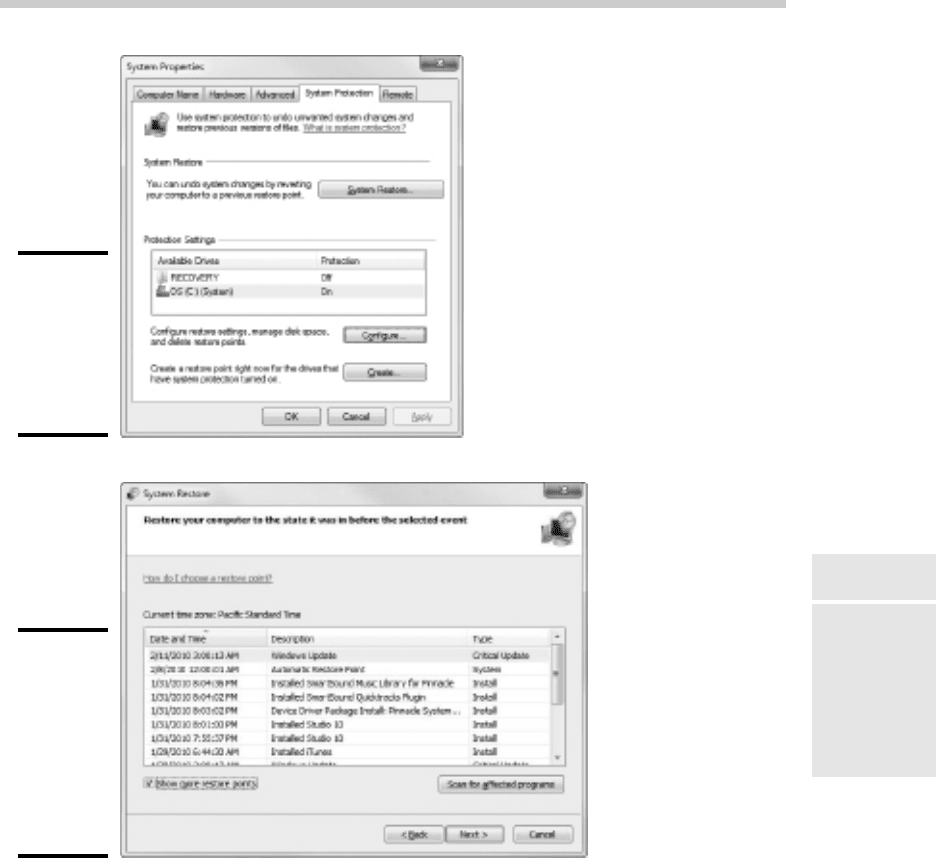
points are being created. To do that, right-click Computer in the Start menu,
choose Properties, and then click the System Protection tab. The dialog
box shown in Figure 7-2 is displayed. Verify that the Protection status for
your computer’s C: drive is “On.” If it isn’t, select the C: drive and click the
Configure button to configure System Restore for the drive.
If your computer develops a problem, you can restore it to a previously
saved restore point by clicking System Restore the System Protection tab.
This brings up the System Restore Wizard, as shown in Figure 7-3. This
wizard allows you to select the restore point you want to use.
Here are a few additional thoughts to remember about System Restore:
✦ System Restore does not delete data files from your system. Thus, files in
your Documents folder won’t be lost.
25_625873-bk03ch07.indd 24225_625873-bk03ch07.indd 242 9/21/10 10:15 PM9/21/10 10:15 PM
Book III
Chapter 7
Solving Network
Problems
243
Using System Restore
Figure 7-2:
The System
Protection
tab of the
System
Properties
dialog box.
Figure 7-3:
Using
System
Restore to
restore your
system to
an earlier
configura-
tion.
✦ System Restore does remove any applications or system updates you
have installed since the time the restore point was made. Thus, you
will need to re-install those applications or system updates — unless,
of course, you determine that an application or system update was the
cause of your problem in the first place.
✦ System Restore automatically restarts your computer. The restart may
be slow because some of the changes made by System Restore happen
after the restart.
25_625873-bk03ch07.indd 24325_625873-bk03ch07.indd 243 9/21/10 10:15 PM9/21/10 10:15 PM
244
Restarting Network Services
✦ Do not turn off or cut power to your computer during System Restore.
Doing so may leave your computer in an unrecoverable state.
Restarting Network Services
Once in awhile, the operating system service that supports the task that’s
causing you trouble inexplicably stops or gets stuck. If users can’t access a
server, it may be because one of the key network services has stopped or is
stuck.
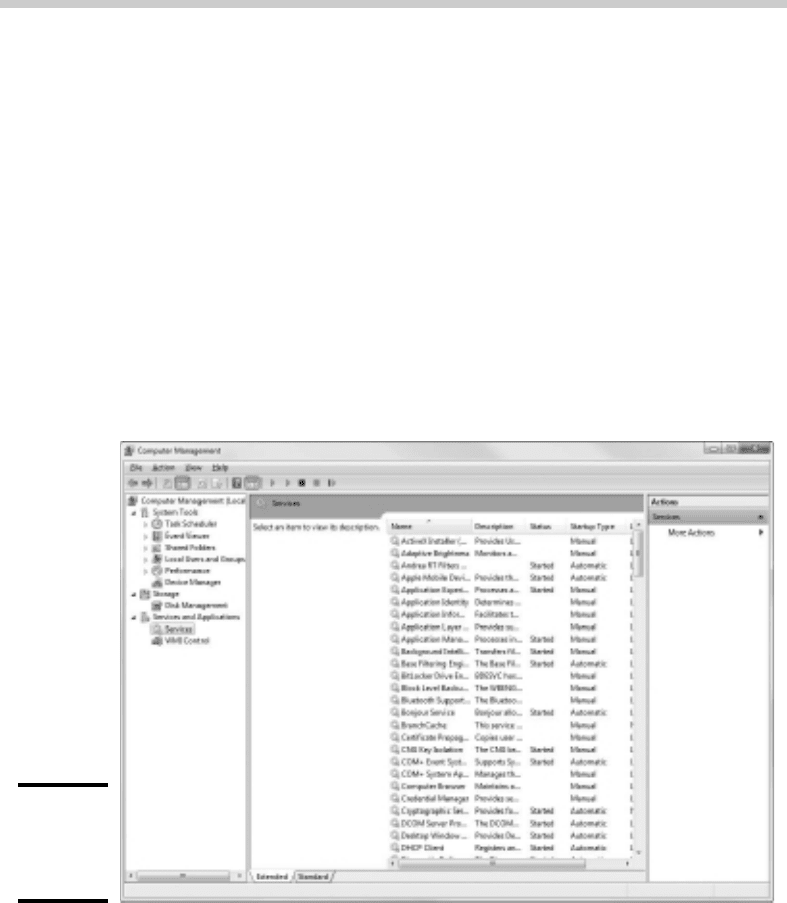
You can review the status of services by using the Services tool, as shown in
Figure 7-4. To display it, right-click Computer on the Start menu and choose
Manage; then, expand the Services and Applications node and click Services.
Review this list to make sure that all key services are running. If an impor-
tant service is paused or stopped, restart it.
Figure 7-4:
Looking at
services
(Windows 7).
Which services qualify as “important” depends on what roles you define for
the server. Table 7-1 lists a few important services that are common to most
Windows network operating systems. However, many servers require addi-
tional services besides these. In fact, a typical server will have many dozens
of services running simultaneously.
25_625873-bk03ch07.indd 24425_625873-bk03ch07.indd 244 9/21/10 10:15 PM9/21/10 10:15 PM

Book III
Chapter 7
Solving Network
Problems
245
Restarting a Network Server
Table 7-1 Key Windows Services
Service Description
Computer
Browser
Maintains a list of computers on the network that can be
accessed. If this service is disabled, the computer won’t be
able to use browsing services, such as My Network Places.
DHCP Client Enables the computer to obtain its IP address from a Dynamic
Host Configuration Protocol (DHCP) server. If this service is
disabled, the computer’s Internet Protocol (IP) address won’t
be configured properly.
DNS Client Enables the computer to access a Domain Name Server
(DNS) server to resolve DNS names. If this service is disabled,
the computer won’t be able to handle DNS names, including
Internet addresses and Active Directory names.
Server Provides basic file- and printer-sharing services for the server.
If this service is stopped, clients won’t be able to connect to
the server to access files or printers.
Workstation Enables the computer to establish client connections with
other servers. If this service is disabled, the computer won’t
be able to connect to other servers.
Key services usually stop for a reason, so simply restarting a stopped ser-
vice probably won’t solve your network’s problem — at least, not for long.
You should review the System log to look for any error messages that may
explain why the service stopped in the first place.
Restarting a Network Server
Sometimes, the only way to flush out a network problem is to restart the net-
work server that’s experiencing trouble.
Restarting a network server is something you should do only as a last
resort. Windows Server is designed to run for months or even years at a
time without rebooting. Restarting a server invariably results in a temporary
shutdown of the network. If you must restart a server, try to do it during off
hours if possible.
Before you restart a server, check whether a specific service that’s required
has been paused or stopped. You may be able to just restart the individual
service rather than the entire server. For more information, see the section,
“Restarting Network Services,” earlier in this chapter.
25_625873-bk03ch07.indd 24525_625873-bk03ch07.indd 245 9/21/10 10:15 PM9/21/10 10:15 PM

246
Looking at Event Logs
Here’s the basic procedure for restarting a network server:
1. Make sure that everyone is logged off the server.
The easiest way to do that is to restart the server after normal business
hours, when everyone has gone home for the day. Then, you can just
shut down the server and let the shutdown process forcibly log off any
remaining users.
To find out who’s logged on, refer to the earlier section, “Who’s on
First?”
2. After you’re sure the users have logged off, shut down the network
server.
You want to do this step behaving like a good citizen if possible —
decently, and in order. Use the Star➪Shut Down command to shut
down the server. This summons a dialog box that requires you to indi-
cate the reason for the shutdown. The information you supply here is
entered into the server’s System log, which you can review by using
Event Viewer.
3. Reboot the server computer or turn it off and then on again.
Watch the server start up to make sure that no error messages appear.
4. Tell everyone to log back on and make sure that everyone can now
access the network.
Remember the following when you consider restarting the network server:
✦ Restarting the network server is more drastic than restarting a client
computer. Make sure that everyone saves his or her work and logs
off the network before you do it! You can cause major problems if you
blindly turn off the server computer while users are logged on.
✦ Obviously, restarting a network server is a major inconvenience to
every network user. Better offer treats.
Looking at Event Logs
One of the most useful troubleshooting techniques for diagnosing net-
work problems is to review the network operating system’s built-in event
logs. These logs contain information about interesting and potentially
troublesome events that occur during the daily operation of your network.
Ordinarily, these logs run in the background, quietly gathering information
about network events. When something goes wrong, you can check the logs
25_625873-bk03ch07.indd 24625_625873-bk03ch07.indd 246 9/21/10 10:15 PM9/21/10 10:15 PM