
Lowe D. Networking For Dummies
Подождите немного. Документ загружается.


Book III
Chapter 4
Firewalls and
Virus Protection
207
The Many Types of Firewalls
In spite of these weaknesses, packet filter firewalls have several advantages
that explain why they are commonly used:
✦ Packet filters are very efficient. They hold up each inbound and out-
bound packet for only a few milliseconds while they look inside the
packet to determine the destination and source ports and addresses.
After these addresses and ports are determined, the packet filter quickly
applies its rules and either sends the packet along or rejects it. In con-
trast, other firewall techniques have a more noticeable performance
overhead.
✦ Packet filters are almost completely transparent to users. The only
time a user will be aware that a packet filter firewall is being used is
when the firewall rejects packets. Other firewall techniques require that
clients and/or servers be specially configured to work with the firewall.
✦ Packet filters are inexpensive. Most routers include built-in packet
filtering.
Stateful packet inspection (SPI)
Stateful packet inspection, also known as SPI, is a step up in intelligence from
simple packet filtering. A firewall with stateful packet inspection looks at
packets in groups rather than individually. It keeps track of which packets
have passed through the firewall and can detect patterns that indicate unau-
thorized access. In some cases, the firewall may hold on to packets as they
arrive until the firewall gathers enough information to make a decision about
whether the packets should be authorized or rejected.
Stateful packet inspection was once found only on expensive, enterprise-
level routers. Now, however, SPI firewalls are affordable enough for small- or
medium-sized networks to use.
Circuit-level gateway
A circuit-level gateway manages connections between clients and servers
based on TCP/IP addresses and port numbers. After the connection is
established, the gateway doesn’t interfere with packets flowing between
the systems.
For example, you could use a Telnet circuit-level gateway to allow Telnet
connections (port 23) to a particular server and prohibit other types of con-
nections to that server. After the connection is established, the circuit-level
gateway allows packets to flow freely over the connection. As a result, the
circuit-level gateway can’t prevent a Telnet user from running specific pro-
grams or using specific commands.
22_625873-bk03ch04.indd 20722_625873-bk03ch04.indd 207 9/21/10 10:14 PM9/21/10 10:14 PM

208
The Built-In Windows Firewall
Application gateway
An application gateway is a firewall system that is more intelligent than a
packet-filtering firewall, stateful packet inspection, or circuit-level gateway
firewall. Packet filters treat all TCP/IP packets the same. In contrast, appli-
cation gateways know the details about the applications that generate the
packets that pass through the firewall. For example, a Web application
gateway is aware of the details of HTTP packets. As a result, it can examine
more than just the source and destination addresses and ports to determine
whether the packets should be allowed to pass through the firewall.
In addition, application gateways work as proxy servers. Simply put, a proxy
server is a server that sits between a client computer and a real server. The
proxy server intercepts packets that are intended for the real server and pro-
cesses them. The proxy server can examine the packet and decide to pass it
on to the real server, or it can reject the packet. Or, the proxy server may be
able to respond to the packet itself without involving the real server at all.
For example, Web proxies often store copies of commonly used Web pages in
a local cache. When a user requests a Web page from a remote Web server,
the proxy server intercepts the request and checks whether it already has a
copy of the page in its cache. If so, the Web proxy returns the page directly to
the user. If not, the proxy passes the request on to the real server.
Application gateways are aware of the details of how various types of TCP/
IP servers handle sequences of TCP/IP packets to can make more intelligent
decisions about whether an incoming packet is legitimate or is part of an
attack. As a result, application gateways are more secure than simple packet-
filtering firewalls, which can deal with only one packet at a time.
The improved security of application gateways, however, comes at a price.
Application gateways are more expensive than packet filters, both in terms
of their purchase price and in the cost of configuring and maintaining them.
In addition, application gateways slow network performance because they
do more detailed checking of packets before allowing them to pass.
The Built-In Windows Firewall
Windows comes with a built-in packet-filtering firewall. If you don’t have a
separate firewall router, you can use this built-in firewall to provide a basic
level of protection. Here are the steps to activate this feature in Windows 7:
1. Choose Start➪Control Panel.
Control Panel appears.
22_625873-bk03ch04.indd 20822_625873-bk03ch04.indd 208 9/21/10 10:14 PM9/21/10 10:14 PM
Book III
Chapter 4
Firewalls and
Virus Protection
209
The Built-In Windows Firewall
2. Click System and Security.
The System and Security page appears.
3. Click Windows Firewall.
The Windows Firewall page appears.
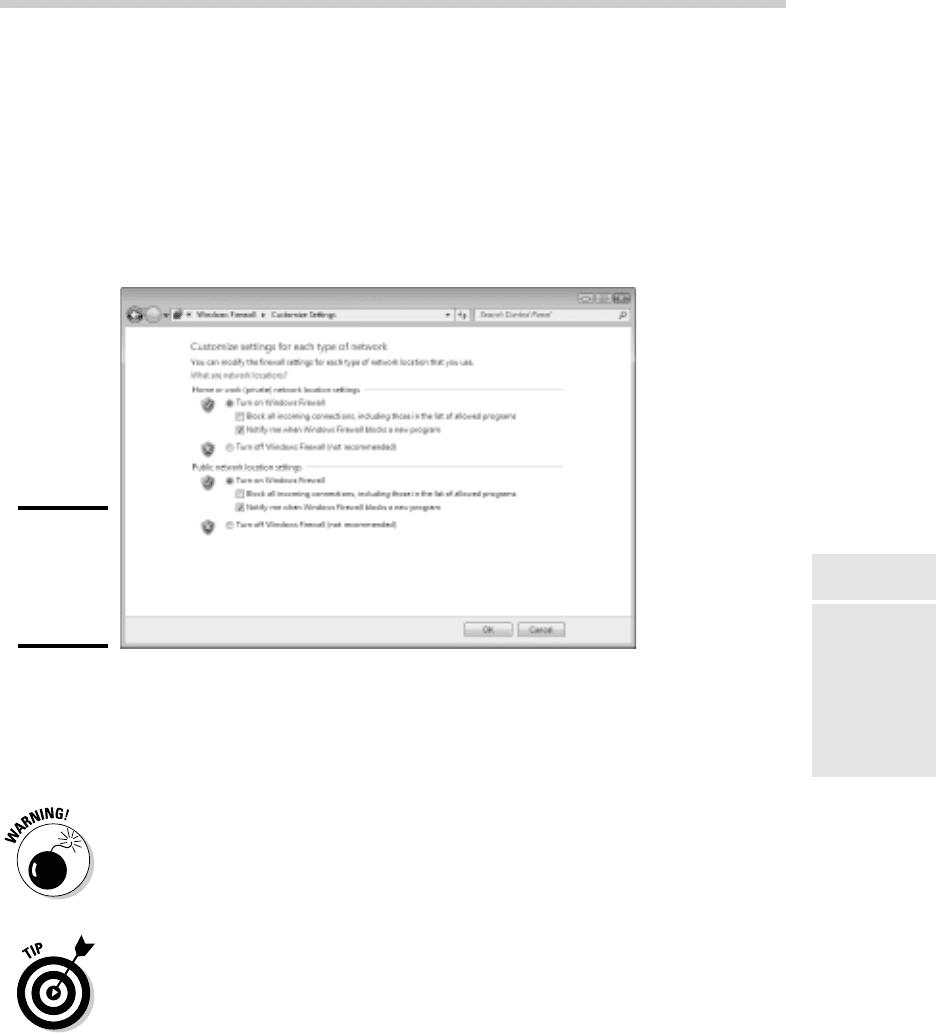
4. Click Turn Windows Firewall On or Off.
The page shown in Figure 4-2 appears.
Figure 4-2:
Activating
the fire-
wall in
Windows 7.
5. Click Turn On Windows Firewall.
6. Click OK.
The firewall is enabled.
Do not enable Windows Firewall if you’re using a separate firewall router to
protect your network. Because the other computers on the network are con-
nected directly to the router and not to your computer, Windows Firewall
won’t protect the rest of the network. Additionally, as an unwanted side
effect, the rest of the network will lose the ability to access your computer.
Windows Firewall is turned on by default. If your computer is already
behind a firewall, you should disable Windows Firewall. (In some cases, the
network’s group policy settings may prevent you from disabling Windows
Firewall. In that case, you must change the group policy so that Windows
Firewall can be disabled. For more information about group policy, see Book
VII, Chapter 6.)
22_625873-bk03ch04.indd 20922_625873-bk03ch04.indd 209 9/21/10 10:14 PM9/21/10 10:14 PM

210
Virus Protection
Virus Protection
Viruses are one of the most misunderstood computer phenomena around
these days. What is a virus? How does it work? How does it spread from
computer to computer? I’m glad you asked.
What is a virus?
Make no mistake — viruses are real. Now that most people are connected
to the Internet, viruses have really taken off. Every computer user is suscep-
tible to attacks by computer viruses, and using a network increases your vul-
nerability because it exposes all network users to the risk of being infected
by a virus that lands on any one network user’s computer.
Viruses don’t just spontaneously appear out of nowhere. Viruses are com-
puter programs that are created by malicious programmers who’ve lost a
few screws and should be locked up.
What makes a virus a virus is its capability to make copies of itself that can
be spread to other computers. These copies, in turn, make still more copies
that spread to still more computers, and so on, ad nauseam.
Then, the virus patiently waits until something triggers it — perhaps when
you type a particular command or press a certain key, when a certain date
arrives, or when the virus creator sends the virus a message. What the virus
does when it strikes also depends on what the virus creator wants the virus
to do. Some viruses harmlessly display a “gotcha” message. Some send an
e-mail to everyone it finds in your address book. Some wipe out all the data
on your hard drive. Ouch.
A few years back, viruses moved from one computer to another by latching
themselves onto floppy disks. Whenever you borrowed a floppy disk from
a buddy, you ran the risk of infecting your own computer with a virus that
may have stowed away on the disk.
Virus programmers have discovered that e-mail is a very efficient method
to spread their viruses. Typically, a virus masquerades as a useful or inter-
esting e-mail attachment, such as instructions on how to make $1,000,000
in your spare time, pictures of naked celebrities, or a Valentine’s Day greet-
ing from your long-lost sweetheart. When a curious but unsuspecting user
double-clicks the attachment, the virus springs to life, copying itself onto
the user’s computer — and, in some cases, sending copies of itself to all the
names in the user’s address book.
After the virus works its way onto a networked computer, the virus can then
figure out how to spread itself to other computers on the network.
22_625873-bk03ch04.indd 21022_625873-bk03ch04.indd 210 9/21/10 10:14 PM9/21/10 10:14 PM

Book III
Chapter 4
Firewalls and
Virus Protection
211
Virus Protection
Here are some more tidbits about protecting your network from virus
attacks:
✦ The term virus is often used to refer not only to true virus programs
(which are able to replicate themselves) but also to any other type
of program that’s designed to harm your computer. These programs
include so-called Trojan horse programs that usually look like games but
are, in reality, hard drive formatters.
✦ A worm is similar to a virus, but it doesn’t actually infect other files.
Instead, it just copies itself onto other computers on a network. After
a worm has copied itself onto your computer, there’s no telling what it
may do there. For example, a worm may scan your hard drive for inter-
esting information, such as passwords or credit card numbers, and then
e-mail them to the worm’s author.
✦ Computer virus experts have identified several thousand “strains” of
viruses. Many of them have colorful names, such as the I Love You virus,
the Stoned virus, and the Michelangelo virus.
✦ Antivirus programs can recognize known viruses and remove them from
your system, and they can spot the telltale signs of unknown viruses.
Unfortunately, the idiots who write viruses aren’t idiots (in the intellectual
sense), so they’re constantly developing new techniques to evade detec-
tion by antivirus programs. New viruses are frequently discovered, and
antivirus programs are periodically updated to detect and remove them.
Antivirus programs
The best way to protect your network from virus infection is to use an
antivirus program. These programs have a catalog of several thousand
known viruses that they can detect and remove. In addition, they can spot
the types of changes that viruses typically make to your computer’s files,
thus decreasing the likelihood that some previously unknown virus will go
undetected.
It would be nice if Windows came with built-in antivirus software, but alas —
it does not. You have to purchase a program on your own. The two best-
known antivirus programs for Windows are Norton AntiVirus by Symantec
and VirusScan by McAfee.
The people who make antivirus programs have their fingers on the pulse of
the virus world and frequently release updates to their software to combat the
latest viruses. Because virus writers are constantly developing new viruses,
your antivirus software is next to worthless unless you keep it up to date by
downloading the latest updates.
22_625873-bk03ch04.indd 21122_625873-bk03ch04.indd 211 9/21/10 10:14 PM9/21/10 10:14 PM

212
Virus Protection
Here are several approaches to deploying antivirus protection on your
network:
✦ Install antivirus software on each network user’s computer. This tech-
nique would be the most effective if you could count on all your users
to keep their antivirus software up to date. Because that’s an unlikely
proposition, you may want to adopt a more reliable approach to virus
protection.
✦ Managed antivirus services place antivirus client software on each
client computer in your network. Then, an antivirus server automati-
cally updates the clients on a regular basis to make sure that they’re
kept up to date.
✦ Server-based antivirus software protects your network servers from
viruses. For example, you can install antivirus software on your mail
server to scan all incoming mail for viruses and remove them before
your network users ever see them.
✦ Some firewall appliances include antivirus enforcement checks that
don’t allow your users to access the Internet unless their antivirus
software is up to date. This type of firewall provides the best antivirus
protection available.
Safe computing
Besides using an antivirus program, you can take a few additional precau-
tions to ensure virus-free computing. If you haven’t talked to your kids about
these safe-computing practices, you had better do so soon.
✦ Regularly back up your data. If a virus hits you, and your antivirus soft-
ware can’t repair the damage, you may need the backup to recover your
data. Make sure that you restore from a backup that was created before
you were infected by the virus!
✦ If you buy software from a store and discover that the seal has been
broken on the disk package, take the software back. Don’t try to install
it on your computer. You don’t hear about tainted software as often as
you hear about tainted beef, but if you buy software that’s been opened,
it may well be laced with a virus infection.
✦ Use your antivirus software to scan your disk for virus infection after
your computer has been to a repair shop or worked on by a consultant.
These guys don’t intend harm, but they occasionally spread viruses acci-
dentally, simply because they work on so many strange computers.
✦ Don’t open e-mail attachments from people you don’t know or attach-
ments you weren’t expecting.
✦ Use your antivirus software to scan any floppy disk or CD that doesn’t
belong to you before you access any of its files.
22_625873-bk03ch04.indd 21222_625873-bk03ch04.indd 212 9/21/10 10:14 PM9/21/10 10:14 PM
Book III
Chapter 4
Firewalls and
Virus Protection
213
Using Windows Action Center
Using Windows Action Center
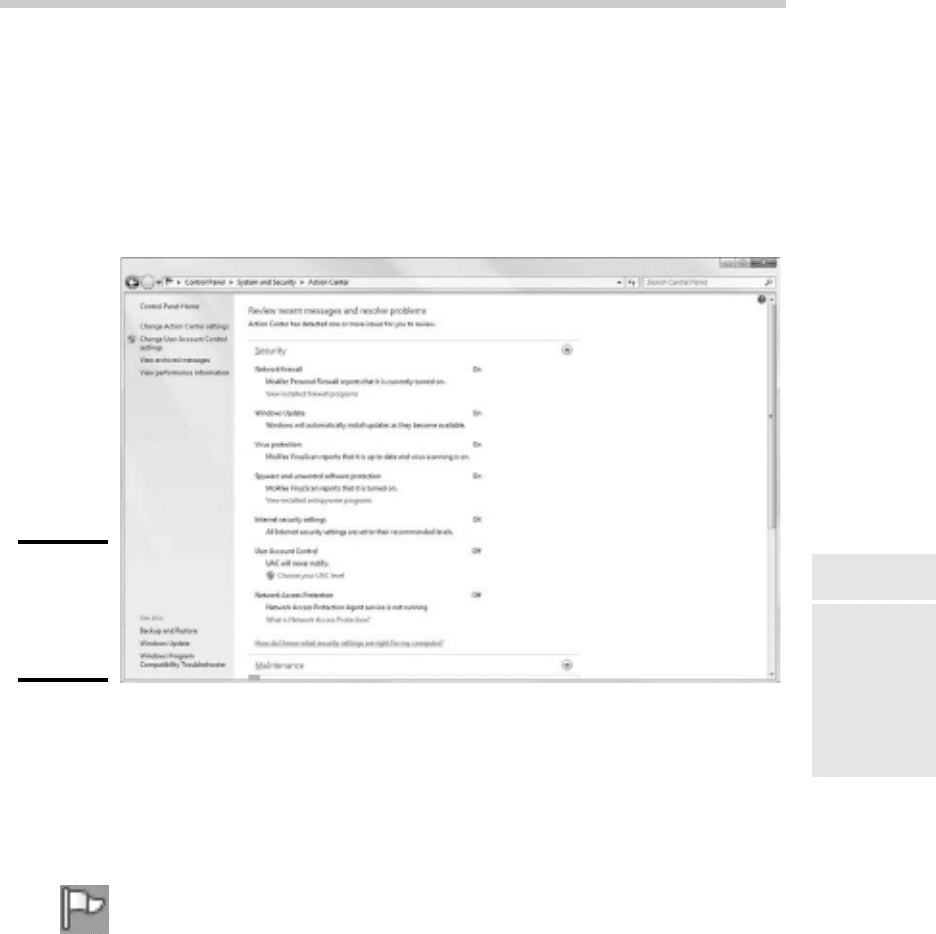
Windows 7 includes a new feature called the Windows Action Center. As
shown in Figure 4-3, the Windows Action Center monitors the status of secu-
rity-related issues on your computer. You can summon the Windows Action
Center by opening the Control Panel, clicking System and Security, and then
clicking Action Center.
Figure 4-3:
The
Windows 7
Action
Center.
The Windows Action Center alerts you to issues with your computer’s secu-
rity status as well as reminds you of maintenance that should be done, such
as installing operating system updates.
Here are a couple of additional points to ponder concerning the Windows
Action Center:
✦ A flag icon (shown in the margin) appears in the notification area on the
right end of the Windows taskbar to alert you to items you should attend
to in the Windows Action Center.
✦ Windows Vista and Windows XP included a similar feature called the
Windows Security Center, which you can access from the Control Panel.
22_625873-bk03ch04.indd 21322_625873-bk03ch04.indd 213 9/21/10 10:14 PM9/21/10 10:14 PM

Book III: Network Administration and Security
214
22_625873-bk03ch04.indd 21422_625873-bk03ch04.indd 214 9/21/10 10:14 PM9/21/10 10:14 PM

Chapter 5: Extending Your
Network with VPN Access
In This Chapter
✓ Examining the uses of VPN
✓ Looking at how VPN works
✓ Considering VPN clients and servers
✓ Pondering VPN hardware and software
T
oday’s network users frequently need to access their networks from
remote locations such as their home offices, hotel rooms, beach villas,
and their kid’s soccer fields. In the early days of computer networking, the
only real option for remotely accessing a network was to set up dial-up
access with telephone lines and modems.
Dial-up access worked, but it was slow and unreliable. Today, enabling
remote access to a local area network is easily done with a virtual private
network, or VPN. Simply put, VPN enables remote users to access a local
area network via any Internet connection.
This chapter is a short introduction to VPNs. You find out the basics of what
a VPN is, how to set one up, and how to access one remotely. Enjoy!
Understanding VPN
A virtual private network (VPN) is a type of network connection that creates
the illusion that you’re directly connected to a network when in fact you are
not. For example, suppose you’ve set up a local area network at your office
but you also occasionally work from home. But how will you access the files
on your work computer from home?
✦ You could simply copy whatever files you need from your work com-
puter onto a flash drive and take them home with you, work on the files,
copy the updated files back to the flash drive, and take them back to
work with you the next day.
✦ You could e-mail the files to your personal e-mail account, work on
them at home, and then e-mail the changed files back to your work
e-mail account.
23_625873-bk03ch05.indd 21523_625873-bk03ch05.indd 215 9/21/10 10:14 PM9/21/10 10:14 PM

216
Looking at VPN Security
✦ You could get a laptop and use the Windows Offline Files feature to
automatically synchronize files from your work network with files on the
laptop.
Or, you could set up a VPN that allows you to log on to your work network
from home. The VPN uses a secured Internet connection to connect you
directly to your work network, so you can access your network files as if you
had a really long Ethernet cable that ran from your home computer all the
way to the office and plugged directly into the work network.
There are at least three situations in which a VPN is the ideal solution:
✦ One or more workers need to occasionally work from home (as in the
scenario described above). In this situation, a VPN connection estab-
lishes a connection between the home computer and the office network.
✦ One or more mobile users — who may not ever actually show up at the
office — need to connect to the work network from mobile computers,
often from locations like hotel rooms, clients’ offices, airports, or coffee
shops. This type of VPN configuration is similar to the home user’s con-
figuration, except that the exact location of the remote user’s computer
is not fixed.
✦ Your company has offices in two or more locations, each with its own
local area network, and you want to connect the locations so that users
on either network can access each other’s network resources. In this
situation, the VPN doesn’t connect a single user with a remote network;
instead, it connects two remote networks to each other.
Looking at VPN Security
The V in VPN stands for virtual, which means that a VPN creates the
appearance of a local network connection when in fact the connection is
made over a public network — the Internet. The term tunnel is sometimes
used to describe a VPN because the VPN creates a tunnel between two
locations which can only be entered from either end. The data that trav-
els through the tunnel from one end to the other is secure as long as it is
within the tunnel — that is, within the protection provided by the VPN.
The P in VPN stands for private, which is the purpose of creating the tunnel.
If the VPN did not create effective security so that data can enter the tunnel
only at one of the two ends, the VPN would be worthless; you may as well
just open your network and your remote computer up to the Internet and let
the hackers have their way.
Prior to VPN technology, the only way to provide private remote network
connections was through actual private lines, which were (and still are) very
expensive. For example, to set up a remote office you could lease a private
23_625873-bk03ch05.indd 21623_625873-bk03ch05.indd 216 9/21/10 10:14 PM9/21/10 10:14 PM