
Lowe D. Networking For Dummies
Подождите немного. Документ загружается.


Book III
Chapter 5
Extending Your
Network with
VPN Access
217
Understanding VPN Servers and Clients
T1 line from the phone company to connect the two offices. This private T1
line provided excellent security because it physically connected the two
offices and could be accessed only from the two endpoints.
VPN provides the same point-to-point connection as a private leased line,
but does it over the Internet instead of through expensive dedicated lines.
To create the tunnel that guarantees privacy of the data as it travels from
one end of the VPN to the other, the data is encrypted using special security
protocols.
The most important of the VPN security protocols is called IPSec, which
stands for Internet Protocol Security. IPSec is a collection of standards for
encrypting and authenticating packets that travel on the Internet. In other
words, it provides a way to encrypt the contents of a data packet so that only
a person who knows the secret encryption keys can decode the data. And it
provides a way to reliably identify the source of a packet so that the parties
at either end of the VPN tunnel can trust that the packets are authentic.
Referring to the OSI reference model presented in Chapter 2 of Book 1, the
IPSec protocol operates at layer 3 of the OSI model, also called the Network
layer. What that means is that the IPSec protocol has no idea about what
kind of data is being carried by the packets it encrypts and authenticates.
The IPSec protocol concerns itself only with the details of encrypting the
contents of the packets (sometimes called the payload) and ensuring the
identity of the sender.
Another commonly used VPN protocol is L2TP. L2TP stands for Layer 2
Tunneling Protocol. This protocol does not provide data encryption. Instead,
it is designed to create end-to-end connections called tunnels through which
data can travel. L2TP is actually a combination of two older protocols,
one (called Layer 2 Forwarding Protocol, or L2FP) developed by Cisco, and
the other (called Point-to-Point Tunneling Protocol, or PPTP) developed by
Microsoft.
Many VPNs today use a combination of L2TP and IPSec, called L2TP Over
IPSec. This type of VPN combines the best features of L2TP and IPSec to pro-
vide a high degree of security and reliability.
Understanding VPN Servers and Clients
A VPN connection requires a VPN Server and a VPN Client — the server is
the gatekeeper at one end of the tunnel, the client at the other. The main dif-
ference between the server and the client is that it’s the client that initiates
the connection with the server. A VPN client can establish a connection with
just one server at a time. However, a server can accept connections from
many clients.
23_625873-bk03ch05.indd 21723_625873-bk03ch05.indd 217 9/21/10 10:14 PM9/21/10 10:14 PM
218
Understanding VPN Servers and Clients
Typically, the VPN server is a separate hardware device, most often a secu-
rity appliance such as a Cisco ASA security appliance. VPN servers can also
be implemented in software. For example, Windows Server 2008 includes
built-in VPN capabilities, though they are not easy to configure. And a VPN
server can be implemented in Linux as well.
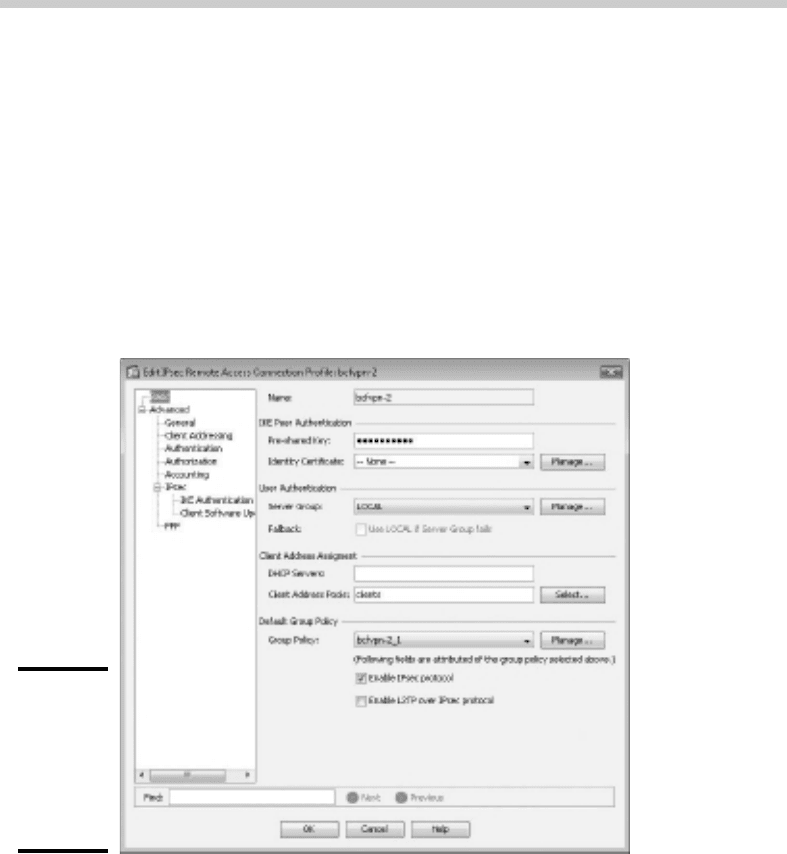
Figure 5-1 shows one of the many VPN configuration screens for a Cisco
ASA appliance. This screen provides the configuration details for an IPSec
VPN connection. The most important item of information on this screen is
the Pre-Shared Key, which is used to encrypt the data sent over the VPN.
The client will need to provide the identical key in order to participate in
the VPN.
Figure 5-1:
An IPSec
configura-
tion page on
a Cisco ASA
security
appliance.
A VPN client is usually software that runs on a client computer that wants to
connect to the remote network. The VPN client software must be configured
with the IP address of the VPN server as well as authentication information
such as a username and the Pre-Shared Key that will be used to encrypt the
data. If the key used by the client doesn’t match the key used by the server,
the VPN server will reject the connection request from the client.
23_625873-bk03ch05.indd 21823_625873-bk03ch05.indd 218 9/21/10 10:14 PM9/21/10 10:14 PM
Book III
Chapter 5
Extending Your
Network with
VPN Access
219
Understanding VPN Servers and Clients
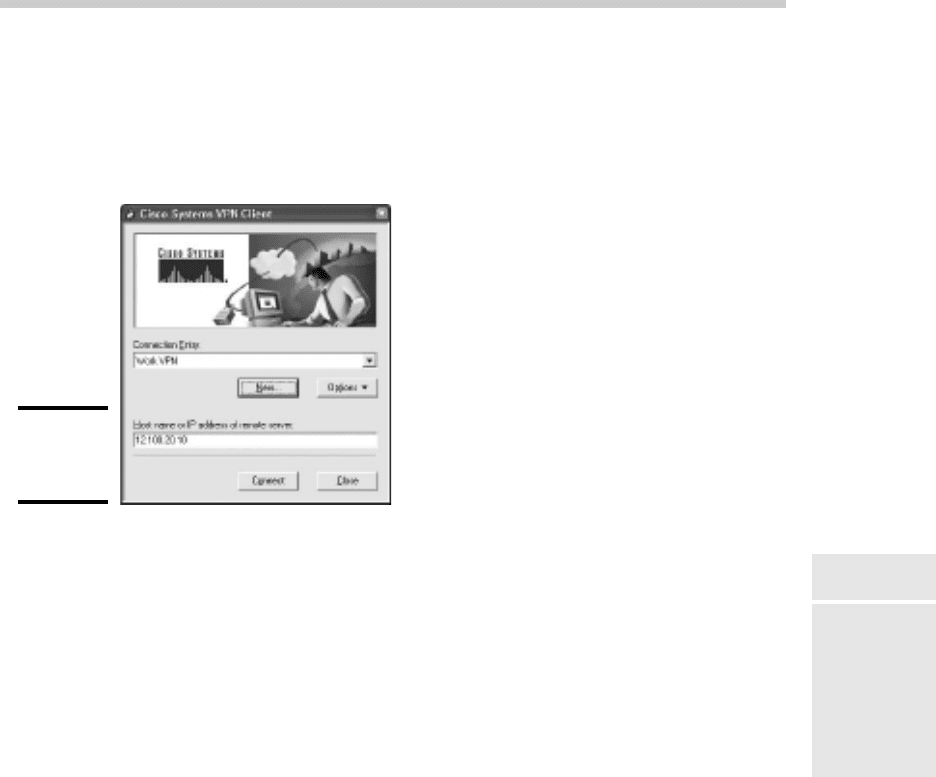
Figure 5-2 shows a typical VPN software client. When the client is config-
ured with the correct connection information (which you can do by click-
ing the New button), you just click Connect. After a few moments, the VPN
client will announce that the connection has been established and the VPN
is connected.
Figure 5-2:
A VPN
client.
A VPN client can also be a hardware device, like another security appliance.
This is most common when the VPN is used to connect two networks at sep-
arate locations. For example, suppose your company has an office in Pixley
and a second office in Hootersville. Each office has its own network with
servers and client computers. The easiest way to connect these offices with
a VPN would be to put an identical security appliance at each location. Then,
you could configure the security appliances to communicate with each other
over a VPN.
23_625873-bk03ch05.indd 21923_625873-bk03ch05.indd 219 9/21/10 10:14 PM9/21/10 10:14 PM

Book III: Network Administration and Security
220
23_625873-bk03ch05.indd 22023_625873-bk03ch05.indd 220 9/21/10 10:14 PM9/21/10 10:14 PM

Chapter 6: Managing
Network Software
In This Chapter
✓ Understanding the types of software licenses
✓ Using license servers
✓ Exploring the deployment options
✓ Keeping up to date with patches and service packs
A
n important task of any network administrator is managing the various
bits and pieces of software that are used by your users throughout
the network. Most, if not all, of your network users will have a version of
Microsoft Office installed on their computers. Depending on the type of
business, other software may be widely used. For example, accounting firms
require accounting software; engineering firms require engineering soft-
ware; and the list goes on.
Long gone are the days when you could purchase one copy of a computer
program and freely install it on every computer on your network. Most soft-
ware has built-in features — commonly called copy protection — designed
to prevent such abuse. But even in the absence of copy protection, nearly
all software is sold with a license agreement that dictates how many com-
puters you can install and use the software on. As a result, managing soft-
ware licenses is an important part of network management.
Some software programs have a license feature that uses a server computer
to regulate the number of users who can run the software at the same time.
As the network administrator, your job is to set up the license server and
keep it running.
Another important aspect of managing software on the network is figuring
out the most expedient way to install the software on multiple computers.
The last thing you want to do is manually run the software’s Setup program
individually on each computer in your network. Instead, you’ll want to use
the network itself to aid in the deployment of the software.
24_625873-bk03ch06.indd 22124_625873-bk03ch06.indd 221 9/21/10 10:15 PM9/21/10 10:15 PM

222
Understanding Software Licenses
Finally, you’ll want to ensure that all the software programs installed
throughout your network are kept up to date with the latest patches and
updates from the software vendors.
This chapter elaborates on these aspects of network software management.
Understanding Software Licenses
Contrary to popular belief, you don’t really buy software. Instead, you buy
the right to use the software. When you purchase a computer program
at a store, all you really own after you complete the purchase is the box
the software comes in, the disks/discs the software is recorded on, and a
license that grants you the right to use the software according to the terms
offered by the software vendor. The software itself is still owned by the
vendor.
That means that you’re obligated to follow the terms of the license agree-
ment that accompanies the software. Very few people actually read the com-
plete text of a software agreement before they purchase and use software. If
you do, you’ll find that a typical agreement contains restrictions, such as the
following:
✦ You’re allowed to install the software on one and only one computer.
Some license agreements have specific exceptions to this, allowing you
to install the software on a single computer at work and a single com-
puter at home, or on a single desktop computer and a single notebook
computer, provided that both computers are used by the same person.
However, most software licenses stick to the one-computer rule.
✦ The license agreement probably allows you to make a backup copy of
the disks/discs. The number of backup copies you can make, though, is
probably limited to one or two.
✦ You aren’t allowed to reverse-engineer the software. In other words,
you can’t use programming tools to dissect the software in an effort to
learn the secrets of how it works.
✦ Some software restricts the kinds of applications it can be used for.
For example, you might purchase a student or home version of a pro-
gram that prohibits commercial use. And some software — for example,
Sun Microsystem’s Java — prohibits its use for military applications.
✦ Some software has export restrictions that prevent you from taking it
out of the country.
24_625873-bk03ch06.indd 22224_625873-bk03ch06.indd 222 9/21/10 10:15 PM9/21/10 10:15 PM

Book III
Chapter 6
Managing Network
Software
223
Understanding Software Licenses
✦ Nearly all software licenses limit the liability of the software vendor
to replacing defective installation disks/discs. In other words, the
software vendor isn’t responsible for any damage that might be caused
by bugs in the software. In a few cases, these license restrictions have
been set aside in court, and companies have been held liable for damage
caused by defective software. For the most part, though, you use soft-
ware at your own risk.
In many cases, software vendors give you a choice of several different types
of licenses to choose from. When you purchase software for use on a net-
work, you need to be aware of the differences between these license types
so you can decide which type of license to get. The most common types are
✦ Retail: A retail license is the software you buy directly from the software
vendor, a local store, or an online store. A retail software license usu-
ally grants you the right for a single user to install and use the software.
Depending on the agreement, the license may allow that user to install
the software on two computers — one at work and one at home. The
key point is that only one user may use the software. (However, it is
usually acceptable to install the software on a computer that’s shared
by several users. In that case, more than one user can use the software,
provided they use it one at a time.)
The main benefit of a retail license is that it stays with the user when
the user upgrades his or her computer. In other words, if you get a new
computer, you can remove the software from your old computer and
install it on your new computer.
✦ OEM: An OEM license is for software that’s installed by a computer man-
ufacturer on a new computer. (OEM stands for original equipment manu-
facturer.) For example, if you purchase a computer from Dell and order
Microsoft Office Professional along with the computer, you’re getting an
OEM license. The most important thing to know about an OEM license
is that it applies only to the specific computer for which you purchased
the software. You are never allowed to install the software on any com-
puter other than the one for which you purchased the software.
Thus, if one day in a fit of rage you throw your computer out the fifth
floor window of your office and the computer smashes into little pieces
in the parking lot below, your OEM version of Office is essentially lost
forever. When you buy a replacement computer, you’ll have to buy a
new OEM license of Office for the new computer. You can’t install the
old software on the new computer.
If this sounds like a severe limitation, it is. However, OEM licenses are
usually substantially less expensive than retail licenses. For example, a
retail license of Microsoft Office 2007 Professional sells for about $500.
The OEM version is less than $400.
24_625873-bk03ch06.indd 22324_625873-bk03ch06.indd 223 9/21/10 10:15 PM9/21/10 10:15 PM

224
Using a License Server
✦ Volume: A volume license allows you to install and use the software on
more than one computer. The simplest type of volume license simply
specifies how many computers on which you can install the software.
For example, you might purchase a 20-user version of a program that
allows you to install the software on 20 computers. Usually, you’re on
the honor system to make sure that you don’t exceed the quantity. You
want to set up some type of system to keep track of this type of software
license. For example, you could create an Excel spreadsheet in which
you record the name of each person for whom you install the software.
Volume licenses can become considerably more complicated. For exam-
ple, Microsoft offers several different types of volume license programs,
each with different pricing and different features and benefits. Table 6-1
summarizes the features of these license programs. For more informa-
tion, refer to www.microsoft.com/licensing.
Table 6-1 Microsoft Volume License Plans
Plan Features
Open License Purchase as few as five end-user licenses.
Open Value Purchase as few as five end-user licenses and receive free
upgrades during the subscription term (three years).
Select License This is a licensing program designed for companies with 250
or more employees.
Enterprise This is an alternative to the Select License program that’s
designed to cost-effectively provide Windows Vista, Office,
and certain other programs throughout an organization of at
least 250 employees.
✦ Subscription: A subscription isn’t really a separate type of license but
rather an optional add-on to a volume license. The added subscription
fee entitles you to technical support and free product upgrades during
the term of the subscription, which is usually annual. For some types
of products, the subscription also includes periodic downloads of new
data. For example, antivirus software usually includes a subscription
that regularly updates your virus signature data. Without the subscrip-
tion, the antivirus software would quickly become ineffective.
Using a License Server
Some programs let you purchase network licenses that enable you to install
the software on as many computers as you want, but regulate the number
of people who can use the software at any given time. To control how many
24_625873-bk03ch06.indd 22424_625873-bk03ch06.indd 224 9/21/10 10:15 PM9/21/10 10:15 PM

Book III
Chapter 6
Managing Network
Software
225
Using a License Server
people use the software, a special license server is set up. Whenever a user
starts the program, the program checks with the license server to see
whether a license is available. If so, the program is allowed to start, and the
number of available licenses on the license server is reduced by one. Later,
when the user quits the program, the license is returned to the server.
One of the most commonly used license server software is FlexLM, by
Macrovision. It is used by AutoCAD as well as by many other network
software applications. FlexLM uses special license files that are issued by
a software vendor to indicate how many licenses of a given product you
have purchased. Although the license file is a simple text file, its contents
are cryptic and generated by a program that only the software vendor has
access to. Here’s an example of a typical license file for AutoCAD:
SERVER server1 000ecd0fe359
USE_SERVER
VENDOR adskflex port=2080
INCREMENT 57000ARDES_2010_0F adskflex 1.000 permanent 6 \
VENDOR_STRING=commercial:permanent BORROW=4320 SUPERSEDE \
DUP_GROUP=UH ISSUED=07-May-2007 SN=339-71570316 SIGN=”102D \
85EC 1DFE D083 B85A 46BB AFB1 33AE 00BD 975C 8F5C 5ABC 4C2F \
F88C 9120 0FB1 E122 BA97 BCAE CC90 899F 99BB 23C9 CAB5 613F \
E7BB CA28 7DBF 8F51 3B21” SIGN2=”033A 6451 5EEB 3CA4 98B8 F92C \
184A D2BC BA97 BCAE CC90 899F 2EF6 0B45 A707 B897 11E3 096E 0288 \
787C 997B 0E2E F88C 9120 0FB1 782C 00BD 975C 8F5C 74B9 8BC1”
(Don’t get any crazy ideas here. I changed the numbers in this license file so
that it won’t actually work. I’m not crazy enough to publish an actual valid
AutoCAD license file!)
One drawback to software that uses a license server is that you have to
take special steps to run the software when the server isn’t available. For
example, what if you have AutoCAD installed on a notebook computer and
you want to use it while you’re away from the office? In that case, you have
two options:
✦ Use virtual private network (VPN) software to connect to the network.
After you’re connected with the VPN, the license server will be available
so you can use the software.
✦ Borrow a license. When you borrow a license, you can use the software
for a limited period of time while you’re disconnected from the network.
Of course, the borrowed license is subtracted from the number of avail-
able licenses on the server.
In most cases, the license server is a mission-critical application — as impor-
tant as any other function on your network. If the license server goes down,
all users who depend on it will be unable to work. Don’t worry; they’ll let you
know. They’ll be lining up outside your door demanding to know when you
can get the license server up and running so they can get back to work.
24_625873-bk03ch06.indd 22524_625873-bk03ch06.indd 225 9/21/10 10:15 PM9/21/10 10:15 PM

226
Options for Deploying Network Software
Because the license server provides such an important function, treat it with
special care. Make sure that the license server software runs on a stable,
well-maintained server computer. Don’t load up the license server computer
with a bunch of other server functions.
And make sure that it’s backed up. If possible, install the license server soft-
ware on a second server computer as a backup. That way, if the main license
server computer goes down and you can’t get it back up and running, you
can quickly switch over to the backup license server.
Options for Deploying Network Software
After you acquire the correct license for your software, the next task of the
network administrator is deploying the software — that is, installing the
software on your users’ computers and configuring the software so that it
runs efficiently on your network. The following sections describe several
approaches to deploying software to your network.
Deploying software manually
Most software is shipped on CD or DVD media along with a Setup program
that you run to install the software. The Setup program usually asks you a
series of questions, such as where you want the program installed, whether
you want to install all of the program’s features or just the most commonly
used features, and so on. You may also be required to enter a serial number,
registration number, license key, or other code that proves you purchased
the software. When all these questions are answered, the Setup program
then installs the program.
If only a few of your network users will be using a particular program, the
Setup program may be the most convenient way to deploy the program.
Just take the installation media with you to the computer you want to
install the program on, insert the disc into the CD/DVD drive, and run the
Setup program.
When you finish manually installing software from a CD or DVD, don’t forget
to remove the disc from the drive! It’s easy to leave the disc in the drive,
and if the user rarely or never uses the drive, it might be weeks or months
before anyone discovers that the disc is missing. By that time, you’ll be hard
pressed to remember where it is.
Running Setup from a network share
If you plan on installing a program on more than two or three computers
on your network, you’ll find it much easier to run the Setup program from a
network share rather than from the original CDs or DVDs. To do so, follow
these steps:
24_625873-bk03ch06.indd 22624_625873-bk03ch06.indd 226 9/21/10 10:15 PM9/21/10 10:15 PM