
Lowe D. Networking For Dummies
Подождите немного. Документ загружается.


Chapter 5: Using FTP
In This Chapter
✓ Figuring out the basics of FTP
✓ Setting up an FTP server
✓ Retrieving files from an FTP server
✓ Using FTP commands
F
ile Transfer Protocol (FTP) is the basic method for exchanging files over
the Internet. If you need to access files from someone’s FTP site, this
chapter shows you how to do so by using a Web browser or a command
line FTP client. If you need to set up your own FTP server to share files with
other users, this chapter shows you how to do that, too.
Discovering FTP
FTP is as old as the Internet. The first versions of FTP date to the early
1970s, and even the current FTP standard (RFC 959) dates to 1985. You can
use FTP with the command line FTP client (which has a decidedly 1980s feel
to it), or you can access FTP sites with most modern Web browsers if you
prefer a graphic interface. Old computer hounds prefer the FTP command
line client, probably for nostalgic reasons.
In spite of its age, FTP is still commonly used on the Internet. For example,
InterNIC (the organization that manages Internet names) maintains an FTP
site at ftp.rs.internic.net. There, you can download important files,
such as named.root, which provides the current location of the Internet’s
root name servers. Many other companies maintain FTP sites from which
you can download software, device drivers, documentation, reports, and
so on. FTP is also one of the most common ways to publish HTML files to a
Web server. Because FTP is still so widely used, it pays to know how to use
it from both the command line and from a browser.
In the Windows world, an FTP server is integrated with the Microsoft Web
server, Internet Information Services (IIS). As a result, you can manage FTP
from the IIS management console along with other IIS features. Note that
the FTP component is an optional part of IIS, so you may need to install it
separately if you opted to not include it when you first installed IIS.
34_625873-bk04ch05.indd 34734_625873-bk04ch05.indd 347 9/21/10 10:31 PM9/21/10 10:31 PM

348
Configuring an FTP Server
On Unix and Linux systems, FTP isn’t usually integrated with a Web server.
Instead, the FTP server is installed as a separate program. You’re usually
given the option to install FTP when you install the operating system. If you
choose not to, you can always install it later.
When you run an FTP server, you expose a portion of your file system to the
outside world. As a result, you need to be careful about how you set up your
FTP server so that you don’t accidentally allow hackers access to the bowels
of your file server. Fortunately, the default configuration of FTP is pretty
secure. You shouldn’t tinker much with the default configuration unless you
know what you’re doing.
Configuring an FTP Server
In the following sections, I show you how to configure FTP services in
Microsoft IIS. The examples show IIS version 6 running on Windows Server
2008, but the procedures are essentially the same for other IIS versions.
Installing FTP
Although FTP is integrated with IIS, FTP is not installed by default when you
install IIS. As a result, if you didn’t specifically select FTP when you installed
IIS, you need to install FTP before you can set up an FTP site. Here are the
procedures for Windows Server 2003 and 2008:
✦ For Windows Server 2003, you install the FTP protocol by choosing
Control Panel➪Add or Remove Programs➪Add/Remove Windows
Components. Then, select Application Server from the list of components,
click Details, and choose Internet Information Services (IIS). Click Details
again and then select File Transfer Protocol (FTP) from the list of IIS
subcomponents. Finally, click OK to install FTP. If asked, you’ll need to
insert the Windows Server 2003 setup disc.
✦ For Windows Server 2008, choose Start➪Server Manager and select the
Web Server (IIS) role. Scroll down to the Role Services section and
then click Add Role Services. Select the FTP Server role, click Next,
and then click Install.
Creating an FTP site
After you install FTP, you must create at least one FTP site. To do that,
follow these steps:
1. Choose Start➪Administrative Programs➪Internet Information Services
(IIS) Manager.
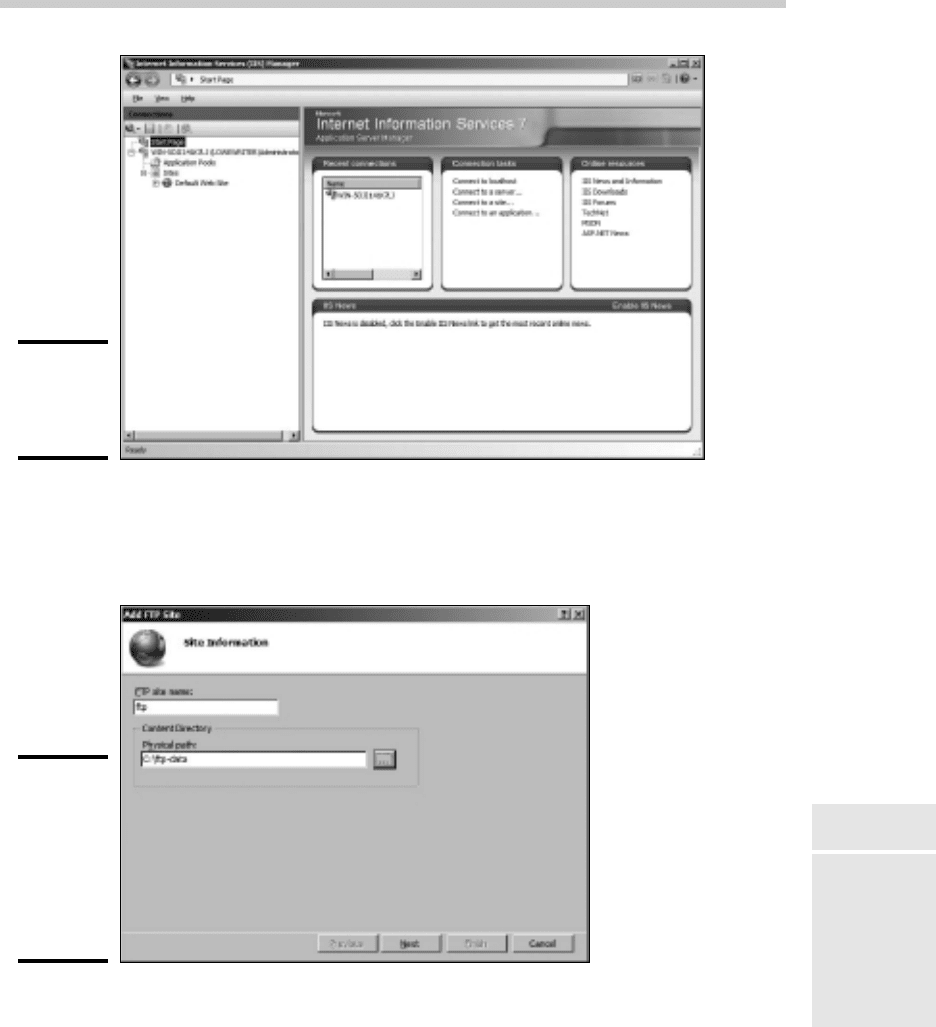
This launches the IIS Manager console, as shown in Figure 5-1.
34_625873-bk04ch05.indd 34834_625873-bk04ch05.indd 348 9/21/10 10:31 PM9/21/10 10:31 PM
Book IV
Chapter 5
Using FTP
349
Configuring an FTP Server
Figure 5-1:
The IIS
management
console.
2. Right-click the Sites node and choose Add FTP Site.
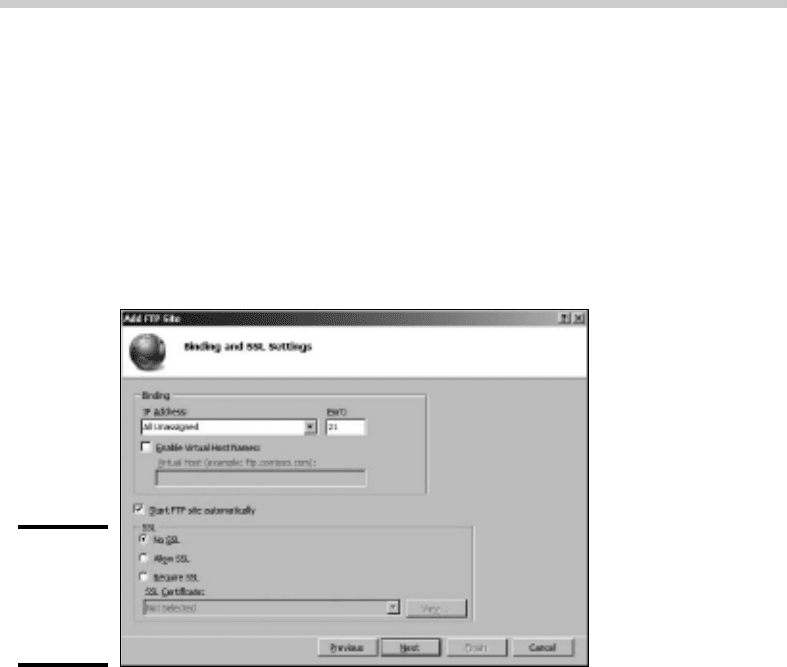
The first page of the Add FTP Site Wizard appears, as shown in Figure 5-2.
Figure 5-2:
The Add FTP
Site Wizard
asks for the
name and
data folder
for the FTP
site.
3. Enter a name for your ftp site.
In Figure 5-2, I entered the name ftp.
34_625873-bk04ch05.indd 34934_625873-bk04ch05.indd 349 9/21/10 10:31 PM9/21/10 10:31 PM
350
Configuring an FTP Server
4. Enter the path to the folder that will hold the FTP site’s data.
This field determines the location on the server where the data stored
on the FTP site will be located. If you don’t know the exact path, click
the Browse button and browse to the folder location.
5. Click Next.
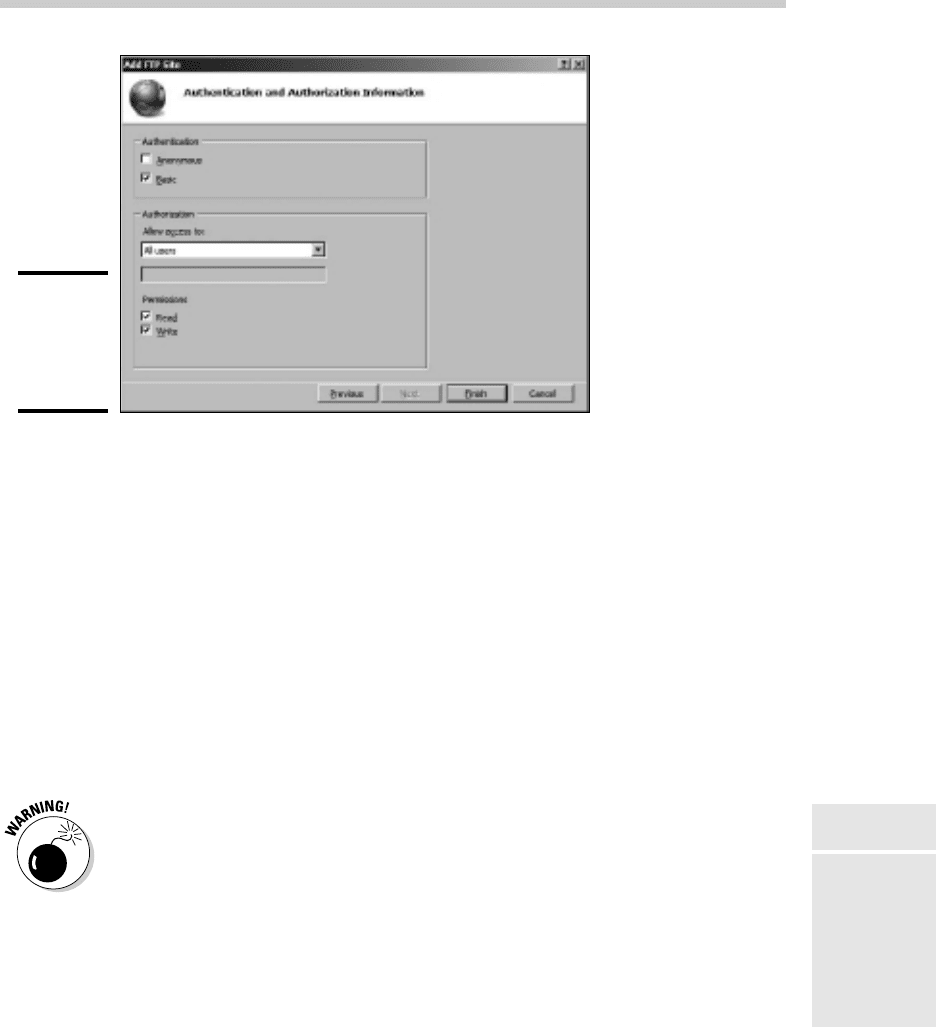
The second page of the Add FTP Site Wizard appears, as shown in
Figure 5-3. This page lets you set the port number that the FTP site will
use, and lets you indicate whether you will use SSL security.
Figure 5-3:
The second
page of the
Add FTP
Site Wizard.
6. Leave the IP Address and Port fields unchanged unless you want to
use a nonstandard port.
By default, the FTP site will use port 21, which is the standard port for
the FTP protocol.
7. Select the SSL security option you want to use.
If you have an SSL certificate and want to use SSL security, select either
Allow SSL or Require SSL. If you select Allow SSL, users can access your
site with or without SSL security. If you select Require SSL, users must
always use SSL security to access the FTP site.
If you don’t have a certificate available or if the site will contain data
that doesn’t require tight security, select No SSL.
8. Click Next.
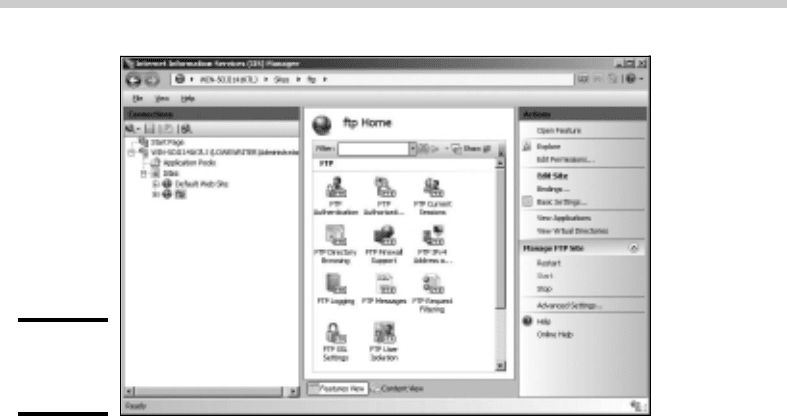
The third page of the Add FTP Site Wizard appears, as shown in Figure
5-4. This page lets you set the basic login security to be used for the site.
34_625873-bk04ch05.indd 35034_625873-bk04ch05.indd 350 9/21/10 10:31 PM9/21/10 10:31 PM
Book IV
Chapter 5
Using FTP
351
Configuring an FTP Server
Figure 5-4:
The third
page of the
Add FTP
Site Wizard.
9. Select the Anonymous option if you want to allow anonymous users to
access your FTP site.
If you check this option, users can access your FTP site without providing
any login information. You should specify this option only for sites that
have no security requirements.
10. Select the Basic option if you want to allow Basic authentication.
This option allows users to log in using a Windows username and
password. Note that because this option transmits the password in
unencrypted form, you should use it only when you know that the
connection between the user and the FTP server is secure.
11. Select the user access permissions you want to grant.
You can grant Read and Write permissions to All Users (as shown in the
figure), to anonymous users, and to individual users or groups.
Do not grant Write permissions to anonymous users. If you do, your FTP
site will quickly become a dumping ground for all kinds of trash as word
gets out about your totally unsecured FTP site.
12. Click Finish.
Your FTP site is created!
Changing the FTP site properties
You can change the properties for an FTP site by selecting the site in IIS
Manager. This brings up a page with several icons that let you change
various settings for the site, as shown in Figure 5-5.
34_625873-bk04ch05.indd 35134_625873-bk04ch05.indd 351 9/21/10 10:31 PM9/21/10 10:31 PM
352
Configuring an FTP Server
Figure 5-5:
The FTP Site
page.
The FTP Site Properties dialog box contains the following tabs that let you
configure the properties of your FTP site:
✦ FTP Authentication: Lets you enable or disable Anonymous and Basic
authentication for the FTP site.
✦ FTP Authorization: Lets you grant access rights to individual users,
groups of users, anonymous users, or all users.
✦ Current Sessions: Displays a list of users who are currently accessing
the FTP site.
✦ FTP Directory Browsing: Sets several options that determine how users
can browse the data directories in the FTP site.
✦ FTP Firewall Support: Sets several advanced options for working with
firewalls. Best leave these settings alone unless you’re a firewall guru.
✦ FTP IPv4 Address and Domain Restrictions: You can use this page to
grant or deny access to users based on their IP addresses or domain
names. This page is useful if you want to restrict access to a specific set
of users.
✦ FTP Logging: Lets you control logging for the site.
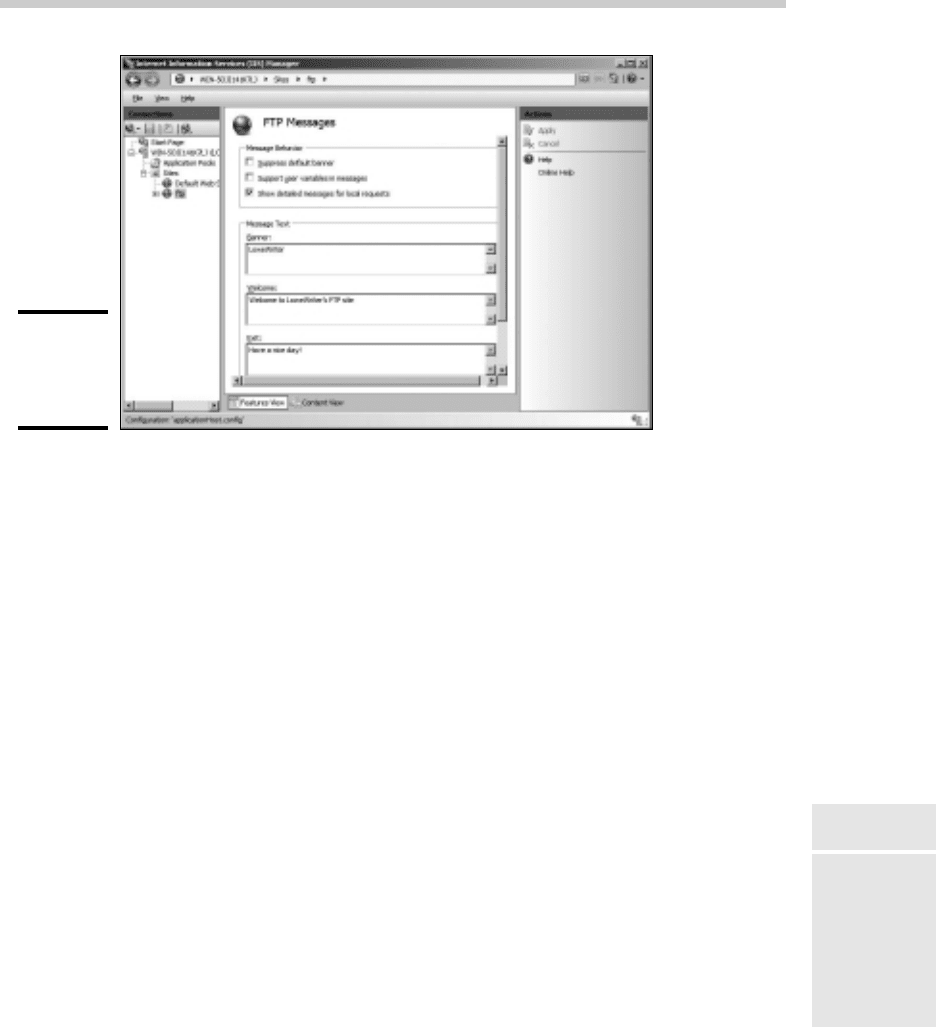
✦ FTP Messages: Lets you create four customized messages that appear
when users access the site, as shown in Figure 5-6.
34_625873-bk04ch05.indd 35234_625873-bk04ch05.indd 352 9/21/10 10:31 PM9/21/10 10:31 PM
Book IV
Chapter 5
Using FTP
353
Configuring an FTP Server
Figure 5-6:
Customizing
the site’s
messages.
The four messages you can configure are:
• The Banner message appears when a user first accesses the site,
before he or she has logged on. If the site allows anonymous logons,
you may mention that in the Banner message.
• The Welcome message appears after the user has successfully logged
on to your site.
• The Exit message appears when the user leaves the site.
• The Maximum Connections message appears when the connection
limit has been exceeded.
Adding content to your FTP site
When you set up an FTP site, the data for the site is stored in a folder on one
of the server’s disks. To make your FTP site useful, you’ll need to add files
to this folder. Those files will then be available for download on the site.
The easiest way to do that is to simply open Windows Explorer, browse to
the folder, and copy the files you want to include. If you’re not sure where
the site’s home folder is located, you can find it by opening the site in IIS
Manager and choosing the site in the IIS Manager and clicking Basic Settings
in the task pane on the right side of the screen.
34_625873-bk04ch05.indd 35334_625873-bk04ch05.indd 353 9/21/10 10:31 PM9/21/10 10:31 PM

354
Accessing an FTP Site with a Browser
The following list offers some useful tips for setting up FTP site content:
✦ Create a readme.txt file in the FTP site’s home directory that
describes the content and rules for your site. Hopefully, users will view
this file when they visit your site. There’s no guarantee that they will,
but you can always hope.
✦ If your site has a lot of files, organize them into subdirectories
beneath the home directory.
✦ Stick to short filenames. Users working with command line clients
appreciate brevity because they’ll have to type the filenames accurately
to retrieve your files.
✦ Don’t use spaces in filenames. Some clients balk at names that include
spaces.
Accessing an FTP Site with a Browser
Modern Web browsers include built-in support for FTP. Internet Explorer
lets you access an FTP site almost as if it were a local disk. You can even
drag and drop files to and from an FTP site.
To access an FTP site in a Web browser, just type the name of the site in
the address bar. If you want, you can explicitly specify the FTP protocol by
typing ftp:// before the FTP site name, but that’s usually not necessary. The
browser determines that the name you type is an FTP site and invokes the
FTP protocol automatically.
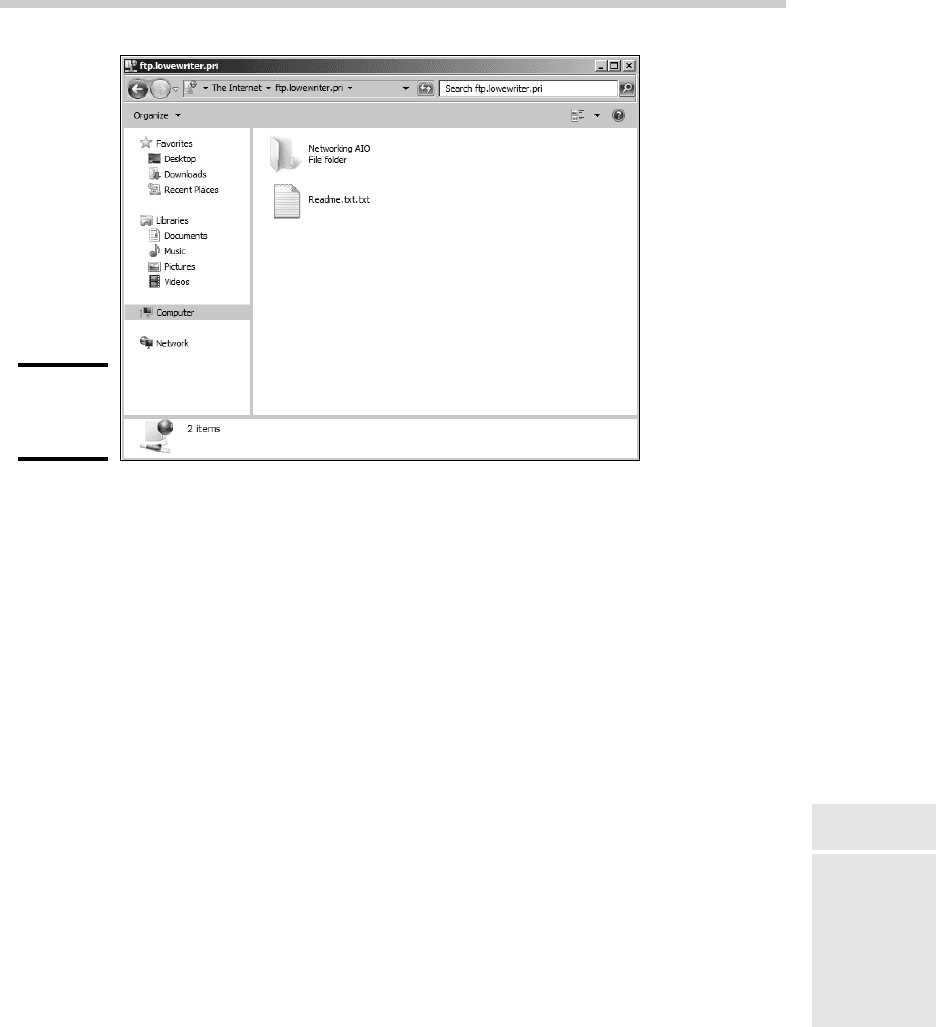
Figure 5-7 shows you how a typical FTP site appears when accessed with
Windows Explorer on a Windows 7 system. As you can see, the files and
folders appear as if they were on a local disk. Double-click a folder to display
the files contained in that folder; download files by dragging them from the
browser window to the desktop or to another window. You can also upload
files by dragging them from the desktop or another window into the FTP
browser window.
If the contents of an FTP site don’t appear in the browser window, you
may need to log on to the site. Choose File➪Login As to display the Log
On As dialog box. If the site administrator has given you a name and
password, you can enter it here to access the site. Otherwise, select the
Log On Anonymously check box and then click the Log On button.
34_625873-bk04ch05.indd 35434_625873-bk04ch05.indd 354 9/21/10 10:31 PM9/21/10 10:31 PM
Book IV
Chapter 5
Using FTP
355
Using an FTP Command Line Client
Figure 5-7:
Browsing an
FTP site.
Using an FTP Command Line Client
If you’re a command line junkie, you’ll appreciate the FTP command that
comes with Windows. It isn’t pretty, but it gets the job done. At the end
of this chapter, you can find a command reference that details all the
subcommands you can use with the FTP command. In this section, I just
show you a typical session in which I sign on to an FTP server named ftp.
lowewriter.com, switch to a directory named pics, download a file, and
then log off.
First, open a command window: Choose Start➪Run, type Command in the
text box, and then click OK. Navigate to the directory to where you want to
download files. This step is important because, although you can change the
local working directory from within the FTP command, it’s much easier to
just start FTP from the right directory.
To start FTP, type ftp with the name of the FTP server as the parameter, like
this:
C:\>ftp ftp.lowewriter.com
34_625873-bk04ch05.indd 35534_625873-bk04ch05.indd 355 9/21/10 10:31 PM9/21/10 10:31 PM

356
Using an FTP Command Line Client
Assuming that you typed the site name correctly, the FTP command connects
to the site, displays the banner message, and prompts you to log on:
Connected to ftp.lowewriter.com.
220-Microsoft FTP Service
220 We have 999 spooks here, but there’s always room for one
more! To volunteer, log in as Anonymous.
User (ftp.lowewriter.com:(none)):
To log on anonymously, type Anonymous and then press Enter. The server
responds by telling you that Anonymous access is allowed and asks for your
e-mail address as a password:
331 Anonymous access allowed, send identity (e-mail name) as
password.
Password:
Type your e-mail address as the password and then press Enter. The
Welcome message appears, followed by the ftp> prompt:
230-Welcome to my FTP site! For spooky Halloween pictures,
check out the Pics folder.
230 Anonymous user logged in.
ftp>
Whenever you see the ftp> prompt, the FTP command is waiting for you to
enter a subcommand. Start by entering dir to see a directory listing:
200 PORT command successful.
150 Opening ASCII mode data connection for /bin/ls.
06-30-07 08:05PM <DIR> pics
06-30-07 07:55PM 2365 readme.txt
06-30-07 07:55PM <DIR> sounds
06-30-07 07:56PM <DIR> videos
226 Transfer complete.
ftp: 190 bytes received in 0.00Seconds 190000.00Kbytes/sec.
ftp>
As you can see, the response from the dir command isn’t quite as clean as
the display from an MS-DOS command. Still, you can pick out that the directory
includes three subdirectories, named pics, sounds, and videos, and a
single file, named readme.txt. The size of the file is 2,365 bytes.
Here’s a good question: If you enter a dir command, why does the response
read 200 PORT command successful? The answer has to do with how
the FTP protocol works. When you enter a dir command, the FTP client
forwards a PORT command to the server that opens a data transfer port that
is then used to return the resulting directory listing. The server replies that
the PORT command has successfully opened a data transfer port. Then, it
sends back the directory listing. Finally, it sends two more lines: one to
indicate that the transfer is complete (that is, that the dir output has been
successfully sent), and the other to summarize the number of bytes of data
that were sent and the data transfer rate.
34_625873-bk04ch05.indd 35634_625873-bk04ch05.indd 356 9/21/10 10:31 PM9/21/10 10:31 PM