
Lowe D. Networking For Dummies
Подождите немного. Документ загружается.

Book IV
Chapter 3
Using DHCP
317
Working with a DHCP Server
Figure 3-5:
The DHCP
management
console.
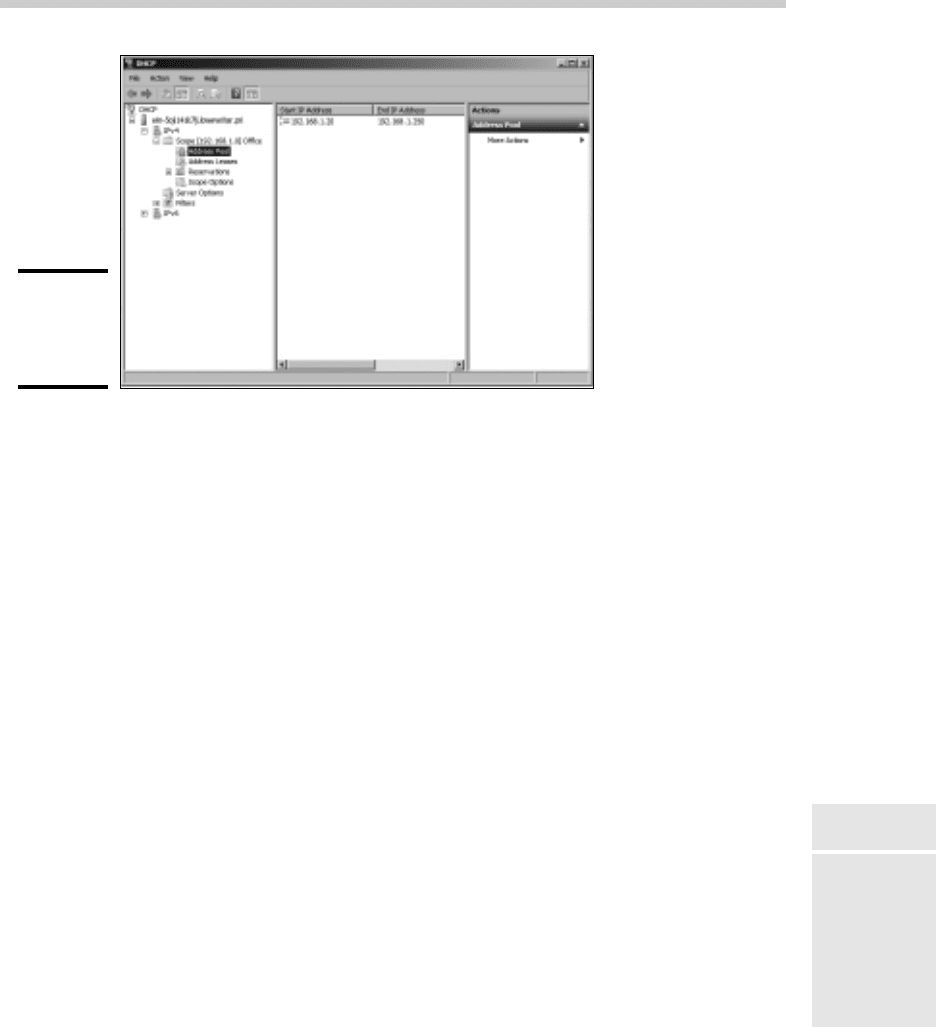
From the DHCP console, you have complete control over the DHCP server’s
configuration and operation. The following list summarizes some of the
things that you can do from the DHCP console:
✦ You can authorize the DHCP server, which allows it to begin assigning
client IP addresses. To authorize a server, select the server, choose
Action➪Manage Authorized Servers, and then click Authorize.
✦ To add another scope, right-click the server in the tree and choose
the New Scope command from the menu that appears. This brings
up the New Scope Wizard. You can follow Steps 5–18 in the preceding
section to complete the wizard.
✦ To activate or deactivate a scope, right-click the scope in the tree and
then choose the Activate or Deactivate command.
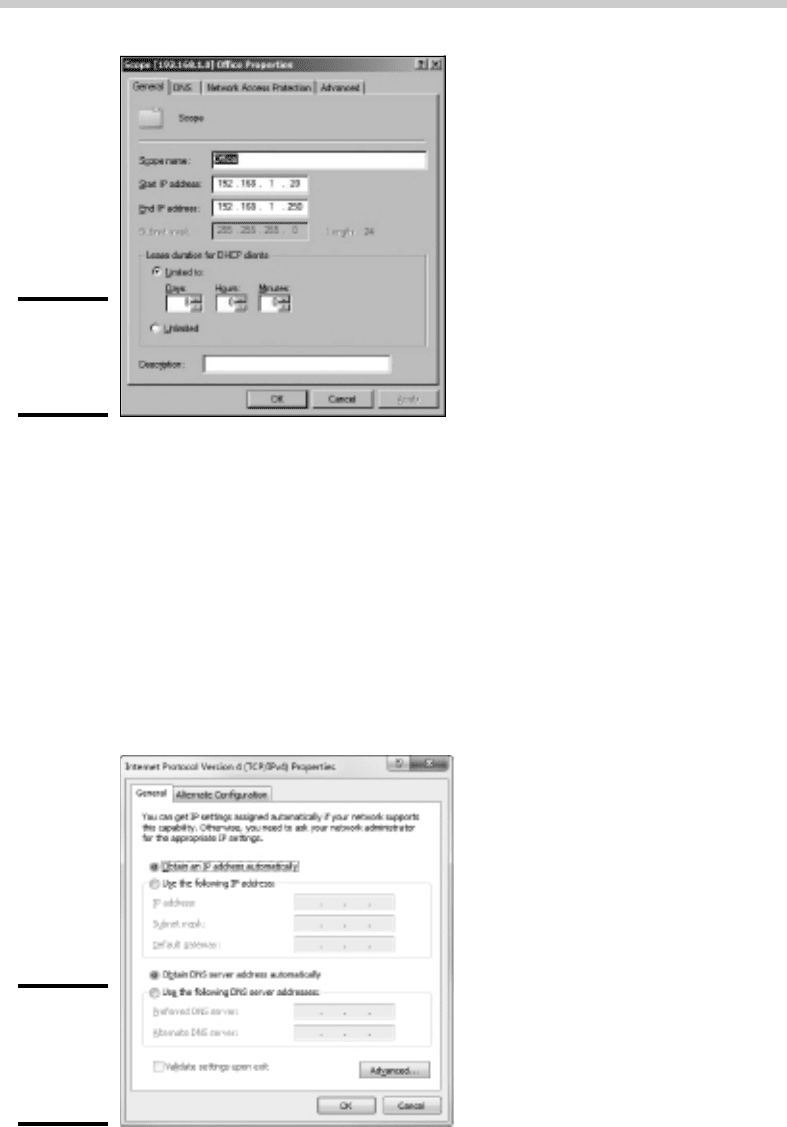
✦ To change scope settings, right-click the scope and choose the
Properties command. This brings up the Scope Properties dialog box, as
shown in Figure 3-6. From this dialog box, you can change the scope’s
start and end IP addresses, subnet mask, and DNS configuration.
✦ To change the scope exclusions, click Address Pool under the scope in
the tree. This lists each range of addresses that’s included in the scope.
You can add or delete a range by right-clicking the range and choos-
ing the Delete command from the menu that appears. You can also add
a new exclusion range by right-clicking Address Pool in the tree and
choosing Add New Exclusion from the contextual menu that appears.
✦ To view or change reservations, click Reservations in the tree.
✦ To view a list of assigned addresses, click Address Leases in the tree.
32_625873-bk04ch03.indd 31732_625873-bk04ch03.indd 317 9/21/10 10:21 PM9/21/10 10:21 PM
318
How to Configure a Windows DHCP Client
Figure 3-6:
The Scope
Properties
dialog box.
How to Configure a Windows DHCP Client
Configuring a Windows client for DHCP is easy. The DHCP client is
automatically included when you install the TCP/IP protocol, so all you have
to do is configure TCP/IP to use DHCP. To do this, bring up the Network
Properties dialog box by choosing Network or Network Connections in the
Control Panel (depending on which version of Windows the client is running).
Then, select the TCP/IP protocol and click the Properties button. This brings
up the TCP/IP Properties dialog box, as shown in Figure 3-7. To configure the
computer to use DHCP, select the Obtain an IP Address Automatically option
and the Obtain DNS Server Address Automatically option.
Figure 3-7:
Configuring
a Windows
client to use
DHCP.
32_625873-bk04ch03.indd 31832_625873-bk04ch03.indd 318 9/21/10 10:21 PM9/21/10 10:21 PM

Book IV
Chapter 3
Using DHCP
319
How to Configure a Windows DHCP Client
Automatic Private IP Addressing
If a Windows computer is configured to use DHCP but the computer can’t
obtain an IP address from a DHCP server, the computer automatically
assigns itself a private address by using a feature called Automatic Private IP
Addressing (APIPA). APIPA assigns a private address from the 169.254.x.x
range and uses a special algorithm to ensure that the address is unique on
the network. As soon as the DHCP server becomes available, the computer
requests a new address, so the APIPA address is used only while the DHCP
server is unavailable.
Renewing and releasing leases
Normally, a DHCP client attempts to renew its lease when the lease is halfway
to the point of being expired. For example, if a client obtains an eight-day
lease, it attempts to renew the lease after four days. However, you can renew
a lease sooner by issuing the ipconfig /renew command at a command
prompt. You may want to do this if you changed the scope’s configuration or
if the client’s IP configuration isn’t working correctly.
You can also release a DHCP lease by issuing the ipconfig /release
command at a command prompt. When you release a lease, the client
computer no longer has a valid IP address. This is shown in the output from
the ipconfig /release command:
C:\>ipconfig /release
Windows IP Configuration
Ethernet adapter Local Area Connection:
Connection-specific DNS Suffix . :
IP Address. . . . . . . . . . . . : 0.0.0.0
Subnet Mask . . . . . . . . . . . : 0.0.0.0
Default Gateway . . . . . . . . . :
Here, you can see that the IP address and subnet masks are set to 0.0.0.0
and that the Default Gateway address is blank. When you release an IP lease,
you can’t communicate with the network by using TCP/IP until you issue an
ipconfig /renew command to renew the IP configuration or restart the
computer.
32_625873-bk04ch03.indd 31932_625873-bk04ch03.indd 319 9/21/10 10:21 PM9/21/10 10:21 PM

320
Book IV: TCP/IP and the Internet
32_625873-bk04ch03.indd 32032_625873-bk04ch03.indd 320 9/21/10 10:21 PM9/21/10 10:21 PM

Chapter 4: Using DNS
In This Chapter
✓ Discovering the basics of DNS
✓ Exploring zones
✓ Examining resource records
✓ Configuring a DNS server
✓ Setting up a DNS client
D
omain Name Server — DNS — is the TCP/IP facility that lets you use
names rather than numbers to refer to host computers. Without DNS,
you’d buy books from 207.171.166.252 instead of from www.amazon.
com, you’d sell your used furniture at 66.211.160.87 instead of on
www.ebay.com, and you’d search the Web at 74.125.19.147 instead of
at www.google.com.
Understanding how DNS works and how to set up a DNS server is crucial
to setting up and administering a Transmission Control Protocol/Internet
Protocol (TCP/IP) network. This chapter introduces you to the basics of
DNS, including how the DNS naming system works and how to set up a DNS
server.
If you want to review the complete official specifications for DNS, look up
RFC 1034 and 1035 at www.ietf.org/rfc/rfc1034.txt and www.ietf.
org/rfc/rfc1035.txt, respectively.
Understanding DNS Names
DNS is a name service that provides a standardized system for providing
names to identify TCP/IP hosts as well as a way to look up the IP address
of a host, given the host’s DNS name. For example, if you use DNS to look
up the name www.ebay.com, you get the IP address of the eBay Web host:
66.211.160.87. Thus, DNS allows you to access the eBay Web site by
using the DNS name www.ebay.com instead of the site’s IP address.
The following sections describe the basic concepts of DNS.
33_625873-bk04ch04.indd 32133_625873-bk04ch04.indd 321 9/21/10 10:30 PM9/21/10 10:30 PM
322
Understanding DNS Names
Domains and domain names
To provide a unique DNS name for every host computer on the Internet, DNS
uses a time-tested technique: Divide and conquer. DNS uses a hierarchical
naming system that’s similar to how folders are organized hierarchically on
a Windows computer. Instead of folders, however, DNS organizes its names
into domains. Each domain includes all the names that appear directly
beneath it in the DNS hierarchy.
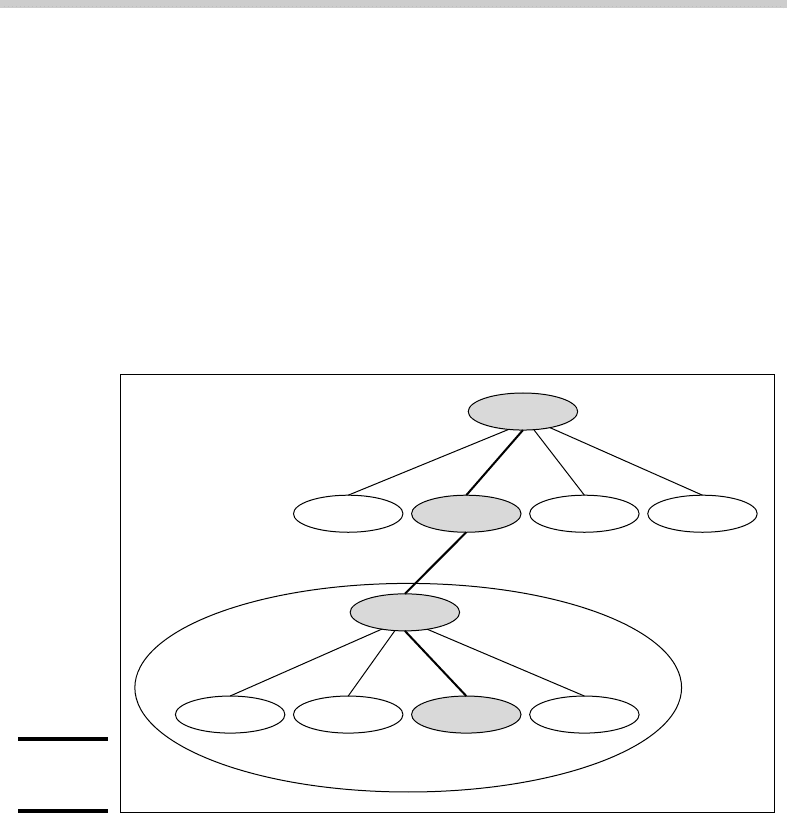
For example, Figure 4-1 shows a small portion of the DNS domain tree. At
the very top of the tree is the root domain, which is the anchor point for
all domains. Directly beneath the root domain are four top-level domains,
named edu, com, org, and gov.
Figure 4-1:
DNS names.
(Root)
LoweWriter.com domain
server1.LoweWriter.com.
edu com org gov
LoweWriter
doug debbie server1 printer1
In reality, many more top-level domains than this exist in the Internet’s root
domain. For more information, see the section “Top-Level Domains” later in
this chapter.
Beneath the com domain in Figure 4-1 is another domain called LoweWriter,
which happens to be my own personal domain. (Pretty clever, eh?) To
completely identify this domain, you have to combine it with the name of
its parent domain (in this case, com) to create the complete domain name:
LoweWriter.com. Notice that the parts of the domain name are separated
from each other with periods, which are called dots. As a result, when you
read this domain name, you pronounce it LoweWriter dot com.
33_625873-bk04ch04.indd 32233_625873-bk04ch04.indd 322 9/21/10 10:30 PM9/21/10 10:30 PM

Book IV
Chapter 4
Using DNS
323
Understanding DNS Names
Beneath the LoweWriter node are four host nodes, named doug, debbie,
server1, and printer1. Respectively, these correspond to three computers
and a printer on my home network. You can combine the host name with
the domain name to get the complete DNS name for each of my network’s
hosts. For example, the complete DNS name for my server is server1.
LoweWriter.com. Likewise, my printer is printer1.LoweWriter.com.
Here are a few additional details that you need to remember about DNS names:
✦ DNS names are not case sensitive. As a result, LoweWriter and
Lowewriter are treated as the same name, as are LOWEWRITER,
LOWEwriter, and LoWeWrItEr. When you use a domain name, you can
use capitalization to make the name easier to read, but DNS ignores the
difference between capital and lowercase letters.
✦ The name of each DNS node can be up to 63 characters long (not
including the dot) and can include letters, numbers, and hyphens.
No other special characters are allowed.
✦ A subdomain is a domain that’s beneath an existing domain. For
example, the com domain is actually a subdomain of the root domain.
Likewise, LoweWriter is a subdomain of the com domain.
✦ DNS is a hierarchical naming system that’s similar to the hierarchical
folder system used by Windows.
However, one crucial difference exists between DNS and the Windows
naming convention. When you construct a complete DNS name, you
start at the bottom of the tree and work your way up to the root. Thus,
doug is the lowest node in the name doug.LoweWriter.com. In
contrast, Windows paths are the opposite: They start at the root and
work their way down. For example, in the path \Windows\System32\
dns, dns is the lowest node.
✦ The DNS tree can be up to 127 levels deep. However, in practice, the
DNS tree is pretty shallow. Most DNS names have just three levels (not
counting the root). And although you’ll sometimes see names with four
or five levels, you’ll rarely see more levels than that.
✦ Although the DNS tree is shallow, it’s very broad. In other words, each
of the top-level domains has a huge number of second-level domains
immediately beneath it. For example, at the time of this writing, the com
domain had well over a million second-level domains beneath it.
Fully qualified domain names
If a domain name ends with a trailing dot, that trailing dot represents the
root domain, and the domain name is said to be a fully qualified domain
name (also known as an FQDN). A fully qualified domain name is also called
an absolute name. A fully qualified domain name is unambiguous because it
33_625873-bk04ch04.indd 32333_625873-bk04ch04.indd 323 9/21/10 10:30 PM9/21/10 10:30 PM

324
Top-Level Domains
identifies itself all the way back to the root domain. In contrast, if a domain
name doesn’t end with a trailing dot, the name may be interpreted in the
context of some other domain. Thus, DNS names that don’t end with a
trailing dot are called relative names.
This is similar to how relative and absolute paths work in Windows. For
example, if a path begins with a backslash, such as \Windows\System32\
dns, the path is absolute. However, a path that doesn’t begin with a backslash,
such as System32\dns, uses the current directory as its starting point. If
the current directory happens to be \Windows, then \Windows\System32\
dns and System32\dns refer to the same location.
In many cases, relative and fully qualified domain names are interchangeable
because the software that interprets them always interprets relative names
in the context of the root domain. That’s why, for example, you can type
www.wiley.com (without the trailing dot) — not www.wiley.com — to go
to the Wiley home page in a Web browser. Some applications, such as DNS
servers, may interpret relative names in the context of a domain other than
the root.
Top-Level Domains
A top-level domain appears immediately beneath the root domain. Top-level
domains come in two categories: generic domains and geographic domains.
These categories are described in the following sections. (Actually, a third
type of top-level domain exists, which is used for reverse lookups. I describe
it later in this chapter, in the section, “Reverse Lookup Zones.”)
Generic domains
Generic domains are the popular top-level domains that you see most often
on the Internet. Originally, seven top-level organizational domains existed.
In 2002, seven more were added to help ease the congestion of the original
seven — in particular, the com domain.
Table 4-1 summarizes the original seven generic top-level domains. Of these,
you can see that the com domain is far and away the most populated, with
nearly 1.9 million second-level domains beneath it.
The Size column in this table indicates approximately how many second-level
domains existed under each top-level domain as of January 2007, according
to an Internet Software Consortium survey, found at www.isc.org.
33_625873-bk04ch04.indd 32433_625873-bk04ch04.indd 324 9/21/10 10:30 PM9/21/10 10:30 PM

Book IV
Chapter 4
Using DNS
325
Top-Level Domains
Table 4-1 The Original Seven Top-Level Domains
Domain Description Size
com
Commercial organizations 1,291,296
edu
Educational institutions 3,873
gov
U.S. government institutions 966
int
International treaty organizations 119
mil
U.S. military institutions 110
net
Network providers 253,741
org
Noncommercial organizations 140,968
Because the com domain ballooned to an almost unmanageable size in the
late 1990s, the Internet authorities approved seven new top-level domains
in an effort to take some of the heat off of the com domain. Most of these
domains, listed in Table 4-2, became available in 2002. As you can see, they
haven’t really caught on yet even though they’ve been around for several
years.
Table 4-2 The New Seven Top-Level Domains
Domain Description Size
aero
Aerospace industry 147
biz
Business 11,399
coop
Cooperatives 263
info
Informational sites 16,276
museum
Museums 11
name
Individual users 710
pro
Professional organizations 30
Geographic domains
Although the top-level domains are open to anyone, U.S. companies and
organizations dominate them. An additional set of top-level domains
corresponds to international country designations. Organizations outside
the United States often use these top-level domains to avoid the congestion
of the generic domains.
33_625873-bk04ch04.indd 32533_625873-bk04ch04.indd 325 9/21/10 10:30 PM9/21/10 10:30 PM

326
Top-Level Domains
Table 4-3 lists those geographic top-level domains with more than 200
registered subdomains at the time of this writing, in alphabetical order. In
all, about 150 geographic top-level domains exist. The exact number varies
from time to time as political circumstances change.
Table 4-3 Geographic Top-Level Domains with
More Than 200 Subdomains
Domain Description Domain Description
ac
Ascension Island
hu
Hungary
ae
United Arab Emirates
ie
Ireland
ag
Antigua and Barbuda
in
India
am
Armenia
is
Iceland
an
Netherlands Antilles
it
Italy
as
American Samoa
jp
Japan
at
Austria
kz
Kazakhstan
be
Belgium
la
Lao People’s Democratic
Republic
bg
Bulgaria
li
Liechtenstein
br
Brazil
lk
Sri Lanka
by
Belarus
lt
Lithuania
bz
Belize
lu
Luxembourg
ca
Canada
lv
Latvia
cc
Cocos (Keeling)
Islands
ma
Morocco
ch
Switzerland
md
Moldova
cl
Chile
nl
Netherlands
cn
China
no
Norway
coop
Cooperatives
nu
Niue
cx
Christmas Island
pl
Poland
cz
Czech Republic
pt
Portugal
de
Germany
ro
Romania
dk
Denmark
ru
Russian Federation
ee
Estonia
se
Sweden
es
Spain
si
Slovenia
eu
European Union
sk
Slovakia
33_625873-bk04ch04.indd 32633_625873-bk04ch04.indd 326 9/21/10 10:30 PM9/21/10 10:30 PM