
Lowe D. Networking For Dummies
Подождите немного. Документ загружается.

Book V
Chapter 1
Setting Up a
Wireless Network
407
Wireless Access Points
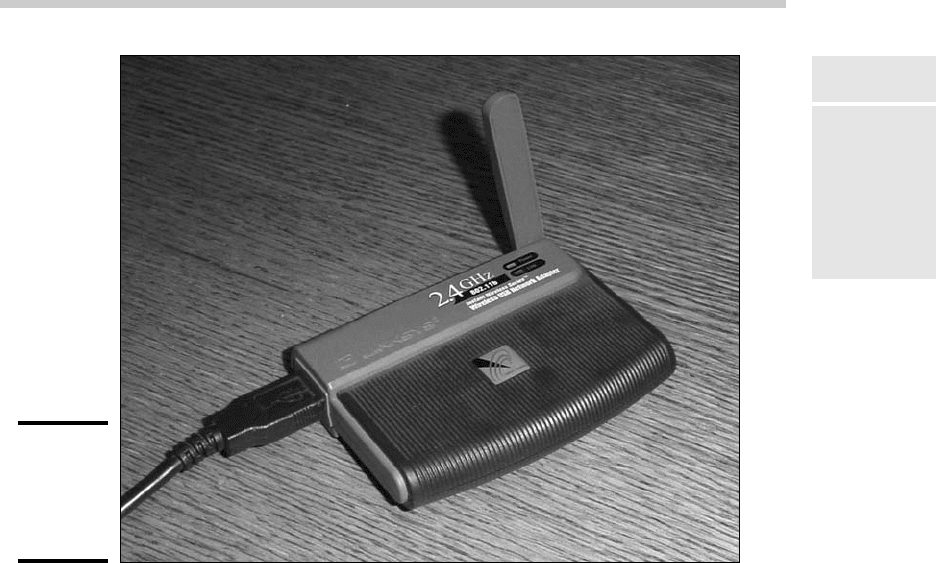
Figure 1-3:
A typical
wireless
networking
adapter.
Wireless Access Points
Unlike cabled networks, wireless networks don’t need a hub or switch. If all
you want to do is network a group of wireless computers, you just purchase
a wireless adapter for each computer, put them all within 300 feet of each
other, and voilà! — instant network.
But what if you already have an existing cabled network? For example, sup-
pose that you work at an office with 15 computers all cabled up nicely, and
you just want to add a couple of wireless notebook computers to the net-
work. Or suppose that you have two computers in your den connected to
each other with network cable, but you want to link up a computer in your
bedroom without pulling cable through the attic.
That’s where a wireless access point, also known as a WAP, comes in. A WAP
actually performs two functions. First, it acts as a central connection point
for all your computers that have wireless network adapters. In effect, the
WAP performs essentially the same function as a hub or switch performs for
a wired network.
Second, the WAP links your wireless network to your existing wired network
so that your wired computer and your wireless computers get along like one
big happy family. Sounds like the makings of a Dr. Seuss story. (“Now the
37_625873-bk05ch01.indd 40737_625873-bk05ch01.indd 407 9/21/10 10:32 PM9/21/10 10:32 PM
408
Wireless Access Points
wireless sneeches had hubs without wires. But the twisted-pair sneeches
had cables to thires. . . .”)
Wireless access points are sometimes just called access points, or APs. An
access point is a box that has an antenna (or often a pair of antennae) and
an RJ-45 Ethernet port. You just plug the access point into a network cable
and then plug the other end of the cable into a hub or switch, and your wire-
less network should be able to connect to your cabled network.
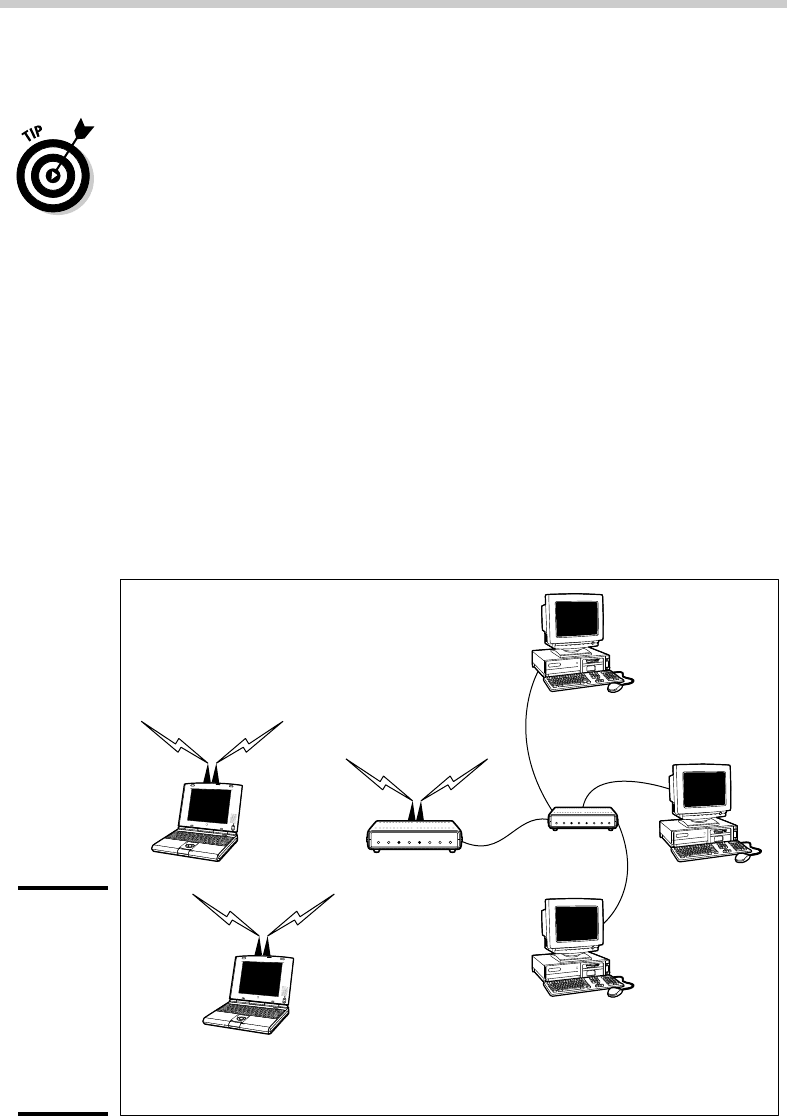
Figure 1-4 shows how an access point acts as a central connection point for
wireless computers and how it bridges your wireless network to your wired
network.
Infrastructure mode
When you set up a wireless network with an access point, you are creat-
ing an infrastructure mode network. It’s called infrastructure mode because
the access point provides a permanent infrastructure for the network. The
access points are installed at fixed physical locations, so the network has
relatively stable boundaries. Whenever a mobile computer wanders into the
range of one of the access points, it has come into the sphere of the network
and can connect.
Figure 1-4:
A wireless
access
point
connects
a wireless
network to
a cabled
network.
Notebook
Wireless Access
Point
10BaseT
Switch
Notebook
Computer
Computer
Computer
Wireless Network 10BaseT Network
37_625873-bk05ch01.indd 40837_625873-bk05ch01.indd 408 9/21/10 10:32 PM9/21/10 10:32 PM

Book V
Chapter 1
Setting Up a
Wireless Network
409
Wireless Access Points
An access point and all the wireless computers that are connected to it are
referred to as a Basic Service Set, or BSS. Each BSS is identified by a Service
Set Identifier, or SSID. When you configure an access point, you specify the
SSID that you want to use. The SSID is often a generic name such as wire-
less, or it can be a name that you create. Some access points use the MAC
address of the WAP as the SSID.
Multifunction WAPs
Wireless access points often include other built-in features. For example,
some access points double as Ethernet hubs or switches. In that case, the
access point will have more than one RJ-45 port. In addition, some access
points include broadband cable or DSL firewall routers that enable you to
connect to the Internet. For example, Figure 1-5 shows a Linksys BEFW11S4
wireless access point router. I have one of these little guys in my home. This
inexpensive (about $60) device includes the following features:
Figure 1-5:
A typical
wireless
router.
37_625873-bk05ch01.indd 40937_625873-bk05ch01.indd 409 9/21/10 10:32 PM9/21/10 10:32 PM

410
Roaming
✦ An 802.11b wireless access point that lets me connect a notebook com-
puter and a computer located on the other side of the house because I
didn’t want to run cable through the attic.
✦ A four-port 10/100 MHz switch that I can connect up to four computers
to via twisted-pair cable.
✦ A DSL/cable router that I connect to my cable modem. This enables all the
computers on the network (cabled and wireless) to access the Internet.
A multifunction access point that’s designed to serve as an Internet gateway
for home networks sometimes is called a residential gateway.
Roaming
You can use two or more wireless access points to create a large wireless
network in which computer users can roam from area to area and still be
connected to the wireless network. As the user moves out of the range of
one access point, another access point automatically picks up the user and
takes over without interrupting the user’s network service.
To set up two or more access points for roaming, you must carefully place
the WAPs so that all areas of the office or building that are being networked
are in range of at least one of the WAPs. Then, just make sure that all the
computers and access points use the same SSID and channel.
Two or more access points joined for the purposes of roaming, along with all
the wireless computers connected to any of the access points, form what’s
called an Extended Service Set, or ESS. The access points in the ESS are usu-
ally connected to a wired network.
One of the current limitations of roaming is that each access point in an ESS
must be on the same TCP/IP subnet. That way, a computer that roams from
one access point to another within the ESS retains the same IP address. If
the access points had a different subnet, a roaming computer would have to
change IP addresses when it moved from one access point to another.
Wireless bridging
Another use for wireless access points is to bridge separate subnets that
can’t easily be connected by cable. For example, suppose that you have
two office buildings that are only about 50 feet apart. To run cable from one
building to the other, you’d have to bury conduit — a potentially expensive
job. Because the buildings are so close, though, you can probably connect
them with a pair of wireless access points that function as a wireless bridge
between the two networks. Connect one of the access points to the first
37_625873-bk05ch01.indd 41037_625873-bk05ch01.indd 410 9/21/10 10:32 PM9/21/10 10:32 PM

Book V
Chapter 1
Setting Up a
Wireless Network
411
Configuring a Wireless Access Point
network and the other access point to the second network. Then, configure
both access points to use the same SSID and channel.
Ad-hoc networks
A wireless access point is not necessary to set up a wireless network. Any
time two or more wireless devices come within range of each other, they
can link up to form an ad-hoc network. For example, if you and a few of your
friends all have notebook computers with 802.11b/g wireless network adapt-
ers, you can meet anywhere and form an ad-hoc network.
All of the computers within range of each other in an ad-hoc network are
called an Independent Basic Service Set, or IBSS.
Configuring a Wireless Access Point
The physical setup for a wireless access point is pretty simple: You take it
out of the box, put it on a shelf or on top of a bookcase near a network jack
and a power outlet, plug in the power cable, and plug in the network cable.
The software configuration for an access point is a little more involved, but
still not very complicated. It’s usually done via a Web interface. To get to
the configuration page for the access point, you need to know the access
point’s IP address. Then, you just type that address into the address bar of a
browser from any computer on the network.
Multifunction access points usually provide DHCP and NAT services for the
networks and double as the network’s gateway router. As a result, they typi-
cally have a private IP address that’s at the beginning of one of the Internet’s
private IP address ranges, such as 192.168.0.1 or 10.0.0.1. Consult the docu-
mentation that came with the access point to find out more.
If you use a multifunction access point that is both your wireless access
point and your Internet router and you can’t remember the IP address, run
the IPCONFIG command at a command prompt from any computer on the
network. The Default Gateway IP address should be the IP address of the
access point.
Basic configuration options
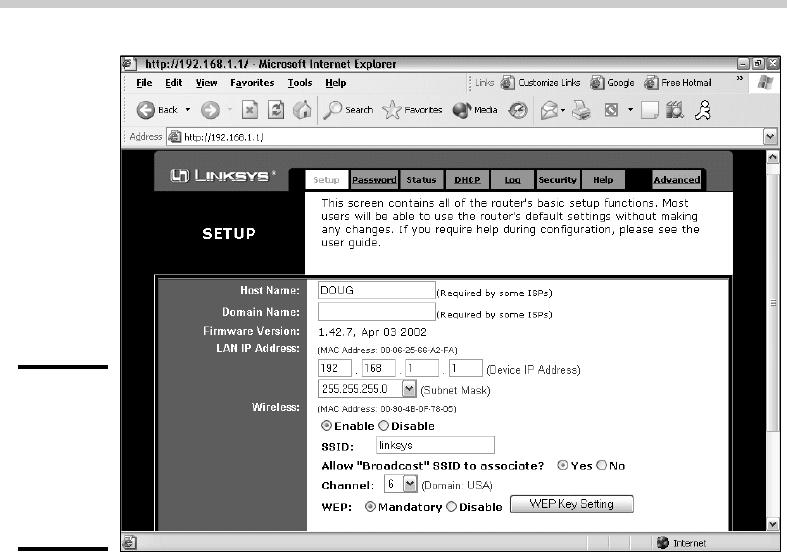
Figure 1-6 shows the main configuration screen for a Linksys BEFW11S4 wire-
less access point router that is pictured in Figure 1-5. I called up this configu-
ration page by entering 192.168.1.1 in the address bar of a Web browser and
then supplying the login password when prompted.
37_625873-bk05ch01.indd 41137_625873-bk05ch01.indd 411 9/21/10 10:32 PM9/21/10 10:32 PM
412
Configuring a Wireless Access Point
Figure 1-6:
The main
configuration
page for
a Linksys
wireless
router.
This configuration page offers the following configuration options that are
related to the wireless access point functions of the device. Although these
options are specific to this particular device, most access points have simi-
lar configuration options.
✦ Enable/Disable: Enables or disables the device’s wireless access point
functions.
✦ SSID: The Service Set Identifier used to identify the network. Most
access points have well-known defaults. You can talk yourself into think-
ing that your network is more secure by changing the SSID from the
default to something more obscure, but in reality, that only protects you
from first-grade hackers. By the time most hackers get into the second
grade, they learn that even the most obscure SSID is easy to get around.
So I recommend that you leave the SSID at the default and apply better
security measures, as described in the next chapter.
✦ Allow broadcast SSID to associate? Disables the access point’s periodic
broadcast of the SSID. Normally, the access point regularly broadcasts
its SSID so that wireless devices that come within range can detect the
network and join in. For a more secure network, you can disable this
function. Then, a wireless client must already know the network’s SSID
in order to join the network.
✦ Channel: Lets you select 1 of 11 channels on which to broadcast. All the
access points and computers in the wireless network should use the
37_625873-bk05ch01.indd 41237_625873-bk05ch01.indd 412 9/21/10 10:32 PM9/21/10 10:32 PM

Book V
Chapter 1
Setting Up a
Wireless Network
413
Configuring a Wireless Access Point
same channel. If you find that your network is frequently losing connec-
tions, try switching to another channel. You may be experiencing inter-
ference from a cordless phone or other wireless device operating on the
same channel.
Switching channels is also a friendly way for neighbors with wireless
networks to stay out of each other’s way. For example, if you share a
building with another tenant who also has a wireless network, you can
agree to use separate channels so that your wireless networks won’t
interfere with each other. Keep in mind that this doesn’t give you any
real measure of security because your neighbor could secretly switch
back to your channel and listen in on your network. So you still need to
secure your network as described in the next chapter.
✦ WEP — Mandatory or Disable: Lets you use a security protocol called
wired equivalent privacy. I have more to say about this in the next chapter.
DHCP configuration
You can configure most multifunction access points to operate as a DHCP
server. For small networks, it’s common for the access point to also be the
DHCP server for the entire network. In that case, you need to configure the
access point’s DHCP server. Figure 1-7 shows the DHCP configuration page
for the Linksys WAP router. To enable DHCP, you select the Enable option
and then specify the other configuration options to use for the DHCP server.
Figure 1-7:
Configuring
DHCP for
a Linksys
wireless
router.
37_625873-bk05ch01.indd 41337_625873-bk05ch01.indd 413 9/21/10 10:32 PM9/21/10 10:32 PM
414
Configuring Windows XP for Wireless Networking
Larger networks that have more demanding DHCP requirements are likely
to have a separate DHCP server running on another computer. In that case,
you can defer to the existing server by disabling the DHCP server in the
access point.
For more information on configuring a DHCP server, please refer to Book IV,
Chapter 3.
Configuring Windows XP for Wireless Networking
The first step in configuring Windows XP for wireless networking is to install
the appropriate device driver for your wireless network adapter. To do that,
you need the installation CD that came with the adapter. Follow the instruc-
tions that came with the adapter to install the drivers.
Windows XP has some nice built-in features for working with wireless net-
works. You can configure these features by opening the Network Connections
folder. Choose Start➪Control Panel and then double-click the Network
Connections icon. Right-click the wireless network connection and then choose
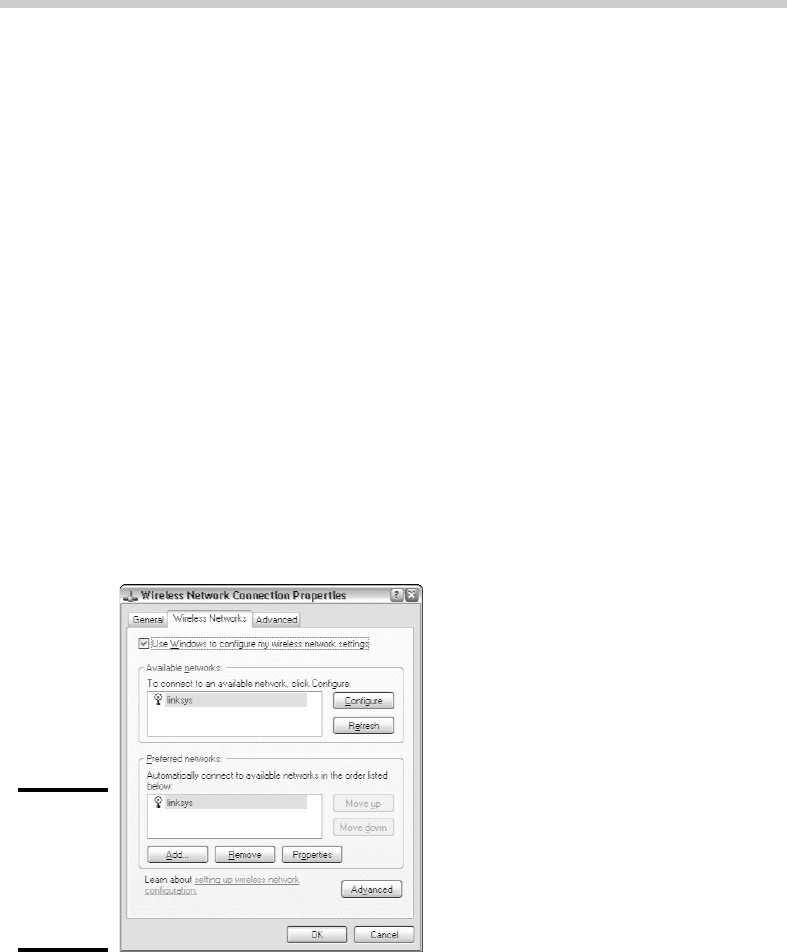
Properties to bring up the Properties dialog box. Then, click the Wireless
Networks tab to display the wireless networking options shown in Figure 1-8.
Figure 1-8:
Configuring
wireless
networking
in Windows
XP.
Each time you connect to a wireless network, Windows XP adds that net-
work to this dialog box. Then, you can juggle the order of the networks
37_625873-bk05ch01.indd 41437_625873-bk05ch01.indd 414 9/21/10 10:32 PM9/21/10 10:32 PM
Book V
Chapter 1
Setting Up a
Wireless Network
415
Using a Wireless Network with Windows XP
in the Preferred Networks section to indicate which network you’d prefer
to join if you find yourself within range of two or more networks at the
same time. You can use the Move Up and Move Down buttons next to the
Preferred Networks list to change your preferences.
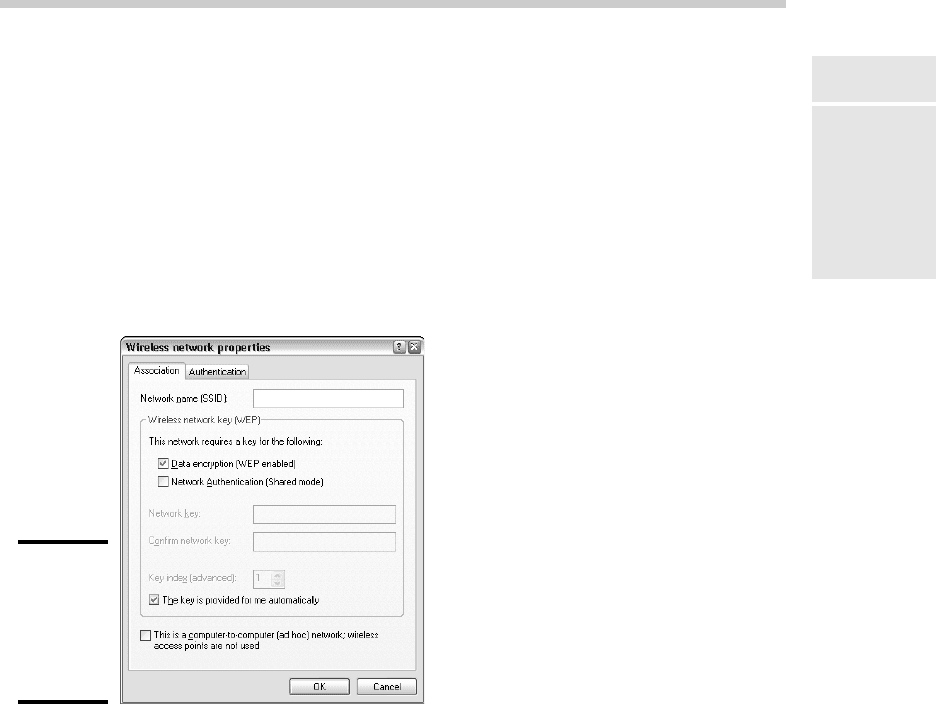
To add a network that you haven’t yet actually joined, click the Add button.
This brings up the dialog box shown in Figure 1-9. Here, you can type the
SSID value for the network that you want to add. You can also specify other
information, such as whether to use data encryption, how to authenticate
yourself, and whether the network is an ad-hoc rather than an infrastructure
network.
Figure 1-9:
Adding a
wireless
network in
Windows
XP.
Using a Wireless Network with Windows XP
Windows XP also has some nice built-in features that simplify the task of
using a wireless network. For example, when your computer comes within
range of a wireless network, a pop-up balloon appears in the taskbar, indicat-
ing that a network is available.
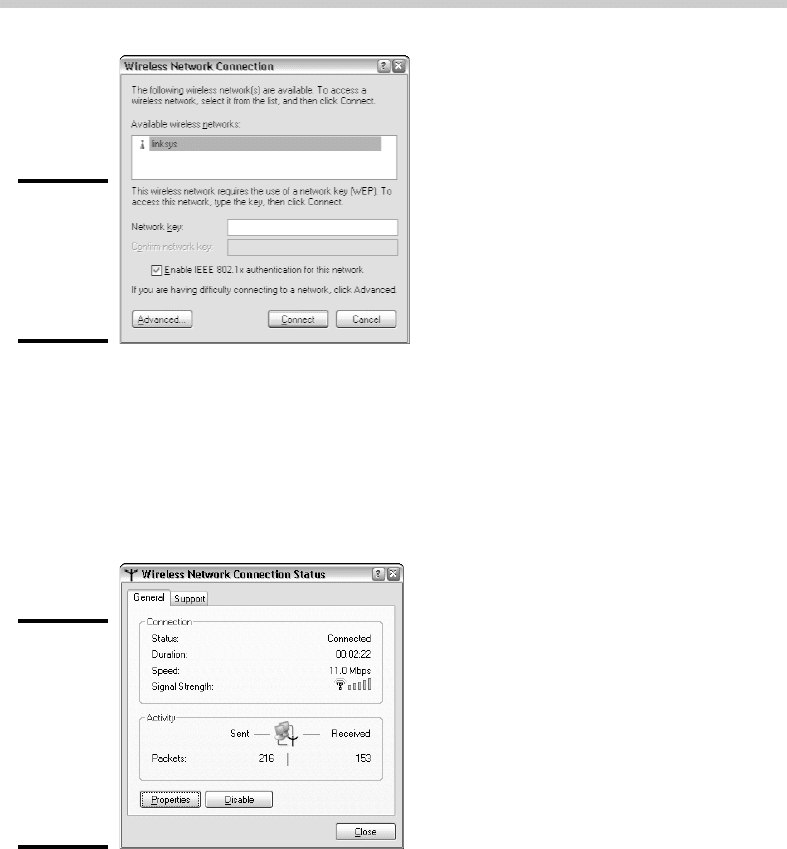
If one of your preferred networks is within range, clicking the balloon auto-
matically connects you to that network. If Windows XP doesn’t recognize
any of the networks, clicking the balloon displays the dialog box shown in
Figure 1-10. With this dialog box, you can choose the network that you want
to join (if more than one network is listed) and then click Connect to join the
selected network.
37_625873-bk05ch01.indd 41537_625873-bk05ch01.indd 415 9/21/10 10:32 PM9/21/10 10:32 PM
416
Using a Wireless Network with Windows XP
Figure 1-10:
Joining a
wireless
network in
Windows
XP.
After you’ve joined a wireless network, a network status icon appears in the
notification area of the taskbar. You can quickly see the network status by
hovering the mouse cursor over this icon; a balloon appears to indicate the
state of the connection. For more detailed information, you can click the
status icon to display the Wireless Network Connection Status dialog box,
shown in Figure 1-11.
Figure 1-11:
The
Wireless
Network
Connection
Status
dialog box
(Windows
XP).
This dialog box provides the following items of information:
✦ Status: Indicates whether you are connected.
✦ Duration: Indicates how long you’ve been connected.
✦ Speed: Indicates the current network speed. Ideally, this should say 11
Mbps for an 802.11b network, or 54 Mbps for an 802.11a or 802.11g network.
37_625873-bk05ch01.indd 41637_625873-bk05ch01.indd 416 9/21/10 10:32 PM9/21/10 10:32 PM