
Lowe D. Networking For Dummies
Подождите немного. Документ загружается.

Book V
Chapter 1
Setting Up a
Wireless Network
417
Connecting to a Wireless Network with Windows 7
However, if the network connection is not of the highest quality, the
speed may drop to a lower value.
✦ Signal Strength: Displays a graphic representation of the quality of the
signal.
✦ Packets Sent & Received: Indicates how many packets of data you’ve
sent and received over the network.
You can click the Properties button to bring up the Connection Properties
dialog box for the wireless connection.
Connecting to a Wireless Network with Windows Vista
Wireless networking in Windows Vista is considerably simpler than
Windows XP. When Windows Vista detects that a wireless network is within
range, a balloon notification appears on the screen to indicate that one or
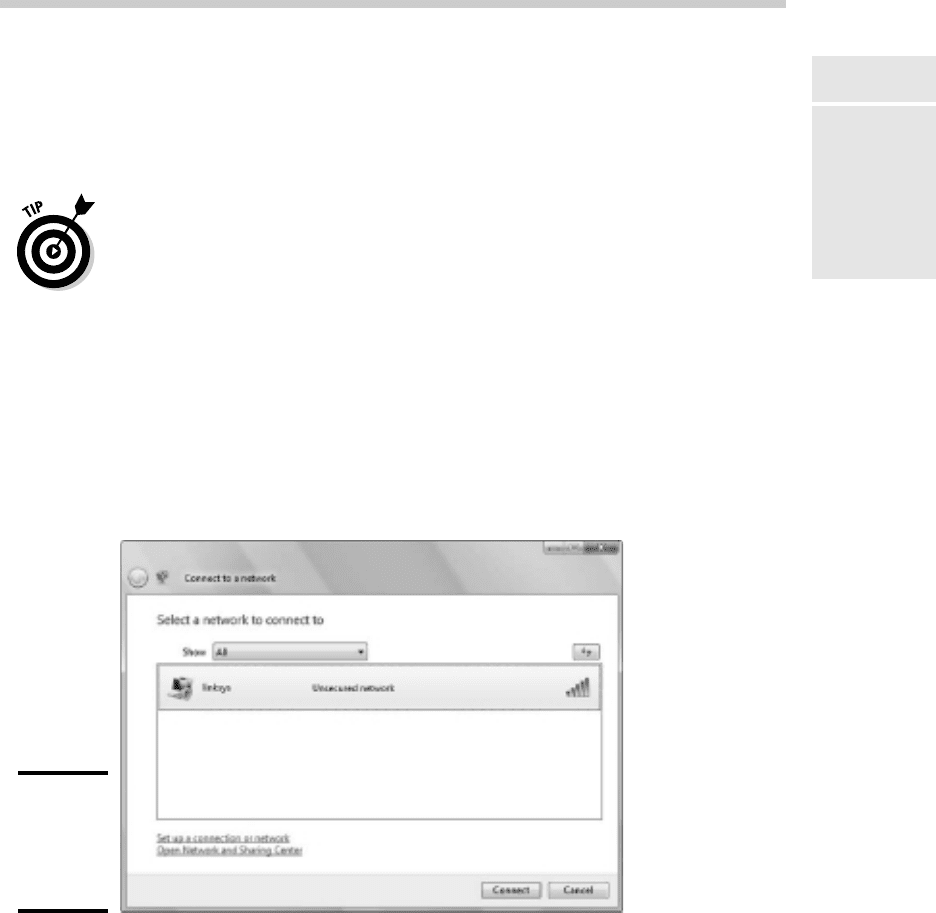
more wireless networks are available. You can double-click this balloon to
summon the dialog box shown in Figure 1-12. Then, you can double-click the
network you want to connect to.
Figure 1-12:
Choosing
a wireless
network in
Vista.
Connecting to a Wireless Network with Windows 7
Wireless networking in Windows 7 is similar to Windows Vista. When
Windows Vista detects a nearby wireless network, it displays a balloon
37_625873-bk05ch01.indd 41737_625873-bk05ch01.indd 417 9/21/10 10:32 PM9/21/10 10:32 PM
418
Connecting to a Wireless Network with Windows 7
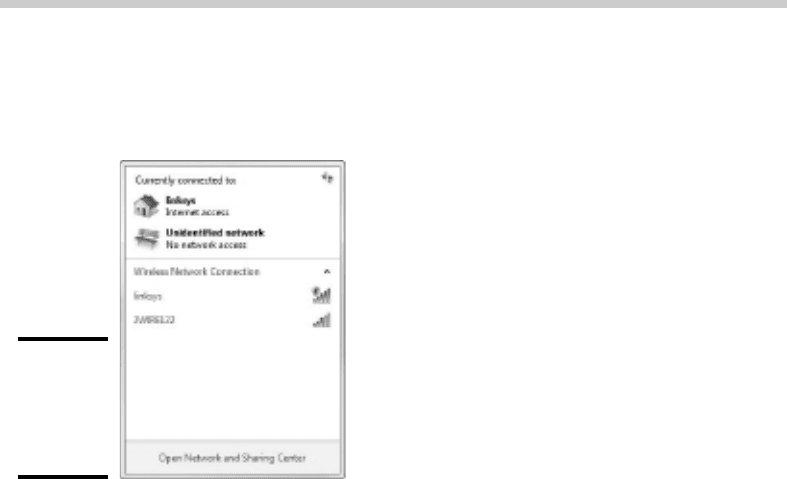
notification in the Windows task bar. You can click the balloon to display
the dialog box shown in Figure 1-13, which lists the available networks. Then
double-click the network you want to connect to.
Figure 1-13:
Choosing
a wireless
network in
Windows 7.
37_625873-bk05ch01.indd 41837_625873-bk05ch01.indd 418 9/21/10 10:32 PM9/21/10 10:32 PM

Chapter 2: Securing a
Wireless Network
In This Chapter
✓ Reviewing the threats posed by wireless networks
✓ Examining the strange world of wardriving and warchalking
✓ Enabling the security features of your wireless access point
B
efore you dive headfirst into the deep end of the wireless networking
pool, you should first consider the inherent security risks in setting up
a wireless network. With a cabled network, the best security tool that you
have is the lock on the front door of your office. Unless someone can physi-
cally get to one of the computers on your network, he or she can’t get into
your network. (Well, I’m sort of ignoring your wide-open broadband Internet
connection for the sake of argument.)
If you go wireless, an intruder doesn’t have to get into your office to hack
into your network. He or she can do it from the office next door. Or the
lobby. Or the parking garage beneath your office. Or the sidewalk outside. In
short, when you introduce wireless devices into your network, you usher in
a whole new set of security issues to deal with.
This chapter explores some of the basic security issues that come with the
territory when you go wireless.
Understanding Wireless Security Threats
Wireless networks have the same basic security considerations as wired
networks. As a network administrator, you need to balance the need of
legitimate users to access network resources against the risk of illegitimate
users breaking into your network. That’s the basic dilemma of network secu-
rity. Whether the network uses cables, wireless devices, kite strings and tin
cans, or smoke signals, the basic issues are the same.
On one extreme of the wireless network security spectrum is the totally open
network, in which anyone within range of your wireless transmissions can
log on as an administrator and gain full access to every detail of your net-
work. On the other end is what I call the “cone-of-silence syndrome,” in which
the network is so secure that no one can gain access to the network — not
even legitimate users.
38_625873-bk05ch02.indd 41938_625873-bk05ch02.indd 419 9/21/10 10:32 PM9/21/10 10:32 PM

420
Understanding Wireless Security Threats
The goal of securing a wireless network is to find the happy medium
between these two extremes that meets the access and risk-management
needs of your organization.
The following sections describe the most likely types of security threats that
wireless networks encounter. You should take each of these kinds of threats
into consideration when you plan your network’s security.
Intruders
With a wired network, an intruder must usually gain access to your facility
to physically connect to your network. Not so with a wireless network — in
fact, with wireless, hackers equipped with notebooks that have wireless
network capability can gain access to your network if they can place them-
selves physically within range of your network’s radio signals. Consider
these possibilities:
✦ If you share a building with other tenants, the other tenants’ offices may
be within range.
✦ If you’re in a multifloor building, the floor immediately above or below
you may be in range.
✦ The lobby outside your office may be within range of your network.
✦ The parking lot outside or the parking garage in the basement may be
in range.
If a would-be intruder can’t get within normal broadcast range, he or she
may try one of several tricks to increase the range:
✦ A would-be intruder can switch to a bigger antenna to extend the range
of his or her wireless computer. Some experiments have shown that
big antennas can receive signals from wireless networks that are miles
away. In fact, I once read of someone who listened in on wireless net-
works based in San Francisco from the Berkeley hills, which is across
the San Francisco Bay.
✦ If a would-be intruder is serious about breaking into your network, he
or she may smuggle a wireless repeater device into your facility — or
near it — to extend the range of your wireless network to a location that
he or she can get to.
Of course, a physical connection to your network is not the only way an
intruder can gain access. You must still take steps to prevent an intruder
from sneaking into your network through your Internet gateway. In most
cases, this means that you need to set up a firewall to block unwanted and
unauthorized traffic.
38_625873-bk05ch02.indd 42038_625873-bk05ch02.indd 420 9/21/10 10:32 PM9/21/10 10:32 PM

Book V
Chapter 2
Securing a
Wireless Network
421
Understanding Wireless Security Threats
Freeloaders
Freeloaders are intruders who want to piggyback on your wireless network
to get free access to the Internet. If they manage to gain access to your wire-
less network, they probably won’t do anything malicious: They’ll just fire up
their Web browsers and surf the Internet. These are folks who are too cheap
to spend $40 per month on their own broadband connection at home, so
they’d rather drive into your parking lot and steal yours.
Even though freeloaders may be relatively benign, they can be a potential
source of trouble. In particular:
✦ Freeloaders use bandwidth that you’re paying for. As a result, their mere
presence can slow down Internet access for your legitimate users.
✦ After freeloaders gain Internet access through your network, they can
potentially cause trouble for you or your organization. For example, they
may use your network to download illegal pornography. Or they may try
to send spam via your mail server. Most ISPs will cut you off cold if they
catch you sending spam, and they won’t believe you when you tell them
the spam came from a kid parked in a Pinto out in your parking lot.
✦ If you’re in the business of selling access to your wireless network, free-
loaders are obviously a problem.
✦ Freeloaders may start out innocently looking for free Internet access.
But once they get in, curiosity may get the better of them, leading them
to snoop around your network.
✦ If freeloaders can get in, so can more malicious intruders.
Eavesdroppers
Eavesdroppers just like to listen to your network traffic. They don’t actually
try to gain access via your wireless network — at least, not at first. They just
listen.
Unfortunately, wireless networks give them plenty to listen to. For example:
✦ Most wireless access points regularly broadcast their SSID to anyone
who’s listening.
✦ When a legitimate wireless network user joins the network, an exchange
of packets occurs as the network authenticates the user. An eavesdrop-
per can capture these packets and, if security isn’t set up right, deter-
mine the user’s logon name and password.
✦ An eavesdropper can steal files that are opened from a network server.
For example, if a wireless user opens a confidential sales report that’s
38_625873-bk05ch02.indd 42138_625873-bk05ch02.indd 421 9/21/10 10:32 PM9/21/10 10:32 PM

422
Understanding Wireless Security Threats
saved on the network, the sales report document is broken into packets
that are sent over the wireless network to the user. A skilled eavesdrop-
per can copy those packets and reconstruct the file.
✦ When a wireless user connects to the Internet, an eavesdropper can see
any packets that the user sends to or receives from the Internet. If the
user purchases something online, the transaction may include a credit
card number and other personal information. (Hopefully, these packets
will be encrypted so the eavesdropper won’t be able to decipher the data.)
Spoilers
A spoiler is a hacker who gets kicks from jamming networks so that they
become unusable. A spoiler usually accomplishes this by flooding the net-
work with meaningless traffic so that legitimate traffic gets lost in the flow.
Spoilers may also try to place viruses or worm programs on your network
via an unsecured wireless connection.
Rogue access points
One of the biggest problems that network administrators have to deal with
is the problem of rogue access points. A rogue access point is an access point
that suddenly appears out of nowhere on your network. What usually hap-
pens is that an employee decides to connect a notebook computer to the
network via a wireless computer. So the user stops at Computers-R-Us on
the way home from work one day and buys a Fisher-Price wireless access
point for $25 and plugs it into the network, without asking permission.
Now, in spite of all the elaborate security precautions you’ve taken to fence
in your network, this well-meaning user has opened the barn door. It’s very
unlikely that the user will enable the security features of the wireless access
point; in fact, he or she probably isn’t even aware that wireless access
devices have security features.
Unless you take some kind of action to find it, a rogue access point can oper-
ate undetected on your network for months or even years. You may not
discover it until you report to work one day and find that your network has
been trashed by an intruder who found his or her way into your network via
an unprotected wireless access point that you didn’t even know existed.
Here are some steps you can take to reduce the risk of rogue access points
appearing on your system:
✦ Establish a policy prohibiting users from installing wireless access
points on their own. Then, make sure that you inform all network users
of the policy and let them know why installing an access point on their
own can be such a major problem.
✦ If possible, establish a program that quickly and inexpensively grants
wireless access to users who want it. The reasons rogue access points
38_625873-bk05ch02.indd 42238_625873-bk05ch02.indd 422 9/21/10 10:32 PM9/21/10 10:32 PM

Book V
Chapter 2
Securing a
Wireless Network
423
What About Wardrivers and Warchalkers?
show up in the first place are (1) users need it, and (2) it’s hard to get
through channels. If you make it easier for users to get legitimate wire-
less access, you’re less likely to find wireless access points hidden
behind file cabinets or in flower pots.
✦ Once in awhile, take a walk through the premises looking for rogue
access points. Take a look at every network outlet in the building and
see what’s connected to it.
✦ Turn off all your wireless access points and then walk around the prem-
ises with a wireless-equipped notebook computer that has scanning
software, such as NetStumbler (www.netstumbler.com), looking for
wireless access. (Of course, just because you detect a wireless network
doesn’t mean you have found a rogue access point — you may have
stumbled onto a wireless network from a nearby office or home.)
✦ If your network is large, consider using a software tool such as AirWave
(www.airwave.com) to snoop for unauthorized access points.
What About Wardrivers and Warchalkers?
The recent explosion of wireless networking has led to a few new terms, includ-
ing wardriving and warchalking. Whether wardriving and warchalking actually
represent security threats is a question that’s subject to a lot of debate.
Wardriving
Wardriving refers to the practice of driving around town with notebook com-
puters looking for open access to wireless networks just to see what networks
are out there. Some wardrivers even make maps and put them on the Internet.
The basic intent of wardriving is to discover open wireless networks that
can be accessed from public places. A side benefit is that it can help network
administrators discover holes in their network security. If your network
shows up on a wardriving map, be grateful for the wardrivers who discov-
ered your vulnerability. And by publishing it, they’ve given you incentive to
plug the hole!
The downside of wardriving is that intruders can check the wardriving maps
posted on the Internet to find potential targets.
Wardrivers arm themselves with the following equipment:
✦ A car
✦ A notebook computer with a wireless adapter
✦ An external antenna isn’t a must, but it helps
✦ Software that can scan for open wireless networks
38_625873-bk05ch02.indd 42338_625873-bk05ch02.indd 423 9/21/10 10:32 PM9/21/10 10:32 PM

424
What About Wardrivers and Warchalkers?
✦ A GPS, or global positioning system, a device that can automatically track
where you are
✦ Software that correlates the discovery of open networks with location
data obtained from the GPS device
✦ Free time
For more information about wardriving, check out the Web site www.
wardriving.com.
Warchalking
Warchalking refers to marking the location of open access points with spe-
cial chalk symbols on the sidewalk. The chalk symbols indicate that a net-
work is nearby. So if you’re wandering around downtown San Francisco and
you spot a warchalk symbol on the curb, you can sit down at the nearest
park bench, fire up your notebook computer, and start surfing the Internet.
Figure 2-1 shows the common warchalking symbol for an open (unprotected)
wireless network. The SSID of the open network is listed above the symbol.
You may also find other information written, such as the bandwidth of the
Internet connection available through the access point.
Figure 2-1:
A
warchalking
symbol.
linksys
The origins of war
Where does the term wardriving come from?
Although the term has nothing to do with actual
combat, I’ve heard two plausible explanations
for its origin:
✦ It derives from the popular hacker word
warez (pronounced wayrz), which refers to
pirated software. Thus, wardriving refers to
looking for pirated wireless network access.
✦ It derives from the movie War Games, in
which a very young Matthew Broderick
hacks his way into the Pentagon’s top-
secret nuclear defense network by setting
up his computer to dial numbers sequen-
tially until it finds a computer worth hacking
into. This practice was called wardialing.
38_625873-bk05ch02.indd 42438_625873-bk05ch02.indd 424 9/21/10 10:32 PM9/21/10 10:32 PM

Book V
Chapter 2
Securing a
Wireless Network
425
Securing Your Wireless Network
Warchalking Web sites like to relate that the practice of warchalking dates
back to the Great Depression in the United States, when homeless people
used chalk or coal to write symbols on sidewalks, fences, or railroad trestles
to provide information or warnings to their fellow travelers. For example,
some symbols represented food, water, or safe places to camp, while other
symbols represented dangerous areas or aggressive police. I leave it up to
you to decide whether college kids wandering the streets looking for free
Internet access is analogous to the unemployed and homeless of the Great
Depression looking for food.
Securing Your Wireless Network
Hopefully, you’re convinced that wireless networks do indeed pose many
security risks. In the following sections, I describe some steps that you can
take to help secure your wireless network.
Changing the password
Probably the first thing you should do when you install a wireless access
point is to change its administrative password. Most access points have a
built-in, Web-based setup page that you can access from any Web browser
to configure the access point’s settings. The setup page is protected by a
username and password. However, the username and password are initially
set to default values that are easy to guess.
For example, the default username for Linksys access points is blank, and
the password is “admin.” If you leave the username and password set to
their default values, anyone can access the access point and change its
configuration settings, thus bypassing any other security features that you
enable for the access point.
So, the first step in securing your wireless access point is changing the setup
password to a value that can’t be guessed. I suggest that you use a random
combination of numerals and both uppercase and lowercase letters. Be sure
to store the password in a secure location. (If you forget the password, you
can press the Reset button on the router to restore it to its factory default.
Then, you can log on using the default password, which you can find with
the documentation that came with the router.)
Securing the SSID
The next step is to secure the SSID that identifies the network. A client must
know the access point’s SSID in order to join the wireless network. If you can
prevent unauthorized clients from discovering the SSID, you can prevent
them from accessing your network.
38_625873-bk05ch02.indd 42538_625873-bk05ch02.indd 425 9/21/10 10:32 PM9/21/10 10:32 PM

426
Securing Your Wireless Network
Securing the SSID is not a complete security solution, so you shouldn’t rely
on it as your only security mechanism. SSID security can slow down casual
intruders and wardrivers who are just looking for easy and free Internet
access, but it isn’t possible to prevent serious hackers from discovering
your SSID.
You can do three things to secure your SSID:
✦ Change the SSID from the default. Most access points come preconfig-
ured with well-known default SSIDs. For example, Table 2-1 lists some
well-known default SSIDs. By changing your access point’s SSID, you can
make it more difficult for an intruder to determine your SSID and gain
access.
Table 2-1 Common Default SSID Values
SSID Manufacturer
3com 3Com
Compaq Compaq
linksys Linksys
tsunami Cicso
Wireless NetGear
WLAN DLink
WLAN SMC
✦ Disable SSID broadcast. Most access points frequently broadcast their
SSIDs so that clients can discover the network when they come within
range. Clients that receive this SSID broadcast can then use the SSID to
join the network.
You can increase network security somewhat by disabling the SSID
broadcast feature. That way, clients won’t automatically learn the
access point’s SSID. To join the network, a client computer must figure
out the SSID on its own. You can then tell your wireless network users
the SSID to use when they configure their clients.
Unfortunately, when a client computer connects to a wireless network,
it sends the SSID to the access point in an unencrypted packet. So a
sophisticated intruder who’s using a packet sniffer to eavesdrop on your
wireless network can determine your SSID as soon as any legitimate
computer joins the network.
38_625873-bk05ch02.indd 42638_625873-bk05ch02.indd 426 9/21/10 10:32 PM9/21/10 10:32 PM