
Lowe D. Networking For Dummies
Подождите немного. Документ загружается.


Chapter 1: Planning a Network
In This Chapter
✓ Making a network plan
✓ Taking stock of your computer stock
✓ Making sure that you know why you need a network
✓ Making the three basic network decisions that you can’t avoid
✓ Using a starter kit
✓ Looking at a sample network
O
kay, so you’re convinced that you need to network your computers.
What now? Do you stop by Computers-R-Us on the way to work, install
the network before drinking your morning coffee, and expect the network to
be fully operational by noon?
I don’t think so.
Networking your computers is just like any other worthwhile endeavor:
Doing it right requires a bit of planning. This chapter helps you to think
through your network before you start spending money. It shows you how
to come up with a networking plan that’s every bit as good as the plan that a
network consultant would charge thousands of dollars for. See? This book is
already saving you money!
Making a Network Plan
Before you begin any networking project, whether it’s a new network instal-
lation or an upgrade of an existing network, you should first make a detailed
plan. If you make technical decisions too quickly, before studying all the
issues that affect the project, you’ll regret it. You’ll discover too late that a
key application won’t run over the network, that the network has unaccept-
ably slow performance, or that key components of the network don’t work
together.
Here are some general thoughts to keep in mind while you create your net-
work plan:
10_625873-bk02ch01.indd 7710_625873-bk02ch01.indd 77 9/21/10 10:09 PM9/21/10 10:09 PM

78
Being Purposeful
✦ Don’t rush the plan. The most costly networking mistakes are the ones
that you make before you install the network. Think things through and
consider alternatives.
✦ Write down the network plan. The plan doesn’t have to be a fancy, 500-
page document. If you want to make it look good, pick up a
1
⁄2-inch three-
ring binder. This binder will be big enough to hold your network plan
with room to spare.
✦ Ask someone else to read your network plan before you buy any-
thing. Preferably, ask someone who knows more about computers
than you do.
✦ Keep the plan up to date. If you add to the network, dig up the plan,
dust it off, and update it.
“The best laid schemes of mice and men gang aft agley, and leave us naught
but grief and pain for promised joy.” Robert Burns lived a few hundred years
before computer networks, but his famous words ring true. A network plan
isn’t chiseled in stone. If you discover that something doesn’t work the way
you thought it would, that’s okay. Just change your plan.
Being Purposeful
One of the first steps in planning your network is making sure that you
understand why you want the network in the first place. Here are some of
the more common reasons for needing a network, all of them quite valid:
✦ My coworker and I exchange files using CDs or flash drives just about
every day. With a network, it would be easier to trade files.
✦ I don’t want to buy everyone a laser printer when I know the one we have
now just sits there taking up space most of the day. So wouldn’t buying a
network be better than buying a laser printer for every computer?
✦ I want to provide an Internet connection for all my computers. (Many
networks, especially smaller ones, exist solely for the purpose of sharing
an Internet connection.)
✦ Someone figured out that we’re destroying seven trees a day by printing
interoffice memos on paper, so we want to save the rainforest by setting
up an e-mail system.
✦ Business is so good that one person typing in orders eight hours each
day can’t keep up. With a network, I can have two people entering
orders, and I won’t have to pay overtime to either person.
✦ My brother-in-law just put in a network at his office, and I don’t want him
to think that I’m behind the times.
10_625873-bk02ch01.indd 7810_625873-bk02ch01.indd 78 9/21/10 10:09 PM9/21/10 10:09 PM

Book II
Chapter 1
Planning a Network
79
Taking Stock
✦ I already have a network, but it’s so old it may as well be made of kite
string and tin cans. An improved network will speed up access to shared
files, provide better security, and be easier to manage.
Make sure that you identify all the reasons why you think you need a net-
work and then write them down. Don’t worry about winning the Pulitzer
Prize for your stunning prose. Just make sure that you write down what you
expect a network to do for you.
If you were making a 500-page networking proposal, you’d place the descrip-
tion of why a network is needed in a tabbed section labeled “Justification.” In
your
1
⁄2-inch network binder, file the description under “Purpose.”
As you consider the reasons why you need a network, you may conclude
that you don’t need a network after all. That’s okay. You can always use the
binder for your stamp collection.
Taking Stock
One of the most challenging parts of planning a network is figuring out how
to work with the computers that you already have. In other words, how do
you get from here to there? Before you can plan how to get “there,” you have
to know where “here” is. In other words, you have to take a thorough inven-
tory of your current computers.
What you need to know
You need to know the following information about each of your computers:
✦ The processor type and, if possible, its clock speed: It would be nice
if each of your computers had a shiny new i7 Quad Core processor. In
most cases, though, you find a mixture of computers: some new, some
old, some borrowed, some blue. You may even find a few archaic pre-
Pentium computers.
You can’t usually tell what kind of processor that a computer has just
by looking at the computer’s case. Most computers, however, display
the processor type when you turn them on or reboot them. If the infor-
mation on the startup screen scrolls too quickly for you to read it, try
pressing the Pause key to freeze the information. After you finish read-
ing it, press the Pause key again so that your computer can continue
booting.
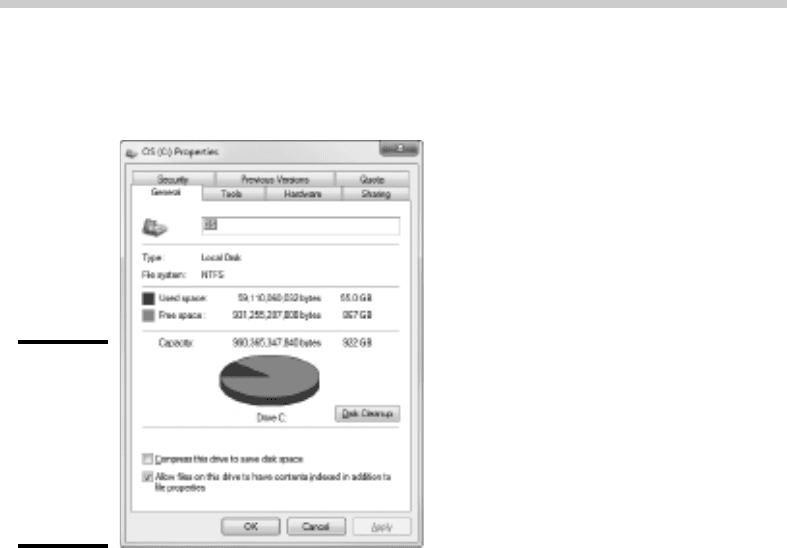
✦ The size of the hard drive and the arrangement of its partitions: To
find out the size of your computer’s hard drive in Windows Vista or
Windows 7, open the Computer window, right-click the drive icon, and
choose the Properties command from the shortcut menu that appears.
10_625873-bk02ch01.indd 7910_625873-bk02ch01.indd 79 9/21/10 10:09 PM9/21/10 10:09 PM
80
Taking Stock
Figure 1-1 shows the Properties dialog box for a 922GB hard drive that
has about 867GB of free space.
Figure 1-1:
The
Properties
dialog
box for a
disk drive
(Windows
Vista).
If your computer has more than one hard drive, Windows lists an icon
for each drive in the Computer window. Jot down the size and amount of
free space available on each drive.
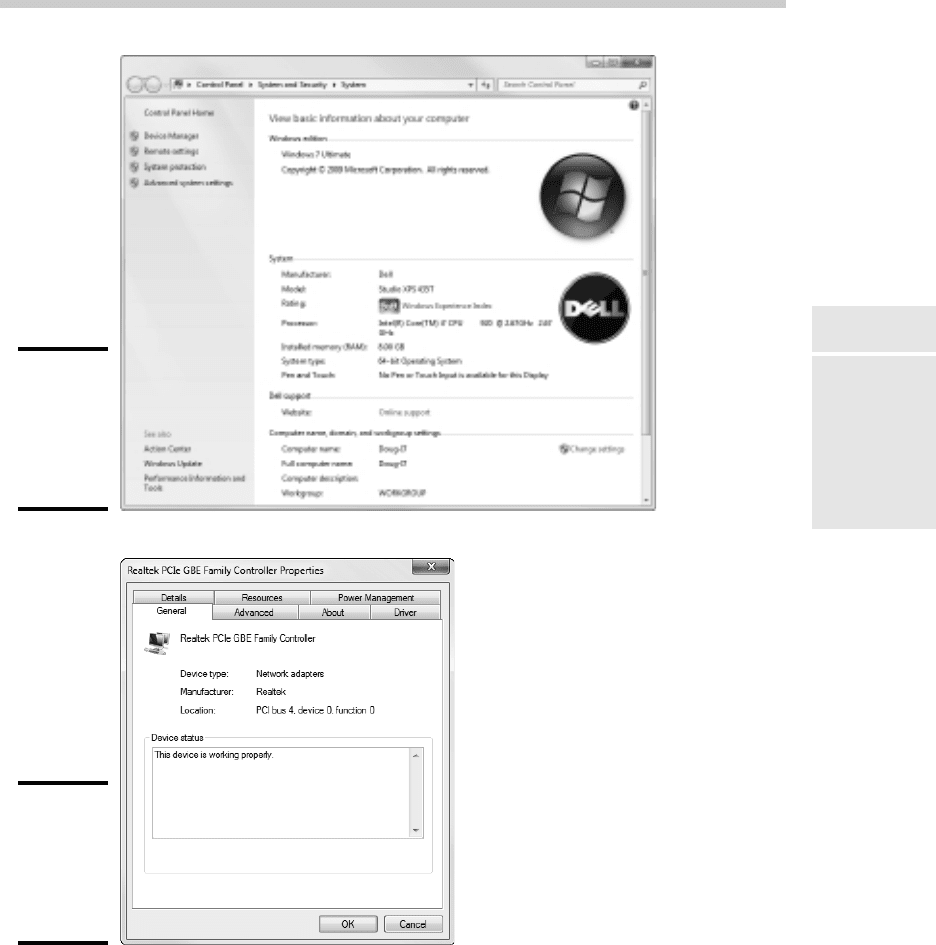
✦ The amount of memory: To find this information in Windows, right-click
Computer on the Start menu and choose the Properties command. The
amount of memory on your computer is shown in the dialog box that
appears. For example, Figure 1-2 shows the System Properties dialog
box for a computer running Windows 7 with 8GB of RAM.
✦ The operating system version: This you can also deduce from the
System Properties dialog box. For example, the Properties page shown
in Figure 1-2 indicates that the computer is running Windows 7 Ultimate.
✦ What type of network card, if any, is installed in the computer: The
easiest way to get this information is to right-click Computer on the
Start menu, choose Manage, click Device Manager, right-click the net-
work adapter, and choose Properties. For example, Figure 1-3 shows the
Properties dialog box for the network adapter that’s built into the moth-
erboard on my computer.
10_625873-bk02ch01.indd 8010_625873-bk02ch01.indd 80 9/21/10 10:09 PM9/21/10 10:09 PM
Book II
Chapter 1
Planning a Network
81
Taking Stock
Figure 1-2:
The
Properties
page for a
Windows 7
system.
Figure 1-3:
The
Properties
page for
a network
adapter.
10_625873-bk02ch01.indd 8110_625873-bk02ch01.indd 81 9/21/10 10:09 PM9/21/10 10:09 PM
82
Taking Stock
The Device Manager is also useful for tracking down other hardware
devices attached to the computer.
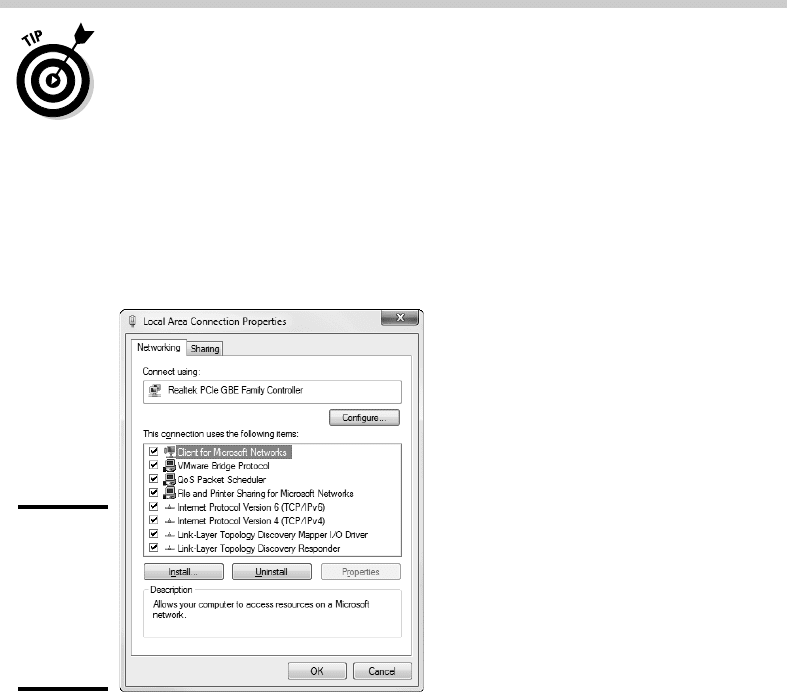
✦ What network protocols are in use: To determine this in Windows
Vista, open Control Panel, open Network and Sharing Center, click
Manage Network Connections, and then right-click the Local Area con-
nection and choose Properties. In Windows 7, open Control Panel, click
View Network Status and Tasks, click Change Adapter Settings, then
right-click the Local Area Connection and choose Properties. The dialog
box shown in Figure 1-4 appears.
Figure 1-4:
The
Properties
page for a
local area
network
connection.
✦ What kind of printer, if any, is attached to the computer: Usually, you
can tell just by looking at the printer. You can also tell by double-
clicking the Printers icon in Control Panel.
✦ Any other devices connected to the computer: A CD, DVD, or CD-RW
drive? Scanner? Zip or Jazz drive? Tape drive? Video camera? Battle
droid? Hot tub?
✦ Which driver and installation disks are available: Hopefully, you’ll be
able to locate the disks or CDs required by hardware devices such as
the network card, printers, scanners, and so on. If not, you may be able
to locate the drivers on the Internet.
✦ What software is used on the computer: Microsoft Office? AutoCAD?
QuickBooks? Make a complete list and include version numbers.
10_625873-bk02ch01.indd 8210_625873-bk02ch01.indd 82 9/21/10 10:09 PM9/21/10 10:09 PM
Book II
Chapter 1
Planning a Network
83
Taking Stock
Programs that gather information for you
Gathering information about your computers is a lot of work if you have
more than a few computers to network. Fortunately, several software pro-
grams are available that can automatically gather the information for you.
These programs inspect various aspects of a computer, such as the CPU
type and speed, amount of RAM, and the size of the computer’s hard drives.
Then they show the information on the screen and give you the option of
saving the information to a hard drive file or printing it.
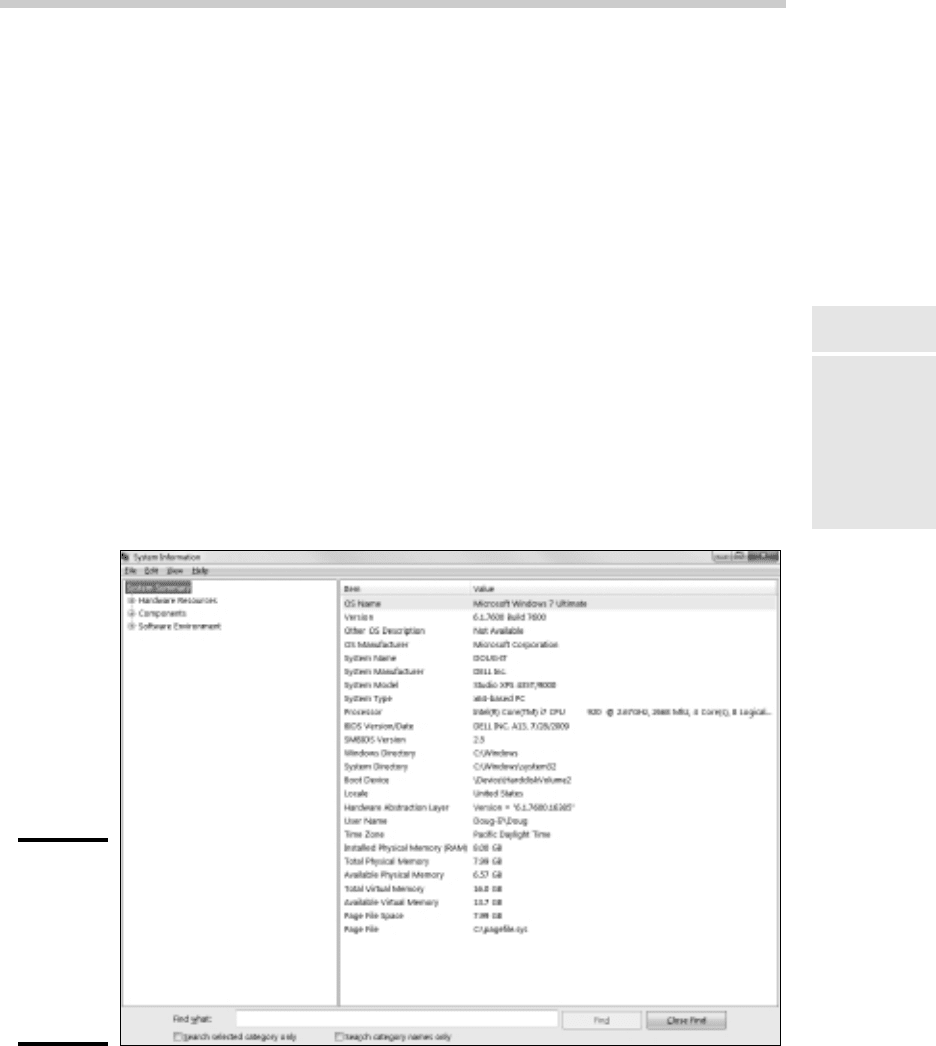
Windows comes with just such a program, called Microsoft System
Information. Microsoft System Information gathers and prints information
about your computer. You can start Microsoft System Information by choos-
ing Start➪All Programs➪Accessories➪System Tools➪System Information.
When you fire up Microsoft System Information, you see a window similar to
the one shown in Figure 1-5. Initially, Microsoft System Information displays
basic information about your computer, such as your version of Microsoft
Windows, the processor type, the amount of memory on the computer,
and so on. You can obtain more detailed information by clicking Hardware
Resources, Components, or other categories in the left side of the window.
Figure 1-5:
Let the
System
Information
program
gather the
data you
need.
10_625873-bk02ch01.indd 8310_625873-bk02ch01.indd 83 9/21/10 10:09 PM9/21/10 10:09 PM

84
To Dedicate or Not to Dedicate: That Is the Question
To Dedicate or Not to Dedicate: That Is the Question
One of the most basic questions that a network plan must answer is
whether the network will have one or more dedicated servers or rely com-
pletely on peer-to-peer networking. If the only reason for purchasing your
network is to share a printer and exchange an occasional file, you may not
need a dedicated server computer. In that case, you can create a peer-to-
peer network by using the computers that you already have. However, all
but the smallest networks will benefit from having a separate, dedicated
server computer.
✦ Using a dedicated server computer makes the network faster, easier to
work with, and more reliable. Consider what happens when the user of
a server computer, which doubles as a workstation, decides to turn off
the computer, not realizing that someone else is accessing files on his or
her hard drive.
✦ You don’t necessarily have to use your biggest and fastest computer
as your server computer. I’ve seen networks where the slowest com-
puter on the network is the server. This advice is especially true when
the server is mostly used to share a printer or to store a small number
of shared files. So if you need to buy a computer for your network, con-
sider promoting one of your older computers to be the server and using
the new computer as a client.
Types of Servers
Assuming that your network will require one or more dedicated servers, you
should next consider what types of servers the network will need. In some
cases, a single server computer can fill one or more of these roles. Whenever
possible, it’s best to limit each server computer to a single server function.
File servers
File servers provide centralized disk storage that can be conveniently shared
by client computers on the network. The most common task of a file server
is to store shared files and programs. For example, the members of a small
workgroup can use disk space on a file server to store their Microsoft Office
documents.
File servers must ensure that two users don’t try to update the same file at
the same time. The file servers do this by locking a file while a user updates
the file so that other users can’t access the file until the first user finishes.
For document files (for example, word processing or spreadsheet files), the
whole file is locked. For database files, the lock can be applied just to the
portion of the file that contains the record or records being updated.
10_625873-bk02ch01.indd 8410_625873-bk02ch01.indd 84 9/21/10 10:09 PM9/21/10 10:09 PM

Book II
Chapter 1
Planning a Network
85
Types of Servers
Print servers
Sharing printers is one of the main reasons that many small networks exist.
Although it isn’t necessary, a server computer can be dedicated for use as
a print server, whose sole purpose is to collect information being sent to a
shared printer by client computers and print it in an orderly fashion.
✦ A single computer may double as both a file server and a print server, but
performance is better if you use separate print and file server computers.
✦ With inexpensive inkjet printers running about $100 each, just giving
each user his or her own printer is tempting. However, you get what
you pay for. Instead of buying $100 printers for 15 users, you may be
better off buying one $1,500 laser printer and sharing it. The $1,500 laser
printer will be much faster, will probably produce better-looking output,
and will be cheaper to operate.
Web servers
A Web server is a server computer that runs software that enables the
computer to host an Internet Web site. The two most popular Web server
programs are Microsoft’s IIS (Internet Information Services) and Apache, an
open-source Web server managed by the Apache Software Foundation.
Mail servers
A mail server is a server that handles the network’s e-mail needs. It is con-
figured with e-mail server software, such as Microsoft Exchange Server.
Exchange Server is designed to work with Microsoft Outlook, the e-mail
client software that comes with Microsoft Office.
Most mail servers actually do much more than just send and receive elec-
tronic mail. For example, here are some of the features that Exchange Server
offers beyond simple e-mail:
✦ Collaboration features that simplify the management of collaborative
projects.
✦ Audio and video conferencing.
✦ Chat rooms and instant messaging (IM) services.
✦ Microsoft Exchange Forms Designer, which lets you develop customized
forms for applications, such as vacation requests or purchase orders.
Database servers
A database server is a server computer that runs database software, such as
Microsoft’s SQL Server 2000. Database servers are usually used along with
customized business applications, such as accounting or marketing systems.
10_625873-bk02ch01.indd 8510_625873-bk02ch01.indd 85 9/21/10 10:09 PM9/21/10 10:09 PM

86
Choosing a Server Operating System
Choosing a Server Operating System
If you determine that your network will require one or more dedicated serv-
ers, the next step is to determine what network operating system those serv-
ers should use. If possible, all the servers should use the same NOS so that
you don’t find yourself supporting different operating systems.
Although you can choose from many network operating systems, from a
practical point of view, your choices are limited to the following:
✦ Windows Server 2003 or 2008
✦ Linux or another version of Unix
For more information, refer to Book I, Chapter 4.
Planning the Infrastructure
You also need to plan the details of how you will connect the computers in
the network. This task includes determining which network topology the
network will use, what type of cable will be used, where the cable will be
routed, and what other devices (such as repeaters, bridges, hubs, switches,
and routers) will be needed.
Although you have many cabling options to choose from, you’ll probably use
Cat 5e or better UTP for most — if not all — of the desktop client comput-
ers on the network. However, you have many decisions to make beyond this
basic choice:
✦ Will you use hubs, which are cheaper, or switches, which are faster but
more expensive?
✦ Where will you place workgroup hubs or switches — on a desktop some-
where within the group or in a central wiring closet?
✦ How many client computers will you place on each hub or switch, and
how many hubs or switches will you need?
✦ If you need more than one hub or switch, what type of cabling will you
use to connect the hubs and switches to one another?
For more information about network cabling, see Book II, Chapter 2, and
Book I, Chapter 3.
If you’re installing new network cable, don’t scrimp on the cable itself.
Because installing network cable is a labor-intensive task, the cost of the
cable itself is a small part of the total cable installation cost. And if you
spend a little extra to install higher-grade cable now, you won’t have to
replace the cable in a few years when it’s time to upgrade the network.
10_625873-bk02ch01.indd 8610_625873-bk02ch01.indd 86 9/21/10 10:09 PM9/21/10 10:09 PM