
Lowe D. Networking For Dummies
Подождите немного. Документ загружается.


Book I
Chapter 3
Understanding
Network Hardware
47
Servers
Rack-mount servers are designed to save space when you need more
than a few servers in a confined area. A rack-mount server is housed in
a small chassis that’s designed to fit into a standard 19-inch equipment
rack. The rack allows you to vertically stack servers in order to save
space.
✦ Blade servers: Blade servers are designed to save even more space than
rack-mount servers. A blade server is a server on a single card that can
be mounted alongside other blade servers in a blade chassis, which
itself fits into a standard 19-inch equipment rack. A typical blade chassis
holds six or more servers, depending on the manufacturer.
One of the key benefits of blade servers is that you don’t need a sepa-
rate power supply for each server. Instead, the blade enclosure provides
power for all its blade servers. Some blade server systems provide
rack-mounted power supplies that can serve several blade enclosures
mounted in a single rack.
In addition, the blade enclosure provides KVM switching so that you
don’t have to use a separate KVM switch. You can control any of the
servers in a blade server network from a single keyboard, monitor, and
mouse. (For more information, see the sidebar, “Saving space with a
KVM switch.”)
One of the biggest benefits of blade servers is that they drastically cut
down the amount of cable clutter. With rack-mount servers, each server
requires its own power cable, keyboard cable, video cable, mouse cable,
and network cables. With blade servers, a single set of cables can ser-
vice all the servers in a blade enclosure.
If you have more than two or three servers in
one location, you should consider getting a
device called a KVM switch to save space. A
KVM switch lets you connect several server
computers to a single keyboard, monitor, and
mouse. (KVM stands for keyboard, video, and
mouse.) Then, you can control any of the serv-
ers from a single keyboard, monitor, and mouse
by turning a dial or by pressing a button on the
KVM switch.
Simple KVM switches are mechanical affairs
that let you choose from among 2 to 16 or more
computers. More elaborate KVM switches can
control more computers, using a pop-up menu
or a special keyboard combination to switch
among computers. Some advanced KVMs can
even control a mix of PCs and Macintosh com-
puters from a single keyboard, monitor, and
mouse.
To find more information about KVM switches,
go to a Web search engine such as Google and
search for “KVM.”
Saving space with a KVM switch
07_625873-bk01ch03.indd 4707_625873-bk01ch03.indd 47 9/21/10 10:07 PM9/21/10 10:07 PM

48
Network Interface Cards
Network Interface Cards
Every computer on a network, both clients and servers, requires a network
interface card (or NIC) in order to access the network. A NIC is usually a
separate adapter card that slides into one of the server’s motherboard
expansion slots. However, most newer computers have the NIC built into the
motherboard, so a separate card isn’t needed.
For client computers, you can usually get away with using the inexpensive
built-in NIC because client computers are used to connect only one user to
the network. However, the NIC in a server computer connects many net-
work users to the server. As a result, it makes sense to spend more money
on a higher-quality NIC for a heavily used server. Most network adminis-
trators prefer to use name-brand cards from manufacturers such as Intel,
SMC, or 3Com.
Most NICs made today support 1 Gbps networking and will also support
slower 100 Mbps and even ancient 10 Mbps networks. These cards automati-
cally adjust their speed to match the speed of the network. So you can use
a gigabit card on a network that has older 100 Mbps cards without trouble.
You can find inexpensive gigabit cards for as little as $5 each, but a typical
name-brand card (such as Linksys or Intel) will cost around $25 or $30.
Here are a few other points to ponder concerning network interface cards:
✦ A NIC is a Physical layer and Data Link layer device. Because a NIC
establishes a network node, it must have a physical network address,
also known as a MAC address. The MAC address is burned into the NIC
at the factory, so you can’t change it. Every NIC ever manufactured has a
unique MAC address.
✦ For server computers, it makes sense to use more than one NIC. That
way, the server can handle more network traffic. Some server NICs have
two or more network interfaces built into a single card.
✦ Fiber-optic networks also require NICs. Fiber-optic NICs are still too
expensive for desktop use in most networks. Instead, they’re used for
high-speed backbones. If a server connects to a high-speed fiber back-
bone, it will need a fiber-optic NIC that matches the fiber-optic cable
being used.
Network Cable
Nearly all modern networks are constructed using a type of cable called
twisted-pair cable, which looks a little like phone cable but is subtly different.
07_625873-bk01ch03.indd 4807_625873-bk01ch03.indd 48 9/21/10 10:07 PM9/21/10 10:07 PM
Book I
Chapter 3
Understanding
Network Hardware
49
Network Cable
You may encounter other types of cable in an existing network: coax cable
that resembles TV cable, thick yellow cable that used to be the only type of
cable used for Ethernet, fiber-optic cables that span long distances at high
speeds, or thick twisted-pair bundles that carry multiple sets of twisted-pair
cable between wiring closets in a large building. But as I mentioned, it’s
twisted-pair cable for nearly all new networks.
A choice that’s becoming more popular every day is to forego network
cable and instead build your network using wireless network components.
Because Book V is devoted exclusively to wireless networking, I don’t
describe wireless network components in this chapter.
Coaxial cable
A type of cable that was once popular for Ethernet networks is coaxial cable,
sometimes called thinnet or BNC cable because of the type of connectors
used on each end of the cable. Thinnet cable operates only at 10 Mbps and is
rarely used for new networks. However, you’ll find plenty of existing thinnet
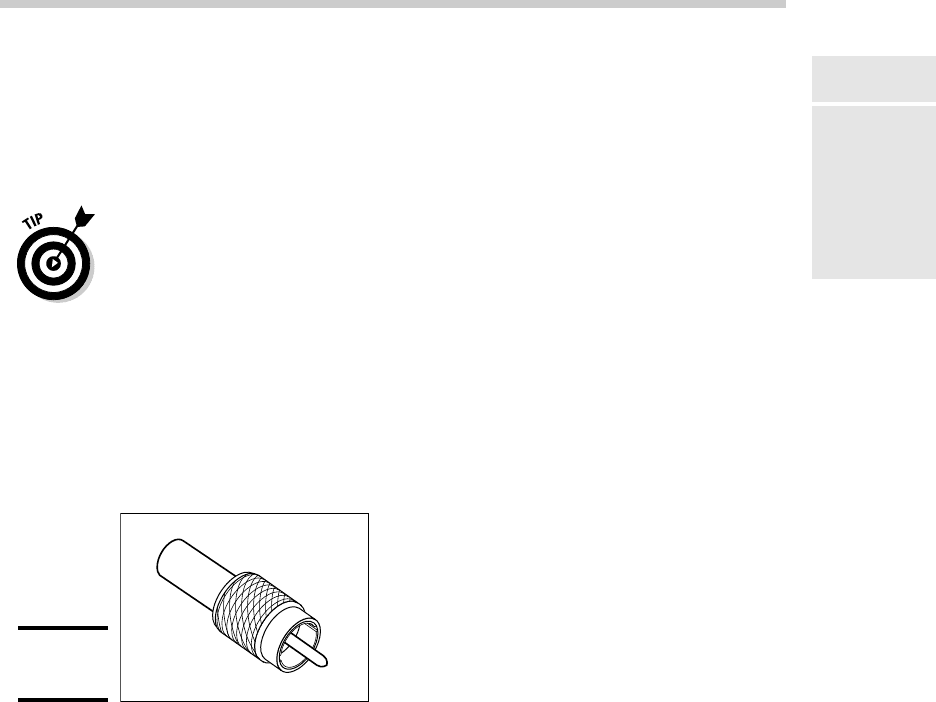
networks still being used. Figure 3-1 shows a typical coaxial cable.
Figure 3-1:
Coax cable.
Here are some salient points about coaxial cable:
✦ You attach thinnet to the network interface card by using a goofy twist-
on connector called a BNC connector. You can purchase preassembled
cables with BNC connectors already attached in lengths of 25 or 50 feet,
or you can buy bulk cable on a big spool and attach the connectors
yourself by using a special tool. (I suggest buying preassembled cables.
Attaching connectors to bulk cable can be tricky.)
✦ With coaxial cables, you connect your computers point-to-point in a
bus topology. At each computer, a T connector is used to connect two
cables to the network interface card.
✦ A special plug called a terminator is required at each end of a series of
thinnet cables. The terminator prevents data from spilling out the end of
the cable and staining the carpet.
07_625873-bk01ch03.indd 4907_625873-bk01ch03.indd 49 9/21/10 10:07 PM9/21/10 10:07 PM
50
Network Cable
✦ The cables strung end-to-end from one terminator to the other are col-
lectively called a segment. The maximum length of a thinnet segment is
about 200 meters (actually, 185 meters). You can connect as many as 30
computers on one segment. To span a distance greater than 185 meters
or to connect more than 30 computers, you must use two or more seg-
ments with a device called a repeater to connect each segment.
✦ Although Ethernet coaxial cable resembles TV coaxial cable, the two
types of cable aren’t interchangeable. Don’t try to cut costs by wiring
your network with cheap TV cable.
Twisted-pair cable
The most popular type of cable today is twisted-pair cable, or UTP. (The U
stands for unshielded, but no one says unshielded twisted pair. Just twisted
pair will do.) UTP cable is even cheaper than thin coaxial cable, and best
of all, many modern buildings are already wired with twisted-pair cable
because this type of wiring is often used with modern phone systems.
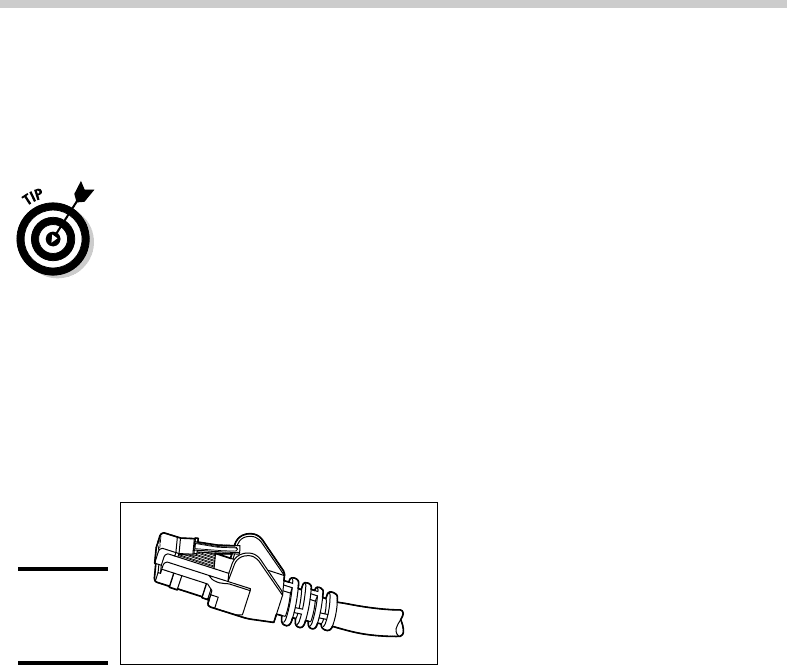
Figure 3-2 shows a twisted-pair cable.
Figure 3-2:
Twisted-pair
cable.
When you use UTP cable to construct an Ethernet network, you connect the
computers in a star arrangement. In the center of the star is a device called a
hub. Depending on the model, Ethernet hubs enable you to connect from 4 to
24 computers using twisted-pair cable.
An advantage of UTP’s star arrangement is that if one cable goes bad, only
the computer attached to that cable is affected; the rest of the network con-
tinues to chug along. With coaxial cable, a bad cable affects the entire net-
work, and not just the computer to which the bad cable is connected.
Here are a few other details that you should know about twisted-pair cabling:
✦ UTP cable consists of pairs of thin wire twisted around each other;
several such pairs are gathered up inside an outer insulating jacket.
Ethernet uses two pairs of wires, or four wires altogether. The number
of pairs in a UTP cable varies, but it’s often more than two.
✦ UTP cable comes in various grades called Categories. Don’t use anything
less than Category 5e cable for your network. Although cheaper, it may
not be able to support faster networks.
07_625873-bk01ch03.indd 5007_625873-bk01ch03.indd 50 9/21/10 10:07 PM9/21/10 10:07 PM

Book I
Chapter 3
Understanding
Network Hardware
51
Switches
Although higher-Category cables are more expensive than lower-Category
cables, the real cost of installing Ethernet cabling is the labor required to
actually pull the cables through the walls. As a result, I recommend that
you always spend the extra money to buy Category 5e cable.
✦ If you want to sound like you know what you’re talking about, say “Cat
5e” instead of “Category 5e.”
✦ Many existing networks are cabled with Category 5 cable, which is fine
for 100Mbps networks but isn’t rated for Gigabit networks. Category
5e cable (the e stands for enhanced) and Category 6 cable will support
1,000 Mbps networks.
✦ UTP cable connectors look like modular phone connectors but are a bit
larger. UTP connectors are officially called RJ-45 connectors.
✦ Like thinnet cable, UTP cable is also sold in prefabricated lengths.
However, RJ-45 connectors are much easier to attach to bulk UTP cable
than BNC cables are to attach to bulk coaxial cable. As a result, I suggest
that you buy bulk cable and connectors unless your network consists of
just two or three computers. A basic crimp tool to attach the RJ-45 con-
nectors costs about $50.
✦ The maximum allowable cable length between the hub and the com-
puter is 100 meters (about 328 feet).
Switches
The biggest difference between using coaxial cable and twisted-pair cable is
that when you use twisted-pair cable, you also must use a separate device
called a switch. Years ago, switches were expensive devices — expensive
enough that most do-it-yourself networkers who were building small net-
works opted for thinnet cable in order to avoid the expense and hassle of
using hubs.
Nowadays, the cost of switches has dropped so much that the advantages
of twisted-pair cabling outweigh the hassle and cost of using switches. With
twisted-pair cabling, you can more easily add new computers to the net-
work, move computers, find and correct cable problems, and service the
computers that you need to remove from the network temporarily.
Note that in some older networks, you may see a device known as a hub used
instead of a switch. Hubs used to be used because they were less expen-
sive than switches. However, the cost of switches came down dramatically,
pushing hubs into relic status. If you have an older network that uses hubs
and seems to run slowly, you can probably improve the network’s speed by
replacing the older hubs with newer switches. For more information, see the
sidebar, “Hubs and switches demystified,” later in this chapter.
07_625873-bk01ch03.indd 5107_625873-bk01ch03.indd 51 9/21/10 10:07 PM9/21/10 10:07 PM

52
Switches
If you use twisted-pair cabling, you need to know some of the ins and outs of
using hubs:
✦ Because you must run a cable from each computer to the switch, find a
central location for the switch to which you can easily route the cables.
✦ The switch requires electrical power, so make sure that an electrical
outlet is handy.
✦ When you purchase a switch, purchase one with at least twice as many
connections as you need. Don’t buy a four-port switch if you want to net-
work four computers because when (not if) you add the fifth computer,
you have to buy another switch.
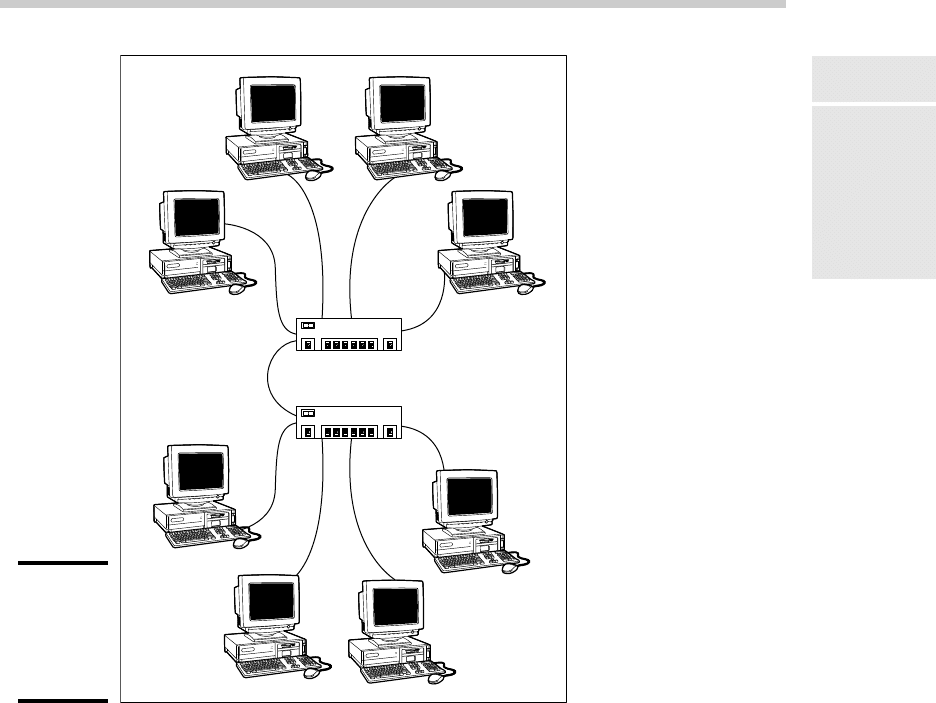
✦ You can connect switches to one another, as shown in Figure 3-3; this is
called daisy chaining. When you daisy chain switches, you connect one
end of a cable to a port on one switch and the other end to a port on the
other switch. Note that on some switches, you must use a special des-
ignated port for daisy chaining. So be sure to read the instructions that
come with the switch to make sure that you daisy chain it properly.
Hubs and switches demystified
Both hubs and switches let you connect mul-
tiple computers to a twisted-pair network.
Switches are more efficient than hubs, but not
just because they’re faster. If you really want
to know, here’s the actual difference between
a hub and a switch:
✓ In a hub, every packet that arrives at the
hub on any of its ports is automatically sent
out on every other port. The hub has to do
this because it’s a Physical layer device,
so it has no way to keep track of which
computer is connected to each port. For
example, suppose that John’s computer
is connected to port 1 on an 8-port hub,
and Andrea’s computer is connected to
port 5. If John’s computer sends a packet
of information to Andrea’s computer, the
hub receives the packet on port 1 and then
sends it out on ports 2–8. All the computers
connected to the hub get to see the packet
so that they can determine whether the
packet was intended for them.
✓ A switch is a Data Link layer device, which
means it’s able to look into the packets
that pass through it to examine a critical
piece of Data Link layer information: the
MAC address. With this information in
hand, a switch can keep track of which
computer is connected to each of its ports.
So if John’s computer on port 1 sends a
packet to Andrea’s computer on port 5,
the switch receives the packet on port 1
and then sends the packet out on port 5
only. This process is not only faster, but
also improves the security of the system
because other computers don’t see pack-
ets that aren’t meant for them.
07_625873-bk01ch03.indd 5207_625873-bk01ch03.indd 52 9/21/10 10:07 PM9/21/10 10:07 PM
Book I
Chapter 3
Understanding
Network Hardware
53
Switches
Figure 3-3:
Daisy
chaining
switches
together.
Switch
Switch
✦ You can daisy chain no more than three switches together. If you have
more computers than three hubs can accommodate, don’t panic. For a
small additional cost, you can purchase hubs that have a BNC connec-
tion on the back. Then you can string the hubs together using thinnet
cable. The three-hub limit doesn’t apply when you use thinnet cable
to connect the hubs. You can also get stackable switches that have
high-speed direct connections that enable two or more switches to be
counted as a single switch.
✦ When you shop for network hubs, you may notice that the expensive
ones have network-management features that support something called
SNMP. These hubs are called managed hubs. Unless your network is very
large and you know what SNMP is, don’t bother with the more expensive
managed hubs. You’d be paying for a feature that you may never use.
07_625873-bk01ch03.indd 5307_625873-bk01ch03.indd 53 9/21/10 10:07 PM9/21/10 10:07 PM

54
Repeaters
✦ For large networks, you may want to consider using a managed switch.
A managed switch allows you to monitor and control various aspects
of the switch’s operation from a remote computer. The switch can alert
you when something goes wrong with the network, and it can keep
performance statistics so that you can determine which parts of the net-
work are heavily used and which aren’t. A managed switch costs two or
three times as much as an unmanaged switch, but for larger networks,
the benefits of managed switches are well worth the additional cost.
Repeaters
A repeater (sometimes called an extender) is a gizmo that gives your net-
work signals a boost so that the signals can travel farther. It’s kind of like a
Gatorade station in a marathon. As the signals travel past the repeater, they
pick up a cup of Gatorade, take a sip, splash the rest of it on their heads,
toss the cup, and hop in a cab when they’re sure that no one is looking.
You need a repeater when the total length of a single span of network cable
exceeds 100 meters (328 feet). The 100-meter length limit applies to the
cable that connects a computer to the switch or the cable that connects
switches to each other when switches are daisy chained together. In other
words, you can connect each computer to the switch with no more than 100
meters of cable, and you can connect switches to each other with no more
than 100 meters of cable.
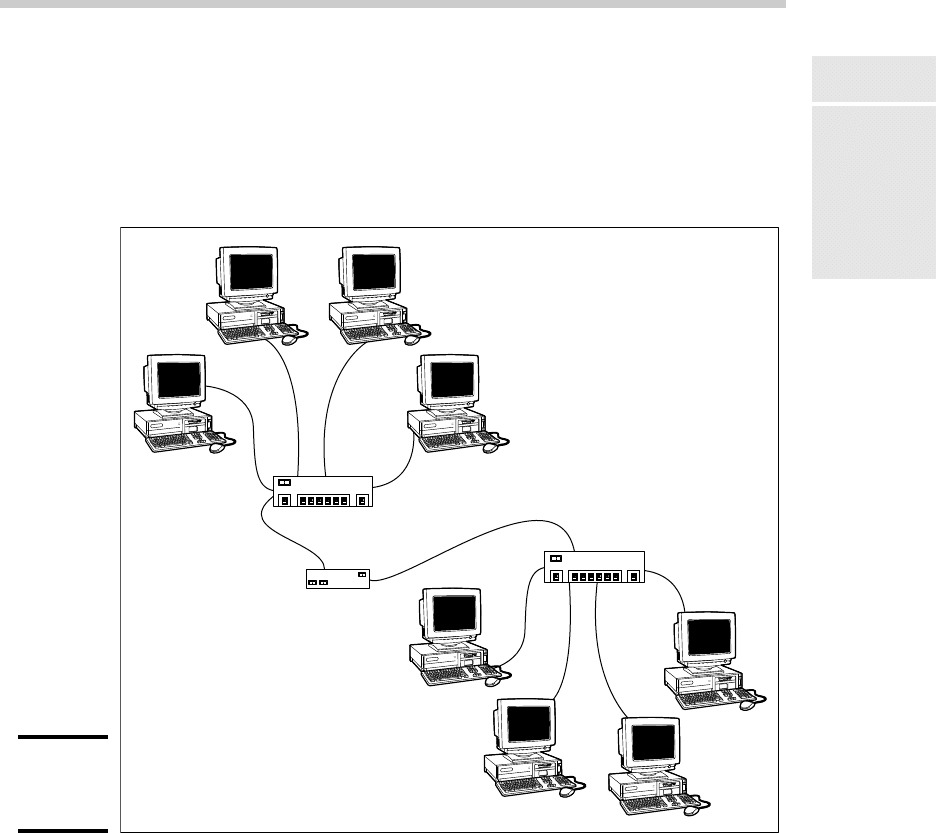
Figure 3-4 shows how you can use a repeater to connect two groups of com-
puters that are too far apart to be strung on a single segment. When you use
a repeater like this, the repeater divides the cable into two segments. The
cable length limit still applies to the cable on each side of the repeater.
Here are some points to ponder when you lie awake tonight wondering
about repeaters:
✦ Repeaters are not typically used with twisted-pair networks.
Well, technically, that’s not true because the switches themselves func-
tion as repeaters. So what I really meant is that you typically see repeat-
ers as stand-alone devices only when a single cable segment would be
more than 100 meters.
✦ A basic rule of Ethernet life is that a signal can’t pass through more than
three repeaters on its way from one node to another. That doesn’t mean
you can’t have more than three repeaters or switches, but if you do, you
have to carefully plan the network cabling so that the three-repeater
rule isn’t violated.
07_625873-bk01ch03.indd 5407_625873-bk01ch03.indd 54 9/21/10 10:07 PM9/21/10 10:07 PM
Book I
Chapter 3
Understanding
Network Hardware
55
Bridges
✦ Repeaters are legitimate components of a by-the-book Ethernet network.
They don’t extend the maximum length of a single segment; they just
enable you to tie two segments together. Beware of the little black boxes
that claim to extend the segment limit beyond the standard 100-meter
limit for 10/100BaseT cable. These products usually work, but playing by
the rules is better.
Figure 3-4:
Using a
repeater.
Switch
Repeater
Switch
Bridges
A bridge is a device that connects two networks so that they act as if they’re
one network. Bridges are used to partition one large network into two
smaller networks for performance reasons. You can think of a bridge as a
kind of smart repeater.
07_625873-bk01ch03.indd 5507_625873-bk01ch03.indd 55 9/21/10 10:07 PM9/21/10 10:07 PM

56
Bridges
Repeaters listen to signals coming down one network cable, amplify them,
and send them down the other cable. They do this blindly, paying no atten-
tion to the content of the messages that they repeat.
In contrast, a bridge is a little smarter about the messages that come down
the pike. For starters, most bridges have the capability to listen to the
network and automatically figure out the address of each computer on
both sides of the bridge. Then the bridge can inspect each message that
comes from one side of the bridge and broadcast it on the other side of
the bridge, but only if the message is intended for a computer that’s on the
other side.
This key feature enables bridges to partition a large network into two
smaller, more efficient networks. Bridges work best in networks that are
highly segregated. For example (humor me here — I’m a Dr. Seuss fan), sup-
pose that the Sneetches networked all their computers and discovered that,
although the Star-Bellied Sneetches’ computers talked to each other fre-
quently and the Plain-Bellied Sneetches’ computers also talked to each other
frequently, rarely did a Star-Bellied Sneetch’s computer talk to a Plain-Bellied
Sneetch’s computer.
A bridge can partition the Sneetchnet into two networks: the Star-Bellied net-
work and the Plain-Bellied network. The bridge automatically learns which
computers are on the Star-Bellied network and which are on the Plain-Bellied
network. The bridge forwards messages from the Star-Bellied side to the
Plain-Bellied side (and vice versa) only when necessary. The overall perfor-
mance of both networks improves, although the performance of any network
operation that has to travel over the bridge slows down a bit.
Here are a few additional things to consider about bridges:
✦ Some bridges also have the capability to translate the messages from
one format to another. For example, if the Star-Bellied Sneetches build
their network with Ethernet and the Plain-Bellied Sneetches use Token
Ring, a bridge can tie the two together.
✦ You can get a basic bridge to partition two Ethernet networks for about
$500 from mail order suppliers. More sophisticated bridges can cost as
much as $5,000 or more.
✦ For simple bridge applications, you don’t need an expensive special-
ized bridge device; instead, you can just use a switch. That’s because a
switch is effectively a multi-port bridge.
✦ If you’ve never read Dr. Seuss’s classic story of the Sneetches, you
should.
07_625873-bk01ch03.indd 5607_625873-bk01ch03.indd 56 9/21/10 10:07 PM9/21/10 10:07 PM