
Lowe D. Networking For Dummies
Подождите немного. Документ загружается.


Book I
Chapter 3
Understanding
Network Hardware
57
Routers
Routers
A router is like a bridge, but with a key difference. Bridges are Data Link layer
devices, so they can tell the MAC address of the network node to which each
message is sent, and can forward the message to the appropriate segment.
However, they can’t peek into the message itself to see what type of informa-
tion is being sent. In contrast, a router is a Network layer device, so it can
work with the network packets at a higher level. In particular, a router can
examine the IP address of the packets that pass through it. And because IP
addresses have both a network and a host address, a router can determine
what network a message is coming from and going to. Bridges are ignorant of
this information.
One key difference between a bridge and a router is that a bridge is essen-
tially transparent to the network. In contrast, a router is itself a node on the
network, with its own MAC and IP addresses. This means that messages can
be directed to a router, which can then examine the contents of the message
to determine how it should handle the message.
You can configure a network with several routers that can work coopera-
tively together. For example, some routers are able to monitor the network
to determine the most efficient path for sending a message to its ultimate
destination. If a part of the network is extremely busy, a router can automati-
cally route messages along a less-busy route. In this respect, the router is
kind of like a traffic reporter up in a helicopter. The router knows that the
101 is bumper-to-bumper all the way through Sunnyvale, so it sends the mes-
sage on 280 instead.
Here’s some additional information about routers:
✦ The functional distinctions between bridges and routers — and switches
and hubs, for that matter — get blurrier all the time. As bridges, hubs,
and switches become more sophisticated, they’re able to take on some
of the chores that used to require a router, thus putting many routers
out of work.
✦ Some routers are nothing more than computers with several network
interface cards and special software to perform the router functions.
✦ Routers can also connect networks that are geographically distant from
each other via a phone line (using modems) or ISDN.
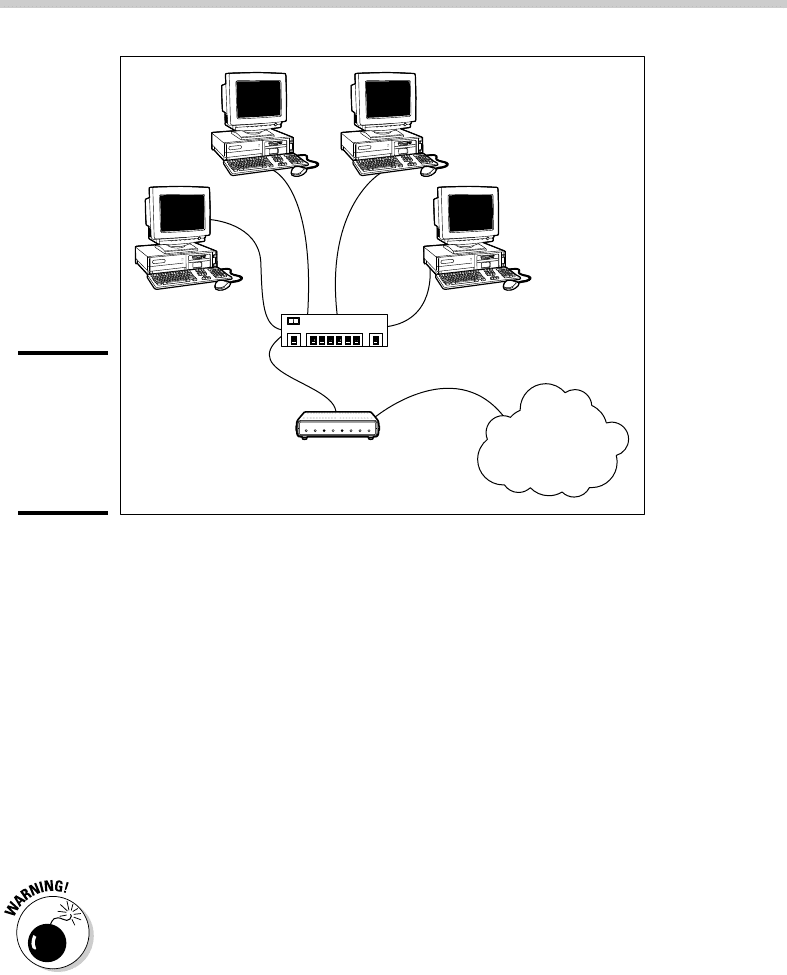
✦ You can also use a router to join your LAN to the Internet. Figure 3-5
shows a router used for this purpose.
07_625873-bk01ch03.indd 5707_625873-bk01ch03.indd 57 9/21/10 10:07 PM9/21/10 10:07 PM
58
Network Attached Storage
Figure 3-5:
Connecting
to the
Internet
with a
router.
Switch
Router
The
Internet
Network Attached Storage
Many network servers exist solely for the purpose of making disk space
available to network users. As networks grow to support more users, and
users require more disk space, network administrators are constantly find-
ing ways to add more storage to their networks. One way to do that is to add
more file servers. However, a simpler and less expensive way is to use net-
work attached storage, also known as NAS.
A NAS device is a self-contained file server that’s preconfigured and ready
to run. All you have to do to set it up is take it out of the box, plug it in, and
turn it on. NAS devices are easy to set up and configure, easy to maintain,
and less expensive than traditional file servers.
NAS should not be confused with a related technology called storage area
networks, or SAN. SAN is a much more complicated and expensive technol-
ogy that provides huge quantities of data storage for large networks. For
more information on SAN, see the sidebar, “SAN is NAS spelled backwards.”
A typical entry-level NAS device is the Dell PowerVault NX300. This device is
a self-contained file server built into a small rack-mount chassis. It supports
up to four hard drives with a total capacity up to four terabyte (or 4,000GB).
The NX300 uses a Xeon processor and two built-in gigabit network ports.
07_625873-bk01ch03.indd 5807_625873-bk01ch03.indd 58 9/21/10 10:07 PM9/21/10 10:07 PM

Book I
Chapter 3
Understanding
Network Hardware
59
Network Printers
The Dell NX300 runs a special version of Windows Server 2008 called the
Windows Storage Server 2008. This version of Windows is designed specifi-
cally for NAS devices. It allows you to configure the network storage from
any computer on the network by using a Web browser.
Note that some NAS devices use customized versions of Linux rather than
Windows Storage Server. Also, in some systems, the operating system
resides on a separate hard drive that’s isolated from the shared disks. This
prevents the user from inadvertently damaging the operating system.
Network Printers
Although you can share a printer on a network by attaching the printer to a
server computer, many printers have network interfaces built in. This lets
you connect the printer directly to the network. Then network users can
connect to the printer and use it without going through a server.
Even if you connect a printer directly to the network, it’s still a good idea to
have the printer managed by a server computer running a network operat-
ing system such as Windows Server 2003 or 2007. That way, the server can
store print jobs sent to the printer by multiple users and print the jobs in the
order in which they were received.
It’s easy to confuse the terms storage area
network (SAN) and network attached storage
(NAS). Both refer to relatively new network
technologies that let you manage the disk stor-
age on your network. However, NAS is a much
simpler and less expensive technology. A NAS
device is nothing more than an inexpensive
self-contained file server. Using NAS devices
actually simplifies the task of adding storage
to a network because the NAS eliminates
the chore of configuring a network operating
system for routine file-sharing tasks.
A storage area network is designed for manag-
ing very large amounts of network storage —
sometimes downright huge amounts. A SAN
consists of three components: storage devices
(perhaps hundreds of them), a separate high-
speed network (usually fiber-optic) that directly
connects the storage devices to each other,
and one or more SAN servers that connect the
SAN to the local area network. The SAN server
manages the storage devices attached to the
SAN and allows users of the LAN to access the
storage.
Setting up and managing a storage area net-
work is a job for a SAN expert. For more infor-
mation about storage area networks, see the
home page of the Storage Networking Industry
Association at www.snia.org.
SAN is NAS spelled backwards
07_625873-bk01ch03.indd 5907_625873-bk01ch03.indd 59 9/21/10 10:07 PM9/21/10 10:07 PM

Book I: Networking Basics
60
07_625873-bk01ch03.indd 6007_625873-bk01ch03.indd 60 9/21/10 10:07 PM9/21/10 10:07 PM

Chapter 4: Understanding Network
Operating Systems
In This Chapter
✓ Understanding what network operating systems do
✓ Figuring out the advantages of Windows Server 2003
✓ Analyzing Windows 2000 Server
✓ Taking a look at Windows NT Server
✓ Navigating NetWare
✓ Delving into peer-to-peer networking
✓ Exploring other network operating systems
O
ne of the basic choices that you must make before you proceed any
further is to decide which network operating system (NOS) to use as
the foundation for your network. This chapter begins with a description of
several important features found in all network operating systems. Next,
it provides an overview of the advantages and disadvantages of the most
popular network operating systems.
Network Operating System Features
All network operating systems, from the simplest to the most complex, must
provide certain core functions. These include the ability to connect to other
computers on the network, share files and other resources, provide for
security, and so on. In the following sections, I describe some of these core
NOS features in general terms.
Network support
It goes without saying that a network operating system should support net-
works. (I can picture Mike Myers in his classic Saturday Night Live role as
Linda Richman, host of Coffee Talk, saying “I’m getting a little verklempt. . . .
Talk amongst yourselves. . . . I’ll give you a topic — network operating sys-
tems do not network, nor do they operate. Discuss.”)
08_625873-bk01ch04.indd 6108_625873-bk01ch04.indd 61 9/21/10 10:08 PM9/21/10 10:08 PM

62
Network Operating System Features
A network operating system must support a wide variety of networking pro-
tocols in order to meet the needs of its users. That’s because a large network
typically consists of a mixture of various versions of Windows, as well as a
few scattered Macintosh (mostly in the art department) and possibly some
Linux computers. The computers often have distinct protocols.
Many servers have more than one network interface card installed. In
that case, the NOS must be able to support multiple network connections.
Ideally, the NOS should have the ability to balance the network load among
its network interfaces. In addition, in the event that one of the connections
fails, the NOS should be able to seamlessly switch to another connection.
Finally, most network operating systems include a built-in ability to function
as a router that connects two networks. The NOS router functions should
also include firewall features in order to keep unauthorized packets from
entering the local network.
File-sharing services
One of the most important functions of a network operating system is its
ability to share resources with other network users. The most common
resource that’s shared is the server’s file system. A network server must
be able to share some or all of its disk space with other users so that those
users can treat the server’s disk space as an extension of their own comput-
ers’ disk spaces.
The NOS allows the system administrator to determine which portions of the
server’s file system to share. Although an entire hard drive can be shared, it
isn’t commonly done. Instead, individual directories or folders are shared.
The administrator can control which users are allowed to access each
shared folder.
Because file sharing is the reason many network servers exist, network oper-
ating systems have more sophisticated disk management features than are
found in desktop operating systems. For example, most network operating
systems have the ability to manage two or more hard drives as if they were
a single drive. In addition, most can create mirrors, which automatically keep
backup copies of drives on a second drive.
Multitasking
Only one user at a time uses a desktop computer; however, multiple users
simultaneously use server computers. As a result, a network operating
system must provide support for multiple users who access the server
remotely via the network.
08_625873-bk01ch04.indd 6208_625873-bk01ch04.indd 62 9/21/10 10:08 PM9/21/10 10:08 PM

Book I
Chapter 4
Understanding
Network Operating
Systems
63
Network Operating System Features
At the heart of multiuser support is multitasking, which is the ability of an
operating system to execute more than one program — called a task or a
process — at a time. Multitasking operating systems are like the guy who
used to spin plates balanced on sticks on the old Ed Sullivan Show. He’d
run from plate to plate, trying to keep them all spinning so they wouldn’t
fall off the sticks. To make it challenging, he’d do it blindfolded or riding on
a unicycle.
Although multitasking creates the appearance that two or more programs
are executing on the computer at one time, in reality, a computer with a
single processor can execute only one program at a time. The operating
system switches the CPU from one program to another to create the appear-
ance that several programs are executing simultaneously, but at any given
moment, only one of the programs is actually executing. The others are
patiently waiting for their turns. (However, if the computer has more than
one CPU, the CPUs can execute programs simultaneously, which is called
multiprocessing.)
To see multitasking in operation on a Windows computer, press
Ctrl+Alt+Delete to bring up the Windows Task Manager and then click the
Processes tab. All the tasks currently active on the computer appear.
For multitasking to work reliably, the network operating system must com-
pletely isolate the executing programs from each other. Otherwise, one
program may perform an operation that adversely affects another program.
Multitasking operating systems do this by providing each task with its own
unique address space that makes it almost impossible for one task to affect
memory that belongs to another task.
In most cases, each program executes as a single task or process within the
memory address space allocated to the task. However, a single program can
also be split into several tasks. This technique is usually called multithread-
ing, and the program’s tasks are called threads.
The two approaches to multitasking are preemptive and non-preemptive. In
preemptive multitasking, the operating system decides how long each task
gets to execute before it should step aside so that another task can execute.
When a task’s time is up, the operating system’s task manager interrupts the
task and switches to the next task in line. All the network operating systems
in widespread use today use preemptive multitasking.
The alternative to preemptive multitasking is non-preemptive multitask-
ing. In non-preemptive multitasking, each task that gets control of the CPU is
allowed to run until it voluntarily gives up control so that another task can
run. Non-preemptive multitasking requires less operating system overhead
because the operating system doesn’t have to keep track of how long each
task has run. However, programs have to be carefully written so that they
don’t hog the computer all to themselves.
08_625873-bk01ch04.indd 6308_625873-bk01ch04.indd 63 9/21/10 10:08 PM9/21/10 10:08 PM

64
Network Operating System Features
Directory services
Directories are everywhere. When you need to make a phone call, you look
up the number in a phone directory. When you need to find the address of a
client, you look up his or her name in your Rolodex. And when you need to
find the Sam Goody store at a shopping mall, you look for the mall directory.
Networks have directories, too. Network directories provide information
about the resources that are available on the network, such as users, com-
puters, printers, shared folders, and files. Directories are an essential part of
any network operating system.
In early network operating systems, such as Windows NT 3.1 and NetWare
3.x, each server computer maintained its own directory database of
resources that were available on just that server. The problem with that
approach was that network administrators had to maintain each directory
database separately. That wasn’t too bad for networks with just a few serv-
ers, but maintaining the directory on a network with dozens or even hun-
dreds of servers was next to impossible.
In addition, early directory services were application specific. For example,
a server would have one directory database for user logins, another for file
sharing, and yet another for e-mail addresses. Each directory had its own
tools for adding, updating, and deleting directory entries.
Most modern networks — particularly those based on Windows servers —
use a directory service called Active Directory. Active Directory is essentially
a database that organizes information about a network and allows users and
computers to gain permission to access network resources. Active Directory
is simple enough to use for small networks with just a few dozen computers
and users, but powerful enough to work with large networks containing tens
of thousands of computers.
Security services
All network operating systems must provide some measure of security to
protect the network from unauthorized access. Hacking seems to be the
national pastime these days. With most computer networks connected to
the Internet, anyone anywhere in the world can and probably will try to
break into your network.
The most basic type of security is handled through user accounts, which
grant individual users the right to access the network resources — and
govern what resources each user can access. User accounts are secured
by passwords; therefore, good password policy is a cornerstone of any secu-
rity system. Most network operating systems let you establish password
08_625873-bk01ch04.indd 6408_625873-bk01ch04.indd 64 9/21/10 10:08 PM9/21/10 10:08 PM

Book I
Chapter 4
Understanding
Network Operating
Systems
65
Microsoft’s Server Operating Systems
policies, such as requiring that passwords have a minimum length and
include a mix of letters and numerals. In addition, passwords can be set to
expire after a certain number of days, so users can be forced to frequently
change their passwords.
Most network operating systems also provide for data encryption, which
scrambles data before it is sent over the network or saved on disk, and digi-
tal certificates, which are used to ensure that users are who they say they are
and files are what they claim to be.
Microsoft’s Server Operating Systems
Over the years, Microsoft has released several versions of its Windows-
based server operating system: Windows NT Server 4, Windows 2000 Server,
Windows Server 2003, and Windows Server 2008. Windows Server 2008 is
the newest version, but because it’s relatively new, many organizations are
still using Windows Server 2003. In fact, some are still using Windows 2000
Server, and there are probably a few (mostly on deserted islands cut off
from civilization) running Windows NT Server 4.
It’s useful to discuss these operating systems in the order they were
released, because each new version builds on the previous version by intro-
ducing new and improved features. However, keep in mind as you read the
following sections that Windows NT Server 4 and Windows 2000 Server are
considered obsolete, and Windows Server 2003 will be too in a few short
years.
NTFS drives
All server versions of Windows use a spe-
cial type of formatting for hard drives, differ-
ent from the standard FAT system used by
MS-DOS since the early 1980s. (FAT stands
for File Allocation Table, in case you’re inter-
ested.) The new system, called NTFS (for NT
File System), offers many advantages over FAT
drives:
✓ NTFS is much more efficient at using the
space on your hard drive. As a result, NTFS
can cram more data onto a given hard
drive than FAT.
✓ NTFS drives provide better security fea-
tures than FAT drives. NTFS stores security
information on disk for each file and direc-
tory. In contrast, FAT has only rudimentary
security features.
✓ NTFS drives are more reliable because
NTFS keeps duplicate copies of important
information, such as the location of each
file on the hard drive. If a problem devel-
ops on an NTFS drive, Windows NT Server
can probably correct the problem without
losing any data. In contrast, FAT drives are
prone to losing information.
08_625873-bk01ch04.indd 6508_625873-bk01ch04.indd 65 9/21/10 10:08 PM9/21/10 10:08 PM

66
Microsoft’s Server Operating Systems
Windows 2000 Server
Windows 2000 Server built on the strengths of Windows NT Server 4 by
adding new features that made Windows 2000 Server faster, easier to
manage, more reliable, and easier to use for large and small networks alike.
The most significant new feature offered by Windows 2000 Server is called
Active Directory, which provides a single directory of all network resources
and enables program developers to incorporate the directory into their pro-
grams. Active Directory drops the 15-character domain and computer names
in favor of Internet-style DNS names, such as Marketing.MyCompany.com or
Sales.YourCompany.com. (However, it still supports the old-style names for
older clients that don’t deal well with DNS names.)
Windows 2000 Server came in three versions:
✦ Windows 2000 Server was the basic server, designed for small- to
medium-sized networks. It included all the basic server features, includ-
ing file and printer sharing, and acted as a Web and e-mail server.
✦ Windows 2000 Advanced Server was the next step up, designed for
larger networks. Advanced Server could support server computers that
have up to 8GB of memory (not hard drive — RAM!) and four integrated
processors instead of the single processor that desktop computers and
most server computers had.
✦ Windows 2000 Datacenter Server supported servers that have as many
as 32 processors with up to 64GB of RAM and was specially designed for
large database applications.
For small networks with 50 or fewer computers, Microsoft offered a special
bundle called the Small Business Server, which included the following com-
ponents for one low, low price:
✦ Windows Server 2003: The operating system for your network server.
✦ Exchange Server 2003: For e-mail and instant messaging.
✦ SQL Server 2000: A database server.
✦ FrontPage 2000: For building Web sites.
✦ Outlook 2000: For reading e-mail.
Windows Server 2003
The next server version of Windows was Windows Server 2003. Windows
Server 2003 built on Windows 2000 Server, with the following added features:
08_625873-bk01ch04.indd 6608_625873-bk01ch04.indd 66 9/21/10 10:08 PM9/21/10 10:08 PM