
Lowe D. Networking For Dummies
Подождите немного. Документ загружается.

Book II
Chapter 8
Going Virtual
167
Creating a Virtual Machine
12. You’re done!
When the operating system is installed, you can then proceed to use the
virtual machine.
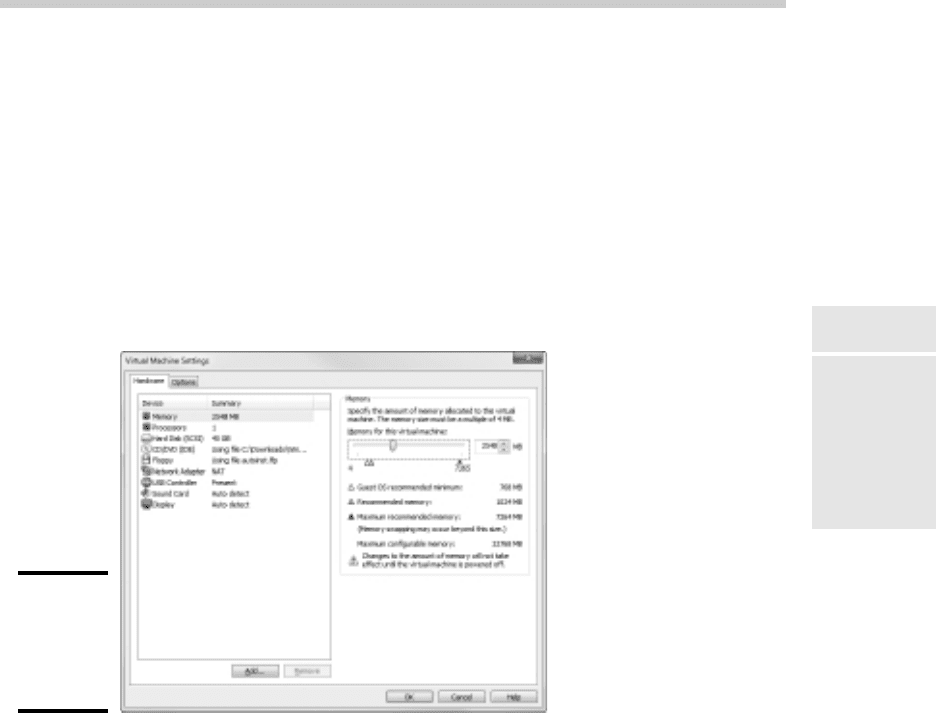
You can adjust the hardware configuration of a virtual machine by choosing
VM➪Settings while the virtual machine is running. This brings up the Virtual
Machine Settings dialog box, as shown in Figure 8-9. From this dialog box,
you can adjust the virtual machine’s hardware configuration including the
amount of RAM available to the VM and the number of processor cores. You
can also adjust the disk drive size, add CD, DVD, or floppy drives, and config-
ure network adapters, USB connections, and sound and display settings.
Figure 8-9:
Configuring
virtual
machine
settings.
17_625873-bk02ch08.indd 16717_625873-bk02ch08.indd 167 9/21/10 10:12 PM9/21/10 10:12 PM

Book II: Building a Network
168
17_625873-bk02ch08.indd 16817_625873-bk02ch08.indd 168 9/21/10 10:12 PM9/21/10 10:12 PM
Book III
Network Administration
and Security
18_625873-pp03.indd 16918_625873-pp03.indd 169 9/21/10 10:12 PM9/21/10 10:12 PM
Contents at a Glance
Chapter 1: Help Wanted: Job Description for
a Network Administrator . . . . . . . . . . . . . . . . . . . . . . . . . . . . . . . . . . . . .171
Chapter 2: Security 101 . . . . . . . . . . . . . . . . . . . . . . . . . . . . . . . . . . . . . . .185
Chapter 3: Managing User Accounts . . . . . . . . . . . . . . . . . . . . . . . . . . .195
Chapter 4: Firewalls and Virus Protection. . . . . . . . . . . . . . . . . . . . . . .203
Chapter 5: Extending Your Network with VPN Access. . . . . . . . . . . .215
Chapter 6: Managing Network Software. . . . . . . . . . . . . . . . . . . . . . . .221
Chapter 7: Solving Network Problems. . . . . . . . . . . . . . . . . . . . . . . . . .233
Chapter 8: Network Performance Anxiety. . . . . . . . . . . . . . . . . . . . . . .249
Chapter 9: Backing Up Your Data . . . . . . . . . . . . . . . . . . . . . . . . . . . . . .259
Chapter 10: Disaster Recovery and Business Continuity Planning 271s
18_625873-pp03.indd 17018_625873-pp03.indd 170 9/21/10 10:12 PM9/21/10 10:12 PM

Chapter 1: Help Wanted: Job
Description for a Network
Administrator
In This Chapter
✓ Deciphering the many jobs of the network administrator
✓ Dusting, vacuuming, and mopping
✓ Managing the network users
✓ Choosing the right tools
✓ Getting certified
H
elp wanted. Network administrator to help small business get control of
a network run amok. Must have sound organizational and management
skills. Only moderate computer experience required. Part time only.
Does this ad sound like one that your company should run? Every network
needs a network administrator, whether the network has 2 computers or
200. Of course, managing a 200-computer network is a full-time job, whereas
managing a 2-computer network isn’t. At least, it shouldn’t be.
This chapter introduces you to the boring job of network administration.
Oops . . . you’re probably reading this chapter because you’ve been elected
to be the network manager, so I’d better rephrase that: This chapter intro-
duces you to the wonderful, exciting world of network management! Oh,
boy! This is going to be fun!
Knowing What Network Administrators Do
Simply put, network administrators administer networks, which means that
they take care of the tasks of installing, configuring, expanding, protecting,
upgrading, tuning, and repairing the network. Network administrators take
care of the network hardware, such as cables, hubs, switches, routers, serv-
ers, and clients, as well as network software, such as network operating
systems, e-mail servers, backup software, database servers, and application
software. Most importantly, network administrators take care of network
users by answering their questions, listening to their troubles, and solving
their problems.
19_625873-bk03ch01.indd 17119_625873-bk03ch01.indd 171 9/21/10 10:12 PM9/21/10 10:12 PM

172
Knowing What Network Administrators Do
On a big network, these responsibilities constitute a full-time job. Large net-
works tend to be volatile: Users come and go, equipment fails, cables break,
and life in general seems to be one crisis after another.
Smaller networks are much more stable. After you get your network up and
running, you probably won’t have to spend much time managing its hard-
ware and software. An occasional problem may pop up, but with only a few
computers on the network, problems should be few and far between.
Regardless of the network’s size, all network administrators must attend to
several common chores:
✦ Equipment upgrades: The network administrator should be involved
in every decision to purchase new computers, printers, or other equip-
ment. In particular, the network administrator should be prepared to
lobby for the most network-friendly equipment possible, such as new
computers that already have network cards installed and configured and
printers that are network ready.
✦ Configuration: The network administrator must put on the pocket
protector whenever a new computer is added to the network. The net-
work administrator’s job includes considering what changes to make
to the cabling configuration, what computer name to assign to the new
computer, how to integrate the new user into the security system, what
rights to grant the user, and so on.
✦ Software upgrades: Every once in a while, your trusty operating system
vendor (in other words, Microsoft) releases a new version of your net-
work operating system. The network administrator must read about the
new version and decide whether its new features are beneficial enough to
warrant an upgrade. In most cases, the hardest part of upgrading to a new
version of your network operating system is determining the migration
path — that is, how to upgrade your entire network to the new version
while disrupting the network or its users as little as possible. Upgrading to
a new network operating system version is a major chore, so you need to
carefully consider the advantages that the new version can bring.
✦ Patches: Between upgrades, Microsoft releases patches and service
packs that fix minor problems with its server operating systems. For
more information, see the section “Patching Up Your Operating System
and Software” later in this chapter.
✦ Performance maintenance: One of the easiest traps that you can get
sucked into is the quest for network speed. The network is never fast
enough, and users always blame the hapless network manager. So the
administrator spends hours and hours tuning and tweaking the network
to squeeze out that last 2 percent of performance. You don’t want to get
caught in this trap, but in case you do, Chapter 8 of this book can help. It
clues you in to the basics of tuning your network for best performance.
19_625873-bk03ch01.indd 17219_625873-bk03ch01.indd 172 9/21/10 10:12 PM9/21/10 10:12 PM

Book III
Chapter 1
Help Wanted: Job
Description for a
Network Administrator
173
Choosing the Part-Time Administrator
✦ Ho-hum chores: Network administrators perform routine chores, such
as backing up the servers, archiving old data, freeing up server hard
drive space, and so on. Much of network administration is making sure
that things keep working and finding and correcting problems before
any users notice that something is wrong. In this sense, network admin-
istration can be a thankless job.
✦ Software inventory: Network administrators are also responsible for
gathering, organizing, and tracking the entire network’s software inven-
tory. You never know when something is going to go haywire on Joe in
Marketing’s ancient Windows 2000 computer and you’re going to have to
reinstall that old copy of WordPerfect. Do you have any idea where the
installation discs are?
Choosing the Part-Time Administrator
The larger the network, the more technical support it needs. Most small
networks — with just a dozen or two computers — can get by with a part-
time network administrator. Ideally, this person should be a closet computer
geek: someone who has a secret interest in computers but doesn’t like to
admit it. Someone who will take books home with him or her and read them
over the weekend. Someone who enjoys solving computer problems just for
the sake of solving them.
The job of managing a network requires some computer skills, but it isn’t
entirely a technical job. Much of the work that the network administrator
does is routine housework. Basically, the network administrator dusts, vacu-
ums, and mops the network periodically to keep it from becoming a mess.
Here are some additional ideas on picking a part-time network administrator:
✦ The network administrator needs to be an organized person. Conduct a
surprise office inspection and place the person with the neatest desk in
charge of the network. (Don’t warn them in advance, or everyone may
mess up their desks intentionally the night before the inspection.)
✦ Allow enough time for network administration. For a small network (say,
no more than 20 or so computers), an hour or two each week is enough.
More time is needed upfront as the network administrator settles into
the job and discovers the ins and outs of the network. After an initial
settling-in period, though, network administration for a small office net-
work doesn’t take more than an hour or two per week. (Of course, larger
networks take more time to manage.)
✦ Make sure that everyone knows who the network administrator is and
that the network administrator has the authority to make decisions about
the network, such as what access rights each user has, what files can and
can’t be stored on the server, how often backups are done, and so on.
19_625873-bk03ch01.indd 17319_625873-bk03ch01.indd 173 9/21/10 10:12 PM9/21/10 10:12 PM

174
Establishing Routine Chores
✦ Pick someone who is assertive and willing to irritate people. A good net-
work administrator should make sure that backups are working before a
hard drive fails and make sure that antivirus protection is in place before
a virus wipes out the entire network. This policing will irritate people,
but it’s for their own good.
✦ In most cases, the person who installs the network is also the network
administrator. This is appropriate because no one understands the net-
work better than the person who designs and installs it.
✦ The network administrator needs an understudy — someone who knows
almost as much about the network, is eager to make a mark, and smiles
when the worst network jobs are delegated.
✦ The network administrator has some sort of official title, such as
Network Boss, Network Czar, Vice President in Charge of Network
Operations, or Dr. Network. A badge, a personalized pocket protector,
or a set of Spock ears helps, too.
Establishing Routine Chores
Much of the network administrator’s job is routine stuff — the equivalent
of vacuuming, dusting, and mopping. Or if you prefer, changing the oil and
rotating the tires every 3,000 miles. Yes, it’s boring, but it has to be done.
✦ Backup: The network administrator needs to make sure that the net-
work is properly backed up. If something goes wrong and the network
isn’t backed up, guess who gets the blame? On the other hand, if
disaster strikes, yet you’re able to recover everything from yesterday’s
backup with only a small amount of work lost, guess who gets the pat
on the back, the fat bonus, and the vacation in the Bahamas? Chapter 9
of this book describes the options for network backups. You’d better
read it soon.
✦ Protection: Another major task for network administrators is sheltering
your network from the evils of the outside world. These evils come in
many forms, including hackers trying to break into your network and
virus programs arriving through e-mail. Chapter 4 of this book describes
this task in more detail.
✦ Cleanup: Users think that the network server is like the attic: They want
to throw files up there and leave them forever. No matter how much
storage your network has, your users will fill it up sooner than you think.
So the network manager gets the fun job of cleaning up the attic once
in a while. Oh, joy. The best advice I can offer is to constantly complain
about how messy it is up there and warn your users that spring cleaning
is coming up.
19_625873-bk03ch01.indd 17419_625873-bk03ch01.indd 174 9/21/10 10:12 PM9/21/10 10:12 PM

Book III
Chapter 1
Help Wanted: Job
Description for a
Network Administrator
175
Patching Up Your Operating System and Software
Managing Network Users
Managing network technology is the easiest part of network management.
Computer technology can be confusing at first, but computers aren’t nearly
as confusing as people. The real challenge of managing a network is manag-
ing the network’s users.
The difference between managing technology and managing users is obvi-
ous: You can figure out computers, but you can never really figure out
people. The people who use the network are much less predictable than the
network itself. Here are some tips for dealing with users:
✦ Training is a key part of the network manager’s job. Make sure that
everyone who uses the network understands it and knows how to use
it. If the network users don’t understand the network, they may uninten-
tionally do all kinds of weird things to it.
✦ Never treat your network users like they’re idiots. If they don’t under-
stand the network, it isn’t their fault. Explain it to them. Offer a class.
Buy them each a copy of Networking All-in-One For Dummies and tell
them to read it during their lunch hour. Hold their hands. But don’t treat
them like idiots.
✦ Make up a network cheat sheet that contains everything that the users
need to know about using the network on one page. Make sure that
everyone gets a copy.
✦ Be as responsive as possible when a network user complains of a net-
work problem. If you don’t fix the problem soon, the user may try to fix
it. You probably don’t want that.
✦ The better you understand the psychology of network users, the more
prepared you’ll be for the strangeness they often serve up. Toward that
end, I recommend that you read the Diagnostic and Statistical Manual of
Mental Disorders (also known as DSM-IV) cover to cover.
Patching Up Your Operating System and Software
One of the annoyances that every network manager faces is applying soft-
ware patches to keep your operating system and other software up to date.
A software patch is a minor update that fixes small glitches that crop up
from time to time, such as minor security or performance issues. These
glitches aren’t significant enough to merit a new version of the software,
but they’re important enough to require fixing. Most of the patches correct
security flaws that computer hackers have uncovered in their relentless
attempts to prove that they’re smarter than the security programmers at
Microsoft.
19_625873-bk03ch01.indd 17519_625873-bk03ch01.indd 175 9/21/10 10:12 PM9/21/10 10:12 PM

176
Discovering Software Tools for Network Administrators
Periodically, all the recently released patches are combined into a service
pack. Although the most diligent network administrators apply all patches as
they’re released, many administrators just wait for the service packs.
For all versions of Windows, you can use Windows Update to apply patches
to keep your operating system and other Microsoft software up to date. You
can find Windows Update in the Start menu. Or, you can fire up Internet
Explorer and browse to http://update.microsoft.com. Windows
Update automatically scans your computer’s software and creates a list of
software patches and other components that you can download and install.
You can also configure Windows Update to automatically notify you of
updates so that you don’t have to remember to check for new patches.
For larger networks, you can set up a server that runs Microsoft’s Software
Update Services (SUS) to automate software updates. SUS essentially lets
you set up your own Windows Update site on your own network. Then, you
have complete control over how software updates are delivered to the com-
puters on your network. For more information, see www.microsoft.com/
windowsserversystem/updateservices.
Discovering Software Tools for Network Administrators
Network administrators need certain tools to get their jobs done. Adminis-
trators of big, complicated, and expensive networks need big, complicated,
and expensive tools. Administrators of small networks need small tools.
Some of the tools that the administrator needs are hardware tools, such as
screwdrivers, cable crimpers, and hammers. The tools that I’m talking about
here, however, are software tools. Here’s a sampling of the tools you’ll need:
✦ A diagramming tool: A diagramming tool lets you draw pictures of your
network. Microsoft sells a program called Visio that’s specially designed
for the types of diagrams you’ll want to make as a network administrator.
✦ A network discovery program: For larger networks, you may want
to invest in a network discovery program such as NetworkView (www.
networkview.com) that can automatically document your network’s
structure for you. These programs scan the network carefully, looking
for computers, printers, routers, and other devices. They then create a
database of the network components, draw diagrams for you, and chug
out helpful reports.
✦ The network’s built-in tools: Many of the software tools that you need
to manage a network come with the network itself. As the network
administrator, you should read through the manuals that come with
your network software to see what management tools are available. For
example, Windows includes a net diag command that you can use to
make sure that all the computers on a network can communicate with
19_625873-bk03ch01.indd 17619_625873-bk03ch01.indd 176 9/21/10 10:12 PM9/21/10 10:12 PM