
Lowe D. Networking For Dummies
Подождите немного. Документ загружается.

Book III
Chapter 3
Managing User
Accounts
197
Looking at Built-In Accounts
Here are a few additional things worth knowing about the Administrator
account:
✦ You can’t delete it. The system must always have an administrator.
✦ You can grant administrator status to other user accounts. However,
you should do so only for users who really need to be administrators.
✦ You should use it only when you really need to do tasks that require
administrative authority. Many network administrators grant adminis-
trative authority to their own user accounts. That isn’t a very good idea.
If you’re killing some time surfing the Web or reading your e-mail while
logged on as an administrator, you’re just inviting viruses or malicious
scripts to take advantage of your administrator access. Instead, you
should set yourself up with two accounts: a normal account that you
use for day-to-day work, and an Administrator account that you use only
when you need it.
✦ The default name for the Administrator account is usually simply
Administrator. You may want to consider changing this name. Better
yet, change the name of the Administrator account to something more
obscure and then create an ordinary user account that has few — if
any — rights and give that account the name Administrator. That way,
hackers who spend weeks trying to crack your Administrator account
password will discover that they’ve been duped, once they finally break
the password. In the meantime, you’ll have a chance to discover their
attempts to breach your security and take appropriate action.
✦ Above all, don’t forget the Administrator account password. Write it
down in permanent ink and store it in Fort Knox, a safe-deposit box, or
some other secure location.
The Guest account
Another commonly created default account is called the Guest account. This
account is set up with a blank password and few — if any — access rights.
The Guest account is designed to allow people to step up to a computer and
log on, but after they do, it then prevents them from doing anything. Sounds
like a waste of time to me. I suggest you disable the Guest account.
Service accounts
Some network users aren’t actual people. I don’t mean that some of your
users are subhuman. Rather, some users are actually software processors
that require access to secure resources and therefore require user accounts.
These user accounts are usually created automatically for you when you
install or configure server software.
21_625873-bk03ch03.indd 19721_625873-bk03ch03.indd 197 9/21/10 10:13 PM9/21/10 10:13 PM

198
Assigning Using Rights
For example, when you install Microsoft’s Web server (IIS), an Internet
user account called IUSR is created. The complete name for this account is
IUSR_<servername>. So if the server is named WEB1, the account is named
IUSR_WEB1. IIS uses this account to allow anonymous Internet users to
access the files of your Web site.
As a general rule, you shouldn’t mess with these accounts unless you know
what you’re doing. For example, if you delete or rename the IUSR account,
you must reconfigure IIS to use the changed account. If you don’t, IIS will
deny access to anyone trying to reach your site. (Assuming that you do
know what you’re doing, renaming these accounts can increase your net-
work’s security. However, don’t start playing with these accounts until
you’ve researched the ramifications.)
Assigning User Rights
User accounts and passwords are only the front line of defense in the game
of network security. After a user gains access to the network by typing a
valid user ID and password, the second line of security defense — rights —
comes into play.
In the harsh realities of network life, all users are created equal, but some
users are more equal than others. The Preamble to the Declaration of
Network Independence contains the statement, “We hold these truths to be
self-evident, that some users are endowed by the network administrator with
certain inalienable rights. . . .”
The specific rights that you can assign to network users depend on which
network operating system you use. Here’s a partial list of the user rights that
are possible with Windows servers:
✦ Log on locally: The user can log on to the server computer directly from
the server’s keyboard.
✦ Change system time: The user can change the time and date registered
by the server.
✦ Shut down the system: The user can perform an orderly shutdown of
the server.
✦ Back up files and directories: The user can perform a backup of files
and directories on the server.
✦ Restore files and directories: The user can restore backed-up files.
✦ Take ownership of files and other objects: The user can take over files
and other network resources that belong to other users.
21_625873-bk03ch03.indd 19821_625873-bk03ch03.indd 198 9/21/10 10:13 PM9/21/10 10:13 PM
Book III
Chapter 3
Managing User
Accounts
199
Controlling User Access with Permissions (Who Gets What)
Controlling User Access with Permissions
(Who Gets What)
User rights control what a user can do on a network-wide basis. Permissions
enable you to fine-tune your network security by controlling access to
specific network resources, such as files or printers, for individual users
or groups. For example, you can set up permissions to allow users in the
accounting department to access files in the server’s \ACCTG directory.
Permissions can also enable some users to read certain files but not modify
or delete them.
Each network operating system manages permissions in a different way.
Whatever the details, the effect is that you can give permission to each user
to access certain files, folders, or drives in certain ways.
Any permissions that you specify for a folder apply automatically to any of
that folder’s subfolders, unless you explicitly specify a different set of per-
missions for the subfolder.
Windows refers to file system rights as permissions. Windows servers have
six basic permissions, listed in Table 3-1. You can assign any combination of
Windows permissions to a user or group for a given file or folder.
Table 3-1 Windows Basic Permissions
Permission Abbreviation What the User Can Do
Read R The user can open and read the file.
Write W The user can open and write to the file.
Execute X The user can run the file.
Delete D The user can delete the file.
Change P The user can change the permissions for
the file.
Take Ownership O The user can take ownership of the file.
Note the last permission listed in Table 3-1. In Windows, the concept of file
or folder ownership is important. Every file or folder on a Windows server
system has an owner. The owner is usually the user who creates the file or
folder. However, ownership can be transferred from one user to another. So
why the Take Ownership permission? This permission prevents someone
from creating a bogus file and giving ownership of it to you without your
21_625873-bk03ch03.indd 19921_625873-bk03ch03.indd 199 9/21/10 10:13 PM9/21/10 10:13 PM

200
Assigning Permissions to Groups
permission. Windows doesn’t allow you to give ownership of a file to another
user. Instead, you can give another user the right to take ownership of the
file. That user must then explicitly take ownership of the file.
You can use Windows permissions only for files or folders that are created
on drives formatted as NTFS volumes. If you insist on using FAT or FAT32 for
your Windows shared drives, you can’t protect individual files or folders on
the drives. This is one of the main reasons for using NTFS for your Windows
servers.
Assigning Permissions to Groups
A group account is an account that doesn’t represent an individual user.
Instead, it represents a group of users who use the network in a similar way.
Instead of granting access rights to each of these users individually, you can
grant the rights to the group and then assign individual users to the group.
When you assign a user to a group, that user inherits the rights specified for
the group.
For example, suppose that you create a group named Accounting for the
accounting staff and then allow members of the Accounting group access
to the network’s accounting files and applications. Then, instead of grant-
ing each accounting user access to those files and applications, you simply
make each accounting user a member of the Accounting group.
Here are a few additional details about groups:
✦ Groups are key to network-management nirvana. As much as pos-
sible, you should avoid managing network users individually. Instead,
clump them into groups and manage the groups. When all 50 users in
the accounting department need access to a new file share, would you
rather update 50 user accounts or just one group account?
✦ A user can belong to more than one group. Then, the user inherits the
rights of each group. For example, suppose that you have groups set
up for Accounting, Sales, Marketing, and Finance. A user who needs to
access both Accounting and Finance information can be made a member
of both the Accounting and Finance groups. Likewise, a user who needs
access to both Sales and Marketing information can be made a member
of both the Sales and Marketing groups.
✦ You can grant or revoke specific rights to individual users to override
the group settings. For example, you may grant a few extra permissions
for the manager of the Accounting department. You may also impose a
few extra restrictions on certain users.
21_625873-bk03ch03.indd 20021_625873-bk03ch03.indd 200 9/21/10 10:13 PM9/21/10 10:13 PM
Book III
Chapter 3
Managing User
Accounts
201
Automating Tasks with Logon Scripts
Understanding User Profiles
A user profile is a Windows feature that keeps track of an individual user’s
preferences for his or her Windows configuration. For a non-networked com-
puter, profiles enable two or more users to use the same computer, each
with his or her own desktop settings, such as wallpaper, colors, Start menu
options, and so on.
The real benefit of user profiles becomes apparent when profiles are used on
a network. A user’s profile can be stored on a server computer and accessed
whenever that user logs on to the network from any Windows computer on
the network.
The following are some of the elements of Windows that are governed by
settings in the user profile:
✦ Desktop settings from the Display Properties dialog box, including wall-
paper, screen savers, and color schemes
✦ Start menu programs and Windows toolbar options
✦ Favorites, which provide easy access to the files and folders that the
user accesses frequently
✦ Network settings, including drive mappings, network printers, and
recently visited network locations
✦ Application settings, such as option settings for Microsoft Word
✦ The Documents folder (My Documents in Windows XP)
Automating Tasks with Logon Scripts
A logon script is a batch file that runs automatically whenever a user logs
on. Logon scripts can perform several important logon tasks for you, such
as mapping network drives, starting applications, synchronizing the client
computer’s time-of-day clock, and so on. Logon scripts reside on the server.
Each user account can specify whether to use a logon script and which
script to use.
Here’s a sample logon script that maps a few network drives and synchro-
nizes the time:
net use m: \\MYSERVER\Acct
net use n: \\MYSERVER\Admin
net use o: \\MYSERVER\Dev
net time \\MYSERVER /set /yes
21_625873-bk03ch03.indd 20121_625873-bk03ch03.indd 201 9/21/10 10:13 PM9/21/10 10:13 PM

202
Automating Tasks with Logon Scripts
Logon scripts are a little out of vogue because most of what a logon script
does can be done via user profiles. Still, many administrators prefer the sim-
plicity of logon scripts, so they’re still used even on Windows Server 2003
and 2008 systems.
21_625873-bk03ch03.indd 20221_625873-bk03ch03.indd 202 9/21/10 10:13 PM9/21/10 10:13 PM

Chapter 4: Firewalls and
Virus Protection
In This Chapter
✓ Understanding what firewalls do
✓ Examining the different types of firewalls
✓ Looking at virus protection
✓ Discovering Windows security
I
f your network is connected to the Internet, a whole host of security
issues bubble to the surface. You probably connected your network
to the Internet so that your network’s users could access the Internet.
Unfortunately, however, your Internet connection is a two-way street. Not
only does it enable your network’s users to step outside the bounds of your
network to access the Internet, but it also enables others to step in and
access your network.
And step in they will. The world is filled with hackers looking for networks
like yours to break into. They may do it just for fun, or they may do it to
steal your customer’s credit card numbers or to coerce your mail server
into sending thousands of spam messages on their behalf. Whatever their
motive, rest assured that your network will be broken into if you leave it
unprotected.
This chapter presents an overview of two basic techniques for securing
your network’s Internet connection: firewalls and virus protection.
Firewalls
A firewall is a security-conscious router that sits between the Internet and
your network with a single-minded task: preventing them from getting to us.
The firewall acts as a security guard between the Internet and your local
area network (LAN). All network traffic into and out of the LAN must pass
through the firewall, which prevents unauthorized access to the network.
22_625873-bk03ch04.indd 20322_625873-bk03ch04.indd 203 9/21/10 10:14 PM9/21/10 10:14 PM
204
Firewalls
Some type of firewall is a must-have if your network has a connection to the
Internet, whether that connection is broadband (cable modem or digital sub-
scriber line; DSL), T1, or some other high-speed connection. Without it,
sooner or later a hacker will discover your unprotected network and tell his
friends about it. Within a few hours, your network will be toast.
You can set up a firewall two basic ways. The easiest way is to purchase a
firewall appliance, which is basically a self-contained router with built-in
firewall features. Most firewall appliances include a Web-based interface
that enables you to connect to the firewall from any computer on your net-
work using a browser. You can then customize the firewall settings to suit
your needs.
Alternatively, you can set up a server computer to function as a firewall
computer. The server can run just about any network operating system, but
most dedicated firewall systems run Linux.
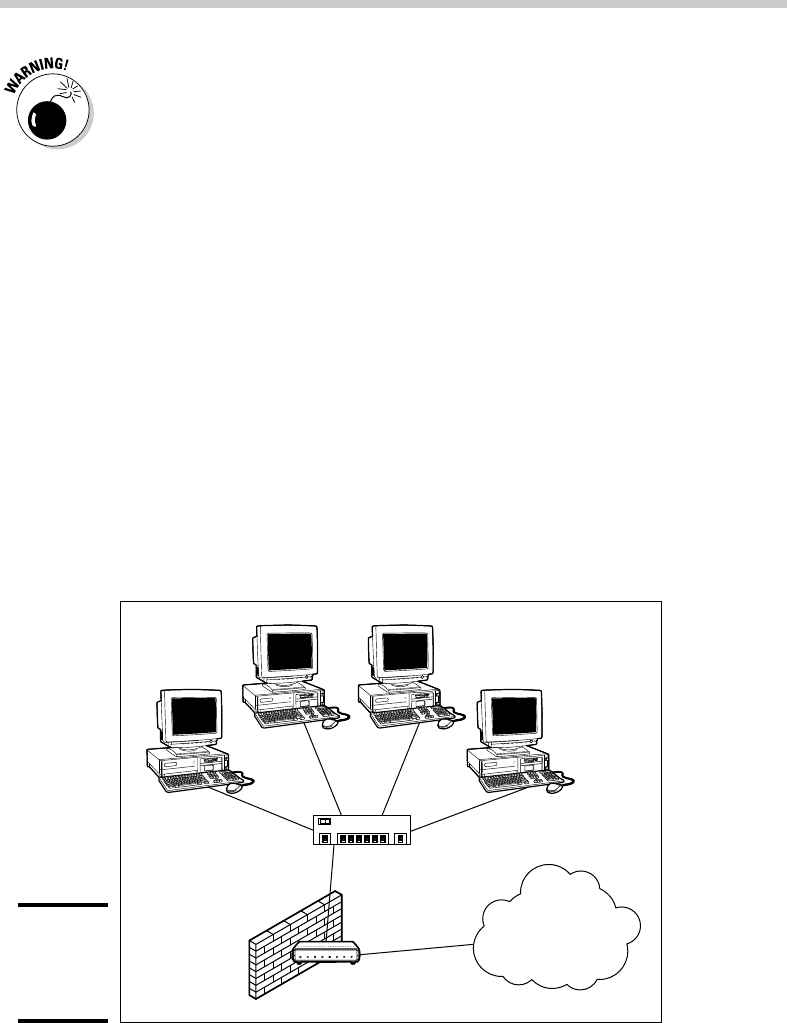
Whether you use a firewall appliance or a firewall computer, the firewall
must be located between your network and the Internet, as shown in Figure
4-1. Here, one end of the firewall is connected to a network hub, which is in
turn connected to the other computers on the network. The other end of the
firewall is connected to the Internet. As a result, all traffic from the LAN to
the Internet and vice versa must travel through the firewall.
Figure 4-1:
Using a
firewall
appliance.
Switch
Firewall Router
The Internet
22_625873-bk03ch04.indd 20422_625873-bk03ch04.indd 204 9/21/10 10:14 PM9/21/10 10:14 PM

Book III
Chapter 4
Firewalls and
Virus Protection
205
The Many Types of Firewalls
The term perimeter is sometimes used to describe the location of a firewall on
your network. In short, a firewall is like a perimeter fence that completely sur-
rounds your property and forces all visitors to enter through the front gate.
The Many Types of Firewalls
Firewalls employ four basic techniques to keep unwelcome visitors out of
your network. The following sections describe these basic firewall techniques.
Packet filtering
A packet-filtering firewall examines each packet that crosses the firewall and
tests the packet according to a set of rules that you set up. If the packet
passes the test, it’s allowed to pass. If the packet doesn’t pass, it’s rejected.
Packet filters are the least expensive type of firewall. As a result, packet-
filtering firewalls are very common. However, packet filtering has a number
of flaws that knowledgeable hackers can exploit. As a result, packet filtering
by itself doesn’t make for a fully effective firewall.
Packet filters work by inspecting the source and destination IP and port
addresses contained in each Transmission Control Protocol/Internet Protocol
(TCP/IP) packet. TCP/IP ports are numbers that are assigned to specific ser-
vices that help to identify for which service each packet is intended. For exam-
ple, the port number for the HTTP protocol is 80. As a result, any incoming
packets headed for an HTTP server will specify port 80 as the destination port.
Port numbers are often specified with a colon following an IP address. For
example, the HTTP service on a server whose IP address is 192.168.10.133
would be 192.168.10.133:80.
Literally thousands of established ports are in use. Table 4-1 lists a few of
the most popular ports.
Table 4-1 Some Well-Known TCP/IP Ports
Port Description
20 File Transfer Protocol (FTP)
21 File Transfer Protocol (FTP)
22 Secure Shell Protocol (SSH)
23 Telnet
25 Simple Mail Transfer Protocol (SMTP)
(continued)
22_625873-bk03ch04.indd 20522_625873-bk03ch04.indd 205 9/21/10 10:14 PM9/21/10 10:14 PM

206
The Many Types of Firewalls
Table 4-1 (continued)
Port Description
53 Domain Name Server (DNS)
80 World Wide Web (HyperText Transport Protocol; HTTP)
110 Post Office Protocol (POP3)
119 Network News Transfer Protocol (NNTP)
137 NetBIOS Name Service
138 NetBIOS Datagram Service
139 NetBIOS Session Service
143 Internet Message Access Protocol (IMAP)
161 Simple Network Management Protocol (SNMP)
194 Internet Relay Chat (IRC)
389 Lightweight Directory Access Protocol (LDAP)
396 NetWare over IP
443 HTTP over TLS/SSL (HTTPS)
The rules that you set up for the packet filter either permit or deny packets
that specify certain IP addresses or ports. For example, you may permit
packets that are intended for your mail server or your Web server and deny
all other packets. Or, you may set up a rule that specifically denies packets
that are heading for the ports used by NetBIOS. This rule keeps Internet
hackers from trying to access NetBIOS server resources, such as files or
printers.
One of the biggest weaknesses of packet filtering is that it pretty much trusts
that the packets themselves are telling the truth when they say who they’re
from and who they’re going to. Hackers exploit this weakness by using a
hacking technique called IP spoofing, in which they insert fake IP addresses
in packets that they send to your network.
Another weakness of packet filtering is that it examines each packet in
isolation without considering what packets have gone through the firewall
before and what packets may follow. In other words, packet filtering is state-
less. Rest assured that hackers have figured out how to exploit the stateless
nature of packet filtering to get through firewalls.
22_625873-bk03ch04.indd 20622_625873-bk03ch04.indd 206 9/21/10 10:14 PM9/21/10 10:14 PM