
Lowe D. Networking For Dummies
Подождите немного. Документ загружается.


Chapter 3: Using DHCP
In This Chapter
✓ Discovering the basics of DHCP
✓ Exploring scopes
✓ Configuring a DHCP server
✓ Setting up a DHCP client
E
very host on a Transmission Control Protocol/Internet Protocol (TCP/
IP) network must have a unique IP address. Each host must be properly
configured so that it knows its IP address. When a new host comes online, it
must be assigned an IP address that’s within the correct range of addresses
for the subnet but not already in use. Although you can manually assign IP
addresses to each computer on your network, that task quickly becomes
overwhelming if the network has more than a few computers.
That’s where DHCP — Dynamic Host Configuration Protocol — comes into
play. DHCP automatically configures the IP address for every host on a
network, thus assuring that each host has a valid, unique IP address. DHCP
even automatically reconfigures IP addresses as hosts come and go. As you
can imagine, DHCP can save a network administrator many hours of tedious
configuration work.
In this chapter, you discover the ins and outs of DHCP: what it is, how it
works, and how to set it up.
Understanding DHCP
DHCP allows individual computers on a TCP/IP network to obtain their
configuration information — in particular, their IP address — from a server.
The DHCP server keeps track of which IP addresses are already assigned so
that when a computer requests an IP address, the DHCP server offers it an
IP address that’s not already in use.
Configuration information provided by DHCP
Although the primary job of DHCP is to dole out IP addresses and subnet
masks, DHCP actually provides more configuration information than just the
IP address to its clients. The additional configuration information are DHCP
options. The following is a list of some common DHCP options that can be
configured by the server:
32_625873-bk04ch03.indd 30732_625873-bk04ch03.indd 307 9/21/10 10:21 PM9/21/10 10:21 PM

308
Understanding DHCP
✦ The router address, also known as the Default Gateway address
✦ The expiration time for the configuration information
✦ Domain name
✦ Domain Name Server (DNS) server address
✦ Windows Internet Name Service (WINS) server address
DHCP servers
A DHCP server can be a server computer located on the TCP/IP network.
All modern server operating systems have a built-in DHCP server. To set up
DHCP on a network server, all you have to do is enable the server’s DHCP
function and configure its settings. In the upcoming section, “Working with
a DHCP Server,” I show you how to configure a DHCP server for Windows
Server 2008. (The procedure for Windows Server 2003 is similar.)
A server computer running DHCP doesn’t have to be devoted entirely to
DHCP unless the network is very large. For most networks, a file server can
share duty as a DHCP server. This is especially true if you provide long
leases for your IP addresses. (I explain the idea of leases later in this chapter.)
Many multifunction routers also have built-in DHCP servers. If you don’t
want to burden one of your network servers with the DHCP function, you
can enable the router’s built-in DHCP server. An advantage of allowing the
router to be your network’s DHCP server is that you rarely need to power-down
a router. In contrast, you occasionally need to restart or power-down a file
server to perform system maintenance, apply upgrades, or perform
troubleshooting.
Most networks require only one DHCP server. Setting up two or more
servers on the same network requires that you carefully coordinate the IP
address ranges (known as scopes) for which each server is responsible. If
you accidentally set up two DHCP servers for the same scope, you may end
up with duplicate address assignments if the servers attempt to assign the
same IP address to two different hosts. To prevent this from happening, just
set up one DHCP server unless your network is so large that one server can’t
handle the workload.
How DHCP actually works
You can configure and use DHCP without knowing the details of how DHCP
client configuration actually works. However, a basic understanding of the
process can help you to understand what DHCP is actually doing. Not
only is this understanding enlightening, but it can also help when you’re
troubleshooting DHCP problems.
32_625873-bk04ch03.indd 30832_625873-bk04ch03.indd 308 9/21/10 10:21 PM9/21/10 10:21 PM

Book IV
Chapter 3
Using DHCP
309
Understanding DHCP
The following paragraphs contain a blow-by-blow account of how DHCP
configures TCP/IP hosts. This procedure happens every time you boot up a
host computer. It also happens when you release an IP lease and request a
fresh lease.
1. When a host computer starts up, the DHCP client software sends a
special broadcast packet, known as a DHCP Discover message.
This message uses the subnet’s broadcast address (all host ID bits set to
one) as the destination address and 0.0.0.0 as the source address.
The client has to specify 0.0.0.0 as the source address because it
doesn’t yet have an IP address, and it specifies the broadcast address
as the destination address because it doesn’t know the address of any
DHCP servers. In effect, the DHCP Discover message is saying, “Hey! I’m
new here. Are there any DHCP servers out there?”
2. The DHCP server receives the broadcast DHCP Discover message and
responds by sending a DHCP Offer message.
The DHCP Offer message includes an IP address that the client can use.
Like the DHCP Discover message, the DHCP Offer message is sent to the
broadcast address. This makes sense because the client to which the
message is being sent doesn’t yet have an IP address and won’t have
one until it accepts the offer. In effect, the DHCP Offer message is saying,
“Hello there, whoever you are. Here’s an IP address you can use, if you
want it. Let me know.”
What if the client never receives a DHCP Offer message from a DHCP
server? In that case, the client waits for a few seconds and tries again.
The client will try four times — at 2, 4, 8, and 16 seconds. If it still
doesn’t get an offer, it will try again after five minutes.
3. The client receives the DHCP Offer message and sends back a message
known as a DHCP Request message.
At this point, the client doesn’t actually own the IP address: It’s simply
indicating that it’s ready to accept the IP address that was offered by the
server. In effect, the DHCP Request message says, “Yes, that IP address
would be good for me. Can I have it, please?”
4. When the server receives the DHCP Request message, it marks the IP
address as assigned to the client and broadcasts a DHCP Ack message.
The DHCP Ack message says, in effect, “Okay, it’s all yours. Here’s the
rest of the information you need to use it.”
5. When the client receives the DHCP Ack message, it configures its TCP/IP
stack by using the address it accepted from the server.
32_625873-bk04ch03.indd 30932_625873-bk04ch03.indd 309 9/21/10 10:21 PM9/21/10 10:21 PM

310
Understanding Scopes
Understanding Scopes
A scope is simply a range of IP addresses that a DHCP server is configured
to distribute. In the simplest case, where a single DHCP server oversees IP
configuration for an entire subnet, the scope corresponds to the subnet.
However, if you set up two DHCP servers for a subnet, you can configure
each with a scope that allocates only one part of the complete subnet range.
In addition, a single DHCP server can serve more than one scope.
You must create a scope before you can enable a DHCP server. When you
create a scope, you can provide it with the following properties:
✦ A scope name, which helps you to identify the scope and its purpose
✦ A scope description, which lets you provide additional details about the
scope and its purpose
✦ A starting IP address for the scope
✦ An ending IP address for the scope
✦ A subnet mask for the scope
You can specify the subnet mask with dotted-decimal notation or with
network prefix notation.
✦ One or more ranges of excluded addresses
These addresses won’t be assigned to clients. For more information, see
the section “Feeling excluded?” later in this chapter.
✦ One or more reserved addresses
These are addresses that will always be assigned to particular host
devices. For more information, see the section “Reservations suggested”
later in this chapter.
✦ The lease duration, which indicates how long the host will be allowed to
use the IP address
The client will attempt to renew the lease when half of the lease duration
has elapsed. For example, if you specify a lease duration of eight days,
the client will attempt to renew the lease after four days pass. This
allows the host plenty of time to renew the lease before the address is
reassigned to some other host.
✦ The router address for the subnet
This value is also known as the Default Gateway address.
✦ The domain name and the IP address of the network’s DNS servers
and WINS servers
32_625873-bk04ch03.indd 31032_625873-bk04ch03.indd 310 9/21/10 10:21 PM9/21/10 10:21 PM

Book IV
Chapter 3
Using DHCP
311
Understanding Scopes
Feeling excluded?
Everyone feels excluded once in awhile. With a wife, three daughters, and
a female dog, I know how it feels. Sometimes, however, being excluded is a
good thing. In the case of DHCP scopes, exclusions can help you to prevent
IP address conflicts and can enable you to divide the DHCP workload for a
single subnet among two or more DHCP servers.
An exclusion is a range of addresses that are not included in a scope. The
exclusion range falls within the range of the scope’s starting and ending
addresses. In effect, an exclusion range lets you punch a hole in a scope. The
IP addresses that fall within the hole won’t be assigned.
Here are a few reasons for excluding IP addresses from a scope:
✦ The computer that runs the DHCP service itself must usually have
a static IP address assignment. As a result, the address of the DHCP
server should be listed as an exclusion.
✦ Some hosts may not be able to support DHCP. In that case, the host
will require a static IP address. For example, you may have a really old
MS-DOS computer that doesn’t have a DHCP client. By excluding its
IP address from the scope, you can prevent that address from being
assigned to any other host on the network.
Reservations suggested
In some cases, you may want to assign a particular IP address to a particular
host. One way to do this is to configure the host with a static IP address so
that the host doesn’t use DHCP to obtain its IP configuration. However, here
are two major disadvantages to that approach:
✦ TCP/IP configuration supplies more than just the IP address. If you use
static configuration, you must manually specify the subnet mask, the
Default Gateway address, the DNS server address, and other configuration
information required by the host. If this information changes, you have
to change it not only at the DHCP server, but also at each host that you
configured statically.
✦ You must remember to exclude the static IP address from the DHCP
server’s scope. Otherwise, the DHCP server won’t know about the static
address and may assign it to another host. Then, you’ll have two hosts
with the same address on your network.
A better way to assign a fixed IP address to a particular host is to create a
DHCP reservation. A reservation simply indicates that whenever a particular
host requests an IP address from the DHCP server, the server should provide
it the address that you specify in the reservation. The host won’t receive the
IP address until the host requests it from the DHCP server, but whenever the
host does request IP configuration, it will always receive the same address.
32_625873-bk04ch03.indd 31132_625873-bk04ch03.indd 311 9/21/10 10:21 PM9/21/10 10:21 PM
312
Understanding Scopes
To create a reservation, you associate the IP address that you want assigned
to the host with the host’s MAC address. As a result, you need to get the
MAC address from the host before you create the reservation. You can get
the MAC address by running the command ipconfig /all from a command
prompt. (If that fails because TCP/IP has not yet been configured on the
computer, you can also get the MAC address [the number that uniquely
identifies the hardware device] by running the System Information command,
which is Start➪All Programs➪Accessories➪System Tools➪System Information.)
If you set up more than one DHCP server, each should be configured to
serve a different range of IP addresses. Otherwise, the servers might assign
the same address to two different hosts.
How long to lease?
One of the most important decisions that you’ll make when you configure
a DHCP server is the length of time to specify for the lease duration. The
default value is eight days, which is appropriate in many cases. However,
you may encounter situations in which a longer or shorter interval may be
appropriate:
✦ The more stable your network, the longer the lease duration can safely
exist. If you only periodically add new computers to the network or
replace existing computers, you can safely increase the lease duration
past eight days.
✦ The more volatile the network, the shorter the lease duration should be.
For example, a wireless network in a university library is used by students
who bring their laptop computers into the library to work for a few hours at
a time. For this network, a duration such as one hour may be appropriate.
BootP — Bootstrap Protocol — is an Internet
protocol that enables diskless workstations
to boot themselves over the Internet or local
network. Like DHCP, BootP allows a
computer to receive an IP address assigned
from a server. However, unlike DHCP, BootP
also enables the computer to download a boot
image file, which the computer can then use
to boot itself from. A significant difference
between BootP and DHCP is that BootP comes
into play before the computer actually loads
an operating system. In contrast, DHCP is used
after an operating system has been loaded,
during the configuration of network devices.
Most DHCP servers can also support BootP. If
your network has diskless workstations, you
can use the DHCP server’s BootP support to
boot those computers. At one time, diskless
workstations were all the rage because
network administrators thought they’d be
easier to manage. Users hated them, however.
Most diskless workstations have now been
buried in landfills, and BootP isn’t used much.
What about BootP?
32_625873-bk04ch03.indd 31232_625873-bk04ch03.indd 312 9/21/10 10:21 PM9/21/10 10:21 PM

Book IV
Chapter 3
Using DHCP
313
Working with a DHCP Server
Don’t configure your network to allow infinite duration leases. Some
administrators feel that this cuts down the workload for the DHCP server
on stable networks. However, no network is permanently stable. Whenever
you find a DHCP server that’s configured with infinite leases, look at the
active leases. I guarantee you’ll find IP leases assigned to computers that no
longer exist.
Working with a DHCP Server
The exact steps that you should follow when configuring and managing a
DHCP server depend on the network operating system that you’re using. The
following procedures show you how to work with a DHCP server in Windows
Server 2008. The procedures for other operating systems are similar.
Installing and configuring a DHCP server
To install the DHCP server role on Windows Server 2008, follow these steps:
1. Choose Start➪Administrative Tools➪Server Manager.
The Manage Your Server application appears.
2. Click the Roles link and then click Add a Role.
The Add Roles Wizard appears.
3. Click Next to get the wizard started.
The wizard displays a list of available server roles.
4. Select DHCP Server from the list of roles and then click Next.
The wizard displays an explanation of DHCP.
5. Click Next.
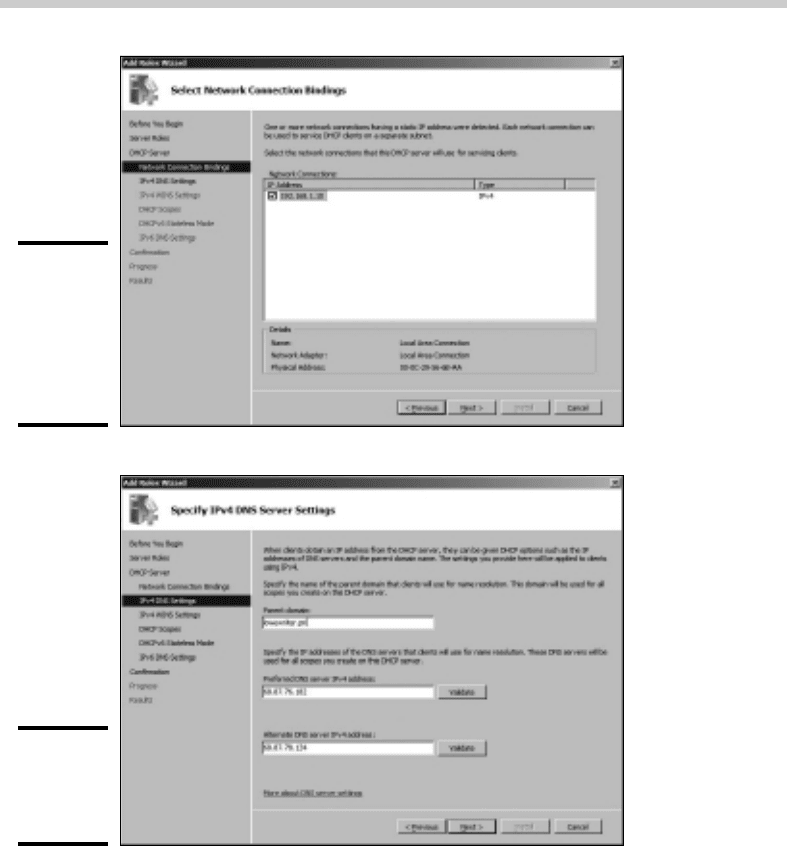
The wizard displays a list of the server’s network connections that have
static IP addresses, as shown in Figure 3-1. (In this example, only one
network connection has a static IP address assigned. Most network
servers will have at least two.)
6. Select the static IP addresses you want to use for the DHCP server.
Then click Next.
The wizard asks for the DNS configuration information, as shown in
Figure 3-2.
7. Enter the domain name and DNS servers. To enter a DNS server, type
its address in the IP address text box and then click Add.
You typically have more than one DNS server.
32_625873-bk04ch03.indd 31332_625873-bk04ch03.indd 313 9/21/10 10:21 PM9/21/10 10:21 PM
314
Working with a DHCP Server
Figure 3-1:
Select the
static IP
addresses
to use for
this DHCP
server.
Figure 3-2:
Specify
the DNS
information.
8. Click Next.
The wizard next asks for the WINS configuration information.
9. (Optional) If you want to enable WINS, enter the WINS server
configuration and then click Next.
If you don’t want to use WINS, skip this step and just click Next.
Either way, the next screen lets you configure scopes.
32_625873-bk04ch03.indd 31432_625873-bk04ch03.indd 314 9/21/10 10:21 PM9/21/10 10:21 PM
Book IV
Chapter 3
Using DHCP
315
Working with a DHCP Server
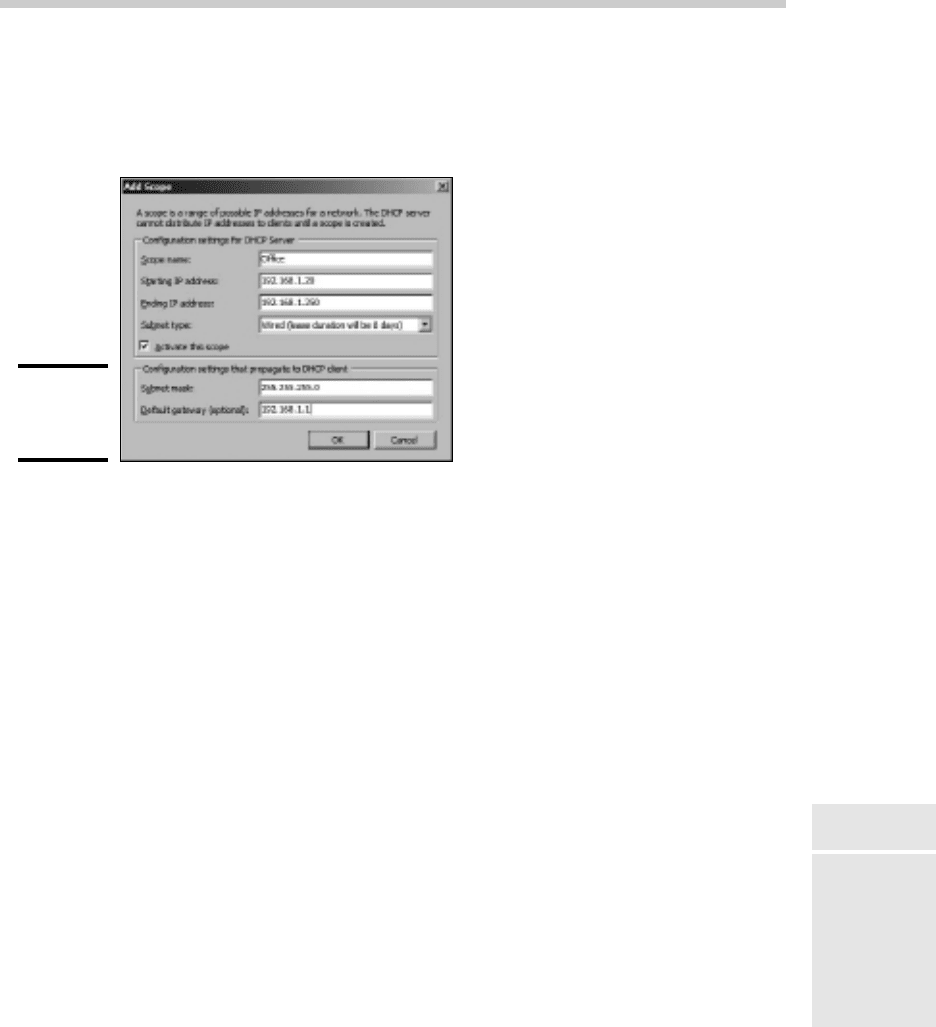
10. To create a new scope, click the Add Scope button.
The wizard asks for a name and description for the new scope, as shown
in Figure 3-3.
Figure 3-3:
Creating a
new scope.
11. Enter the information for the new scope.
You must enter the following information:
• Scope Name: The name can be anything you want. I suggest that you
use a generic name such as Office or your company name unless
you’re creating two or more scopes. Then, the names should indicate
the function of each scope.
• Scope Starting IP Address: This is the lowest IP address that will be
issued for this scope.
• Scope Ending IP Address: This is the highest IP address that will be
issued for this scope.
• Subnet Mask: This is the subnet mask issued for IP addresses in this
scope.
• Default Gateway: This is the default gateway address that will be
used for this scope. This is usually the address of your router.
• Subnet type: Choose Wired or Wireless. The difference is how long
the IP address will be valid. For wired networks, the addresses will
be valid for six days. For wireless networks, the addresses will expire
in eight hours.
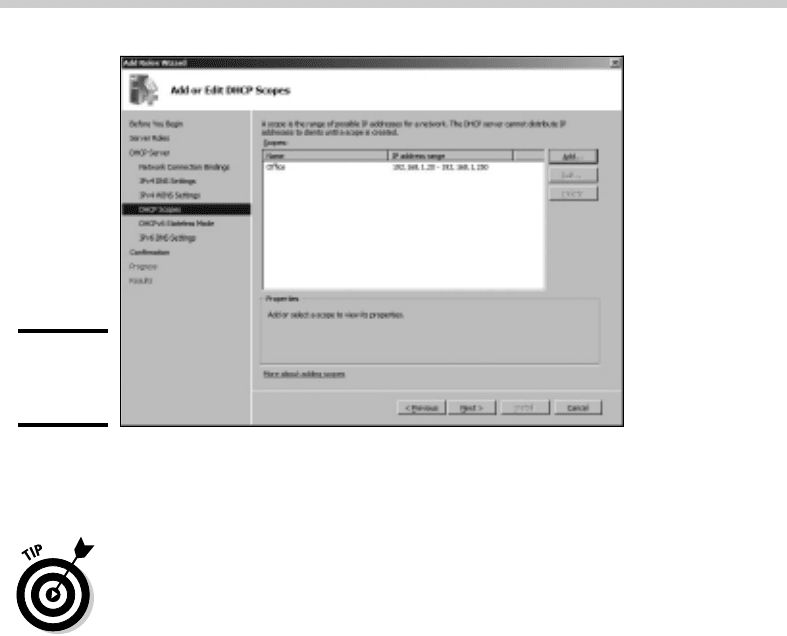
12. Select the Activate This Scope check box and then Click OK.
The scope is created, as shown in Figure 3-4.
32_625873-bk04ch03.indd 31532_625873-bk04ch03.indd 315 9/21/10 10:21 PM9/21/10 10:21 PM
316
Working with a DHCP Server
Figure 3-4:
The scope is
created.
13. If you want to create additional scopes, repeat Steps 10–12.
You can create as many scopes as you want for your DHCP server.
14. When you finish creating scopes, click Next.
The wizard asks whether you want to enable stateless mode, which is
used for IPv6. I recommend disabling this mode unless dealing with IPv6
clients is important to your network.
15. Click Next.
The wizard asks for the credentials to use when creating this DHCP
server. The default is to use your current login credentials.
16. Click Next.
The wizard displays a confirmation screen that summarizes the settings
you’ve entered for the DHCP server.
17. Click Install.
The DHCP server is created. This might take a few minutes. When the
server is finished, a final results page is displayed to confirm that the
server was properly installed.
18. Click Close.
You’re done!
Managing a DHCP server
You can bring up the DHCP management console by choosing Start➪
Administrative Tools➪DHCP or by clicking Manage This DHCP Server from
the Manage Your Server application. Either way, the DHCP management
console appears, as shown in Figure 3-5.
32_625873-bk04ch03.indd 31632_625873-bk04ch03.indd 316 9/21/10 10:21 PM9/21/10 10:21 PM