
Lowe D. Networking For Dummies
Подождите немного. Документ загружается.

Book I
Networking Basics
04_625873-pp01.indd 704_625873-pp01.indd 7 9/21/10 10:05 PM9/21/10 10:05 PM
Contents at a Glance
Chapter 1: Understanding Networks . . . . . . . . . . . . . . . . . . . . . . . . . . . . .9
Chapter 2: Understanding Network Protocols and Standards. . . . . . .21
Chapter 3: Understanding Network Hardware. . . . . . . . . . . . . . . . . . . .43
Chapter 4: Understanding Network Operating Systems. . . . . . . . . . . .61
04_625873-pp01.indd 804_625873-pp01.indd 8 9/21/10 10:05 PM9/21/10 10:05 PM

Chapter 1: Understanding
Networks
In This Chapter
✓ Introducing computer networks
✓ Finding out all about clients, servers, and peers
✓ Understanding the various types of networks
✓ Figuring out the disadvantages of networking
T
he first computer network was invented when ancient mathematicians
connected their abacuses (or is it abaci?) together with kite string so they
could instantly share their abacus answers with each other. Over the years,
computer networks became more and more sophisticated. Now, instead of
string, networks use electrical cables, fiber-optic cables, or wireless radio
signals to connect computers to each other. The purpose, however, has
remained the same: sharing information and getting work done faster.
This chapter describes the basics of what computer networking is and how
it works.
What Is a Network?
A network is nothing more than two or more computers connected to each
other so that they can exchange information, such as e-mail messages or
documents, or share resources, such as disk storage or printers. In most
cases, this connection is made via electrical cables that carry the infor-
mation in the form of electrical signals. But in some cases, other types of
connections are used. For example, fiber-optic cables let computers com-
municate at extremely high speeds by using impulses of light. Wireless net-
works let computers communicate by using radio signals, so the computers
aren’t restricted by physical cables.
In addition to the hardware that comprises the network, a network also
requires special software to enable communications. In the early days of
networking, you had to add this software to each computer on the network.
Nowadays, network support is built in to all major operating systems, includ-
ing all current versions of Windows, Macintosh operating systems, and Linux.
05_625873-bk01ch01.indd 905_625873-bk01ch01.indd 9 9/21/10 10:05 PM9/21/10 10:05 PM

10
What Is a Network?
Network building blocks
All networks, large or small, require specialized network hardware to make
them work. For small networks, the hardware may consist of nothing more
than a collection of computers that are equipped with network ports, a cable
for each computer, and a network switch that all the computers plug in to
via the cable. Larger networks probably have additional components, such
as routers or repeaters.
Small or large, all networks are built from the following basic building
blocks:
✦ Client computers: The computers that end users use to access the
resources of the network. Client computers are typically computers
located on users’ desks. They usually run a desktop version of Windows
such as Windows 7, Vista, or XP. In addition, the client computers usu-
ally run some type of application software such as Microsoft Office.
Client computers are sometimes referred to as workstations.
✦ Server computers: Computers that provide shared resources, such as
disk storage and printers, as well as network services, such as e-mail
and Internet access. Server computers typically run a specialized net-
work operating system such as Windows Server 2008 or 2003, NetWare,
or Linux, along with special software to provide network services. For
example, a server may run Microsoft Exchange to provide e-mail ser-
vices for the network, or it may run Apache Web Server so that the com-
puter can serve Web pages.
✦ Network interface: An interface — sometimes called a network port —
that’s installed in a computer to enable the computer to communicate
over a network. Almost all network interfaces implement a networking
standard called Ethernet.
A network interface is sometimes called a NIC, which stands for network
interface card, because in the early days of networking you actually had
to install a separate circuit card in the computer to provide a network
interface. Nowadays, nearly all computers come with network interfaces
built in as an integral part of the computer’s motherboard. Although
separate network cards are rarely required these days, the term NIC is
still frequently used to refer to the network interface.
It’s still common to install separate network interface cards to provide
more than one network interface on a single computer, or to replace
a built-in network interface that has malfunctioned without having to
replace the entire motherboard.
✦ Cable: Computers in a network are usually physically connected to each
other using cable. Although several types of cable have been popular
over the years, most networks today use a type of cable called twisted-
pair, also known by its official designation 10BaseT.
05_625873-bk01ch01.indd 1005_625873-bk01ch01.indd 10 9/21/10 10:05 PM9/21/10 10:05 PM

Book I
Chapter 1
Understanding
Networks
11
What Is a Network?
Twisted-pair cable is also sometimes referred to as Cat-5 or Cat-6 cable.
These terms refer to the standards that determine the maximum speed
with which the cable can carry data, Cat-6 being rated for more speed
than Cat-5.
Twisted-pair cable can also be referred to simply as copper, to distin-
guish it from fiber-optic cable which is used for the highest-speed net-
work connections. Fiber-optic cable uses strands of glass to transmit
light signals at very high speeds.
In many cases, the cables run through the walls and converge on a cen-
tral room called a wiring closet. But for smaller networks, the cables are
often just strung along the floor, hidden behind desks and other furni-
ture whenever possible.
✦ Switches: Network cable usually doesn’t connect computers directly to
each other. Instead, each computer is connected by cable to a device
known as a switch. The switch, in turn, connects to the rest of the net-
work. Each switch contains a certain number of ports, typically 8 or 16.
Thus, you can use an eight-port switch to connect up to eight comput-
ers. Switches can be connected to each other to build larger networks.
For more information about switches, see the “Network Topology” sec-
tion later in this chapter. (Older networks may use a more primitive type
of device called a hub instead of a switch. A hub provides the same func-
tion as a switch, but it isn’t as efficient. The term hub is sometimes used
to mean switch, even though hubs and switches are not technically the
same thing.)
✦ Wireless networks: In many networks, cables and switches are making
way for wireless network connections, which enable computers to com-
municate via radio signals. In a wireless network, radio transmitters
and receivers take the place of cables. The main advantage of wireless
networking is its flexibility. With a wireless network, you don’t have to
run cables through walls or ceilings, and your client computers can be
located anywhere within range of the network broadcast. The main dis-
advantage of wireless networking is that it’s inherently less secure than
a cabled network.
✦ Network software: Although network hardware is essential, what really
makes a network work is software. A whole bunch of software has to be
set up just right in order to get a network working. Server computers
typically use a special network operating system (also known as a NOS)
in order to function efficiently, and client computers need to have their
network settings configured properly in order to access the network.
One of the most important networking choices to make is which network
operating system you’ll use on the network’s servers. That’s because
much of the task of building a new network and managing an existing
one is setting up and maintaining the network operating system on the
servers.
05_625873-bk01ch01.indd 1105_625873-bk01ch01.indd 11 9/21/10 10:05 PM9/21/10 10:05 PM

12
What Is a Network?
Why bother?
If the truth be told, computer networks are a pain to set up. So, why bother?
Because the benefits of having a network make the difficulty of setting one
up worthwhile. You don’t have to be a Ph.D. to understand the benefits
of networking. In fact, you learned everything you need to know about
the benefits of networking in kindergarten. Networks are all about shar-
ing. Specifically, networks are about sharing three things: information,
resources, and applications.
✦ Sharing information: Networks allow users to share information in
several different ways. The most common way of sharing information
is to share individual files. For example, two or more people can work
together on a single spreadsheet file or word-processing document. In
most networks, a large hard drive on a central server computer is set up
as a common storage area where users can store files to be shared with
other users.
In addition to sharing files, networks allow users to communicate with
each other in various ways. For example, messaging applications let
network users exchange messages with each other using an e-mail appli-
cation such as Microsoft Outlook. Users can also hold online meetings
over the network. In fact, with inexpensive video cameras and the right
software, users can hold videoconferences over the network.
✦ Sharing resources: Certain computer resources, such as printers or hard
drives, can be set up so that network users can share them. Sharing these
resources can result in significant cost savings. For example, it’s cheaper
to buy a single high-speed printer with advanced features such as collat-
ing, stapling, and duplex printing that can be shared by an entire work-
group than it is to buy separate printers for each user in the group.
Hard drives can also be shared resources. In fact, providing users with
access to a shared hard drive is the most common method of sharing
files on a network. A computer whose main purpose in life is to host
shared hard drives is called a file server.
In actual practice, entire hard drives aren’t usually shared. Instead,
individual folders on a networked hard drive are shared. This way, the
network administrator can allow different network users to have access
to different shared folders. For example, a company may set up shared
folders for its sales department and accounting department. Then, sales
personnel can access the sales department’s folder, and accounting per-
sonnel can access the accounting department’s folder.
You can share other resources on a network. For example, a network
can be used to share an Internet connection. In the early days of the
Internet, it was common for each user who required access to the
Internet to have his or her own modem connection. Nowadays, it’s more
common for the network to provide a shared, high-speed Internet con-
nection that everyone on the network can access.
05_625873-bk01ch01.indd 1205_625873-bk01ch01.indd 12 9/21/10 10:05 PM9/21/10 10:05 PM

Book I
Chapter 1
Understanding
Networks
13
Of Clients and Servers
✦ Sharing applications: One of the most common reasons for network-
ing in many businesses is so that several users can work together on
a single business application. For example, an accounting department
may have accounting software that can be used from several comput-
ers at the same time. Or a sales-processing department may have an
order-entry application that runs on several computers to handle a large
volume of orders.
Of Clients and Servers
The network computer that contains the hard drives, printers, and other
resources that are shared with other network computers is called a server.
This term comes up repeatedly, so you have to remember it. Write it on the
back of your left hand.
Any computer that’s not a server is called a client. You have to remember
this term, too. Write it on the back of your right hand.
Only two kinds of computers are on a network: servers and clients. Look at
your left hand and then look at your right hand. Don’t wash your hands until
you have these terms memorized.
The distinction between servers and clients in a network would be some-
what fun to study in a sociology class because it’s similar to the distinction
between the haves and the have-nots in society:
✦ Usually, the most powerful and expensive computers in a network are
the servers. This fact makes sense because every user on the network
shares the server’s resources.
✦ The cheaper and less powerful computers in a network are the clients.
Clients are the computers used by individual users for everyday work.
Because clients’ resources don’t have to be shared, they don’t have to
be as fancy.
✦ Most networks have more clients than servers. For example, a network
with ten clients can probably get by with one server.
✦ In some networks, a clear line of segregation exists between servers and
clients. In other words, a computer is either a server or a client, and not
both. A server can’t become a client, nor can a client become a server.
✦ Other networks are more progressive, allowing any computer in the
network to be a server and allowing any computer to be both server and
client at the same time. The network illustrated in Figure 1-1, later in this
chapter, is this type of network.
05_625873-bk01ch01.indd 1305_625873-bk01ch01.indd 13 9/21/10 10:05 PM9/21/10 10:05 PM

14
Dedicated Servers and Peers
Dedicated Servers and Peers
In some networks, a server computer is a server computer and nothing else.
This server computer is dedicated solely to the task of providing shared
resources, such as hard drives and printers, to be accessed by the network
client computers. Such a server is referred to as a dedicated server because
it can perform no other tasks besides network services. A network that relies
on dedicated servers is sometimes called a client/server network.
Other networks take an alternative approach, enabling any computer on the
network to function as both a client and a server. Thus, any computer can
share its printers and hard drives with other computers on the network.
And while a computer is working as a server, you can still use that same
computer for other functions such as word processing. This type of network
is called a peer-to-peer network because all the computers are thought of as
peers, or equals.
While you’re walking the dog tomorrow morning, ponder these points con-
cerning the difference between dedicated server networks and peer-to-peer
networks:
✦ Peer-to-peer networking has been built in to all versions of Windows
since Windows 95. Thus, you don’t have to buy any additional software
to turn your computer into a server. All you have to do is enable the
Windows server features.
✦ The network server features that are built in to desktop versions of
Windows (including Windows 7, Vista, and XP) aren’t very efficient
because these versions of Windows were not designed primarily to be
network servers. If you’re going to dedicate a computer to the task of
being a full-time server, you should use a full-fledged network operating
system, such as Windows Server 2008, instead.
Networks Big and Small
Networks come in all sizes and shapes. In fact, it’s common to categorize
networks based on the geographical size they cover, as described in the fol-
lowing list:
✦ Local area networks: A local area network, or LAN, is a network in which
computers are relatively close together, such as within the same office
or building.
Note that the term LAN doesn’t imply that the network is small. A LAN
can, in fact, contain hundreds or even thousands of computers. What
makes a network a LAN is that all those computers are located within
05_625873-bk01ch01.indd 1405_625873-bk01ch01.indd 14 9/21/10 10:05 PM9/21/10 10:05 PM

Book I
Chapter 1
Understanding
Networks
15
Network Topology
close proximity to each other. Usually a LAN is contained within a single
building, but a LAN can extend to several buildings on a campus —
provided the buildings are close to each other (typically within 300
feet of each other, though greater distances are possible with special
equipment).
✦ Wide area networks: A wide area network, or WAN, is a network that
spans a large geographic territory, such as an entire city or region, or
even an entire country. WANs are typically used to connect two or more
LANs that are relatively far apart. For example, a WAN may connect an
office in San Francisco with an office in New York.
Again, it’s the geographic distance, not the number of computers
involved, that makes a network a WAN. If the office in San Francisco and
the office in New York both have only one computer, the WAN will have
a total of two computers but will span more than 3,000 miles.
✦ Metropolitan area networks: A metropolitan area network, or MAN,
is a network that’s smaller than a typical WAN but larger than a LAN.
Typically, a MAN connects two or more LANs that are within the same
city but are far enough apart that the networks can’t be connected using
a simple cable or wireless connection.
Network Topology
The term network topology refers to the shape of how the computers and
other network components are connected to each other. There are several dif-
ferent types of network topologies, each with advantages and disadvantages.
In the following discussion of network topologies, I use two important terms:
✦ Node: A node is a device that’s connected to the network. For your pur-
poses here, a node is the same as a computer. Network topology deals
with how the nodes of a network are connected to each other.
✦ Packet: A packet is a message that’s sent over the network from one
node to another node. The packet includes the address of the node
that sent the packet, the address of the node the packet is being sent
to, and data.
Bus topology
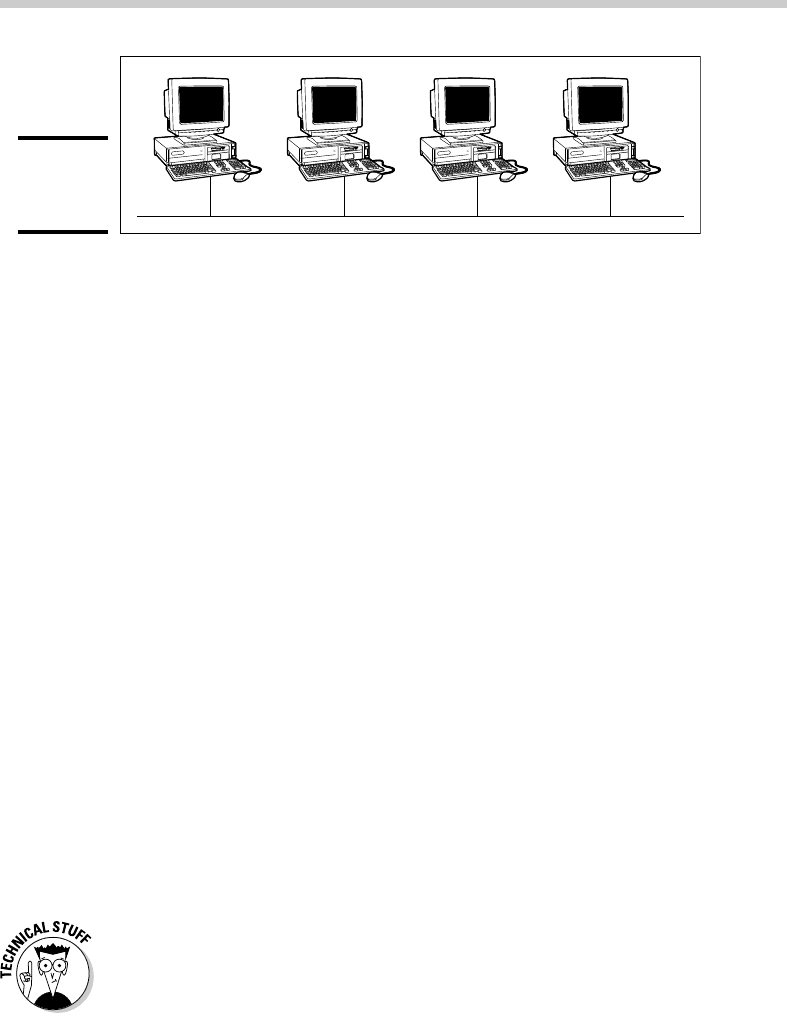
The first type of network topology is called a bus, in which nodes are strung
together in a line, as shown in Figure 1-1. The key to understanding how a
bus topology works is to think of the entire network as a single cable, with
each node “tapping” into the cable so it can listen in on the packets being
sent over that cable. If you’re old enough to remember party lines, you get
the idea.
05_625873-bk01ch01.indd 1505_625873-bk01ch01.indd 15 9/21/10 10:05 PM9/21/10 10:05 PM
16
Network Topology
Figure 1-1:
Bus
topology.
In a bus topology, every node on the network can see every packet that’s
sent on the cable. Each node looks at each packet to determine whether the
packet is intended for it. If so, the node claims the packet. If not, the node
ignores the packet. This way, each computer can respond to data sent to it
and ignore data sent to other computers on the network.
If the cable in a bus network breaks, the entire network is effectively dis-
abled. Obviously the nodes on opposite sides of the break can’t continue to
communicate with each other because data can’t span the gap created by
the break. But even those nodes that are on the same side of the break will
be unable to communicate with each other, because the open end of the
cable left by the break disrupts the proper transmission of electrical signals.
In the early days of Ethernet networking, bus topology was commonplace.
Although bus topology has given way to star topology (see the next section)
for most networks today, many networks today still have elements that rely
on bus topology.
Star topology
In a star topology, each network node is connected to a central device called
a hub or a switch, as shown in Figure 1-2. Star topologies are commonly used
with LANs.
If a cable in a star network breaks, only the node connected to that cable is
isolated from the network. The other nodes can continue to operate without
interruption — unless, of course, the node that’s isolated because of the
break happens to be the file server.
You should be aware of the somewhat technical distinction between a hub
and a switch. Simply put, a hub doesn’t know anything about the computers
that are connected to each of its ports. So when a computer connected to
the hub sends a packet to a computer that’s connected to another port, the
hub sends a duplicate copy of the packet to all its ports. In contrast, a switch
knows which computer is connected to each of its ports. As a result, when
a switch receives a packet intended for a particular computer, it sends the
packet only to the port that the recipient is connected to.
05_625873-bk01ch01.indd 1605_625873-bk01ch01.indd 16 9/21/10 10:05 PM9/21/10 10:05 PM