
Lowe D. Networking For Dummies
Подождите немного. Документ загружается.


Book VIII
Chapter 4
Using SharePoint
657
All the pages on a SharePoint site have several elements in common, includ-
ing the following:
✦ Near the top left is a title area that displays the name of the SharePoint
site — in this case, simply Home.
✦ At the top left (above the title area) is a button labeled Site Actions.
When you click this button, a menu appears with commands that let you
create additional pages, edit the current page, or manage site settings.
✦ At the top right is a log-on control that displays the name of the cur-
rent user and includes a drop-down menu that lets you sign out, change
users, or update your user settings.
✦ Beneath the log-on control is a Help button that displays useful informa-
tion about how to use SharePoint.
✦ To the left of the Help button is a search box that lets you search the
entire site for specific text. Just enter the text you want to search for
and then click the magnifying glass icon.
✦ Below the title area is a series of one or more tabs called the Top Link
Bar. Initially, the Top Link Bar contains a single tab named Home, which
takes you to the home page for the site. But you can add links.
✦ A navigation menu called Quick Launch runs down the left side of the
window. It provides quick access to the individual pages on the site.
✦ The main display area, in the center of each SharePoint page, contains
one or more gadgets called Web Parts. SharePoint comes with a collec-
tion of Web Parts that can be added to this area, and additional Web
parts are available from various sources. If you’re handy with ASP.NET
Web programming, you can even create your own Web parts.
Adding Users
One of the first things you’ll want to do after you create a SharePoint site
is add one or more users for the site. SharePoint recognizes three different
types, also called groups, of users:
✦ Owners have full control over the site. Owners can add or remove
pages, change the look and feel of pages, manage site settings, and per-
form any other administrative tasks necessary to keep the site running
well. You should create a limited number of owners.
✦ Members can add content to the site but can’t change the site’s overall
structure or modify its settings. Most of your users should be Team Site
Members.
✦ Visitors have read-only access to the site: They can view the site’s pages
but cannot add content of their own.
Adding Users
61_625873-bk08ch04.indd 65761_625873-bk08ch04.indd 657 9/21/10 10:43 PM9/21/10 10:43 PM
658
Here’s the procedure for adding a new member:
1. Log on to the site as an Owner.
Only an Owner can manage users. If you created the site yourself, you’re
already designated as an owner.
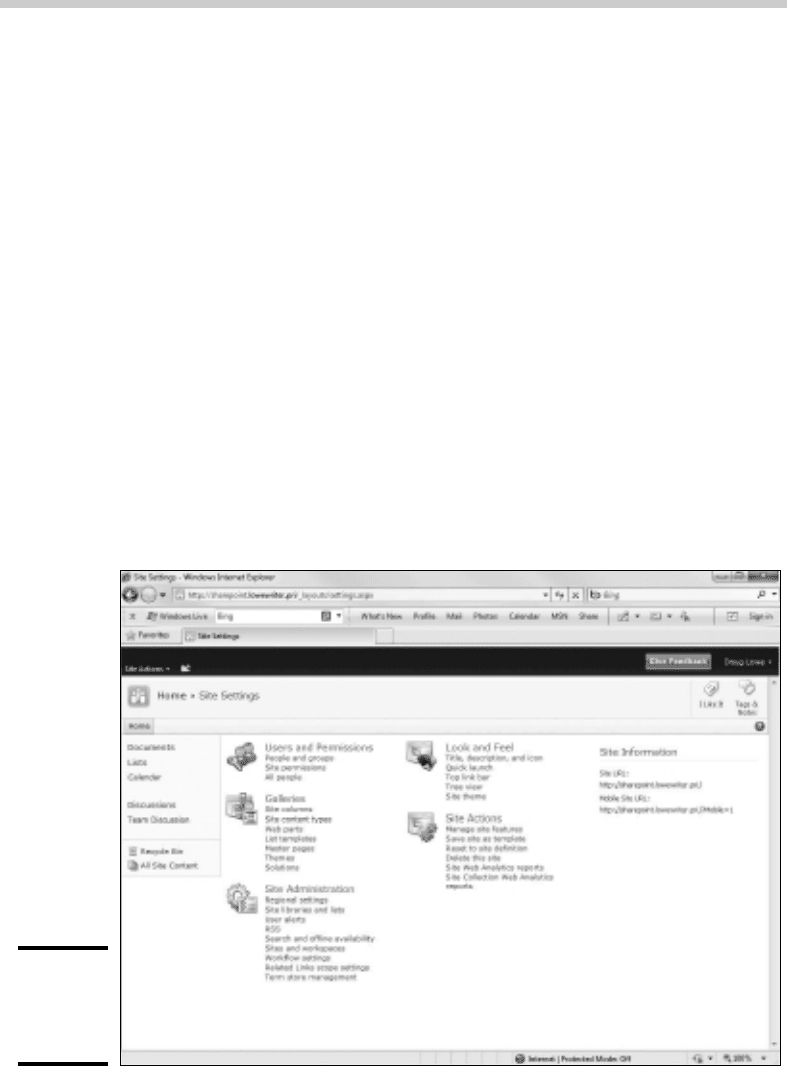
2. Click the Site Actions button and then choose Site Settings.
This brings up the Site Settings page, shown in Figure 4-2. As you can
see, this page contains links that lead to various site administration
pages.
3. Under the Users and Permissions heading, click the People and
Groups link.
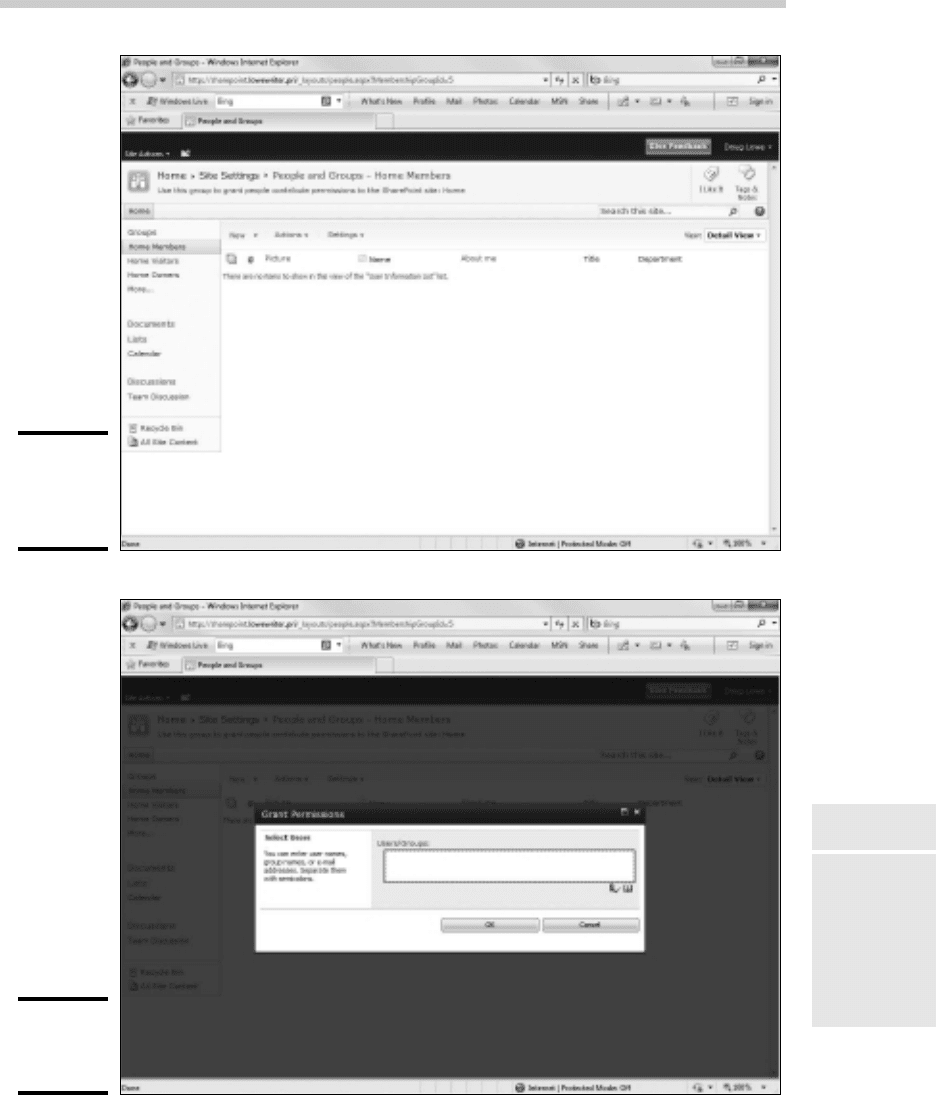
This brings up the People and Groups page, as shown in Figure 4-3.
4. Select the group you want to add the new user to.
The site groups are listed in the Quick Launch area on the left of the
page. In Figure 4-3, the Members group is selected.
5. Click the New drop-down list and then choose Add Users.
The Grant Permissions dialog box appears, as shown in Figure 4-4.
Figure 4-2:
The Site
Settings
page.
Adding Users
61_625873-bk08ch04.indd 65861_625873-bk08ch04.indd 658 9/21/10 10:43 PM9/21/10 10:43 PM
Book VIII
Chapter 4
Using SharePoint
659
Figure 4-3:
The People
and Groups
page.
Figure 4-4:
Adding
users.
Adding Users
61_625873-bk08ch04.indd 65961_625873-bk08ch04.indd 659 9/21/10 10:43 PM9/21/10 10:43 PM
660
6. Type the name of the user you want to add in the Users/Groups text box.
You must type the actual domain account name. To add more than one
user, separate the names with semicolons. If you want, you can click
the Browse button (represented by an address book icon) to browse for
names.
7. Click OK.
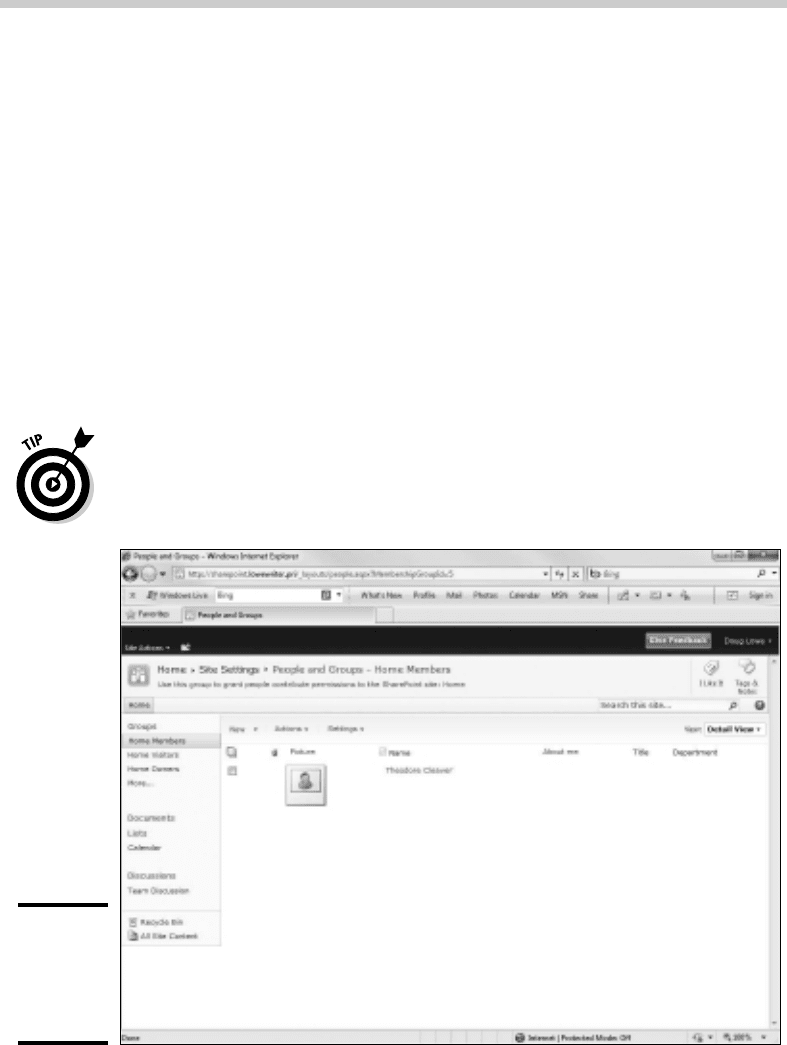
The user is created. You’re returned to the People and Groups page,
where the new user account is now listed. See Figure 4-5.
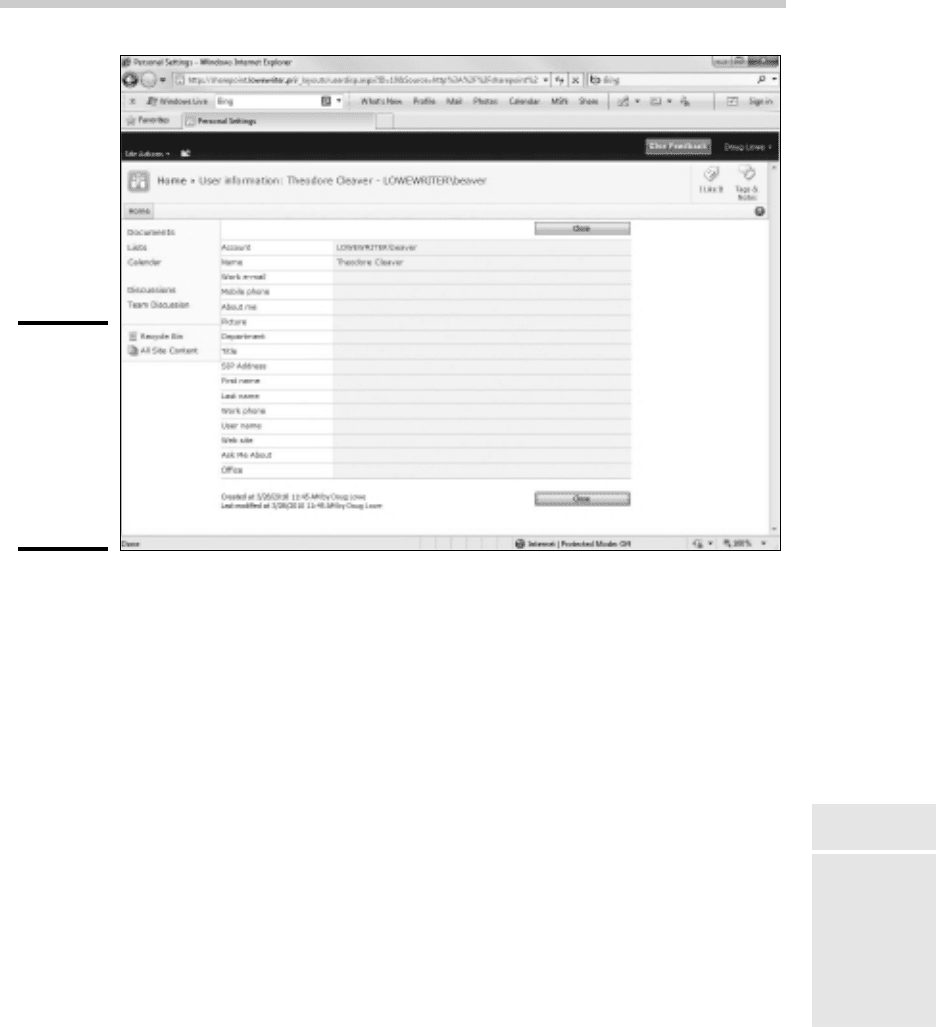
After you’ve created a new user, you can edit the user’s settings by clicking
the user’s name. This brings up the User Information page, shown in Figure
4-6. Initially, there isn’t much user information — just the user’s name and
Active Directory account. You can rectify that situation by clicking Edit Item,
which brings up a form that lets you enter the user’s e-mail address, descrip-
tive About Me information, a picture, and so on.
Any SharePoint user can access his or her own User Information page by
choosing My Settings from the log-on control that appears at the top right of
each SharePoint page.
Figure 4-5:
A user
account
has been
created.
Adding Users
61_625873-bk08ch04.indd 66061_625873-bk08ch04.indd 660 9/21/10 10:43 PM9/21/10 10:43 PM
Book VIII
Chapter 4
Using SharePoint
661
Figure 4-6:
The User
Information
page for a
new user
doesn’t
contain any
interesting
information.
Adding and Removing Announcements
The home page includes an area for announcements. As the site owner,
you’ll want to periodically add new announcements to this page and remove
old ones. Here are the steps for adding a new announcement:
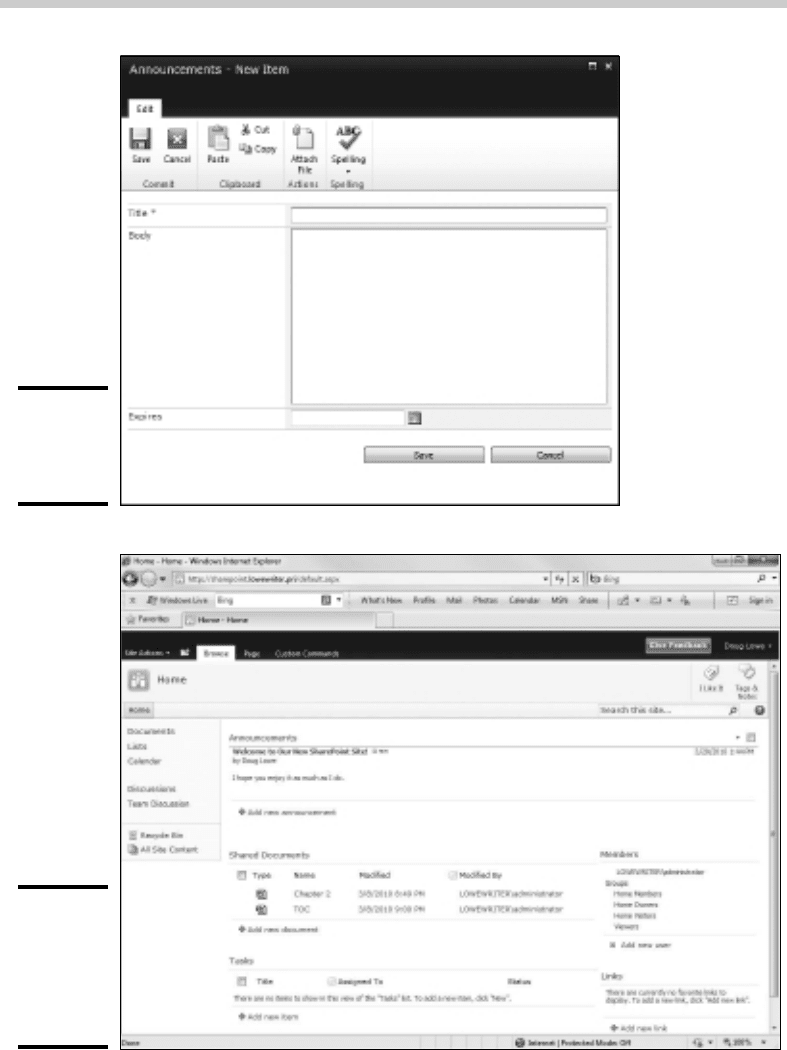
1. Click the Add New Announcement link.
If you don’t see an Add New Announcement link, you don’t have ade-
quate permissions to add new announcements. You can skip the rest of
this procedure.
Assuming you have adequate permissions, the page shown in Figure 4-7
appears.
2. Type a subject and body for the announcement.
3. Set an expiration date if you want.
When you set an expiration date, the message is automatically removed
when it has expired.
4. Click Save.
The new announcement is added to the top of the list of announcements
on the home page, as shown in Figure 4-8.
You’re done! You and the site’s users can now view and enjoy your
latest announcement.
Adding and Removing Announcements
61_625873-bk08ch04.indd 66161_625873-bk08ch04.indd 661 9/21/10 10:43 PM9/21/10 10:43 PM
662
Figure 4-7:
The
Announce-
ments page.
Figure 4-8:
The home
page with
a new
announce-
ment.
Adding and Removing Announcements
61_625873-bk08ch04.indd 66261_625873-bk08ch04.indd 662 9/21/10 10:43 PM9/21/10 10:43 PM
Book VIII
Chapter 4
Using SharePoint
663
To edit or remove the announcement, click the announcement’s title. This
displays a page that lets you modify or delete the announcement.
Creating New Pages
The default SharePoint site consists of several standard pages, including
a document library, calendar, and a discussion forum. You can add pages
to your SharePoint site to customize it as needed. For instance, many
SharePoint sites have more than one document library to store different
types of documents.
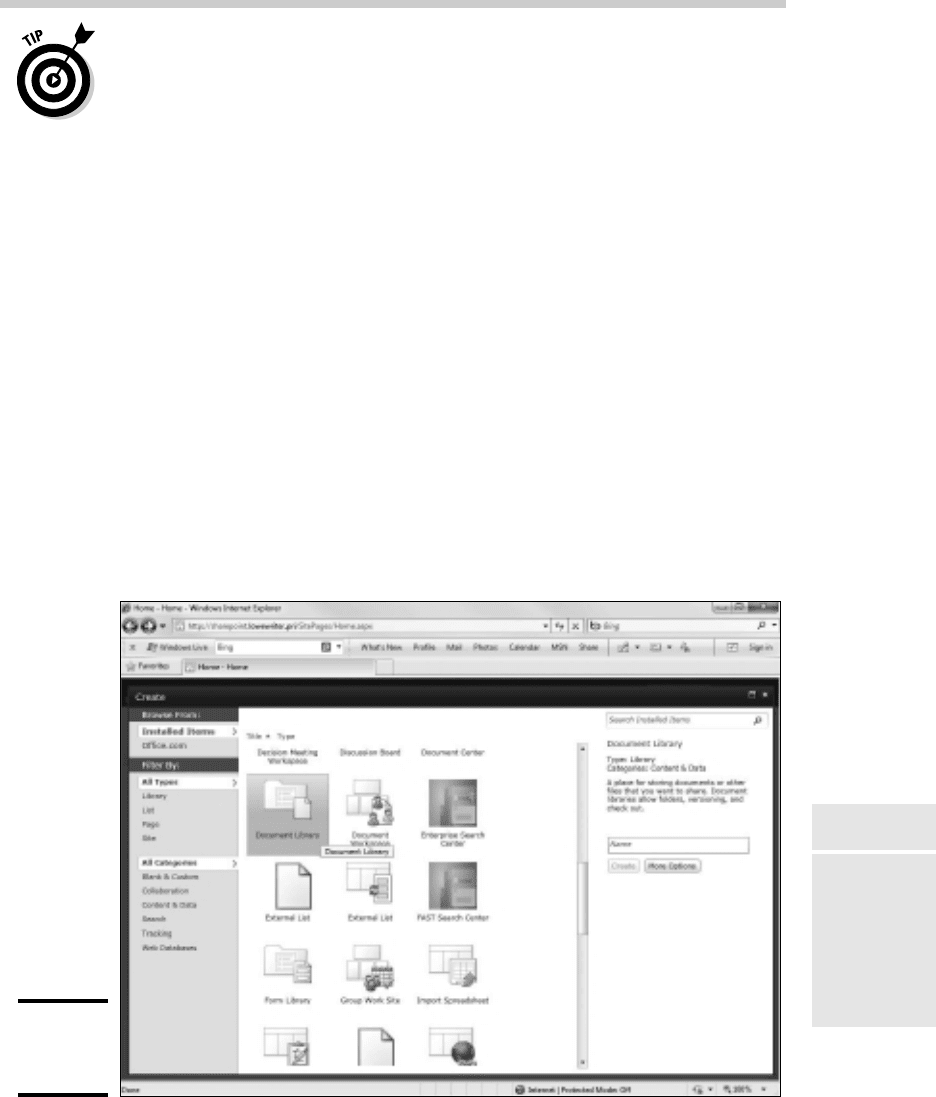
To create a new SharePoint page, click Site Actions and then click More
Options. The Create page is displayed, as shown in Figure 4-9.
As you can see, SharePoint lets you add many different types of pages and
sites to your portal. Here are some of the more commonly used ones:
✦ Announcements: A list of news items and other short bits of information.
✦ Basic Meeting Workspace: An entire site (not just a single page) that lets
you plan, organize, and record the results of a meeting. The site includes
lists for managing the agenda, meeting attendees, and documents.
Figure 4-9:
Creating a
new page.
Creating New Pages
61_625873-bk08ch04.indd 66361_625873-bk08ch04.indd 663 9/21/10 10:43 PM9/21/10 10:43 PM

664
✦ Blank Meeting Workspace: A blank meeting site, similar to the basic
meeting workspace but without the pre-defined lists.
✦ Blank Site: A site (not just a single page) that doesn’t add any content.
✦ Blog: A blog page.
✦ Calendar: SharePoint calendar pages track events related to the
SharePoint site, but they can be integrated with users’ personal calendar
managers such as Outlook.
✦ Charitable Contributions Web: Tracks information about fundraising
campaigns.
✦ Contacts: Here you can find a list of names and addresses that can be
integrated with other contact managers, including Microsoft Outlook
and Exchange.
✦ Content Page: A page that you can edit any way you wish.
✦ Custom List: A list in which you can specify the data to be recorded for
each item in the list.
✦ Discussion Board: This is a message forum where users can post mes-
sages and post replies to other user’s messages.
✦ Document Library: This is a repository of document files in a system of
folders and subfolders. Document libraries can track multiple versions
of documents, and they give users the ability to check documents in and
out of the library. For more information about document libraries, see
the section “Working with Document Libraries” later in this chapter.
✦ Document Workspace: A collaboration center where users can work
together on shared documents. Document Workspaces are nicely inte-
grated with Office 2010.
✦ Form Library: A form library is a repository of XML-based business
forms. Form libraries are designed to work with a forms editor such as
Microsoft’s InfoPath.
✦ Group Work Site: A site designed for groups working together on a
project. The site includes a group calendar, circulation list, phone-call
memo, document library, and other lists.
✦ Issue Tracking: Tracks problems associated with a project or item.
✦ Links: This is a list of links to other Web pages.
✦ Picture Library: This is a collection of pictures. Picture libraries can
offer users the ability to view thumbnails, download picture files, and
easily create slideshows.
✦ Project Tasks: This page contains a list of project-management tasks
that can be viewed as a Gantt chart.
Creating New Pages
61_625873-bk08ch04.indd 66461_625873-bk08ch04.indd 664 9/21/10 10:44 PM9/21/10 10:44 PM
Book VIII
Chapter 4
Using SharePoint
665
✦ Survey: A list of questions that can be answered by users.
✦ Web Part Page: This is a Web page that you can add standard or cus-
tomized Web parts to.
✦ Wiki Page Library: A Wiki library is a collection of interconnected articles.
When you click one of the page types on the Create page, SharePoint
prompts you for the basic options for the page — typically just the name of
the page — in the pane on the right side of the window, as shown earlier in
Figure 4-9. To create the item, type a name in the text box and click Create.
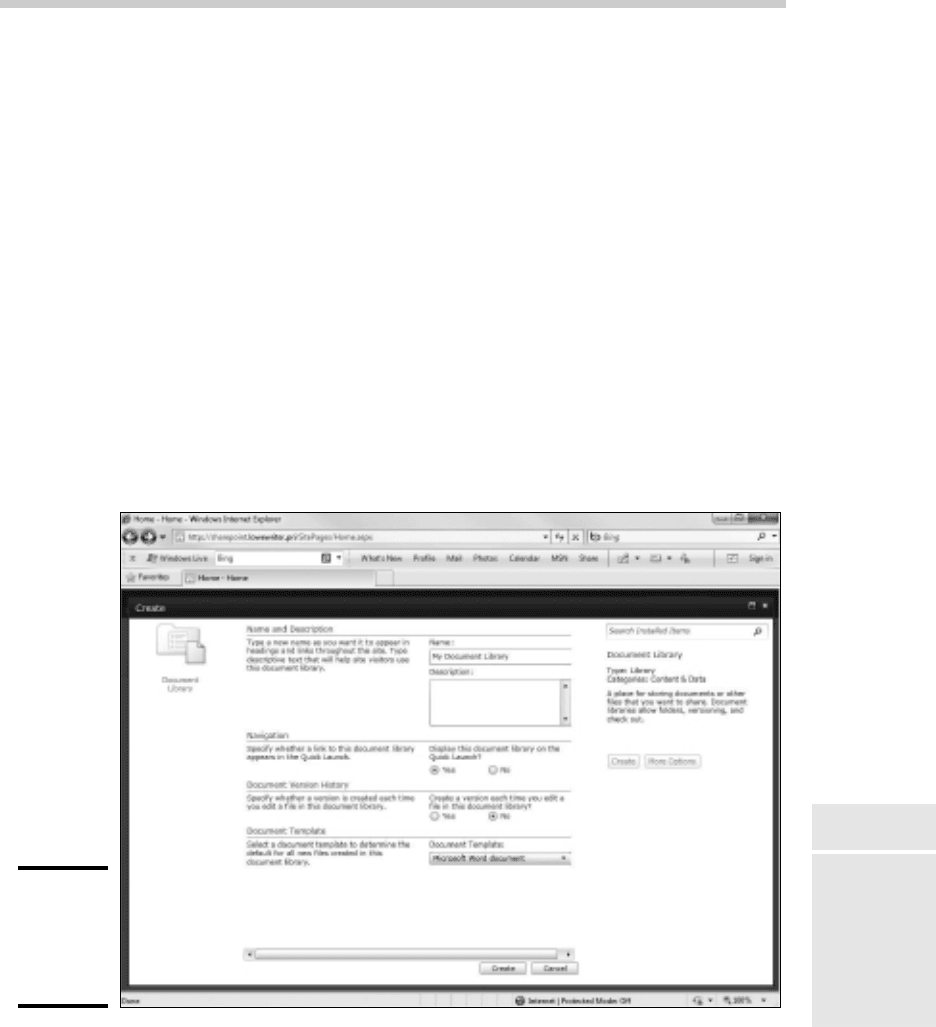
If you want to set additional options, you can click the More Options button
on the right to display a page that asks for the additional information. For
example, the More Options page for a Document Library (shown in Figure
4-10) asks you to enter the name and description for the document library
and lets you choose whether to include the library in the Quick Launch
menu, whether to track version history for documents in the library, and the
default file type for new documents added to the library. After you enter the
requested information, click the Create button to create the page.
Figure 4-10:
Creating
a new
document
library.
Creating New Pages
61_625873-bk08ch04.indd 66561_625873-bk08ch04.indd 665 9/21/10 10:44 PM9/21/10 10:44 PM
666
Editing the Quick Launch Menu
The Quick Launch menu is the menu that appears on the left side of
SharePoint pages. It provides one-click access to the most important pages
in the site.
In most cases, you’ll want to include any new pages you add to a SharePoint
site to the Quick Launch menu. Otherwise, the site’s users will have dif-
ficulty locating the pages. You can specify that a new page is added to the
Quick Launch menu when you create the page, or you can add the page later
if you forget.
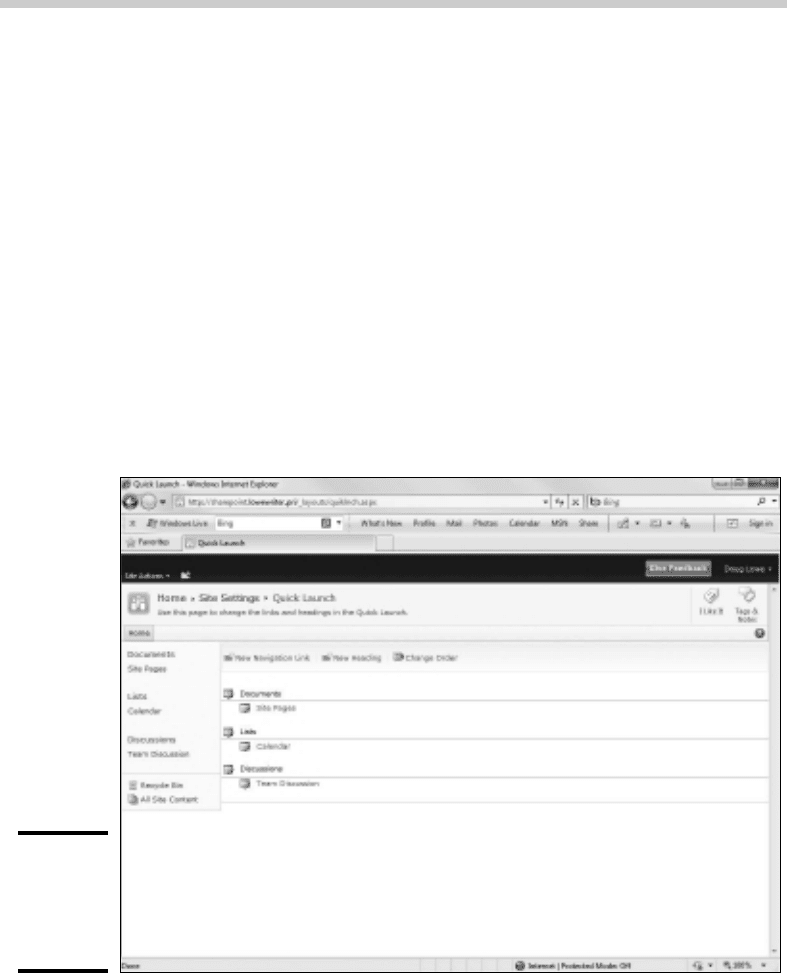
To modify the Quick Launch menu, click Site Actions, choose Site Settings, and
then click the Quick Launch link. This displays the page shown in Figure 4-11,
which lets you modify the way items appear in the Quick Launch menu. You
can use this page to add or remove items, change the order in which items
appear, or add or change existing headings.
Figure 4-11:
Editing
the Quick
Launch
menu.
Editing the Quick Launch Menu
61_625873-bk08ch04.indd 66661_625873-bk08ch04.indd 666 9/21/10 10:44 PM9/21/10 10:44 PM