
Lowe D. Networking For Dummies
Подождите немного. Документ загружается.

Book VIII
Chapter 4
Using SharePoint
667
Working with Document Libraries
In many ways, document libraries are the heart of SharePoint. They’re often
the most important and most frequently used pages in a SharePoint site. In
fact, the purpose of many SharePoint sites is to enable a team of people to
collaborate on the creation of the documents stored in a document library.
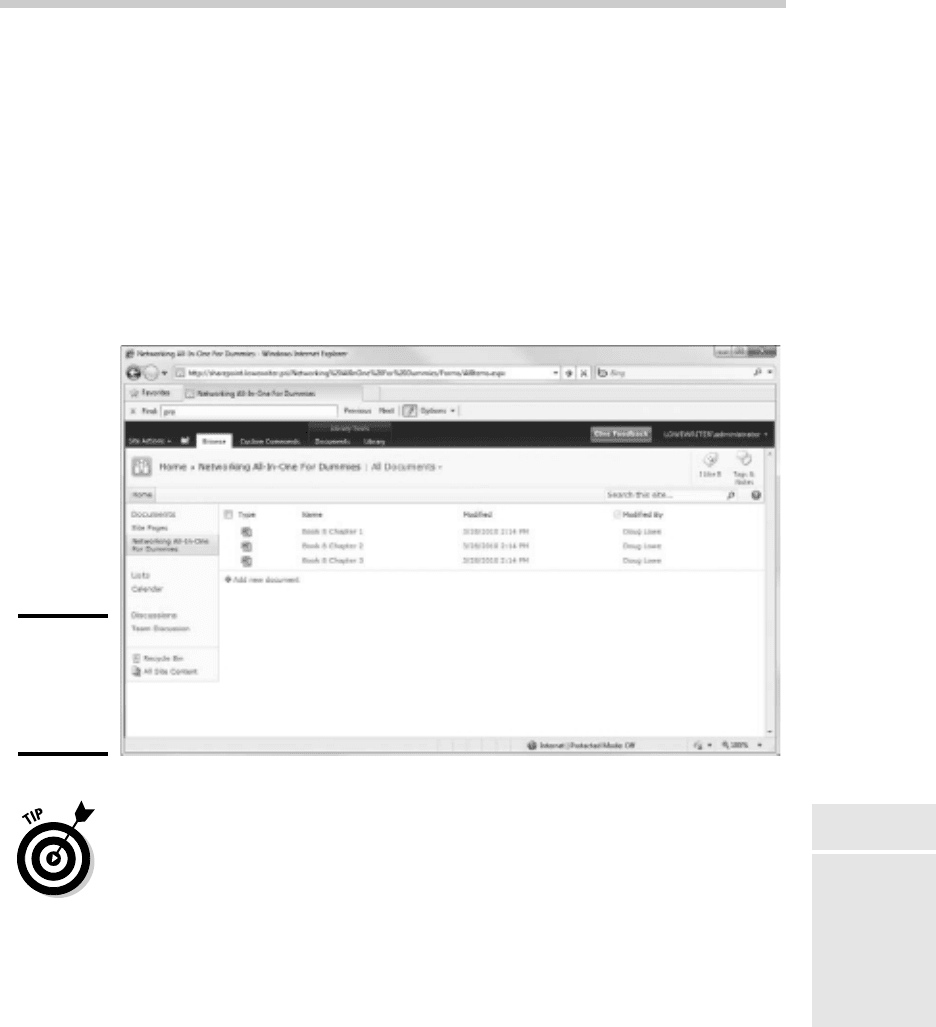
Figure 4-12 shows a document library named Networking All-In-One For
Dummies, which I might use if I wanted to use SharePoint to help with the
development of a book such as this. As you can see, I’ve added three Word
documents to the library so far.
Figure 4-12:
A
SharePoint
document
library.
As a network administrator, the single most important thing to know about
SharePoint document libraries (and maybe about SharePoint in general)
is this: Documents stored in a SharePoint library are not stored as sepa-
rate files on the server computer’s file system. Instead, they are stored in
a SQL database. The bottom-line result of this fact is this: After you (or a
user) have created a document in a SharePoint library, that document can
be accessed and managed only from SharePoint. You can’t open Windows
Explorer and navigate to the file via the Windows folder structure.
Working with Document Libraries
61_625873-bk08ch04.indd 66761_625873-bk08ch04.indd 667 9/21/10 10:44 PM9/21/10 10:44 PM
668
The following paragraphs describe some things you can do with documents
in SharePoint document libraries:
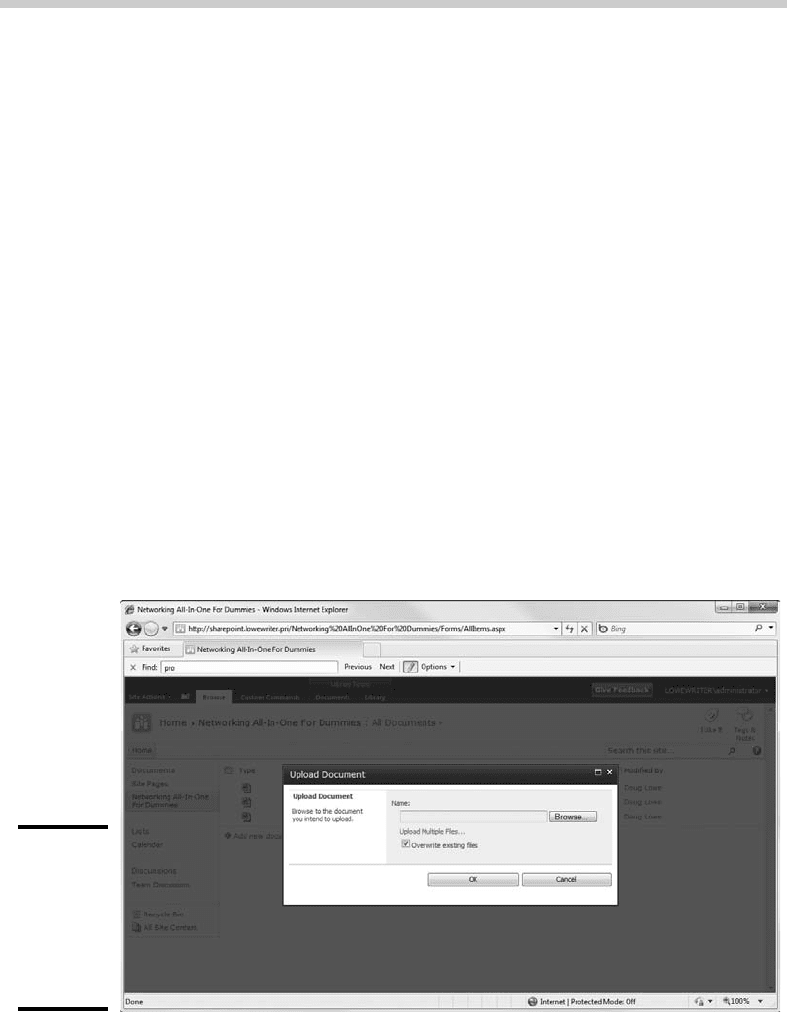
✦ To add an existing file to a document library, click the Upload button,
and then choose the Upload Document. This brings up the page shown
in Figure 4-13, from which you can upload an existing file. Just type in
the complete path and filename for the file, or click the Browse button to
browse for the file. Then, click OK to upload the file.
✦ To open a file, just click the filename in the Document Library. This
launches the application associated with the file and opens the document.
✦ You can display a shortcut menu with useful commands by hover-
ing the mouse over a document name. In a moment, a border appears
around the filename, with a drop-down arrow at the right. Click this
arrow to reveal the shortcut menu.
✦ You can check out a document by choosing Check Out from the docu-
ment’s shortcut menu. This prevents other users from changing the file
until you check the file back in by choosing Check In from the shortcut
menu.
✦ You can organize documents in document libraries by creating folders.
To create a folder, click the New button and then choose the New Folder
command.
Figure 4-13:
Uploading
an existing
file to a
SharePoint
document
library.
Working with Document Libraries
61_625873-bk08ch04.indd 66861_625873-bk08ch04.indd 668 9/21/10 10:44 PM9/21/10 10:44 PM
Book IX
Managing Linux Systems
62_625873-pp09.indd 66962_625873-pp09.indd 669 9/21/10 10:44 PM9/21/10 10:44 PM
Contents at a Glance
Chapter 1: Installing a Linux Server . . . . . . . . . . . . . . . . . . . . . . . . . . . .671
Chapter 2: Getting Used to Linux. . . . . . . . . . . . . . . . . . . . . . . . . . . . . . .685
Chapter 3: Basic Linux Network Configuration . . . . . . . . . . . . . . . . . .693
Chapter 4: Running DHCP and DNS. . . . . . . . . . . . . . . . . . . . . . . . . . . . .707
Chapter 5: Doing the Samba Dance . . . . . . . . . . . . . . . . . . . . . . . . . . . .717
Chapter 6: Running Apache . . . . . . . . . . . . . . . . . . . . . . . . . . . . . . . . . . .731
Chapter 7: Running Sendmail. . . . . . . . . . . . . . . . . . . . . . . . . . . . . . . . . .743
Chapter 8: Running FTP . . . . . . . . . . . . . . . . . . . . . . . . . . . . . . . . . . . . . . .753
Chapter 9: Linux Commands. . . . . . . . . . . . . . . . . . . . . . . . . . . . . . . . . . .759
62_625873-pp09.indd 67062_625873-pp09.indd 670 9/21/10 10:44 PM9/21/10 10:44 PM

Chapter 1: Installing a
Linux Server
In This Chapter
✓ Getting ready to install Linux
✓ Installing Linux
✓ Adding additional packages after installation
T
his chapter presents the procedures that you need to follow to install
Linux on a server computer. The specific details provided are specifically
for Fedora 12, a free Linux distribution from Red Hat. However, the proce-
dures for installing other distributions of Linux are similar, so you won’t have
any trouble adapting these procedures if you’re using a different distribution.
Planning a Linux Server Installation
Before you begin the installation program, you need to make a number of
preliminary decisions. The following sections describe the decisions that
you need to make before you install Linux.
Checking system requirements
Before you install Linux, you should make sure that the computer meets the
minimum requirements. Although the minimum requirements for Linux are
considerably less than those for the latest version of Windows Server, you
can’t run Linux on an abacus. The following paragraphs summarize the mini-
mum capabilities you need:
✦ A Pentium-based computer. Even a slow 100 MHz system will run some
builds of Linux, although performance will be slow. The minimum rec-
ommended for Fedora Core is a 200 MHz Pentium.
✦ 256MB of RAM or more. Of course, the more the better. But Linux can
make do with much less RAM than Windows.
✦ A hard drive with enough free space to hold the packages that you
need to install. The kernel itself needs about 1GB. If you choose not to
install a graphical user interface, you can install a full-featured server in
about 1.5GB. If you install everything, you need about 5GB.
✦ A CD-ROM drive from which to install the operating system.
63_625873-bk09ch01.indd 67163_625873-bk09ch01.indd 671 9/21/10 10:45 PM9/21/10 10:45 PM

672
✦ Just about any video card and monitor combination. You don’t need
anything fancy for a server. In fact, fancy video cards often lead to hard-
ware compatibility issues. Stick to a basic video card.
✦ A mouse is very helpful. If you’re converting an old junker computer to a
Linux server and you’ve lost the mouse (that seems to happen a lot), pick
one up at your local office supply store. A cheap one costs only about $15.
✦ A network interface.
Choosing a distribution
Because the kernel (that is, the core operating functions) of the Linux operat-
ing system is free, several companies have created their own distributions of
Linux, which include the Linux operating system along with a bundle of pack-
ages, such as administration tools, Web servers, and other useful utilities, as
well as printed documentation. These distributions are inexpensive — ranging
from $25 to $150 — and are well worth the small cost.
The following are some of the more popular Linux distributions:
✦ Fedora is one of the popular Linux distributions. At one time, Fedora
was an inexpensive distribution offered by Red Hat. But Red Hat recently
changed its distribution strategy by announcing that its inexpensive dis-
tribution would become a community project known as Fedora, so that
it could focus on its more expensive Enterprise editions. As a result, you
can’t purchase Fedora, but you can download it free from http://
fedoraproject.org. You can also obtain it by purchasing any of several
books on Fedora that include the Fedora distribution on DVD or CD-ROM.
All the examples in this book are based on Fedora 12.
✦ Mandriva Linux is another popular Linux distribution, one that is often
recommended as the easiest for first-time Linux users to install. This
distribution was formerly known as Mandrake Linux. Go to www.
mandriva.com for more information.
✦ Ubuntu is a Linux distribution that has gained popularity in recent
years. It focuses on ease of use. For more information, go to www.
ubuntu.com.
✦ SUSE (pronounced SOO-zuh, like the name of the famous composer of
marches) is a popular Linux distribution sponsored by Novell. You can
find more information at www.suse.com.
✦ Slackware, one of the oldest Linux distributions, is still popular —
especially among Linux old-timers. A full installation of Slackware gives
you all the tools that you need to set up a network or Internet server.
See www.slackware.com for more information.
There are, of course, many other distributions of Linux available, including
Knoppix (www.knoppix.net), Debian (www.debian.org), and Xandros
Planning a Linux Server Installation
63_625873-bk09ch01.indd 67263_625873-bk09ch01.indd 672 9/21/10 10:45 PM9/21/10 10:45 PM

Book IX
Chapter 1
Installing a Linux
Server
673
Desktop (www.xandros.com). If you want, you can search a comprehensive
database of Linux distributions at www.linux.org/dist.
All distributions of Linux include the same core components — the Linux
kernel, an X Server, popular windows managers such as GNOME and
KDE, compilers, Internet programs such as Apache, Sendmail, and so on.
However, not all Linux distributions are created equal. In particular, the
manufacturer of each distribution creates its own installation and configura-
tion programs to install and configure Linux.
The installation program is what makes or breaks a Linux distribution. All
the distributions I list in this section have easy-to-use installation programs
that automatically detect the hardware that’s present on your computer and
configure Linux to work with that hardware, thus eliminating most — if not
all — manual configuration chores. The installation programs also let you
select the Linux packages that you want to install and let you set up one or
more user accounts besides the root account.
Thinking about multiboot
Linux comes with a boot loader program called GRUB that lets you choose
from several installed operating systems when you start your computer.
GRUB makes it possible to keep your existing Windows system on a com-
puter and install Linux into a separate partition. Then, each time you start
the computer, you can decide whether to start Windows or Linux.
I’m not a big fan of having multiple operating systems on one computer. If
the computer is going to be a production server, you’re not going to need to
reboot the computer into Windows anyway. However, installing Linux into a
separate partition while keeping your Windows system intact may be a viable
alternative if you want to experiment with Linux before you commit to it.
Planning your partitions
Linux handles partitions a little differently than Windows. The Windows
operating system installs itself into a single partition. However, Linux instal-
lations typically require three or more hard drive partitions:
✦ A boot partition: This should be small — 16MB is recommended. The
boot partition contains the operating system kernel and is required to
start Linux properly on some computers.
✦ A swap partition: This should be about twice the size of your com-
puter’s RAM. For example, if the computer has 256MB of RAM, allocate a
512MB swap partition. Linux uses this partition as an extension of your
computer’s RAM.
✦ A root partition: In most cases, this uses up the remaining free space on
the drive. The root partition contains all the files and data used by your
Linux system.
Planning a Linux Server Installation
63_625873-bk09ch01.indd 67363_625873-bk09ch01.indd 673 9/21/10 10:45 PM9/21/10 10:45 PM

674
You can also create additional partitions if you want. The installation pro-
gram includes a disk-partitioning feature that lets you set up your drive
partitions and indicate the mount point for each partition. The installation
program can make a recommendation for partitioning your drives that will
be appropriate in most situations. (For more information about drive parti-
tions, see the sidebar, “I can’t see my C: drive!” earlier in this chapter.)
Deciding on your TCP/IP configuration
Before you install the operating system, you should have a plan for how you
will implement TCP/IP on the network. Here are some of the things you need
to decide or find out:
✦ What are the public IP subnet address and mask for your network?
Linux and Windows have a completely different
method of referring to your computer’s hard
drives and partitions. The differences can take
some getting used to for experienced Windows
users.
Windows uses a separate letter for each drive
and partition on your system. For example, if
you have a single drive formatted into three
partitions, Windows identifies the partitions as
drives C:, D:, and E:. Each of these drives has its
own root directory, which can, in turn, contain
additional directories used to organize your
files. As far as Windows is concerned, drives
C:, D:, and E: are completely separate drives,
even though the drives are actually just parti-
tions on a single drive.
Linux doesn’t use drive letters. Instead, Linux
combines all the drives and partitions into a
single directory hierarchy. In Linux, one of the
partitions is designated as the root partition. The
root partition is roughly analogous to the root
directory of the C: drive on a Windows system.
Then, the other partitions can be mounted on the
root partition and treated as if they were directo-
ries on the root partition. For example, you may
designate the first partition as the root partition
and then mount the second partition as /user
and the third partition as /var. Then, any files
stored in the /user directory would actually be
stored in the second partition, and files stored in
the /var directory would be stored in the third
partition.
The directory to which a drive mounts is called
the drive’s mount point.
Notice that Linux uses regular forward slash
characters (/) to separate directory names
rather than the backward slash characters (\)
used by Windows. Typing backslashes instead
of regular slashes is one of the most common
mistakes made by new Linux users.
While I’m on the subject, Linux uses a different
convention for naming files, too. In Windows,
filenames end in a three-letter extension that’s
separated from the rest of the filename by a
period. The extension is used to indicate the
file type. For example, files that end in .exe
are program files, but files that end in .doc
are word-processing documents.
Linux doesn’t use file extensions, but periods
are often used in Linux filenames to separate
different parts of the name — and the last
part often indicates the file type. For example,
ldap.conf and pine.conf are both con-
figuration files.
I can’t see my C: drive!
Planning a Linux Server Installation
63_625873-bk09ch01.indd 67463_625873-bk09ch01.indd 674 9/21/10 10:45 PM9/21/10 10:45 PM
Book IX
Chapter 1
Installing a Linux
Server
675
✦ What is the domain name for the network?
✦ What is the host name for the server?
✦ Will the server obtain its address from DHCP?
✦ Will the server have a static IP address? If so, what?
✦ Will the server be a DHCP server?
✦ What is the Default Gateway for the server? (That is, what is the IP
address of the network’s Internet router?)
✦ Will the server be a DNS server?
If the server will host TCP/IP servers (such as DHCP or DNS), you’ll probably
want to assign the server a static IP address.
For more information about planning your TCP/IP configuration, see Book IV.
Installing Fedora 7
Now that you’ve planned your installation and prepared the computer,
you’re ready to actually install Linux. The following procedure describes the
steps you must follow to install Fedora 7 on a computer that has a bootable
DVD-ROM drive:
1. Insert the Fedora 7 CD in the DVD drive and restart the computer.
The computer boots from the DVD drive and displays a Linux boot
prompt, which looks like this:
Boot:
If you don’t have the installation DVD, download the DVD images from
www.fedoraproject.org. Then, use DVD burning software to create a
DVD from the image.
2. Press Enter.
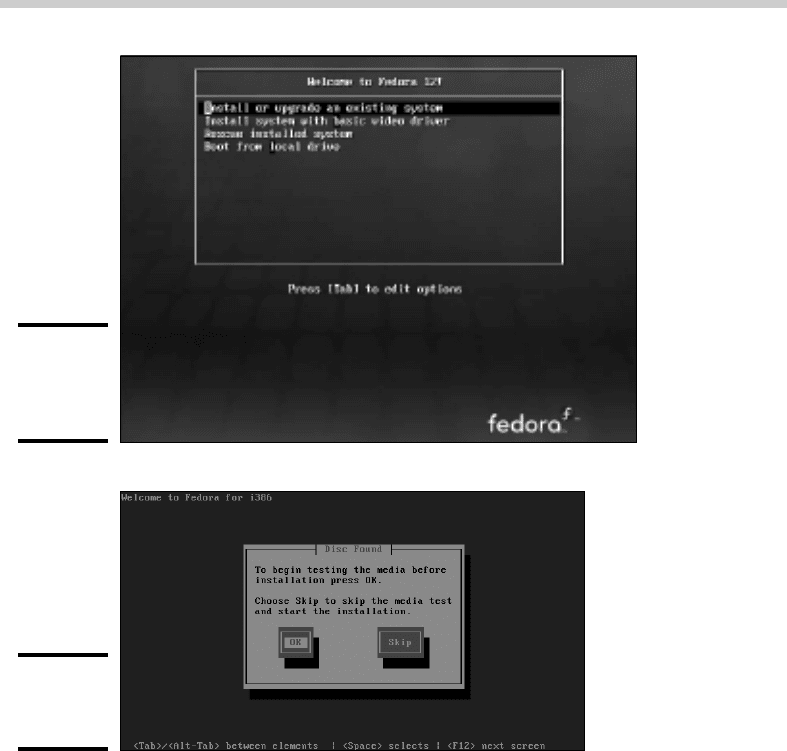
The computer starts Linux from the installation disk. The screen shown
in Figure 1-1 soon appears.
This screen gives you several options for starting the installation. The
most common is to simply press Enter.
3. Press Enter.
Now a bunch of text messages fly by your screen as Linux starts up.
Eventually, the screen shown in Figure 1-2 appears, offering to test the
CD media you’re installing from to make sure you have downloaded and
burned the CD images correctly.
Installing Fedora 7
63_625873-bk09ch01.indd 67563_625873-bk09ch01.indd 675 9/21/10 10:45 PM9/21/10 10:45 PM
676
Figure 1-1:
Selecting an
installation
option.
Figure 1-2:
Testing the
CD media.
4. Press the Tab key and then press Enter to skip the test.
Still more text messages fly by, but soon Fedora switches into graphics
mode and displays the Welcome to Fedora Core screen, as shown in
Figure 1-3.
5. Click Next.
The Language Selection screen appears, offering quite a few language
choices, as shown in Figure 1-4.
6. Choose your language and then click Next.
The Keyboard Configuration screen appears. It lets you choose from
about 55 different keyboard styles.
Installing Fedora 7
63_625873-bk09ch01.indd 67663_625873-bk09ch01.indd 676 9/21/10 10:45 PM9/21/10 10:45 PM