
Lowe D. Networking For Dummies
Подождите немного. Документ загружается.

Book IX
Chapter 6
Running Apache
737
Configuring Virtual Hosts
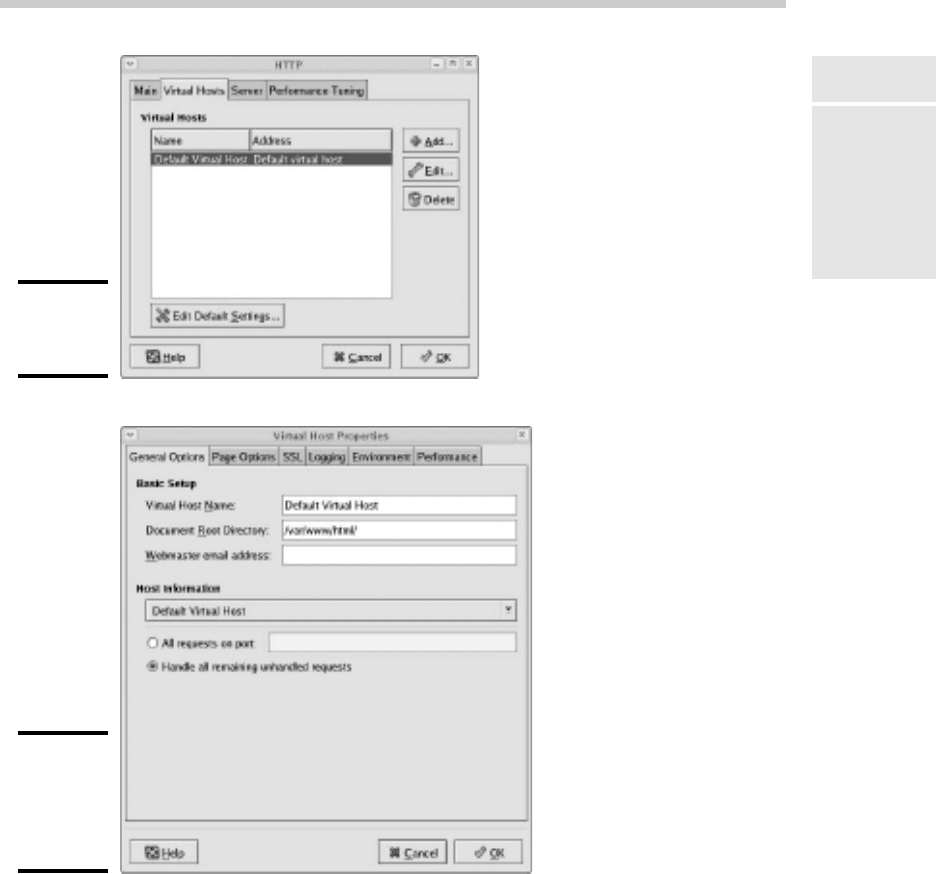
Figure 6-5:
The Virtual
Hosts tab.
Figure 6-6:
The Virtual
Host
Properties
dialog box.
From this dialog box, you can configure a variety of important settings for
the virtual host:
✦ Virtual Host Name: The name you use to refer to the virtual host. For
the default virtual host, the default name is — drum roll, please —
Default Virtual Host. (Don’t blame me, it isn’t my fault.)
68_625873-bk09ch06.indd 73768_625873-bk09ch06.indd 737 9/21/10 10:47 PM9/21/10 10:47 PM
738
Configuring Virtual Hosts
✦ Document Root Directory: This is the file system location that contains
the HTML documents for the Web site. The default is /var/www/html,
but you can specify a different location if you want to store your HTML
files somewhere else.
✦ Webmaster E-Mail Address: Each virtual host can have its own
Webmaster e-mail address. If you leave this option blank, the address
specified for the main HTTP configuration (refer to Figure 6-3) is used.
✦ Host Information: This section of the dialog box lets you specify what
HTTP requests should be serviced by this virtual host. In most cases,
you should leave this set to the default setting, Handle All Remaining
Unhandled Requests.
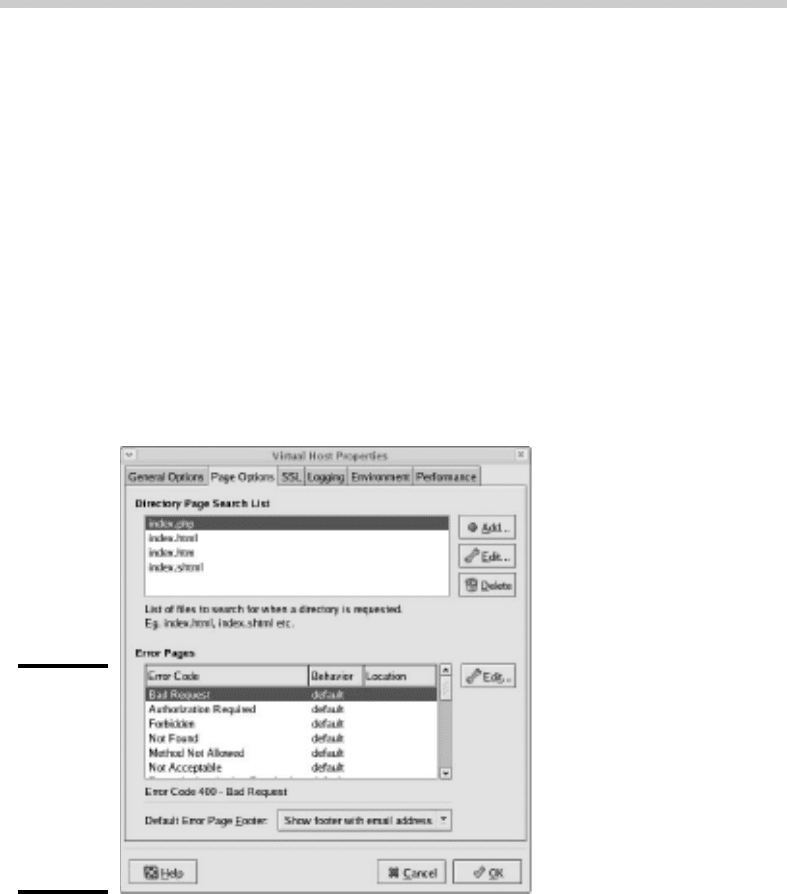
You can use the other tabs of the Virtual Host Properties dialog box to con-
figure additional options. For example, Figure 6-7 shows the Page Options
tab. Here, you can set the following options:
Figure 6-7:
The Page
Options
tab lets
you set the
directory
search list
and custom
error pages.
✦ Directory Page Search List: This list specifies the default page for the
Web site. The default page is displayed if the user doesn’t indicate a spe-
cific page to retrieve. Then, Apache looks for each of the pages listed in
the Directory Page Search list and displays the first one it finds. You can
use the Add, Edit, and Delete buttons to modify this list.
68_625873-bk09ch06.indd 73868_625873-bk09ch06.indd 738 9/21/10 10:47 PM9/21/10 10:47 PM
Book IX
Chapter 6
Running Apache
739
Configuring Virtual Hosts
✦ Error Pages: This list lets you change the default error pages that are
displayed when an HTTP error occurs. The most common HTTP error,
Not Found, happens when the user requests a page that doesn’t exist.
If you want to create a custom error page to let the user know that the
page doesn’t exist or that some other error has occurred, this is the
place to do it.
Creating a virtual host
If you want to host more than one Web site on an Apache server, you can
create additional virtual hosts. Just follow these steps:
1. Click the Add button on the Virtual Hosts tab of the HTTP configura-
tion tool.
This brings up the Virtual Host Properties dialog box, which you’ve
already seen in Figure 6-6.
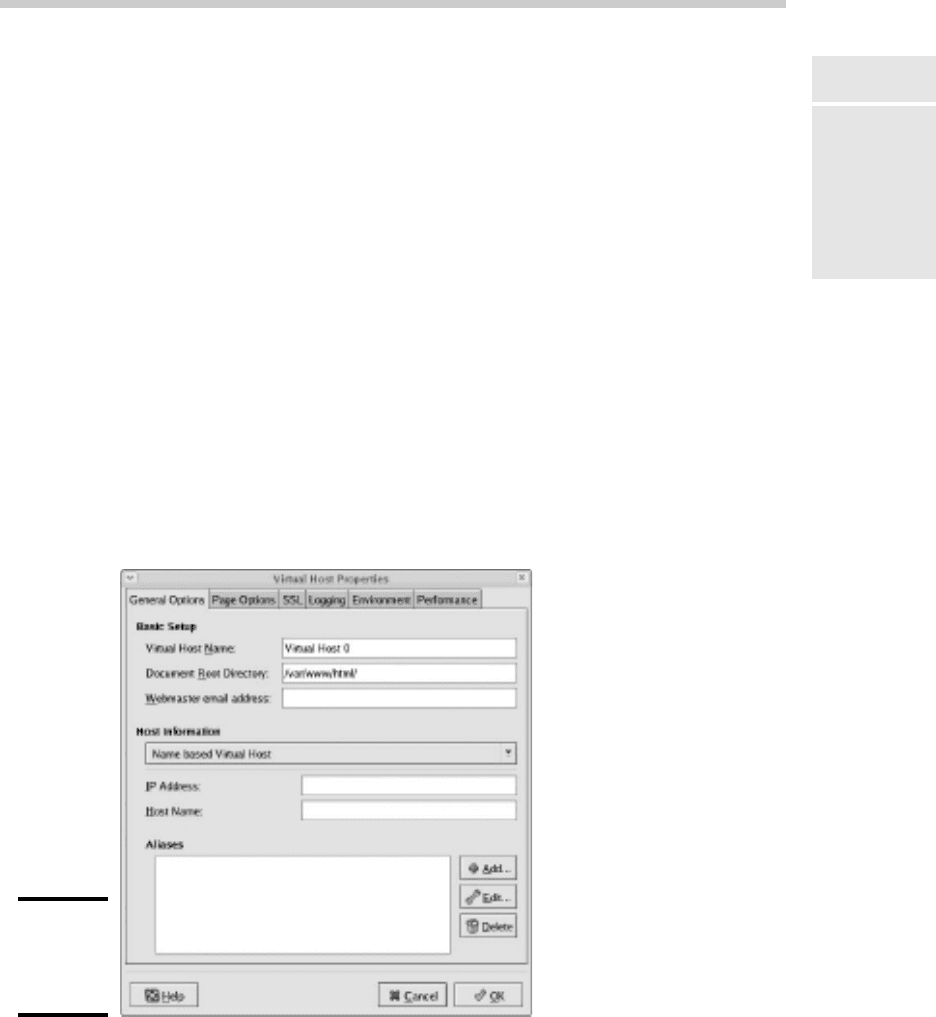
2. In the Host Information section, choose Name Based Virtual Host in
the drop-down list.
The Virtual Host Properties dialog box morphs into the dialog box
shown in Figure 6-8.
Figure 6-8:
Creating a
new virtual
host.
68_625873-bk09ch06.indd 73968_625873-bk09ch06.indd 739 9/21/10 10:47 PM9/21/10 10:47 PM

740
Setting the Apache User Account
3. Enter the IP address and the host name for the virtual host.
The IP address is usually the IP address assigned to the Apache server,
and the host name is the DNS name used to access the virtual host.
4. If you want to provide an alias for the virtual host, click the Add
button, enter the alias name, and click OK.
An alias is often used for Web sites that are used on an intranet rather
than on public Web sites. For example, if you’re setting up an intranet
Web site for your company suggestion box, the full DNS name for the
virtual host might be suggestionbox.mycompany.com. But if you pro-
vide just suggestionbox as an alias, users can access the suggestion
box Web site by using suggestionbox rather than suggestionbox.
mycompany.com as the Web site address.
5. Use the other tabs of the Virtual Host Properties dialog box to config-
ure additional options.
For example, you might want to use the Page Options tab to change the
directory page search list or designate custom error pages.
6. Click OK.
The virtual host is created. You’re returned to the HTTP configuration
tool, and the new virtual host will appear in the Virtual Hosts list.
Setting the Apache User Account
The Server tab of the HTTP configuration tool lets you set several configura-
tion options, the most important of which is the user account that Apache
will run under. By default, this account is named apache, and it belongs to
a group named apache. This account is created automatically when you
install Apache, so you don’t have to do anything special to configure it.
Although it may be tempting, resist the urge to change this user setting to a
user account with more rights. If you do so, you run the risk of a major secu-
rity breach. An intelligent hacker can use a Web browser to break into your
system. But the hacker will be constrained by the rights granted to the user
account that Apache runs under. One of the worst mistakes you could make
would be to change this user account from apache to root. Then, a hacker
who manages to exploit a security hole in your Web site will have virtually
free reign over your Linux server.
68_625873-bk09ch06.indd 74068_625873-bk09ch06.indd 740 9/21/10 10:47 PM9/21/10 10:47 PM

Book IX
Chapter 6
Running Apache
741
Creating Web Pages
Manually Editing Apache’s Configuration Files
If you’re allergic to GUI configuration tools, you can configure your Apache
server by directly editing the configuration files. Apache’s configuration set-
tings are found in three separate configuration files, named httpd.conf,
srm.conf, and access.conf. These files are located in /etc/httpd/conf
in Fedora Core Linux, but they may be in a different location in other Linux
distributions. Be sure to study the Apache documentation before you start
messing with these files!
Whenever you make a configuration change to Apache, you should restart
Apache by using the service httpd restart command.
Creating Web Pages
This section is about how to create and edit HTML content for your Web
site. Plenty of good books are available on how to do that, including my own
Creating Web Pages For Dummies Quick Reference (Wiley Publishing). Rather,
I just want to point out a few key things that you need to know in order to
set up a Web site using Apache:
✦ The default location for Web documents is /var/www/html. When you
create Web pages for your site, save them in that directory.
✦ When a user visits your Web site by typing just the domain name with-
out a filename (for example, www.mydomain.com instead of www.my
domain.com/file1.html), Apache displays the file named index.
html or index.htm. You should give the home page for your Web site
one of these two names.
✦ If you’re a programmer, you can build complicated Web-based applica-
tions using PHP, which is installed along with Apache.
68_625873-bk09ch06.indd 74168_625873-bk09ch06.indd 741 9/21/10 10:47 PM9/21/10 10:47 PM

742
Book IX: Managing Linux Systems
68_625873-bk09ch06.indd 74268_625873-bk09ch06.indd 742 9/21/10 10:47 PM9/21/10 10:47 PM

Chapter 7: Running Sendmail
In This Chapter
✓ Looking at how e-mail works
✓ Installing and starting Sendmail
✓ Basic Sendmail configuration
✓ Blocking spam with SpamAssassin
✓ Reading e-mail with mail and Evolution
S
endmail, which is a standard part of most Linux distributions, is one
of the most popular mail server programs on the Internet. You can
use Sendmail as an alternative to expensive mail server programs, such as
Microsoft Exchange Server, to provide e-mail services for your LAN. This
chapter shows you how to set up and use Sendmail on a Linux server.
Spam artists — unscrupulous marketers who clutter the Internet with mil-
lions of unsolicited e-mails — are constantly on the prowl for unprotected
Sendmail servers, which they can use to launch their spam campaigns. If
you don’t protect your server, sooner or later a spammer will coax your
computer into spending almost all its time sending out the spammer’s
e-mail. To protect your server from becoming an indentured spam servant,
you can configure it to refuse any mail that merely wants to use your com-
puter to relay messages to other computers. See the sidebar “Don’t be an
open relay!” later in this chapter.
Understanding E-Mail
Before I get into the details of installing and configuring Sendmail, I want to
review some basics of how Internet e-mail works. First, you need to under-
stand that e-mail consists of messages that are delivered according to an
Internet protocol commonly referred to as SMTP. SMTP, which stands for
Simple Mail Transfer Protocol, was first codified in 1983, long before Al Gore
invented the Internet. Several enhancements have been made along the way,
but most e-mail on the Internet today is delivered using this nearly ancient
protocol.
69_625873-bk09ch07.indd 74369_625873-bk09ch07.indd 743 9/21/10 10:47 PM9/21/10 10:47 PM

744
Installing Sendmail
Interestingly, the software that delivers 70 percent of all the e-mail on the
Internet — Sendmail — also originated in the same year. In 1983, Eric Allman
developed the first version of the Sendmail program as part of the Berkeley
Software Distribution (BSD) of Unix, one of the earliest versions of Unix
made publicly available.
The following paragraphs describe some of the key features of e-mail that
you should know about if you plan on setting up a Linux server running
Sendmail:
✦ Mailbox: A mailbox is a simple text file that holds incoming e-mail mes-
sages until they are processed by a mail user agent. In Fedora Linux,
each user has a mailbox file in /var/mail.
✦ Mail User Agent (MUA): A program that end users can use to send and
receive mail. The most widely used MUA is Microsoft Outlook. Linux
comes with several MUAs. The most basic is Mail, a text-based MUA
that lets you read and compose e-mail messages from a console prompt.
Fedora also includes a sophisticated graphical MUA called Evolution,
which is similar in many ways to Microsoft Outlook. Both are described
later in this chapter.
✦ Mail Transfer Agent (MTA): A program that transfers e-mail messages
between computers. Sendmail, which most of this chapter is devoted
to, is an MTA. When a user uses an MUA to send an e-mail message, the
MUA delivers the message to an MTA, which then transfers the message
to the intended recipient.
✦ Mail Delivery Agent (MDA): A program that accepts incoming mail
from an MTA and places it in the intended recipient’s mailbox. A basic
MDA simply copies each message to the mailbox, but more advanced
MDAs can be used to filter the incoming mail to eliminate spam or check
for viruses. The default MDA for Fedora Linux is Procmail. Fedora also
includes SpamAssassin, which you can use to filter spam from your
incoming mail.
Installing Sendmail
You can quickly find out whether Sendmail is installed on your system by
entering the following command from a shell prompt:
rpm -q sendmail
If Sendmail has been installed, the package version is displayed. If not, the
message package sendmail is not installed is displayed.
69_625873-bk09ch07.indd 74469_625873-bk09ch07.indd 744 9/21/10 10:47 PM9/21/10 10:47 PM

Book IX
Chapter 7
Running Sendmail
745
Modifying sendmail.mc
While you’re at it, you should check to make sure that m4 is installed by run-
ning the command rpm -q m4. Then check to make sure that sendmail-c4
is installed by running the command rpm -q sendmail-c4. M4 and send-
mail-c4 are required if you want to make changes to your Sendmail con-
figuration. They’re installed by default when you install Sendmail, so they
should be there if Sendmail is installed. But it never hurts to check.
If Sendmail isn’t installed, you can install it by following these steps:
1. Choose System➪Administration➪Add/Remove Software.
The Add/Remove Software window is displayed.
2. Choose Package Collections in the list on the left side of the Add/
Remove Software window.
This displays a list of commonly installed collections of packages.
3. Select the Mail Server option in the Add/Remove Software window’s
main list box.
This selects SendMail and its companion packages.
4. Click Apply.
The Add/Remove Software program installs the SendMail packages.
5. Close the Add/Remove Software program.
You’re done!
Modifying sendmail.mc
Sendmail is probably one of the most difficult programs to configure that
you’ll ever encounter. In fact, the basic configuration file, sendmail.cf, is
well over a thousand lines long. You don’t want to mess with this file if you
can possibly avoid it.
Fortunately, you don’t have to. The sendmail.cf configuration file is gener-
ated automatically from a much shorter file called sendmail.mc. This file
contains special macros that are processed by a program called m4. The m4
program reads the macros in the sendmail.mc file and expands them to
create the actual sendmail.cf file.
Even so, the sendmail.mc file is a few hundred lines long. Configuring
Sendmail isn’t for the faint of heart.
69_625873-bk09ch07.indd 74569_625873-bk09ch07.indd 745 9/21/10 10:47 PM9/21/10 10:47 PM

746
Modifying sendmail.mc
You can find the sendmail.mc and sendmail.cf files in the /etc/mail
directory. Before you edit these files, you should make backup copies of the
current files. That way, if you mess up your mail configuration, you can
quickly return to a working configuration by reinstating your backup copies.
After you’ve made backup copies, you can safely edit sendmail.mc. When
you’re finished, you can regenerate the sendmail.cf file by entering these
commands:
cd /etc/mail
m4 sendmail.mc > sendmail.cf
service sendmail restart
The first command changes the current working directory to /etc/mail.
Then, the second command compiles the sendmail.mc command into the
sendmail.cf command. Finally, the third command restarts the Sendmail
service so that the changes will take effect.
You need to be aware of two strange conventions used in the sendmail.mc
file:
✦ Unlike most configuration files, comments don’t begin with a hash mark
(#). Instead, they begin with the letters dnl.
✦ Strings are quoted in an unusual way. Instead of regular quotation
marks or apostrophes, strings must begin with a backquote (`), which
is located to the left of the numeral 1 on the keyboard and ends with
an apostrophe (‘), located to the right of the semicolon. So a properly
quoted string looks like this:
MASQUERADE_AS(`mydomain.com’)
Pretty strange, eh?
The following sections describe the common configuration changes that you
may need to make to sendmail.mc.
Enabling connections
The default configuration allows connections only from localhost. If you
want Sendmail to work as a server for other computers on your network,
look for the following line in the sendmail.mc file:
DAEMON_OPTIONS(`Port-smtp,Addr=127.0.0.1, Name=MTA’)dnl
Add dnl # to the beginning of this line to make it a comment.
69_625873-bk09ch07.indd 74669_625873-bk09ch07.indd 746 9/21/10 10:47 PM9/21/10 10:47 PM