
Lowe D. Networking For Dummies
Подождите немного. Документ загружается.


Chapter 4: Running
DHCP and DNS
In This Chapter
✓ Dealing with DHCP
✓ Running a DNS server
✓ Understanding BIND configuration files
O
ne of the main reasons that many network administrators add Linux
servers to their networks is to run Internet services such as DHCP and
DNS. These services were originally developed for the Unix environment, so
they tend to run better under Linux than they do under Windows.
Well, that’s the theory, at least. The most recent versions of Windows are
probably just as good at running these services as Linux. Still, if you prefer
to set up these services on a Linux server, this chapter is for you.
Running a DHCP Server
DHCP is the TCP/IP protocol that automatically assigns IP addresses to
hosts as they come on the network. (DHCP stands for Dynamic Host Control
Protocol, but that won’t be on the test.) For a very small network (say, fewer
than ten hosts), you don’t really need DHCP: You can just configure each
computer to have a static IP address. For larger networks, however, DHCP
is almost a must. Without DHCP, you have to manually plan your entire IP
address scheme and manually configure every computer with its IP informa-
tion. Then, if a critical address such as your Internet gateway router or your
DNS server address changes, you have to manually update each computer
on the network. As you can imagine, DHCP can save you a lot of time.
Even for small networks, however, DHCP can be a timesaver. For example,
suppose that you have a notebook computer that you take back and forth
between your home and office. If you don’t set up a DHCP server at home,
you have to change the computer’s static IP address each time you move the
computer. With DHCP, the computer can change IP addresses automatically.
66_625873-bk09ch04.indd 70766_625873-bk09ch04.indd 707 9/21/10 10:46 PM9/21/10 10:46 PM
708
Running a DHCP Server
For the complete lowdown on DHCP, please refer to Book IV, Chapter 3. In
the following sections, I show you how to install and configure a DHCP
server on the Fedora 12 Linux distribution.
Installing DHCP
You can quickly find out whether DHCP is installed on your system by enter-
ing the following command from a shell prompt:
rpm -q dhcp
If DHCP has been installed, the package version is displayed. If not, the mes-
sage package dhcp is not installed is displayed.
If DHCP isn’t installed on your Linux server, you can install it by following
these steps:
1. Choose System➪Administration➪Add/Remove Software.
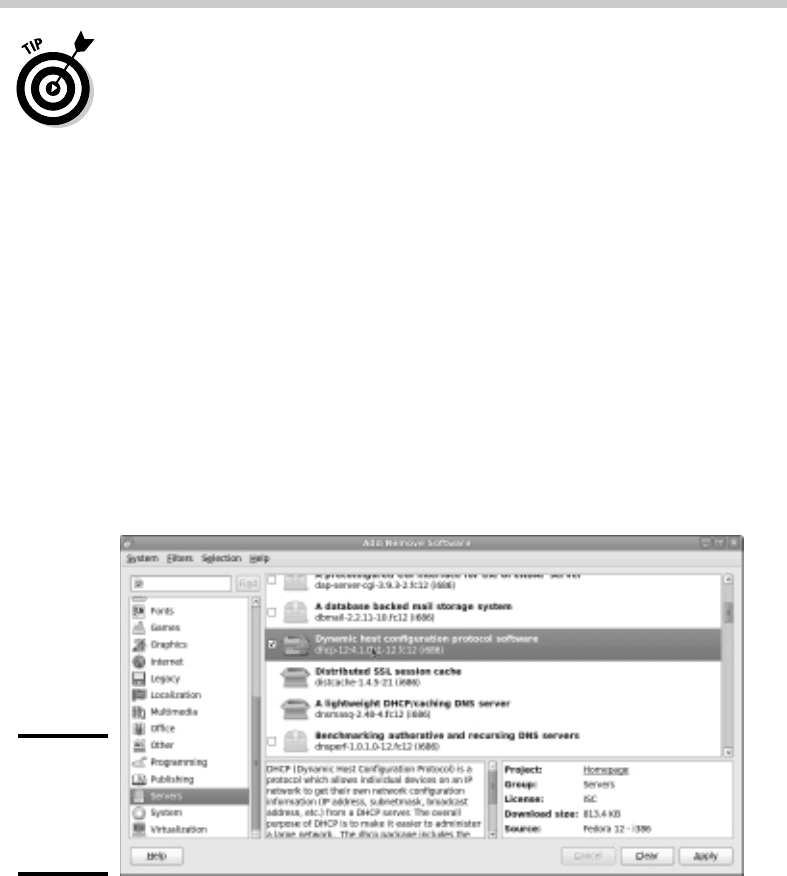
This summons the Add/Remove Software program, shown in Figure 4-1.
Figure 4-1:
The Add/
Remove
Software
program.
2. Select the Servers option in the list box on the left side of the Add/
Remove Software window.
A list of server packages appears in the window’s main list box.
3. Select the Dynamic Host Configuration Protocol Software package.
66_625873-bk09ch04.indd 70866_625873-bk09ch04.indd 708 9/21/10 10:46 PM9/21/10 10:46 PM

Book IX
Chapter 4
Running DHCP
and DNS
709
Running a DHCP Server
4. Click Apply.
The Add/Remove Software program grinds and whirs for a moment and
then installs the package you selected.
5. Close the Add/Remove Software program.
You’re done! DHCP is now installed.
Configuring DHCP
You configure DHCP settings through a file called dhcpd.conf that lives
in the /etc directory. Fedora provides you with a sample configuration file
located in the directory /usr/share/doc/dhcp-version/dhcpd.conf.
sample. Open this file in the text editor and then save it to the /etc direc-
tory, changing its name from dhcpd.conf.sample to just dhcpd.conf.
Then, edit the file to reflect the settings that you want to use.
Listing 4-1 shows the sample configuration file that comes with Fedora. (The
exact contents of this file vary from release to release and include additional
comments that I’ve removed for the sake of brevity.)
Listing 4-1: A Sample dhcpd.conf File
ddns-update-style interim;
ignore client-updates;
subnet 192.168.0.0 netmask 255.255.255.0 {
# --- default gateway
option routers 192.168.0.1;
option subnet-mask 255.255.255.0;
option nis-domain “domain.org”;
option domain-name “domain.org”;
option domain-name-servers 192.168.1.1;
option time-offset -18000; # Eastern Standard Time
# option ntp-servers 192.168.1.1;
# option netbios-name-servers 192.168.1.1;
# --- Selects point-to-point node (default is hybrid). Don’t change this
# -- unless you understand Netbios very well
# option netbios-node-type 2;
range dynamic-bootp 192.168.0.128 192.168.0.255;
default-lease-time 21600;
max-lease-time 43200;
# we want the nameserver to appear at a fixed address
host ns {
next-server marvin.redhat.com;
hardware ethernet 12:34:56:78:AB:CD;
fixed-address 207.175.42.254;
}
}
66_625873-bk09ch04.indd 70966_625873-bk09ch04.indd 709 9/21/10 10:46 PM9/21/10 10:46 PM

710
Running a DHCP Server
The following paragraphs describe some of the key points of this file:
✦ ddns-update-style: The DHCP standards group is in the midst
of deciding exactly how DHCP will handle changes to DNS data. This
option specifies that the interim method should be used. This line is
required — so don’t mess with it.
✦ subnet: This line specifies a subnet that’s managed by this DHCP
server. Following the subnet ID and netmask is an opening bracket; all
the options that appear between this bracket and the closing bracket in
the last line of the file belong to this subnet. In some cases, your DHCP
server may dole out IP configuration information for two or more subnet
groups. In that case, you need additional subnet groups in the configura-
tion file.
✦ option routers: This line provides the IP address of the Default
Gateway.
✦ option subnet mask: This line provides the subnet mask for the
subnet.
✦ option nis-domain: This line provides the NIS domain name. This
line is important only if you’ve set up one or more NIS servers.
✦ option domain-name: This line provides the domain name for the
network.
✦ option domain-name-servers: This line provides the IP addresses
of your DNS servers.
✦ range: This line specifies the range of addresses that the DHCP server
will assign for this subnet.
✦ default-lease-time: This line determines the default lease time in
seconds.
✦ max-lease-time: This line determines the maximum life of a lease.
✦ host: This line specifies a reservation. The host group specifies the
MAC address for the host and the fixed IP address to be assigned.
Starting DHCP
After you’ve set up the configuration file, you can start DHCP by opening a
terminal window or virtual console and entering the following command:
dhcpd start
If an error exists in the configuration file, a message to that effect is dis-
played. You have to edit the file in order to correct the error and then start
the DHCP service again.
66_625873-bk09ch04.indd 71066_625873-bk09ch04.indd 710 9/21/10 10:46 PM9/21/10 10:46 PM

Book IX
Chapter 4
Running DHCP
and DNS
711
Running a DNS Server
You should also restart the service whenever you make a change to the con-
figuration file. To restart DHCP, enter this command:
dhcpd restart
To automatically start DHCP whenever you start the computer, run this
command:
chkconfig –level 35 dhcpd on
Running a DNS Server
Linux comes with BIND, the best DNS server that money can buy. BIND is
an extremely powerful program. Some people make entire careers of setting
up and configuring BIND. In these few short pages, I just touch on the very
basics of setting up a DNS server on your network.
You can find plenty of details about DNS in Book IV, Chapter 4. Please review
that chapter before playing with BIND on your Linux system.
Installing BIND
You can quickly find out whether BIND is installed on your system by enter-
ing the following command from a shell prompt:
rpm -q bind
If BIND has been installed, the package version is displayed. If not, the mes-
sage package bind is not installed is displayed.
BIND is usually installed by default when you install Linux as a network
server. If it isn’t, you can easily install it by following these steps:
1. Choose System➪Administration➪Add/Remove Software.
This summons the Add/Remove Software program.
2. Type Bind in the text box and click the Find button.
The BIND package will be located.
3. Select the Berkeley Internet Name Domain (BIND) DNS (Domain Name
Server) package.
4. Click Apply.
The Add/Remove Software program grinds and whirs for a moment and
then installs the package you selected.
66_625873-bk09ch04.indd 71166_625873-bk09ch04.indd 711 9/21/10 10:46 PM9/21/10 10:46 PM

712
Running a DNS Server
5. Close the Add/Remove Software program.
You’re done! BIND is now installed.
Looking at BIND configuration files
Although Fedora Linux includes a handy BIND configuration tool, you still
need to know the location and purpose of each of BIND’s basic configuration
files. These files are described in the following sections.
named.conf
This file, found in the /etc directory, is the basic BIND configuration file.
This file contains global properties and links to the other configuration files.
Because the Fedora BIND configuration tool edits this file, you shouldn’t
edit this file directly. If you need to set your own configuration options, use
named.custom instead.
Here’s a typical named.conf file:
## named.conf - configuration for bind
#
# Generated automatically by redhat-config-bind, alchemist et al.
# Any changes not supported by redhat-config-bind should be put
# in /etc/named.custom
#
controls {
inet 127.0.0.1 allow { localhost; } keys { rndckey; };
};
include “/etc/named.custom”;
include “/etc/rndc.key”;
zone “0.0.127.in-addr.arpa” {
type master;
file “0.0.127.in-addr.arpa.zone”;
};
zone “localhost” {
type master;
file “localhost.zone”;
};
zone “lowewriter.com” {
type master;
file “lowewriter.com.zone”;
};
The line include “/etc/named.custom”; is what causes the named.
custom file to be read in. The zone lines name the zone files for each
domain for which the server is responsible.
66_625873-bk09ch04.indd 71266_625873-bk09ch04.indd 712 9/21/10 10:46 PM9/21/10 10:46 PM

Book IX
Chapter 4
Running DHCP
and DNS
713
Running a DNS Server
By default, this file always includes two zones: 0.0.127.in-addr.arpa,
which is the reverse-lookup zone for localhost, and localhost, the zone
file for the local computer. Any other zones that you’ve added through the
Fedora BIND configuration tool appear in this file as well.
named.custom
This file, also found in /etc, lets you add information to the named.conf
file. Here’s a typical named.custom file:
## named.custom - custom configuration for bind
#
# Any changes not currently supported by redhat-config-bind should be put
# in this file.
#
zone “.” {
type hint;
file “named.ca”;
};
options {
directory “/var/named/”;
};
One reason to use this file is if you want to include zone files that you create
yourself without the aid of the Fedora BIND configuration program. If you
want to include your own zone file, just add a zone statement that names
the zone file. For example, suppose that you want to add a zone named
cleaver.com, and you’ve manually created the cleaver.com.zone. To
include this zone, add these lines to the named.custom file:
zone “cleaver.com” {
type master;
file “cleaver.com.zone”;
};
named.ca
This file, located in the /var/named directory, lists the names and
addresses of the Internet’s root servers. It’s a fascinating file to look at
because it helps to unveil the mystery of how the Internet really works. You
shouldn’t change it, however, unless, of course, you happen to be the admin-
istrator of one of the Internet’s root servers — in which case, I hope you’re
not reading this book to learn how BIND works.
Here’s the named.ca file that ships with Fedora 12:
; This file holds the information on root name servers needed to
; initialize cache of Internet domain name servers
; (e.g. reference this file in the “cache . <file>”
; configuration file of BIND domain name servers).
;
66_625873-bk09ch04.indd 71366_625873-bk09ch04.indd 713 9/21/10 10:46 PM9/21/10 10:46 PM

714
Running a DNS Server
; This file is made available by InterNIC
; under anonymous FTP as
; file /domain/named.cache
; on server FTP.INTERNIC.NET
; -OR- RS.INTERNIC.NET
;
; last update: Jan 29, 2004
; related version of root zone: 2004012900
;
;
; formerly NS.INTERNIC.NET
;
. 3600000 IN NS A.ROOT-SERVERS.NET.
A.ROOT-SERVERS.NET. 3600000 A 198.41.0.4
;
; formerly NS1.ISI.EDU
;
. 3600000 NS B.ROOT-SERVERS.NET.
B.ROOT-SERVERS.NET. 3600000 A 192.228.79.201
;
; formerly C.PSI.NET
;
. 3600000 NS C.ROOT-SERVERS.NET.
C.ROOT-SERVERS.NET. 3600000 A 192.33.4.12
;
; formerly TERP.UMD.EDU
;
. 3600000 NS D.ROOT-SERVERS.NET.
D.ROOT-SERVERS.NET. 3600000 A 128.8.10.90
;
; formerly NS.NASA.GOV
;
. 3600000 NS E.ROOT-SERVERS.NET.
E.ROOT-SERVERS.NET. 3600000 A 192.203.230.10
;
; formerly NS.ISC.ORG
;
. 3600000 NS F.ROOT-SERVERS.NET.
F.ROOT-SERVERS.NET. 3600000 A 192.5.5.241
;
; formerly NS.NIC.DDN.MIL
;
. 3600000 NS G.ROOT-SERVERS.NET.
G.ROOT-SERVERS.NET. 3600000 A 192.112.36.4
;
; formerly AOS.ARL.ARMY.MIL
;
. 3600000 NS H.ROOT-SERVERS.NET.
H.ROOT-SERVERS.NET. 3600000 A 128.63.2.53
;
; formerly NIC.NORDU.NET
;
. 3600000 NS I.ROOT-SERVERS.NET.
I.ROOT-SERVERS.NET. 3600000 A 192.36.148.17
;
; operated by VeriSign, Inc.
;
66_625873-bk09ch04.indd 71466_625873-bk09ch04.indd 714 9/21/10 10:46 PM9/21/10 10:46 PM

Book IX
Chapter 4
Running DHCP
and DNS
715
Running a DNS Server
. 3600000 NS J.ROOT-SERVERS.NET.
J.ROOT-SERVERS.NET. 3600000 A 192.58.128.30
;
; operated by RIPE NCC
;
. 3600000 NS K.ROOT-SERVERS.NET.
K.ROOT-SERVERS.NET. 3600000 A 193.0.14.129
;
; operated by ICANN
;
. 3600000 NS L.ROOT-SERVERS.NET.
L.ROOT-SERVERS.NET. 3600000 A 198.32.64.12
;
; operated by WIDE
;
. 3600000 NS M.ROOT-SERVERS.NET.
M.ROOT-SERVERS.NET. 3600000 A 202.12.27.33
; End of File
An organization named InterNIC keeps the named.ca file up to date. You can
download the most current version of named.ca from InterNIC’s FTP site at
ftp.internic.net. Every once in awhile, InterNIC publishes a new version
of this file, so you should check now and then to make sure that your file is
current.
named.local
This file, located in /var/named, is a zone file for your local computer —
that is, for the localhost domain. Rarely (if ever) do you need to modify it.
It typically looks like this:
$TTL 86400
@ IN SOA localhost. root.localhost. (
1997022700 ; Serial
28800 ; Refresh
14400 ; Retry
3600000 ; Expire
86400 ) ; Minimum
IN NS localhost.
1 IN PTR localhost.
Zone files
Each zone for which your DNS server is authoritative should have a zone file,
named domain.zone and located in the /var/named directory. If you like
to edit DNS records directly, you can create this file yourself. Or you can use
the point-and-click interface of the Fedora BIND configuration tool to auto-
matically create the file.
66_625873-bk09ch04.indd 71566_625873-bk09ch04.indd 715 9/21/10 10:46 PM9/21/10 10:46 PM

716
Here’s a typical zone file, named lowewriter.com.zone:
$TTL 86400
@ IN SOA ns207.pair.com. root.localhost (
2 ; serial
28800 ; refresh
7200 ; retry
604800 ; expire
86400 ; ttl
)
IN NS ns000.ns0.com.
IN NS ns207.pair.com.
@ IN MX 1 sasi.pair.com.
www IN A 209.68.34.15
Table 4-1 lists the most common types of records that appear in zone files.
For a complete description of each of these record types, refer to Book IV,
Chapter 4.
Table 4-1 Common Resource Record Types
Type Name Description
SOA Start Of Authority Identifies a zone.
NS Name Server Identifies a name server that is authoritative
for the zone.
A Address Maps a fully qualified domain name to an IP
address.
CNAME Canonical Name Creates an alias for a fully qualified domain
name.
MX Mail Exchange Identifies the mail server for a domain.
PTR Pointer Maps an IP address to a fully qualified domain
name for reverse lookups.
Restarting BIND
BIND runs as a service called named. As a result, when you make changes to
your DNS configuration, you have to restart the named service to apply the
changes. To do that, use this command:
service named restart
You can also restart the named service from the Service Configuration tool.
Choose Main Menu➪System Settings➪Server Settings➪Services. This brings
up a dialog box that lists all of the running services. Scroll down the list to
find named, select it, and then click the Restart button.
Running a DNS Server
66_625873-bk09ch04.indd 71666_625873-bk09ch04.indd 716 9/21/10 10:46 PM9/21/10 10:46 PM