
Lowe D. Networking For Dummies
Подождите немного. Документ загружается.


Chapter 5: Doing the Samba Dance
In This Chapter
✓ Finding out what Samba does
✓ Installing Samba on your Linux computer
✓ Configuring Samba the easy way
✓ Tweaking the smb.conf file
✓ Using the Samba client
U
ntil now, you probably thought of Samba as a Brazilian dance with
intricate steps and fun rhythms. In the Linux world, however, Samba
refers to a file- and printer-sharing program that allows Linux to mimic a
Windows file and print server so that Windows computers can use shared
Linux directories and printers. If you want to use Linux as a file or print
server in a Windows network, you’ll need to know how to dance the Samba.
Understanding Samba
Because Linux and Windows have such different file systems, you can’t
create a Linux file server simply by granting Windows users access to Linux
directories. Windows client computers wouldn’t be able to access files in
the Linux directories. Too many differences exist between the file systems.
For example:
✦ Linux filenames are case sensitive, whereas Windows filenames are not.
For example, in Windows, File1.txt and file1.txt are the same
file. In Linux, they’re different files.
✦ In Linux, periods aren’t used to denote file extensions. Linux filenames
don’t use extensions.
✦ Windows has file attributes like read-only and archive. Linux doesn’t
have these.
More fundamentally, Windows networking uses a protocol called SMB,
which stands for Server Message Block, to manage the exchange of file data
among file servers and clients. Linux doesn’t have SMB support built in.
67_625873-bk09ch05.indd 71767_625873-bk09ch05.indd 717 9/21/10 10:46 PM9/21/10 10:46 PM

718
Installing Samba
That’s why Samba is required. Samba is a program that mimics the behavior
of a Windows-based file server by implementing the SMB protocol. So when
you run Samba on a Linux server, the Windows computers on your network
see the Linux server as if it were a Windows server.
Like a Windows server, Samba works by designating certain directories as
shares. A share is simply a directory that’s made available to other users via
the network. Each share has the following elements:
✦ Share name: The name by which the share is known over the network.
Share names should be eight characters whenever possible.
✦ Path: The path to the directory on the Linux computer that’s being
shared, such as \Users\Doug.
✦ Description: A one-line description of the share.
✦ Access: A list of users or groups who have been granted access to the
share.
Samba also includes a client program that lets a Linux computer access
Windows file servers.
Why did Samba’s developers choose to call their program Samba? Simply
because the protocol that Windows file and print servers use to communi-
cate with each other is called SMB, which stands for Server Message Block.
Add a couple of vowels to SMB, and you get Samba.
Installing Samba
If you didn’t install Samba when you installed Linux, you’ll have to install it
now. Here are the steps:
1. Choose System➪Administration➪Add/Remove Software.
This summons the Add/Remove Software program.
2. Type Samba in the search text box and click Find.
A list of Samba packages appears in the window’s main list box.
3. Select the package labeled Server and Client Software to Interoperate
with Windows Machines.
This is the basic Samba package.
4. Scroll down a bit and also choose the Samba Server Configuration
Tool package.
This package provides a user-friendly interface for configuring Samba.
67_625873-bk09ch05.indd 71867_625873-bk09ch05.indd 718 9/21/10 10:46 PM9/21/10 10:46 PM

Book IX
Chapter 5
Doing the
Samba Dance
719
Starting and Stopping Samba
5. Click Apply.
The Add/Remove Software program grinds and whirs for a moment and
then installs the package you selected.
6. Close the Add/Remove Software program.
Samba is now installed.
One sure way to render a Samba installation useless is to enable the default
Linux firewall settings on the computer that runs Samba. The Linux firewall is
designed to prevent users from accessing network services such as Samba.
It’s designed to be used between the Internet and your local network — not
between Samba and your local network. Although it’s possible to configure
the firewall to allow access to Samba only to your internal network, a much
better option is to run the firewall on a separate computer. That way, the
firewall computer can concentrate on being a firewall, and the file server
computer can concentrate on being a file server.
Starting and Stopping Samba
Before you can use Samba, you must start its two daemons, smbd and nmbd.
Both can be started at once by starting the SMB service. From a command
shell, use this command:
service smb start
Whenever you make a configuration change, such as adding a new share
or creating a new Samba user, you should stop and restart the service with
these commands:
service smb restart
If you prefer, you can stop and start the service with separate commands:
service smb stop
service smb start
If you’re not sure whether Samba is running, enter this command:
service smb status
You get a message indicating whether the smbd and nmbd daemons are running.
67_625873-bk09ch05.indd 71967_625873-bk09ch05.indd 719 9/21/10 10:46 PM9/21/10 10:46 PM
720
Starting and Stopping Samba
To configure Samba to start automatically when you start Linux, use this
command:
chkconfig –level 35 smb on
To make sure that the chkconfig command worked right, enter this command:
chkconfig –list smb
You should see output similar to the following:
Smb 0:off 1:off 2:off 3:on 4:off 5:on 6:off
You can independently configure services to start automatically for each
of the six boot levels of Linux. Boot level 3 is normal operation without an X
server; level 5 is normal operation with an X server. So setting SMB to start
for levels 3 and 5 makes SMB available — regardless of whether you’re using
a graphical user interface.
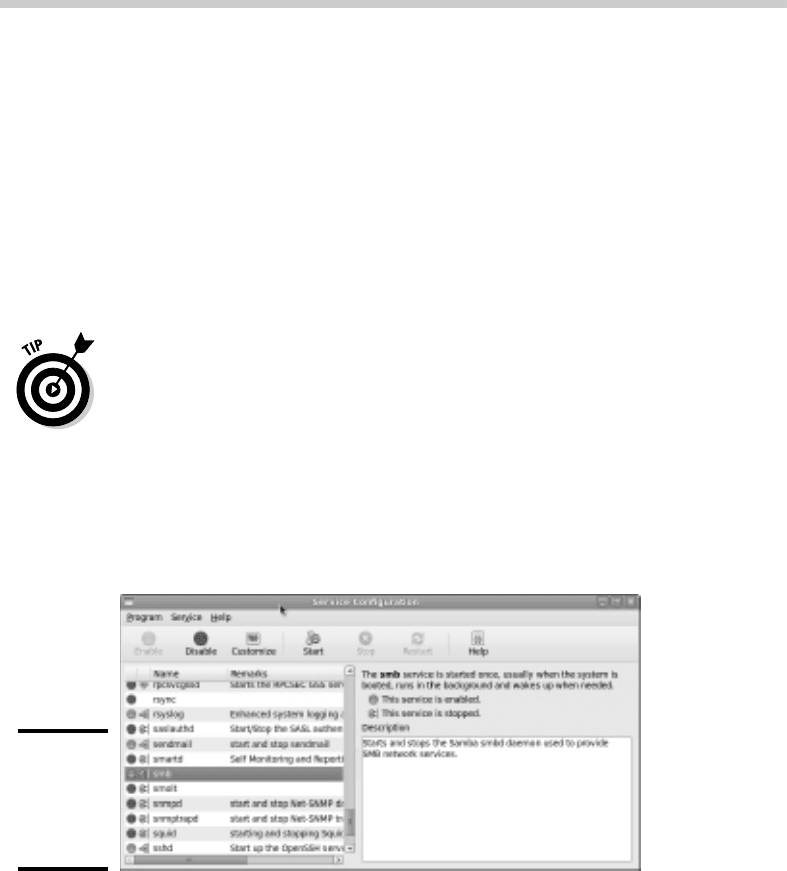
You can also start and stop Samba by using the Service Configuration tool,
shown in Figure 5-1. Scroll down the list of services until you find the SMB
service. You can use the three buttons on the toolbar at the top of the
window to start, stop, or restart a service.
Figure 5-1:
Using the
Service
Config-
uration tool.
You can also use the Service Configuration tool to start Samba automati-
cally, although frankly, the chkconfig command is easier to use. To config-
ure Samba to start automatically for levels 3 and 5, follow these steps:
1. Select the SMB in the list of services.
67_625873-bk09ch05.indd 72067_625873-bk09ch05.indd 720 9/21/10 10:46 PM9/21/10 10:46 PM
Book IX
Chapter 5
Doing the
Samba Dance
721
Using the Samba Server Configuration Tool
2. Click the Customize button.
This brings up a dialog box that lists five run levels.
3. Make sure all five check boxes are selected.
4. Click OK.
Using the Samba Server Configuration Tool
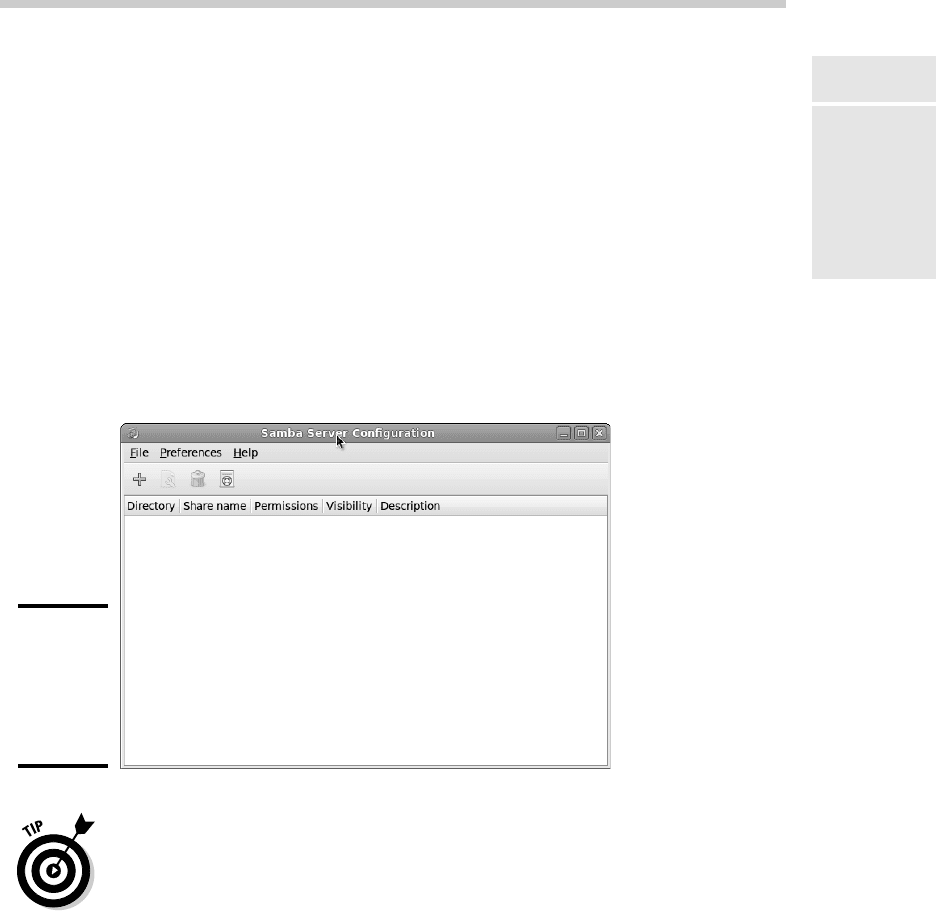
Fedora includes a handy GNOME-based configuration tool that
simplifies the task of configuring Samba. To start it, choose
System➪Administration➪Samba. When you do so, the Samba Server
Configuration tool appears, as shown in Figure 5-2. This tool lets you config-
ure basic server settings and manage shares.
Figure 5-2:
Using the
Samba
Server
Config-
uration tool.
Not all of Samba’s configuration options are available from the Samba Server
Configuration tool. For advanced Samba server configuration, you need to
edit the smb.conf file directly, as described in the section “Editing the smb.
conf File,” later in this chapter.
Also, if you don’t like the GNOME-based configuration tool, you can use a
new Web-based configuration tool called SWAT. For more information, use
Google or another Web search service to search for the package samba-
swat.
67_625873-bk09ch05.indd 72167_625873-bk09ch05.indd 721 9/21/10 10:46 PM9/21/10 10:46 PM
722
Using the Samba Server Configuration Tool
Configuring server settings
To make your Samba server visible on the network, you need to configure its
server settings. Follow these steps:
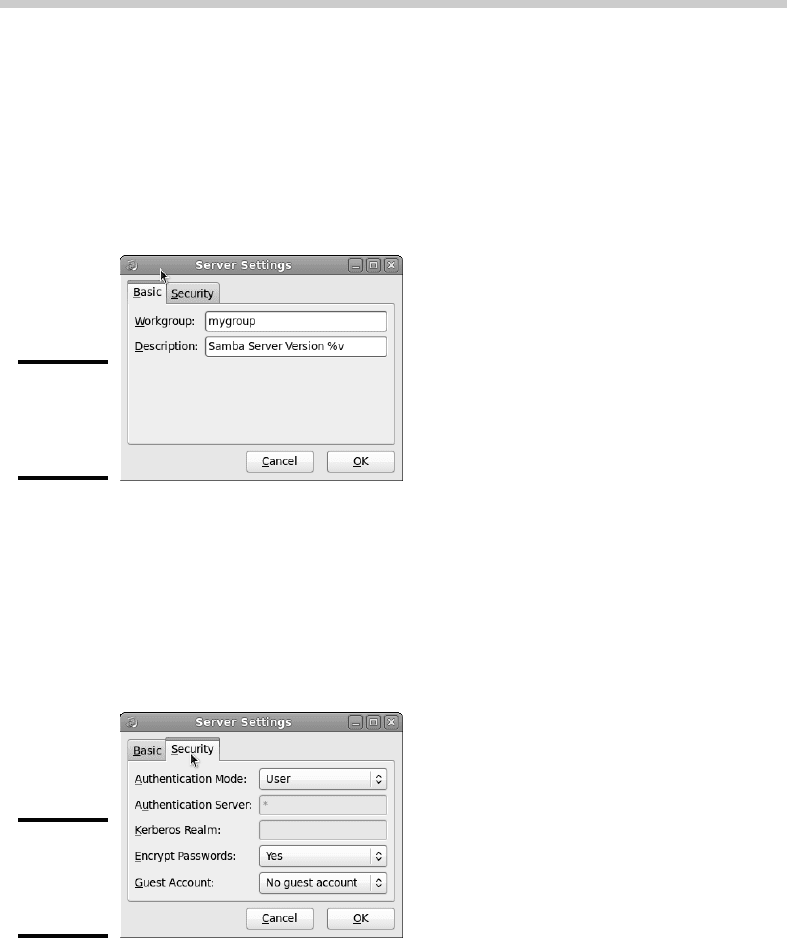
1. Choose Preferences➪Server Settings.
The Server Settings dialog box springs to life, as shown in Figure 5-3.
Figure 5-3:
Configuring
the server
preferences.
2. Enter the workgroup name and a description for your server.
The workgroup name must match the workgroup or domain name used
by the computers that will be accessing the server.
3. Click the Security tab.
The security settings appear, as shown in Figure 5-4.
Figure 5-4:
Configuring
security
options.
4. Set the authentication mode the way you want.
The Authentication Mode drop-down list offers four basic types of security:
67_625873-bk09ch05.indd 72267_625873-bk09ch05.indd 722 9/21/10 10:46 PM9/21/10 10:46 PM

Book IX
Chapter 5
Doing the
Samba Dance
723
Using the Samba Server Configuration Tool
• Domain: This mode configures the Samba server to use a Windows
domain controller to verify the user. If you specify this option,
you must provide the name of the domain controller in the
Authentication Server text box. Also, you must set the Encrypt
Passwords drop-down list to Yes if you use Domain mode.
• Server: This mode configures Samba to use another Samba server to
authenticate users. If you have more than one Samba server, this fea-
ture lets you set up user accounts on just one of the servers. Specify
the name of the Samba server in which you want to perform the
authentication in the Authentication Server text box.
• Share: This mode authorizes users separately for each share that
they attempt to access.
• User: This is the default mode. It requires that users provide a valid
username and password when they first connect to a Samba server.
That authentication then grants them access to all shares on the
server, subject to the restrictions of the account under which they
are authorized.
5. Set the Encrypt Passwords drop-down list to Yes.
This option is required to allow users of Windows 98 or later versions to
connect.
6. Set the Guest Account drop-down list to the account that you want
anonymous users to access.
Normally, this account is set to No Guest Account, which means that
guest account access is disabled.
If you want to enable guest account access, click the Guest Account
drop-down list to reveal a list of all your Linux users. Then, choose the
Linux user you want to be used by guest users. Usually, you set the
guest account to the pre-defined Linux account named Nobody.
7. Click OK.
The Server Settings dialog box is dismissed.
Configuring Samba users
You must create a separate Samba user account for each network user who
needs to access the Samba server. In addition, you must first create a Linux
user account for each user. The Samba user account maps to an existing
Linux user account, so you must create the Linux user account first.
67_625873-bk09ch05.indd 72367_625873-bk09ch05.indd 723 9/21/10 10:46 PM9/21/10 10:46 PM
724
Using the Samba Server Configuration Tool
To create a Samba user account, follow these steps:
1. From the Samba Server Configuration window, choose
Preferences➪Samba Users.
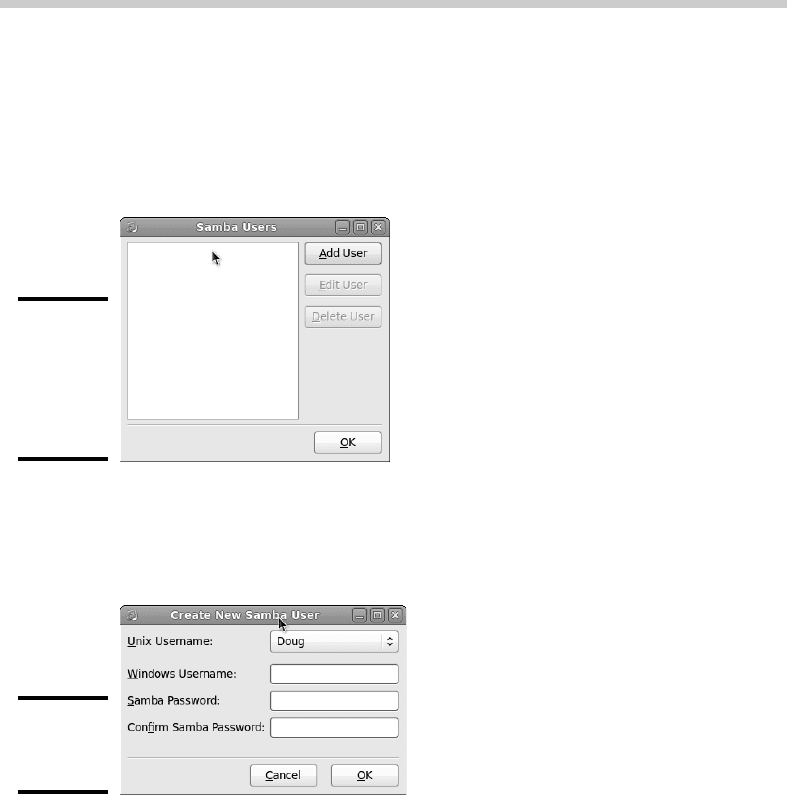
The Samba Users dialog box appears, as shown in Figure 5-5.
Figure 5-5:
The Samba
Users dialog
box lists
your Samba
users.
2. Click Add User.
The dialog box in Figure 5-6 appears.
Figure 5-6:
Adding a
Samba user.
3. From the Unix Username drop-down list, select the Linux user that you
want this user to log on as.
If you forgot to create the Linux user account for this user, choose
System➪Administration➪Users and Groups and create the account now.
4. Enter the Windows username for the user.
This is the name of the user’s Windows user account.
5. Type the user’s password into the password fields.
67_625873-bk09ch05.indd 72467_625873-bk09ch05.indd 724 9/21/10 10:46 PM9/21/10 10:46 PM
Book IX
Chapter 5
Doing the
Samba Dance
725
Using the Samba Server Configuration Tool
6. Click OK.
You’re returned to the Samba Users dialog box, which should now list
the user that you just created.
7. Repeat Steps 2 through 6 for any other users you want to create.
8. After you’re done, click OK.
The Samba Users dialog box is dismissed.
Creating a share
To be useful, a file server should offer one or more shares — directories that
have been designated as publicly accessible via the network. You can see a
list of the current shares available from a file server by firing up the Samba
Server Configuration program.
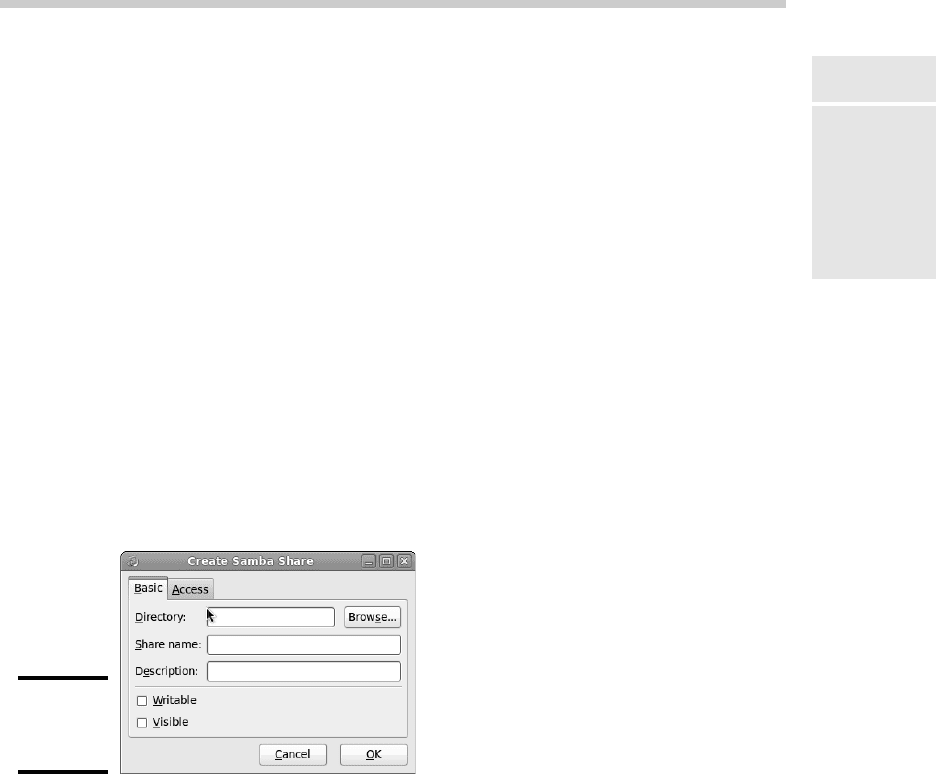
To create a new share, follow these steps:
1. Click the Add button.
The dialog box shown in Figure 5-7 appears.
Figure 5-7:
Creating a
share.
2. Type the path for the directory that you want to share in the Directory
text box.
If you aren’t sure of the path, you can click the Browse button. This
action calls up a dialog box that lets you search the server’s file system
for a directory folder to share. You can also create a new directory
from this dialog box if the directory that you want to share doesn’t yet
exist. After you’ve selected or created the directory to share, click OK to
return to the Create Samba Share dialog box.
3. Type a description of the share in the Description text box.
The description is strictly optional but can sometimes help users to
determine the intended contents of the folder.
67_625873-bk09ch05.indd 72567_625873-bk09ch05.indd 725 9/21/10 10:46 PM9/21/10 10:46 PM
726
Using the Samba Server Configuration Tool
You may be wondering why there’s no text box labeled Share Name in
the Create Samba Share dialog box. Unfortunately, the Samba
Configuration program doesn’t let you specify the share name for the
share. Instead, it just uses the name of the directory being shared. If a
share already exists by that name, the configuration program adds a
number to the end of the directory name in order to make the share
name unique.
Don’t despair, however. You can change the share name by editing the
smb.conf file, as described later in this chapter.
4. Specify whether you want the share to be read-only or read/write.
The default is read-only. If you want to let users save their files on your
Samba server, you need to change this setting to read/write.
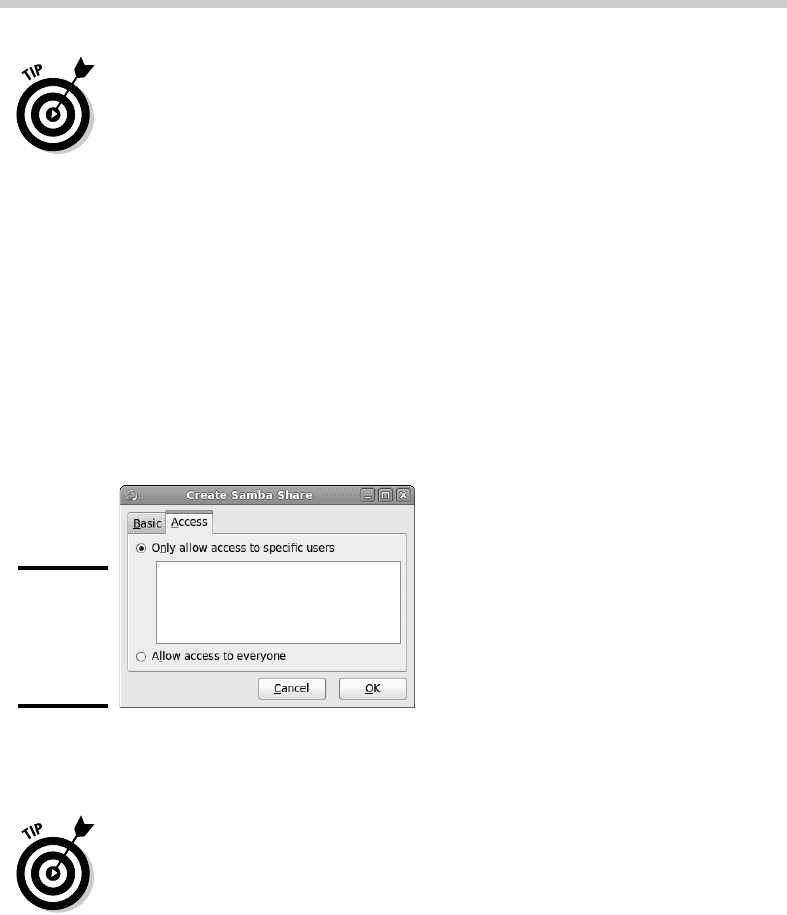
5. Click the Access tab.
The Access tab of the Create Samba Share dialog box appears, as shown
in Figure 5-8.
Figure 5-8:
Allowing
access to
a Samba
share.
6. If you want to limit access to the share, select the Only Allow Access
to Specific Users check box and then select the users to whom you
want to grant access.
Note that users’ names will appear in this box only if you create Samba
users. Refer to the section “Configuring Samba Users” earlier in this
chapter.
7. Click OK.
You’re returned to the Samba Configuration window, where the share
that you just added appears in the list of shares.
67_625873-bk09ch05.indd 72667_625873-bk09ch05.indd 726 9/21/10 10:46 PM9/21/10 10:46 PM