
Velten K. Mathematical Modeling and Simulation: Introduction for Scientists and Engineers
Подождите немного. Документ загружается.

4.10 A Look Beyond the Heat Equation 295
Note that Richard’s equation 4.131 is a nonlinear PDE since the unknown ψ
appears in the general nonlinear functions (ψ )andK(ψ), see the discussion of
nonlinearity in Section 4.3.1.3. Appropriate numerical methods thus need to be
applied to linearize Equation 4.131 [139].
4.10.2.4 Asparagus Drip Irrigation
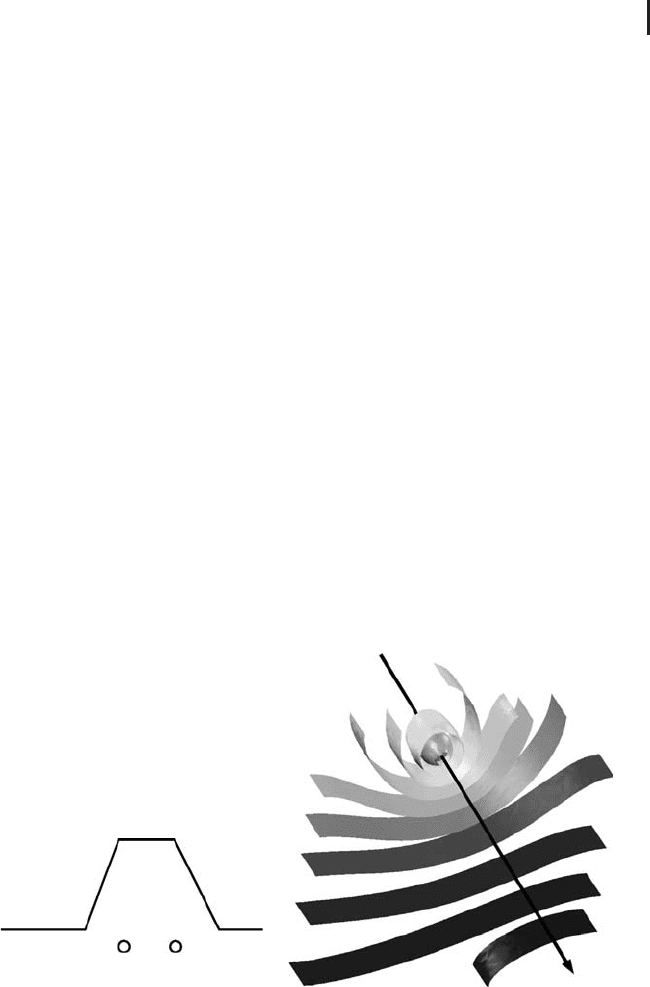
Figure 4.24 shows an example application of Richards equation, which was com-
puted using the ‘‘earth science module’’ of the commercial FE software Comsol
Multiphysics (since this model is currently unavailable in CAELinux). Asparagus is
cultivated in ridges having the shape that is indicated in Figure 4.24a. To control
the moisture levels within these ridges, drip irrigation through water pipes is used
in some cases. Figure 4.24a shows some possible locations of these water pipes
below the surface level. The pipes release water into the soil through special drip
generating devices that generate a sequence of water drops at the desired rate (e.g.
there may be one of these drip generators per 20 cm pipe length). Now the question
is where the exact location of the pipes should be and how much water should be
released through the drip generators so as to achieve an optimum distribution of
soil moisture within the soil at minimal costs. To solve this optimization problem, a
mathematical model based on Richard’s equation and the Mualem/van Genuchten
model, Equations 4.131 and 4.132, has been developed in [195]. Figure 4.24b
shows isosurfaces of the volumetric soil moisture content around one of the drip
generators in a water pipe. The same figure is also shown on the title page of
this book. Referring to the colors on the title page, it can be seen that the soil
moisture is highest (red colors) close to the water pipe, while it decreases gradually
Air
Soil
(a) (b)
Fig. 4.24 (a) Example location of water pipes under an
asparagus ridge. (b) Isosurfaces of the volumetric moisture
content in an asparagus ridge (arrow indicates the water
pipe).

296 4 Mechanistic Models II: PDEs
with increasing distance toward the pipe (the dark blue color indicates the lowest
moisture value).
4.10.2.5 Multiphase Flow and Poroelasticity
Richard’s equation can be generalized in a number of ways. First, we can drop
the assumption that the pressure in one of the fluid phases is constant. If we still
consider two-phase flow, this leads to two equations similar to Equation 4.131 for
each of the fluid phases or – in the case of more than two fluid phases – to as many
equations of this type as there are fluid phases [183, 196]. Using the mechanics of
mixtures approach described in [183, 197], this can be further extended to cases
where one of the phases is a solid. An approach of this kind has been used, for
example, in [5] to describe the wet pressing of paper machine felts, which involves
two fluid phases (water and air) and the felt itself as a solid phase. See [198] for
a number of other approaches to describe poroelasticity, that is, the deformation
of a porous material, and in particular the coupling of such a deformation with
the fluid flow inside the porous medium, which is required in a great number
of applications. Finally, we remark that Richard’s equation can also be applied to
situations where the flow domain consists of layered materials that are saturated
in some parts and unsaturated in other parts of the flow domain, such as technical
textiles, diapers, and other hygienic materials [199].
4.10.3
Computational Fluid Dynamics (CFD)
CFDinvolvesallkindsofproblemswheremathematicalmodelsareusedtodescribe
fluid flow. As was already mentioned above, CFD is perhaps the ‘‘most classical’’
application of PDEs in science and technology in the sense that it involves many
applications that have gained attention in the public, such as meteorological flow
simulations on the earth’s surface, the simulation of air flow around cars, airplanes
or space shuttles. Its special importance is underlined by the fact that an abundant
number of systems in science and technology involve fluid flow (we could quote
Heraclitus panta rhei here again, similar to Section 4.10.2). Of course, the problems
involving flow in porous media that were treated in Section 4.10.2 are already a
part of CFD in its general sense.
4.10.3.1 Navier–Stokes Equations
In a narrower sense, people often use ‘‘CFD’’ as a synonym for applications
of the Navier–Stokes equations and its generalizations. In the simplest case (in-
compressible, Newtonian fluid) these equations can be written as [182, 200]
ρ
Dv
Dt
=−∇p + μ∇
2
v + f (4.133)
∇·v = 0 (4.134)

4.10 A Look Beyond the Heat Equation 297
where ρ is the density (kg m
−3
), v = (v
x
, v
y
, v
z
)isthevelocity(ms
−1
), p is the
pressure (Pa), μ is the (dynamic) viscosity (Pa·s), and f = (f
x
, f
y
, f
z
)isabodyforce
(N m
−3
).
As before, ∂ρ/∂t = 0 is due to the incompressibility assumption, and this is
why ρ does not appear in the time derivative of Equation 4.133. If compressible
fluids such as gases are considered, time derivatives of ρ will appear in Equations
4.133 and 4.134 similar to Equation 4.129. Gas flow is often described based
on the Euler equations, which assume inviscid flow, that is, μ = 0 [182]. The
‘‘Newtonian fluid’’ assumption pertains to the fluids stress–strain behavior. In
short, Newtonian fluids flow ‘‘like water’’ in the sense that, like water, they
exhibit a linear stress–strain relationship with the dynamic viscosity as constant
of proportionality [182]. Non-Newtonian fluids, on the other hand, do not have
a well-defined viscosity, that is, the viscosity changes depending on the shear
stressthatisapplied.Examplesincludeblood,toothpaste,mustard,mud,paints,
polymers, and so on.
D/Dt in Equation 4.133 is the material derivative (which is also called the convective
or substantive derivative). It expresses the time derivative taken with respect to a
coordinate system that is moving along the velocity field v [139]. The body force
vector f typically expresses gravitation, but it may also express other forces that are
acting on the fluid such as electromagnetic forces. As before, these equations can
be interpreted in terms of conservation principles: Equation 4.133 as conservation
of momentum and Equation 4.134 as conservation of mass, which can be easily
shown based on the control volume approach used in Section 4.2.2.
A major advantage of the material derivative notation is that it can be seen
very easily here that Equation 4.133, indeed, expresses conservation of momentum
(note that this is much less obvious in the case of Darcy’s law, Equation 4.127): The
left-hand side of this equation basically is the time derivative of momentum, that
is, of ρv since everything is expressed on a per-volume basis in the Navier–Stokes
equations. You may imagine that all quantities refer to a small fluid volume,
that is, to a control volume as was discussed in Section 4.2.2. Now we know from
Newton’s second law that the rate of change of momentum of a body is proportional
to the resultant force acting on that body. Exactly this is expressed by Equation
4.133, since its right-hand side summarizes all the forces that are acting on the
control volume, which are forces exerted by pressure gradients and viscous and
body forces based on the assumptions made above. Equation 4.133, thus, can be
thought of as expressing Newton’s second law for a small control volume in a
fluid.
In a standard coordinate system, the material derivative can be written as
Dv
Dt
=
∂v
∂t
+
(
v ·∇
)
v (4.135)
which shows that Equation 4.133 again is a nonlinear PDE in the sense discussed in
Section 4.3.1.3, since derivatives of the unknown v are multiplied by v itself. Thus,
298 4 Mechanistic Models II: PDEs
again, specific numerical methods need to be applied to solve the Navier–Stokes
equations based on an appropriate linearization [201–203].
The incompressible Navier–Stokes equations 4.133 and 4.134 can be generalized
in a number of ways. As was mentioned above, the incompressibility assumption
can be dropped, for example, when one is concerned with gas flow. Other important
generalizations include non-Newtonian flow, the consideration of temperature fluc-
tuations and its interactions with the flow (e.g. via density variations in fermentation
processes, see the above discussion of fermentation), the modeling of turbulence
phenomena, and so on. Turbulence models are of particular importance since tur-
bulent flows are rather the rule than the exception in the applications. Equations
4.133 and 4.134 assume laminar flow conditions, which correspond to what may be
described as a ‘‘smooth’’ flow pattern, in contrast to turbulent flow regimes that are
characterized by chaotic, stochastic changes of state variables such as fluid velocity
and pressure. The open-source CFD software Code-Saturne (Section 4.10.3.3 and
Appendix A) includes a number of turbulence models such as the Reynolds-averaged
Navier–Stokes equations which are also known as the RANS equations [204].
4.10.3.2 Backward Facing Step Problem
We will use Code-Saturne now to solve a standard problem of fluid mechanics: the
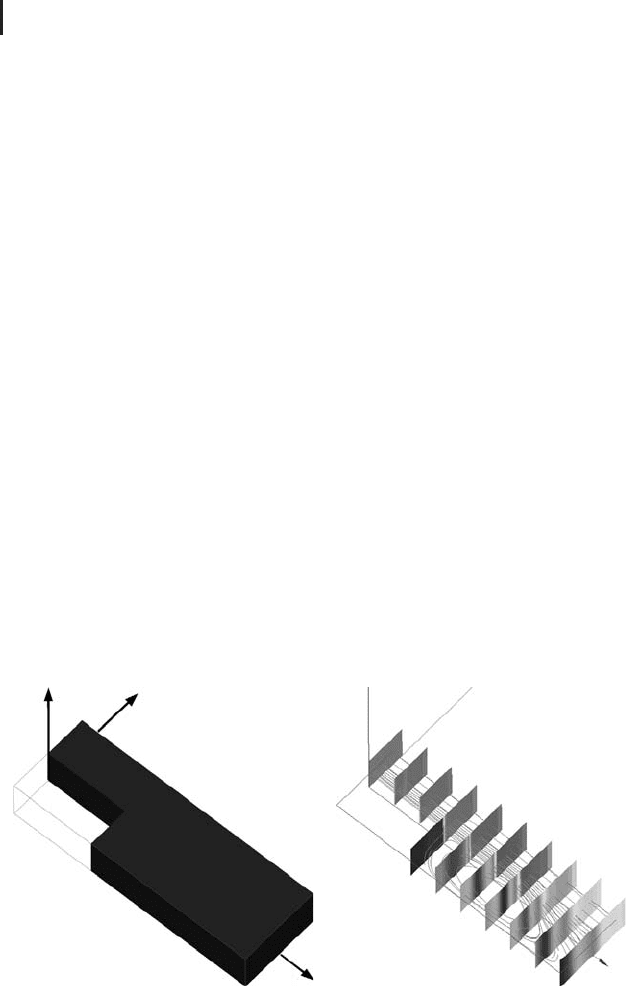
backward facing step problem [201]. Referring to the geometry shown in Figure 4.25a,
the backward facing step problem is characterized by the following boundary
conditions:
•
1: inflow boundary, constant inflow velocity v = (1,0,0);
•
2,3,4,6: walls, no-slip condition;
•
5: outflow boundary, pressure condition p = 0;
•
top and bottom surface: symmetry condition.
(a) (b)
5
4
6
3
2
1
z
x
x
y
Fig. 4.25 (a) Backward facing step geometry with enumer-
ated boundaries. (b) Solution of the backward facing step
problem obtained with Code-Saturne: combination of cut
planes (absolute value of the velocity) with streamlines.

4.10 A Look Beyond the Heat Equation 299
The no-slip boundary conditions at the boundaries 2,3,4,6 forbid any flow through
these boundaries similar to the ‘‘no-flow condition’’ discussed in Section 4.3.2.
Additionally, they impose zero flow velocity relative to the boundary immediately
adjacent to the boundary, which expresses the fact that the flow velocity of
viscous fluids such as water will always be almost zero close to a wall [182].
The symmetry boundary conditions at the top and bottom surfaces basically mean
that a geometry is assumed here that extends infinitely into the positive and
negative z directions (similar conditions have been considered in Section 4.3.3).
The symmetry conditions forbid any flow through these boundaries similar to the
no-slip condition, but they do not impose a zero flow velocity close to the boundaries.
The fluid can slip freely along symmetry boundaries, and this is why the symmetry
boundary condition is also known as the slip boundary condition. Owing to the
symmetry conditions, everything will be constant along the z direction, that is,
there will be no changes, for example, in the fluid flow velocity as we move into the
positive or negative z directions. This means that this problem is a 2D problem in
the sense explained in Section 4.3.3. To demonstrate Code-Saturne’s 3D facilities,
it will, nevertheless, be solved in 3D.
4.10.3.3 Solution Using Code-Saturne
Let us now see how the backward facing step problem can be solved using
Code-Saturne. Code-Saturne is open-source software that is a part of the CAELinux
distribution (Appendix A). Like Code_Aster, it has been developed by EDF, a French
electricity generation and distribution company. On the basis of the finite volume
method, it is able to treat 3D compressible and incompressible flow problems with
and without heat transfer and turbulence [204]. It can be run on parallel computer
architectures, which is an important benefit since CFD problems can be very
demanding in terms of computation time and memory requirements. See [204]
and www.code-saturne.org for more details.
To solve the backward facing step problem described above, the same steps
will be applied that have already been used in Section 4.9: geometry definition,
mesh generation, problem definition, solution, and postprocessing. Only those
steps of the solution procedure are addressed here that differ substantially from
the procedure in Section 4.9. The geometry definition step and mesh generation
step are skipped here since this can be done very similar to the corresponding
steps in Sections 4.9.1 and 4.9.2. After mesh generation is finished, we have to
leave Salome-Meca since the problem definition and solution steps will be done
in the separate Code-Saturne GUI. As a last step in Salome-Meca, the mesh must
be exported in a
.med file. You will find an appropriate mesh corresponding to
Figure 4.25a in the file
flowstep.med in the book software (Appendix A).
The problem definition step and the solution step will now be performed within the
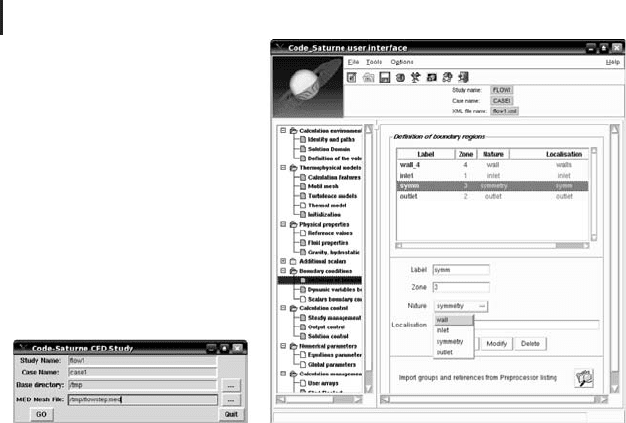
Code-Saturne GUI. This GUI should be started using the CFD-Wizard, which can
be accessed if you select ‘‘CAE-software/Code-Saturne/CFD-Wizard’’ under the PC
button in CAELinux. Figure 4.26a shows appropriate settings within this wizard.
After confirming the wizard, the Code-Saturne GUI will appear (Figure 4.26b).
Within this GUI, select the ‘‘open a new case’’ symbol (directly below the ‘‘file’’
300 4 Mechanistic Models II: PDEs
(a) (b)
Fig. 4.26 (a) CFD-wizard in CAELinux.(b)Code-Saturne GUI.
menu), which automatically selects the appropriate data that have been generated
by the CFD-wizard based on the mesh in
flowstep.med. After this, you just have
to follow the steps listed in the left, vertical subwindow of the Code-Saturne GUI.
The following must be done:
•
Calculation environment/solution domains: under ‘‘stand alone
running’’, choose Code-Saturne preprocessor batch running.
•
Thermophysical models/calculation features: choose ‘‘steady
flow’’.
•
Physical properties/fluid properties: set the density to 1000
(kg m
−3
), the viscosity to 10
−3
(Pa s), and the specific heat to
4800 (J kg
−1
K
−1
) (which means that we will simulate water
flow).
•
Boundary conditions/definition of boundary regions: select
‘‘Import groups and references from preprocessor listing’’,
then choose file
listenv.pre.
You will then see a list with boundary regions
wall_1, wall_2, wall_3,and
wall_4 which correspond to the boundaries in Figure 4.25a as follows:
•
wall_1: inflow boundary, boundary 1 in Figure 4.25a;
•
wall_2: outflow boundary, boundary 5 in Figure 4.25a;
•
wall_3: symmetry boundaries, top and bottom surfaces of
the geometry in Figure 4.26a;
•
wall_4: no-slip boundaries, boundaries 2,3,4,6 in
Figure 4.25a.

4.10 A Look Beyond the Heat Equation 301
After selecting the appropriate ‘‘Nature’’ for boundaries wall_1–wall_3,goon
as follows:
•
Boundary conditions/dynamic variables b.c.: select wall_1 and
then set U = 1(m s
−1
) and the hydraulic diameter for the
turbulence model to 0.1 m (see [204] for details).
•
Calculation control/steady management: set the iterations
number to 20.
•
Calculation control/output control: set format to MED_file.
•
Calculation management/prepare batch calculation: select
batch script file
lance; then choose /tmp as the prefix of the
temporary directory in the advanced options; choose
‘‘file/save’’ in the Code-Saturne’s main menu, and save the
Salome GUI case file under the name flow1.
•
Press the ‘‘Run Batch Script’’ button to start the computation.
You will find the results in the CAELinux directory
/tmp/FLOW1/CASE1/RESU.
Among the results you will, for example, find a text file beginning with
listing...
which contains details about the solution process. The result will be stored in a
.med file.
4.10.3.4 Postprocessing Using Salome-Meca
After this, the postprocessing step is performed within Salome-Meca again. First,
choose the Post-Pro module described in Section 4.9.4. Then you can import the
.med file that was generated by Code-Saturne.Ifyoudonotwanttodotheabove
computation yourself, you can also use the file
result.med in the book software
at this point, which contains the result of a Code-Saturne computation as described
above. The generation of graphical plots from the data then goes along the same
lines as described in Section 4.9.4.
Figure 4.25b shows the solution displayed using a combination of a cut plane plot
with a streamline plot. One can see here, for example, that the darkest color of the
cut planes – which corresponds to the smallest velocity – is located immediately
behind the step, that is, exactly where physical intuition would tell us that it should
be. The cut planes also show that the velocity distribution is indeed two-dimensional
(see the above discussion), since it can be seen that the colors remain unchanged as
we move into the positive or negative z directions. Using the procedure described
above, you may look at this picture in full colors on your computer screen if you
want to see the velocity distribution in more detail. The streamline plot within
Figure 4.25 (b) shows the recirculation region just downstream of the step, which
is caused by the sudden widening of the flow domain at the step.
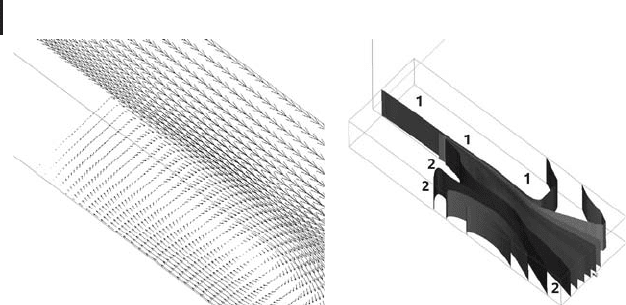
The vector plot in Figure 4.27a shows this recirculation region in some more
detail. It shows the exact flow directions at each particular point. Note that the
length of the velocity vectors in Figure 4.27a is proportional to the absolute value of
the velocity. Finally, Figure 4.27b shows an isosurface plot of the absolute value of the
velocity, similar to the isosurface plots discussed in Section 4.9.4. The ‘‘tape-like’’
302 4 Mechanistic Models II: PDEs
(
a
)(
b
)
Fig. 4.27 Solution of the backward facing step problem dis-
played using (a) a vector plot of the velocity and (b) an
isosurface plot of the absolute value of the velocity.
character of these isosurface (i.e. no bending in the z direction) confirms again that
we have solved a two-dimensional problem. In this case, the isosurface plot helps
us, for example, to distinguish between regions of high velocity (labeled ‘‘1’’ in the
plot) and regions of low velocity (labeled ‘‘2’’ in the plot). One can also see the effect
of the no-slip boundary conditions in this plot: for example, the isosurfaces ending
on boundary 6 (Figure 4.25a) are bent against the flow direction, which means
that the flow velocity decreases close to the boundary, as is required by the no-slip
boundary condition.
4.10.3.5 Coupled Problems
Many CFD models are coupled with mathematical models from other fields.
A problem of this kind has already been mentioned in Section 4.10.2.5: the wet
pressing of paper machine felts, where the porous media flow equations are coupled
with equations describing the mechanical deformation of the felt. Problems of this
kind are usually classified as fluid–structure interaction problems.
There is also a great number of problems where the Navier–Stokes equations are
coupled with the porous media flow equations. An example are filtration processes,
where the flow domain can usually be divided into two parts:
•
a porous flow domain, where the fluid flows inside the
so-called (porous) filter cake that is made up of the solid
particles that are deposited at the filtering device and
•
a free flow domain, where the fluid flows ‘‘freely’’ outside the
filter cake.
In [173, 205], such a coupled problem is solved in order the optimize candle
filters that are used, for example, for beer filtration.
Another example is the industrial cleaning of bottles. In this process, a fluid is
injected into a bottle at high velocity (Figure 4.28). The fluid contains cleaning
agents that are intended to remove any bacteria from the inside surface of the
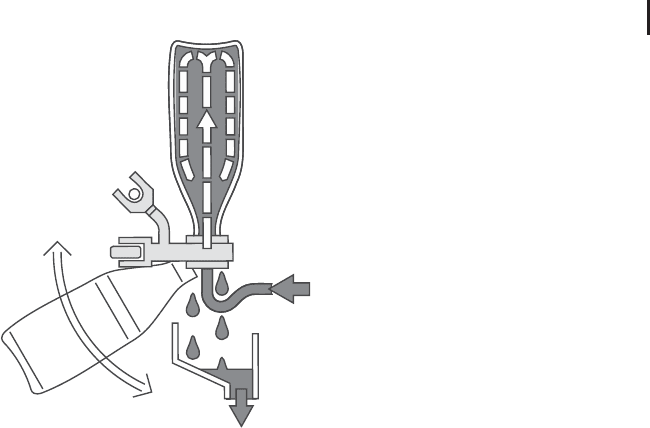
4.10 A Look Beyond the Heat Equation 303
Fig. 4.28 Industrial cleaning of bottles (© 2008 KHS AG, Bad Kreuznach, Germany).
bottle. Owing to the high speed of this process, it is a difficult task for the engineers
to ensure an effective cleaning of the entire internal surface of the bottles. Again,
computer simulations based on appropriate mathematical models are used to
optimize this process [206]. In this case, an appropriate generalization of the
Navier–Stokes equations that includes a turbulence model (Section 4.10.3.1) is
coupled with a model of the microbial dynamics inside the bottle in the form of
ODEs.
4.10.4
Structural Mechanics
The wet pressing of paper machine felts that was mentioned in Section 4.10.2.5 is
an example of a problem in the field of structural mechanics, since it involves the
computation of the mechanical deformation of the felt material. Beyond this, there
is again an abundant number of other systems in science and technology which
involve mechanical deformations. We have cited Heraclitus panta rhei (‘‘everything
flows’’) several times above – in this case, it would be valid to say something
like ‘‘everything deforms’’ or (ta) panta paramorfonontai (translation by my Greek
colleague, A. Kapaklis – thank you). Before looking at more examples, however, let
us write down the governing equations in a simple case.
4.10.4.1 Linear Static Elasticity
Deformations of elastic solids are caused by forces that are acting on the solid.
These forces may act on any point within the body (e.g. body forces such as
gravitation) or across its external boundaries. If the solid is in equilibrium, the
resultant forces will vanish at any point within the solid. This is expressed by the

304 4 Mechanistic Models II: PDEs
following equilibrium equations [207]
−∇ · σ = F (4.136)
where σ is the stress tensor (N m
−2
), and F is the body force (N m
−3
).
The stress tensor σ expresses the forces that are acting inside the body. σ is a
so-called rank-two tensor quantity, which can be expressed as a 3 × 3matrix:
σ =
⎛
⎜
⎝
σ
11
σ
12
σ
13
σ
21
σ
22
σ
23
σ
31
σ
32
σ
33
⎞
⎟
⎠
(4.137)
To understand the meaning of σ ,letn = (n
1
, n
2
, n
3
)
t
be the normal vector of a
plane through a particular point x = (x
1
, x
2
, x
3
) within the solid, and let σ (x)bethe
stress at that particular point. Then,
T = n
t
· σ (x) (4.138)
is the force that is acting on the plane. Hence, we see that σ basically describes the
forces that are acting inside the solid across arbitrarily oriented planes.
Now in order to compute the deformed state of a solid, it is of course not sufficient
if we just know the forces expressed by σ . We also need to know how the body
reacts on these forces. As we know from our everyday experience, this depends on
the material: the same force that substantially deforms a rubber material may not
cause the least visible deformation of a solid made of concrete. Thus, we need here
what is called a material law, that is, an equation that expresses the specific way in
which the solid material under investigation ‘‘answers’’ to forces that are applied
to the solid. Consider the simple case of a cylinder that is made of a homogeneous
material, and that is deformed along its axis of symmetry by a force F (Figure 4.29).
Assuming that the force reduces the initial length of the cylinder from L to L −L
asshowninthefigure,thestrain
=
L
L
(4.139)
characterizes the deformation of the cylinder. As Equation 4.139 shows, is a
dimensionless quantity. The stress σ (Pa) caused by the force F (N) can be written
as
σ =
F
A
(4.140)
where A (m
2
) is the cross-sectional area of the cylinder. Now writing down a mate-
rial law for the cylinder in this situation amounts to writing down an equation that
relates the force that causes the deformation (described by σ ) with the ‘‘answer’’ of