
Velten K. Mathematical Modeling and Simulation: Introduction for Scientists and Engineers
Подождите немного. Документ загружается.


4.8 Finite-element Software 275
Table 4.1
Examples of finite-element and finite-volume software packages.
Program Open source? Comment
Salome-Meca Yes Professional design. Workflow for a
limited number of FE models similar to
the commercial products. Part of
CAELinux, see Appendix A, Section 4.9
and www.caelinux.com.
Code_Aster Yes Part of the Salome-Meca package. ISO 9001
certified FE solver. Focus on structural
mechanics problems. Part of CAEL inux,
see Appendix A,andwww.code-aster.org.
Code_Saturne Yes Computational fluid dynamics (CFD)
software based on finite volumes. Part of
CAELinux, see Appendix A, Section 4.10.3,
and www.code-saturne.org
OpenFoam Yes Finite-element software. Limited
user-friendliness, but large range of
applications ranging from complex fluid
flows involving chemical reactions,
turbulence, and heat transfer to solid
dynamics, electromagnetics, and the
pricing of financial options. Part of
CAELinux, see www.openfoam.org.
Many other
open-source
programs
Yes Search for ‘‘finite element’’ or ‘‘finite
volume’’ at www.sourceforge.net.
ABAQUS No General FE software, particularly good in
structural mechanics applications. See
www.simulia.com.
Comsol Multiphysics No General FE software, particularly suitable
for coupled phenomena such as
fluid–structure interactions. See
www.comsol.com.
Fluent No General FE software, particularly good in
computational fluid dynamics (CFD)
applications. See www.fluent.com.
LS-DYNA No General FE software, particularly good in
structural mechanics applications. See
www2.lstc.com.
Does this mean that one should use commercial software in the field of FE
analysis? Yes – and no. Yes: for example, if your daily work involves a large range
of applications that is not covered by any particular open-source FE software, if you
need fast results, if your time for software training is limited, if you do not have
time or enough competences to assess the numerical quality of the results, and

276 4 Mechanistic Models II: PDEs
if you need software support. No: for example, if you find commercial software
too expensive. Looking at the prices of commercial FE software, you will find that
the complexity of FE software corresponds to the fact that you have to pay a really
substantial amount of money for these packages.
Note 4.8.1 (Open-source versus commercial FE software) Every user of FE
software has to trade off the advantages of commercial software mentioned above
against the disadvantage of paying a lot of money for this, and a general answer
to the question whether one should use open-source or commercial FE software,
thus, cannot be given.
For a beginner in FE analysis, however, who just wants to get a first impression
of FE software and its general procedures, an answer can be given as follows: try the
open-source Salome-Meca. It is based on the ISO 9001 certified FE solver Code_Aster,
and it is currently one of the best available approximations of commercial FE
software, for example, in terms of its general workflow that features a full integration
of all steps of the analysis beginning with the geometry definition and ending with
the postprocessing step as described in Section 4.7.5. If you understand and
reproduce the Salome-Meca sample session described in the next section, you will
have a fairly good idea of the way in which an FE analysis is performed using
software.
4.9
A Sample Session Using Salome-Meca
The general steps of an FE analysis have been described in Section 4.7.5: geometry
definition, mesh generation, weak problem formulation, solution, and postprocess-
ing. These steps define the general structure of a typical software-based FE analysis,
and we will go through each of these steps now in the corresponding subsections.
We will use Salome-Meca – which is available in CAELinux,seeAppendix A –to
solve Problem 2 from Section 4.1.3 with T
c
= 20
◦
CandT
s
= 0
◦
C:
Problem 6:
Referring to the configuration in Figure 4.1b and assuming
•
a constant temperature 20
◦
C at the top surface of the cube
(z = 1),
•
a constant temperature 0
◦
C at the sphere surface,
•
and a perfect insulation of all other surfaces of the cube,
what is the stationary temperature distribution T(x, y, z) within the cube (i.e. in
the domain [0, 1]
3
\ S if S is the sphere)?
4.9 A Sample Session Using Salome-Meca 277
4.9.1
Geometry Definition Step
4.9.1.1 Organization of the GUI
To start Salome-Meca in CAELinux, select CAE-Software/Salome_Meca under
the
PC button of the desktop (see Appendix A for more details on CAELinux).
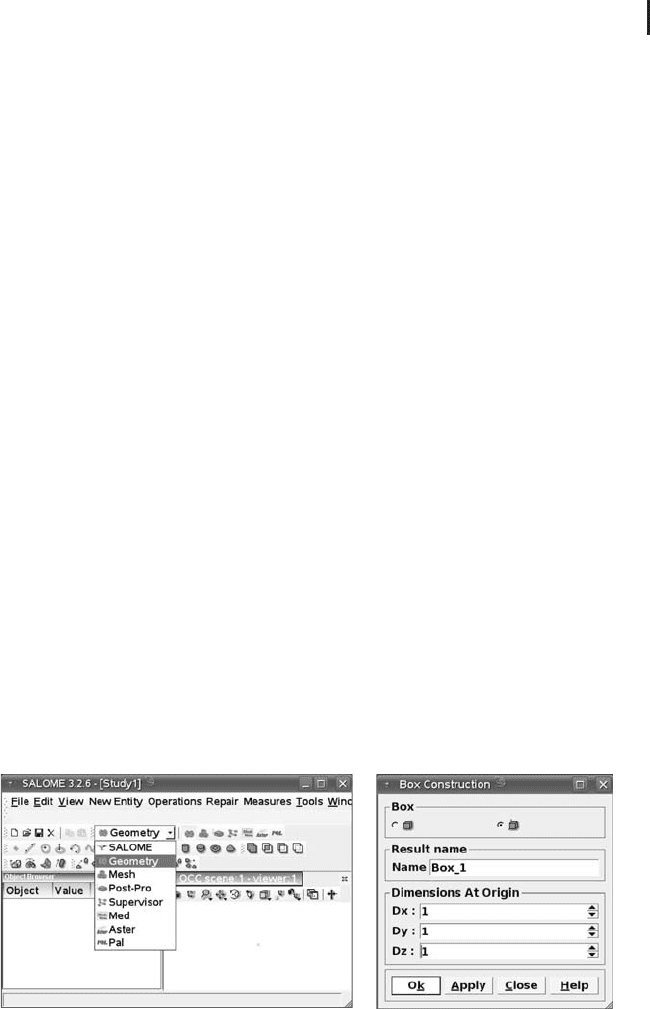
Choose the geometry module using the drop-down list as shown in Figure 4.9a.
The remaining steps of the FE analysis discussed in the next sections (except for the
problem definition step) will also begin with the selection of an appropriate module
from that same drop-down list. Figure 4.9a shows the general structure of the
Salome-Meca window: the left subwindow shows an object browser,whichisusedto
select and explore various items that are generated during the analysis procedure,
such as geometrical forms, meshes, solutions, and plots. The right subwindow is
used to visualize these items. In the geometry module, an OCC viewer is used for
visualization. Here, ‘‘OCC’’ refers to the fact that this viewer was developed using
Open CasCade, a development platform for a variety of 3D graphical applications
(www.opencascade.org).
Standard Salome-Meca will also display a third subwindow called Python Console,
which we do not need here. If you want to get the same picture as shown in
Figure 4.9a, deactivate the Python Console using the menu entry
View/Windows.
Python is a general programming language, which can be used in connection with
Salome-Meca to perform the analysis in batch mode, that is, independent of the
GUI [168]. This can be effective, for example, in situations where you perform
a complex analysis several times, changing just a few parameters of the analysis
between subsequent runs. Using the GUI, you would have to do almost the same
work (except for those few parameters) again and again. Using the batch mode,
on the other hand, you do your work just one time using the GUI, and then save
your work in a Python script. Editing that script, you can then impose any desired
parameter changes and rerun the analysis without using the GUI again. Similar
batch mode facilities are provided by most FE software packages.
(
a
)(
b
)
Fig. 4.9 (a) Salome-Meca window and its module selection box. (b) Box construction
window.
278 4 Mechanistic Models II: PDEs
4.9.1.2 Constructing the Geometrical Primitives
In Problem 2, the geometry involves two main ingredients: the cube [0, 1]
3
and a
sphere with radius 0.1 in the center of the box. The usual procedure now is to con-
struct each of these geometrical primitives one after the other, and then to put them
together as required. So let us begin with the construction of the cube, which can be
done using the menu option
New Entity/Primitives/Box.(Alternatively, you
could use the appropriate symbol on Salome-Meca’s toolbars, but this is omitted here
and in the following for the sake of simplicity.) Figure 4.9b shows the box construc-
tion window that opens up when you click on
New Entity/Primitives/Box.In
this window, the cube data are entered in a self-explanatory way. After confirming
the box construction window, the cube receives a name (
Box_1 in this case), which
is then used to display and access that geometrical primitive in the object browser
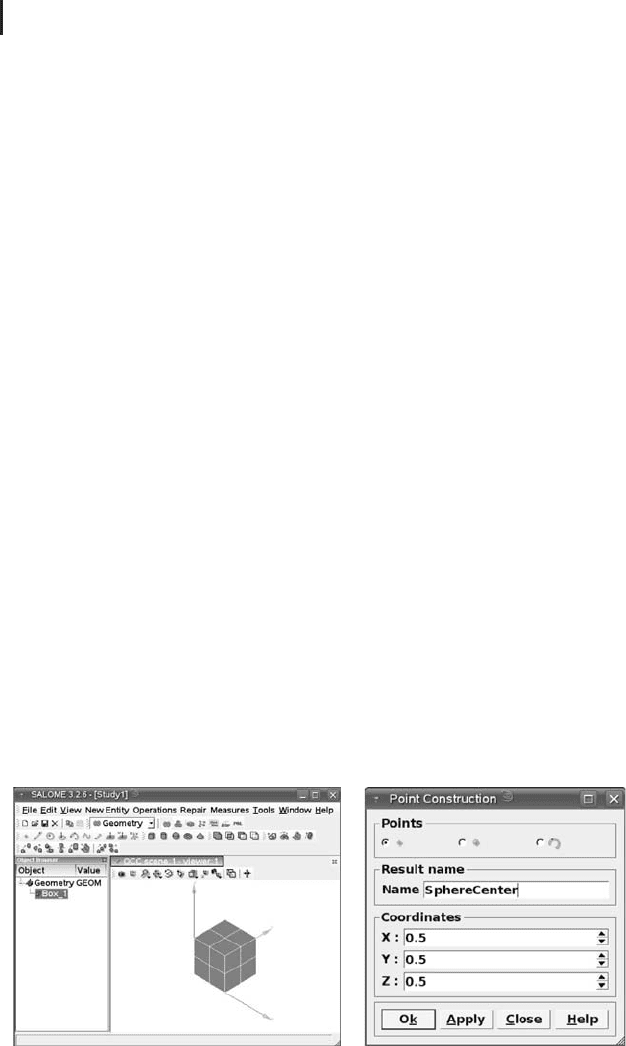
window as it is shown in Figure 4.10a. In the right OCC viewer subwindow of
Figure 4.10a, you can see a 3D picture of
Box_1. Note that if you use Salome-Meca
with its standard settings, this 3D picture will look different, that is, you will have
another background color, wireframe graphics, and so on. All this can be changed
via the menu
File/Preferences or by using the context menu in the OCC viewer
(right-click of your mouse).
To construct the sphere, we can start similar to above using the menu option
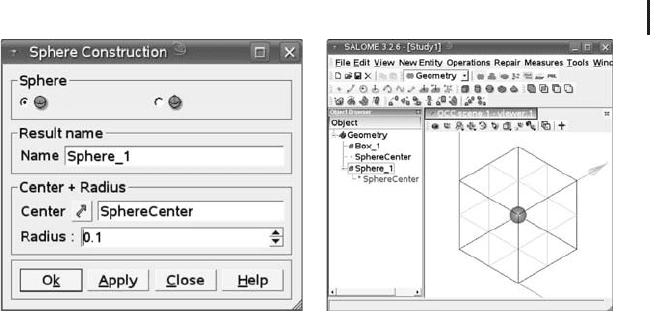
New Entity/Primitives/Sphere.Thisactivatesthesphere construction window
shown in Figure 4.11a. In this window, you cannot enter the sphere center in terms
of coordinates. Rather, you have to enter the center of the sphere by reference to an
existing point object in the object browser window, which is a general principle used
in Salome-Meca. So, the right procedure is to begin with the definition of the sphere
center using
New Entity/Basic/Point, which opens up the point construction
window shown in Figure 4.10b. There you can enter the point coordinates and supply
a name for that point. Calling that point
SphereCenter, it will appear under that
name in the object browser window as shown in Figure 4.11b. Now you can open
thesphereconstructionwindowusing
New Entity/Primitives/Sphere and
define the sphere center by a mouse click on
SphereCenter in the object browser
(a) (b)
Fig. 4.10 (a) Salome-Meca showing Box_1. (b) Point construction window.
4.9 A Sample Session Using Salome-Meca 279
(a) (b)
Fig. 4.11 (a) Sphere construction window. (b) Salome-Meca
showing
Box_1 in ‘‘wireframe’’ mode and the sphere
Sphere_1 inside the box in ‘‘shading’’ mode.
and a subsequent click on the arrow button in the sphere construction window
(Figure 4.11a). The same principle is used generally in Salome-Meca to import
geometrical information into subwindows.
After confirming the sphere construction window, the sphere appears as the new
entity
Sphere_1 in the object browser. To see the box and the sphere inside the box
at the same time, you can use the context menu in the OCC viewer to display the box
in wireframe mode and the sphere in shading mode, as it is shown in Figure 4.11b.
Other options would have been to display the box in a transparent shading mode,
using the transparency option in the context menu of the OCC viewer, or to use the
clipping plane option of the OCC viewer, which allows you to look into the geometry
along an arbitrarily oriented plane. See Figure 4.13b for an example application of
a clipping plane.
4.9.1.3 Excising the Sphere
So far the box and the sphere have been constructed as separate geometrical items.
They are displayed together in Figure 4.11b, but they virtually do not ‘‘know’’
of their mutual existence. For the physical problem expressed in Problem 2, it
is, of course, important that the cube ‘‘knows’’ that there is a cold sphere in its
center. In terms of the discussion in Section 4.3.2, we can say that what we need
here is a boundary condition inside the cube that imposes 0
◦
C at the sphere
surface. To be able to impose such a boundary condition, the sphere surface
must appear as a boundary of the computational domain, and this means that the
computational domain must be what could be phrased in rough terms as ‘‘cube
minus sphere’’.
To get this kind of domain, the sphere needs to be excised from the cube, and
this is again a standard operation that is used quite generally when a finite-element
analysis is performed using software. In Salome-Meca,thisisdoneintwosteps.
First, you choose the menu option
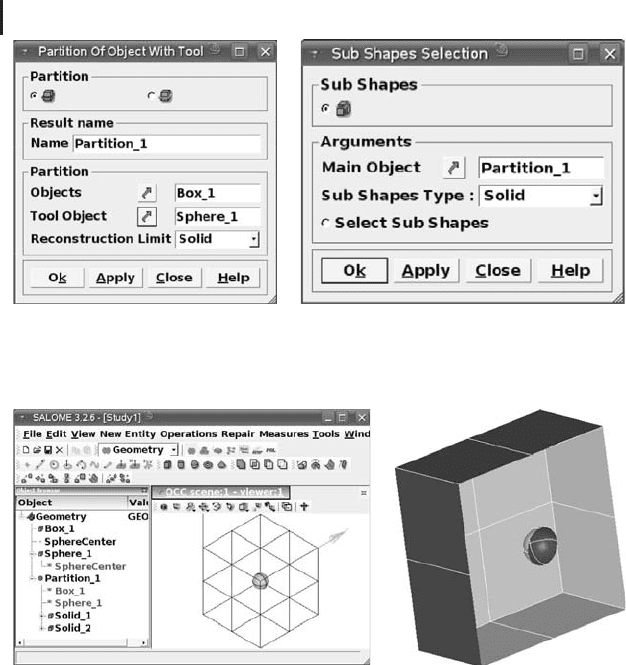
Operations/Partition, which gives the
280 4 Mechanistic Models II: PDEs
(a) (b)
Fig. 4.12 (a) Object partition window. (b) Subshapes selection window.
(
a
)(
b
)
Fig. 4.13 (a) Salome-Meca after the definition of Solid_1
and Solid_2.(b)Solid_1 displayed using the clipping
plane x = 0.5.
object partition window shown in Figure 4.12a. Within this window, there is an
object named
Partition_1,whichinvolvesBox_1 and Sphere_1 as subobjects
(verify this using the object browser). These two objects need now to be separated
from each other as explained above, which can be done using the menu option
New
Entity/Explode
(a really meaningful name, is it not...). This gives the subshapes
selection window in Figure 4.12b, along with two new geometrical entities
Solid_1
and Solid_2 (see the object browser in Figure 4.13a). Using Salome_Meca’s OCC
viewer, you can verify that
Solid_1 is what we have called cube minus sphere,while
Solid_2 is the sphere. To achieve this, you can, for example, use the OCC viewer’s
clipping plane tool mentioned above. After defining a clipping plane at x = 0.5, it
can be seen that
Solid_2 indeed consists of the cube with the sphere being excised
from its center (Figure 4.13b).
4.9 A Sample Session Using Salome-Meca 281
4.9.1.4 Defining the Boundaries
After this, names need to be assigned to those boundaries of the geometry
where boundary conditions are applied, which can then be used later to access
these boundaries in a simple way when the boundary conditions are defined
(Section 4.9.3). This is done using the menu option
New Entity/Group/Create,
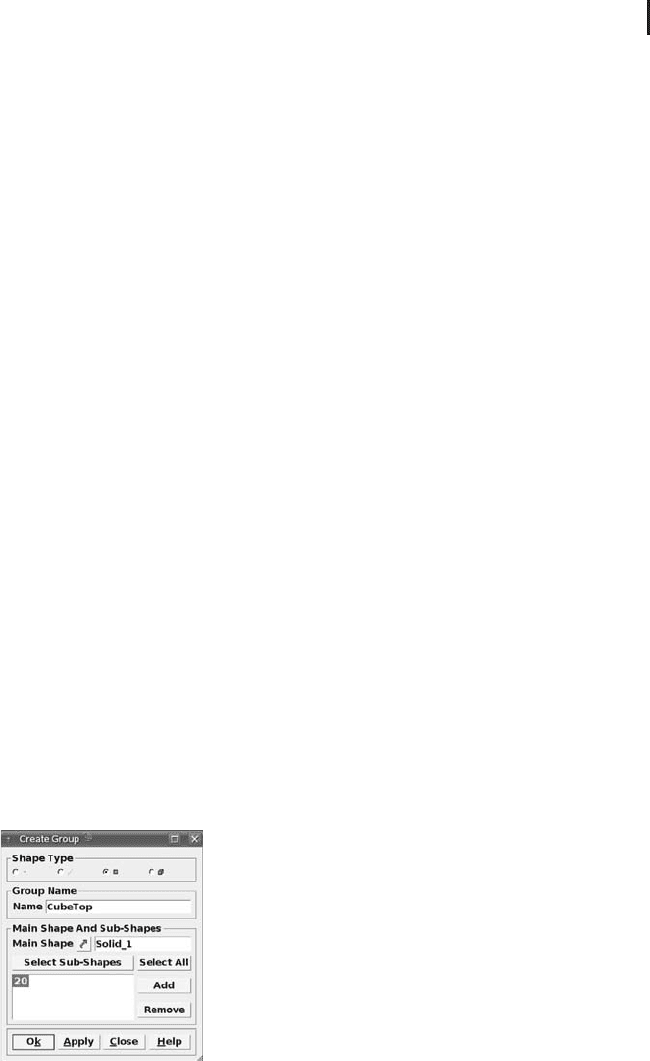
which brings up the ‘‘Create Group’’ window displayed in Figure 4.14. Using
Solid_1 as the main shape and the ‘‘select subshapes’’ button, select the top side
of the cube in the OCC viewer where a temperature of 20
◦
Cisrequired(Problem
6). This side of the cube can then be given a name in the name field of the ‘‘Create
Group’’ window. Let us denote it as
CubeTop in the following text. In the same way
(referring to
Solid_2 as the main shape), a name can be assigned to the sphere
surface where a temperature of 0
◦
CisrequiredinProblem 2. This boundary will
be denoted as
SphereSurf in the following text.
4.9.2
Mesh Generation Step
The next step is mesh generation. Choose the mesh module using the drop-down
list shown in Figure 4.9a as before. As the mesh module is started, a second
subwindow opens up at the right-hand side of the Salome-Meca window on top of
the OCC viewer: the Visualization Toolkit VTK 3D viewer,whichisSalome-Meca’s
default viewer for mesh visualization (Figure 4.16a). The VTK 3D viewer is based
on an open-source graphics application called Visualization Toolkit (VTK),see
http://www.vtk.org/. To construct the mesh, choose
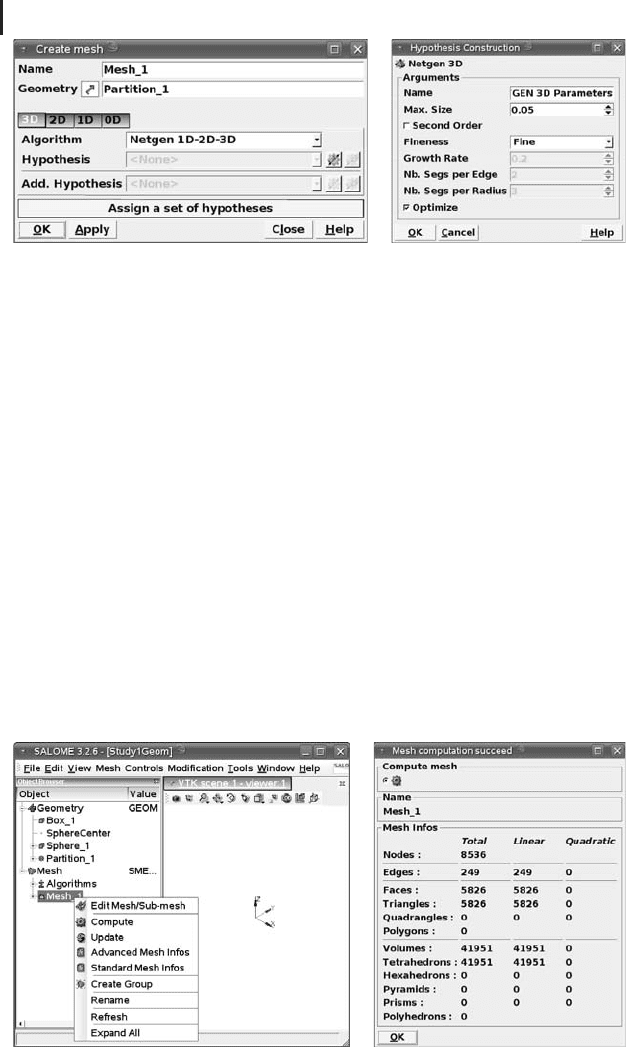
Mesh/Create Mesh,which
opens up the create mesh window shown in Figure 4.15a. Within this window,
the geometry object needs to be specified for which a mesh is to be created,
which is
Partition_1 in our case. A number of algorithms can then be used to
generate the mesh using the drop-down list supplied in the create mesh window.
Within the scope of this book, we are unable to go into a detailed discussion of
the various meshing algorithms – the interested reader is referred to specialized
literature such as [163]. As a default choice we recommend the NETGEN algorithm
developed by Sch
¨
oberl [169], which is a reliable 3D tetrahedral mesh generator.
Fig. 4.14 Group creation window.
282 4 Mechanistic Models II: PDEs
(a) (b)
Fig. 4.15 (a) Create mesh window. (b) Hypothesis construction window.
After choosing the algorithm, various parameters can be set in the hypothesis field
of the ‘‘create mesh’’ window.
A click on the hypothesis button of the ‘‘create mesh’’ window opens up the
hypothesis construction windowshowninFigure4.15b.Inthiswindow,youcanlimit
the maximal size of the tetrahedra within the mesh, adjust the general fineness
of the mesh, and so on. Since the computation time increases substantially with
the fineness of the mesh particularly in 3D applications (see the discussion of
computational efficiency in Section 4.6.8), these parameters should be chosen with
care. Generally, it is a good idea to start with a relatively coarse mesh and then
to increase the mesh fineness in small steps as required. For example, a finer
mesh may be necessary since a finer resolution of the result is required in your
application, or to control the computational error as described in Section 4.6.4).
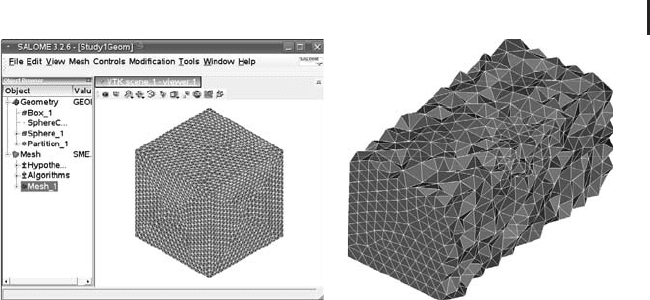
Choosing ‘‘ok’’ in the create mesh window generates an entity called
Mesh_1 in
Salome-Meca’s object browser (Figure 4.16a). A right mouse click on
Mesh_1 brings
up the context menu shown in the figure. Choose ‘‘Compute’’ in this menu to
start the mesh computation. After mesh computation is finished, a mesh statistic is
(a) (b)
Fig. 4.16 (a) Drop-down list for mesh computation. (b) Mesh statistics.
4.9 A Sample Session Using Salome-Meca 283
(a) (b)
Fig. 4.17 (a) VTK viewer showing the mesh. (b) Internal
structure of the mesh visualized using the clipping planes
z = 0.5andx = 0.5.
displayed, as shown in Figure 4.16b, if all parameters are chosen as in Figure 4.15.
In the mesh statistics, you see, for example, that the mesh consists of a total of
8536 nodes, 41 951 tetrahedrons, and so on. This information can, for example, be
used to assess the size of the mesh and to get an idea about the computation time
and memory requirements. The mesh is displayed in Salome-Meca’s VTK viewer
(Figure 4.17a). The VTK viewer can be used for a detailed investigation of the mesh.
For example, clipping planes can be used as described above to see the internal
structure of the mesh. Figure 4.17b shows an example that has been generated
using the clipping planes z = 0.5andx = 0.5 in the VTK viewer. The figure shows
that the NETGEN algorithm generated a uniform tetrahedral layout of the mesh as
required.
4.9.3
Problem Definition and Solution Step
After geometry definition and mesh generation, the next steps in the FE procedure
explained in Section 4.7.5 are the weak problem formulation step and the solution step.
In Salome-Meca, these two steps are performed within the Aster module,whichis
selected as before using the drop-down list shown in Figure 4.9a. This module is
based on the ISO 9001 certified FE solver Code_Aster (Section 4.8). To solve Prob-
lem 2, choose the menu option
Code_Aster Wizards/Linear Thermal.This
fixes the PDE that is to be solved (the stationary heat equation). The weak problem
formulation of this PDE is then done by the software, invisible for a standard
user. Experienced users may apply a number of options provided by Salome-Meca
which affect the weak problem formulation. For example, standard Salome-Meca
uses piecewise linear shape functions (Section 4.7.3), which can be replaced, for
example, by quadratic shape functions using the appropriate options in the ‘‘Create
Mesh’’ window (Section 4.9.2). The menu option
Code_Aster Wizards/Linear
Thermal
starts a wizard that prompts the user for all information required to set up
284 4 Mechanistic Models II: PDEs
(a)
(b)
Fig. 4.18 (a) Imposing temperature boundary conditions in
the linear thermal analysis wizard. (b) Context menu to start
the solution engine.
the weak problem. To get the result shown in the next section, enter the following
information:
•
Model: 3D
•
Salome Object: Geometry
•
Main Shape: Partition_1
•
Thermal Conductivity: any value (see below)
•
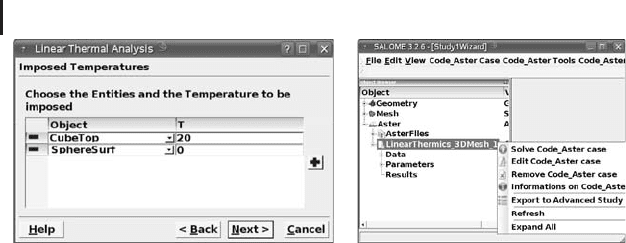
Imposed Temperatures: T = 20 for Object = CubeTop and
T = 0forObject=
SphereSurf (use the ‘‘+’’-key of the
wizard, see Figure 4.18a )
•
Imposed Flux: remove everything using the ‘‘-’’-key of the
wizard
•
Applied Sources: remove everything using the ‘‘-’’-key of the
wizard
Note that any value can be used here for the thermal conductivity since these
settings are based on the isotropic stationary heat equation, which can be written as
T = 0 (4.119)
sincewehave∂T/∂t = 0 in the stationary case (see Equation 4.3 in Section 4.2).
The settings in the ‘‘imposed temperatures’’ option of the wizard are based on the
definition of the boundary surfaces
CubeTop and SphereSurf in Section 4.9.1.4.
The ‘‘imposed flux’’ option of the wizard can be used to impose boundary condi-
tions involving a heat flow across the boundary, while the ‘‘applied sources’’ option
refers to situations where sinks or sources of heat are present, that is, where heat
is generated or removed somewhere inside the domain [97].
After the wizard is finished, an entity called
Aster appears in Salome-Meca’s
object browser (Figure 4.18b). Opening this entity as shown in the figure, the
context menu on the item ‘‘LinearThermics_3DMesh_1’’ allows the user to solve
the problem via Solve Code_Aster case.