
Canete J.F. System Engineering and Automation: An Interactive Educational Approach
Подождите немного. Документ загружается.

208 Appendix B: The rltool Interactive Tutorial
from the MATLAB command window or else
>> rltool(G)
in case we have created a transfer function ‘G’ previously. In both cases, the
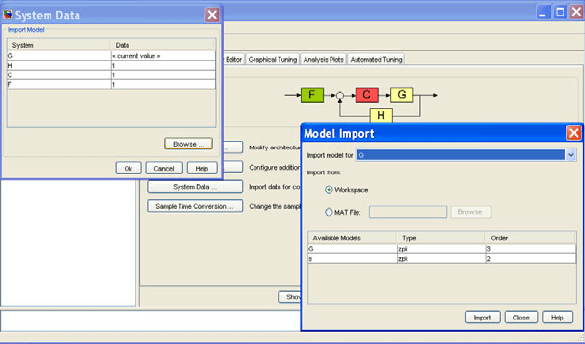
‘Control and Estimation Tool Manager’ is activated, showing the closed loop
configuration actually used, where ‘F’, ‘C’, ‘G’ and ‘H’ stand for filter, controller,
plant and sensor, all of these represented by linear and invariant transfer functions
(fig. B.1)
These transfer functions can be imported from the MATLAB command
window if they are previously created by selecting the ‘System Data’ option
(fig. B.2).
Fig. B.2 The selection of closed loop components form the Control and Estimation Tool
Manager’
For instance, if we execute
>> s=zpk('s');
>> G= 5*(s+2)/(s*(s+1)*(s+5));
>> rltool(G)
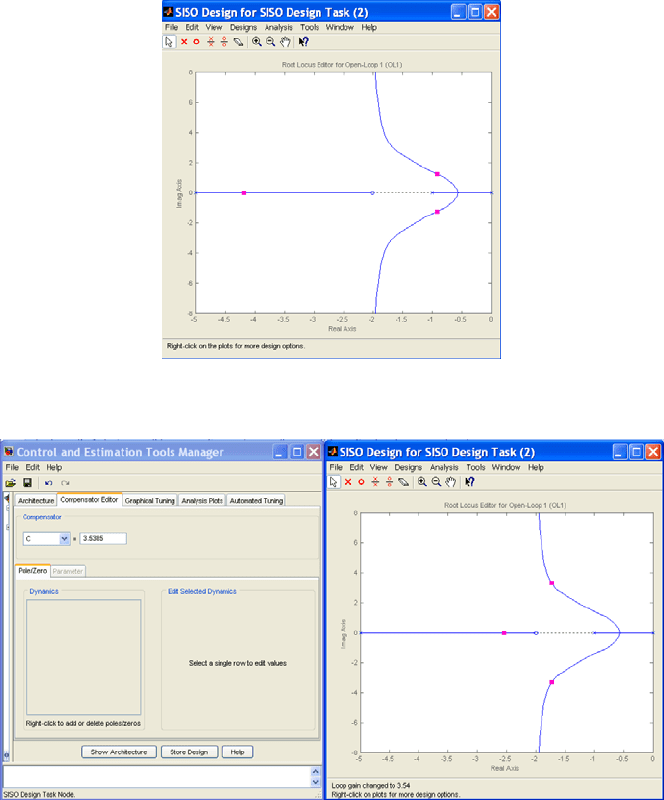
then, the rltool GUI is opened showing the root locus for ‘G’ for the case of
controller compensator C = 1 (fig. B.3). In this chart we can observe the closed
loop pole location as pink squares, which can be moved by dragging them along
the root locus. Note that the controller gain automatically changes in the ’Current
Compensator” window (fig. B.4).
Appendix B: The rltool Interactive Tutorial
209
Fig. B.3 The window design of rltool, showing the root locus plot.
Fig. B.4 The Compensator Editor window of rltool.
This ‘Compensation Editor’ toolbar allows to add poles, add zeros or to delete
either for the controller by selecting the ‘Pole/Zero’ option. This operation can
also be made by right clicking and accessing to the ‘Add Pole/Zero’ or ‘Delete
Pole/Zero’ option.
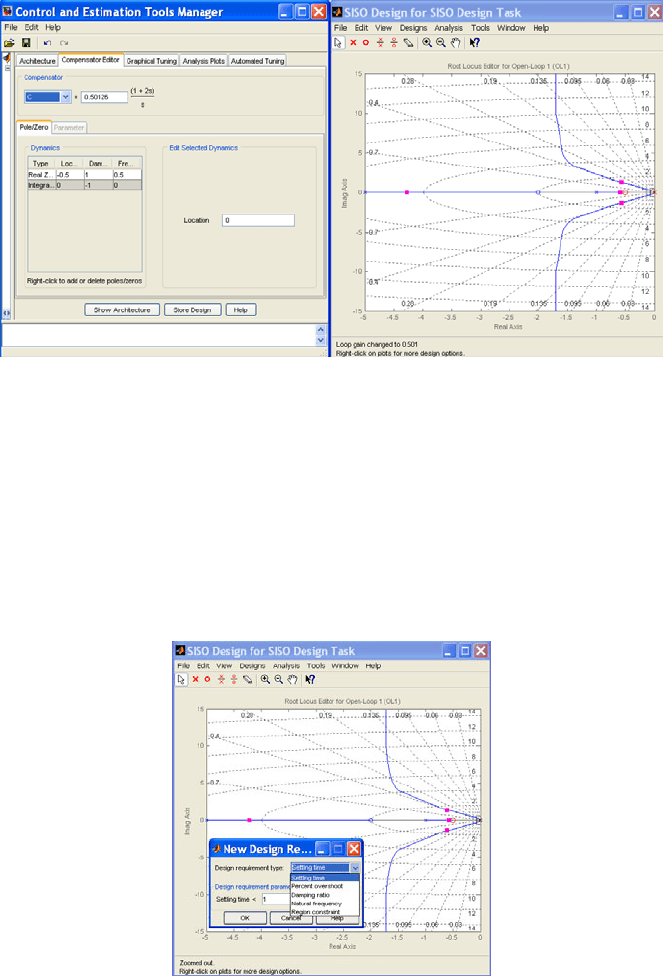
For instance, we can add a zero at s = -0.5 and an integrator at s = 0 we get
another root locus plot with moving closed loop poles (fig. B.5).
210 Appendix B: The rltool Interactive Tutorial
Fig. B.5 The Compensator Editor window of rltool showing the effect of added poles/zeros
It can be seen how this proportional integral controller has moved the root locus
graph to the right half plane, by impairing its transient performance (even causing
unstability) but at the same time improving its steady state regime.
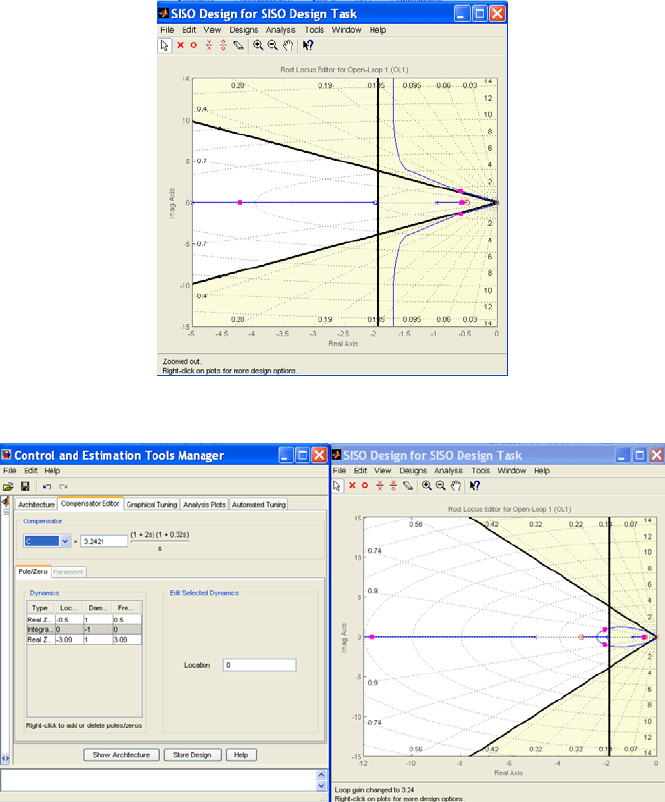
The rltool also enables to super-impose design constraints on the s-plane. For
this, we have to right click and select ”Design Requirements”, then ”New” in the
”Constraint type” menu. It is possible to choice between ‘Settling Time’, ‘Percent
Overshoot’, ‘Damping Ratio’, ‘Natural Frequency’ and ‘Region Constraint’
requirements that can be viewed over an s-grid by right clicking ‘Grid’ (fig. B.6).
Fig. B.6 The Design Requirements setting of rltool
Appendix B: The rltool Interactive Tutorial
211
For example, we can select a settling time
2 and a percent overshoot
20 %. It can be seen that these specifications cannot be met with this
controller, no matter what we set the proportional gain to. That is, the
two dominant roots of the closed loop system will never be in the valid region
(fig. B.7).
Fig. B.7 Imposing specific requirements in rltool
Fig. B.8 Fulfilling requirements by modifying the controller in rltool
Nevertheless, we can add a new the controller zero by using the toolbar in the
rltool main window and drag one of the closed loop poles until they are inside the
212 Appendix B: The rltool Interactive Tutorial
white region. Note how the new compensator transfer function designed meets the
requirements in spite of the closed loop pole closer to the zero at s= -0.5 due to the
cancellation effects (fig. B.8).
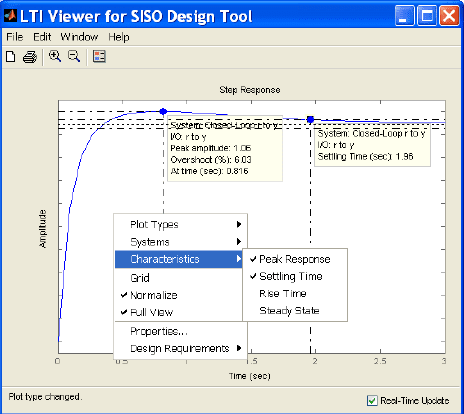
Besides we can see the time responses of the closed loop system by selecting
the ‘Analysis’ at the toolbar and the ‘Response to Step Command option. Then, a
new plot window is opened, showing the step response from the reference to the
system’s output (fig. B.9). By right clicking, it can be shown that the time
response characteristics (peak response, settling time, etc.) in order to test if the
requirements have been effectively met.
Fig. B.9 Step response of the closed loop system designed by rltool
Appendix C:
The SIMULINK Interactive Tutorial
Appendix C The SIMULINK Interactive Tutorial
Appendix C
C.1 Introduction
SIMULINK is an extension to MATLAB that allows users to rapidly and
accurately build computer models of dynamical systems using block diagrams.
A block diagram describes a set of relationships that holds simultaneously, so the
block diagram can be thought of being represented by a set of simultaneous equations.
The block diagram is assembled by gathering the constitutive blocks from the
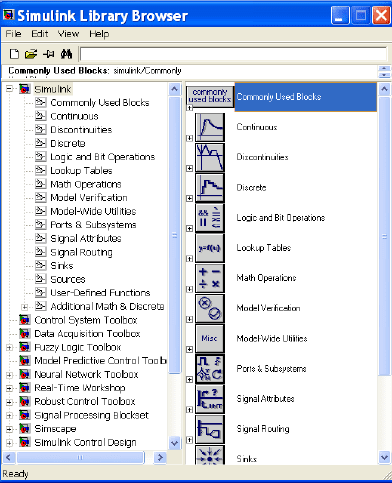
SIMULINK Library Browser, which are grouped by categories into different
libraries (fig. C.1).
Fig. C.1 The SIMULINK Library browser
214 Appendix C: The SIMULINK Interactive Tutorial
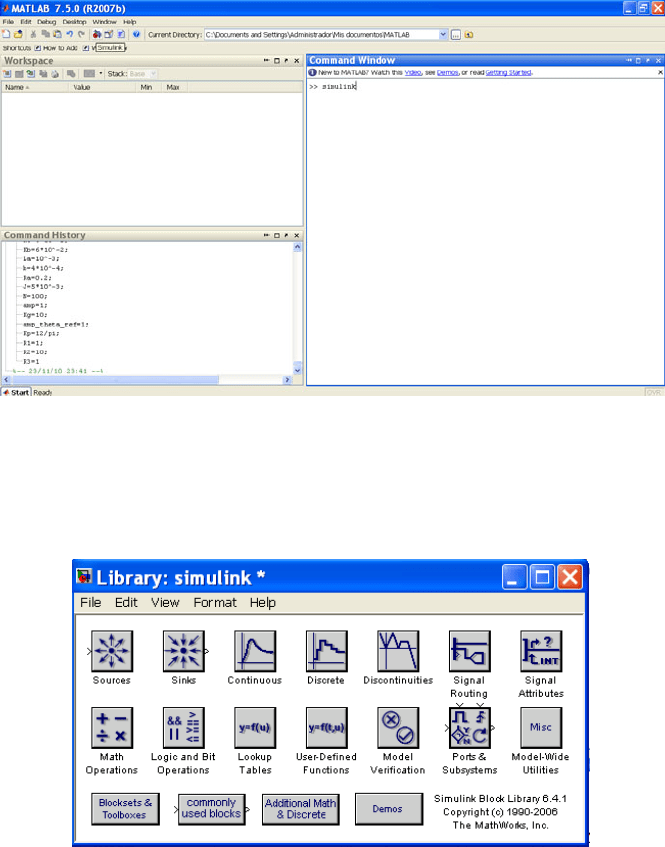
In order to access SIMULINK we can type in the MATLAB command window
>> SIMULINK
or else click on the SIMULINK icon (fig. C.2)
Fig. C.2 The access to SIMULINK from MATLAB
Once we access SIMULINK a new model must be created by dragging blocks
from the SIMULINK Library browser to this new model window, by selecting the
appropriate library where the searched block is included.
Fig. C.3 The SIMULINK Block Library
For the purpose of modeling, simulation, and control of dynamic systems, a subset
of SIMULINK libraries will be used, namely, Continuous, Discontinuities, Lookup
C.2 Creating a Model 215
Tables, Math Operations, Ports and Subsystems, Signal Routing, Sinks, Sources, User-
Defined Functions and Additional Linear (included into SIMULINK Extras) (fig. C.3)
C.2 Creating a Model
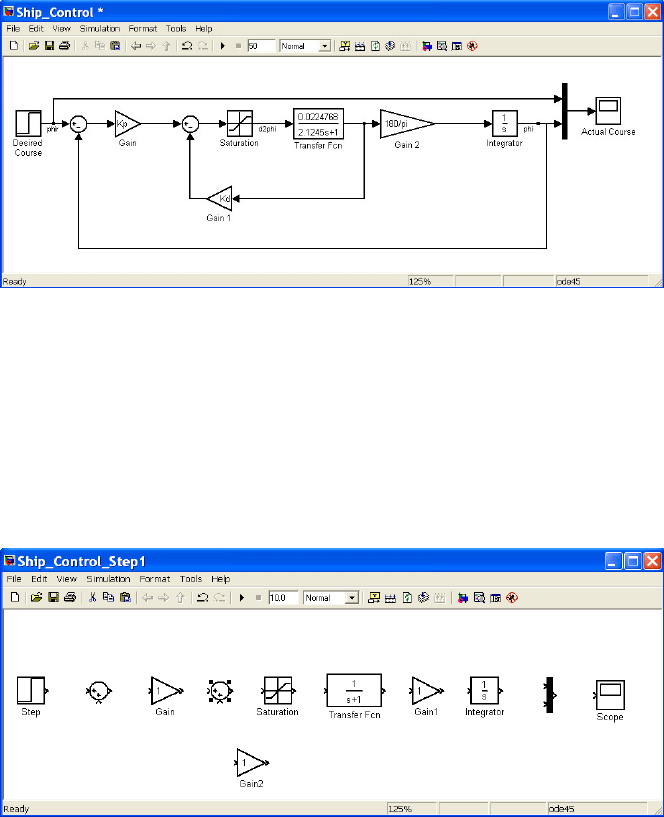
In order to explain the process followed to create a SIMULINK model, we have
selected a simple feedback control system for a ship (fig. C.4).
Fig. C.4 Feedback control system for a ship
In the first place we have to collect all blocks necessary to build the system from the
SIMULINK block Library. Afterwards, we will connect the selected blocks to
implement the block diagram, also changing the parameters of these blocks if it is
necessary. Finally the system is simulated by selecting the appropriate solver options.
Therefore, as first step, we open a new model, dragging the constitutive blocks
of the block diagram from each one of the block libraries where they are included
(fig. C.5)
Fig. C.5 Building process for the feedback control of a ship (step 1)
216 Appendix C: The SIMULINK Interactive Tutorial
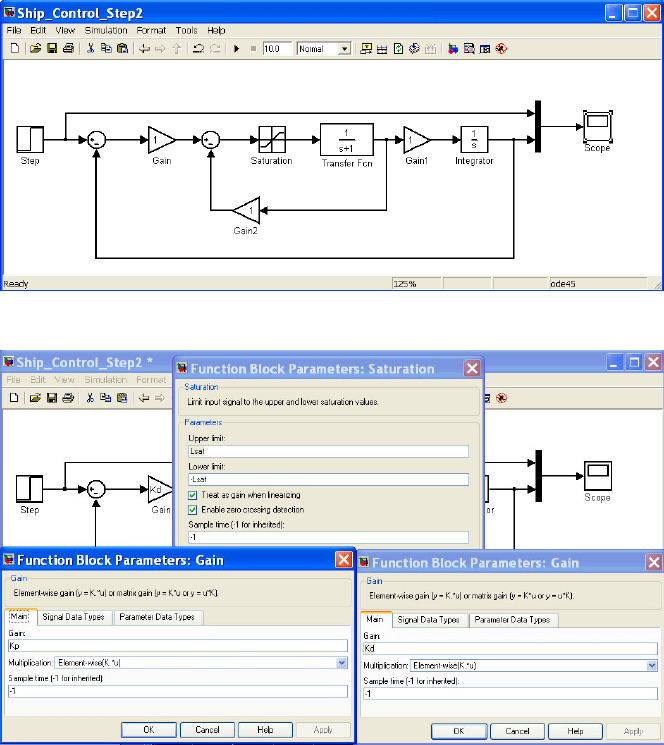
As second step, we connect these blocks following the desired connection
pattern as indicated in the feedback control system (fig. C.6). Possibly, it will be
necessary to flip or rotate some blocks or to derive some pickoff points.
Fig. C.6 Building process for the feedback control of a ship (step 2)
Fig. C.7 Building process for the feedback control of a ship (step 3)
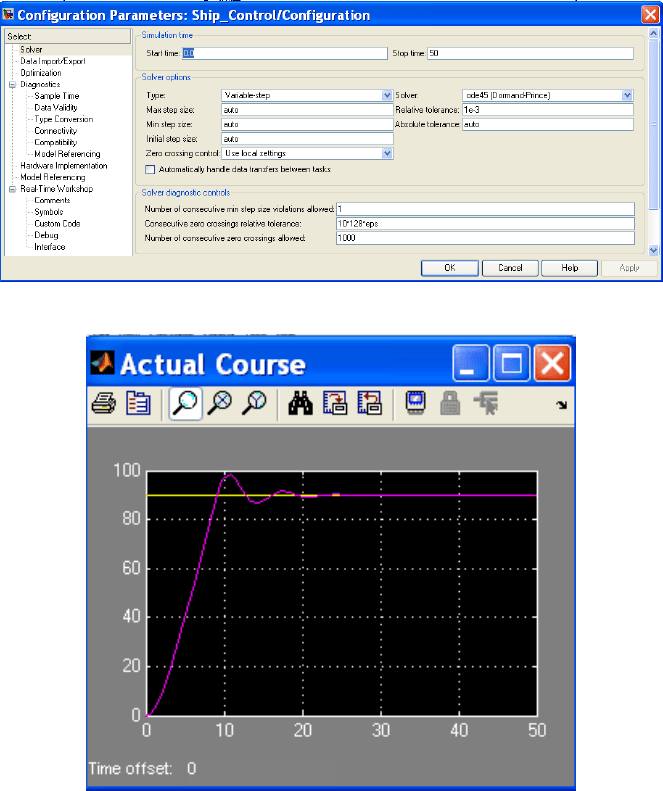
Afterword, in a third step we have to change the block’s parameters according
to the values defined in the original feedback control system if it is necessary,
adding optionally labels both to identify the signals transferred between blocks or
to name specific blocks (fig. C.7). Block parameters can also be defined from the
MATLAB workspace and used in SIMULINK. In this case we have assigned the
gains, maxim saturation, and reference step as
>> Kd=1.8;
>> Kp=1.5;
C.2 Creating a Model 217
>> Lsat=10;
>> phir=90;
Before simulation is run, we must select the appropriate simulation time and the
numerical method used, including the integration step value in case of fixed-step
selection (fig. C.8).
Fig. C.8 Definition of the solver configuration for the feedback control.
Fig. C.9 Step response of the DC motor obtained by using SIMULINK
Finally, the simulation is run by double-clicking on the icon and output
responses can be viewed by double-clicking on the Scope block to view its output.
Hit the auto-scale button to see the step response of the feedback controller
applied to a reference course for a step amplitude of 90
(fig. C.9)