
Canete J.F. System Engineering and Automation: An Interactive Educational Approach
Подождите немного. Документ загружается.

218 Appendix C: The SIMULINK Interactive Tutorial
C.3 SIMULINK Libraries
SIMULINK contains a large number of blocks from which models can be built.
These blocks are arranged in Block Libraries which are accessed by the main
SIMULINK window.
The set of Block Libraries we are going to describe contains the main blocks
used for analysis, modeling and control of dynamic system, nonlinear in general.
We will only focus on the blocks which have been used throughout the text,
leaving aside other blocks less used in the System Engineering field.
C.3.1 Continuous Library
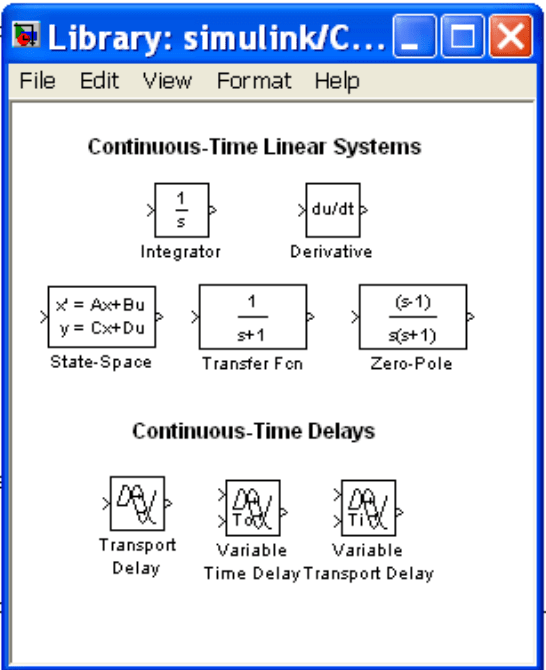
This section is an introduction to the Continuous Library of SIMULINK. We will
describe the function of some blocks included in this library (fig. C.10)
Fig. C.10 The SIMULINK Continuous Library

C.3 SIMULINK Libraries 219
Integrator
The Integrator block integrates its input and is used with continuous−time signals.
We can use different numerical integration methods to compute the Integrator
block's output.
Transfer Function
The Transfer Fcn block implements a transfer function as a ratio of polynomials.
Zero-Pole
The Zero-Pole block implements a system with the specified zeros, poles, and
gain in the s domain.
State-Space
The State-Space block implements a system defined by the state-space equations.
Derivative
The Derivative block approximates the derivative of its input. The initial output
for the block is zero. The accuracy of the results depends on the size of the time
steps taken in the simulation.
Transport Delay
220 Appendix C: The SIMULINK Interactive Tutorial
The Transport Delay block delays the input by a specified amount of time. It can
be used to simulate a time delay.
C.3.2 Source Library
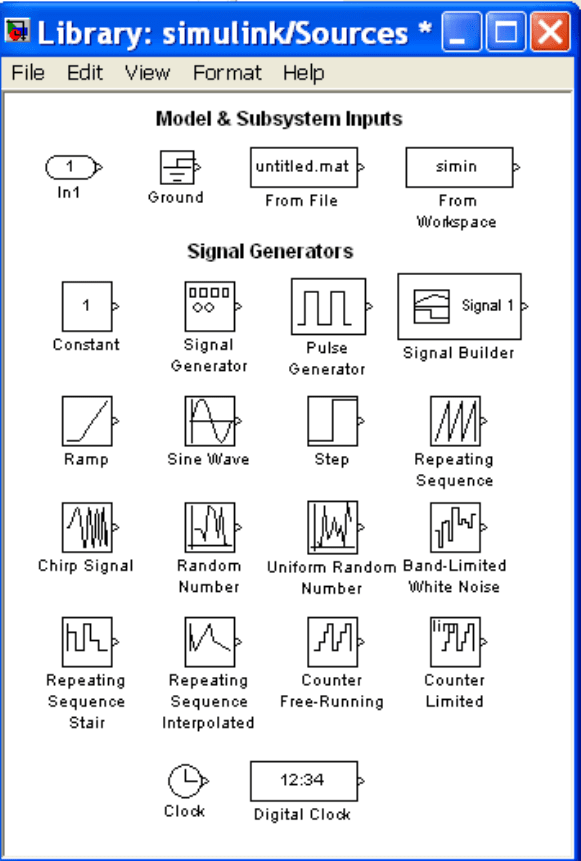
This section is an introduction to the Source Library of SIMULINK. We will
describe the function of some blocks included in this library (fig. C.11).
Fig. C.11 The SIMULINK Source Library

C.3 SIMULINK Libraries 221
Constant block
The Constant block is used to define a real or complex constant value. This block
accepts scalar, vector, or matrix.
Step
The Step block generates a step between two defined levels at some specified
time.
Ramp
The Ramp block generates a signal that starts at a specified time and value and
changes by a specified rate. The characteristics of the generated signal are
determined by the specified Slope and Start time.
Sine Wave
The Sine Wave block generates a sine wave. To generate a cosine wave, we
specify the Phase parameter as
.
Pulse Generator
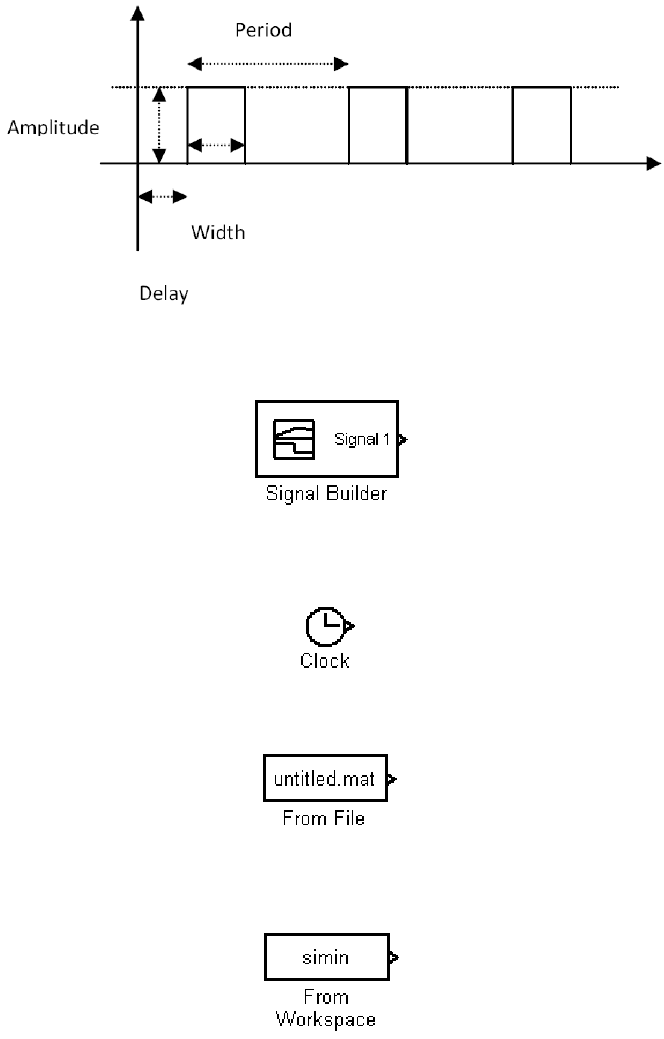
The Pulse Generator block generates square wave pulses at regular intervals. The
shape of the generated waveform depends on the parameters, Amplitude, Pulse
Width, Period, and Phase Delay as shown in (fig. C.12).
222 Appendix C: The SIMULINK Interactive Tutorial
Fig. C.12 Illustration of the Pulse Generator block parameters
Signal Builder
The Signal Builder block allows the user to create interchangeable groups of
piece-wise linear signal sources.
Digital Clock
The Digital Clock block displays the simulation time at a specified sampling interval.
From File
The From File block outputs data read from a MAT file. The name of the file is
displayed inside the block.
From Workspace
The From Workspace block reads data from the MATLAB workspace.
C.3 SIMULINK Libraries 223
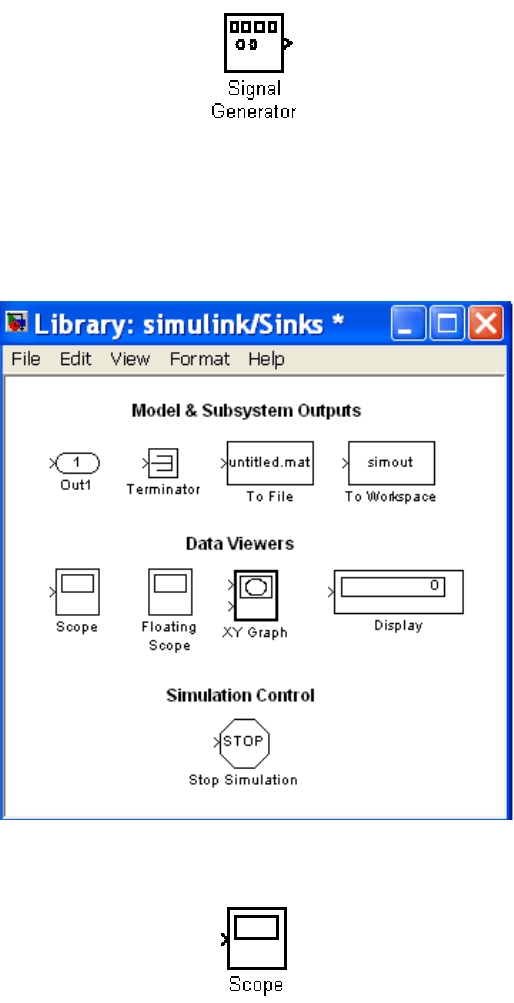
Signal Generator
The Signal Generator block can produce one of four different waveforms: sine
wave, square wave, saw tooth wave, and random wave.
C.3.3 Sinks Library
This section is an introduction to the Sinks Library of SIMULINK. We will
describe the function of some blocks included in this library (fig. C.13).
Fig. C.13 The SIMULINK Sinks Library
Scope
The Scope block displays its input with respect to simulation time. The Scope
block can have multiple axes (one per port), but all axes have a common time
224 Appendix C: The SIMULINK Interactive Tutorial
range with independent y−axes. We can move and resize the Scope window and
we can modify the Scope's parameter values during the simulation.
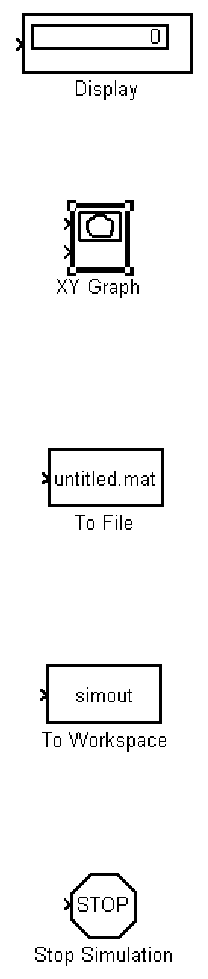
Display
The Display block shows the value of its input on its icon. The display formats are
the same as those of MATLAB.
XY Graph
The XY Graph block displays an X−Y plot of its inputs in a MATLAB figure
window. This block plots data in the first input (the x direction) against data in the
second input (the y direction).
To File
The To File block writes its input to a matrix in a MAT−file. The block writes one
column for each time step: the first row is the simulation time; the remainder of
the column is the input data.
To Workspace
The To Workspace block writes its input to the workspace. This block writes its
output to an array or structure that has the name specified by the block's Variable
name parameter. The Save format parameter determines the output format.
Stop Simulation
The Stop Simulation blocks the simulation when the input signal is “TRUE”.
C.3 SIMULINK Libraries 225
C.3.4 Math Operations Library
This section is an introduction to the Math Operations Library of SIMULINK. We
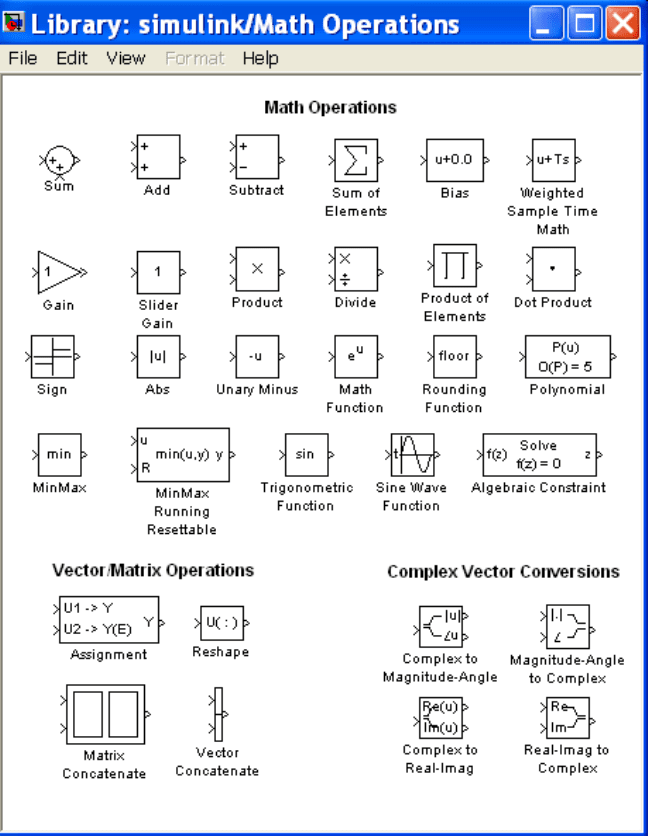
will describe the function of some blocks included in this library (fig. C.14).
Fig. C.14 The SIMULINK Math Operations Library

226 Appendix C: The SIMULINK Interactive Tutorial
Sum
The Sum block is an implementation of the Add block which is described below.
We can choose the icon shape (round or rectangular) of the block on the Block
Parameters dialog box.
Add
The Add block performs addition or subtraction on its inputs. This block can add
or subtract scalar, vector, or matrix inputs. We specify the operations of the block
with the list of sign parameters, plus (+), minus (-).
Gain
The Gain block multiplies the input by a constant value (gain). The input and the
gain can each be a scalar, vector, or matrix.
Product block
The Product block performs multiplication or division of its inputs. We specify
the operations with the number of inputs parameter. Multiply (*) and divide (/)
characters indicate the operations to be performed on the inputs.
Divide
The Divide block is an implementation of the Product block. It can be used to
multiply or divide inputs.

C.3 SIMULINK Libraries 227
Sign
The Sign block indicates the sign of the input. The output is 1 when the input is
greater than zero, the output is 0 when the input is equal to zero, and the output is
−1 when the input is less than zero.
Abs
The Abs block outputs the absolute value of the input.
Math Function
The Math Function block performs the following mathematical functions: exp,
log, 10
u
, log10, magnitude
2
, square, sqrt, pow, etc.
MinMax
The MinMax block outputs either the minimum or the maximum element or
elements of the inputs. We choose the function to apply by selecting one of the
choices from the Function parameter.
Trigonometric Function