
Claverie J-M., Notredame C. Bioinformatics for Dummies
Подождите немного. Документ загружается.

First, however, we have to fetch the entry by using the same protocol
as before:
1. Point your browser to www.ncbi.nlm.nih.gov/entrez/.
The NCBI PubMed home page appears.
2. From the Search pull-down menu, choose Nucleotide.
3. Type in AF018430 in the For window, and click Go.
4. Click the
AF018430 link.
The AF018430 entry appears, as shown in Figure 3-7.
You’re now ready to read your first human genomic GenBank entry. We’ve
selected a simple one for you to start with, but it contains some of the speci-
ficities only encountered in eukaryotic entries.
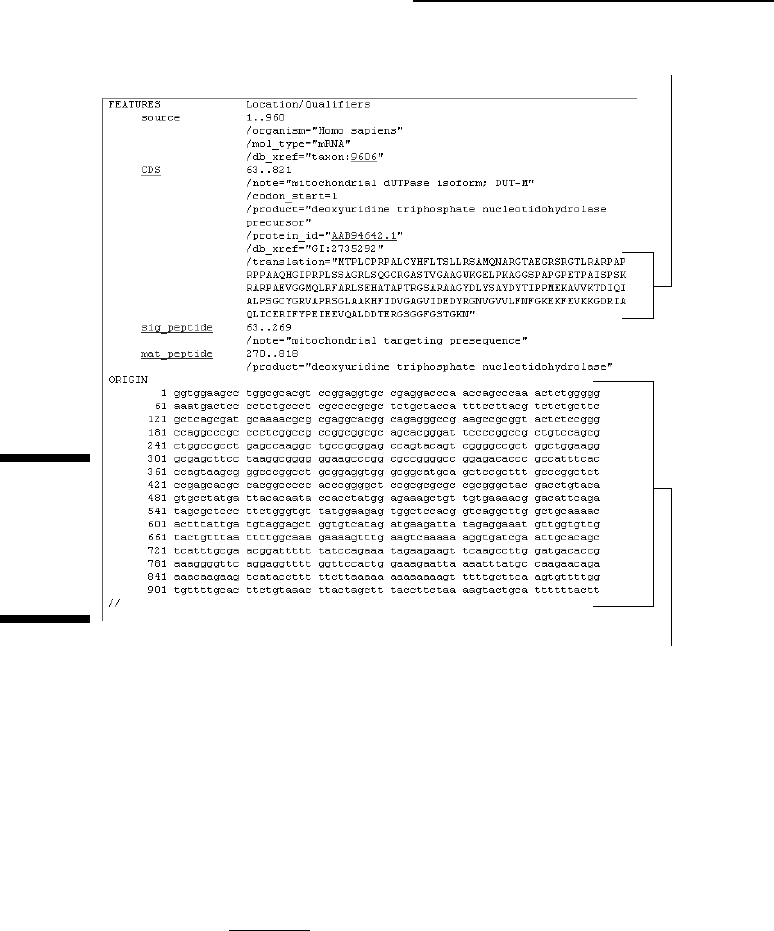
Protein (translation) sequence
mRNA (nucleotide) sequence
Figure 3-6:
FEATURES
section of
GenBank
entry
U90223.
80
Part II: A Survival Guide to Bioinformatics
08_089857 ch03.qxp 11/6/06 3:54 PM Page 80
@Spy
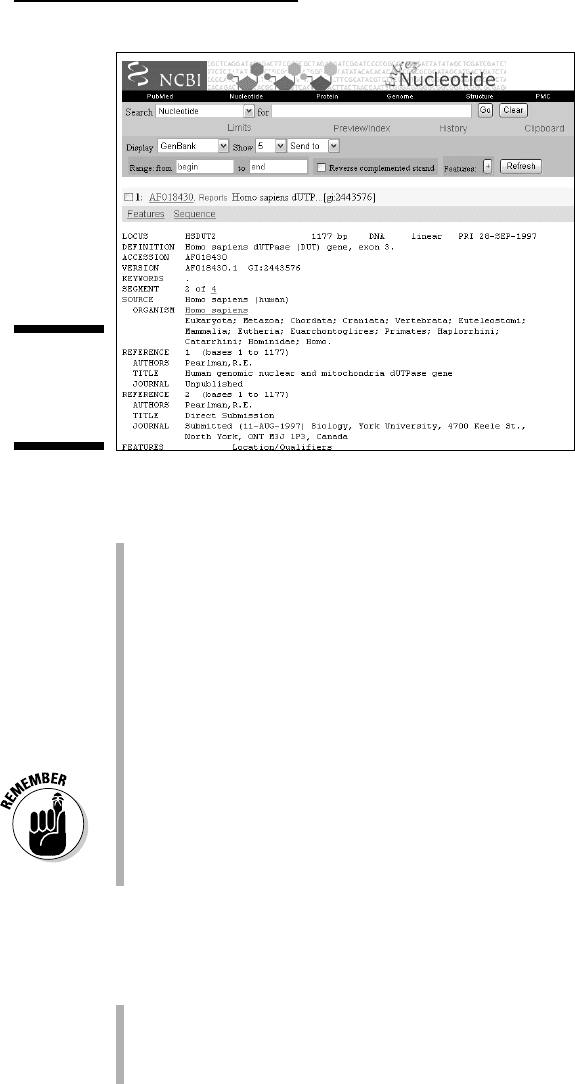
The top part contains general information introduced by the usual keywords:
LOCUS: The locus name is HSDUT2. The rest of the line tells us that
we’re dealing with 1177 bp of linear DNA.
DEFINITION: This line indicates that the name of the gene is DUT and
specifies that the entry encompasses
exon 3 of the gene. This reminds
us that human genes generally spread their protein-coding regions
across many disjointed pieces, the exons.
The ACCESSION, VERSION, and KEYWORDS lines are standard. Note
that for AF018430, the latter is empty, meaning you can’t retrieve this
entry via a keyword-field-restricted search.
SEGMENT: This field relates to the mosaic structure of eukaryotic genes.
It indicates that this current GenBank entry is the second segment of a
super entry made of four. You need all four entries to reconstruct the
complete mRNA sequence used as a template for producing the protein.
The ORGANISM, SOURCE, and REFERENCE lines are standard.
The FEATURES table is what really makes a eukaryotic genomic entry
special — and, as such, is much longer than the ones for prokaryotic
organisms. It contains the following elements (see Figure 3-8):
The source section contains a /map section. For AF018430, it indicates
that the sequence belongs to chromosome 15, and was more precisely
mapped on the long arm (q) of this chromosome, within the q21.1 cyto-
genetic band.
Figure 3-7:
GenBank
entry
AF018430.
81
Chapter 3: Using Nucleotide Sequence Databases
08_089857 ch03.qxp 11/6/06 3:54 PM Page 81
@Spy
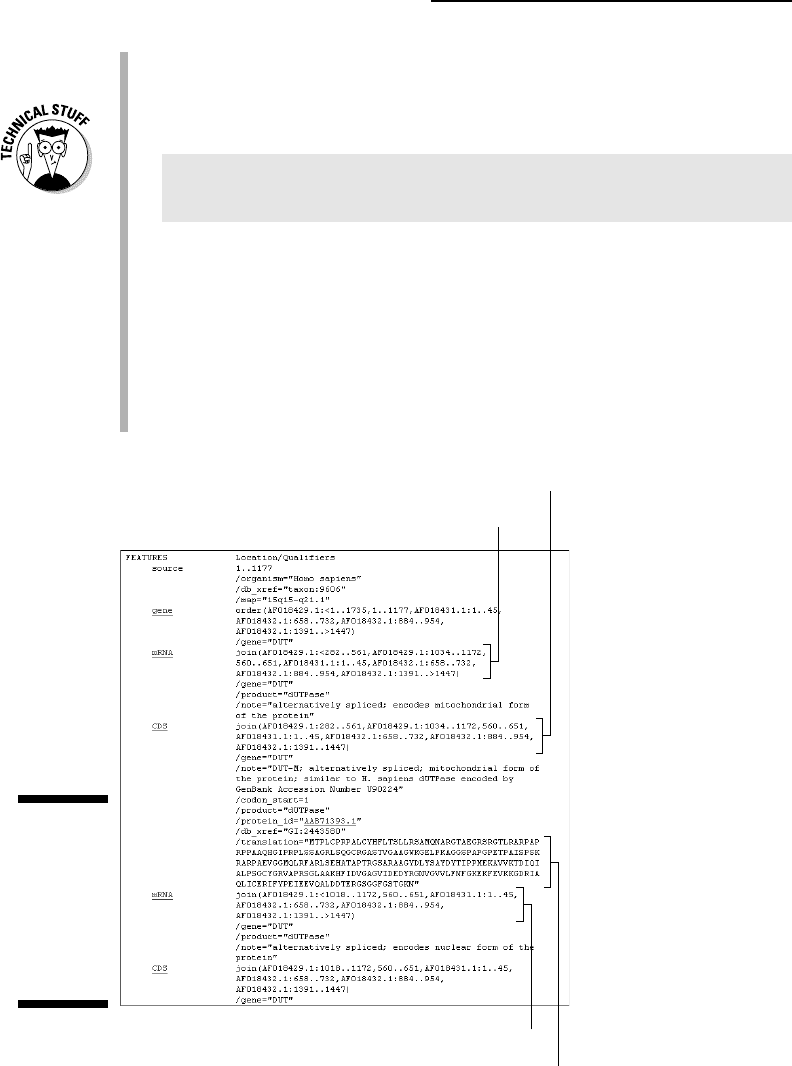
The gene keyword introduces complex-looking formulas. Their purpose
is to describe precisely the reconstruction of the various mRNAs spread
over several separate entries.
Concentrate on the first
gene order formula to understand how this works:
AF018429.1:<1..1735,1..1177,AF018431.1:1..45,
AF018432.1:658..732,AF018432.1:884..954,
AF018432.1:1391..>1447
This is nothing more than an exon splicing recipe telling us how to recon-
struct the mRNA sequence. All it says is:
1. Take nucleotides from positions 1 to 1735 from entry AF018429.
2. Add nucleotides from positions 1 to 1177 from the current entry
(AF018430).
3. Add nucleotides 1 to 45 from entry AF018431.
4. Add nucleotides 658 to 732 from entry AF018432.
mRNA form 1
Protein form 1
Protein sequence form 1
mRNA form 2
Figure 3-8:
GenBank
entry
AF018430:
FEATURES
table for a
eukaryotic
gene.
82
Part II: A Survival Guide to Bioinformatics
08_089857 ch03.qxp 11/6/06 3:54 PM Page 82
@Spy

5. Add nucleotides 884 to 954 from the same entry (AF018432).
6. Add nucleotides 1391 to 1447 from the same entry again.
The
< (less-than sign) at the beginning of the formula indicates that
the gene might actually start before the indicated position, while the
>
(greater-than sign) at the end of the formula indicates that the gene
might actually continue beyond the indicated position.
The mRNA: The AF018430 entry has two mRNA fields, which are inter-
esting because they illustrate the way GenBank represents alternative
splicing patterns. Alternative splicing is a common property of higher
eukaryotic gene expression. If you use the same parsing logic as gene
order (which we describe in the preceding bullet), you can produce the
results we summarize in Table 3-1.
Table 3-1 Mitochondrial or Nuclear dUTPase mRNAs in AF018430
Mrna AF018429 AF018430 AF018431 AF018432
Type 1 282-561 560-651 1-45 658-732
(Mitochondria) 1034-1172 884-954
1391-1447 ->
Type 2 <1018- 560-651 1-45 658-732
(Nuclear) 1172 884-954
1391-1447 ->
Table 3-1 makes it easy to understand what’s going on here:
• There are two alternative mRNA: type 1 (for the mitochondria) and
type 2 (for the nucleus).
• The nuclear mRNA does not contain the first exon (stored in entry
AF018429) although the mitochondrial mRNA uses this exon.
• The nuclear mRNA uses a part of the second exon (stored in
the AF018429) in a different reading frame from its mitochondrial
counterpart.
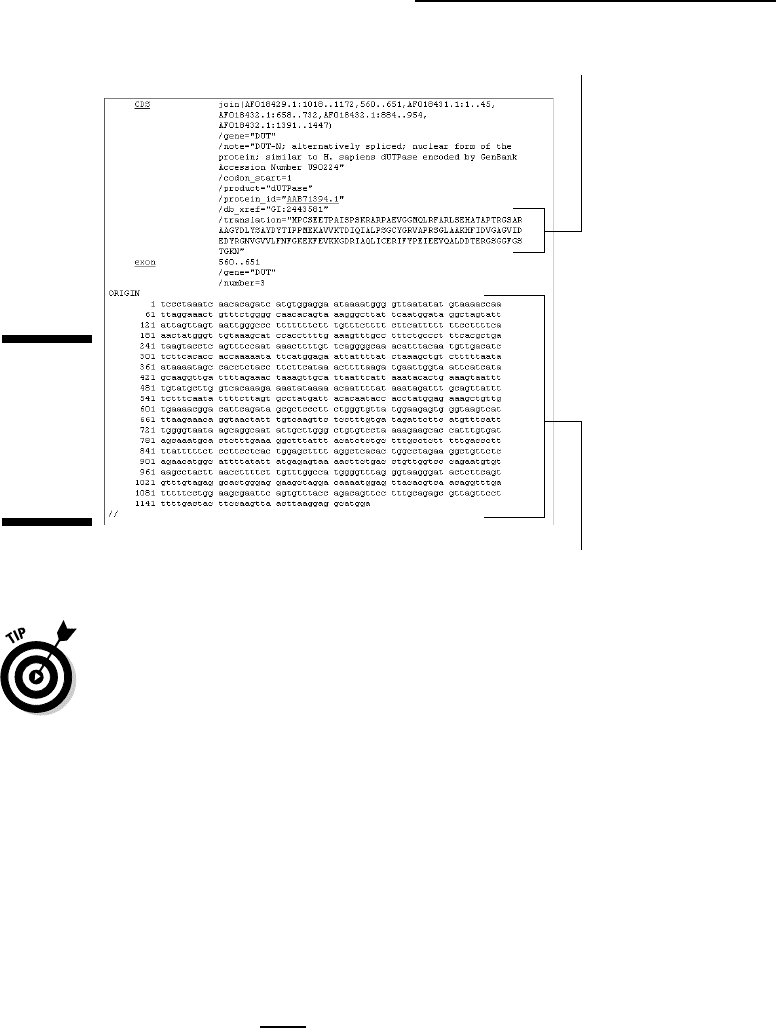
• The two protein sequences become identical on the third exon. You
can see this in the two
/translation fields (ETPAISPSK and so on).
See Figure 3-9 for the sequence of the nuclear form of the protein.
The exon keyword indicates the position of the sole exon present in this
sequence. This is near the end of the FEATURES part of the AF018430
entry (refer to Figure 3-9, positions 560–651). Look at AF018432 if you
want to see multiple occurrences of the exon field in a single entry.
The sequence section, located in the bottom part of the entry, is format-
ted as usual. (Refer again to Figure 3-9.)
83
Chapter 3: Using Nucleotide Sequence Databases
08_089857 ch03.qxp 11/6/06 3:54 PM Page 83
@Spy
Understanding how to splice back the various nucleotide sequence fragments
to form an mRNA and the associated coding regions from segmented
GenBank entries was the main difficulty of this chapter. When you’ve done
that, congratulations — you can sit back and relax while we continue our
tour of GenBank.
Working with related GenBank entries
In every example that we’ve used so far, we knew the accession numbers for
the entries we wanted to look up — X01714, U90223, or AF018430, for exam-
ple. Normally you get these accession numbers by reading articles that
explicitly mention them when reporting about the corresponding sequence.
That’s a good strategy to start off with, but after you’ve accessed the first
GenBank entry relevant to your work, you can retrieve other related genes by
selecting the Related Sequences option in the pull-down menu that appears
when clicking the Links
link on the right side of the screen for each GenBank
entry retrieved by its accession number (refer back to Figure 3-5). If you click
this link for entry U90223, for example, it returns 37 human dUTPase-related
GenBank entries. They include various mRNA forms and partial sequences,
Protein sequence form 2
Genomic sequence
Figure 3-9:
GenBank
entry
AF018430:
Bottom and
sequence
part.
84
Part II: A Survival Guide to Bioinformatics
08_089857 ch03.qxp 11/6/06 3:54 PM Page 84
@Spy

partial genomic sequences (around exons), and two large (154kb and 192kb)
sequences of the 15q21.1 genomic region. There are some monkey sequences
as well!
Retrieving GenBank entries
without accession numbers
Although GenBank isn’t the best database for keyword-based searches (see
“Using a Gene-Centric Database,” a bit later in this chapter, for a better
method), querying GenBank by using gene or protein keywords rather than
accession numbers is still possible. Suppose that you want to find the
nucleotide sequence encoding the human dUTPase, but you don’t have any
handy accession numbers lying around. The following shows you how you
should proceed, step by step:
1. Point your browser to www.ncbi.nlm.nih.gov/entrez/.
The NCBI PubMed home page appears.
2. From the Search pull-down menu, choose Nucleotide.
3. Type
human [organism] AND dUTPase [Protein name] in the Search
window, and then click Go.
This search retrieves five GenBank entries: AH005568, AF018429,
AF018430, AF018431, AF018432. They encompass exons 1 and 2
(AH005568), exon 3 (AF018430), exon 4 (AF018431), and exons 5, 6,
and 7 (AF018432). The four last entries indicate the full amino-acid
sequence of the two forms (nuclear and mitochondrial) of the dUTPase
protein, as well as the alternative exon usage pattern. Not a bad start!
4. Click the Links link to the right of the AF018432 entry ID line, and
then choose Related Sequences from the pull-down menu that
appears.
This retrieves a total of 20 entries. Among these entries, some contain
mRNA sequences such as U90223.
Note: We do not yet have all the entries related to human dUTPase in
GenBank. By looking at some of the new entries we just pulled out, we
realize that
dUTPase is a nickname for “dUTP pyrophosphatase”. Let’s
try to use these new terms in our next search:
5. Type human [organism] AND “dUTP pyrophosphatase” [Title] (the
“quotes” are important here) in the Search window, and then click
the Go button.
Notice that we restricted the search to the [Title] field here — not as
a protein name, which is what we did in Step 3.
85
Chapter 3: Using Nucleotide Sequence Databases
08_089857 ch03.qxp 11/6/06 3:54 PM Page 85
@Spy

This search now retrieves 20 GenBank entries that are not exactly the
same ones we identified earlier! This illustrates the general difficulty in
retrieving all entries relevant to a given subject, due to inconsistent
usage of synonymous terms (such dUTPase, dUTP pyrophosphatase, or
deoxyuridine triphosphatase) and fields. About half the current entries
correspond to short, single-pass, partial mRNA sequences called
Expressed Sequence Tags (ESTs).
To remove these ESTs from the list, you can use the Search-within-Limits trick
we used with PubMed in Chapter 2:
1. Open the Limits setting menu by clicking the Limits link (below the
Search window).
2. Select the Exclude ESTs check box.
3. Scroll to the top of the form, and click the Go button.
Only eleven GenBank entries survive this particular limit-setting.
Feel free to use this handy Search-within-Limits protocol to try other field-
restricted searches in GenBank.
Using a Gene-Centric Database
Besides the traditional GenBank, NCBI recently developed other databases
(or database interfaces) that are more adapted to gene-centric queries.
Making a gene-centered query involves asking a question that relates directly
to a specific gene, rather than going through all known pieces of sequences
related to that gene. The main advantage of gene-centric databases is that
they return results that are more synthetic than a long list of GenBank
entries, and make much more sense to the biologists. Basically, you get the
whole story at once.
In this section, we take you through the Entrez/Gene resource available on the
NCBI server. This resource makes it possible to gather important information
related to a genetic
locus, a specific place on a chromosome where a given gene
has been identified. Thanks to this service, you can rapidly find out everything
that is known about your favorite gene, or its genomic surrounding.
1. Point your browser to www.ncbi.nlm.nih.gov/entrez/.
The NCBI/Entrez home page appears, eager to serve.
2. From the Search pull-down menu, choose Gene.
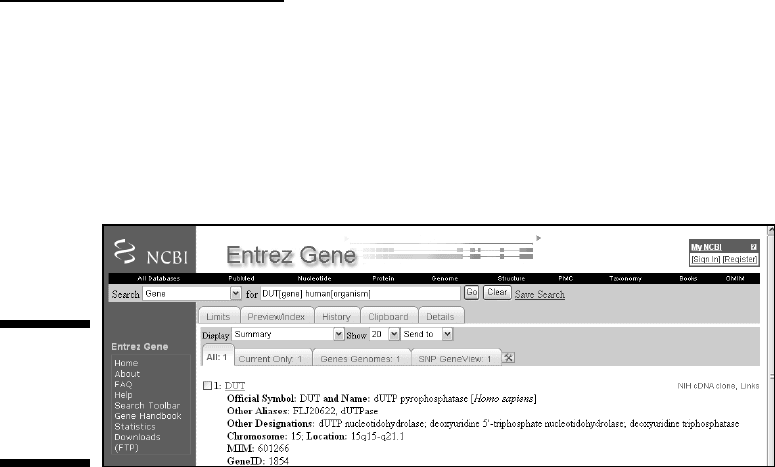
3. Type
DUT [gene] human[organism] in the For window, and then click Go.
You get a screen that looks like Figure 3-10.
86
Part II: A Survival Guide to Bioinformatics
08_089857 ch03.qxp 11/6/06 3:54 PM Page 86
@Spy
Different queries such as DUT[gene name] AND “homo
sapiens”[organism]
produce the same result. More importantly, it’s
a way to land at the same place — by selecting Gene in the pull-down
menu of Links associated with the nucleotide GenBank entry retrieved
by accession number U90223 (see Figure 3-5). Now, that’s a great way to
link a piece of sequence with the corresponding gene!
The Results page you see in Figure 3-10 is your doorway to a wealth of infor-
mation. By clicking the DUT link — or by changing the display option into Full
Report — you can now get to a large body of information concerning this par-
ticular gene and its genomic environment.
The top of the DUT entry (see Figure 3-11) provides a general description of
what this gene is all about — and what function its products are known to
perform, as well as a large variety of links (right-side menu) to other data-
bases or NCBI files.
Figure 3-12 displays the next part of the entry: a schematic view of the
Human DUT gene structure, with its seven exons used differentially and
spread over 11,909 base pairs of genomic DNA on Chromosome 15.
The long entry then continues — additional sections provide information on
potential interactions with other gene products, homologous sequences in
other organisms, protein functions, and relevant metabolic pathways — as
well as a list of all corresponding sequence entries in GenBank.
Each section, in turn, provides multiple links to help you get a complete (and
sometimes redundant) picture of what’s known about your gene. This one-stop
shopping capacity illustrates the useful concept of a gene-centric database.
What you have here are all the types of mRNA sequences that have been
observed and recorded in GenBank for this gene. You can see that variations
mainly involve the two first exons. These variants (alternative transcripts)
include the mitochondrial and nuclear forms of dUTPase (Table 3-1).
Figure 3-10:
Entrez Gene
entry page
for human
gene DUT.
87
Chapter 3: Using Nucleotide Sequence Databases
08_089857 ch03.qxp 11/6/06 3:54 PM Page 87
@Spy
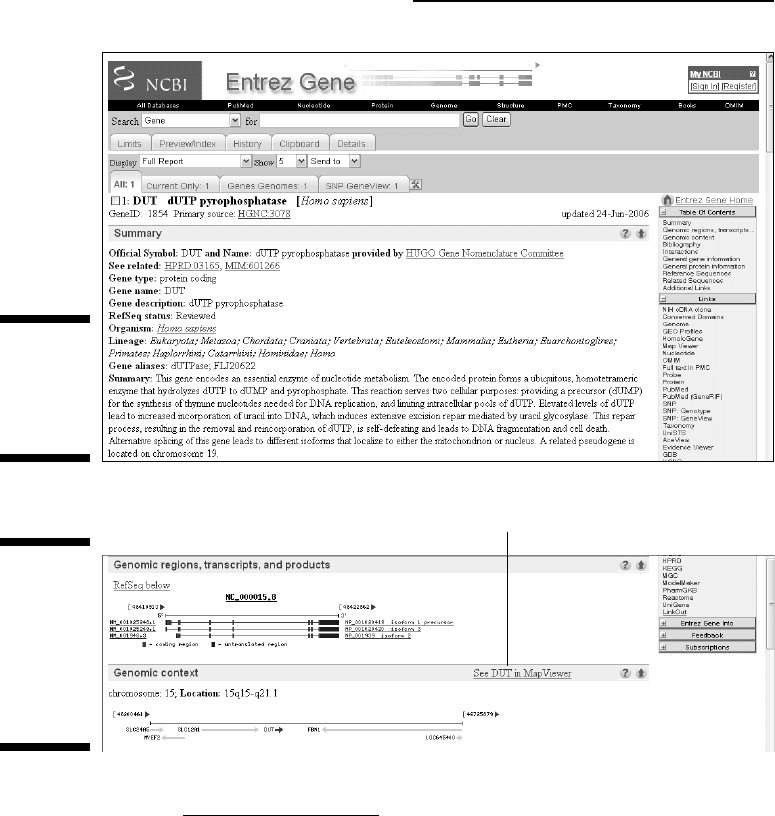
Click the See DUT in MapViewer link to go to a detailed display of the gene
structure. You can review for yourself the experimental arguments in favor of
the various mRNA models presented, right down to the nucleotide level.
Working with Whole-Genome Databases
The most recent genome-centric databases are the modern bioinformatic
response to the proliferation of complete genome sequencing projects. The
goal of these new types of resources is to gather all the information you need
on a given organism, clearly separated from all the others, so you can more
easily target your analyses on all genes from a specific genome. These new
resources also promote comparisons of whole genomes with whole genomes,
a new field of endeavor called
comparative genomics.
Click here for a detailed map and experimental evidence.
Figure 3-12:
Genomic
context and
detailed
alternative
mRNAs for
the Human
DUT gene.
Figure 3-11:
Top of the
entry for
human gene
DUT.
88
Part II: A Survival Guide to Bioinformatics
08_089857 ch03.qxp 11/6/06 3:54 PM Page 88
@Spy

These new databases still provide sequence information on isolated genes,
but now bring in the additional capacity of showing them
in relation to each
other
within the global framework of an entire genome.
The best way to interact with these databases is to zoom in and out until
you reach the level of detail you need for the question you’re interested in.
Genome-centric databases also provide the easiest way to gather every
gene/protein sequence of a given organism at once, with only a few mouse
clicks.
We start our exploration of whole genome databases by taking a peek at the
Viral Genome section available on the NCBI server.
Working with complete viral genomes
Viruses are fascinating objects, on the edge of the living world. They function
as minimal molecular bits of machinery, cleverly designed to ensure the mul-
tiplication of nucleic-acid molecules (the
viral genome) at the expense of cel-
lular hosts (eukaryotic, bacterial, or archaebacterial). While going about
their business, viruses might go unnoticed — or trigger dreadful diseases and
epidemics, such as smallpox, poliomyelitis, or AIDS. Viral genomes come in
all varieties of biochemical forms (RNA/DNA, circular/linear, single/double
stranded) and size (a few kb to a million bp).
Visiting the NCBI Viral Genome resource is a great way to find out more about
them. To demonstrate, we show you what you can find out about the dreadful
AIDS-causing, type-1 human immunodeficiency virus, or HIV-1.
1. Point your browser to www.ncbi.nlm.nih.gov/entrez/.
You’ve probably memorized this address by now. The NCBI PubMed
home page appears.
2. On the black menu bar at the top of the form, click Genome.
This takes you to the Entrez Genome page.
3. Click the Viruses link (on the right side of the form).
The Viral Genomes reference page appears.
4. Scroll down the Viral Reference Genomes page until you reach the
table of available viral-genome sequences grouped by class
(Deltavirus, Retroid viruses, and so on), as shown in Figure 3-13.
5. Type
HIV1 in the Search window, and then click the Find button.
Your browser returns a nice global summary of the HIV-1 genome, as
shown in Figure 3-14. At the bottom, a clickable picture indicates the
identity and respective positions of all the genes.
89
Chapter 3: Using Nucleotide Sequence Databases
08_089857 ch03.qxp 11/6/06 3:54 PM Page 89
@Spy