
Claverie J-M., Notredame C. Bioinformatics for Dummies
Подождите немного. Документ загружается.

• phylogenetic_tree: The true phylogenetic tree in Newick format,
generated from the Tcoffee multiple alignment by using the Neighbor
Joining method (see Chapter 13). This is not a guide tree but a real
phylogenetic tree.
•
pdf: A pdf picture of the phylogenetic tree that corresponds to the
phylogenetic_tree file.
Combining sequences and structures with EXPRESSO
EXPRESSO is the latest development of Tcoffee, replacing what was known
as 3D-Coffee. When you run Expresso, the program uses BLAST to search the
PDB (database of structures) for structures whose sequences are similar to
your sequences. It then uses theses structures to guide the alignment.
Alignments based on structures are expected to be much more accurate
than simple sequence alignments.
EXPRESSO is slower than Tcoffee, but if it finds enough structures it produces
the most accurate sequence alignments available today, so it’s worth a try!
EXPRESSO aligns the structures using SAP, a program from Taylor and
Orengo, and it aligns sequences and structures using FUGUE, a threading
package from Kenji Mizuguchi (developed in Tom Blundell’s lab at Cambridge
University).
To run EXPRESSO, simply click on the Regular button of the EXPRESSO line
on
www.tcoffee.org. The rest is identical to Tcoffee — so identical that as
a user you’d never know you’re using structures!
In the output section, look for a file named
template_list. It lists every struc-
ture that the program managed to associate with your original sequences. If this
file is empty, it means no structure was available to align your sequences and it
means your EXPRESSO alignment was merely a standard Tcoffee alignment.
Evaluating the quality of an alignment with CORE
If you want, you can give Tcoffee a multiple alignment that you generated
with your favorite method (or by hand if you are a specialist), and you can
ask Tcoffee to evaluate the quality of this multiple sequence alignment for
you — which can give you an idea of which portions of your alignment you
can trust and which are safer to ignore. To do so, cut and paste your align-
ment into the CORE server on
www.tcoffee.org. You can use any of the
most common formats (MSF, ALN, FASTA, and PIR).
These evaluations are only empirical, and they do not replace E-values.
Nonetheless, it’s useful to know that residues with a yellow/orange/red
background have an index above 5 (out of 10) — and have more than an
80 percent chance of being correctly aligned.
290
Part III: Becoming a Pro in Sequence Analysis
15_089857 ch09.qxp 11/6/06 4:00 PM Page 290

Crunching large datasets with MUSCLE
MUSCLE is a newcomer in the multiple-sequence-alignment arena — but it is a
remarkably efficient package for making fast, high-quality multiple sequence
alignments. MUSCLE is ideal if you want to align several hundred sequences.
You can access it on various servers, including its home page (at
www.
drive5.com/muscle/
). Running MUSCLE is very straightforward — only a
matter of cutting and pasting your sequences into the designated window.
Interpreting Your Multiple
Sequence Alignment
Interpreting an alignment is a bit of an art. E-values — the scores that tell you
how reliable your database search is — do not (yet) exist for multiple
sequence alignments. And that means deciding whether your alignment is
correct still involves some educated guesswork.
291
Chapter 9: Building a Multiple Sequence Alignment
Tcoffee and sequence democracy
Tcoffee is a progressive alignment method and,
in many ways, a proud relative of ClustalW. The
main difference between Tcoffee and ClustalW
is that Tcoffee doesn’t directly use substitution
matrices to align sequences; it’s much lazier, and
simply relies on other methods to work for it.
When you give sequences to Tcoffee, it starts
making pairwise comparisons. To do so, it takes
every possible pair of sequences and makes a
global alignment with ClustalW. It also makes a
Lalign comparison for each of these pairs.
(Lalign is a local-alignment method developed
by Huang and Miller to do pairwise local align-
ments.) Given two sequences, Lalign produces
the ten best local alignments. The complete col-
lection of local and global alignments is a
library.
After the library is finished, Tcoffee builds a mul-
tiple alignment that has the highest possible
agreement with all the pairwise alignments in
the library. It does so by using a progressive
algorithm like ClustalW. This process looks
much like a general election, where all the bits
of information contained in the library are com-
peting to find their way into the final alignment.
The nice thing about the libraries is that they
can contain whatever you want: pairwise align-
ments, multiple alignments (Mcoffee), global or
local, structure-based sequence alignments
(EXPRESSO), or even alignments you made your-
self by using experimental information. Tcoffee
also makes it possible to measure the local
agreement between your multiple sequence
alignment and any library (CORE).
15_089857 ch09.qxp 11/6/06 4:00 PM Page 291

DNA alignments are by far the most difficult to interpret. If you’re analyzing
this type of sequence, you want a very high level of conservation, knowing
that single conserved columns are likely to be meaningless. A DNA block is
only informative when it contains several identical columns in a cluster. Even
with the DNA of closely related sequences, obtaining such an alignment is
still difficult. This is why most biologists (when they have a choice) much
prefer protein alignments.
Recognizing the good parts
in a protein alignment
The most convincing evaluative grid we have for a protein multiple alignment
stems from our knowledge of protein structures (see Chapter 11). We know
that structures contain surface loops that evolve rapidly. Loops are softer
portions of the protein that connect its more rigid portions. Protein structures
also contain core regions that act as support walls for the protein. These sup-
port walls evolve less rapidly than the loops on the surface (see Chapter 11).
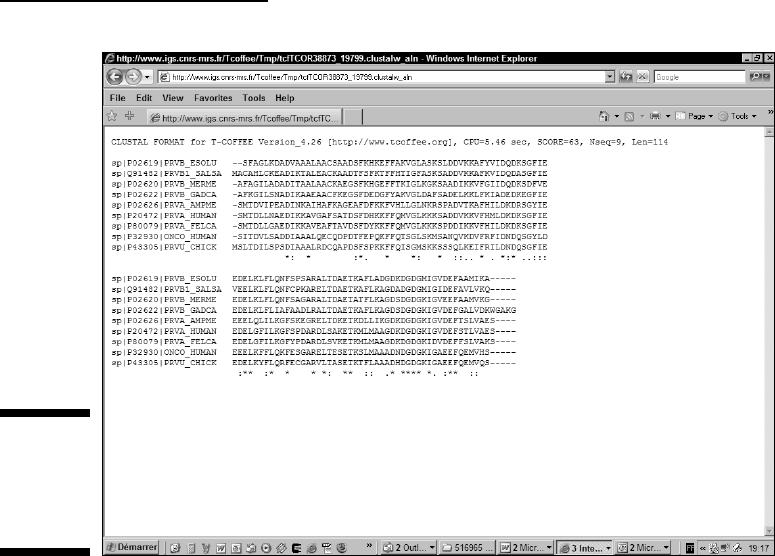
In your multiple alignment, you can expect to find nice, gap-free blocks that
correspond to the core regions — and gap-rich regions that correspond to
the loops. The alignment shown in Figure 9-9 (which appears in the following
section, “Taking your multiple alignment further”) is a good illustration of
this principle.
Now, how can you tell whether a block is good? When you look at a ClustalW,
a MUSCLE, or a Tcoffee alignment, you can see that the last line contains
seemingly-cabalistic signs such as (
*), (:), or (.). These three symbols have
very precise meanings:
(*) A star indicates an entirely conserved column.
(:) A colon indicates columns where all the residues have roughly the
same size and the same hydropathy.
(.) A period indicates columns where the size or the hydropathy has
been preserved in the course of evolution.
After you get used to them, these indications are really quite priceless. For
instance, your average
good block is a unit at least 10–30 amino acids long,
exhibiting at least one to three stars (
*), a few more colons (:) close to the
stars, and a several periods (
.) sprinkled here and there. This is exactly what
you see in the alignment shown in Figure 9-9.
The magic thing about multiple sequence alignments is that 4 or 5 conserved
positions over 50 amino acids can be enough to convince us that we’re look-
ing at a genuine signal. This is less than 10 percent identity! If you remember
that we require at least 25 percent identity to consider a pairwise alignment
292
Part III: Becoming a Pro in Sequence Analysis
15_089857 ch09.qxp 11/6/06 4:00 PM Page 292

interesting, you can easily understand why multiple alignments are so power-
ful. They can help you find treasure in the twilight zone, that region of simi-
larity where pair-wise identity does not tell you anything about potential
homology (see Chapter 8).
Another criterion for a useful multiple alignment is knowing the type of
amino acids you can expect to see conserved. Amino acids aren’t equal —
and they all have very characteristic patterns of mutation/conservation in
a multiple sequence alignment. Table 9-7 lists the most common features
associated with some conserved columns you may come across.
Conserved columns in a multiple sequence alignment are meaningful only
when the surrounding columns are not conserved.
Table 9-7 Patterns of Conservation in Multiple
Sequence Alignments
Amino Acid Characteristic
W,Y, F It is common to find conserved tryptophans. Tryptophan is a large
hydrophobic residue that sits deep in the core of proteins. It plays
an important role in their stability and is therefore difficult to
mutate. When tryptophan mutates, it is usually replaced by
another aromatic amino acid, such as phenylalanine or tyrosine.
Patterns of conserved aromatic amino acids constitute the most
common signatures for recognizing protein domains.
G, P It is common to find conserved columns with a glycine or a proline
in a multiple alignment. These two amino acids often coincide
with the extremities of well-structured beta strands or alpha
helices. (For more on these structures, see Chapter 11.)
C Cysteines are famous for making C-C (disulphide) bridges.
Conserved columns of cysteines are rather common and usually
indicate such bridges. Columns of conserved cysteines with a
specific distance provide a useful signature for recognizing pro-
tein domains and folds.
H, S Histidine and serine are often involved in catalytic sites, espe-
cially those of proteases. Conserved histidine or a conserved
serine are good candidates for being part of an active site.
K, R, D, E These charged amino acids are often involved in ligand binding.
Highly conserved columns can also indicate a salt bridge inside
the core of the protein.
L Leucines are rarely very conserved unless they’re involved in
protein-protein interactions such as a leucine zipper.
293
Chapter 9: Building a Multiple Sequence Alignment
15_089857 ch09.qxp 11/6/06 4:00 PM Page 293

Taking your multiple alignment further
One sentence summarizes what you really want from your multiple align-
ment: You want to identify important positions! You want to find the amino
acids that are not allowed to mutate, those that you find conserved even
when aligning distantly related proteins.
Consider, for instance, the alignment in Figure 9-9. You can use any ClustalW
or Tcoffee server to generate this multiple sequence alignment using any
server you fancy. It is a good alignment: It contains distantly related proteins,
and it is beginning to tell us a nice story about the various components of our
protein family. For instance, we can clearly see that the N-terminus region
seems to be more conserved than the C-terminus region. In the N-terminus,
we can see a short stretch of highly conserved amino acids that make this
region a good candidate for being a binding or an active site.
This is interesting — but it isn’t enough to make a big story. This alignment still
contains too many conserved positions for a detailed analysis. At this point,
what we could do is add a few distantly related sequences, one by one, and
carefully check the effect of these sequences on the overall alignment quality.
More specifically, we want to make sure that these distantly related sequences
actually enhance existing patterns rather than completely destroying blocks.
Here is a possible strategy to further reveal the evolutionary constraints
within our protein. This strategy relies on the integration within the multiple
alignment of precisely those sequences that BLAST reported as marginal hits
when we first scanned Swiss-Prot for homologues of the human parvalbumin.
(If this all sounds a bit unfamiliar, take a look at the “Selecting sequences on
the ExPASy server” section, earlier in this chapter.) You don’t actually need to
rerun BLAST to use this example; we give you the info you need to know. First
and foremost, gather your sequences as follows:
1. Point your browser to www.expasy.ch/sprot/sprot-retrieve-
list.html
.
The Swiss-Prot/TrEMBL: Retrieve a List of Entries page appears.
2. In the Format line, select the FASTA radio button.
3. Enter the accession number of your sequences in the Sequence window.
Enter one accession number per line. For our example, we entered
P20472, P80079, P02626, P02619, P43305, P32930, Q91482, P02620,
P02622, P02586.
P02586 is the TPCS_RABIT, the troponin C of rabbit. In the BLAST of the
human parvalbumin against Swiss-Prot that we used to select the other
sequences, BLAST reported this hit with an E-value of 5!
On its own, this result is not interesting — but now that we have a multi-
ple sequence alignment, we can see whether this rabbit can tell us some-
thing about our human protein.
294
Part III: Becoming a Pro in Sequence Analysis
15_089857 ch09.qxp 11/6/06 4:00 PM Page 294
4. Click the Create FTP File button.
5. Copy the sequences onto the Clipboard.
When you’ve got all the sequences in your basket (well, on the Clipboard at
least), get ready to do some alignment work:
1. Point your browser to the EBI ClustalW server home page at
www.ebi.ac.uk/clustalw/index.html.
2. Paste the sequences you gathered in the preceding steps list into the
Sequence window.
3. Choose Fast from the Alignment pull-down menu.
4. Use the Output Format pull-down menu to choose the output format
you want.
5. Choose Input from the Output Order pull-down menu.
6. Click the Run button at the bottom of the page.
7. Save your results.
You can see in Figure 9-10 that the new sequence respects the blocks that
already existed (Figure 9-9), while shunting some conserved positions. It
also reveals regions where insertion and deletions are likely to occur. These
Figure 9-9:
A good
multiple
sequence
alignment.
295
Chapter 9: Building a Multiple Sequence Alignment
15_089857 ch09.qxp 11/6/06 4:00 PM Page 295
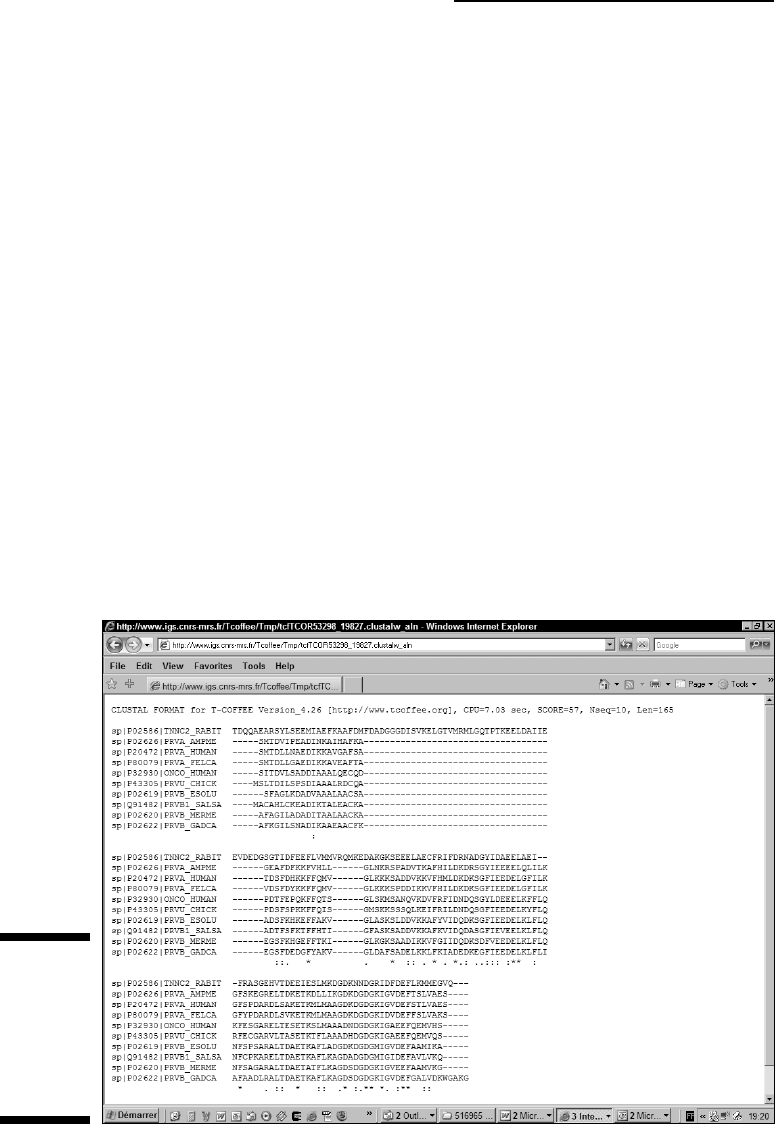
regions are good candidates for being loops. (Remember that loops are por-
tions of the protein structure that are a bit more flexible than the rest of the
structure and act as connectors; see Chapter 11 for more details.)
Figure 9-10 also reveals the existence of two conserved regions in the N-terminus
of the human parvalbumin. This is an interesting result that narrows down
the range of possibilities if we were looking for the amino acids responsible
for the function of our protein.
At this point, going a bit further and adding another distantly related protein
is a good idea. Our aim is to check that these few highly conserved regions
are indeed conserved across the whole protein family, even when we com-
pare distantly related cousins.
To do this check, you can go once again through the two previous step lists,
using an extra sequence:
P20472, P80079, P02626, P02619, P43305, P32930, Q91482, P02620, P02622,
P02586, P19123
P19123 is TPCC_MOUSE, the mouse troponin C. It is a very remote homologue
of the human parvalbumin. Figure 9-11 shows the result of the inclusion of
this new protein in our multiple sequence alignment. It clearly shows that most
conserved columns remain.
Figure 9-10:
Making a
multiple
alignment of
distantly
related
proteins.
296
Part III: Becoming a Pro in Sequence Analysis
15_089857 ch09.qxp 11/6/06 4:00 PM Page 296
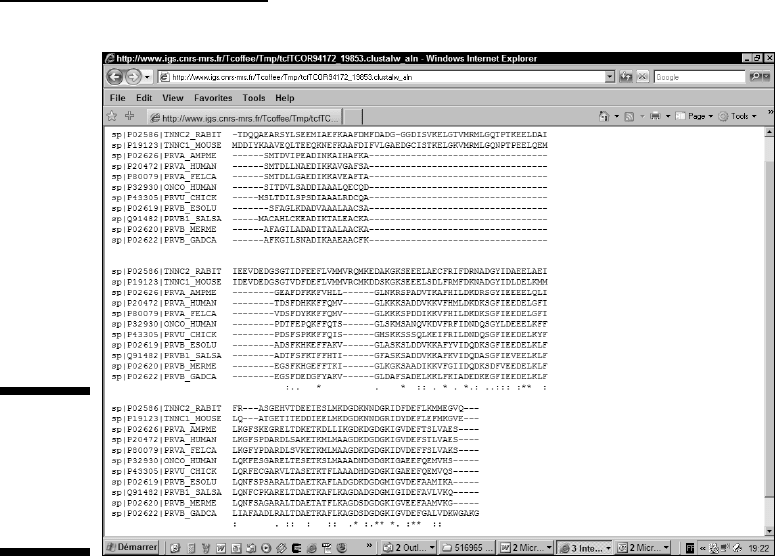
With such a result, we can safely bet that these two conserved regions are
surely involved in some biological function. We know that most of these pro-
teins bind calcium, so we can safely bet that the calcium-binding site involves
some of these conserved positions. This is indeed the case as revealed by the
Swiss-Prot annotation.
Comparing Sequences
That You Can’t Align
Sometimes you need to compare sequences that don’t necessarily have a
common ancestor — or are so distantly related that considering them as
homologous is difficult.
Multiple-sequence-alignment programs are usually hopeless in these situa-
tions. They’ll include proteins that contain homologous domains but that are
otherwise unrelated, or segments of DNA that seem to contain similar regu-
lating features although it is impossible to see anything common between
them in a multiple alignment.
Figure 9-11:
Including
more distant
relatives in
the multiple
alignment.
297
Chapter 9: Building a Multiple Sequence Alignment
15_089857 ch09.qxp 11/6/06 4:00 PM Page 297

When a situation like this arises, do not expect miracles from bioinformatics.
In most cases, your first intuition that there is nothing to get out of these
sequences proves to be the right one. Nonetheless, before giving up com-
pletely, it is worth trying the two techniques we briefly introduce in this
section. The first one, the Gibbs sampler, simultaneously looks into all your
sequences for short, partially conserved gap-free segments. Pratt, the second
method, looks for flexible patterns — a special category of segments that can
contain gaps, and that need to be conserved only at certain positions.
Making multiple local alignments
with the Gibbs sampler
The Gibbs sampler is a stochastic method: It first scrambles your sequences,
aligns them randomly until a good solution appears, and then keeps scram-
bling the sequences to improve this good solution. The interesting thing
about using chance is that you can solve complicated problems without
having to explore all the possible solutions.
Gurus name this type of method
stochastic because it contains an element of
chance. Stochastic methods are by far the most powerful in bioinformatics.
Unfortunately, they do not have the popularity they deserve because they
make it difficult to reproduce the same results twice. For instance, if you run
the Gibbs sampler twice on the same set of sequences, you may not get
exactly the same solution. For most biologists, reproducibility is paramount,
and — let’s face it — we all hate it when computers change their minds from
one minute to the next.
Nonetheless, if you’re ready for a bit of fuzzy logic, you may find that the
Gibbs sampler can offer very sensible solutions to extremely complicated
problems. For instance, the Gibbs sampler is very good at identifying HTH
(Helix-Turn-Helix) domains across a protein family. It is also a nice way to
search for regulatory elements shared by otherwise unrelated DNA
sequences. You can access the Gibbs sampler from its home page at
bayesweb.wadsworth.org/gibbs/gibbs.html
or use the server the Pasteur Institute maintains at
bioweb.pasteur.fr/seqanal/interfaces/gibbs-simple.html
When using a Gibbs sampler, bear in mind that to be accurate, it needs as many
sequences as possible. You should not use it with less than 20 sequences.
298
Part III: Becoming a Pro in Sequence Analysis
15_089857 ch09.qxp 11/6/06 4:00 PM Page 298

Searching conserved patterns
The Gibbs sampler is useful only when the segments you’re looking for
have exactly the same length, like Helix-Turn-Helix domains. However,
the vast majority of the interesting motifs you may come across when
doing bioinformatics have different lengths; the most standard situation
is to find motifs that are poorly conserved. When this happens, your only
hope is to find a few highly conserved amino acids or nucleotides that
anchor the motif.
If your sequences are poorly related but contain such motifs, then the only
way to analyze them is to use a pattern-finding motif. If you want to know
more about patterns (biologists often call them PROSITE patterns), you can
go to Chapter 7. Several tools exist for identifying these conserved patterns
in a set of unaligned sequences. Showing you how to use these tools and to
interpret their result is beyond the scope of this book. However, if you want
to experiment with them, you should know that Pratt is one of the most pow-
erful because it allows some flexible spacing between the conserved posi-
tions. You can also use TEIRESIAS, MEME, or SMILE. (Flip ahead to Table 9-10
to see a partial list of these resources.)
Internet Resources for Doing Multiple
Sequence Comparisons
The amount of resources for making multiple alignments online is almost
overwhelming. The usual words of caution apply to the resources that we
list in the following tables:
Use stable resources and always make a few simple tests to make sure
that the service you’re using does what it’s supposed to do.
Never depend blindly on a resource you don’t control. As they say,
“Good servers go bad, and bad servers go down.”
If you want to do many multiple sequence alignments — or if your com-
pany does not authorize you to send your sequences over the Internet —
you may have to install these programs on your own machine. We give
you addresses where you can download the source code or the exe-
cutable files of some of these programs.
299
Chapter 9: Building a Multiple Sequence Alignment
15_089857 ch09.qxp 11/6/06 4:00 PM Page 299