
Claverie J-M., Notredame C. Bioinformatics for Dummies
Подождите немного. Документ загружается.

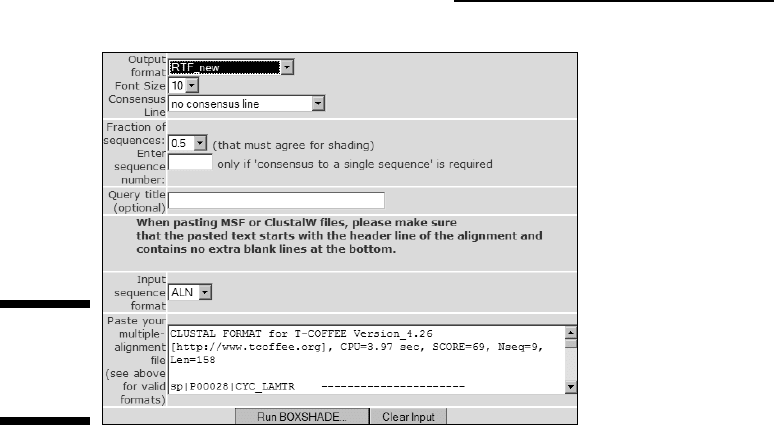
2. Choose RTF_new from the Output Format drop-down menu.
Most of these formats are difficult to use on a PC. The most convenient is
RTF New (Rich Text Format). It generates a file that most word processors
(such as Microsoft Word) can read.
3. Select the font size you want.
If your alignment is long, select a small font size. If you have selected
RTF_new as your output, you can change your font size later.
4. Choose Add a Consensus Line with Letters from the Consensus Line
drop-down menu.
This adds a consensus sequence that contains the most common amino
acid for each column.
5. Select the fraction of sequences you would like shaded.
Boxshade only shades columns that have a certain level of conservation.
This feature ensures that conserved columns show up in your align-
ment. If you request 0.5, for example, it means you want half the amino
acids (or nucleotides) to be conserved for some shading to occur.
Conservation doesn’t necessarily mean identity in Boxshade. Similar
residues, such as isoleucine and valine, also account for conservation.
Two types of shading exist:
•
Black: Identical amino acids or nucleotides
•
Gray: Similar amino acids
Figure 10-12:
Part of the
Boxshade
home page.
320
Part III: Becoming a Pro in Sequence Analysis
16_089857 ch10.qxp 11/6/06 4:01 PM Page 320
6. Select the format of the multiple sequence alignment you want to use.
If you’re planning to use the dummy multiple alignment from
www.tcoffee.org/dummy_aln.html, select ALN.
Other possible formats include anything that the READSEQ program can
read, such as FASTA or PIR alignments.
7. Paste your multiple sequence alignment into the Sequence window.
8. Click the Run Boxshade button.
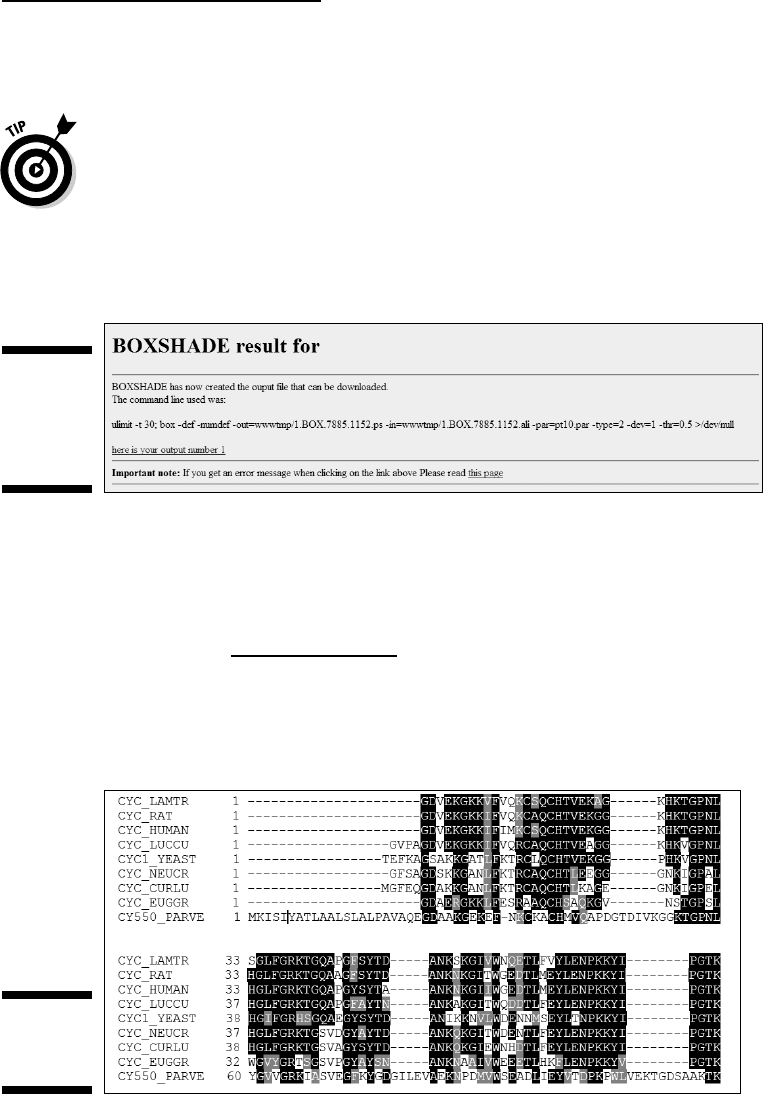
An intermediate page appears, as shown in Figure 10-13.
If this page does not contain an active hyperlink, it means that Boxshade
had troubles reading your alignment. (Refer to Figure 10-13 for an exam-
ple of an active hyperlink.) When this happens, double-check the align-
ment format. If this doesn’t help, use a different format.
9. Click the here is your output link, save to a local file, then open the
local file with Word.
Figure 10-14 shows you what your multiple sequence alignment looks
like after proper shading.
Figure 10-14:
Boxshade
output.
Figure 10-13:
The
Boxshade
intermediate
page.
321
Chapter 10: Editing and Publishing Alignments
16_089857 ch10.qxp 11/6/06 4:01 PM Page 321
Logos
Logos are a terrific way to generate high-impact pictures from multiple
sequence alignments. They have been around in sequence analysis for
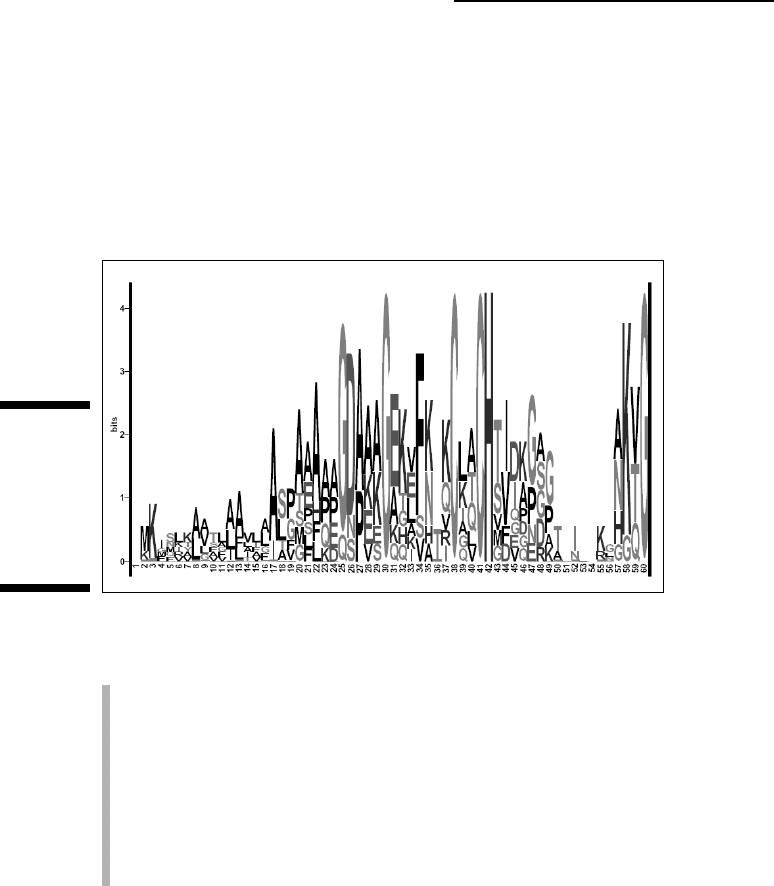
quite some time. Figure 10-15 shows a logo representation of the alignment
in Figure 10-1. Notice how the conserved amino acids (such as cysteines)
stick out, indicating regions of potential biological importance.
When looking at a sequence logo, you can consider the following elements:
Each position corresponds to a column in the multiple alignment.
The total height of a logo position depends on the degree of conserva-
tion in the corresponding multiple alignment column. Very conserved
alignment columns give you high logo positions. Positions that contain
a very heterogeneous mixture of symbols yield low logo positions.
The size of each letter in a logo position depends on how frequent this
letter is in the column.
The top letter is always the most frequent in the column.
It’s possible to build logos with either protein or nucleotide multiple
sequence alignments. Of course, the better the alignment, the more informa-
tive the logo. The most complete logo server around is the one from Berkeley
(at
weblogo.berkeley.edu/) — and it is probably the easiest-to-use
server available today. You simply cut and paste your alignment in any con-
venient format (such as ALN or FASTA) and the server returns a logo like the
one in Figure 10-15. A slightly more complicated alternative is also available
from:
www.cbs.dtu.dk/~gorodkin/appl/plogo.html.
Figure 10-15:
Logo
represen-
tation of a
multiple
sequence
alignment.
322
Part III: Becoming a Pro in Sequence Analysis
16_089857 ch10.qxp 11/6/06 4:01 PM Page 322

Logos make sense only if you have a nice block with a few highly conserved
positions surrounded by highly degenerated positions. There is a handy util-
ity on the Web that identifies blocks within your multiple alignments and
turns each of them into a log. Check it out at
blocks.fhcrc.org./blocks/process_blocks.html
Editing and Analyzing Multiple Sequence
Alignments for Free over the Internet
This last section briefly introduces and/or recapitulates some lists of
resources available on the Internet for editing, analyzing, or visualizing
your multiple sequence alignments. If you need to reformat your multiple
sequence alignment, you can use the resources indicated in Table 10-2.
Finding multiple-sequence-
alignment editors
The only tool available for editing multiple sequence alignments online is
Jalview. If you’re ready to install some program locally on your machine, a
vast selection of high-quality packages exists. Table 10-5 lists some of these
programs; most come with extensive documentation for installation and usage.
Table 10-5 Packages for Editing Multiple Sequence Alignments
Name Address Description
Jalview www.jalview.org Java package,
www.es.embnet.org/Services/ available online
MolBio/jalview/
Kalignview msa.cgb.ki.se Nice online alignment
viewer
CINEMA
www.bioinf.man.ac.uk/ A very complete Java
dbbrowser/CINEMA2.1/ package
Seaview
pbil.univ-lyon1.fr/ A beautiful editor, very
software/seaview.html easy to install
Belvu
www.cgr.ki.se/cgr/groups/ Useful for removing
sonnhammer/Belvu.html redundancy
(continued)
323
Chapter 10: Editing and Publishing Alignments
16_089857 ch10.qxp 11/6/06 4:01 PM Page 323

Table 10-5
(continued)
Name Address Description
Bioedit www.mbio.ncsu.edu/BioEdit/ Adapted for RNA
bioedit.html
RALEE www.sanger.ac.uk/Users/ An RNA viewer
sgj/ralee/
Review bioweb.pasteur.fr/cgi-bin/ A very complete list
seqanal/review-edital.pl of viewers
Finding tools to interpret your multiple
sequence alignment
The interpretation of a multiple alignment depends very much on its appear-
ance. Some tools on the Net can help you make sense of your multiple align-
ments by extracting blocks or singling out special positions. Table 10-6 lists
some of these resources.
Table 10-6 Extracting Information from a Multiple
Sequence Alignment
Name Address Description
Logo weblogo.berkeley.edu, Logos
www-lmmb.ncifcrf.gov/~toms/
sequencelogo.html
,
www.cbs.dtu.dk/~gorodkin/
appl/plogo.html
Blocks blocks.fhcrc.org/blocks/ Identifies blocks
process_blocks.html
Blockgap www.bork.embl-heidelberg. Measures blocks
de/Alignment/blockgap.html
Lama blocks.fhcrc.org/blocks- Compares your
bin/LAMA_search.sh multiple alignment
with the BLOCKs
database
Amas
www.compbio.dundee.ac.uk/ Identifies important
servers/amas_server.html features in the multi-
ple alignment
324
Part III: Becoming a Pro in Sequence Analysis
16_089857 ch10.qxp 11/6/06 4:01 PM Page 324

Finding tools for beautifying
your multiple alignments
Boxshade — which we describe earlier in this chapter — is one of the sim-
plest tools for improving the visual aspect of a multiple sequence alignment.
It isn’t the only server you can use for this purpose, however. Table 10-7 lists
some alternative resources that are available online.
Table 10-7 Multiple Alignment Beautifying Tools
Name Address Description
ESPript espript.ibcp.fr A very powerful shading-
and-coloring tool
Boxshade
www.ch.embnet.org/ Shading in black and white
software/BOX_form.html
Mview bioweb.pasteur.fr/ Can process BLAST
seqanal/interfaces/ alignments
mview_blast-simple.html
325
Chapter 10: Editing and Publishing Alignments
16_089857 ch10.qxp 11/6/06 4:01 PM Page 325

326
Part III: Becoming a Pro in Sequence Analysis
16_089857 ch10.qxp 11/6/06 4:01 PM Page 326
Part IV
Becoming a
Specialist:
Advanced
Bioinformatics
Techniques
17_089857 pp04.qxp 11/14/06 12:11 PM Page 327

In this part . . .
T
his part is dedicated to a major slice of bioinformat-
ics: predictions. Accurate predictions are the ultimate
dream of biologists. It is a very practical dream because
computers are cheap whereas experiments are expensive.
In this part we introduce a Biology Holy Grail: the predic-
tion of protein structures. We also present you with its
more successful nucleic acid counterpart: the prediction
of RNA structure. We call this sort of stuff
advanced bioin-
formatics because the results of these methods only make
sense if you know how to interpret them and if you have
a good understanding of their limitations. These aren’t
methods that you can trust blindly, and in this part, we
tell you when to keep your eyes peeled!
17_089857 pp04.qxp 11/14/06 12:11 PM Page 328

Chapter 11
Working with Protein
3-D Structures
In This Chapter
Looking at 3-D structures and why they’re important
Predicting the secondary structure of a protein
Finding the best 3-D model for your sequence
Creating pictures of 3-D protein structures for your talks and reports
Analyzing a sequence from a structural point of view
Displaying interactive (rotating) 3-D molecular models on your own PC
There is no foreseeable limit to the number of proteins whose structure is
worth analyzing, since each will have its own unique function which
demands explanation in structural terms.
— John C. Kendrew, Nobel Lecture 1962
W
hen you study a protein, you are usually interested in its function.
One thing all biologists know these days is that there is a tight rela-
tionship between the structure and the function of a protein. As soon as you
find an interesting feature at the level of the protein sequence — perhaps a
motif or an evolutionarily conserved segment — the right thing to do is to
ask what this feature looks like within the 3-D structure.
Typical questions you want to ask are
Do the amino acids at given sequence positions contribute to the stabil-
ity of the protein structure?
Why is this sequence segment conserved (or variable)?
18_089857 ch11.qxp 11/6/06 4:02 PM Page 329