
Claverie J-M., Notredame C. Bioinformatics for Dummies
Подождите немного. Документ загружается.


Are these amino acids located at the surface of my protein molecules?
Are these amino acids directly involved in the function of the protein?
Are these amino acids involved in the binding of another molecule?
In this chapter, we show you how to look at your sequence from a 3-D
perspective.
From Primary to Secondary Structures
Biologists refer to the sequence of a protein as its primary structure, as
opposed to the 3-D or
tertiary structure that is the final shape of the protein.
No prize for guessing that an intermediary level of structure exists that is
known as the
secondary structure!
When the first crystallographers started looking at protein structures, they
discovered (and predicted) that there was a hierarchy in the way that amino
acid sequences fold onto themselves to become a biologically active mole-
cule. Amino acids first look to their immediate neighbors in the sequence to
form regions of regular, periodical conformations (backbone shapes). After
this is done, the chain collapses further by folding those preshaped regions
onto each other (or onto unstructured regions), leading to the final 3-D struc-
ture in which residues that are far apart in the sequence come in direct con-
tact with each other.
There are three types of local segments:
Helices: Where residues seem to be following the shape of a spring. The
most common are the so-called alpha helices.
Extended or Beta-strands: Where residues are in line and successive
residues turn their back to each other.
Random coils: When the amino-acid chain is neither helical nor
extended.
Within the latter category, biologists like to distinguish those cases where the
chain makes a sharp turn (90° or more) by labeling them
loops.
Predicting the secondary structure
of a protein sequence
Predicting the secondary structure of proteins was one of the hottest goals of
the 1990s. It is fair to say that this is one of the great successes of that decade.
Nowadays, fairly good servers are available that use Hidden Markov Models
330
Part IV: Becoming a Specialist: Advanced Bioinformatics Techniques
18_089857 ch11.qxp 11/6/06 4:02 PM Page 330

and neural networks to accurately predict the secondary structure of any
protein that may interest you. In this section, we show you how to use
PSIPRED, one of the most accurate of these servers.
If your protein has enough homologues in the current databases, you can
expect its secondary structure prediction to be close to 80 percent accurate.
However, bear in mind that this is
only a prediction; as with all predictions, it
can be more or less inaccurate.
To get started using PSIPRED, do the following:
1. Prepare your favorite protein in a FASTA-formatted .txt file.
We used GenPep NP_360043, Rickettsia conorii sequence TolB for this
example. You can fetch it from the NCBI Web server (
www.ncbi.nlm.
nih.gov
); see Step 1 in the later section “Looking at sequence features
in 3-D.”
2. Point your browser to bioinf.cs.ucl.ac.uk/psipred/.
This displays the home page of the Protein Structure Prediction server,
which is maintained by the Bioinformatics Unit of University College in
London (U.K.).
3. Scroll down the page and click CLICK HERE TO ACCESS THE SERVER.
A one-page input form appears.
4. Copy your sequence and paste it into the Input Sequence window.
Both FASTA and plain (with no header) formats are accepted here.
5. Keep the default pre-selected option in the Choose Prediction Method
section.
6. Keep the default pre-selected option in the Filtering Options.
7. Enter your e-mail address in the Submit Sequence section.
You’ll also find a field in this section where you can enter a short name
for your sequence; this is handy if you need help remembering what the
analysis was all about.
8. Click the Predict button.
This server returns its results by e-mail, usually in less than 30 minutes
(sometimes more, depending on its load). By default, the server runs
PSIPRED, the secondary structure prediction method.
Alternatively, you can select three other prediction methods: one for
transmembrane segments and two for fold recognition. Feel free to
explore these if you have time.
If everything is fine, a new page pops up and informs you that your prediction
job has been submitted and that the result will be sent to the e-mail address
you provided in Step 7 (check to make sure that the e-mail address is correct!).
331
Chapter 11: Working with Protein 3-D Structures
18_089857 ch11.qxp 11/6/06 4:02 PM Page 331
It also tells you how many jobs are currently in front of you in the processing
queue. At this point, there’s little that you can do but wait for your e-mail to
show up (about 20 minutes or more, depending on the server load). Go and
have a coffee!
The server does not accept free, Web-based e-mail addresses (such as those
from MSN’s Hotmail or Google’s Gmail). No results will be returned.
When you come back, look for an e-mail from
psipred@cs.ucl.ac.uk, sim-
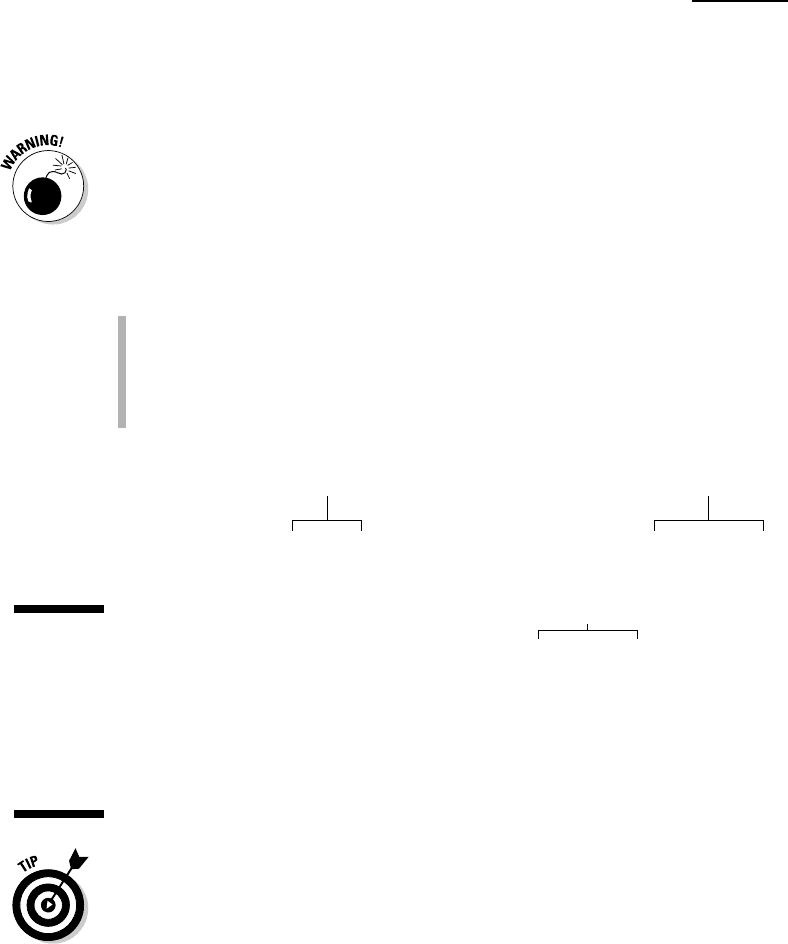
ilar to what you see in Figure 11-1. The output is a simple text file in which each
line of the sequence (AA) is now printed side by side with two other lines:
The prediction line (Pred), consisting of H, E, and C characters, denoting
the predicted conformation for each residue (H =
Helical, E = Extended,
and C = Random Coil).
The confidence (Conf) line, consisting of digits from 9 to 0, indicating the
reliability of the prediction for each position (9 = high, 0 = poor).
To get the various columns well lined up as in Figure 11-1, copy the e-mailed
results into a Word document and use a constant spaced font such as
Courier 10.
PSIPRED is very popular because of its accuracy (over 80 percent correctly
predicted positions, on average) and also because it produces a nice graphic
output that comes in handy for publication. To retrieve the graphic files, look
at the very end of your PSIPRED e-mail. It reads like this:
Random Coil Helical
Extended
Conf: 913778999987376455327877401565346504651688875111157789999998
Pred: CCHHHHHHHHHHCCCCCCCEEEEEEECCCCCCCCEEEECCCCCCCCCCHHHHHHHHHHHH
AA: MRNIIYFILSLLFSVTSYALETINIEHGRADPTPIAVNKFDADNSAADVLGHDMVKVISN
10 20 30 40 50 60
Conf: 643025612266422432455676566620022157149999999878998607899997
Pred: HHHHCCCCCCCCCCCCCCCCCCCCCCCCCCHHHHCCCEEEEEEEEEECCCCCEEEEEEEE
AA: DLKLSGLFRPISAASFIEEKTGIEYKPLFAAWRQINASLLVNGEVKKLESGKFKVSFILW
70 80 90 100 110 120
Conf: 145510000013430511202233200012210234455566883899982589888636
Pred: CCCCCCCEEEEEEECCHHHHHHHHHHHHHHHHCCCCCCCCCCCCEEEEEECCCCCCCCCE
AA: DTLLEKQLAGEMLEVPKNLWRRAAHKIADKIYEKITGDAGYFDTKIVYVSESSSLPKIKR
130 140 150 160 170 180
Figure 11-1:
Typical
PSIPRED
e-mail:
Partial
output for R.
conorii TolB
(NP_360043).
332
Part IV: Becoming a Specialist: Advanced Bioinformatics Techniques
18_089857 ch11.qxp 11/6/06 4:02 PM Page 332
Calculate PostScript, PDF and JPEG graphical output for
this result using
http://bioinf2.cs.ucl.ac.uk/cgi-
bin/psipred/gra/nphview2.cgi?id=xxxxx.psi
Clicking this URL gets you to a PSIPRED output page that offers you the
opportunity to download the graphic files in a number of different formats:
PostScript File: http://bioinf2.cs.ucl.ac.uk/psiout/
xxxxxx.ps
PDF File: http://bioinf2.cs.ucl.ac.uk/psiout/xxxxxx.pdf
JPEG Page 1: http://bioinf2.cs.ucl.ac.uk/psiout/
xxxxx_1.jpg
JPEG Page 2: http://bioinf2.cs.ucl.ac.uk/psiout/
xxxxx_2.jpg
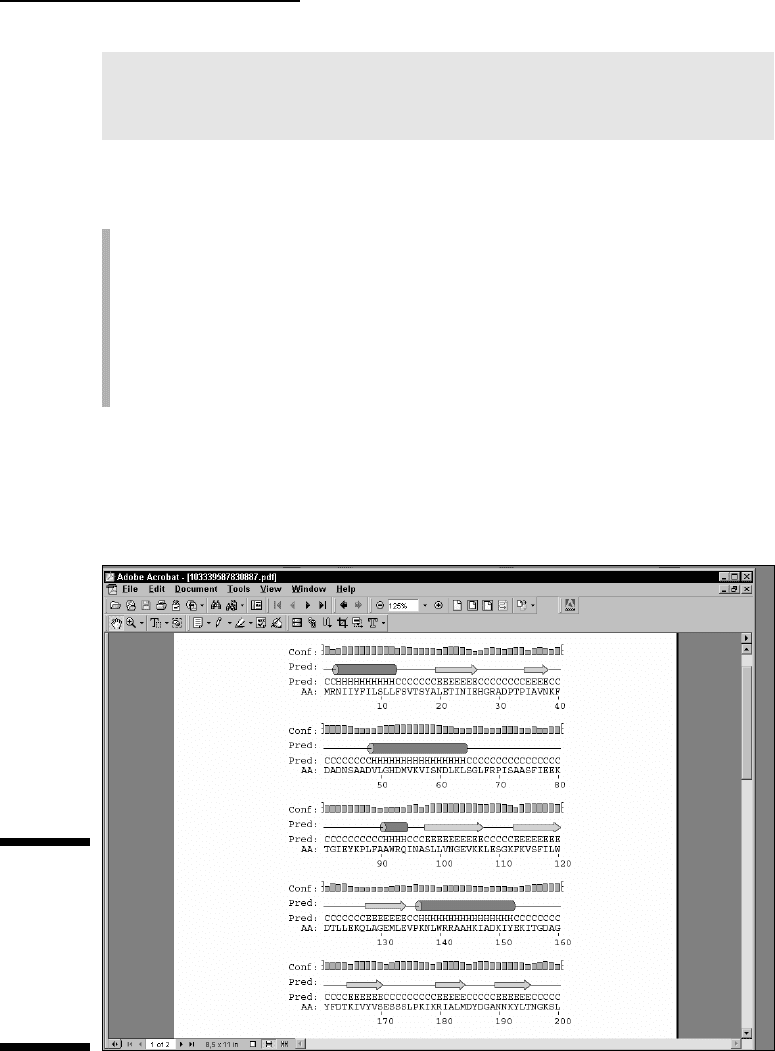
If your computer is already set up with Adobe Acrobat, select the graphic file
in PDF format by simply clicking the appropriate URL. That should open up a
display similar to what’s shown in Figure 11-2. You may also download the
JPEG version if you want to incorporate it into a PowerPoint presentation.
Figure 11-2:
Typical
PSIPRED
graphics:
Partial
output for R.
conorii TolB
(NP_360043).
333
Chapter 11: Working with Protein 3-D Structures
18_089857 ch11.qxp 11/6/06 4:02 PM Page 333

The graphic output is organized along the same lines as the text output, with
the confidence line replaced by a confidence
profile, and the Prediction line
completed by explicit symbols (Helical:
cylinder, Extended: arrow, Coil: nothing).
Predicting additional structural features
PSIPRED is ideal if you need a quick answer to a basic question, such as What
is the secondary structure of my protein?
If you want to know more, you must
turn to other sites capable of predicting a much broader variety of features in
your protein.
The PredictProtein server is probably the most comprehensive site for pro-
tein structure analysis. Unfortunately, the original site (based at Columbia
University) is also very busy — and response times can be more than a day
or two. Luckily, the PredictProtein server has numerous mirror sites through-
out the world — including Europe, the United States, Asia, and Australia (but
beware: some of the URLs listed on the server’s home page are obsolete).
Here is a list of up-to-date URLs:
Europe: www.predictprotein.org/
www.cmbi.ru.nl/bioinf/predictprotein/
USA: cubic.bioc.columbia.edu/predictprotein/
www.sdsc.edu/predictprotein/
Asia: www.cbi.pku.edu.cn/predictprotein/
Your basic PredictProtein server
To check out a PredictProtein server, have your protein sequence handy in
another browser window or in a local file, and follow these steps:
1. Point your browser to www.sdsc.edu/predictprotein/.
The PredictProtein Server page dutifully appears.
We found (for now!) that the San Diego site tends to be the more
responsive.
2. Click the Submit a Protein Sequence for Prediction link (the first
bullet).
A default submission form appears.
3. Enter your e-mail address in the top text field.
4. Select the output format by checking a box.
In the default mode (Results on Our Web Site), the server sends you an
e-mail that indicates the URL of your result file on the PredictProtein
334
Part IV: Becoming a Specialist: Advanced Bioinformatics Techniques
18_089857 ch11.qxp 11/6/06 4:02 PM Page 334

site. This file remains available for one day. It can be in HTML or HTML for
Printouts. In this mode, a graphic processing of the results is also offered.
If you deselect the default mode, the results are sent to you as a rather
long e-mail. Beware that your local e-mail device might not be able to
handle these large result files.
So, in all cases, the server sends you an e-mail; with an address where to
find your results or with the results themselves.
5. Copy your sequence from another browser window (or your local file)
and paste it into the Paste or Type Your Sequence box.
The server only accepts a single protein sequence, in one-letter code, in
the raw (plain) format. No FASTA header.
6. If you like, you can enter a short name for your sequence in the One-
Line Name of Protein text field.
7. Click the Submit/Run Prediction button.
Now all you have to do is check your e-mail from time to time. To estimate
how long that will take, click the yellow Wait button at the bottom-left of the
form to display the status of the PredictProtein queue.
A default analysis returns the following:
A secondary structure prediction on the three conformational states
(H =
Helical, E = Extended, and C = Random Coil)
A prediction of the solvent accessibility of the various residues
A prediction of transmembrane helices and their topologies
A prediction of globular regions in your protein
A prediction of the coiled/coil regions of your protein
A description of the PROSITE motifs matching your sequence (for more
on PROSITE motifs, see Chapter 6)
A description of the putative domain structure for your protein (Prodom
domains)
A list of likely homologues of your query sequence found in the Swiss-
Prot protein database using the similarity-search program PSI-BLAST
A multiple alignment of your query with these homologous sequences
generated by the MaxHom program
A prediction of bound cysteines (disulphide bonds) in your sequence
A description of the composition-biased regions in your sequence
These various features are reported only if they occur in your query
sequence. If you need the details on any of these predictions, you can run
additional programs by using the Advanced or Expert input form.
335
Chapter 11: Working with Protein 3-D Structures
18_089857 ch11.qxp 11/6/06 4:02 PM Page 335

The PredictProtein Meta server
The PredictProtein site also runs a META server — an interface that lets you
submit your sequence to many servers at once, and which then automatically
retrieves the results for you. Here’s how it’s done:
1. Point your browser to www.sdsc.edu/predictprotein/.
You’re back at the UC-San Diego PredictProtein Server page.
2. Click the Submit Requests to META-PP link (the second bullet).
This displays a one-page input form.
3. Enter your e-mail address in the top text field.
This server returns its results by e-mail.
4. Copy your sequence from another browser window (or from a local
file) and paste it into the Paste or Type Your Sequence box.
A one-letter code sequence given in the raw (plain) format is fine.
5. Scroll down to find the table of options available and choose the
methods that you’re interested in.
Most of these services are alternative methods for doing secondary-
structure prediction or threading. The threading methods try to fit your
sequence into a known 3-D structure. (We describe threading methods
later in this chapter.)
6. Click the Submit/Run Prediction button.
Although it may seem convenient to submit all these analyses at once, our
experience is that it is quicker and less confusing to go to the relevant sites
and use them without the META intermediary.
Finding the best server around
There are many servers around the world and, as is to be expected, many use
different kind of algorithms — which usually means that some perform faster
than others. Of course, their authors keep updating them. If you want to know
which one is currently the best server, you can check out EVA, the secondary-
structure server monitoring system, at
cubic.bioc.columbia.edu/eva/.
(EVA is short for
EValuation of Automatic protein structure prediction.)
From the Primary Structure
to the 3-D Structure
In the previous section, we show you how to get some preliminary informa-
tion about what your protein sequence may look like when it’s folded into a
336
Part IV: Becoming a Specialist: Advanced Bioinformatics Techniques
18_089857 ch11.qxp 11/6/06 4:02 PM Page 336

biologically active molecule. Such information would involve helical and
extended regions, loops, residues exposed at the surface, and so on.
If you have nothing else at hand, such information may be useful. For instance,
it may help you predict the potential effect of a mutation — or choose the
right protein fragment to make antibodies. Unfortunately, you’ll soon find out
that secondary structure predictions are far less useful than we would like
them to be. They fall short of being the real thing: the detailed spatial repre-
sentation of your molecule. In this section, we show you how to gather and
use 3-D information to better understand what goes on in your protein
sequence.
The good news for biologists is that plenty of experimental 3-D structure
information is available on the Internet. As was the case when the molecular
biologists of the world agreed to centralize their sequence data into the
GenBank/EMBL/DDBJ databank repository, all structural biologists have
agreed to deposit their 3-D structure coordinates into a single database: the
Protein Data Bank. Everybody refers to this database by its acronym: PDB.
Retrieving and displaying a 3-D
structure from a PDB site
Like other data repositories, the Protein Data Bank (PDB) offers a rather
daunting interface that wasn’t particularly designed with the nonspecialist in
mind. Yet, in those rare cases where you know precisely what you’re looking
for — and even know what you’re doing! — you may want to retrieve a protein
3-D structure dataset directly from one of the PDB sites. Before you query the
PDB, be sure to collect some precise information about the structure you’re
looking for — such as the exact protein name or (even better) its PDB identi-
fier. You can usually obtain this identifier from such user-friendly sources as
the ExPASy/Swiss-Prot server or by using the various NCBI query tools. (See
Chapter 4 for more on how to use these tools.)
Here’s how to obtain and display a PDB structure. For now, let’s assume that
we are looking for the structure of an
Escherichia coli (E. coli) protein named
TolB, with PDB ID code 1CRZ.
1. Point your browser to www.rcsb.org/pdb/.
This takes you to the PDB home page.
2. Enter the PDB ID code 1CRZ in the search box in the middle at the
very top of the page.
3. Click the adjacent SEARCH button.
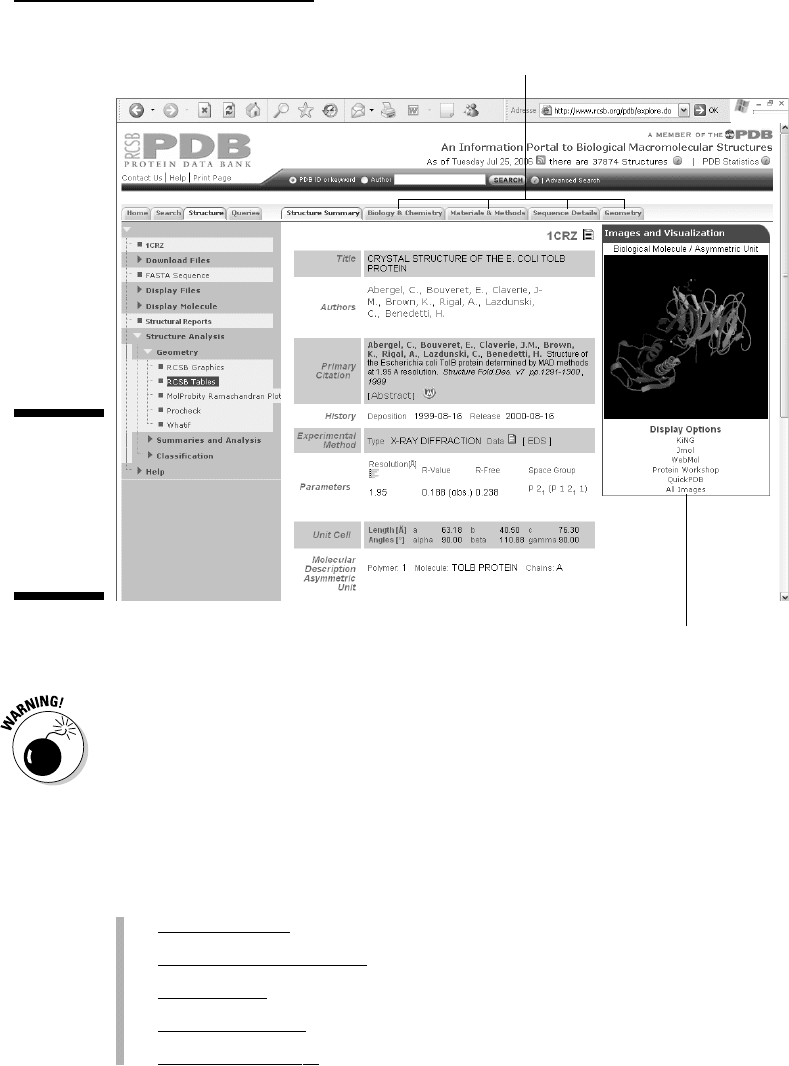
Figure 11-3 shows the resulting output. This one-page Structure Summary
form presents the essential information on this protein structure —
including a small graphic, a bibliographical reference, its function, its
337
Chapter 11: Working with Protein 3-D Structures
18_089857 ch11.qxp 11/6/06 4:02 PM Page 337

organism of origin and — for the brave — some more obscure crystallo-
graphic parameters. You can get additional details on various aspects of
this protein by clicking the various tags at the top of the form (see
Figure 11-3).
For now, we only want to see what the protein molecule looks like in 3-D.
4. Click the All Images link in the Display Options below the structure
image (refer to Figure 11-3).
A new page appears, with an enlarged still view of the structure on the
top, and an interactive view (a Java applet) at the bottom.
5. Right-click the Still Image (in color).
A menu of options now allows you to either print the image, copy it, or
save it to your own hard drive. It is now suitable for inclusion in reports
or presentations. (Including such a figure is a great way to impress your
boss or your professor!)
But wait, there’s more! You can actually get a better feeling for the shape
of this protein using the bottom gray-scale Interactive View as follows:
6. Right-click the Interactive View picture.
You are offered a large menu of viewing options. Explore them to see
which functions of this Java applet actually work on your specific
system. For instance, selecting Spin On puts the molecule in an endless
rotation. (To stop the merry-go-round, select Spin Off.) This is a great
way to gain a better understanding of the 3D shape of the molecule.
7. Left-click and drag from any position in the structure, as shown in
Figure 11-4.
This sets the molecule in controlled motion. Use this mode to inspect
specific structural regions at your own pace, from any angle that you
choose. (You can zoom in as well.) In addition, double-clicking allows
you to select a given position from which you can measure distances
and angles. Try it out for yourself to see what you can do; it’s fun, and
you may impress your colleagues with your brand new expertise in
structural biology.
Feel free to play with the other display options (KiNG, WebMol, . . ., etc.) and
see which one works best for you. See the section “Exploring the sequence/
PDB structure relationship the interactive way,” later in this chapter, for a
tutorial on a more advanced tool that requires downloading and installing the
CnD3 free software on your machine.
The preceding steps list shows you how to jump directly from the PDB entry
to a visual representation of the molecule. This may not be enough, and you
may also want to keep the PDB entry for further study on your own com-
puter. Read on to find out how.
338
Part IV: Becoming a Specialist: Advanced Bioinformatics Techniques
18_089857 ch11.qxp 11/6/06 4:02 PM Page 338
PDB files aren’t meant to be read by nonspecialists. They are rather long
because they contain a vast amount of data. For instance, the 1CRZ contains
the detailed x, y, z coordinates of 3,488 atoms — as well as additional infor-
mation about their connectivity!
If you’re sure that you need to download a PDB file, you can simply stop after
Step 3 in the previous step list — and look for the various links provided in
the leftmost blue column of the screen. (Refer to Figure 11-3.) The possibili-
ties are
Download Files
(to save them to your own hard drive)
Get the F
ASTA Sequence
Display Files
(to look at their internal format)
Display Molecule
Str
uctural Reports
Click here for details.
Click here for an interactive view.
Figure 11-3:
The PDB
structure
summary
output form
for query
1CRZ.
339
Chapter 11: Working with Protein 3-D Structures
18_089857 ch11.qxp 11/6/06 4:02 PM Page 339