
Enns R.H. Computer Algebra Recipes for Mathematical Physics
Подождите немного. Документ загружается.


268 CHAPTER 7. CALCULUS OF VARIATIONS
The volume V = abc is constant, so I. M. eliminates the variable c by setting
c= V/(ab). The new form of E is then displayed.
>
c:=V/(a*b): E:=E;
E := A (
1
a
2
+
1
b
2
+
a
2
b
2
V
2
)
To determine the values of a and b which will extremize E, she sets ∂E/∂a =0
and ∂E/∂b=0 in eq1 and eq2 , respectively.
>
eq1:=diff(E,a)=0; eq2:=diff(E,b)=0;
eq1 := A (−
2
a
3
+
2 ab
2
V
2
)=0 eq2 := A (−
2
b
3
+
2 a
2
b
V
2
)=0
For the extremum to be a minimum, I. M. notes that one must have [Ste87]
∂
2
E
∂a
2
> 0, and
∂
2
E
∂a
2
∂
2
E
∂b
2
−
∂
2
E
∂a∂b
2
> 0.
The left-hand sides of these two conditions are now entered in eq3a and eq3b.
>
eq3a:=diff(E,a,a);
eq3b:=diff(E,a,a)*diff(E,b,b)-diff(E,a,b)ˆ 2;
eq3a := A (
6
a
4
+
2 b
2
V
2
) eq3b := A
2
(
6
a
4
+
2 b
2
V
2
)(
6
b
4
+
2 a
2
V
2
) −
16 A
2
a
2
b
2
V
4
Clearly ∂
2
E/∂a
2
is positive, but it is not yet clear whether the second expression
in the above output is also positive. I. M. now solves eq1 and eq2 for a and b.
>
sol:=solve({eq1,eq2},{a,b});
sol := {a = RootOf(−V +
Z
3
),b= RootOf(−V + Z
3
)}, ....
Four possible solutions for a and b are generated in sol, all expressed as RootOf.
These four solutions are now converted to radical forms in sol2 .
>
sol2:=seq(convert(sol[i],radical),i=1..4);
sol2 := {a = V
(1/3)
,b= V
(1/3)
}, {a = −(−V )
(1/3)
,b=(−V )
(1/3)
},
{a = −V
(1/3)
,b= V
(1/3)
}, {a =(−V )
(1/3)
,b=(−V )
(1/3)
}
Clearly, the first solution in sol2 is the desired one, which I. M. now assigns.
Thevaluesofa, b, c, and the minimum energy, Emin, immediately follow.
>
assign(sol2[1]): a:=a; b:=b; c:=c; Emin:=E;
a := V
(1/3)
b := V
(1/3)
c := V
(1/3)
Emin :=
3 A
V
(2/3)
To minimize the energy, the box must be cubical. That the energy is a minimum
follows on displaying eq3a and eq3b, which are both positive.
>
eq3a:=eq3a; eq3b:=eq3b;
eq3a :=
8 A
V
(4/3)
eq3b :=
48 A
2
V
(8/3)
(b) Now, I. M. uses the method of Lagrange multipliers. The energy expression
E is entered along with g ≡ abc − V. The subsidiary condition is g =0.

7.2. SUBSIDIARY CONDITIONS 269
>
restart: E:=A*(1/aˆ2+1/bˆ2+1/cˆ2); g:=a*b*c-V;
E := A (
1
a
2
+
1
b
2
+
1
c
2
) g := abc− V
I. M. forms a functional operator f to differentiate E + λg with respect to an
arbitrary variable v, and then set the result equal to zero.
>
f:=v->diff(E+lambda*g,v)=0:
Then f is used, with v equal to a, b,andc in eq1 , eq2 ,andeq3 , respectively.
The relation g = 0 is given in eq4 .
>
eq||1:=f(a); eq||2:=f(b); eq||3:=f(c); eq||4:=g=0;
eq1 := −
2 A
a
3
+ λbc=0 eq2 := −
2 A
b
3
+ λac=0
eq3 := −
2 A
c
3
+ λab=0 eq4 := abc− V =0
The sequence of four equations is solved for a, b, c,andλ, and each of the
solutions converted from RootOf forms to radical notation.
>
sol:=solve({seq(eq||i,i=1..4)},{a,b,c,lambda}):
>
sol2:=seq(convert(sol[i],radical),i=1..4);
sol2 := {b = V
(1/3)
,c= V
(1/3)
,a= V
(1/3)
,λ=
2 A
V
(5/3)
}, ....
The first solution in sol2 is assigned and a, b, c,andEmin displayed.
>
assign(sol2[1]): a:=a; b:=b; c:=c; Emin:=E;
a := V
(1/3)
b := V
(1/3)
c := V
(1/3)
Emin :=
3 A
V
(2/3)
As I. M. expected, the answer agrees with that obtained with the direct method.
7.2.2 Erehwon Hydro Line
The fundamental concept in social science is Power, in the same
sense in which Energy is the fundamental concept in physics.
Bertrand Russell, British philosopher, mathematician, (1872–1970)
Erehwon Hydro has suspended a power line, of length L =1.5 km and lin-
ear mass density = 1000 kg/km, across a deep, wide, gorge. Relative to the
origin at the gorge bottom, the two towers from which the cable is suspended
are at (−a/2,b)and(a/2,b), where a =1.25 km and b = 1 km. Assuming
that the equilibrium shape of the cable is such as to minimize the potential en-
ergy, determine the cable shape and plot it. Take the gravitational acceleration
g =9.8/1000 km/s
2
. What is the distance between the lowest point in the cable
and the gorge bottom?
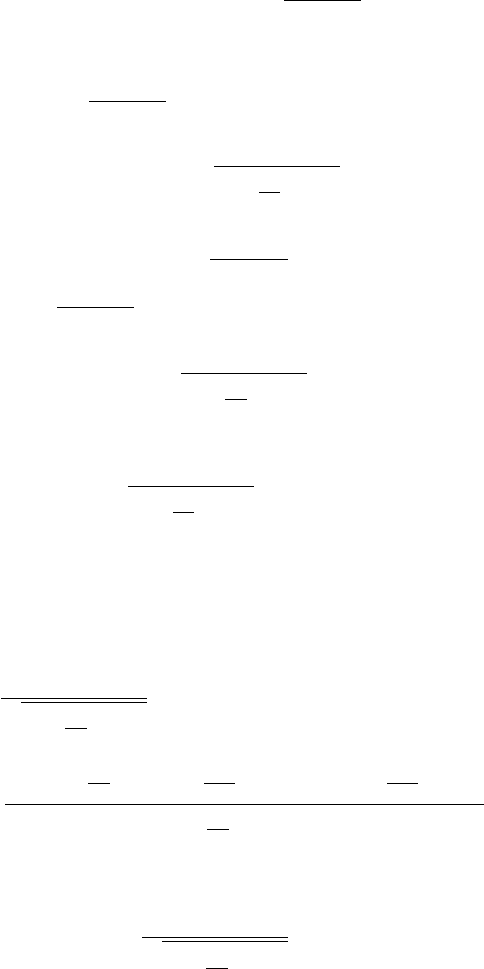
If an arclength element ds=
1+(y
)
2
dx of cable at a point x is a distance
y(x) above the gorge bottom, the potential energy of the whole cable is
270 CHAPTER 7. CALCULUS OF VARIATIONS
V =
dsgy=
a/2
−a/2
gy
1+(y
)
2
dx.
After loading the VariationalCalculus package,
>
restart: with(VariationalCalculus):
the integrand F = gy
1+(y
)
2
of the potential energy V is entered.
>
F:=epsilon*g*y(x)*sqrt(1+diff(y(x),x)ˆ2);
F := εgy(x)
1+(
d
dx
y(x))
2
The subsidiary condition is that the length of the cable must be L, i.e.,
ds =
a/2
−a/2
1+(y
)
2
dx = L.
The integrand G=
1+(y
)
2
of this constraint relation is entered,
>
G:=sqrt(1+diff(y(x),x)ˆ2);
G :=
1+(
d
dx
y(x))
2
and the combination FF =F + λG formed, where λ is the Lagrange multiplier.
>
FF:=simplify(F+lambda*G);
FF :=
1+(
d
dx
y(x))
2
(εgy(x)+λ)
The EulerLagrange command is applied to FF and simplified. Since FF
doesn’t explicitly depend on x, in addition to the lhs of the Euler–Lagrange
equation, a first integral is generated, the integration constant being K
1
.
>
eq:=simplify(EulerLagrange(FF,x,y(x)));
eq :=
⎧
⎪
⎨
⎪
⎩
εgy(x)+λ
1+(
d
dx
y(x))
2
= K
1
,
εg+ εg(
d
dx
y(x))
2
− (
d
2
dx
2
y(x)) εgy(x) − (
d
2
dx
2
y(x)) λ
(1 + (
d
dx
y(x))
2
)
(3/2)
⎫
⎪
⎬
⎪
⎭
The select command is used to extract the first integral relation.
>
eq2:=select(has,eq,K[1])[1];
eq2 :=
εgy(x)+λ
1+(
d
dx
y(x))
2
= K
1
The ODE in eq2 is analytically solved for y(x), assuming that >0, g>0.
>
sol:=dsolve(eq2,y(x)) assuming epsilon>0,g>0;

7.2. SUBSIDIARY CONDITIONS 271
Two equivalent solutions (not shown here) are produced in sol , the rhs of the
second solution being chosen, simplified, and assigned the name Y .
>
Y:=simplify(rhs(sol[2]));
Y :=
1
2
(K
1
2
+ e
(−
2 εg(x− C1 )
K
1
)
− 2 e
(−
εg(x− C1 )
K
1
)
λ) e
(
εg(x− C1 )
K
1
)
εg
The solution Y is converted to a trig form, and the combine command applied.
>
Y2:=combine(convert(Y,trig));
Y2 :=
1
2
(K
1
2
cosh(
εg(x −
C1 )
K
1
)+K
1
2
sinh(
εg(x −
C1 )
K
1
)
+cosh(
εg(x −
C1 )
K
1
) − sinh(
εg(x −
C1 )
K
1
) − 2 λ)
(εg)
The cosh and sinh terms are collected in Y2 .
>
Y3:=collect(Y2,[cosh,sinh]);
Y3 :=
1
2
(1+K
1
2
)cosh(
εg(x − C1 )
K
1
)
εg
+
1
2
(K
1
2
− 1) sinh(
εg(x − C1 )
K
1
)
εg
−
λ
εg
To evaluate the constants K
1
,
C1, and λ, three conditions are needed. Since
the cable will hang symmetrically, the slope at the center of the cable (x =0)
must be zero. This is entered as boundary condition bc1 .Attheendpoint
x=a/2, the vertical coordinate is b.Thisisenteredinbc2 .
>
bc1:=eval(diff(Y3,x),x=0)=0: bc2:=eval(Y3,x=a/2)=b:
The two boundary conditions are solved for λ and
C1.
>
sol2:=solve({bc1,bc2},{lambda,_C1}): assign(sol2):
After assigning sol2 , the cable shape is given by Y4 .
>
Y4:=expand(Y3);
Y4 :=
cosh(
εgx
K
1
) K
1
εg
−
cosh(
1
2
aεg
K
1
) K
1
εg
+ b
The constant K
1
remainstobeevaluated. Theconstraint
a/2
−a/2
Gdx= L is
applied in bc3 . To perform the integration, it is assumed that a>0, >0,
g>0, and K
1
> 0.
>
bc3:=simplify(int(eval(G,y(x)=Y4),x=-a/2..a/2))=L
assuming a>0,epsilon>0,g>0,K[1]>0;
bc3 :=
e
(−1/2
aεg
K
1
)
K
1
(−1+e
(
aεg
K
1
)
)
εg
= L
bc3 is a transcendental equation, which must be solved numerically for K
1
.The
given parameter values are entered.
>
epsilon:=1000: L:=1.5: a:=1.25: b:=1: g:=9.8/1000:
272 CHAPTER 7. CALCULUS OF VARIATIONS
Then bc3 is numerically solved for K
1
, the value being labeled K1. Evaluating
Y4 at K
1
=K1 , the equilibrium shape of the cable is given by Y5 .
>
K1:=fsolve(bc3,K[1]=0..10); Y5:=eval(Y4,K[1]=K1);
K1 := 5.751883654
Y5 := 0.5869269033 cosh(1.703789678 x)+0.0476433492
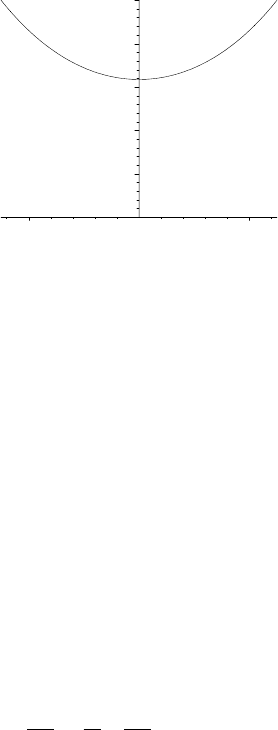
The equilibrium shape Y5 , called a catenary, is plotted with constrained scal-
ing, the resulting picture being shown in Figure 7.4.
>
plot(Y5,x=-a/2..a/2,thickness=2,view=[-a/2..a/2,0..b],
scaling=constrained,tickmarks=[3,3],labels=["x","y"]);
0
0.2
0.4
0.6
0.8
1
y
–0.5 0.5
x
Figure 7.4: Equilibrium shape of the power line.
Evaluating Y5 at x =0, the lowest point on the cable
>
height:=eval(Y5,x=0);
height := 0.6345702525
is about 0.635 km, or 635 m, above the gorge bottom.
7.3 Lagrange’s Equations
In classical mechanics, the Lagrangian L is defined by L = T − V ,whereT
is the kinetic energy and V the potential energy of the system of interest. If
L= L(q
i
, ˙q
i
,t)whereq
i
are the generalized coordinates (any set of coordinates
completely specifying the state of the system), ˙q
i
the (generalized) velocity com-
ponents, and t the time, then Hamilton’s principle states that of all possible
motions the actual motion of the system over a time interval t
0
to t
1
is the one
for which
t
1
t
0
L(q
i
, ˙q
i
,t) dt is an extremum. Setting the variation of the integral
equal to zero leads to Lagrange’s equations of motion
∂L
∂q
i
−
d
dt
∂L
∂ ˙q
i
=0, (7.8)
which are equivalent to Newton’s law of motion. Since (7.8) is of the same
structure as Eq. (7.2), we can also make use of the EulerLagrange command.

7.3. LAGRANGE’S EQUATIONS 273
7.3.1 Daniel’s Chaotic Pendulum
Out of chaos God made a world,
and out of high passions comes a people.
Lord Byron, English poet, (1788–1824)
Daniel’s engineering father has given him a toy for his birthday which basi-
cally consists of a simple pendulum (a small mass m attached to the end of a
lightrodoflengthb), whose pivot point is attached to the rim of a wheel of
radius a which rotates at a constant angular velocity ω. The pendulum is in
the same vertical plane as the wheel and is free to rotate completely about its
pivot point. All frictional effects are neglected. This recipe will determine the
equation of motion for m, numerically solve the resulting nonlinear ODE, and
animate the motion. The plots and VariationalCalculus packages are loaded.
>
restart: with(plots): with(VariationalCalculus):
If θ(t) is the angle that the pendulum rod makes with the vertical, the horizontal
coordinate of m at time t is x= a cos(ωt)+b sin(θ(t)) which is entered.
>
x:=a*cos(omega*t)+b*sin(theta(t));
x := a cos(ωt)+b sin(θ(t))
The vertical coordinate of m at time t is y =a sin(ωt) − b cos(θ(t)).
>
y:=a*sin(omega*t)-b*cos(theta(t));
y := a sin(ωt) − b cos(θ(t))
The horizontal ( ˙x)andvertical(˙y) components of m’s velocity are calculated.
>
xdot:=diff(x,t); ydot:=diff(y,t);
xdot := −a sin(ωt) ω + b cos(θ(t)) (
d
dt
θ(t))
ydot := a cos(ωt) ω + b sin(θ(t)) (
d
dt
θ(t))
The kinetic (T =
1
2
m (˙x
2
+˙y
2
)) and potential (V = mgy) energy are determined.
>
T:=simplify(m*(xdotˆ2+ydotˆ2)/2); V:=m*g*y;
T :=
1
2
m(a
2
ω
2
− 2 a sin(ωt) ωbcos(θ(t)) (
d
dt
θ(t))
+2a cos(ωt) ωbsin(θ(t)) (
d
dt
θ(t)) + b
2
(
d
dt
θ(t))
2
)
V := mg(a sin(ωt) −b cos(θ(t)))
The Lagrangian L=T −V is formed, T being simplified by applying the combine
command with the trig option.
>
L:=combine(T,trig)-V;
L :=
ma
2
ω
2
2
− maωb(
d
dt
θ(t)) sin(ωt− θ(t)) +
1
2
mb
2
(
d
dt
θ(t))
2
− mg(a sin(ωt) − b cos(θ(t)))

274 CHAPTER 7. CALCULUS OF VARIATIONS
The governing equation of motion, ode , is obtained by applying the
EulerLagrange command as follows. Because L depends explicitly on t,a
first integral is not generated with the EulerLagrange command.
>
ode:=simplify(-EulerLagrange(L,t,theta(t))[1]/(m*b))=0;
ode := g sin(θ(t)) − aω
2
cos(ωt− θ(t)) + b (
d
2
dt
2
θ(t)) = 0
Since ode is a nonlinear ODE, it must be solved numerically. We will consider
a giant version of Daniel’s toy taking a=1 m and b=3 m. The wheel is rotated
at ω =2 rads/s and g =9.8m/s
2
. The ODE is then displayed in ode2 .
>
a:=1: b:=3: omega:=2: g:=9.8: ode2:=ode;
ode2 := 9.8sin(θ(t)) − 4 cos(2 t − θ(t)) + 3 (
d
2
dt
2
θ(t)) = 0
For the initial condition, let’s take θ(0)= π/6radsand
˙
θ(0)= 0.
>
ic:=theta(0)=Pi/6,D(theta)(0)=0:
Then, ode2 is numerically solved in sol, subject to the initial condition, for
θ(t). The output is given as a listprocedure.
>
sol:=dsolve({ode2,ic},theta(t),type=numeric,
output=listprocedure):
Making use of sol, the next three command lines allow us to evaluate the
horizontal and vertical coordinates of m at an arbitrary time t.
>
Theta:=eval(theta(t),sol):
>
X:=t->eval(x,theta(t)=Theta(t)):
>
Y:=t->eval(y,theta(t)=Theta(t)):
The circle command, found in the plottools library package, is used to plot a
thick red circle of radius a, centered on the origin, representing the wheel’s rim.
>
c:=plottools[circle]([0,0],a,color=red,style=line,
thickness=2):
The line command (also in the plottools package) is used to create an arrow
operator l to draw the pendulum rod as a thick green line at arbitrary time t.
>
l:=t->plottools[line]([a*cos(omega*t),a*sin(omega*t)],
[X(t),Y(t)],color=green,thickness=2):
The pointplot command is used to form an operator p to draw size 16 blue
circles at the pivot point and at m at arbitrary time t.
>
p:=t->pointplot({[a*cos(omega*t),a*sin(omega*t)],
[X(t),Y(t)]},symbol=circle,symbolsize=16,color=blue):
The three graphs are superimposed in gr||i at a time t =0.1 i,andadoloop
used to generate plots for i from 0 to 200, i.e, for t=0 to 20 s.
>
for i from 0 to 200 do
>
t:=0.1*i:
>
gr||i:=display({c,p(t),l(t)},labels=["x","y"]):
>
end do:
7.3. LAGRANGE’S EQUATIONS 275
The motion of the pendulum is animated by displaying the sequence of graphs,
using the insequence=true option.
>
display(seq(gr||i,i=0..200),insequence=true);
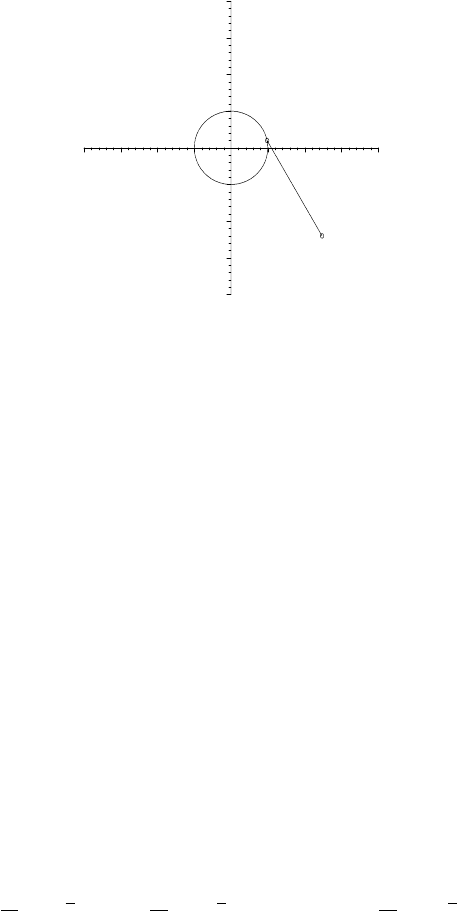
A typical (at t=0.1 s) frame of the animation is shown in Figure 7.5. Click on
the computer plot and on the start arrow to see the entire pendulum motion.
–4
0
4
y
–4 4
x
Figure 7.5: Typical frame of the animation of Daniel’s chaotic pendulum.
For the choice of parameter values, the motion is quite irregular or “chaotic”
in appearance. You should try other values and see what happens.
7.3.2 Van Allen Belts
He could not see a belt without hitting below it.
Margot Asquith, British socialite about a former prime minister, (1864–1945)
As an interesting and non-trivial example, in this recipe we will determine
and animate the motion of a proton moving in the magnetic dipole field of the
earth. The animated motion is characteristic of the behavior of charged parti-
cles trapped in the Van Allen radiation belts surrounding the earth. [Bra68]
This recipe uses the plots, VariationalCalculus, and VectorCalculus pack-
ages which will generate several warnings unless suppressed, e.g., by using the
interface command to set the warnlevel to 0.
>
restart: interface(warnlevel=0):
>
with(plots): with(VariationalCalculus): with(VectorCalculus):
The magnetic field of the earth will be treated as a pure magnetic dipole oriented
along the z-axis and spherical polar coordinates (r, θ, φ) used. The velocity
vector v of the proton at arbitrary time t is entered.
>
v:=VectorField(<diff(r(t),t),r(t)*diff(theta(t),t),r(t)*
sin(theta(t))*diff(phi(t),t)>,’spherical’[r,theta,phi]);
v := (
d
dt
r(t))
e
r
+r(t)(
d
dt
θ(t))
e
θ
+r(t)sin(θ(t)) (
d
dt
φ(t))
e
φ

276 CHAPTER 7. CALCULUS OF VARIATIONS
From Griffiths [Gri99], the spherical polar components of the vector poten-
tial
A at time t for a pure magnetic dipole are A
r
=0, A
θ
=0, and A
φ
=
(µ
0
/4π) m sin(θ(t))/r
2
(t), where µ
0
is the permeability of free space and m the
magnetic dipole moment (of the earth). The vector field
A is now entered.
>
A:=VectorField(<0,0,(mu[0]/(4*Pi))*m*sin(theta(t))/r(t)ˆ2>,
’spherical’[r,theta,phi]);
A :=
1
4
µ
0
m sin(θ(t))
π r(t)
2
e
φ
As a check on the form of
A, let’s calculate the magnetic field
B = ∇×
A.
Removing the time dependence from
A and taking the curl yields the standard
expression [Gri99] for the magnetic dipole field.
>
B:=Curl(subs({theta(t)=theta,r(t)=r},A));
B :=
1
2
µ
0
m cos(θ)
r
3
π
e
r
+
1
4
sin(θ) µ
0
m
r
3
π
e
θ
From Goldstein [GPS02], the Lagrangian for a particle of mass M and charge
q moving in the magnetic dipole field is given by L=(1/2) M (v ·v)+q (
A ·v).
This Lagrangian is now entered.
>
L:=(1/2)*M*(v . v)+q*(A . v);
L :=
1
2
M ((
d
dt
r(t))
2
+r(t)
2
(
d
dt
θ(t))
2
+r(t)
2
sin(θ(t))
2
(
d
dt
φ(t))
2
)
+
1
4
qµ
0
m sin(θ(t))
2
(
d
dt
φ(t))
π r(t)
Applying the EulerLagrange command to L, and specifying the time-dependent
spherical polar coordinates, yields three equations of motion for r, θ,andφ,as
well as two constants of the motion. The lengthy output is suppressed here.
>
EL:=EulerLagrange(L,t,[r(t),theta(t),phi(t)]);
What do the constants of the motion tell us? First, let’s select the expression
in EL containing the constant K
1
.
>
eq1:=select(has,EL,K[1])[1];
eq1 := M r(t)
2
sin(θ(t))
2
(
d
dt
φ(t)) +
1
4
qµ
0
m sin(θ(t))
2
π r(t)
= K
1
The result eq1 can be used to determine the range of motion of the proton. For
given initial conditions, there are “forbidden” regions of space which the particle
cannot reach. The particle is “trapped” in an allowed region. This topic will
not be pursued here. The interested reader is referred to Bradbury. [Bra68]
Now, the expression in EL containing the constant K
2
is selected, simplified,
and simplified further in eq2b with the substitution cos
2
(θ(t))= 1 − sin
2
(θ(t)).
>
eq2:=simplify(select(has,EL,K[2])[1]);
>
eq2b:=algsubs(cos(theta(t))ˆ2=1-sin(theta(t))ˆ2,eq2);
7.3. LAGRANGE’S EQUATIONS 277
eq2b := −
1
2
M ((
d
dt
r(t))
2
+r(t)
2
(
d
dt
θ(t))
2
+r(t)
2
sin(θ(t))
2
(
d
dt
φ(t))
2
)=K
2
eq2b tells us that the speed of the particle remains constant with time. This
is hardly surprising, as it is well-known that a magnetic field can do no work
on a charged particle. Now, the motion of the proton in the magnetic dipole
field must be determined by solving the equations of motion numerically. We
remove the expressions involving the constants K
1
and K
2
from EL,
>
eq3:=remove(has,EL,[K[1],K[2]]):
and write out the relevant equations in eq4 , eq5 , eq6 .Onlyeq4 is shown here.
>
eq4:=expand(eq3[1]/M)=0; eq5:=expand(eq3[2]/M)=0;
eq6:=expand(eq3[3]/M)=0;
eq4 := −2r(t)sin(θ(t))
2
(
d
dt
φ(t)) (
d
dt
r(t))
− 2r(t)
2
sin(θ(t)) (
d
dt
φ(t)) cos(θ(t)) (
d
dt
θ(t)) − r(t)
2
sin(θ(t))
2
(
d
2
dt
2
φ(t))
−
1
2
qµ
0
m sin(θ(t)) cos(θ(t)) (
d
dt
θ(t))
Mπr(t)
+
1
4
qµ
0
m sin(θ(t))
2
(
d
dt
r(t))
Mπr(t)
2
=0
To solve the three coupled nonlinear ODEs in eq4 , eq5 ,andeq6 , we enter the
numerical values of the proton rest mass (M0 in kilograms), the proton charge
(q in Coulombs), the earth’s magnetic dipole moment (m in Joules/Tesla), the
permeability (µ
0
)offreespace,themeanradiusoftheearth(RE in meters),
and the vacuum speed of light (c in meters/second).
>
M0:=1.67*10ˆ(-27); q:=1.60*10ˆ(-19); m:=7.94*10ˆ(22);
mu[0]:=4*Pi*10ˆ (-7); RE:=6.37*10ˆ 6; c:=3*10ˆ 8;
M0 := 0.1670000000 10
−26
q := 0.1600000000 10
−18
m := 0.7940000000 10
23
µ
0
:=
π
2500000
RE := 0.637000000 10
7
c := 300000000
At time t = 0, let’s take r(0) = 2 RE (radial distance twice the earth’s radius),
θ(0)= π/2rads,φ(0)=0, ˙r(0) =0,
˙
φ(0)= 0, and
˙
θ(0)= 19 rads/sec.
>
ic:=r(0)=2*RE,theta(0)=evalf(Pi/2),phi(0)=0,
D(r)(0)=0,D(phi)(0)=0,D(theta)(0)=19;
ic := r(0) = 0.1274000000 10
8
,θ(0) = 1.570796327,φ(0) = 0,
D(r)(0) = 0, D(φ)(0) = 0, D(θ)(0) = 19
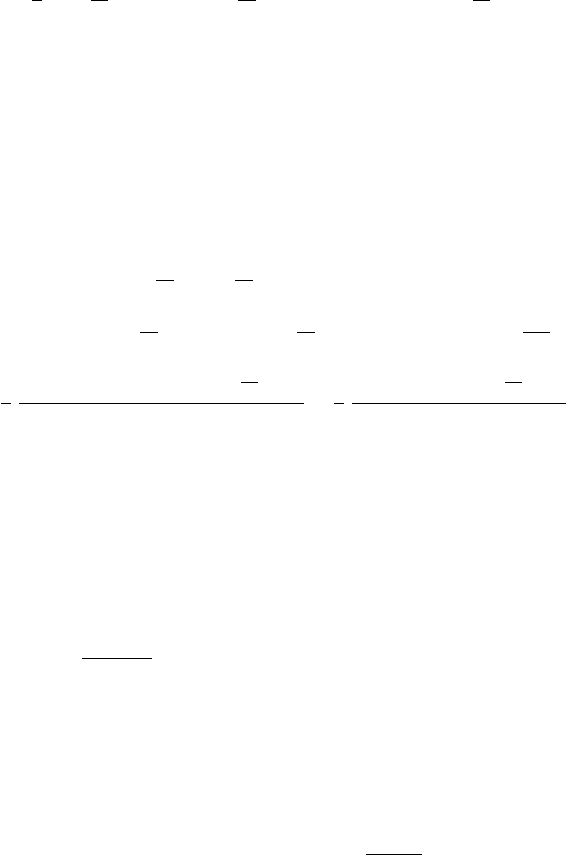
The mass of the proton is given by M = M0 /
1 − β
2
,withβ = v/c.Inthe
next two command lines, β and M are calculated.
>
beta:=evalf(subs(ic,sqrt(D(r)(0)ˆ2+(r(0)*D(theta)(0))ˆ2
+(r(0)*sin(theta(0))*D(phi)(0))ˆ 2)/c));
β := 0.8068666667
>
M:=M0/sqrt(1-betaˆ2);
M := 0.2826993436 10
−26