
Enns R.H. Computer Algebra Recipes for Mathematical Physics
Подождите немного. Документ загружается.

278 CHAPTER 7. CALCULUS OF VARIATIONS
In this simulation, the proton is traveling at about 8/10 the (vacuum) speed
of light, and its mass is about 5/3 times its rest mass. eq4 , eq5 ,andeq6 are
expressed with the numerical values substituted, their outputs suppressed here.
>
eq4:=evalf(eq4); eq5:=evalf(eq5); eq6:=evalf(eq6);
The three ODES are numerically solved in sol subject to the initial condition,
>
sol:=dsolve({eq4,eq5,eq6,ic},{r(t),theta(t),phi(t)},
type=numeric,output=listprocedure):
and r(t), θ(t), φ(t) evaluated at arbitrary time t in R, Theta,andPhi.
>
R:=eval(r(t),sol): Theta:=eval(theta(t),sol):
Phi:=eval(phi(t),sol):
For plotting purposes, three functional operators are now introduced to convert
from spherical polar coordinates to Cartesian coordinates at arbitrary time t.
>
x:=t->R(t)*sin(Theta(t))*cos(Phi(t)):
>
y:=t->R(t)*sin(Theta(t))*sin(Phi(t)):
>
z:=t->R(t)*cos(Theta(t)):
The total time (tt) for the animation is taken to be 3.5 seconds, N = 100 frames
will be used, and the time step will be tt/N .
>
tt:=3.5: N:=100: step:=tt/N:
In gr1,thespacecurve command is used to plot the proton’s trajectory from
t =0 to t = tt. The coordinates x(t), y(t), and z(t) are normalized by dividing
by the radius RE of the earth. The trajectory is colored with the zhue option.
>
gr1:=spacecurve([x(t)/RE,y(t)/RE,z(t)/RE],t=0..tt,
numpoints=2000,shading=zhue):
In gr2,theplot3d command is used in spherical coordinates to plot a bluish
colored sphere of radius 1 to represent the earth.
>
gr2:=plot3d(1,theta=0..Pi,phi=0..2*Pi,coords=spherical,
color=COLOR(RGB,0.1,0.5,0.8),style=patchnogrid):
In the following do loop, the proton’s position is plotted at each time step and
superimposed on the graphs gr1 and gr2.
>
fornfrom0toNdo
>
t:=step*n;
>
gr3||n:=pointplot3d([x(t)/RE,y(t)/RE,z(t)/RE],style=point,
symbol=circle,symbolsize=16,color=red);
>
pl||n:=display({gr1,gr2,gr3||n});
>
end do:
Using the display command with the insequence=true option allows the pro-
ton’s motion to be animated.
>
display(seq(pl||n,n=0..N),insequence=true,
scaling=constrained,axes=framed,labels=["x","y","z"],
orientation=[45,55],tickmarks=[3,3,3]);
On executing the last command line and clicking on the computer plot and on
7.4. RAYLEIGH–RITZ METHOD 279
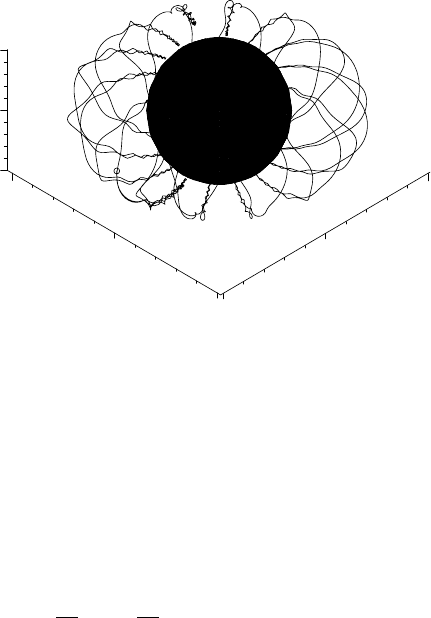
the start arrow, the motion of the proton may be viewed. The opening frame
of the animation is shown in Figure 7.6, the proton represented by the small
circle at the bottom left of the figure.
–2
0
2
x
–2
0
y
–1
0
1
z
Figure 7.6: Path traced out by proton in the magnetic dipole field of the earth.
In the animation, the proton spirals around the magnetic dipole field lines, un-
dergoing repeated reflections in the vicinity of the poles, and precessing around
the earth. The aurora occur in the vicinity of the turning points near the poles.
7.4 Rayleigh–Ritz Method
In Chapter 1, we noted that the simple harmonic oscillator, Bessel, Legendre,
and some other commonly occuring ODEs of physical interest, are all special
cases of the Sturm–Liouville (S-L) equation,
d
dx
p(x)
dy
dx
− q(x) y = −λw(x) y. (7.9)
for particular choices of the real functions p(x), q(x), and w(x). w(x) is taken
to be non-negative over the range x = a to b of interest. In boundary-value
problems where y satisfies the Sturm–Liouville boundary conditions (y or its
derivative vanish at a and b), y is the eigenfunction and λ the real eigenvalue.
The S-L equation can be formulated as a variational problem. Suppose that
we want to extremize the integral
I[y]=
b
a
[p (y
)
2
+ qy
2
] dx, subject to J[y]=
b
a
wy
2
dx =1. (7.10)
The form that y must take is determined by solving the Euler–Lagrange (E-L)
equation with F = p (y
)
2
+ qy
2
− λwy
2
,whereλ is the Lagrange multiplier.
Substituting F into the E-L equation just yields the S-L equation, (7.9). So the
function y which makes I[y] an extremum subject to the subsidiary condition
on J[y] is an eigenfunction of the S-L equation. The Lagrange multiplier λ is

280 CHAPTER 7. CALCULUS OF VARIATIONS
the corresponding eigenvalue, while the subsidiary condition corresponds to the
normalization condition on the eigenfunctions.
Now form the quantity Λ[y]=I[y]/J[y]. Extremizing Λ is exactly equivalent
to extremizing I with the subsidiary condition on J. For S-L boundary condi-
tions, it can be shown that the value of Λ for y = y
n
, an eigenfunction of the
S-L equation, is equal to the eigenvalue λ
n
, i.e., Λ[y
n
]=λ
n
. This latter result
is the basis of the Rayleigh–Ritz method for estimating eigenvalues.
For example, for atomic or molecular systems more complicated than the
hydrogen atom, an exact analytical determination of the eigenvalues (energy
levels) and eigenfunctions is not possible, so one must resort to approximate
techniques. The Rayleigh–Ritz method is one such approach.
In this method one introduces a “trial function” φ, satisfying the boundary
conditions. For the lowest eigenvalue λ
1
(ground state energy for molecular
systems), it can be shown that Λ[φ] ≥ λ
1
, i.e., Λ provides an upper bound to
the lowest eigenvalue. By introducing one or more adjustable parameters into
φ, the estimate of λ
1
can usually be improved, the estimate converging on λ
1
from above. The Rayleigh–Ritz method can also be used to estimate higher
eigenvalues, but the estimate does not necessarily converge to the exact answer
from above. In the recipes presented here, we will only estimate the lowest
eigenvalue. The text Mathematics in Physics and Engineering by Irving and
Mullineux [IM69] deals with estimating higher eigenvalues.
7.4.1 I. M. Estimates a Bessel Zero
To arrive at a just estimate of a renowned man’s character
one must judge it by the standards of his time, not ours.
Mark Twain, American author, (1835–1910)
This recipe, provided by Ms. I.M. Curious, solves the following problem, which
has often appeared in various guises on my mathematical physics exams.
The Bessel function of order 1 satisfies the equation
d
2
J
1
dr
2
+
1
r
dJ
1
dr
+(k
2
−
1
r
2
)J
1
=0.
Given that J
1
(r = 0) = 0, and noting that if we impose the boundary condition
J
1
(r = 1)=0, then k must be a zero of J
1
(kr), use the Rayleigh–Ritz method with
no adjustable parameters to obtain an approximate value of the first zero of J
1
.
What is the percentage error in your answer when compared to the exact value?
Improve your estimate by including one adjustable parameter. Generally, the
agreement between the trial function and the exact solution is not nearly as
good as between the eigenvalue estimate and the exact eigenvalue. Confirm
that this is the case here by plotting the trial function with one adjustable
parameter and the exact first-order Bessel function solution.
I. M. begins by entering the general form of Λ[φ(r)]. The range of interest
here is from r = 0 to 1, so the integrals are taken to have these limits. From the
structure of Λ, she notes that the trial function need not be normalized as the
normalization constant will obviously cancel out.

7.4. RAYLEIGH–RITZ METHOD 281
>
restart:
>
Lambda:=int(p(r)*diff(phi(r),r)ˆ2+q(r)*phi(r)ˆ2,r=0..1)
/int(w(r)*phi(r)ˆ 2,r=0..1);
Λ:=
1
0
p(r)(
d
dr
φ(r))
2
+q(r) φ(r)
2
dr
1
0
w(r) φ(r)
2
dr
The first-order Bessel equation can be put into Sturm–Liouville form by choos-
ing p(r)=r, q(r)=1/r, w(r)=r, and noting that λ =k
2
.
>
p(r):=r: q(r):=1/r: w(r):=r:
I. M. chooses φ = r(1 − r)(1 + cr)asher
2
trial function, with c an adjustable
parameter which she will set to 0 in the first part of the problem. The boundary
conditions are clearly satisfied, i.e., φ=0 at r =0 and 1.
>
phi(r):=r*(1-r)*(1+c*r):
The trial function φ is automatically substituted into Λ, which on being sim-
plified takes the following form.
>
Lambda:=simplify(Lambda);
Λ:=
14 (7 c
2
+18c + 15)
5 c
2
+16c +14
To answer the first part of the question, I. M. evaluates Λ with c =0.
>
Lambda0:=eval(Lambda,c=0);
Λ0 := 15
Then the estimated value of k is obtained by taking the square root of Λ0.
>
k0:=evalf(sqrt(Lambda0));
k0 := 3.872983346
The exact (numerical) k value is obtained by using the BesselJZeros command.
>
kexact:=BesselJZeros(1.0,1);
kexact := 3.831705970
I. M. now calculates the percentage error, 100 (k0 − kexact)/kexact, and finds
it to be about 1.08%.
>
percenterror0:=((k0-kexact)/kexact)*100;
percenterror0 := 1.077258441
Now, she adjusts the parameter c to minimize the value of Λ. This is accom-
plished by calculating dΛ/dc and setting the result equal to 0.
>
eq:=diff(Lambda,c)=0;
eq :=
14 (14 c + 18)
5 c
2
+16c +14
−
14 (7 c
2
+18c + 15) (10 c + 16)
(5 c
2
+16c + 14)
2
=0
2
Since the form of φ is deliberately not specified in the wording of the problem, I do get
a variety of possible forms submitted by my students, sometimes even trial functions that do
not satisfy the boundary conditions!
282 CHAPTER 7. CALCULUS OF VARIATIONS
Then, eq is solved for c, and put into decimal form by applying the floating
point evaluation command.
>
sol:=evalf(solve(eq));
sol := −0.3055081542, −1.785400936
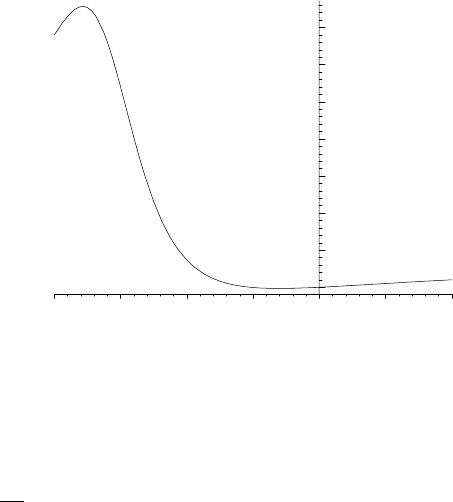
Two values are generated for c. To decide on which value will minimize Λ, I. M.
plots Λ over the range c= −2 to 1. The resulting picture is shown in Figure 7.7.
>
plot(Lambda,c=-2..1,labels=["c","Lambda"]);
20
30
40
50
Lambda
–2 –1 0
c
1
Figure 7.7: Λ versus c.
From the figure, the value c −1.79 must be ruled out as then Λ 50 > Λ0.
Λ should be evaluated with c −0.31. This is done in Λ1, the number being
slightly lower than Λ0= 15.
>
Lambda1:=eval(Lambda,c=sol[1]);
Λ1 := 14.84137598
Then, k1 =
√
Λ1 is calculated and the percentage error determined once again.
>
k1=sqrt(Lambda1);
k1 := 3.852450646
>
percenterror:=((k1-kexact)/kexact)*100;
percenterror := 0.5413952992
With one adjustable parameter included, the estimated value of k, i.e., k1 ,now
only differs by 0.54% from the exact value. The corresponding trial function is
given by φ1.
>
phi1:=eval(phi(r),c=sol[1]);
φ1:=r (1 − r)(1− 0.3055081542 r)
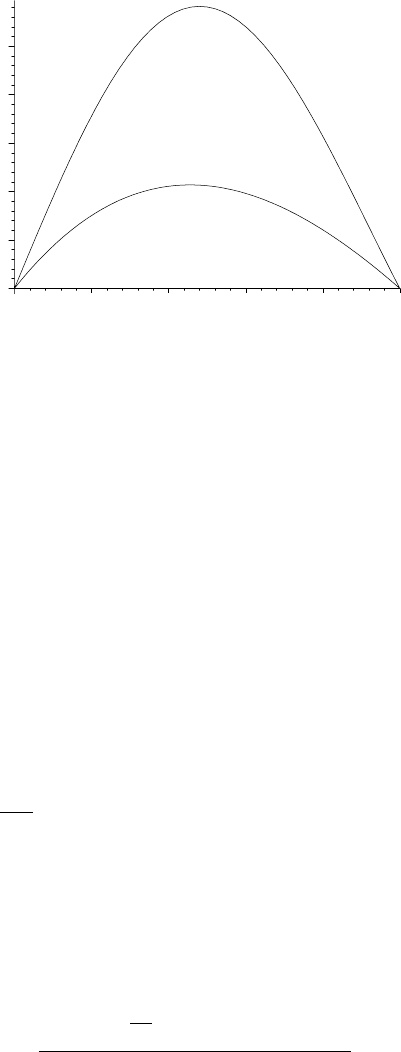
Tofinishtheproblem,I.M.plotsφ1 and the exact Bessel solution in Fig. 7.8.
>
plot([phi1,BesselJ(1,kexact*r)],r=0..1,color=[red,blue],
labels=["r","phi"]);
7.4. RAYLEIGH–RITZ METHOD 283
0
0.1
0.2
0.3
0.4
0.5
phi
0.2 0.4
0.6
0.8 1
r
Figure 7.8: Comparison of trial function (lower curve) and exact solution (top).
She observes that although the estimated value of k is extremely good, the trial
function φ1 doesn’t do a very good job of representing the exact first-order
Bessel function solution over the range r = 0 to 1. Part of the discrepancy could
be due to the fact that φ1andJ
1
are not similarly normalized.
7.4.2 I. M. Estimates the Ground State Energy
The only difference between a tax man and a taxidermist
is that the taxidermist leaves the skin.
Mark Twain, American author, (1835–1910)
In the last example, the trial function contained one adjustable parameter.
In the following problem, for which I. M. Curious will provide her recipe as a
solution, there are two parameters which must be adjusted to minimize Λ.
Use the Rayleigh–Ritz procedure and the trial function φ = e
−x
2
to esti-
mate the ground state energy E
1
of a particle satisfying the one-dimensional
Schr¨odinger equation (in appropriate units)
d
2
ψ
dx
2
− x
4
ψ = −Eψ, −∞ <x<∞.
Improve your estimate by considering φ = e
−x
2
(1 + c1 x
2
+ c2 x
4
), with two
adjustable parameters c1 and c2 .
I. M. enters the general form of Λ, the range now from x=−∞ to ∞.
>
restart: with(plots):
>
Lambda:=int(p(x)*diff(phi(x),x)ˆ2+q(x)*phi(x)ˆ2,x=-infinity
..infinity)/int(w(x)*phi(x)ˆ 2,x=-infinity..infinity);
Λ:=
∞
−∞
p(x)(
d
dx
φ(x))
2
+q(x) φ(x)
2
dx
∞
−∞
w(x) φ(x)
2
dx

284 CHAPTER 7. CALCULUS OF VARIATIONS
From the given ODE, she identifies p(x)=1, q(x)=x
4
,andw(x)=1, which are
now entered. The eigenvalue λ= E.
>
p(x):=1: q(x):=xˆ4: w(x):=1:
I. M. enters the trial wave function with the two adjustable parameters. The
first part of the question can be answered by setting c1 =0, c2 =0.
>
phi(x):=exp(-xˆ2)*(1+c1*xˆ2+c2*xˆ4);
φ(x):=e
(−x
2
)
(1 + c1 x
2
+ c2 x
4
)
φ(x) is automatically substituted into Λ, which on simplifying is as follows.
>
Lambda:=simplify(value(Lambda));
Λ:=
13995 c2
2
+ 10248 c2 c1 − 1248 c2 + 3472 c1
2
+ 4864 − 128 c1
16 (256 + 105 c2
2
+ 120 c2 c1 + 128 c1 +96c2 +48c1
2
)
The estimate of the ground state energy with no adjustable parameters is de-
termined in Λ0.
>
Lambda0:=evalf(eval(Lambda,{c1=0,c2=0}));
Λ0 := 1.187500000
So, I. M. estimates the ground state energy E
1
to be about 1.19 units. Now,
she considers the situation when the parameters are non-zero. In this case, she
must minimize Λ with respect to both parameters. This is done by imposing
the conditions ∂Λ/∂c1 =0 and ∂Λ/∂c2 =0, which is done in C1 and C2 .
>
C1:=simplify(diff(Lambda,c1))=0;
C2:=simplify(diff(Lambda,c2))=0;
C1 := −2(−68352 c2 + 18855 c2
3
+ 19200 c2
2
c1 − 24576 c2 c1
+ 20976 c2
2
+ 2352 c2 c1
2
− 40960 c1 − 14080 c1
2
+ 20480)
/(256 + 105 c2
2
+ 120 c2 c1 + 128 c1 +96c2 +48c1
2
)
2
=0
C2 := 6(64000 c2 + 6285 c2
2
c1 + 37600 c2 c1 + 15360 c2
2
+ 6400 c2 c1
2
+ 19712 c1 + 9728 c1
2
+ 784 c1
3
− 8192)
/(256 + 105 c2
2
+ 120 c2 c1 + 128 c1 +96c2 +48c1
2
)
2
=0
The formidable nonlinear algebraic equations C1 and C2 must be numerically
solved for c1 and c2. To guide her in arriving at the correct solution, I. M. forms
a functional operator gr to apply the implicitplot command to a specified
algebraic equation A, the color of the curve being dictated by the choice of B.
To obtain smooth curves, the number of plotting points is increased to 2000.
>
gr:=(A,B)->implicitplot(A,c1=-10..10,c2=-10..10,
numpoints=2000,color=B):
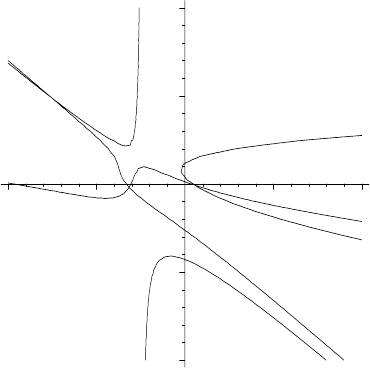
Aplotofc2 versus c1 satisfying the equation C1 follows on taking A= C1 in
gr. The curve will be colored blue. Similarly, a green curve is generated for the
choice A = C2 . The two curves are superimposed with the display command,
the resulting picture being shown in Figure 7.9.
>
display({gr(C1,blue),gr(C2,green)});
7.4. RAYLEIGH–RITZ METHOD 285
–10
–5
0
5
10
c2
–10
–5 5
10
c1
Figure 7.9: Possible values of c1 and c2 occur at intersection points.
Within the range of the plot, I. M. spots three intersection points. Applying
the floating point solve command to C1 and C2 without specifying the search
range for c1 and c2 ,
>
s1:=fsolve({C1,C2},{c1,c2});
s1 := {c1 = −7.524875339, c2 =4.879077669}
yields the intersection point in the second quadrant of Figure 7.9. To obtain
the other two intersection points, I. M. now specifies the appropriate plotting
ranges in the fsolve command in s2 and s3
>
s2:=fsolve({C1,C2},{c1,c2},{c1=0..2,c2=-2..2});
s2 := {c1 =0.5221933646, c2 = −0.05771753990}
>
s3:=fsolve({C1,C2},{c1,c2},{c1=-5..0,c2=-2..2});
s3 := {c2 = −0.2086941568, c1 = −3.169995132}
An operator L is created to evaluate λ for a specified s, which I. M. then applies
to s1 , s2 ,ands3 in Λ1, Λ2, and Λ3.
>
L:=s->eval(Lambda,s):
>
Lambda1:=L(s1); Lambda2:=L(s2); Lambda3:=L(s3);
Λ1 := 16.71552532 Λ2 := 1.061092905 Λ3 := 7.535881788
The estimates Λ1 and Λ3 are rejected as both are larger than Λ0 1.19. The
estimate Λ2 1.06 is lower than Λ0, so represents an improved estimate of
the ground state energy. It would appear from Iam’s recipe that her estimates
are converging on the value E
1
=1. Itisleftasanexerciseforyoutoconfirm
whether this conclusion is correct or not.

286 CHAPTER 7. CALCULUS OF VARIATIONS
7.5 Supplementary Recipes
07-S01: Geodesic
The curve of shortest length joining two points is called a geodesic. Show that
the geodesic on the surface of a right circular cylinder of radius a is a helix. Plot
the geodesic on a cylinder of radius a =2 between the points (z =1/2,θ=π/8)
and (5/2,π/2), where z is the cylinder axis coordinate and θ the polar angle.
07-S02: Laws of Geometrical Optics
Use Fermat’s principle to prove the following geometrical optics relations:
(a) A light ray incident at an angle i to the normal on a planar mirror is
reflected back into the same medium at an angle r
= i to the normal.
(b) Consider a light ray traveling from a medium with refractive index n
1
through a planar interface into a medium with refractive index n
2
.If
the light ray is incident at an angle i, the angle of refraction r in the
second medium is given by Snell’s law: n
1
sin i = n
2
sin r. Both angles
are measured with respect to the normal to the interface.
07-S03: Bending of Starlight
According to the theory of general relativity, the trajectory of starlight travel-
ing in the spherically symmetric static field of the sun is such as to minimize
the integral
I =
(dr/γ)
2
+(rdθ)
2
/γ
where (r, θ) are polar coordinates and γ =1−(2 Gms)/(c
2
r), G being the grav-
itational constant, ms the mass of the sun, and c the vacuum speed of light.
Using the variational approach and setting u =1/r, prove that the differential
equation of the trajectory can be written in the form
d
2
u
dθ
2
+ au= bu
2
,
where a and b remain to be identified. Taking G=6.673×10
−11
N·m
2
/kg
2
, ms=
1.99×10
30
kg, c =2.997×10
8
m/s, and the sun’s radius Rs=6.96×10
8
m, numer-
ically solve the nonlinear ODE for u(θ), taking u(0)= 1/(10Rs)anddu(0)/dθ =
0. Then use the spacecurve command to plot (r(θ) cos(θ),r(θ)sin(θ)) for
θ = −π/2toπ/2. Include the sun in your figure.
07-S04: Another Refractive Index
Using Fermat’s principle, prove that light rays in a medium with refractive
index n(x, y)=1/y will follow a path which is the arc of a circle.
07-S05: Mirage
Assuming that the refractive index varies linearly with height in the following
way, n(x, y)=n
0
(1 + αy)withn
0
> 0andα>0, use Fermat’s principle to
determine the angle θ by which a point P is apparently lowered when viewed
from a point P
at the same height as P at a horizontal distance d.The
parameter α is sufficiently small that you may take αd<< 1. This problem is
relevant to the phenomenon of mirages observed in hot desert regions.

7.5 SUPPLEMENTARY RECIPES 287
07-S06: A Constrained Extremum
Determine a function y(x) for which I =
π
0
((y
)
2
− y
2
) dx is an extremum,
subject to N =
π
0
ydx=1, and y(0) =0, y(π) =1. Plot y(x).
07-S07: Maximum Volume
Find the maximum value of the volume V = xyz, subject to the condition
x
2
/a
2
+ y
2
/b
2
+ z
2
/c
2
=1, with a, b,andc positive. Use (a) the direct method,
(b) the Lagrange multiplier method.
07-S08: Eigenvalue Estimate
Taking a trial function of the form y =A
0
+ A
1
x + A
2
x
2
+ A
3
x
3
, estimate the
smallest eigenvalue k of y
+ k
2
y = 0, subject to y(0) = y(1) = 0. Compare the
estimate and the trial function with the exact results.
07-S09: Surface of Revolution
Consider a surface of revolution generated by revolving a curve y(x) about the
x-axis. The curve is required to pass through the fixed end points (x=0,y=1)
and (x =1,y= 2). Determine what shape y(x)musthavesothattheareaof
the resulting surface will be a minimum. Plot the curve.
07-S10: Dido Wasn’t a Dodo
Given a closed planar curve C of a fixed length L, what shape should the curve
have to maximize the enclosed area A? The answer, known as the isoperimetric
theorem, is a circle. Evidently, this theorem has been known from about 900
BC, and according to Virgil’s Aneid was applied by Queen Dido in a practical
way to establish the city of Carthage (now Tunisia) in North Africa. The
local ruler, King Jambas, agreed to sell her all the land that she could enclose
within a bull’s hide. She cleverly had the hide cut into thin strips which were
joined end to end to form a long “string” and made use of a variation on the
isoperimetric theorem. She cleverly maximized A by selecting a straight portion
of the Mediterranean coast and laying the string out in a semicircle with the
string’s two ends touching the coast.
Given that A =
1
2
C
(xdy− ydx) for a closed planar curve C, make use of
the Euler–Lagrange equation to prove the isoperimetric theorem.
07-S11: Another Approach to the String Equation
In recipe 04-1-1, the wave equation for small transverse vibrations of a light
flexible horizontal string under tension and fixed on its ends was derived us-
ing Newton’s second law of motion. Another approach to deriving the wave
equation is to use the variational method.
It can be shown that a necessary condition for y =y(x, t)tobeanextremal
of
t
2
t
1
x
2
x
1
F (x, t, y, y
x
,y
t
) dx dt is
∂F
∂y
−
∂
∂x
∂F
∂y
x
−
∂
∂t
∂F
∂y
t
=0.
Here y
x
≡ ∂y/∂x, y
t
≡ ∂y/∂t, x
1
and x
2
are fixed end points, and t
1
and t
2
are
specified times. Making use of this extension of Lagrange’s equation, derive the