
Lowe D. Networking For Dummies
Подождите немного. Документ загружается.


Book VI
Chapter 2
Managing
BlackBerry Devices
457
Understanding BlackBerry
main purpose of BES is to act as an interface between e-mail servers
(most often Microsoft Exchange Server) and the BlackBerry NOC. Simply
put, BES monitors all activity on a user’s Exchange mailbox and sends
periodic updates over the Internet to the BlackBerry NOC, which relays
the updates to the handheld device via the cellular network.
As a network administrator, BES is the critical piece in the BlackBerry
puzzle. Most of the time you spend administering BlackBerry users will be
spent in BES. Here are some additional details you should know about BES:
✦ Although it’s possible to run BES on the same computer that you run
Exchange on, this configuration isn’t recommend. Instead, BES should
be run on its own, dedicated, server computer.
✦ A free version of BES called BlackBerry Enterprise Server Express is avail-
able for smaller systems with fewer than 75 handheld users. For larger
organizations, you’ll need to purchase the Enterprise edition of BES.
✦ BES works like a client as far as Microsoft Exchange is concerned. BES
logs on to Exchange using a special account called BESAdmin and uses
this account to access the data in BlackBerry users’ mailboxes. BES
retrieves the data from these mailboxes and then sends it over the
Internet to the BlackBerry NOC.
✦ For BES to work, you must grant the BESAdmin account full mailbox
rights for each BlackBerry user. Without this right, the BESAdmin
account won’t be able to access the BlackBerry user’s mailbox.
✦ To connect a BlackBerry handheld device with a BES server, you must
go through a process called Enterprise Activation.
✦ BES uses sophisticated encryption techniques to ensure that the data sent
over the Internet to the BlackBerry NOC and then from the BlackBerry
NOC to the handheld is secure. Thus, you can be confident that no one
can intercept your Exchange data as it travels from your Exchange server,
through the Internet, and over the cellular network to your BlackBerry.
One final note before I get into the details of working with BES: It was developed
at a time when the bandwidth capacity of cellular networks was very limited. As
a result, BES goes to great lengths to optimize the delivery of data over the cell
network. Where this becomes most evident is in how BES handles attachments.
Instead of sending the attachment directly to the handheld, BES creates a com-
pressed JPEG image of the attachment and sends the image. Initially, this image
is scaled to keep the file size as small as possible. Even this small image is sent
only when the BlackBerry user requests it. The viewer built in to the BlackBerry
handheld includes the ability to zoom in for a closer look at the image. When
the user zooms in, the handheld requests a more detailed JPEG rendering of the
attachment. BES then creates and sends the requested detail.
This arrangement may seem cumbersome, especially with the high-capacity 3G
cellular networks that are available in many areas now. But it is very efficient.
44_625873-bk06ch02.indd 45744_625873-bk06ch02.indd 457 9/21/10 10:35 PM9/21/10 10:35 PM

458
Adding a BES User
Adding a BES User
One of the most common BES administration tasks is to add new BlackBerry
users. To do this, follow these steps:
1. In Active Directory Users and Computers, right-click the user you want
to add and choose Properties.
This brings up the Properties page for the user.
2. Select the Exchange Advanced tab and click the Mailbox Rights button.
This brings up the Permissions dialog box, which lets you grant mailbox
rights for the user’s mailbox.
3. Click Add, type BESAdmin, and click OK.
This adds the BESAdmin account to the list of users who have mailbox
rights permissions for the user you selected in Step 1, but doesn’t actu-
ally grant any permissions.
4. Select the Full Mailbox Access check box and click OK.
This grants full mailbox access rights to the BESAdmin account for the
BlackBerry user.
5. Click OK again to dismiss the Properties dialog box.
You’re done with Active Directory Users and Computers; you can now
close it if you want.
6. Open the BlackBerry Manager by clicking the BlackBerry Manager
icon on the desktop.
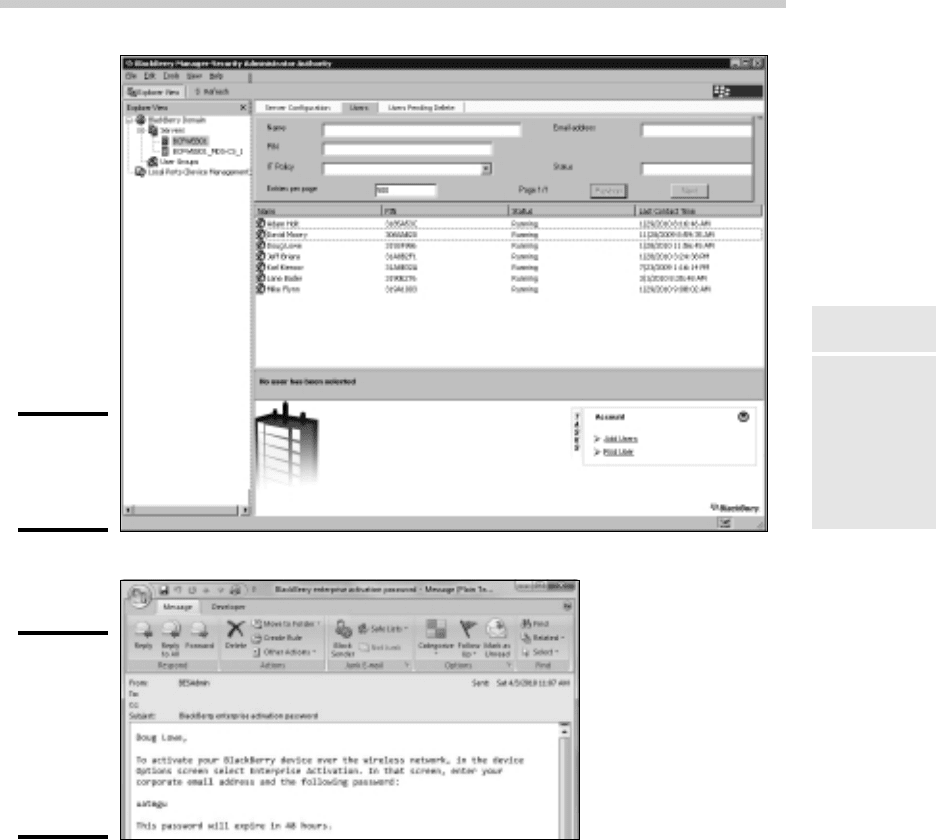
BlackBerry Manager comes to life, as shown in Figure 2-2.
7. In the Explorer View pane, navigate to the server you’re managing.
In Figure 2-2, I navigated to the server BCFWEB01.
8. Click in a blank area within the list of BlackBerry users and choose
Add Users.
A dialog box named Select Mailbox appears. This dialog box lists all the
Active Directory users who have Exchange mailboxes.
9. Select the user you want to add and then click OK.
The Select Mailbox dialog box vanishes and the user is added to the list
of BlackBerry users.
10. Right-click the user and then choose Generate an Email Activation
Password.
This action initiates the Enterprise Activation process by generating an
activation password and e-mailing it to the user, as shown in Figure 2-3.
This e-mail provides not only the password, but also the instructions the
user needs to follow to activate his or her BlackBerry device.
44_625873-bk06ch02.indd 45844_625873-bk06ch02.indd 458 9/21/10 10:35 PM9/21/10 10:35 PM
Book VI
Chapter 2
Managing
BlackBerry Devices
459
Adding a BES User
Figure 2-2:
BlackBerry
Manager in
action.
Figure 2-3:
This e-mail
is sent to
invite a
BlackBerry
user to
Enterprise
Activation.
11. You’re done!
After you’ve created the activation password, it’s up to the user to activate
the BlackBerry device. The user does this by navigating to the Options
screen and selecting Enterprise Activation. Then, the user enters his or her
e-mail address and the activation password that was generated and sent via
e-mail. After the e-mail address and password are verified, the activation
process begins. It should take 10–15 minutes to complete. After the activa-
tion is complete, the phone should begin receiving e-mails, contacts, and cal-
endar items from the user’s Exchange mailbox.
44_625873-bk06ch02.indd 45944_625873-bk06ch02.indd 459 9/21/10 10:35 PM9/21/10 10:35 PM
460
Locking and Erasing a Handheld
Locking and Erasing a Handheld
After adding new BlackBerry users, the next most common BES administra-
tion task is either locking or erasing a missing handheld. If a user complains
that his or her BlackBerry is missing, I usually start by locking the device.
That way, if the device has fallen into the wrong hands, they won’t be able to
access the device without the correct password.
If the BlackBerry doesn’t turn up within a few days, the next step is to erase
the BlackBerry entirely so that even if the new owners manage to get past
the password lock, they won’t find any useful information on the phone.
Both of these tasks are handled via the BlackBerry Manager. Right-click the
user whose phone you want to lock or erase and then choose one of the fol-
lowing commands:
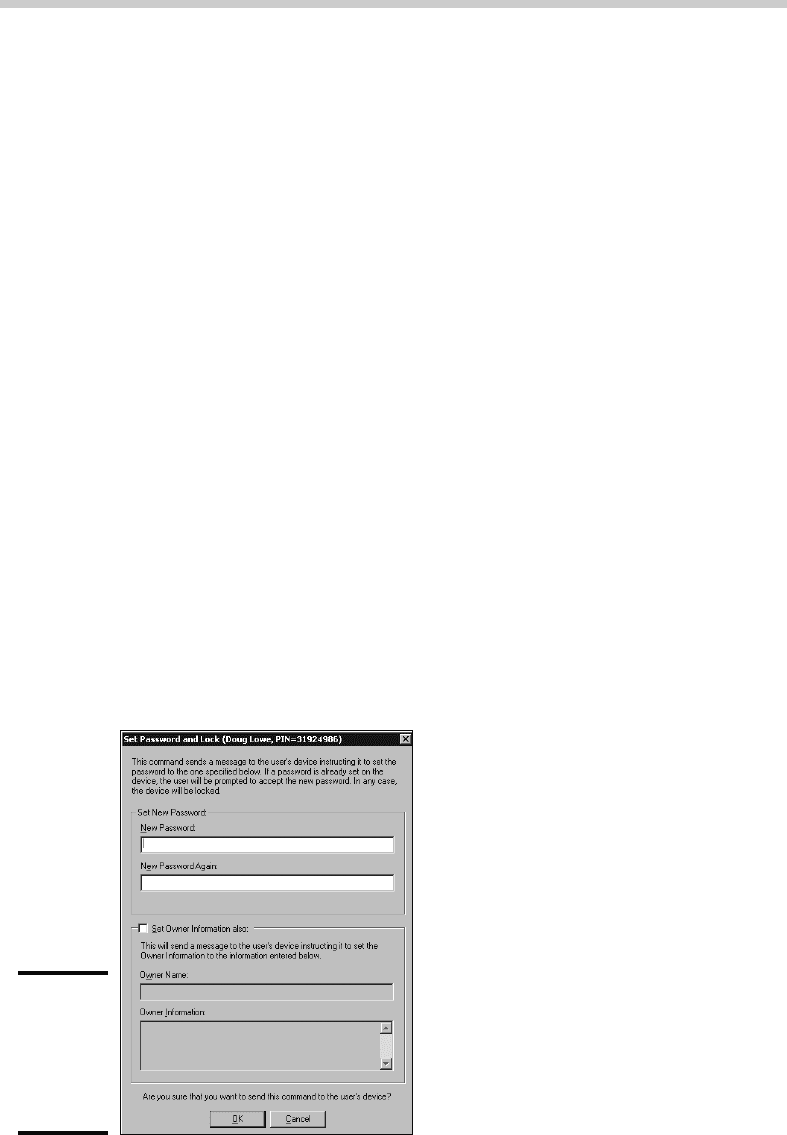
✦ Set Password and Lock Handheld: This command displays the dialog
box shown in Figure 2-4. This dialog box lets you set a new password for
the handheld device. It also lets you change the owner information that’s
displayed when the handheld device is locked. When you click OK, a mes-
sage will be sent to the handheld directing it to change the password and
(optionally) the owner information and then to lock the keyboard. Once
locked, the keyboard can be unlocked only by entering the password.
✦ Erase Data and Disable Handheld: This command is more drastic: It
erases all of the contents of the handheld, including any stored e-mails,
contacts, calendar items, or other files. It also disables the enterprise
activation. This command effectively restores the handheld device to
it’s original, factory-new state.
Figure 2-4:
Remotely
locking a
BlackBerry
handheld
device.
44_625873-bk06ch02.indd 46044_625873-bk06ch02.indd 460 9/21/10 10:35 PM9/21/10 10:35 PM

Chapter 3: Managing
iPhone Devices
In This Chapter
✓ Looking at how the iPhone works
✓ Enabling ActiveSync for iPhone Users
✓ Configuring an Exchange e-mail account
I
n 2007, the Apple iPhone was one of the most innovative little gadgets
to hit the technology market in many, many years. As a result, in just a
few short years the iPhone has captured a huge share of a market that was
previously owned almost exclusively by RIM and its BlackBerry devices.
Some experts predict that the iPhone will eventually take over the lead
that BlackBerry has in the smartphone market — especially if Apple ever
releases its exclusive contract with AT&T so that other cell phone providers
can offer iPhones that work on their networks.
This chapter covers the iPhone. You get a brief overview of what the iPhone
actually is, as well as simple procedures for setting it up to access enter-
prise e-mail.
Understanding the iPhone
The iPhone is essentially a combination of four different devices:
✦ A cell phone
✦ An iPod with a memory capacity of either 8, 16, or 32GB
✦ A 2- or 3-megapixel digital camera
✦ An Internet device with its own Web browser (named Safari) and other
applications such as e-mail, calendar, and contact management
The most immediately noticeable feature of the iPhone is its lack of a key-
board. Instead, nearly the entire front surface of the iPhone is occupied by
a high-resolution, touch-sensitive LCD display. The display is not only the
main output device of the iPhone, but also its main input device. When nec-
essary, the display becomes either a keypad input for dialing a telephone
number or a keyboard for entering text. You can also use various finger
gestures, such as tapping icons to start programs or pinching to zoom in the
display.
45_625873-bk06ch03.indd 46145_625873-bk06ch03.indd 461 9/21/10 10:35 PM9/21/10 10:35 PM

462
Integrating iPhone with Exchange
In addition, the iPhone has several other innovative features:
✦ An accelerometer tracks the motion of the iPhone in three directions.
The main use of the accelerometer is to adjust the orientation of the
display from landscape to portrait based on how the user is holding the
phone. Some other applications — mostly games — use the accelerom-
eter as well.
✦ A Wi-Fi interface lets the iPhone connect to local Wi-Fi networks for
faster Internet access.
✦ GPS capability provides location-awareness for many applications,
including Google Maps.
✦ The VPN client lets you connect to your internal network.
Of all the unique features of the iPhone, probably the most important is its
huge collection of third-party applications that can be downloaded from a
special Web portal called the App Store. Many of these applications are free
or cost just a few dollars. (Many are just $0.99 or $1.99.) At the time I wrote
this chapter (April 2010), there were more than 150,000 applications avail-
able on the App Store. These applications provide everything from business
productivity to games.
As innovative as the iPhone is, it isn’t without limitations. Here are a few of the
most significant limitations business users will encounter with the iPhone:
✦ Limited battery life. Compared with other devices, the iPhone battery life
is relatively short. You’ll need to keep it on a charger as much as you can.
✦ Speaking of the battery, it is not user-replaceable. If the battery goes
bad, you have to take the dead iPhone to an Apple store to have the bat-
tery replaced — a process which can take several days if the phone is
not under warranty.
✦ Although the iPhone has VPN capability, it doesn’t have a native file
storage system that lets you navigate into your network’s file servers to
copy or save files.
✦ The iPhone is available only from AT&T. It doesn’t work with other cell
phone networks.
Integrating iPhone with Exchange
The iPhone can integrate with Microsoft Exchange e-mail. There are three
procedures you must follow to do that. First, you must enable the mobile
services feature of Microsoft Exchange. Second, you must enable ActiveSync
45_625873-bk06ch03.indd 46245_625873-bk06ch03.indd 462 9/21/10 10:35 PM9/21/10 10:35 PM
Book VI
Chapter 3
Managing iPhone
Devices
463
Integrating iPhone with Exchange
for the user’s mailbox. And third, you must configure the iPhone to connect
to the user’s Exchange mailbox. The following sections describe each of
these procedures.
Enabling Exchange Mobile Services
To enable an Exchange mailbox for the iPhone, you must first enable the
Exchange Mobile Services feature on the Exchange server. Note that this proce-
dure must be done just one time for each Exchange server. Here are the steps:
1. Log on to the Exchange server with an Exchange Administrator account.
2. Choose Start➪Administrative Tools➪Exchange System Manager.
3. In the navigation pane, expand the Global Settings node.
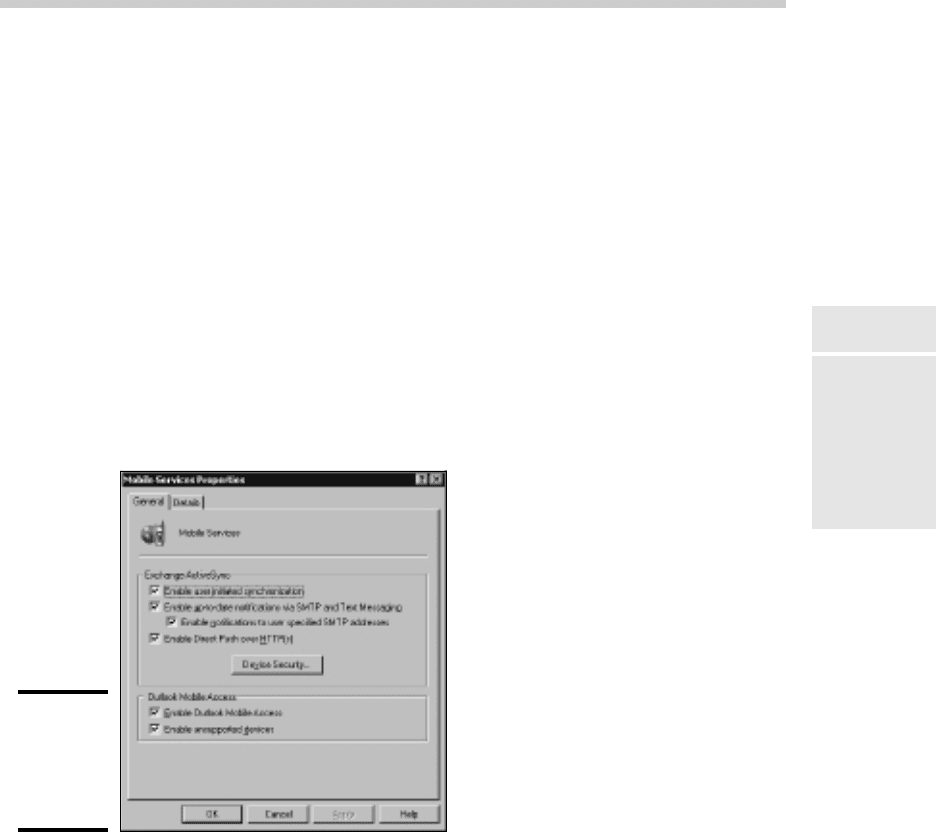
4. Right-click Mobile Services and then choose Properties.
The dialog box shown in Figure 3-1 appears.
Figure 3-1:
Enabling
Outlook
Mobile
Access.
5. Select all the check boxes on the General tab.
This step enables all the capabilities of Outlook Mobile Access and
Exchange ActiveSync.
6. Click OK.
7. Close Exchange System Manager.
You’re done!
45_625873-bk06ch03.indd 46345_625873-bk06ch03.indd 463 9/21/10 10:35 PM9/21/10 10:35 PM
464
Integrating iPhone with Exchange
Enabling ActiveSync for a user’s mailbox
Once you have enabled Exchange Mobile Services for your Exchange server,
you can enable ActiveSync for the user’s Exchange mailbox. Enabling
ActiveSync allows the mailbox to be synchronized with a remote mail client
such as an iPhone.
Here are the steps:
1. Choose Start➪Administrative Tools➪Active Directory Users and
Computers.
The Active Directory Users and Computers console opens.
2. Expand the domain and locate the user you want to enable mobile
access for.
3. Right-click the user and choose Properties.
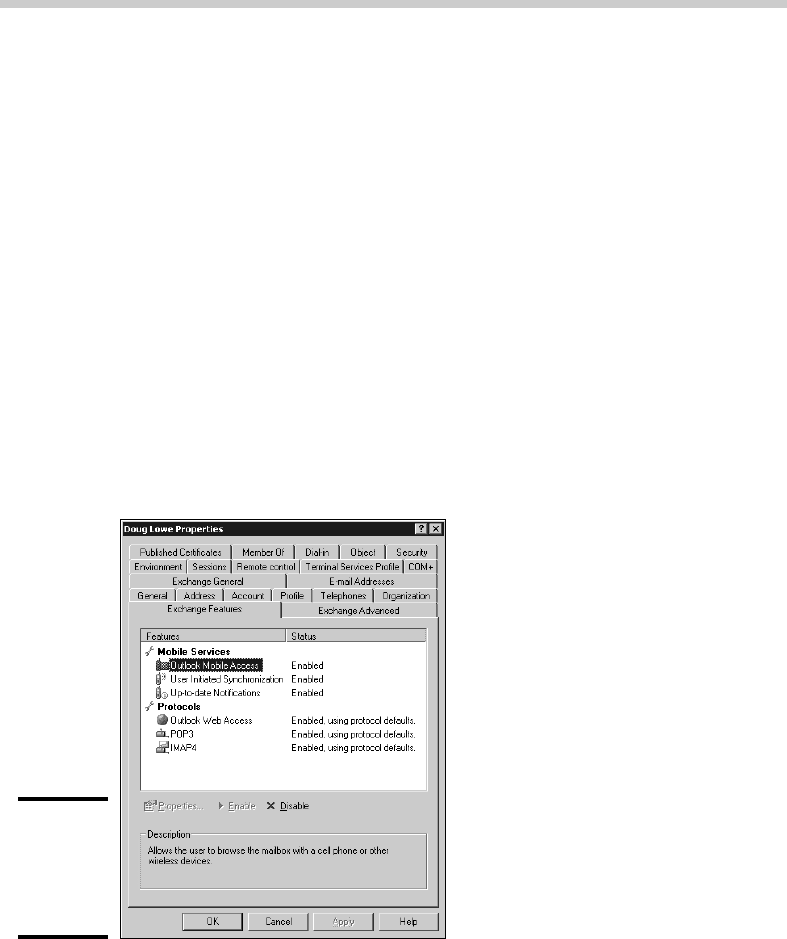
4. Click the Exchange Features tab.
The Exchange Features options are displayed, as shown in Figure 3-2.
Figure 3-2:
Enabling
mobile
access for a
user.
5. Enable all three options listed under Mobile Services.
If the options aren’t already enabled, right-click each option and choose
Enable.
45_625873-bk06ch03.indd 46445_625873-bk06ch03.indd 464 9/21/10 10:35 PM9/21/10 10:35 PM
Book VI
Chapter 3
Managing iPhone
Devices
465
Integrating iPhone with Exchange
6. Click OK.
7. Repeat Steps 5 and 6 for any other users you want to enable mobile
access for.
8. Close Active Directory Users and Computers.
That’s all there is to it. After you have enabled these features, any users run-
ning Windows Mobile will be able to synchronize their handhelds with their
Exchange mailboxes.
Configuring the iPhone for Exchange e-mail
Once ActiveSync is enabled for the mailbox, you can configure the iPhone to
tap into the Exchange account by following these steps:
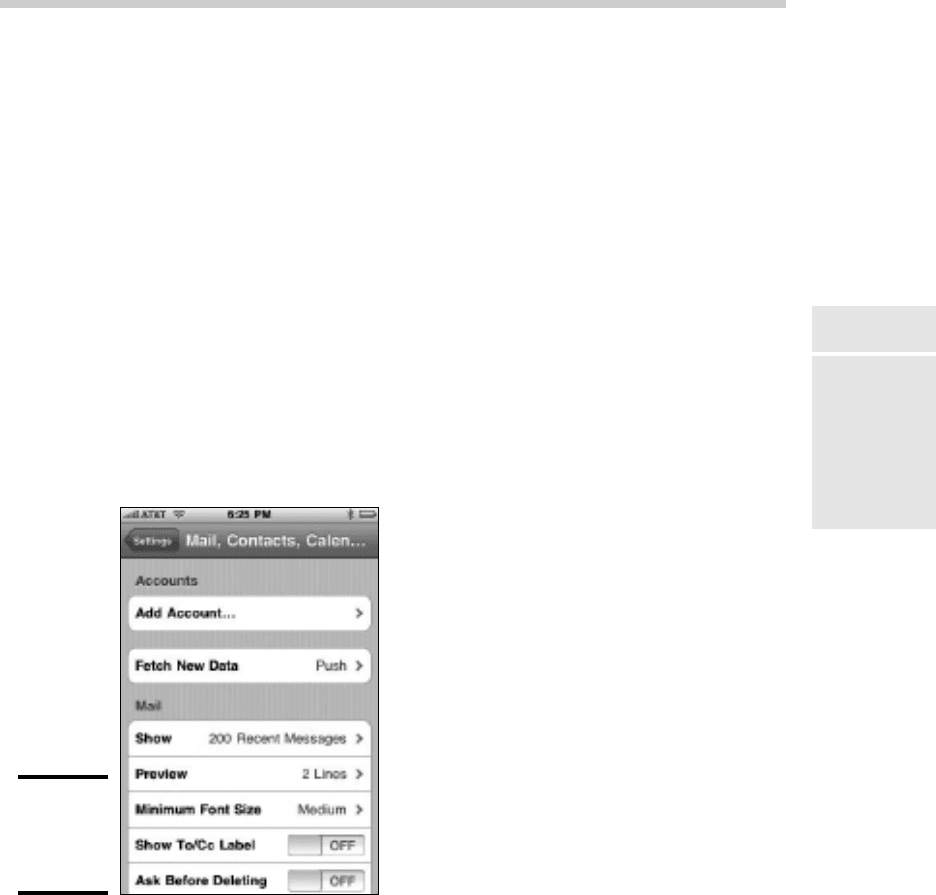
1. On the iPhone, tap Settings, then tap Mail, Contacts, Calendars, and
then tap Add Account.
The screen shown in Figure 3-3 appears.
Figure 3-3:
Adding
an e-mail
account.
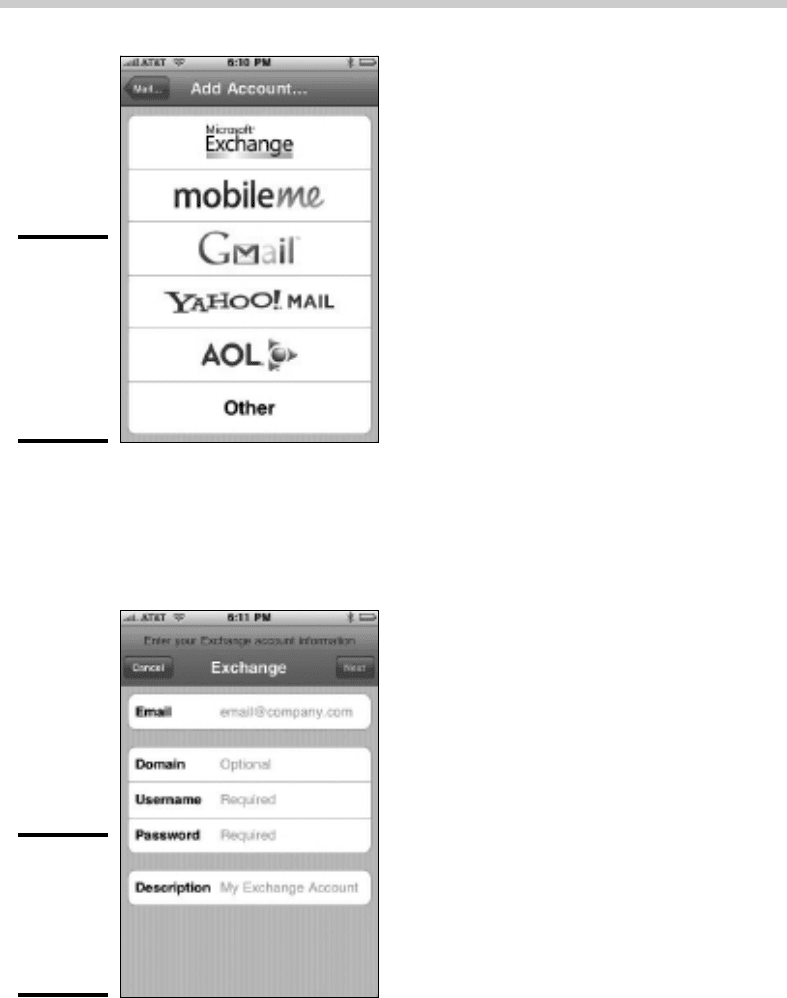
2. Tap Add Account.
The screen shown in Figure 3-4 appears, allowing you to choose the type
of e-mail account you wish to add.
45_625873-bk06ch03.indd 46545_625873-bk06ch03.indd 465 9/21/10 10:35 PM9/21/10 10:35 PM
466
Integrating iPhone with Exchange
Figure 3-4:
The iPhone
can support
many
different
types of
e-mail
accounts.
3. Tap Microsoft Exchange.
The screen shown in Figure 3-5 appears, which lets you enter the basic
information for your Exchange account.
Figure 3-5:
Entering
your e-mail
address
and logon
information.
45_625873-bk06ch03.indd 46645_625873-bk06ch03.indd 466 9/21/10 10:35 PM9/21/10 10:35 PM