
Lowe D. Networking For Dummies
Подождите немного. Документ загружается.

Book VII
Windows Server 2008
Reference
48_625873-pp07.indd 47748_625873-pp07.indd 477 9/21/10 10:37 PM9/21/10 10:37 PM
Contents at a Glance
Chapter 1: Installing and Configuring Windows Server 2008 R2. . . .479
Chapter 2: Managing Windows Server 2008. . . . . . . . . . . . . . . . . . . . .493
Chapter 3: Dealing with Active Directory . . . . . . . . . . . . . . . . . . . . . . .509
Chapter 4: Managing Windows User Accounts . . . . . . . . . . . . . . . . . .519
Chapter 5: Managing a File Server . . . . . . . . . . . . . . . . . . . . . . . . . . . . .539
Chapter 6: Using Group Policy. . . . . . . . . . . . . . . . . . . . . . . . . . . . . . . . .553
Chapter 7: Troubleshooting . . . . . . . . . . . . . . . . . . . . . . . . . . . . . . . . . . .563
Chapter 8: Windows Commands . . . . . . . . . . . . . . . . . . . . . . . . . . . . . . .575
48_625873-pp07.indd 47848_625873-pp07.indd 478 9/21/10 10:37 PM9/21/10 10:37 PM

Chapter 1: Installing and Configuring
Windows Server 2008 R2
In This Chapter
✓ Making sure you have everything you need
✓ Planning how you will install Windows Server 2008 R2
✓ Installing Windows Server 2008 R2
T
his chapter presents the procedures that you need to follow in order to
install Windows Server — specifically, Windows Server 2008 R2. Note
that although the specific details provided are for Windows Server 2008 R2,
installing the previous version (just plain Windows Server 2008) is very
similar, as is installing the older Windows Server 2003. So you won’t have
any trouble adapting these procedures if you’re installing Windows Server
2008 R2 or Windows Server 2003.
Planning a Windows Server Installation
Before you begin the Setup program to actually install a Windows Server
operating system, you need to make a number of preliminary decisions, as
the following sections describe.
Checking system requirements
Before you install a Windows Server operating system, you should make
sure that the computer meets the minimum requirements. Table 1-1 lists the
official minimum requirements for Windows Server 2008 R2. (The minimums
for Windows Server 2003 are a bit less.) Table 1-1 also lists what I consider
to be more realistic minimums if you expect satisfactory performance from
the server as a moderately used file server.
Table 1-1 Minimum Hardware Requirements for
Windows Server 2008 R2 (Standard Edition)
Item Official Minimum A More Realistic Minimum
CPU 1.4 GHz 3 GHz
RAM 512MB 4GB
Free disk space 32GB 100GB
49_625873-bk07ch01.indd 47949_625873-bk07ch01.indd 479 9/21/10 10:37 PM9/21/10 10:37 PM
480
Planning a Windows Server Installation
Besides meeting the minimum requirements, you should also make sure that
your specific hardware has been checked out and approved for use with
Windows Server 2008 R2. Microsoft publishes an official list of supported
hardware, called the Hardware Compatibility List, or HCL. You can find the
HCL at www.microsoft.com/whdc/hcl/default.mspx.
The Windows Server 2008 R2 distribution DVD includes a feature called the
Check System Compatibility option that automatically checks your hardware
against the HCL.
Reading the release notes
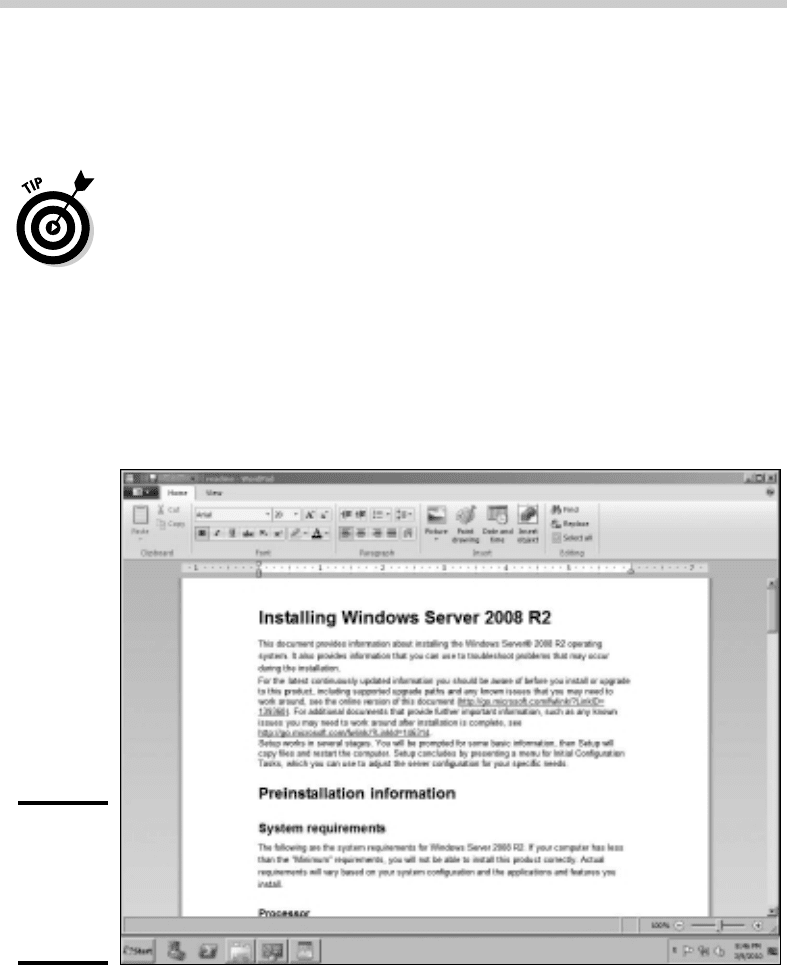
The Windows Server 2008 R2 distribution DVD includes a file called readme.
rtf, located in the Sources folder. When you open this file, the page shown
in Figure 1-1 is displayed. You should read this file before you start Setup,
just to check whether any of the specific procedures or warnings it contains
apply to your situation.
Figure 1-1:
The
Windows
Server 2008
R2 Readme
file.
49_625873-bk07ch01.indd 48049_625873-bk07ch01.indd 480 9/21/10 10:37 PM9/21/10 10:37 PM

Book VII
Chapter 1
Installing and
Configuring Windows
Server 2008 R2
481
Planning a Windows Server Installation
Deciding whether to upgrade or install
Windows offers two installation modes to choose from: full installation or
upgrade installation.
A full installation deletes any existing operating system(s) it finds on the
computer and configures the new operating system from scratch. If you do
a full installation onto a disk that already has an operating system installed,
the full installation offers to keep any existing data files that it finds on the
disk.
An upgrade installation assumes that you already have a previous Windows
Server (Windows Server 2008 or Windows Server 2003) installation in place.
The operating system is upgraded to Windows Server 2008 R2, preserving as
many settings from the previous installation as possible.
Here are some points to ponder before you perform an upgrade installation:
✦ You can’t upgrade a client version of Windows to a server version.
✦ With an upgrade installation, you don’t have to reinstall any applications
that were previously installed on the disk.
✦ Always perform a full backup before doing an upgrade installation!
Considering your licensing options
Two types of licenses are required to run a Windows Server operating system:
a server license, which grants you permission to run a single instance of the
server, and Client Access Licenses (CALs), which grant users or devices
permission to connect to the server. When you purchase Windows Server,
you ordinarily purchase a server license plus some number of CALs.
To complicate matters, there are two distinct types of CALs: per-user and
per-device. Per-user CALs limit the number of users that can simultaneously
access a server, regardless of the number of devices (for example, client
computers) in your organization. In contrast, per-device CALs limit the
number of unique devices that can access the server regardless of the
number of users in your organization.
Thinking about multiboot
Windows includes a multiboot feature that lets you set up the computer so
that it has more than one operating system. Then, when you boot up the
computer, you can select which operating system you want to boot up from
a menu.
49_625873-bk07ch01.indd 48149_625873-bk07ch01.indd 481 9/21/10 10:37 PM9/21/10 10:37 PM

482
Planning a Windows Server Installation
If you’re a software developer or a network manager who needs to make
sure that software is compatible with multiple operating systems, the
multiboot feature can be useful. For most servers, however, you want to
install just one operating system.
A much better alternative to a multiboot installation is to use virtual
machine software such as VMWare. This software allows you to install a
development version of an operating system such as Windows Server 2008
R2 within an already installed operating system. For more information, see
www.vmware.com.
Choosing a file system
Windows servers provide three choices for the file system format: FAT,
FAT32, and NTFS. In most cases, you should choose NTFS. Well, actually, you
should use NTFS in almost all cases. Come to think of it, you should always
use NTFS.
The name FAT refers to the file allocation table, which was used in the original
version of MS-DOS back when disco was still popular. FAT was a simple but
effective way to track disk space allocated to files on diskettes and on small
hard drives. The original FAT system used 16-bit disk addresses to divide
the total space on a disk into 65,526 units, called clusters, each of which
could be allocated to any file on the disk. The size of each cluster could vary
from as little as 2K to as much as 256K, depending on the size of the drive.
When disk drives started to get bigger than 512MB (can you remember when
512MB was a huge disk?), FAT was upgraded to FAT32, which used 32-bit
addresses for clusters. That allowed a maximum of 524,208 clusters on the
disk with the size of each cluster ranging from 4K to 32K, depending on the
size of the drive.
FAT32 was a nice improvement over FAT, but both suffer from several
inherent problems:
✦ Even with 32-bit addresses, FAT32 is stretched by today’s 200GB+ disk
drives.
✦ Neither FAT nor FAT32 has built-in security features.
✦ Frankly, FAT and FAT32 are inherently unreliable. Most users, at one
time or another, lose files due to the unreliability of FAT/FAT32.
✦ FAT and FAT32 allocate space inefficiently on large volumes because the
smallest unit of space that they can allocate must be large — as much as
256K in some cases.
49_625873-bk07ch01.indd 48249_625873-bk07ch01.indd 482 9/21/10 10:37 PM9/21/10 10:37 PM

Book VII
Chapter 1
Installing and
Configuring Windows
Server 2008 R2
483
Planning a Windows Server Installation
Here are just a few of the reasons why choosing NTFS for Windows servers
is a no-brainer:
✦ NTFS has built-in security features that track security information for
individual files and directories.
✦ NTFS tracks clusters with 64-bit disk addresses rather than 32-bit
addresses (FAT32) or 16-bit addresses (FAT). As a result, an NTFS
volume can theoretically have something in the neighborhood of
18 million billion disk clusters, which should keep you going for awhile.
✦ The benefit of having so many clusters available is that the size of each
cluster can be kept small. NTFS can efficiently use 4KB clusters for even
the largest drives available today.
✦ NTFS drives are more reliable because NTFS keeps duplicate copies
of important information, such as the location of each file on the hard
drive. If a problem develops on an NTFS drive, Windows can usually
correct the problem automatically without losing any data. In contrast,
FAT drives are prone to losing data.
✦ The system that FAT uses to keep track of which disk clusters belong to
a given file is prone to errors. In contrast, NTFS has more redundancy
built into its record keeping, so it’s less likely to scramble your files.
✦ NTFS has better support for large drives and large files. Table 1-2 compares
some of the upper limits of the FAT, FAT32, and NTFS file systems.
Table 1-2 File System Limits
Limit FAT FAT32 NTFS
Maximum volume size 4GB 32GB 16TB
Maximum file size 2GB 4GB 16TB
Maximum files per folder 512 65,534 4,294,967,295
Maximum files per volume 65,526 524,208 Too many to count
Planning your partitions
Partitioning enables you to divide a physical disk into one or more separate
units called partitions. Each disk can have up to four partitions. All four of
the partitions can be primary partitions, each of which can be formatted with
a different file system, such as NTFS or FAT32. Or you can create up to three
primary partitions and one extended partition, which can then be subdivided
into one or more logical drives. Then, each logical drive can be formatted
with a file system.
49_625873-bk07ch01.indd 48349_625873-bk07ch01.indd 483 9/21/10 10:37 PM9/21/10 10:37 PM

484
Planning a Windows Server Installation
Although you can set up partitions for a Windows server in many ways, the
following two approaches are the most common:
✦ Allocate the entire disk as a single partition that will be formatted
with NTFS. The operating system is installed into this partition, and
disk space that isn’t needed by the operating system or other network
applications can be shared.
✦ Divide the disk into two partitions. Install the operating system and
any other related software (such as Exchange Server or a backup utility)
on the first partition. If the first partition will contain just the operating
system, 10GB is a reasonable size, although you can get by with as little
as 4GB if space is at a premium. Then, use the second partition for
application data or network file shares.
Note that the disk partitioning scheme is independent of any hardware-
based RAID configuration your server might employ. For example, your
server might actually include five physical hard drives that are combined by
the hardware disk controller to form a single logical drive. Within this logical
drive, you can create one or more operating system partitions.
Deciding your TCP/IP configuration
Before you install the operating system, you should have a plan for how you
will implement TCP/IP on the network. Here are some of the things you need
to decide or find out:
✦ What are the IP subnet address and mask for your network?
✦ What is the domain name for the network?
✦ What is the host name for the server?
✦ Will the server obtain its address from DHCP?
✦ Will the server have a static IP address? If so, what?
✦ Will the server be a DHCP server?
✦ What is the Default Gateway for the server? (That is, what is the IP
address of the network’s Internet router?)
✦ Will the server be a DNS server?
If the server will host TCP/IP services (such as DHCP or DNS), you should
assign the server a static IP address.
For more information about planning your TCP/IP configuration, see Book IV.
49_625873-bk07ch01.indd 48449_625873-bk07ch01.indd 484 9/21/10 10:37 PM9/21/10 10:37 PM

Book VII
Chapter 1
Installing and
Configuring Windows
Server 2008 R2
485
Before You Install . . .
Choosing workgroups or domains
A domain is a method of placing user accounts and various network
resources under the control of a single directory database. Domains ensure
that security policies are consistently applied throughout a network and
greatly simplify the task of managing user accounts on large networks.
A workgroup is a simple association of computers on a network that makes it
easy to locate shared files and printers. Workgroups don’t have sophisticated
directory databases, so they can’t enforce strict security.
Microsoft says that workgroups should be used only for very small networks
with just a few users. In fact, any network that is large enough to have a
dedicated server running Windows Server 2008 R2 is too large to use
workgroups. As a result, if you’re installing a Windows server, you should
always opt for domains.
After you decide to use domains, you have to make two basic decisions:
✦ What will the domain name be? If you have a registered Internet
domain name, such as mydomain.com, you may want to use it for your
network’s domain name. Otherwise, you can make up any name you
want.
✦ What computer or computers will be the domain controllers for the
domain? If this is the first server in a domain, you must designate it as
a domain controller. If you already have a server acting as a domain
controller, you can either add this computer as an additional domain
controller or designate it as a member server.
You can always change the role of a server from a domain controller to a
member server and vice versa if the needs of your network change. If your
network has more than one server, it’s always a good idea to create at least
two domain controllers. That way, if one fails, the other one can take over.
Before You Install . . .
After you’ve made the key planning decisions for your Windows server
installation, you should take a few precautionary steps before you actually
start the Setup program. The following sections describe the steps that
you should take before you perform an upgrade installation. Note that all
these steps except the last one apply only to upgrades. If you’re installing a
Windows server on a new system, you can skip the first steps.
49_625873-bk07ch01.indd 48549_625873-bk07ch01.indd 485 9/21/10 10:37 PM9/21/10 10:37 PM

486
Running Setup
Backing up
Do a complete backup of the server before you begin. Although Windows
Setup is reliable, sometimes something serious goes wrong, and data is lost.
Note that you don’t have to back up the drive to external media, such as tape.
If you can find a network disk share with enough free space, back up to it.
Checking the event logs
Look at the event logs of the existing server computer to check for recurring
errors. You may discover that you have a problem with a SCSI device or
your current TCP/IP configuration. Better to find out now rather than in the
middle of setup.
Uncompressing data
If you’ve used DriveSpace or any other disk compression software to compress
a drive, you have to uncompress the drive before you run Setup. Neither
Windows 2003 Server nor Windows Server 2008 supports DriveSpace or
other disk compression programs.
Disconnecting UPS devices
If you have installed an uninterruptible power supply (UPS) device on the
server and connected it to your computer via a serial cable, you should
temporarily disconnect the serial cable before you run Setup. After Setup is
complete, you can reconnect the serial cable.
Running Setup
Now that you’ve planned your installation and prepared the computer,
you’re ready to run the Setup program. The following procedure describes
the steps that you must follow in order to install Windows Server 2008 R2 on
a new computer that has a bootable DVD drive.
1. Insert the distribution CD in the DVD drive and restart the computer.
After a few moments, the Windows Setup Wizard fires up, as shown in
Figure 1-2.
2. Click Install Now to start the installation.
The wizard next asks for the product key, which is printed on a sticker
attached to the CD case.
49_625873-bk07ch01.indd 48649_625873-bk07ch01.indd 486 9/21/10 10:37 PM9/21/10 10:37 PM