
Lowe D. Networking For Dummies
Подождите немного. Документ загружается.


Book VII
Chapter 8
Windows
Commands
597
Net Commands
If you use Net Statistics Server, the following information is listed:
✦ The computer name.
✦ The date and time the statistics were last updated.
✦ The number of sessions that have been started, disconnected
automatically, and disconnected because of errors.
✦ The number of kilobytes sent and received and the average response time.
✦ The number of password and permission errors and violations.
✦ The number of times the shared files, printers, and communication
devices were used.
✦ The number of times the size of the memory buffer was exceeded.
The Net Stop command
This command lets you stop a networking service. The syntax is
net stop service
To use this command, first run the Net Start command to determine
the exact spelling of the service that you want to stop. If the service name
includes spaces, enclose it in quotation marks.
You can restart the service later using the Net Start command.
The following example stops the DNS Server service:
C:\>net stop “DNS Server”
The Net Time command
This command synchronizes the computer’s clock with the clock on another
computer. To access a clock on another computer in the same domain or
workgroup, use this form:
net time \\ComputerName [/set]
To synchronize time with a domain, use this form:
net time /domain[:DomainName] [/set]
To use an RTS time server, use this syntax:
net time /rtsdomain[:DomainName] [/set]
56_625873-bk07ch08.indd 59756_625873-bk07ch08.indd 597 9/21/10 10:41 PM9/21/10 10:41 PM

598
Net Commands
To specify the computer to use for Network Time Protocol, use this syntax:
net time [\\ComputerName] [/querysntp]
[/setsntp[:NTPServerList]]
For example, to set the computer’s clock to match the Server01, use this
command:
C:\>net time \\Server01 /set
The Net Use command
This command connects to or disconnects from a shared resource on
another computer and maps the resource to a drive letter. Here’s the
complete syntax:
net use [{drive | *}]
[{\\ComputerName\ShareName]
[{Password | *}]]
[/user:[DomainName\]UserName]
[/savecred]
[/smartcard]
[{/delete | /persistent:{yes | no}}]
To set up a home directory, use this syntax:
net use [drive [/home[{password | *}]
[/delete:{yes | no}]]
And to control whether connections should be persistent, use this:
net use [/persistent:{yes | no}]
Here’s what the parameters do:
✦ DeviceName: Specifies the drive letter. (Note that for a printer, you
should specify a printer device such as LPT1: here instead of a drive
letter.) If you specify an asterisk, Windows will determine what drive
letter to use.
✦ \\ComputerName\ShareName: The server and share name to connect to.
✦ Password: The password needed to access the shared resource. If you
use an asterisk, you’re prompted for the password.
✦ User: Specifies the username to use for the connection.
56_625873-bk07ch08.indd 59856_625873-bk07ch08.indd 598 9/21/10 10:41 PM9/21/10 10:41 PM

Book VII
Chapter 8
Windows
Commands
599
Net Commands
✦ Savecred: Saves the credentials for reuse later if the user is prompted
for a password.
✦ Smartcard: Specifies that the connection should use a smart card for
authorization.
✦ Delete: Deletes the specified connection. If you specify an asterisk (*),
all network connections are canceled.
✦ Persistent: Specifies whether connections should be persistent.
✦ Home: Connects to the home directory.
To display all current connections, type net use with no parameters.
The following example shows how to create a persistent connection to a
drive named Acct on a server named Server01, using drive K:
C:\>net use k: \\Server01\Acct /persistent: yes
The following example drops the connection:
C:\>net use k: /delete
The Net User command
This command creates or changes user accounts. To display a user’s
information, use this form:
net user username
To update user information, use this form:
net user [username [password | *] [options]] [/domain]
To add a new user, use this form:
net user username [password | *] /add [options] [/domain]
To delete a user, use this form:
net user username /delete [/domain]
Most of the parameters for this command are straightforward. However, the
options parameters can have a variety of different settings. Table 8-2 lists
the descriptions of these options as presented by the Net Help Users
command.
56_625873-bk07ch08.indd 59956_625873-bk07ch08.indd 599 9/21/10 10:41 PM9/21/10 10:41 PM

600
Net Commands
Table 8-2 The Options Parameters
Options Description
/ACTIVE:{YES | NO}
Activates or deactivates the account. If the
account is not active, the user can’t access
the server. The default is YES.
/COMMENT:”text”
Provides a descriptive comment about the
user’s account (maximum of 48 characters).
Enclose the text in quotation marks.
/COUNTRYCODE:nnn
Uses the operating system country code to
implement the specified language files for a
user’s help and error messages. A value of 0
signifies the default country code.
/EXPIRES:{date |
NEVER}
Causes the account to expire if date is set.
NEVER sets no time limit on the account. An
expiration date is in the form mm/dd/yy or
dd/mm/yy, depending on the country code.
Months can be a number, spelled out, or
abbreviated with three letters. The year can
be two or four numbers. Use slashes (/), not
spaces, to separate parts of the date.
/FULLNAME:” name”
Is a user’s full name (rather than a username).
Enclose the name in quotation marks.
/HOMEDIR:pathname
Sets the path for the user’s home directory.
The path must exist.
/PASSWORDCHG:{YES |
NO}
Specifies whether users can change their
own passwords. The default is YES.
/PASSWORDREQ:{YES |
NO}
Specifies whether a user account must have
a password. The default is YES.
/PROFILEPATH[:path]
Sets a path for the user’s logon profile.
/SCRIPTPATH:pathname
Is the location of the user’s logon script.
/TIMES:{times | ALL} Is the logon hours. TIMES is expressed as
day[-day][,day[-day]],time[-
time] [,time[-time]], limited to
1-hour increments. Days can be spelled out
or abbreviated. Hours can be 12- or 24-hour
notation. For 12-hour notation, use am or pm
(without periods) or a.m. or p.m. ALL means
a user can always log on, and a blank value
means a user can never log on. Separate day
and time entries with a comma, and separate
multiple day and time entries with a semicolon.
56_625873-bk07ch08.indd 60056_625873-bk07ch08.indd 600 9/21/10 10:41 PM9/21/10 10:41 PM

Book VII
Chapter 8
Windows
Commands
601
Net Commands
Options Description
/USERCOMMENT:”text”
Lets an administrator add or change the User
Comment for the account.
/WORKSTATIONS:
Lists as many as eight computers from which
a user {ComputerName[,...] | *} can log on to
the network. If /WORKSTATIONS has no list
or if the list is *, the user can log on from any
computer.
To display information for a particular user, use the command like this:
C:\>net user Doug
To add a user account for Theodore Cleaver with the username Beaver, use
this command:
C:\>net user Beaver /add /fullname:”Theodore Cleaver”
The Net View command
This command displays information about your network. If you use it
without parameters, it displays a list of the computers in your domain.
You can use parameters to display resources that are being shared by a
particular computer. Here’s the syntax:
net view [\\ComputerName] [/domain[:DomainName]]
net view /network:nw [\\ComputerName]
Here’s what the parameters do:
✦ ComputerName: The computer whose shared resources you want to
view.
✦ DomainName: The domain you want to view if other than the current
domain.
Here’s typical output from a Net View command:
C:\>net view
Server Name Remark
-------------------------------------------------
\\Server01 Main file server
\\Print01 Main print server
56_625873-bk07ch08.indd 60156_625873-bk07ch08.indd 601 9/21/10 10:41 PM9/21/10 10:41 PM

602
The RunAs Command
The RunAs Command
The RunAs command lets you run a program from a command prompt using
the credentials of another user account. Here’s the basic syntax:
runas /user:username [other parameters] program
For example, to run the Microsoft Management Console with the dom1
domain’s administrator account, you can use this command:
runas /user:dom1\administrator mmc
Assuming that the username is valid, you’ll be prompted for the user’s
password. Then, the program will be run using the specified user’s account.
Here are some of the parameters you can use with the RunAs command:
✦ /user: Specifies the domain and username. You can use one of two
forms to specify the domain and username: domain\username or
username@domain.
✦ /profile: Specifies that the user’s profile should be loaded. (This
option is on by default, so you don’t have to explicitly specify it.)
✦ /noprofile: Doesn’t load the user’s profile. Although this can cause
the application to load more quickly, it can also prevent some applications
from functioning properly.
✦ /env: Uses the current environment instead of the user’s.
✦ /netonly: Indicates that the user account isn’t valid in the current
domain. (If you use /netonly, the username must be specified in the
form domain\username; the username@domain form won’t work.)
✦ /savecred: Saves the password so it has to be entered only the first
time the RunAs command is used.
The /savecred parameter is an extremely bad idea, as it creates a
gaping security hole. In short, once you’ve used /savecred, any user
at the computer can use the RunAs command to run any program with
administrator privileges.
✦ /smartcard: Specifies that the user’s credentials will be supplied by a
smartcard device.
56_625873-bk07ch08.indd 60256_625873-bk07ch08.indd 602 9/21/10 10:41 PM9/21/10 10:41 PM
Book VIII
Using Other Windows
Servers
57_625873-pp08.indd 60357_625873-pp08.indd 603 9/21/10 10:41 PM9/21/10 10:41 PM
Contents at a Glance
Chapter 1: Using Internet Information System (IIS) . . . . . . . . . . . . . . .605
Chapter 2: Managing Exchange Server 2010. . . . . . . . . . . . . . . . . . . . .615
Chapter 3: Using SQL Server 2008 . . . . . . . . . . . . . . . . . . . . . . . . . . . . . .635
Chapter 4: Using SharePoint . . . . . . . . . . . . . . . . . . . . . . . . . . . . . . . . . .655
57_625873-pp08.indd 60457_625873-pp08.indd 604 9/21/10 10:41 PM9/21/10 10:41 PM

Chapter 1: Using Internet
Information System (IIS)
In This Chapter
✓ Configuring a server to use IIS
✓ Working with the default Web site
✓ Creating your own Web sites
I
nternet Information Services, also known as IIS, is the Web server that
comes with Windows Server 2003 and 2008. It’s an essential piece of soft-
ware for hosting public Web sites, and it’s also a must for any network that
includes an intranet with Web pages designed to be used by your network
users.
In this chapter, you find out how to set up IIS and perform the most
common types of maintenance chores, such as creating new Web sites.
Installing IIS
IIS is a free component of Windows Server 2003 and 2008, but it’s not
installed by default. After you’ve completed the installation of Windows
Server, you must add the Web Server role to enable IIS. The following proce-
dure is for Windows Server 2008 R2, but the procedure for Windows Server
2008 (or 2003 for that matter) is similar:
1. Choose Start➪Administrative Tools➪Server Manager.
The Server Manager comes to life.
2. Choose Roles in the navigation pane.
The roles configured for the server are displayed.
3. Click Add Roles.
This launches the Welcome page of the Add Roles Wizard.
4. Click Next.
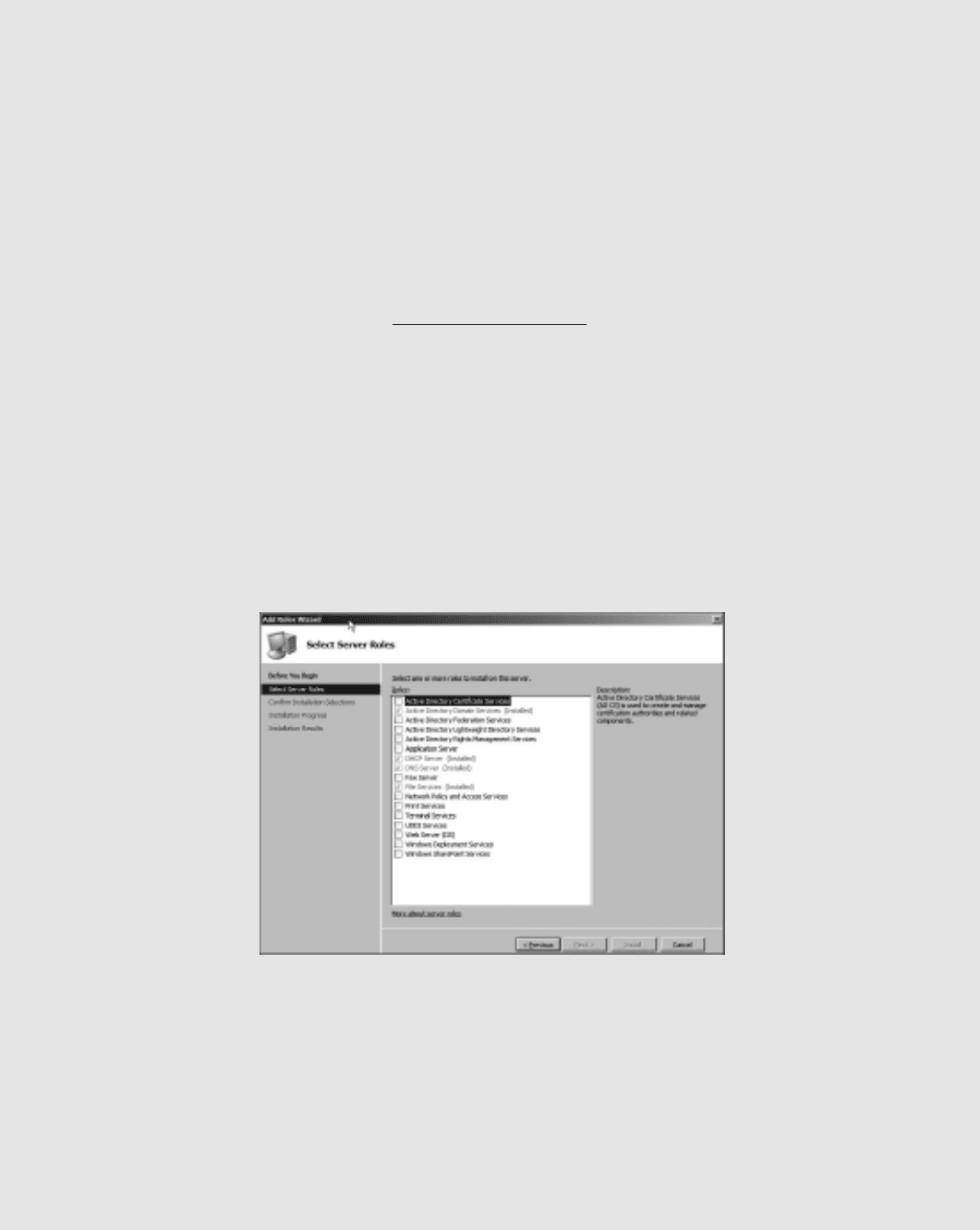
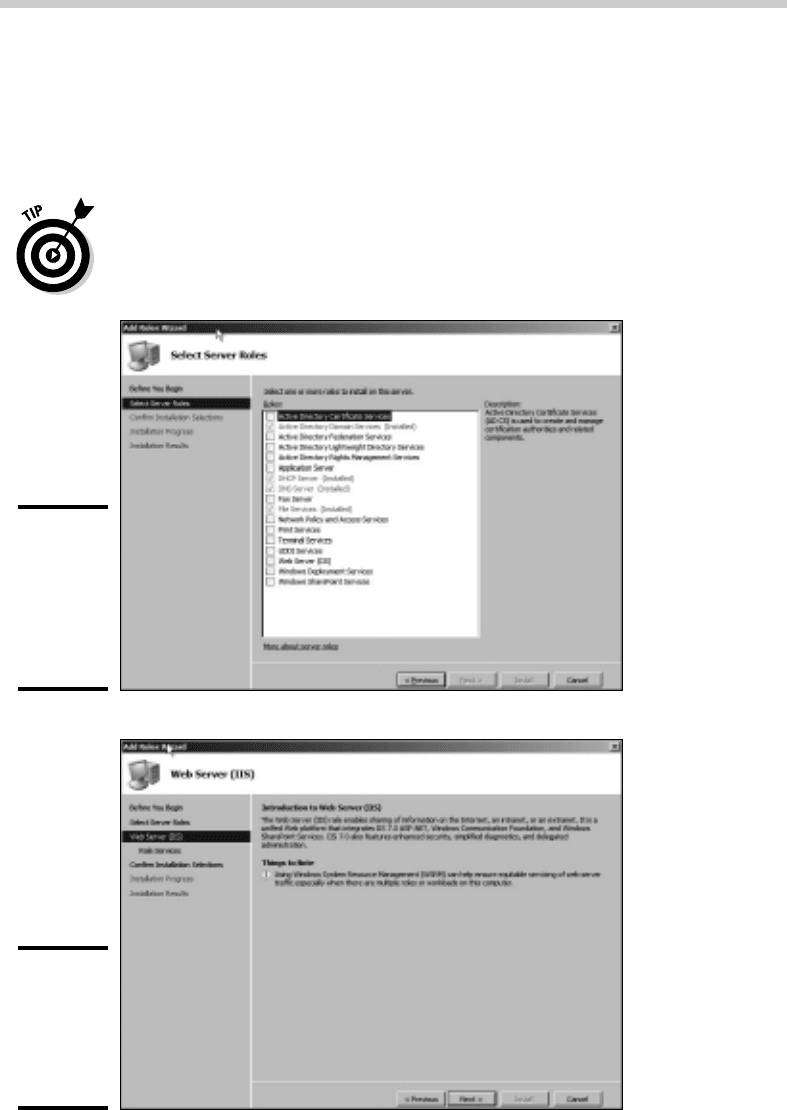
The Select Server Roles page appears, as shown in Figure 1-1.
5. Select the Web Server (IIS) check box and then click Next.
The Web Server (IIS) page appears, as shown in Figure 1-2.
58_625873-bk08ch01.indd 60558_625873-bk08ch01.indd 605 9/21/10 10:42 PM9/21/10 10:42 PM
606
6. Click Next.
The Role Services page appears, as shown in Figure 1-3. This page lists a
variety of optional services that can be configured for IIS.
7. Select the services you want to configure for IIS.
If you want, you can study this list and try to anticipate which features
you think you’ll need. Or you can just leave the default options selected.
You can always return to the Add Roles Wizard to add features you
leave out here.
Figure 1-1:
The Select
Server
Roles page
of the
Add Roles
Wizard.
Figure 1-2:
The Web
Server (IIS)
page of the
Add Roles
Wizard.
Installing IIS
58_625873-bk08ch01.indd 60658_625873-bk08ch01.indd 606 9/21/10 10:42 PM9/21/10 10:42 PM