
Lowe D. Networking For Dummies
Подождите немного. Документ загружается.

Book IX
Chapter 3
Basic Linux
Network
Configuration
697
Restarting Your Network
Redhat-config-network:
Changes are saved.
You may want to restart
the network and network services
or restart the computer.
10. Click OK.
You can now close the Network Configuration window.
11. Restart the network services.
To find out how to restart, see the next section, “Restarting Your
Network.”
Restarting Your Network
Whenever you make a configuration change to your network, you must
restart Linux networking services in order for the change to take effect. If
you find that annoying, just be thankful that you don’t have to restart the
entire computer. Simply restarting the network services is sufficient.
You can restart the network services from a GNOME desktop by following
these steps:
1. Choose System➪Administration➪Services.
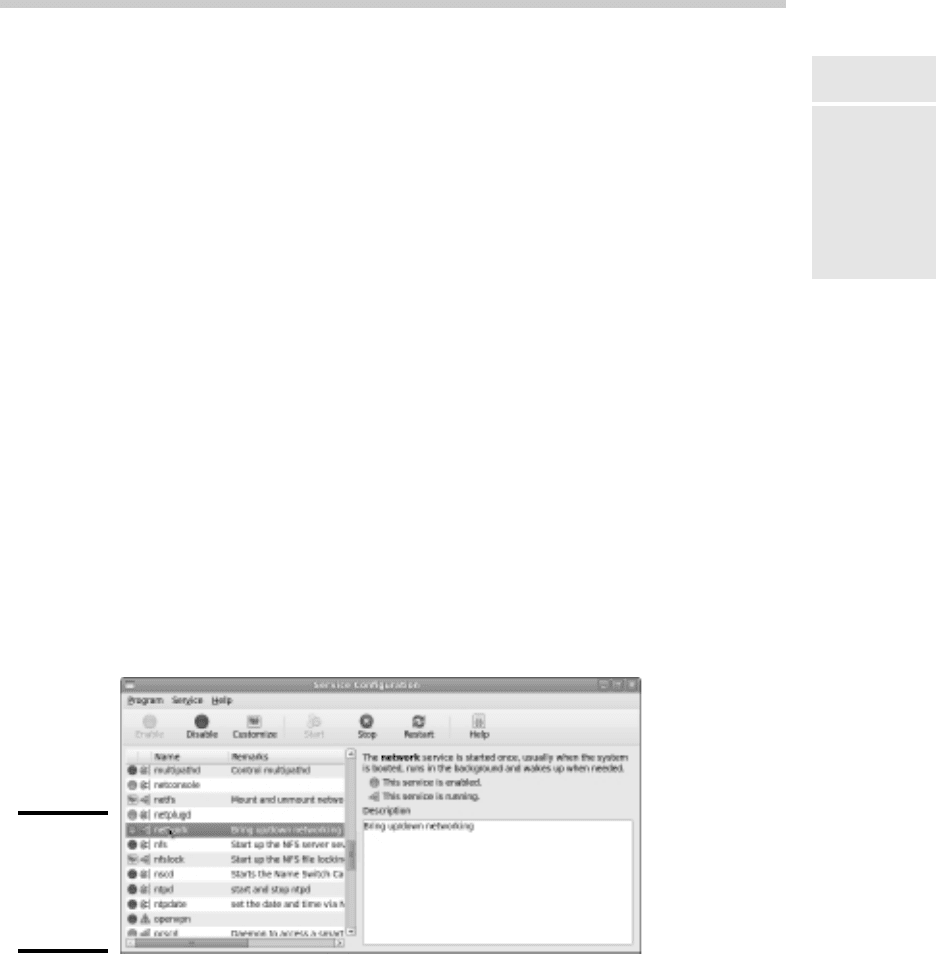
The Service Configuration window appears, as shown in Figure 3-5.
Figure 3-5:
The Service
Config-
uration
window.
65_625873-bk09ch03.indd 69765_625873-bk09ch03.indd 697 9/21/10 10:45 PM9/21/10 10:45 PM

698
Working with Network Configuration Files
2. Select the Network service.
You have to scroll down the list of services to find it.
3. Click the Restart button.
The service is stopped and then started again. When finished, a small
dialog box appears, displaying the message, “Network restart successful.”
4. Click OK.
You return to the Service Configuration window.
5. Close the Service Configuration window.
That’s all!
If you prefer working in a command shell, you can restart the network by
entering the command service network restart. This results in a dis-
play similar to the following:
Shutting down interface eth0: [ OK ]
Shutting down loopback interface: [ OK ]
Setting network parameters: [ OK ]
Bringing up loopback interface: [ OK ]
Bringing up interface eth0: [ OK ]
Working with Network Configuration Files
Like other operating system services, the Linux network is configured by
settings that are specified in configuration files that you can find in the /etc
directory or in one of its subdirectories. Graphical configuration programs
such as Red Hat Network Configuration are actually little more than glori-
fied text editors that enable you to select network configuration options
from user-friendly screens and then save your configuration changes to the
standard configuration files. If you prefer to do the grunt work yourself, you
can open the configuration files in a text editor and make changes to them
directly.
Any time you open a configuration file in a text editor, you run the risk of
messing up your system’s configuration. So be careful!
Table 3-1 lists the main Linux network configuration files and describes what
each file does. The details of these files are described in the sections that
follow.
65_625873-bk09ch03.indd 69865_625873-bk09ch03.indd 698 9/21/10 10:45 PM9/21/10 10:45 PM

Book IX
Chapter 3
Basic Linux
Network
Configuration
699
Working with Network Configuration Files
Table 3-1 Linux Network Configuration Files
File Location Description
network /etc/sysconfig
Basic network
configuration.
hostname /etc
Specifies the host name
(obsolete, but should still be
present).
ifcfg-eth0 -/etc/sysconfig/
IP settings for the first
Ethernet adapter network-
scripts.
ifcfg-eth1 -/etc/sysconfig/
IP settings for the second
Ethernet adapter network-
scripts.
hosts /etc
Lists host address
mappings.
resolv.conf /etc
Lists DNS nameservers.
nsswitch.conf /etc
Specifies the name search
order.
xinetd.conf /etc
Specifies which network
services are started
automatically.
The Network file
The Network file, which lives in /etc/sysconfig, specifies basic configura-
tion settings for your network. Here’s a typical Network file:
NETWORKING=yes
HOSTNAME=LSERVER
GATEWAY=192.168.1.1
This file specifies that networking is enabled, the computer’s host name is
LSERVER, and the default gateway address is 192.168.1.1.
The following paragraphs describe all the settings that are valid for this file:
✦ NETWORKING: Specifies yes or no to enable or disable networking for
the computer.
✦ HOSTNAME: Specifies the host name for this computer. You should also
specify this name in /etc/hostname, although that file is considered
obsolete and is used only by some old programs. Note that this can be a
simple host name (like LSERVER) or a fully qualified domain name (like
Lserver.LoweWriter.com).
65_625873-bk09ch03.indd 69965_625873-bk09ch03.indd 699 9/21/10 10:45 PM9/21/10 10:45 PM

700
Working with Network Configuration Files
✦ FORWARD_IPV4: Specifies YES or NO to enable or disable IP forwarding.
Specify FORWARD_IPV4=YES to set up a router.
✦ GATEWAY: Specifies the IP address of the computer’s Default Gateway. If
the network has a gateway router, specify its address here. If this com-
puter is the network’s gateway router, specify the gateway IP address
provided by your ISP.
✦ GATEWAYDEV: Specifies the interface (such as eth0) that should be used
to reach the gateway.
The ifcfg files
Each network interface has an ifcfg configuration file located in /etc/
sysconfig/network-scripts. The device name is added to the end of
the filename. So, for example, the configuration file for the first Ethernet
interface is called ifcfg-eth0.
This file is created and updated by the Network Configuration program, so
you don’t have to edit it directly (if you don’t want to).
Here’s a typical ifcfg file for an interface that has a static IP address:
DEVICE=eth0
BOOTPROTO=none
ONBOOT=yes
USERCTL=no
IPADDR=192.168.1.200
NETMASK=255.255.255.0
BROADCAST=192.168.1.255
NETWORK=192.168.1.0
Here’s an example for an interface that uses DHCP:
DEVICE=eth0
BOOTPROTO=dhcp
ONBOOT=yes
USERCTL=no
Here, the ifcfg file doesn’t have to specify the IP address information
because the interface gets that information from a DHCP server.
The following paragraphs describe the settings that you’re most likely to see
in this file:
✦ DEVICE: The name of the device, such as eth0 or eth1.
✦ USERCTL: Specifies YES or NO to indicate whether local users are
allowed to start or stop the network.
65_625873-bk09ch03.indd 70065_625873-bk09ch03.indd 700 9/21/10 10:45 PM9/21/10 10:45 PM

Book IX
Chapter 3
Basic Linux
Network
Configuration
701
Working with Network Configuration Files
✦ ONBOOT: Specifies YES or NO to indicate whether the device should be
enabled when Linux boots up.
✦ BOOTPROTO: Specifies how the device gets its IP address. Possible values
are NONE for static assignment, DHCP, or BOOTP.
✦ BROADCAST: The broadcast address used to send packets to everyone
on the subnet. For example: 192.168.1.255.
✦ NETWORK: The network address. For example: 192.168.1.0.
✦ NETMASK: The subnet mask. For example: 255.255.255.0.
✦ IPADDR: The IP address for the adapter.
The Hosts file
The Hosts file is a simple list of IP addresses and the host names associated
with each address. You can think of the Hosts file as a local DNS database
of sorts. Whenever Linux needs to resolve a DNS name, it first looks for the
name in the Hosts file. If Linux finds the name there, it doesn’t have to do a
DNS lookup; it simply uses the IP address found in the Hosts file.
For small networks, common practice is to list the host name for each com-
puter on the network in the Hosts file on each computer. Then, whenever
you add a new computer to the network, you just update each computer’s
Hosts file to include the new computer. That’s not so bad if the network has
just a few computers, but you wouldn’t want to do it that way for a network
with 1,000 hosts. That’s why other name resolution systems are more popu-
lar for larger networks.
The default Linux Hosts file looks something like this:
# Do not remove the following line, or various programs
# that require network functionality will fail.
127.0.0.1 localhost.localdomain localhost
Here, the names localhost.localdomain and localhost both resolve to
127.0.0.1, which is the standard local loopback address.
Here’s an example of a Hosts file that has some additional entries:
# Do not remove the following line, or various programs
# that require network functionality will fail.
127.0.0.1 LServer localhost.localdomain localhost
192.168.1.1 linksys
192.168.1.100 ward.cleaver.com ward
192.168.1.101 june.cleaver.com june
192.168.1.102 wally.cleaver.com wally
192.168.1.103 theodore.cleaver.com theodore beaver
65_625873-bk09ch03.indd 70165_625873-bk09ch03.indd 701 9/21/10 10:45 PM9/21/10 10:45 PM

702
Working with Network Configuration Files
Here, I’ve defined host names for each of the Cleaver family’s four comput-
ers and their Linksys router. Each computer can be accessed by using one of
two names (for example, ward.cleaver.com or just ward), except the last
one, which has three names.
The resolv.conf file
The resolv.conf file lists the DNS nameservers that can be consulted to
perform DNS lookups. A typical resolv.conf file looks like this:
nameserver 192.168.1.110
nameserver 204.127.198.19
nameserver 63.249.76.19
If you have set up a nameserver on your own network, its IP address should
be the first one listed.
The nsswitch.conf file
This configuration file controls how name resolution works when looking up
various types of objects, such as host addresses and passwords. Listing 3-1
shows the sample nsswitch.conf file that comes with Fedora Linux. As
you can see, this file is loaded with comments that explain what the various
settings do.
You can use the files, db, and dns keywords to specify how objects
should be retrieved. files specifies that the local file should be used, db
specifies a database lookup, and dns specifies that a DNS server should be
consulted.
The order in which you list these keywords determines the order in which
the data sources are searched. Thus, if you want host names to be resolved
first by the local Hosts file and then by DNS, you should include the follow-
ing line in nsswitch:
hosts: files dns
Listing 3-1: A Sample /etc/nsswitch.conf File
#
# /etc/nsswitch.conf
#
# An example Name Service Switch config file. This file should be
# sorted with the most-used services at the beginning.
#
# The entry ‘[NOTFOUND=return]’ means that the search for an
# entry should stop if the search in the previous entry turned
# up nothing. Note that if the search failed due to some other reason
# (like no NIS server responding) then the search continues with the
# next entry.
#
65_625873-bk09ch03.indd 70265_625873-bk09ch03.indd 702 9/21/10 10:45 PM9/21/10 10:45 PM

Book IX
Chapter 3
Basic Linux
Network
Configuration
703
Working with Network Configuration Files
# Legal entries are:
#
# nisplus or nis+ Use NIS+ (NIS version 3)
# nis or yp Use NIS (NIS version 2), also called YP
# dns Use DNS (Domain Name Service)
# files Use the local files
# db Use the local database (.db) files
# compat Use NIS on compat mode
# hesiod Use Hesiod for user lookups
# [NOTFOUND=return] Stop searching if not found so far
#
# To use db, put the “db” in front of “files” for entries you want to be
# looked up first in the databases
#
# Example:
#passwd: db files nisplus nis
#shadow: db files nisplus nis
#group: db files nisplus nis
passwd: files
shadow: files
group: files
#hosts: db files nisplus nis dns
hosts: files dns
# Example - obey only what nisplus tells us...
#services: nisplus [NOTFOUND=return] files
#networks: nisplus [NOTFOUND=return] files
#protocols: nisplus [NOTFOUND=return] files
#rpc: nisplus [NOTFOUND=return] files
#ethers: nisplus [NOTFOUND=return] files
#netmasks: nisplus [NOTFOUND=return] files
bootparams: nisplus [NOTFOUND=return] files
ethers: files
netmasks: files
networks: files
protocols: files
rpc: files
services: files
netgroup: files
publickey: nisplus
automount: files
aliases: files nisplus
The xinetd.conf file
Xinetd is a service that oversees a variety of networking services, such as
Telnet or Finger. Xinetd listens for requests on the ports on which these ser-
vices talk and automatically starts the service when a connection is made.
Xinetd is controlled by the configuration file xinetd.conf, which is found
in the /etc directory, and each of the services controlled by xinetd is in
turn controlled by a configuration file found in the /etc/xinet.d directory.
You should leave most of the settings in these configuration files alone
unless you’ve studied up on xinetd. (You can find out more about it at www.
xinetd.org.) However, you may want to modify the configuration files in
order to enable or disable specific services.
65_625873-bk09ch03.indd 70365_625873-bk09ch03.indd 703 9/21/10 10:45 PM9/21/10 10:45 PM

704
Displaying Your Network Configuration with the ifconfig Command
Each of the services controlled by xinetd has a configuration file in the /
etc/xinet.d directory. Each of these configuration files ends with a line
that enables or disables the service. For example, here’s the configuration
file for Telnet, /etc/xinet.d/telnet:
# default: on
# description: The telnet server serves telnet sessions; it uses \
# unencrypted username/password pairs for authentication.
service telnet
{
Flags = REUSE
socket_type = stream
wait = no
user = root
server = /usr/sbin/in.telnetd
log_on_failure += USERID
disable = yes
}
Here, the last line disables Telnet. You can enable the Telnet service by
changing the last line to disable = no.
Displaying Your Network Configuration
with the ifconfig Command
Linux doesn’t have an ipconfig command like Windows. Instead, the com-
mand that you use to display information about your network configuration
is ifconfig. You can also use this command to set network configuration
options, but in most cases, using the Network Configuration program or
directly editing the network configuration files is easier.
If you enter ifconfig without any parameters, you get output similar to the
following:
Eth0 Link encap:Ethernet HWaddr 00:40:05:80:51:F3
inet addr:192.168.1.200 Bcast:192.168.1.255 Mask:255.255.255.0
UP BROADCAST RUNNING MULTICAST MTU:1500 Metric:1
RX packets:17293 errors:0 dropped:0 overruns:0 frame:0
TX packets:334 errors:0 dropped:0 overruns:0 carrier:0
collisions:0 txqueuelen:100
RX bytes:1124153 (1.0 Mb) TX bytes:45726 (44.6 Kb)
Interrupt:3 Base address:0xc000
lo Link encap:Local Loopback
inet addr:127.0.0.1 Mask:255.0.0.0
UP LOOPBACK RUNNING MTU:16436 Metric:1
RX packets:202939 errors:0 dropped:0 overruns:0 frame:0
TX packets:202939 errors:0 dropped:0 overruns:0 carrier:0
collisions:0 txqueuelen:0
RX bytes:13856758 (13.2 Mb) TX bytes:13856758 (13.2 Mb)
65_625873-bk09ch03.indd 70465_625873-bk09ch03.indd 704 9/21/10 10:45 PM9/21/10 10:45 PM

Book IX
Chapter 3
Basic Linux
Network
Configuration
705
Displaying Your Network Configuration with the ifconfig Command
From this output, you can tell that the IP address of the Ethernet adapter
(eth0) is 192.168.1.200, the broadcast address is 192.168.1.255, and the
netmask is 255.255.255.0. You can also see transmit and receive statistics
as well as information about the hardware configuration, such as the MAC
address and the adapter’s interrupt and memory base address assignments.
Linux offers many other commands that can help you configure and trouble-
shoot a network. Many of these commands are described in detail in Chapter 9
of this minibook.
65_625873-bk09ch03.indd 70565_625873-bk09ch03.indd 705 9/21/10 10:45 PM9/21/10 10:45 PM

706
Book IX: Managing Linux Systems
65_625873-bk09ch03.indd 70665_625873-bk09ch03.indd 706 9/21/10 10:45 PM9/21/10 10:45 PM