
Schmuller J. Statistical Analysis with Excel For Dummies
Подождите немного. Документ загружается.


359
Chapter 18: A Career in Modeling
A Simulating Discussion
Another approach to modeling is to simulate a process. The idea is to define
as much as you can about what a process does and then somehow use num-
bers to represent that process and carry it out. It’s a great way to find out
what a process does in case other methods of analysis are very complex.
Taking a chance: The Monte Carlo method
Many processes contain an element of randomness. You just can’t predict
the outcome with certainty. To simulate this type of process, you have to
have some way of simulating the randomness. Simulation methods that incor-
porate randomness are called Monte Carlo simulations. The name comes
from the city in Monaco whose main attraction is gambling casinos.
In the next sections, I show you a couple of examples. These examples aren’t
so complex that you can’t analyze them. I use them for just that reason: You
can check the results against analysis.
Loading the dice
In Chapter 16, I talked about a die (one member of a pair of dice) that’s
biased to come up according to the numbers on its faces: A 6 is six times as
likely as a 1, a 5 is five times as likely, and so on. On any toss, the probability
of getting a number n is n/21.
Suppose you have a pair of dice loaded this way. What would the outcomes
of 200 tosses of these dice look like? What would be the average of those 200
tosses? What would be the variance and the standard deviation? You can use
Excel to set up Monte Carlo simulations and answer these questions.
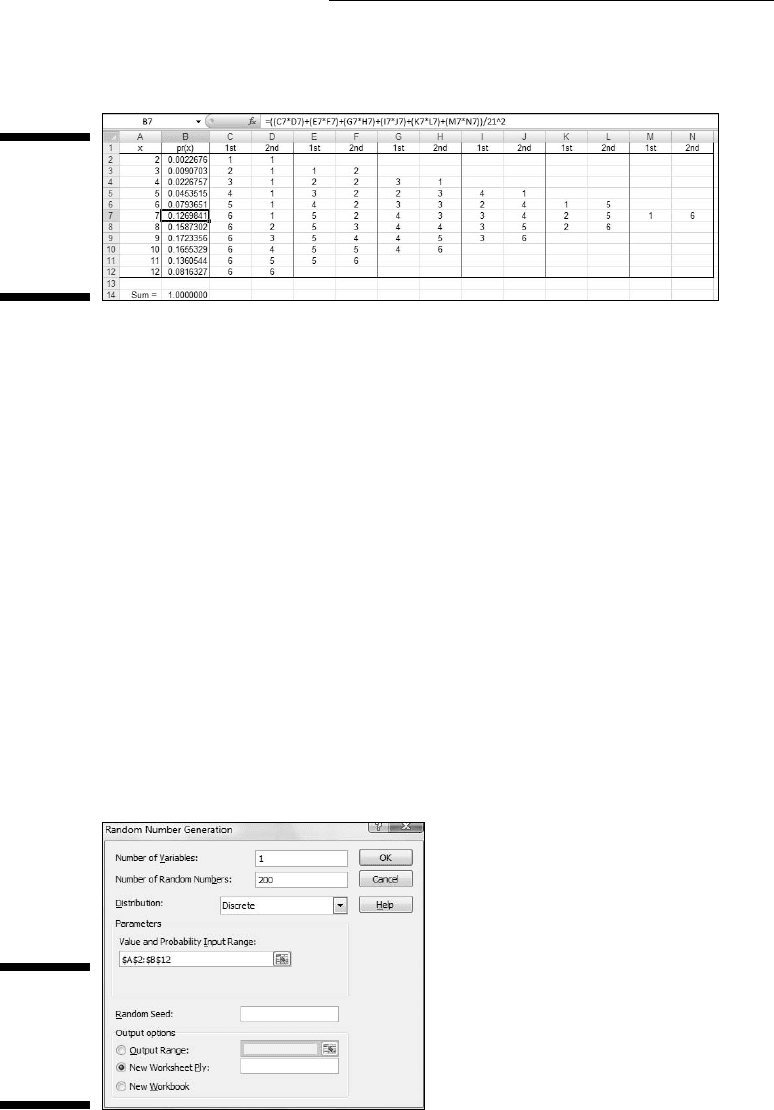
To start, I used Excel to calculate the probability of each outcome. Figure
18-6 shows how I did it. Column A holds all the possible outcomes of tossing
a pair of dice (2-12). Columns C through N hold the possible ways of getting
each outcome. Columns C, E, G, I, K, and M show the possible outcomes on
the first die. Columns D, F, H, J, L, and N show the possible outcomes on the
second die. Column B gives the probability of each outcome, based on the
numbers in Columns C-M. I highlighted B7 so the formula box shows I used
this formula to have Excel calculate the probability of a 7:
=((C7*D7)+(E7*F7)+(G7*H7)+(I7*J7)+(K7*L7)+(M7*N7))/21^2
I autofilled the remaining cells in Column B.
25 454060-ch18.indd 35925 454060-ch18.indd 359 4/21/09 7:37:16 PM4/21/09 7:37:16 PM
360
Part IV: Working with Probability
The sum in B14 confirms that I considered every possibility.
Figure 18-6:
Outcomes
and prob-
abilities for
a pair of
loaded dice.
Next, it’s time to simulate the process of tossing the dice. Each toss, in effect,
generates a value of the random variable x according to the probability distri-
bution defined by Column A and Column B. How do you simulate these tosses?
Data analysis tool: Random Number Generation
Excel’s Random Number Generation tool is tailor-made for this kind of simu-
lation. Tell it how many values you want to generate, give it a probability
distribution to work with, and it randomly generates numbers according to
the parameters of the distribution. Each randomly generated number corre-
sponds to a toss of the dice.
Here’s how to use the Random Number Generation Tool:
1. Select Data | Data Analysis to open the Data Analysis dialog box.
2. In the Data Analysis dialog box, scroll down the Analysis Tools list
and select Random Number Generation. Click OK to open the Random
Number Generation dialog box.
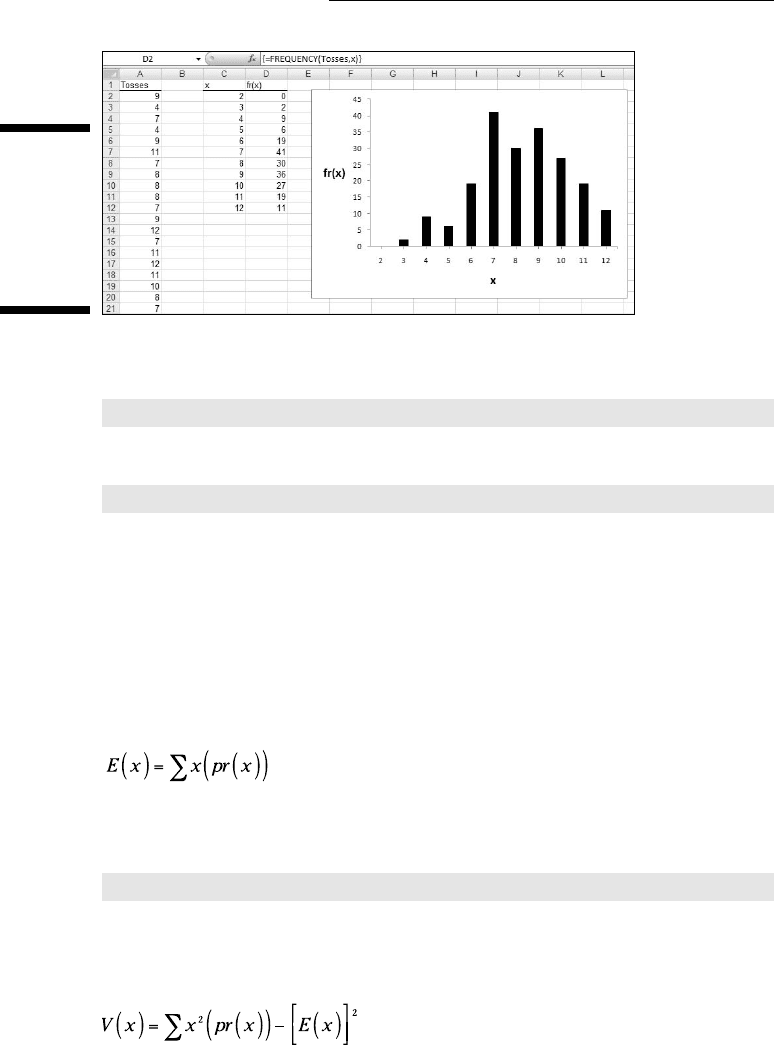
Figure 18-7 shows the Random Number Generation dialog box.
Figure 18-7:
The Random
Number
Generation
dialog box.
25 454060-ch18.indd 36025 454060-ch18.indd 360 4/21/09 7:37:16 PM4/21/09 7:37:16 PM

361
Chapter 18: A Career in Modeling
3. In the Number of Variables box, type the number of variables you
want to create random numbers for.
I know, I know. . . Don’t end a sentence with a preposition. As Winston
Churchill once said: “That’s the kind of nonsense up with which I will
not put.” Hey but seriously, I entered 1 for this example. I’m only inter-
ested in the outcomes of tossing a pair of dice.
4. In the Number of Random Numbers box, type the number of numbers
to generate.
I entered 200 to simulate 200 tosses of the loaded dice.
5. In the Distribution box, click the down arrow to select the type of
distribution.
You have seven options here. The choice you make determines what
appears in the Parameters area of the dialog box, because different
types of distributions have different types (and numbers) of parameters.
You’re dealing with a discrete random variable here, so the appropriate
choice is Discrete.
6. Choosing Discrete causes the Value and Probability Input Range box
to appear under Parameters. Enter the array of cells that holds the
values of the variable and the associated probabilities.
The possible outcomes of the tosses of the die are in A2:A12, and the
probabilities are in B2:B12, so the range is A2:B12. Excel fills in the
$-signs for absolute referencing.
7. In the Output Options, select a radio button to indicate where you
want the results.
I selected New Worksheet Ply to put the results on a new page in the
worksheet.
8. Click OK.
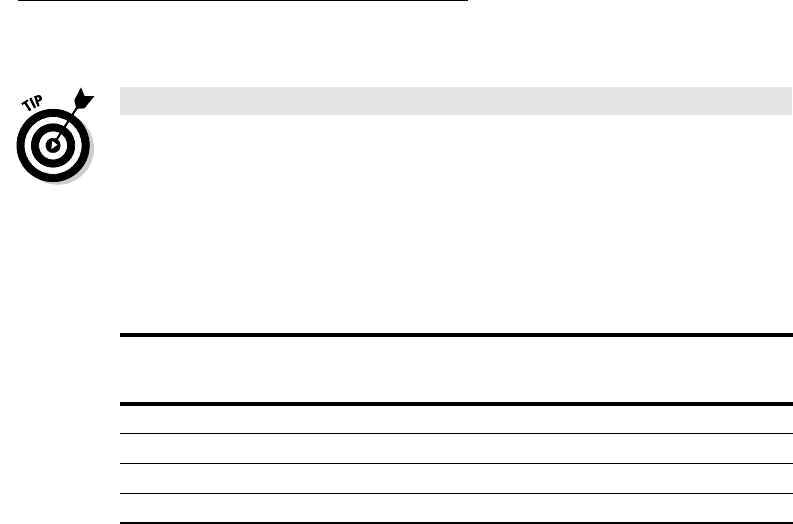
Because I selected New Worksheet Ply, a newly created page opens with the
results. Figure 18-8 shows the new page. The randomly generated numbers
are in Column A. The 200 rows of random numbers are too long to show you.
I could have cut and pasted them into 10 columns of 20 cells, but then you’d
just be looking at 200 random numbers.
Instead, I used FREQUENCY to group the numbers into frequencies in
Columns C and D and then used Excel’s graphics capabilities to create a
graph of the results. I selected D2 so the formula box shows how I used
FREQUENCY for that cell. As you can see, I defined Tosses as the name for
A2:A201 and x as the name for C2:C12.
25 454060-ch18.indd 36125 454060-ch18.indd 361 4/21/09 7:37:16 PM4/21/09 7:37:16 PM
362
Part IV: Working with Probability
Figure 18-8:
The results
of simulat-
ing 200
tosses of
a pair of
loaded dice.
What about the statistics for these simulated tosses?
=AVERAGE(Tosses)
tells you the mean is 8.240.
=VAR(Tosses)
returns 4.244 as the estimate of the variance, and SQRT applied to the vari-
ance returns 2.060 as the estimate of the standard deviation.
How do these values match up with the parameters of the random variable?
This is what I meant before by “checking against analysis.” In Chapter 16, I
show how to calculate the expected value (the mean), the variance, and the
standard deviation for a discrete random variable.
The expected value is:
In the worksheet in Figure 18-6, I used the SUMPRODUCT worksheet function
to calculate E(x). The formula is:
=SUMPRODUCT(A2:A12,B2:B12)
The expected value is 8.667.
The variance is:
25 454060-ch18.indd 36225 454060-ch18.indd 362 4/21/09 7:37:16 PM4/21/09 7:37:16 PM
363
Chapter 18: A Career in Modeling
With E(x) stored in B16, I used this formula
=SUMPRODUCT(A2:A12,A2:A12,B2:B12)-B16^2
Note the use of A2:A12 twice in SUMPRODUCT. That gives you the sum of x2.
The formula returns 4.444 as the variance. SQRT applied to that number gives
2.108 as the standard deviation.
Table 18-2 shows how closely the results from the simulation match up with
the parameters of the random variable.
Table 18-2 Statistics from the Loaded Dice-Tossing Simulation
and the Parameters of the Discrete Distribution
Simulation Statistic Distribution Parameter
Mean 8.240 8.667
Variance 4.244 4.444
Standard Deviation 2.060 2.108
Simulating the Central Limit Theorem
This might surprise you, but statisticians often use simulations to make
determinations about some of their statistics. They do this when mathemati-
cal analysis becomes very difficult.
For example, some statistical tests depend on normally distributed popula-
tions. If the populations aren’t normal, what happens to those tests? Do they
still do what they’re supposed to? To answer that question, statisticians might
create non-normally distributed populations of numbers, simulate experiments
with them, and apply the statistical tests to the simulated results.
In this section, I use simulation to examine an important statistical item —
the Central Limit Theorem. In Chapter 9, I introduce the Central Limit
Theorem in connection with the sampling distribution of the mean. In fact,
I simulated sampling from a population with only three possible values to
show you that even with a small sample size, the sampling distribution starts
to look normally distributed.
Here, I use the Random Number Generation tool to set up a normally distrib-
uted population and draw 40 samples of 16 scores each. I calculate the mean
25 454060-ch18.indd 36325 454060-ch18.indd 363 4/21/09 7:37:16 PM4/21/09 7:37:16 PM
364
Part IV: Working with Probability
of each sample, and then set up a distribution of those means. The idea is to
see how that distribution matches up with the Central Limit Theorem.
The distribution for this example has the parameters of the population of
scores on the IQ test, a distribution I use for examples in several chapters.
It’s a normal distribution with μ=100 and σ=16. According to the Central Limit
Theorem, the mean of the distribution of means should be 100, and the stan-
dard deviation (the standard error of the mean) should be 4.
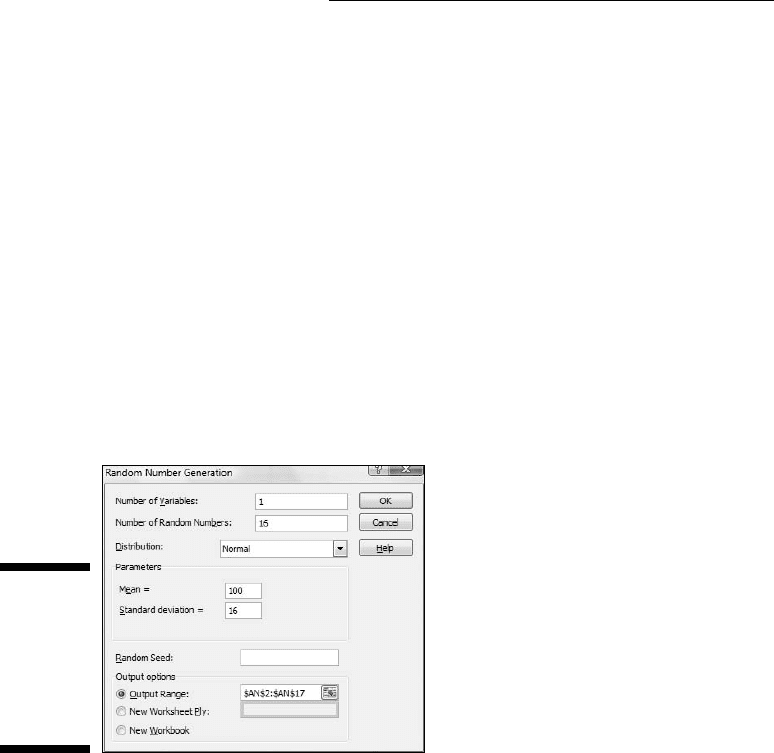
For a normal distribution, the Random Number Generation dialog box looks
like Figure 18-9. The first two entries cause Excel to generate 16 random num-
bers for a single variable. Choosing Normal in the Distribution box causes
the Mean box and the Standard Deviation box to appear under Parameters.
As the Figure shows, I entered 100 for the Mean and 16 for the Standard
Deviation. Under Output Options, I selected Output Range and entered a
column of 16 cells. This puts the randomly generated numbers into the indi-
cated column on the current page.
Figure 18-9:
The Random
Number
Generation
dialog box
for a normal
distribution.
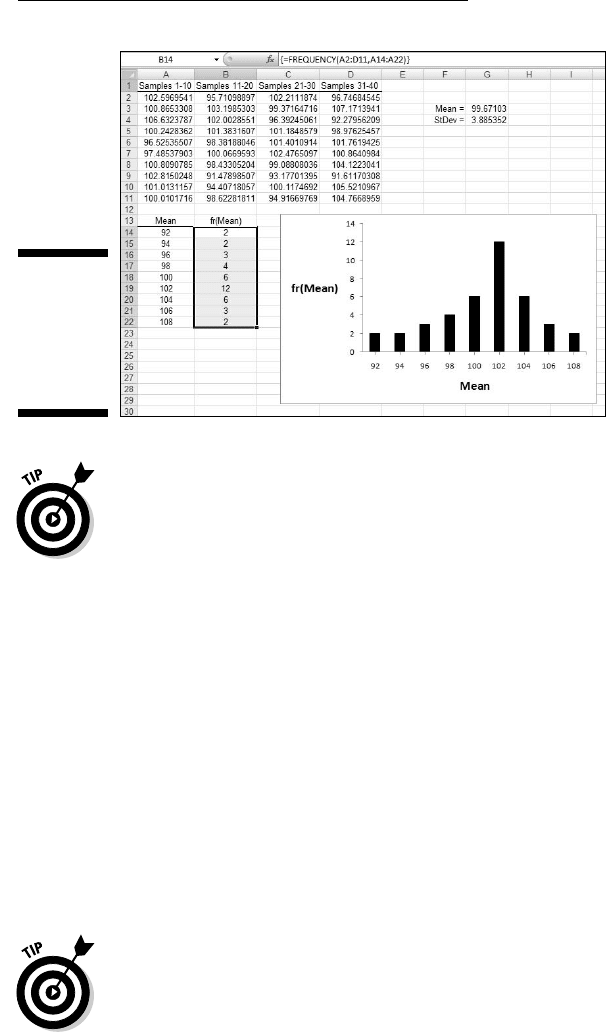
I used this dialog box 40 times to generate 40 simulated samples of 16 scores
each from a normal population, and put the results in adjoining columns.
Then I used AVERAGE to calculate the mean for each column.
Next, I copied the 40 means to another worksheet so I could show you how
they’re distributed. I calculated their mean and the standard deviation. I used
FREQUENCY to group the means into a frequency distribution, and Excel’s
graphics capabilities to graph the distribution. Figure 18-10 shows the results.
The mean of the means, 99.671, is close to the Central Limit Theorem’s pre-
dicted value of 100. The standard deviation of the means, 3.885, is close to
the Central Limit’s predicted value of 4 for the standard error of the mean.
The graph shows the makings of a normal distribution, although it’s slightly
skewed. In general, the simulation matches up well with the Central Limit
Theorem.
25 454060-ch18.indd 36425 454060-ch18.indd 364 4/21/09 7:37:16 PM4/21/09 7:37:16 PM
365
Chapter 18: A Career in Modeling
Figure 18-10:
The results
of the
Central Limit
Theorem
simulation.
A couple of paragraphs ago, I said “I copied the 40 means to another work-
sheet.” That’s not quite a slam-dunk. When you try to paste a cell into another
worksheet, and that cell holds a formula, Excel usually balks and gives you an
ugly-looking error message when you paste. That happens when the formula
refers to cell locations that don’t hold any values in the new worksheet.
To get around that, you have to do a little trick on the cell you want to copy.
You have to convert its contents from a formula into the value that the for-
mula calculates. The steps are:
1. Select the cell or cell array you want to copy.
2. Right-click and from the pop-up menu, select Copy (or just press
Ctrl+C without right-clicking).
3. Click the cell where you want the copy to go.
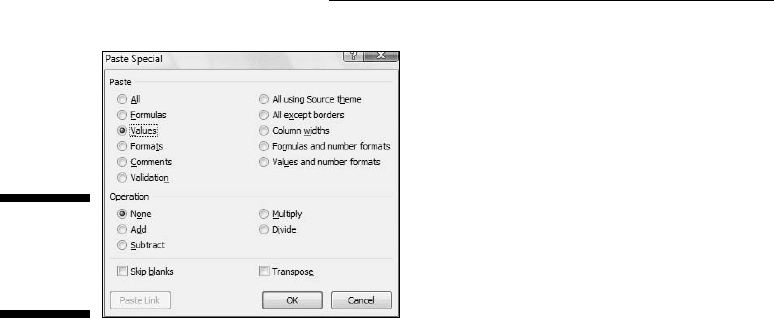
4. Right-click and from the pop-up menu again, select Paste Special to
open the Paste Special dialog box. (See Figure 18-11.)
5. In the dialog box, select the Values radio button.
6. Click OK to complete the conversion.
The Paste Special dialog box offers another helpful capability. Every so often
in statistical work, you have to take a row of values and relocate them into a
column or vice versa. Excel calls this transposition. In the steps that follow, I
describe transposing a row into a column, but it works the other way, too:
1. Select a row of data.
2. Right-click and from the pop-up menu, select copy or press Ctrl+ C
without right-clicking.
25 454060-ch18.indd 36525 454060-ch18.indd 365 4/21/09 7:37:17 PM4/21/09 7:37:17 PM
366
Part IV: Working with Probability
Figure 18-11:
The Paste
Special
dialog box.
3. Select the cell that begins the column where you want to put the
values.
4. Right-click and from the pop-up menu again, select Paste Special to
open the Paste Special dialog box. (Refer to Figure 18-11.)
5. Click the Transpose checkbox. (It’s in the lower-right corner.)
6. Click OK to complete the row-to-column transposition.
25 454060-ch18.indd 36625 454060-ch18.indd 366 4/21/09 7:37:17 PM4/21/09 7:37:17 PM
Part V
The Part of Tens
26 454060-pp05.indd 36726 454060-pp05.indd 367 4/21/09 7:37:51 PM4/21/09 7:37:51 PM

In this part . . .
W
e come to the famous “Part of Tens.” I put two
chapters into this part. The first one covers statis-
tical traps and helpful tips — from problems with hypoth-
esis testing to advice on graphs, from pitfalls in regression
to advice on graphing variability.
The second chapter goes over a number of Excel features
I just couldn’t fit anywhere else. This part covers forcast-
ing, graphing, testing for independence, and more. I talk
about Excel functions based on logarithms – do you see
what I mean about not fitting anywhere else? – and end by
showing you how to import data from the Web.
26 454060-pp05.indd 36826 454060-pp05.indd 368 4/21/09 7:37:52 PM4/21/09 7:37:52 PM