
Baker K.R. Optimization Modeling with Spreadsheets
Подождите немного. Документ загружается.

obtain a title, renew an operator’s license, and perform a number of other minor activities.
However, it is expensive for the DMV to operate a large number of offices, so the DMV
has been keeping some offices open only three days per week and closing down other
offices entirely in an attempt to reduce expenses. Recently, the suggestion was made to
have one mobile DMV office which would operate out of a trailer and appear in a different
location each day. The question then became: How much coverage could the mobile
design provide? A possible standard was proposed: Locate the mobile office so that at
least once a week, residents of the state could go to the DMV in their own county, or
in a neighboring county.
1
Is it possible to locate the mobile office in such a way that for any county, the office
will either locate in that county or locate in a neighboring county at least once per (5-day)
week? If so, which counties should host the office for a day? If not, what is the minimum
number of days required to provide all residents access within their county or a neighbor-
ing county?
6.7. Reservation Scheduling Roth Auto Rentals, a car rental company specializing is
SUVs, is making up a schedule for the next weekend’s demands. The peak demand
period occurs on the weekend, when Roth may not have enough SUVs to meet
demand. The customer demands that have been logged in are listed below.
Days Customers
Fri– Mon 1
Fri– Sat 4
Fri– Sun 5
Sat–Sun 4
Sat–Mon 3
Sun–Sun 2
The rental cost depends on which days the contract covers.
Days FSSM FS FSS SS SSM Sun
Rate 119.95 69.95 99.95 74.95 89.95 39.95
Roth Auto Rentals carries only one type of vehicle and expects to have 10 SUVs available
for rental over the weekend.
(a) What is the maximum revenue that can be generated from the list of orders?
(b) In the optimal solution of (a), what percentage of customer demand is satisfied?
(c) In the optimal solution of (a), what percentage of dollar demand is satisfied?
(d) Answer the set of three questions above for fleet sizes of 11–16.
6.8. Scheduling Reservations Reed’s Rent-a-Car is a traditional auto rental company
facing the problem of assigning vehicles to weekend demands. However, Reed’s
1
A map of counties can be found by selecting a state at http://www.digital-topo-maps.com/county-map/
246 Chapter 6 Integer Programming: Binary Choice Models
distinguishes rentals by car type. Its fleet consists of three compact (C) cars, five mid-size
(M) cars and three full-size (F) cars. The customer demands that have been logged in are
listed below.
Days C M F
Fri–Mon 0 1 0
Fri–Sat 1 2 1
Fri–Sun 2 2 1
Sat–Sun 1 3 0
Sat–Mon 3 0 0
Sun–Sun 0 1 1
The rental rates depend on how many days the contract covers. Prices for compact
cars are shown below. Mid-size cars carry a 10 percent premium, and full-size cars
carry a 20 percent premium.
Days 1234
Rate 39.95 74.95 99.95 119.95
(a) Assume Reed’s were to prohibit a customer who ordered one size from renting
another size. What is the maximum revenue that can be generated from the list of
orders?
(b) Assume Reed’s were to permit a customer to substitute a larger size for any order, but
with no change in price. What is the maximum revenue that can be generated from the
list of orders?
(c) In the optimal solution of (b), what percentage of dollar demand is satisfied?
6.9. Allocating Components to Assemblies Bikes.com is a web-based company that sells
bicycles on the internet. Its distinctive feature is that it allows customers to customize the
design when they order and then to receive quick delivery. Bikes.com gives customers
choices for frame size (34, 36, 38), suspension (standard or heavy-duty), and gear
speeds (5, 10, 15). As a result, customers can order one of 18 possible combinations
(3 × 2 × 3). The company shorthand refers to frame size as Option A (A1 is the 34-
inch model, A2 is the 36-inch model, and A3 is the 38-inch model). Similarly, the stan-
dard suspension is option B1, and the heavy-duty suspension is B2. The gear speeds are
C1 (5), C2 (10), and C3 (15).
Rather than stock 18 different types of bicycles, Bikes.com holds inventories
of the major components and then assembles the bikes once a customer order comes
in. Orders are taken Mondays through Wednesdays, assemblies are done on Thursdays,
and shipments go out on Fridays. Thus, at the close of business on Wednesday,
Bikes.com has an inventory of components and a list of orders, and its task is
to match components with orders to meet as much demand as possible. The tables
below describe customer orders for this week and the inventory status at the end of
Wednesday.
Exercises
247
Model 1 2 3 4 5 6 7 8 9 10 11 12 13 14 15 16 17 18
A 111111222222333333
B 111222111222111222
C 123123123123123123
Orders 4 5 0 5 1 7 0 4 8 120564015
Component A1 A2 A3 B1 B2 C1 C2 C3
Inventory 12 20 30 20 25 18 16 20
(a) What is the maximum number of customer orders that can be satisfied this week?
(b) Suppose that the profitability varies by model type, as shown in the table below. What
is the maximum profit that can be achieved from this week’s orders?
Model 123456789101112131415161718
Profit 45 55 70 65 75 90 47 57 72 67 77 92 50 60 75 70 80 95
6.10. The Latin American Soccer Association (Revisited) Revisit Example 6.6. Suppose
that the Latin American Soccer Association (LASA) decides to create a longer playoff
schedule. They want each team to play two games against the teams in its own division
and one game against each team in the other division. Construct a playoff schedule that
maximizes the number of games played by intra-division rivals toward the end of the
season.
(a) How many weeks are required for the entire schedule?
(b) How many variables and constraints appear in the optimization model?
(c) What is an optimal schedule for LASA?
(d) Review your schedule in part (c) and determine whether the same two teams ever
meet in successive weeks. Amend the model to prohibit such meetings and construct
an optimal schedule.
6.11. Cutting Stock Poly Products sells packaging tape to industrial customers. All tape is
sold in 100-foot rolls that are cut in various widths from a master roll, which is 15
inches wide. The product line consists of the following widths: 2
′′
,3
′′
,5
′′
,7
′′
, and 11
′′
.
These can be cut in different combinations from a 15-inch master roll. For example,
one combination might consist of three cuts of 5
′′
each. Another combination might con-
sist of two 2
′′
cuts and an 11
′′
cut. Both of these combinations use the entire 15-inch roll
without any waste, but other combinations are also possible. For example, another com-
bination might consist of two 7
′′
cuts. This combination creates one inch of waste for
every roll cut this way.
Each week, Poly Products collects demands from its customers and distributors and
must figure out how to configure the cuts in its master rolls. To do so, the production man-
ager lists all possible combinations of cuts and tries to fit them together so that waste is
minimized while demand is met. (In particular, demand must be met exactly, because
248 Chapter 6 Integer Programming: Binary Choice Models
Poly Products does not keep inventories of its tape.) This week’s demands are shown
below.
Size 2
′′
3
′′
5
′′
7
′′
11
′′
Demand 20 30 40 50 60
(a) How many combinations can be cut from a 15-inch master roll so that there is less
than two inches of waste (i.e., the smallest quantity that can be sold) left on the roll?
(b) Find a set of combinations that meets demand exactly and generates the minimum
amount of waste. (Stated another way, the requirement is to meet or exceed
demand for each size, but any excess must be counted as waste.) What is the optimal
set of combinations and the minimum amount of waste?
Case: Motel Location for Nature’s Inn
Nature’s Inn operates a motel chain with two types of motels. Under its brand Comfort Express
(CE), it offers a relatively inexpensive, spartan motel. Under its Family Suites (FS) brand, it
offers a more expensive motel distinguished by various extra features. Both brands are associ-
ated with the latest ideas in green building design, attracting a segment of the customer market
that is willing to let considerations of sustainability influence its purchasing decisions.
Following a successful first round of expansion in the Northeast region, Nature’s Inn is planning
another round of expansion, this time into the Midwest region.
Working with a real estate consultant, Nature’s Inn has identified ten potential sites for the
location of new motels. Each site can accommodate either a CE motel or a FS motel (but not
both). Using historical data from the Northeast region, the consultant has estimated the net pre-
sent value (NPV) of the cash flows attainable over the next ten years at each location, with sep-
arate figures for CE and FS.
EXHIBIT 6.1 Proximity Data and Economic Estimates
Location
Locations
within 30 miles
Locations
within 40 miles
CE NPV
($ million)
FS NPV
($ million)
1 2 2, 6 10.147 11.899
2 1 1 12.191 11.242
3 4 4 13.359 10.731
4 3 3, 5 9.344 7.519
5 – 4 11.388 14.235
6 9 1, 8, 9 6.935 9.636
7 8, 10 8, 10 12.629 8.687
8 7, 9, 10 6, 7, 9, 10 13.505 10.293
9 6, 8, 10 6, 8, 10 9.344 9.709
10 7, 8, 9 7, 8, 9 8.249 11.461
Case: Motel Location for Nature’s Inn
249
The consultant has also carried out a survey to explore the extent to which demand might be
affected when two motels are located in close proximity. The first finding was that CE customers
and FS customers are different segments, for the most part, and little crossover demand occurs.
On the other hand, among CE and FS customers, competition occurs when motels are located too
close to each other. The data suggest that competition becomes an economic factor for CE motels
when they are located within 30 miles of each other and for FS motels within 40 miles of each
other. Nature’s Inn has therefore decided to respect these distances in their choice of locations: In
the Midwest, CE motels will not be located within 30 miles of each other, and FS motels will not
be located within 40 miles of each other. The results of the consultant’s work are summarized in
Exhibit 6.1.
The task for Nature’s Inn is now to develop a location plan for its Midwest expansion.
250 Chapter 6 Integer Programming: Binary Choice Models
Chapter 7
Integer Programming:
Logical Constraints
In the previous chapter, we covered how to solve integer programming problems using
Solver. We also introduced the use of binary variables, which represent yes/no
decisions, and we saw how binary variables arise naturally in set covering, set packing,
and set partitioning. In this chapter, we expand the use of binary variables in connec-
tion with relationships we call logical constraints that restrict consideration to certain
combinations of variables. Normally, we might not immediately think of these restric-
tions as linear constraints, but we can capture them in linear form with the use of binary
variables.
We begin with the illustration of a counting constraint. This term refers to a quan-
titative constraint for counting our decisions, and the use of binary variables makes
counting easy. As an example, we revisit the capital budgeting problem which, in
its basic form, is a pure integer program containing binary variables and one con-
straint. We encountered this structure in Example 6.2, in the Newton Corporation.
EXAMPLE 7.1
The Newton Corporation
The Newton Corporation has tentatively allocated $40 million for capital investments after
considering the financial characteristics of the following projects.
P1 Renovate the production facility for greater efficiency.
P2 License a new technology for use in production.
P3 Expand advertising by naming a stadium.
P4 Purchase land and construct a new headquarters building.
P5 Introduce a new product to complement the current line.
Project P1 P2 P3 P4 P5
NPV 2.0 3.6 3.2 1.6 2.8
Expenditure 12 24 20 8 16
Optimization Modeling with Spreadsheets, Second Edition. Kenneth R. Baker
# 2011 John Wiley & Sons, Inc. Published 2011 by John Wiley & Sons, Inc.
251
After the initial analysis, which led to a total NPV of $6.8 million, some further consider-
ations have been brought up. It appears that the recommended selection of P1, P3, and P4
may not be feasible after all. The committee would still like to maximize the total NPV from
projects selected, subject to a $40-million limit on capital expenditures, but it has to recognize
the additional considerations. B
The tentative representation of the problem at Newton Corporation led to the
following model.
Maximize z = 2.0P1 +3.6P2 +3.2P3 +1.6P4 +2.8P5
subject to 12P1 +24P2 +20P3 +8P4 +16P5 ≤ 40
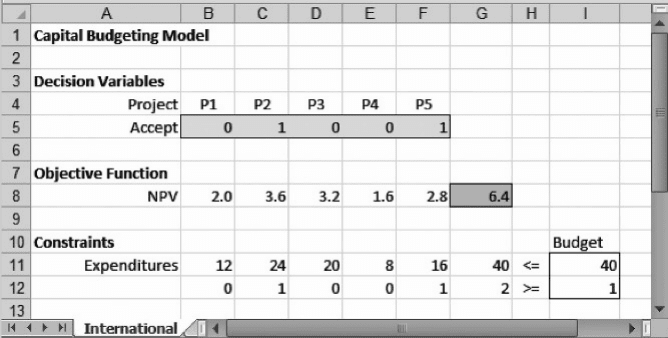
Projects P2 and P5 have international dimensions, whereas the others are dom-
estic. When the committee discussed this aspect of the projects, they decided to
select at least one project from the international arena. To represent this requirement
in the optimization model, we can add a covering constraint to the base case
P2 + P5 ≥ 1
The left-hand side of this constraint counts the number of international
projects adopted. Of course, the addition of a new constraint may make the
objective function worse. Neither P2 nor P5 was part of the optimal set of
projects, and becau se there is no extra space in the budget to include P2orP5
without removing at least one of the other projects, we should anticipate that the
inclusion of P2orP5 could lead to a lower NPV. With the new constraint, the optimal
NPV drops to $6.4 million, obtained by accepting both projects P2 and P5. Figure 7.1
shows this solution of the revised model, with the additional constraint for inter-
national projects.
Figure 7.1. Solution to Example 7.1 with international constraint.
252 Chapter 7 Integer Programming: Logical Constraints
This additional constraint illustrates the fact that we can use binary variables, and
standard LT, GT, or EQ constraints, to represent counting requirements of the follow-
ing form.
†
Select at least m of the possible projects from a given subset.
†
Select at most n of the possible projects from a given subset.
†
Select exactly k of the possible projects from a given subset.
To incorporate counting constraints, we must have binary variables representing each
of the elements we may wish to count. At least in the capital budgeting model, that is
precisely the structure we have.
7.1. SIMPLE LOGICAL CONSTRAINTS: EXCLUSIVITY
AND CONTINGENCY
Relationships we normally think of as logical relationships can also be expressed
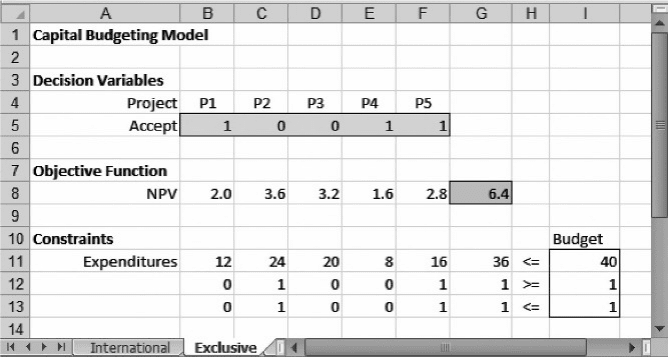
with binary variables. Suppose that projects P2 and P5aremutually exclusive (e.g.,
they could require the same staff resources). Although we might think of mutual exclu-
sivity as a logical property belonging to a pair of variables, we can also interpret this
feature as a special case of the condition for selecting at most n and write
P2 + P5 ≤ 1
We know that adding a constraint will not lead to a better solution, but we can’t antici-
pate whether the optimal NPV will actually get worse. As it happens, there is another
solution that achieves an NPV of $6.4 million without requiring both P2 and P5, as
shown in Figure 7.2.
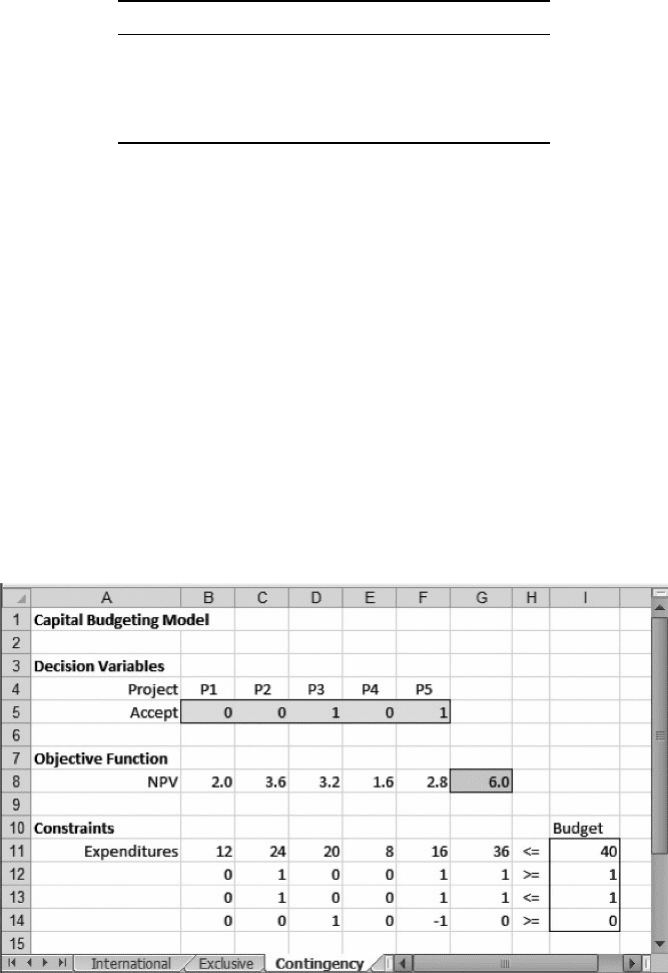
In addition, we sometimes encounter contingency relationships. Suppose that pro-
ject P5 requires that P3 be selected. In other words, P5 is contingent on P3. To analyze
Figure 7.2. Solution to Example 7.1 with mutually-exclusive constraint.
7.1. Simple Logical Constraints: Exclusivity and Contingency 253
logical requirements of this sort, consider all possible combinations for the variables
P3 and P5. The following table shows that three of the four combinations are consist-
ent with the contingency condition.
P3 P5 Consistent?
00 Yes
10 Yes
01 No
11 Yes
We can accommodate the three consistent combinations and exclude the inconsistent
combination by adding the following constraint
P3 − P5 ≥ 0
At this stage, we specify the model as follows.
Objective: G8 (maximize)
Variables: B5:F5
Constraints: G11 ≤ I11
G12 ≥ I12
G13 ≤ I13
G14 ≥ I14
B5:F5 = binary
With the contingency constraint appended, the optimal NPV drops to $6 million, as
shown in Figure 7.3.
Figure 7.3. Solution to Example 7.1 with mutually-exclusive constraint.
254 Chapter 7 Integer Programming: Logical Constraints
Thus, we can accommodate logical constraints among related variables within the
framework of linear programming with binary variables. The Newton Corporation
example illustrates how we might incorporate counting constraints, such as “at most
2,” or qualitative information, such as contingency or mutual exclusivity. Such
relationships usually require some specialized constraints in the model in addition
to the use of binary variables. In the remainder of this chapter, we elaborate on
models containing other logical constraints by examining a series of illustrative
problem types.
7.2. LINKING CONSTRAINTS: THE FIXED
COST PROBLEM
Linear objective functions assume strict proportionality: In particular, the cost
incurred by an activity is proportional to the activity level. However, we commonly
encounter situations in which an activity cost is compo sed of a fixed component
and a variable component, where only the variable cost is proportional to the level
of activity. Using a binary variable, we can represent the fixed cost as part of the objec-
tive function and still work with a linear model.
Suppose that we have already built a linear programming model, but one variable
(x) has a fixed cost that we want to represent in the objective function. To incorporate a
fixed cost into the model, we first separate the fixed and variable components of cost.
In algebraic terms, we write total cost in the following form
Total cost = Fixed cost + Variable cost
BOX 7.1
Excel Mini-Lesson: Binary Variables and the IF Function
Experienced users of Excel will see little difficulty in modeling a contingency constraint
if they are familiar with the IF function. A logical statement of the contingency between
P3 and P5 could include the recalculation P5 in light of P3. Once P3 and P5 have initial
values, we could recalculate P 5 in cell F6 according to the contingency by using the
formula
¼ IF(P3¼ 1,P5,0)
This formula would take the original value of P5ifP3 ¼ 1, but it would become zero other-
wise (i.e. if P3 ¼ 0). The objective function can then be expressed with the formula
¼ SUMPRODUCT ($B$5:$E$5,B8:E8)+$F$6
∗
F8
A similar function can represent the left-hand side of each of the constraints. However, the
IF function is not a linear function. If the Nonsmooth Transformation option is set to Never
and we specify the linear solver, we encounter an error message stating that the model does
not satisfy the linearity conditions. To use Solver reliably for integer programming, the IF
function should be avoided.
7.2. Linking Constraints: The Fixed Cost Problem
255