
Lowe D. Networking For Dummies
Подождите немного. Документ загружается.

Book VII
Chapter 2
Managing Windows
Server 2008
507
Customizing MMC
Figure 2-12:
Selecting an
icon.
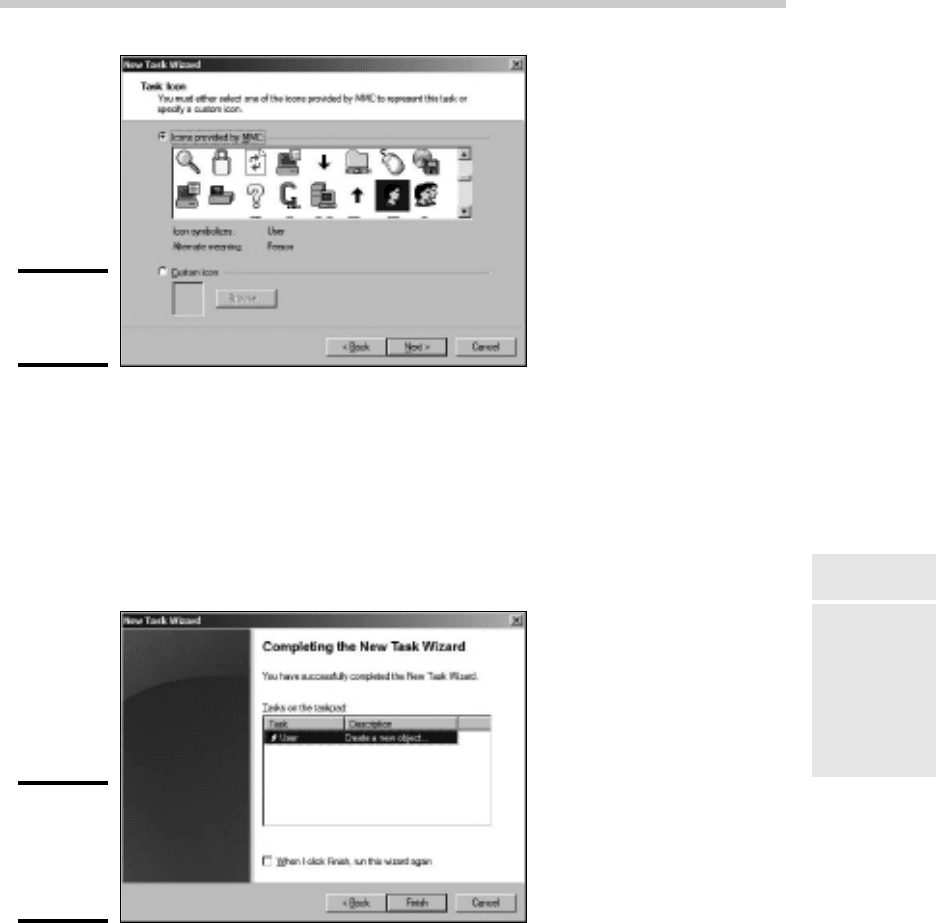
12. Choose the icon you want to use and then click Next.
Note that in many cases, the New Task Wizard suggests an appropriate
icon. For example, if you select a Delete command, the standard Delete
icon will be selected.
When you click Next, the final page of the wizard is displayed, as shown
in Figure 2-13.
Figure 2-13:
The final
page of the
New Task
Wizard.
13. If you want to create additional tasks, select the When I Click Finish,
Run This Wizard Again check box and then click Finish and repeat
Steps 8 through 13.
You can run the wizard as many times as necessary to add tasks to your
taskpad.
50_625873-bk07ch02.indd 50750_625873-bk07ch02.indd 507 9/21/10 10:38 PM9/21/10 10:38 PM

508
Customizing MMC
14. When you’re finished adding tasks, deselect the When I Click Finish,
Run This Wizard Again check box and click Finish.
You’re done!
Here are a few other pointers for working with taskpads:
✦ You can edit an existing taskpad by selecting the tree node that displays
the taskpad and choosing Action➪Edit Taskpad View. This brings up a
Properties dialog box that lets you change the taskpad layout options
and add or remove tasks.
✦ To delete a taskpad, select the tree node that displays the taskpad and
choose Action➪Delete Taskpad View.
✦ Don’t forget to save (File➪Save) often while you’re creating custom
taskpads.
50_625873-bk07ch02.indd 50850_625873-bk07ch02.indd 508 9/21/10 10:38 PM9/21/10 10:38 PM

Chapter 3: Dealing with
Active Directory
In This Chapter
✓ Discovering directories
✓ Examining how Active Directory is structured
✓ Setting up a domain controller
✓ Creating organizational units
A
ctive Directory is among the most important features of Windows
Server, and much of your time as a network administrator will be
spent keeping Active Directory neat and tidy. In Chapter 4 of this minibook,
I discuss the details of working with the most common and troublesome
types of Active Directory objects, users, and groups. But first, this chapter
lays some foundation by explaining what Active Directory is and how it
works.
What Directories Do
Everyone uses directory services of one type or another every day. When
you look up someone’s name in a phone book, you’re using a directory
service. But you’re also using a directory service when you make a call:
When you enter someone’s phone number into your touch-tone phone, the
phone system looks up that number in its directory to locate that person’s
phone.
Almost from the very beginning, computers have had directory services.
I remember when I first got started in the computer business back in the
1970s, using IBM mainframe computers and a transaction-processing system
called CICS that is still in widespread use today. CICS relied on many different
directories to track such things as files available to the system, users that
were authorized to access the system, and application programs that could
be run.
51_625873-bk07ch03.indd 50951_625873-bk07ch03.indd 509 9/21/10 10:38 PM9/21/10 10:38 PM

510
Remembering the Good-Ol’ Days of NT Domains
But the problem with this directory system, and with most other directory
systems until recently, is that it was made up of many small directory
systems that didn’t know how to talk to each other. I have the very same
problem at home. We have our own little personal address book that has
phone numbers and addresses for our friends and family. And I have a
Day-Timer book with a bunch of other phone numbers and addresses. Then I
have a church directory that lists everyone who goes to my church. Oh, and
there’s the list of players on the softball team I coach. And of course, my cell
phone has a directory.
All counted, I probably have a dozen sources for phone numbers that I
routinely call. So when I need to look up someone’s phone number, I first
have to decide which directory to look in. And, of course, some of my friends
are listed in two or three of these sources, which raises the possibility that
their listings might be out of sync.
That’s exactly the type of problem that Active Directory is designed to
address. Before I get into the specifics of Active Directory, however, I show
you the directory system that Microsoft used on Windows networks before
Active Directory became available.
Remembering the Good-Ol’ Days of NT Domains
Active Directory was introduced with Windows 2000 Server. Before then,
the directory management system in a Windows network was managed by
Windows NT domains, which stored directory information in a database
called the Security Account Manager (SAM) database.
PDCs and BDCs
The most important thing to know about NT domains is that they are server-
centric. That is, every Windows NT domain is under the control of a Windows
NT server computer that hosts the primary copy of the SAM database. This
server is called the Primary Domain Controller, or PDC.
Of course, large networks couldn’t work efficiently if all directory access
had to be channeled through a single computer. To solve that bottleneck
problem, Windows NT domains can also be serviced by one or more Backup
Domain Controllers, or BDCs. Each BDC stores a read-only copy of the SAM
database, and any changes made to the SAM database on the PDC must be
propagated down to the BDC copies of the database.
Note that although any of the BDC servers can service access requests such
as user logons, all changes to the SAM database must be made via the PDC.
Then, those changes are copied to the BDC servers. Naturally, this raises the
possibility that the PDC and BDC database can get out of sync.
51_625873-bk07ch03.indd 51051_625873-bk07ch03.indd 510 9/21/10 10:38 PM9/21/10 10:38 PM

Book VII
Chapter 3
Dealing with Active
Directory
511
Active Directory to the Rescue
If the PDC should fail for some reason, one of the BDCs can be promoted so
that it becomes the PDC for the domain. This allows the domain to continue to
function while the original PDC is repaired. Because the BDC is an important
backup for the PDC, it’s important that all NT networks have at least one BDC.
Trusts
Many organizations have directory needs that are too complicated to store
on just one NT domain PDC. In that case, the organization can create two or
more separate domains for its network, each with its own PDC and BDCs.
Then, the organization can set up trusts among its domains.
Simply put, a trust is a relationship in which one domain trusts the directory
information stored in another domain. The domain that does the trusting
is called — you guessed it — the trusting domain, while the domain that
contains the information being trusted is called the trusted domain.
Trust relationships work in one direction. For example, suppose you have
two domains, named DomainA and DomainB, and a trust relationship is set
up so that DomainA trusts DomainB. That means that users whose accounts
are defined in DomainB can log on to DomainA and access resources.
However, the trust relationship doesn’t work in the other direction: Users in
DomainA can’t log on and access resources defined in DomainB.
Also, trust relationships are not transitive. (There’s a word that takes you
back to high school algebra.) That means that even if DomainA trusts
DomainB and DomainB trusts DomainC, DomainA does not automatically
trust DomainC. For DomainA to trust DomainC, you’d have to create a
separate trust relationship between DomainA and DomainC.
NetBIOS names
One other important characteristic of Windows NT domains is that they
use NetBIOS names. Thus, NT names such as computer names and domain
names are limited to 15 characters.
Actually, NetBIOS names are 16 characters long. But NT uses the last character
of the 16-character NetBIOS name for its own purposes, so that character
isn’t available for use. As a result, NT names can be only 15 characters long.
Active Directory to the Rescue
Active Directory solves many of the inherent limitations of Windows NT
domains by creating a distributed directory database that keeps track of
every conceivable type of network object.
51_625873-bk07ch03.indd 51151_625873-bk07ch03.indd 511 9/21/10 10:38 PM9/21/10 10:38 PM

512
Understanding How Active Directory Is Structured
Active Directory is a comprehensive directory management system that
tracks just about everything worth tracking in a Windows network, including
users, computers, files, folders, applications, and much more. Much of your
job as a network administrator involves working with Active Directory. So
it’s vital that you have a basic understanding of how it works.
One of the most important differences between Active Directory and NT
domains is that Active Directory is not server-centric. In other words, Active
Directory isn’t tied to a specific server computer the way a Windows NT
domain is. Although Active Directory still uses domains and domain controllers,
these concepts are much more flexible in Active Directory than they are in
Windows NT.
Another important difference between Active Directory and NT domains
is that Active Directory uses the same naming scheme that’s used on the
Internet: Domain Name Service (DNS). Thus, an Active Directory domain
might have a name like sales.mycompany.com.
Understanding How Active Directory Is Structured
Like all directories, Active Directory is essentially a database management
system. The Active Directory database is where the individual objects
tracked by the directory are stored. Active Directory uses a hierarchical
database model, which groups items in a tree-like structure.
The terms object, organizational unit, domain, tree, and forest are used to
describe the way Active Directory organizes its data. The following sections
explain the meaning of these important Active Directory terms.
Objects
The basic unit of data in Active Directory is called an object. Active Directory
can store information about many different kinds of objects. The objects you
work with most are users, groups, computers, and printers.
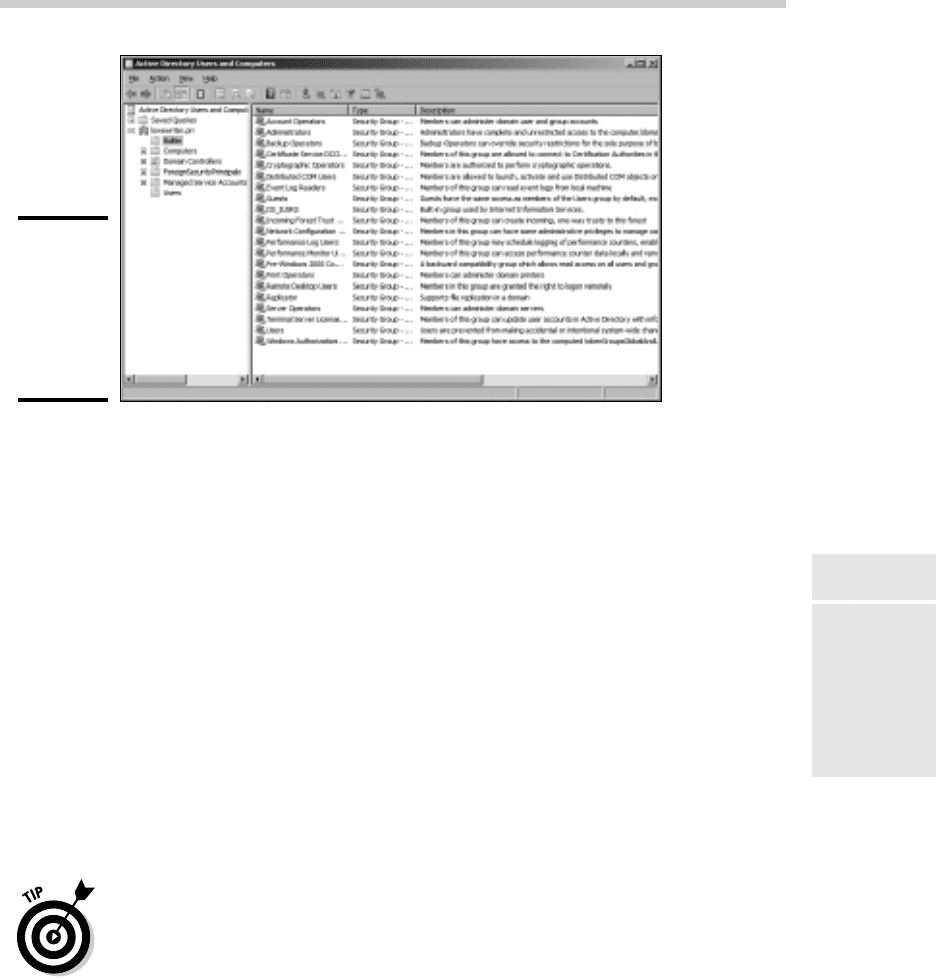
Figure 3-1 shows the Active Directory Manager displaying a list of built-in
objects that come preconfigured with Windows Server 2008 R2. To get to
this management tool, choose Start➪Administrative Tools➪Active Directory
Users and Computers. Then click the Builtin node to show the built-in
objects.
Objects have descriptive characteristics called properties or attributes. You
can call up the properties of an object by double-clicking the object in the
management console.
51_625873-bk07ch03.indd 51251_625873-bk07ch03.indd 512 9/21/10 10:38 PM9/21/10 10:38 PM
Book VII
Chapter 3
Dealing with Active
Directory
513
Understanding How Active Directory Is Structured
Figure 3-1:
Objects
displayed by
the Active
Directory
Manager
console.
Domains
A domain is the basic unit for grouping related objects in Active Directory.
Typically, domains correspond to departments in a company. For example,
a company with separate Accounting, Manufacturing, and Sales departments
might have domains named (you guessed it) Accounting, Manufacturing,
and Sales. Or the domains correspond to geographical locations. For
example, a company with offices in Detroit, Dallas, and Denver might have
domains named det, dal, and den.
Note that because Active Directory domains use DNS naming conventions,
you can create subdomains that are considered to be child domains. You
should always create the top-level domain for your entire network before
you create any other domain. For example, if your company is named
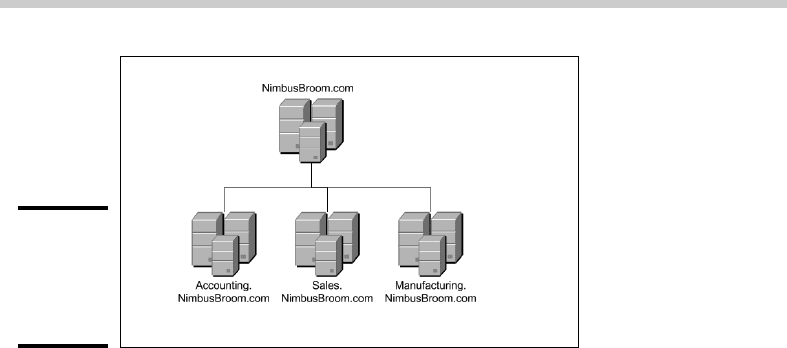
Nimbus Brooms and you’ve registered NimbusBroom.com as your domain
name, you should create a top-level domain named NimbusBroom.com
before you create any other domains. Then, you can create subdomains such
as Accounting.NimbusBroom.com, Manufacturing.NimbusBroom.com,
and Sales.NimbusBroom.com.
If you have Microsoft Visio, you can use it to draw diagrams for your Active
Directory domain structure. Visio includes several templates that provide
cool icons for various types of Active Directory objects. For example,
Figure 3-2 shows a diagram that shows an Active Directory with four
domains created with Visio.
51_625873-bk07ch03.indd 51351_625873-bk07ch03.indd 513 9/21/10 10:38 PM9/21/10 10:38 PM
514
Understanding How Active Directory Is Structured
Figure 3-2:
Domains for
a company
with three
departments.
Note that these domains have little to do with the physical structure of your
network. In Windows NT, domains usually are related to the network’s
physical structure.
Every domain must have at least one domain controller, which is a server
that’s responsible for the domain. However, unlike a Windows NT PDC, an
Active Directory domain controller doesn’t have unique authority over its
domain. In fact, a domain can have two or more domain controllers that
share administrative duties. A feature called replication works hard at
keeping all the domain controllers in sync with each other.
Organizational units
Many domains have too many objects to manage all together in a single
group. Fortunately, Active Directory lets you create one or more organizational
units, also known as OUs. OUs let you organize objects within a domain,
without the extra work and inefficiency of creating additional domains.
One reason to create OUs within a domain is so that you can assign
administrative rights to each OU of different users. Then, these users can
perform routine administrative tasks such as creating new user accounts or
resetting passwords.
For example, suppose the domain for the Denver office, named den, houses
the Accounting and Legal departments. Rather than create separate
domains for these departments, you could create organizational units for the
departments.
Trees
A tree is a set of Active Directory names that share a common namespace.
For example, the domains NimbusBroom.com, Accounting.
51_625873-bk07ch03.indd 51451_625873-bk07ch03.indd 514 9/21/10 10:38 PM9/21/10 10:38 PM
Book VII
Chapter 3
Dealing with Active
Directory
515
Understanding How Active Directory Is Structured
NimbusBroom.com, Manufacturing.NimbusBroom.com, and Sales.
NimbusBroom.com make up a tree that is derived from a common root
domain, NimbusBroom.com.
The domains that make up a tree are related to each other through transitive
trusts. In a transitive trust, if DomainA trusts DomainB and DomainB trusts
DomainC, then DomainA automatically trusts DomainC.
Note that a single domain all by itself is still considered to be a tree.
Forests
As its name suggests, a forest is a collection of trees. In other words, a forest
is a collection of one or more domain trees that do not share a common
parent domain.
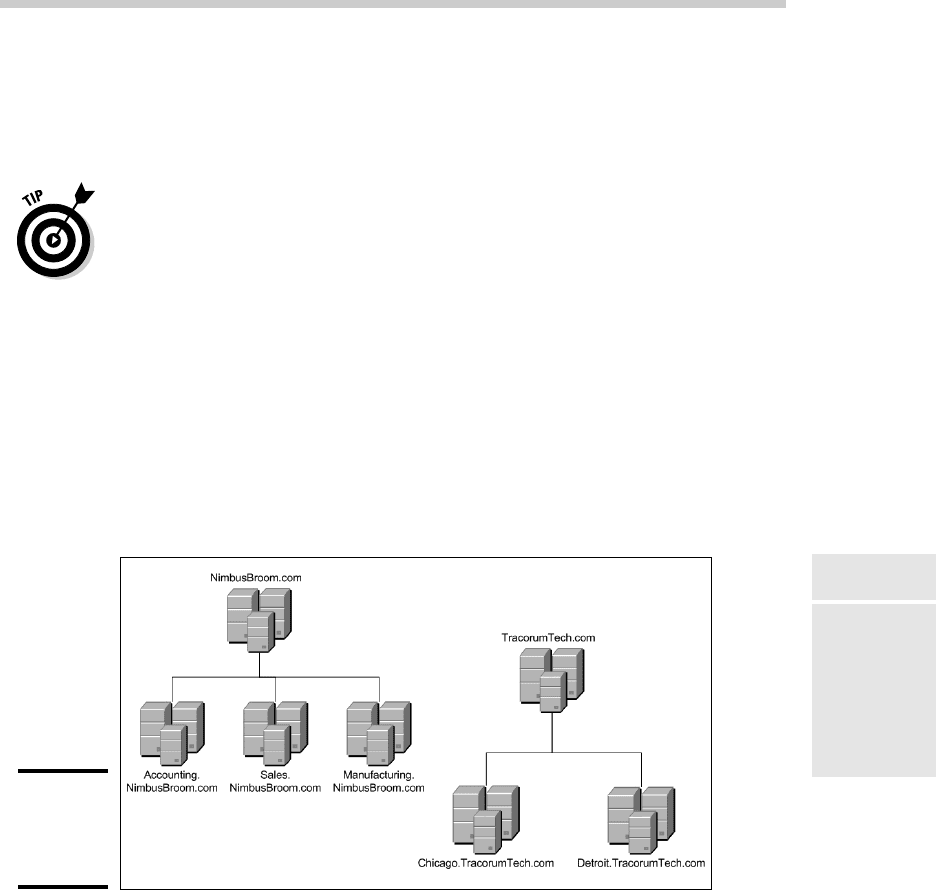
For example, suppose Nimbus Brooms acquires Tracorum Technical
Enterprises, which already has its own root domain named TracorumTech.
com, with several subdomains of its own. Then, you can create a forest from
these two domain trees so the domains can trust each other. Figure 3-3
shows this forest.
Figure 3-3:
A forest
with two
trees.
The key to Active Directory forests is a database called the global catalog.
The global catalog is sort of a super-directory that contains information
about all of the objects in a forest, regardless of the domain. Then, if a user
account can’t be found in the current domain, the global catalog is searched
for the account. The global catalog provides a reference to the domain in
which the account is defined.
51_625873-bk07ch03.indd 51551_625873-bk07ch03.indd 515 9/21/10 10:38 PM9/21/10 10:38 PM

516
Creating a Domain
Creating a Domain
To create a domain, you start by designating a Windows Server 2008 R2
system to be the new domain’s controller. You can do that by using the
Configure Your Server Wizard as described in Chapter 1 of this minibook. This
wizard is automatically started when you first install Windows Server 2008
R2. However, you can start it at any time by choosing Start➪Administrative
Tools➪Configure Your Server.
From the Configure Your Server Wizard, select Domain Controller (Active
Directory) to start the Active Directory Installation Wizard. This wizard
lets you create a new domain by choosing the Domain Controller for a New
Domain option. You can also create a new forest or create the new domain in
an existing forest.
The Active Directory Installation Wizard asks for a name for the new domain.
If you’re creating the first domain for your network, use your company’s
domain name, such as NimbusBroom.com. If you’re creating a subdomain,
use a name such as Sales.NimbusBroom.com.
Creating an Organizational Unit
Organizational units can simplify the task of managing large domains by
dividing users, groups, and other objects into manageable collections. By
default, Active Directory domains include several useful OUs. For example,
the Domain Controllers OU contains all of the domain controllers for the
domain.
If you want to create additional organizational units to help manage a
domain, follow these steps:
1. Choose Start➪Administrative Tools➪Active Directory Users and
Computers.
The Active Directory Users and Computers console appears, as shown
in Figure 3-4.
2. Right-click the domain you want to add the OU to and choose
New➪Organizational Unit.
The New Object — Organizational Unit dialog box appears, as shown in
Figure 3-5.
3. Type a name for the new organization unit.
4. Click OK.
You’re done!
51_625873-bk07ch03.indd 51651_625873-bk07ch03.indd 516 9/21/10 10:38 PM9/21/10 10:38 PM