
Schmuller J. Statistical Analysis with Excel For Dummies
Подождите немного. Документ загружается.

139
Chapter 7: Summarizing It All
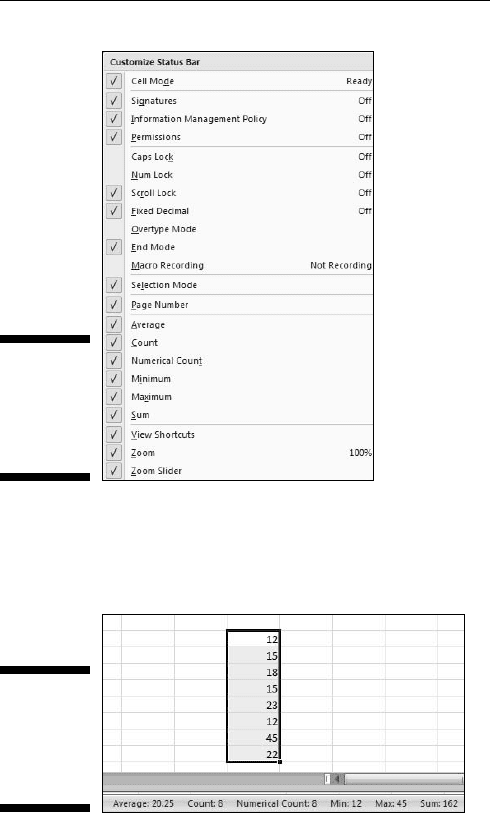
Figure 7-16:
The
Customize
Status Bar
menu.
Figure 7-17 shows these values displayed on the Status bar for the cells I
selected.
Figure 7-17:
Displaying
values on
the status
bar.
12 454060-ch07.indd 13912 454060-ch07.indd 139 4/21/09 7:22:41 PM4/21/09 7:22:41 PM

140
Part II: Describing Data
12 454060-ch07.indd 14012 454060-ch07.indd 140 4/21/09 7:22:41 PM4/21/09 7:22:41 PM
Chapter 8
What’s Normal?
In This Chapter
▶ Meet the normal distribution
▶ Standard deviations and the normal distribution
▶ Excel’s normal distribution-related functions
A
main job of statisticians is to estimate population characteristics.
The job becomes easier if they can make some assumptions about the
populations they study.
One particular assumption works over and over again: A specific attribute,
trait, or ability is distributed throughout a population so that most people
have an average or near-average amount of the attribute, and progressively
fewer people have increasingly extreme amounts of the attribute. In this
chapter, I discuss this assumption and what it means for statistics. I also
describe Excel functions related to this assumption.
Hitting the Curve
When you measure something in the physical world like length or weight,
you deal with objects you can see and touch. Statisticians, social scientists,
market researchers, and businesspeople, on the other hand, often have to
measure something they can’t see or put their hands around. Traits like
intelligence, musical ability, or willingness to buy a new product fall into this
category.
These kinds of traits are usually distributed throughout the population so
that most people are around the average — with progressively fewer people
represented toward the extremes. Because this happens so often, it’s become
an assumption about how most traits are distributed.
13 454060-ch08.indd 14113 454060-ch08.indd 141 4/21/09 7:27:32 PM4/21/09 7:27:32 PM
142
Part II: Describing Data
It’s possible to capture the most-people-are-about-average assumption in a
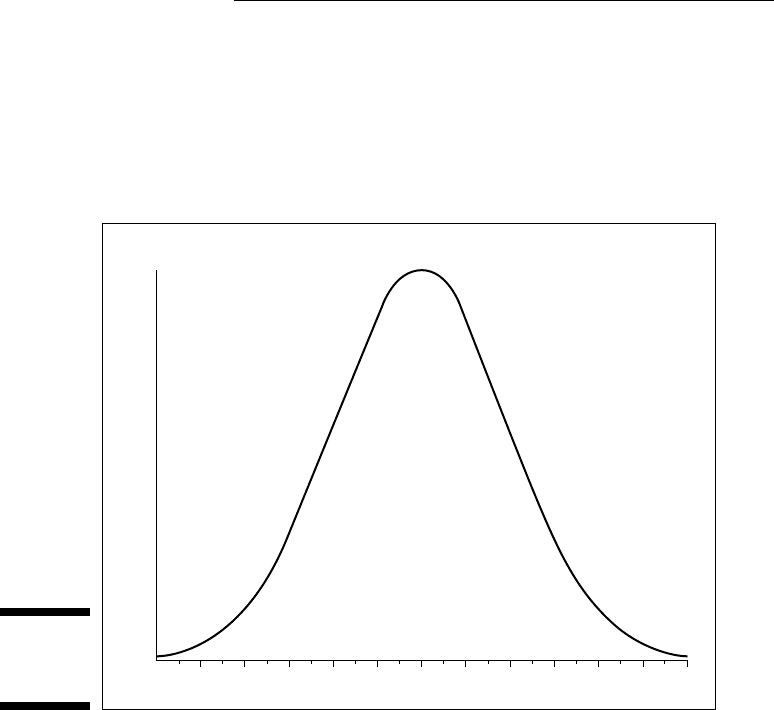
graphic way. Figure 8-1 shows the familiar bell curve that characterizes how a
variety of attributes are distributed. The area under the curve represents the
population. The horizontal axis represents measurements of the ability under
consideration. A vertical line drawn down the center of the curve would cor-
respond to the average of the measurements.
Figure 8-1:
The Bell
curve.
f(x)
x
So if we assume that it’s possible to measure a trait like intelligence and if
we assume this curve represents how intelligence is distributed in the popu-
lation, we can say this: The bell curve shows that most people have about
average intelligence, very few have very little intelligence, and very few are
geniuses. That seems to fit nicely with our intuitions about intelligence,
doesn’t it?
Digging deeper
On the horizontal axis of Figure 8-1 you see x, and on the vertical axis f(x).
What do these symbols mean? The horizontal axis, as I just mentioned, repre-
sents measurements, so think of each measurement as an x.
13 454060-ch08.indd 14213 454060-ch08.indd 142 4/21/09 7:27:33 PM4/21/09 7:27:33 PM
143
Chapter 8: What’s Normal?
The explanation of f(x) is a little more involved. A mathematical relationship
between x and f(x) creates the bell curve and enables us to visualize it. The
relationship is rather complex, and I won’t burden you with it. Just under-
stand that f(x) represents the height of the curve for a specified value of x.
You supply a value for x (and for a couple of other things), and that complex
relationship I mentioned returns a value of f(x).
Now for some specifics. The bell curve is formally called the normal distribu-
tion. The term f(x) is called probability density, so the normal distribution is
an example of a probability density function. Rather than give you a technical
definition of probability density, I ask you to think of probability density as
something that turns the area under the curve into probability. Probability
of . . . what? I discuss that in the next section.
Parameters of a normal distribution
People often speak of the normal distribution. That’s a misnomer. It’s really a
family of distributions. The members of the family differ from one another in
terms of two parameters — yes, parameters because I’m talking about popu-
lations. Those two parameters are the mean (μ) and the standard deviation
(σ). The mean tells you where the center of the distribution is, and the stan-
dard deviation tells you how spread out the distribution is around the mean.
The mean is in the middle of the distribution. Every member of the normal
distribution family is symmetric — the left side of the distribution is a mirror
image of the right.
The characteristics of the normal distribution are well known to statisticians.
More important, you can apply those characteristics to your work.
How? This brings me back to probability. You can find some useful probabili-
ties if you can do four things:
✓ If you can lay out a line that represents the scale of the attribute you’re
measuring
✓ If you can indicate on the line where the mean of the measurements is
✓ If you know the standard deviation
✓ If you know (or if you can assume) the attribute is normally distributed
throughout the population
I’ll work with IQ scores to show you what I mean. Scores on the Stanford-
Binet IQ test follow a normal distribution. The mean of the distribution of
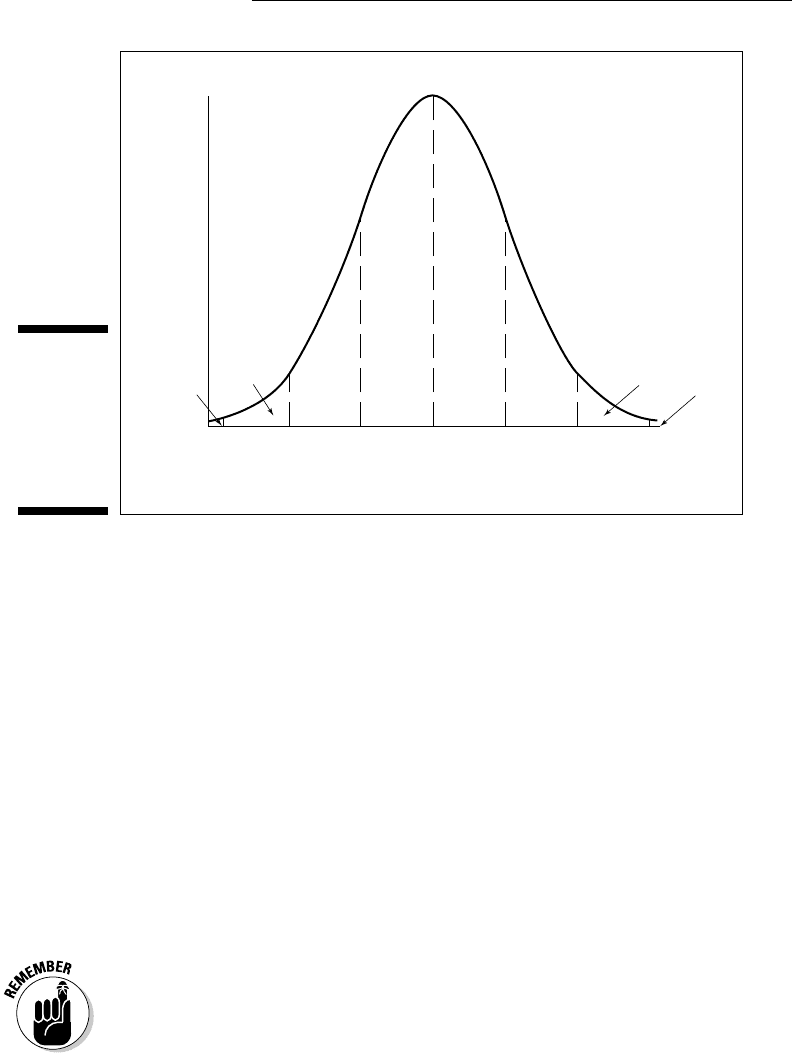
these scores is 100 and the standard deviation is 16. Figure 8-2 shows this
distribution.
13 454060-ch08.indd 14313 454060-ch08.indd 143 4/21/09 7:27:33 PM4/21/09 7:27:33 PM
144
Part II: Describing Data
Figure 8-2:
The normal
distribu-
tion of IQ
divided into
standard
deviations.
f(x)
x
100 116846852 132 148
.3413
.3413
.1359
.1359
.0215
.0215
.0013
.0013
As the figure shows, I’ve laid out a line for the IQ scale. Each point on the
line represents an IQ score. With 100 (the mean) as the reference point, I’ve
marked off every 16 points (the standard deviation). I’ve drawn a dotted line
from the mean up to f(100) (the height of the normal distribution where x =
100), and a dotted line from each standard deviation point.
The figure also shows the proportion of area bounded by the curve and the
horizontal axis, and by successive pairs of standard deviations. It also shows
the proportion beyond 3 standard deviations on either side (52 and 148). Note
that the curve never touches the horizontal. It gets closer and closer, but it
never touches. (Mathematicians say the curve is asymptotic to the horizontal.)
So between the mean and one standard deviation — between 100 and 116 —
are .3413 (or 34.13 percent) of the scores in the population. Another way to
say this: The probability that an IQ score is between 100 and 116 is .3413. At
the extremes, in the tails of the distribution, .0013 (.13 percent) of the scores
are on each side.
The proportions in Figure 8-2 hold for every member of the normal distribu-
tion family, not just for Stanford-Binet IQ scores. For example, in a sidebar in
Chapter 6, I mention SAT scores, which have a mean of 500 and a standard
deviation of 100. They’re normally distributed, too. That means 34.13 percent
of SAT scores are between 500 and 600, 34.13 percent between 400 and 500,
and . . . well, you can use Figure 8-2 as a guide for other proportions.
13 454060-ch08.indd 14413 454060-ch08.indd 144 4/21/09 7:27:33 PM4/21/09 7:27:33 PM

145
Chapter 8: What’s Normal?
NORMDIST
Figure 8-2 only shows areas partitioned by scores at the standard deviations.
What about the proportion of IQ scores between 100 and 125? Or between
75 and 91? Or greater than 118? If you’ve ever taken a course in statistics,
you might remember homework problems that involve finding proportions
of areas under the normal distribution. You might also remember relying on
tables of the normal distribution to solve them.
Excel’s NORMDIST worksheet function enables you to find normal distribu-
tion areas without relying on tables. NORMDIST finds a cumulative area. You
supply a score, a mean, and a standard deviation for a normal distribution, and
NORMDIST returns the proportion of area to the left of the score (also called
cumulative proportion or cumulative probability). For example, Figure 8-2 shows
that in the IQ distribution .8413 of the area is to the left of 116.
How did I get that proportion? All the proportions to the left of 100 add up to
.5000. (All the proportions to the right of 100 add up to .5000, too.) Add that
.5000 to the .3413 between 100 and 116 and you have .8413.
Restating this another way, the probability of an IQ score less than or equal
to 116 is .8413.
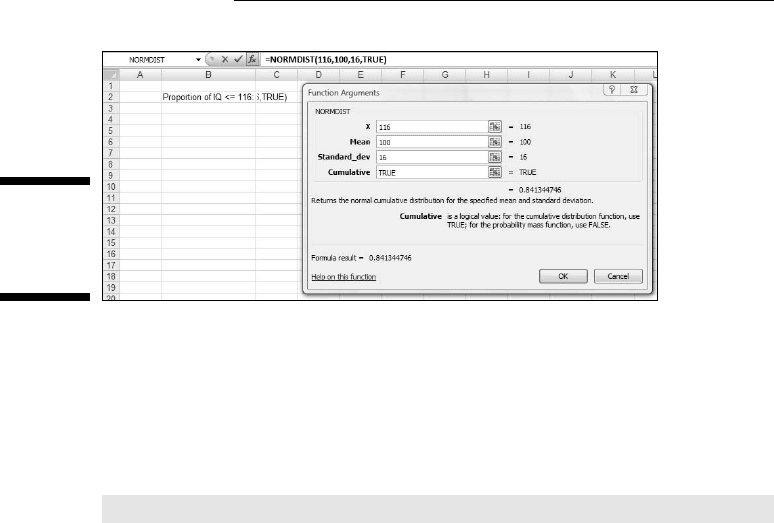
In Figure 8-3, I use NORMDIST to find this proportion. Here are the steps:
1. Select a cell for NORMDIST’s answer.
For this example, I selected C2.
2. From the Statistical Functions menu, select NORMDIST to open the
Function Arguments dialog box for NORMDIST.
3. In the Function Arguments dialog box, enter the appropriate values
for the arguments.
In the X box, I entered the score for which I want to find the cumulative
area. In this example, that’s 116.
In the Mean box, I entered the mean of the distribution, and in the
Standard_dev box, I enter the standard deviation. Here, the mean is 100
and the standard deviation is 116.
In the Cumulative box, I entered TRUE. This tells NORMDIST to find the
cumulative area. The dialog box shows the result.
4. Click OK to see the result in the selected cell.
Figure 8-3 shows that the cumulative area is .84134476 (in the dialog box). If
you enter FALSE in the Cumulative box, NORMDIST returns the height of the
normal distribution at 116.
13 454060-ch08.indd 14513 454060-ch08.indd 145 4/21/09 7:27:33 PM4/21/09 7:27:33 PM
146
Part II: Describing Data
Figure 8-3:
Working
With
NORMDIST.
To find the proportion of IQ scores greater than 116, subtract the result from
1.0. (Just for the record, that’s .15865524.)
How about the proportion of IQ scores between 116 and 125? Apply NORMDIST
for each score and subtract the results. For this particular example, the for-
mula is
=NORMDIST(125,100,16,TRUE)-NORMDIST(116,100,16,TRUE)
The answer, by the way, is .09957.
NORMINV
NORMINV is the flip side of NORMDIST. You supply a cumulative probability,
a mean, and a standard deviation, and NORMINV returns the score that cuts
off the cumulative probability. For example, if you supply .5000 along with a
mean and a standard deviation, NORMINV returns the mean.
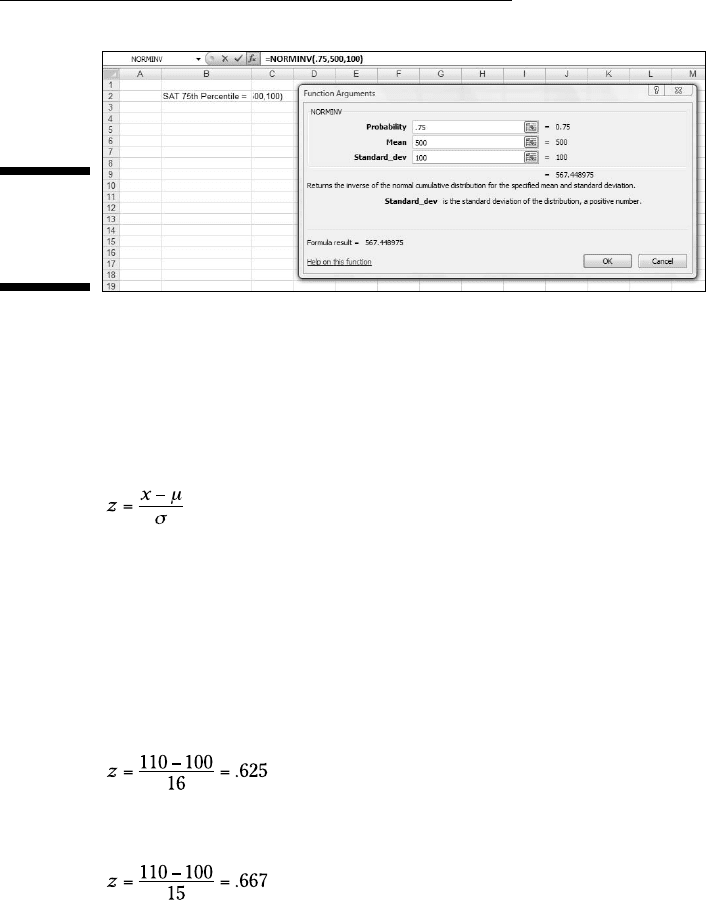
This function is useful if you have to calculate the score for a specific per-
centile in a normal distribution. Figure 8-4 shows the Function Arguments
dialog box for NORMINV with .75 as the cumulative probability, 500 as the
mean, and 100 as the standard deviation. Because the SAT follows a normal
distribution with 500 as its mean and 100 as its standard deviation, the result
corresponds to the score at the 75th percentile for the SAT. (For more on
percentiles, see Chapter 6.)
13 454060-ch08.indd 14613 454060-ch08.indd 146 4/21/09 7:27:33 PM4/21/09 7:27:33 PM
147
Chapter 8: What’s Normal?
Figure 8-4:
Working
With
NORMINV.
A Distinguished Member of the Family
To standardize a set of scores so that you can compare them to other sets of
scores, you convert each one to a z-score. (See Chapter 6.) The formula for
converting a score to a z-score (also known as a standard score) is:
The idea is to use the standard deviation as a unit of measure. For example,
the Stanford-Binet version of the IQ test has a mean of 100 and a standard
deviation of 16. The Wechsler version has a mean of 100 and a standard
deviation of 15. How does a Stanford-Binet score of, say, 110, stack up against
a Wechsler score of 110?
An easy way to answer this question is to put the two versions on a level
playing field by standardizing both scores. For the Stanford-Binet
For the Wechsler
So 110 on the Wechsler is a slightly higher score than 110 on the Stanford-Binet.
Now, if you convert all the scores in a normal distribution (such as either ver-
sion of the IQ), you have a normal distribution of z-scores. Any set of z-scores
13 454060-ch08.indd 14713 454060-ch08.indd 147 4/21/09 7:27:33 PM4/21/09 7:27:33 PM
148
Part II: Describing Data
(normally distributed or not) has a mean of 0 and a standard deviation of 1. If
a normal distribution has those parameters it’s a standard normal distribution —
a normal distribution of standard scores.
This is the member of the normal distribution family that most people have
heard of. It’s the one they remember most from statistics courses, and it’s the
one that most people are thinking about when they say the normal distribu-
tion. It’s also what people think of when they hear z-scores. This distribution
leads many to the mistaken idea that converting to z-scores somehow trans-
forms a set of scores into a normal distribution.
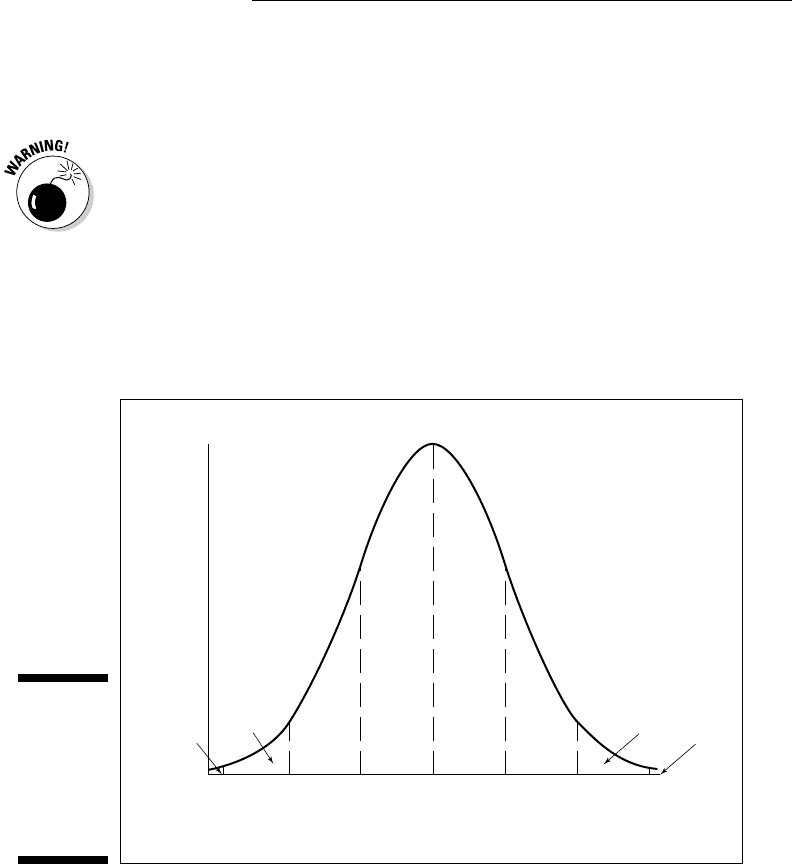
Figure 8-5 shows the standard normal distribution. It looks like Figure 8-2,
except that I’ve substituted 0 for the mean and standard deviation units in
the appropriate places.
Figure 8-5:
The stan-
dard normal
distribution
divided up
by standard
deviations.
f(x)
x
0 10-10-20-30 20 30
.3413
.3413
.1359
.1359
.0215
.0215
.0013
.0013
In the next two sections, I describe Excel’s functions for working with the
standard normal distribution.
NORMSDIST
NORMSDIST is like its counterpart NORMDIST, except that it’s designed for
a normal distribution whose mean is 0 and whose standard deviation is 1.00.
13 454060-ch08.indd 14813 454060-ch08.indd 148 4/21/09 7:27:34 PM4/21/09 7:27:34 PM